Overview
As a rendering component, XComponent can be used to meet your requirements for advanced custom rendering, such as displaying camera preview streams and rendering game images. Problems such as black screen and frame freezing may occur during XComponent-based rendering. This document provides troubleshooting guidance from three aspects: XComponent Rendering Principles, Positioning Tool Chain for Image Rendering, and Typical Case Analysis.
XComponent Rendering Principles
XComponent is responsible for creating the surface and notifying the app of surface-related information through callbacks. Apps can set the properties of the surface through dedicated APIs. It should be noted that the component itself has no awareness of the actual drawn content and does not provide direct rendering APIs. The following figure shows the architecture of XComponent rendering.

XComponent holds a surface. You can call the APIs of the NativeWindow module to apply for and submit a buffer to the image queue, thereby transferring the custom drawing content to the surface. The following figure shows the main process.
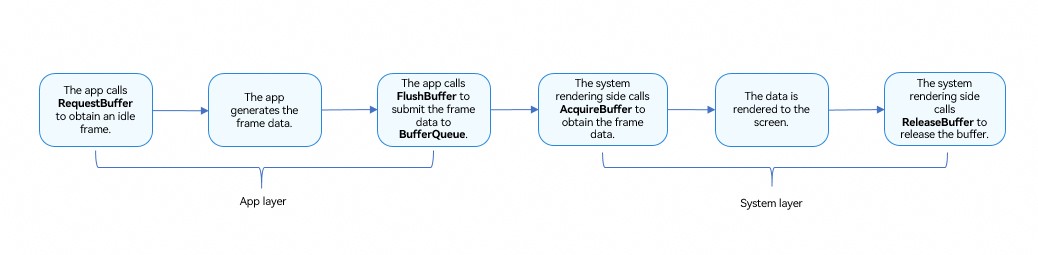
The following figure shows the data flow.

After the preceding process is complete, the self-rendered content of the app can be displayed in the surface held by XComponent. XComponent integrates the surface into the UI, and the displayed content is the self-drawn content you sent. The default position and size of the surface are the same as those of XComponent. You can use the setXComponentSurfaceRect() API to customize the position and size of the surface.
[h2]Key HiLog Information and Common Error Codes
- Key log information of XComponent
Search for XComponent in the log to obtain the component ID, triggering information of onSurfaceCreated() and onLoad(), and surface ID obtained through getXComponentSurfaceId(), as shown in the following figure.

- Image rendering exception information and error codes
Search for C01401 or Bufferqueue in the log to obtain the image rendering exception information and the corresponding error code. For details about the error codes, see OHNativeErrorCode. The following figure shows the exception information.

[h2]Image Rendering Information Query Using Hidumper
- Querying the UI component tree
Obtain the component tree information by referring to Obtaining an Application Component Tree. Then, search for XComponent to obtain the XComponent information, as shown in the following figure.
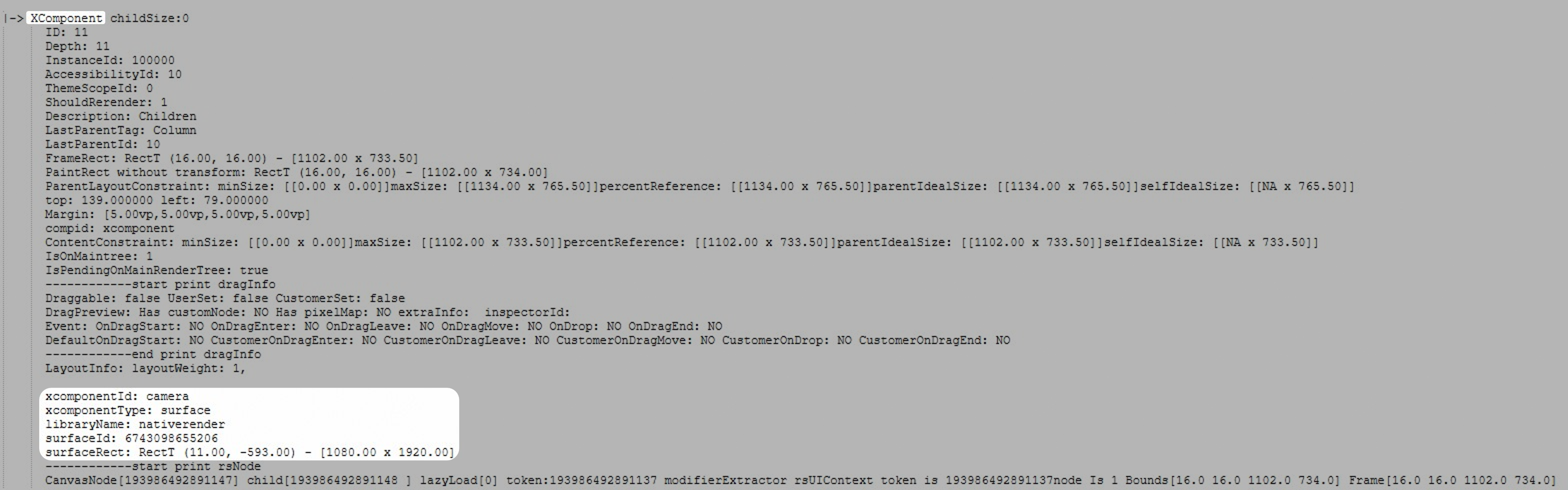
- Querying Render Service capabilities
Obtain the Render Service information by referring to Obtaining System Service Details, as shown in the following figure.
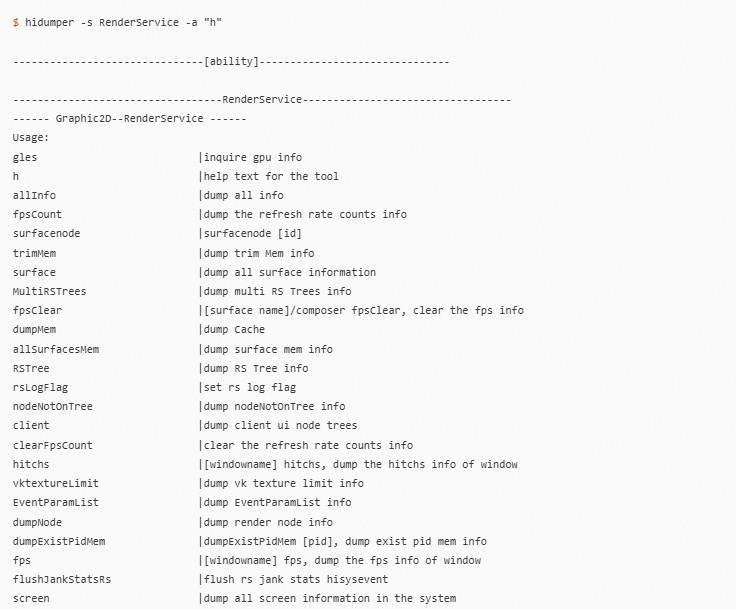
- Querying common information about Render Service
You can run the hdc shell "hidumper -s RenderService -a allInfo" command to obtain information about the surface and RS tree at the same time.
1. Obtain the RS tree information.
The RS tree indicates the rendering tree information converted by Render Service based on the UI component tree. Run the hdc shell "hidumper -s RenderService -a RSTree" > RSTree.dump command to obtain the RS tree information, and then search for SURFACE_NODE to obtain the node information corresponding to XComponent, as shown in the following figure.

2. Obtain the surface information.
Run the hdc shell "hidumper -s RenderService -a surface" > surface.dump command to obtain the surface information, and then search for XComponent id and Surface id of XComponent to obtain surface and image queue information corresponding to XComponent, as shown in the following figure.

[h2]Analysis on Abnormal Information About Image Rendering Frames
- View frame data.
For details, see Checking Frame Data Statistics of All Processes.
- Analyze the frame data.
For details, see Analyzing Frame Data.
[h2]Analysis on XComponent Lifecycle Exceptions
Symptom
After NativeWindow is obtained from XComponent through the OnSurfaceCreated() API of OH_NativeXComponent, NativeWindow is passed to the rendering child thread for use. When the page exits and XComponent is destroyed, a crash occurs.
Possible causes
- When XComponent is destroyed, the reference count of NativeWindow is decremented by 1. If the reference count becomes 0 and the child thread is still using NativeWindow, a crash occurs.
- The lifecycle of an OH_NativeXComponent instance is closely related to XComponent. If you still operate this instance after XComponent is destroyed, the app may crash due to stability issues.
Solution
- Before passing NativeWindow to the child thread, use OH_NativeWindow_NativeObjectReference() to increase the reference count by 1. After the child thread has finished using NativeWindow, use OH_NativeWindow_NativeObjectUnreference() to decrease the reference count by 1.
- Replace the APIs related to OH_NativeXComponent with those related to OH_ArkUI_SurfaceHolder by referring to Migrating from OH_NativeXComponent to OH_ArkUI_SurfaceHolder.
[h2]Analysis on Multi-Layer Overlay Exceptions Between XComponent and Other Components
Symptom
The background of the content drawn using XComponent is transparent, but only the content drawn at the first layer can be seen in the cascading layout.
Possible causes
If your custom drawn content includes transparent elements, they will blend with the content below the surface. If the transmitted content is completely transparent and the background color of XComponent is set to black, a black area will be displayed, and the content below the cascading layout will be invisible.
Solution
Set backgroundColor of XComponent to transparent.
[h2]Analysis on the Black Screen Problem
Symptom
When XComponent is used for rendering, a black screen is displayed.
Possible causes
- The XComponent lifecycle is abnormal. For example, the component is not created or the surface ID is abnormal.
- The XComponent rendering is abnormal. For example, there is no XComponent node in the RS tree, or the width or height of XComponent is 0.
- The buffer data sent by the app is abnormal. For example, no buffer is sent, or a completely black buffer is sent.
Solution
- Check whether onSurfaceCreated()/onLoad() is successfully triggered and whether the surface ID is normal by referring to the key log information of XComponent. Create an XComponent and manage the lifecycle of the surface held by XComponent in a proper way. For details, see Creating an XComponent and Managing the Surface Lifecycle.
- Check whether the XComponent node exists in the UI tree and RS tree, whether the width and height of the node are normal, and whether attributes such as visibility are normal. For details, see Image Rendering Information Query Using Hidumper.
- Check whether the features of the upper-layer link are normal, for example, the camera preview, decoder frame output, and OpenGL processing.
[h2]Analysis on the Image Flickering Problem
Symptom
During page switching, the image rendered by XComponent flickers.
Possible causes
XComponent is destroyed and recreated, or the attributes of XComponent change.
Solution
Check whether the information about the XComponent node in the UI tree and RS tree changes, for example, the ID, width, height, background color, and transparency attributes. For details, see Image Rendering Information Query Using Hidumper.
[h2]Analysis on the Screen Tearing Problem
Symptom
The buffer is obtained from the NativeWindow corresponding to XComponent and is drawn. After the buffer is displayed, the screen is blurred or screen tearing occurs.
Possible causes
When OH_NativeWindow_NativeWindowRequestBuffer() is used to obtain the buffer, a fence file descriptor (fenceFd) is returned. fenceFd is a file descriptor created by the consumer process and indicates whether the consumer has finished consuming the buffer. The producer can start filling the buffer only after the consumer has finished consuming the buffer. Otherwise, problems such as screen blur and screen tearing may occur.
Solution
After calling OH_NativeWindow_NativeWindowRequestBuffer(), wait until the value of fenceFd is -1 (indicating that the consumer has finished consuming the buffer) and then write the produced content to the buffer. For details, see NativeWindow Development (C/C++).
[h2]Analysis on the Frame Freezing Problem
Symptom
The buffer is obtained from the NativeWindow corresponding to XComponent and then drawn. Frame freezing occurs during continuous rendering.
Possible causes
- The time for the producer to fill the buffer is too long, that is, the production speed is lower than the consumption speed. As a result, frame freezing occurs.
- To ensure that complex drawing effects from different sources can be drawn, synthesized, and displayed at the same time, the Render Service depends on VSync to implement a globally unified signal receiving and sending mechanism. If no NativeVsync is requested when OH_NativeWindow_NativeWindowFlushBuffer() is used to submit buffers, the drawing frame rate of the app will be out of sync with the system frame rate, resulting in frame freezing.
Solution
- Increase the production speed of the producer, for example, by using hardware decoding or optimizing post-processing algorithms.
- Apply for VSync when submitting buffers. For details, see NativeVSync Development (C/C++).
[h2]Analysis on Rendering Memory Leakage
Symptom
When OH_NativeImage_AcquireNativeWindowBuffer() is used to obtain a buffer and OH_NativeImage_ReleaseNativeWindowBuffer() is used to return the buffer after consumption, memory leakage still occurs.
Possible causes
- OH_NativeImage_ReleaseNativeWindowBuffer() decreases the reference count only when the operation is successful. If the return value is not processed, memory leakage occurs.
- After OH_NativeWindow_NativeObjectReference() is used to increase the reference count of the buffer, the reference count is not decreased accordingly. As a result, the buffer cannot be released.
Solution
- When the return value of OH_NativeImage_ReleaseNativeWindowBuffer() is not NATIVE_ERROR_OK, OH_NativeWindow_NativeObjectUnreference() is called to decrease the reference count by one.
- Ensure that OH_NativeWindow_NativeObjectUnreference() is called to decrease the reference count by one when all branches return.