Static images. It is recommended that EffectKit be used to perform asynchronous blurring. Problems with using AdaptiveColor
[Symptom]
When multiple internal and external apps use the color picking and blurring function, the AdaptiveColor parameter is set to AVERAGE. As a result, the frame rate does not meet the requirement. This parameter has been marked to indicate that it will take time in non-default mode. The typical trace is as follows:

[Impact of Incorrect Usage]
The single-frame processing time of the app is too long, which affects the frame rate and causes frame freezing during animation.
[Suggestions]
Use the AdaptiveColor.DEFAULT mode to pick colors, or use the asynchronous color picking function of the ColorPicker in EffectKit.
[Document Link]
AdaptiveColor.DEFAULT: Do not use the color picking and blurring function. The default color is used as the mask color. The non-default mode is time-consuming.
ColorPicker in EffectKit: a color picker, which is used to obtain the main color from an image.
1. Callback leakage
[Symptom]
After the .on('xxx') registration of the callback is used in an app, the .off('xxx') function is used to deregister the callback by passing an anonymous function. The callback passed by the anonymous function is considered as a new callback function. As a result, the previously registered callback cannot be removed, and the number of callbacks increases. Ensure that the callback used for registration is properly released. Otherwise, the lifecycle cannot be managed when anonymous functions are used.
[Impact of Incorrect Usage]
No application response
[Suggestions]
To delete a callback, define the callback method and then pass parameters.
[Document Link]
Use Cases
sessionController.on('playbackStateChange', 'all', (state) => {
  callback(state, 'locale');
})
...
sessionController.off('playbackStateChange', 'all', (state) => {
  callback(state, 'locale');
})
[Best Practices]
let playStateCallback: (state: avSession.AVPlaybackState) => void = (state: avSession.AVPlaybackState) => {
}
sessionController.on('playbackStateChange', 'all', this.playStateCallback);
sessionController.off('playbackStateChange', this.playStateCallback);
2. Too many logs are printed.
[Symptom]
The size of printed logs exceeds 60 MB.
[Suggestions]
Reduce the scenarios where setAVPlaybackState and SetAVMetadata are frequently called.
[Document Link]
3. Correctly play resources during casting.
[Symptom]
Use the AVCastController to play the media asset. When the API is not called synchronously, you need to start playback in the callback.
[Impact of Incorrect Usage]
The screen casting content cannot be played.
[Suggestions]
When using AVCastController to play resources and the API is not called synchronously, you need to start playback in the callback.
[Document Link]
[Use Cases]
this.castController?.prepare(playItem, () => {
   ...
});
[Best Practices]
// Preparing to play, this will not trigger actual playback, it will load and buffer
this.castController?.prepare(playItem, () => {
  // Start playback, truly triggering the playback on the other end. Please call start after Prepare is successful.
  this.castController?.start(playItem, () => {
    hilog.info(0x0000, 'testTag', 'Playback started');
  });
});
4. Correctly set the playback state and progress.
[Symptom]
The playback state and current progress are set when the app is played or paused.
[Impact of Incorrect Usage]
The playback state is displayed abnormally, including the progress bouncing back and incorrect progress display.
[Suggestions]
When the playback state, progress, or speed of the application changes, the setAVPlaybackState API is used to update the AVPlaybackState.
[Document Link]
[Use Cases]
this.session?.on('pause', async () => {
  // Not implemented
});
[Best practices]
this.session?.on('pause', async () => {
  // Execute player pause
  // Set the status and progress during pause
  this.currentState = {
    state: avSession.PlaybackState.PLAYBACK_STATE_PAUSE,
    position: {
      elapsedTime: this.currentTime,
      updateTime: new Date().getTime(),
    }
  };
  await this.session?.setAVPlaybackState(this.currentState);
}); 1. In the on('xxx') callback, do not add (by calling on) or remove (by calling off) callback operations.
[Symptom]
The callback implementation on the framework side has been locked. If the application triggers the time-shifting callback or adds a callback in the framework, a thread deadlock occurs.
[Impact of Incorrect Usage]
The application is suspended.
[Suggestions]
If you need to add or remove a callback, perform the operation in another thread or process it in another service process.
[Document Link]
The on APIs mentioned in this document are not limited to the preceding two examples.
[Typical Cases]
After the cameraStatus callback is triggered, the code is suspended at the off position.
function callback() {
  cameraManager.off('cameraStatus');
}
cameraManager.on('cameraStatus', callback);
2. In the CameraSession, the input parameter of the addInput API must be a CameraInput that has been opened.
[Symptom]
After the CameraInput is opened, the information about the corresponding device is obtained. If the information fails to be obtained, an exception will be thrown when CameraInput is added to Session.
[Impact of Incorrect Usage]
An error occurs when the app calls the API.
[Suggestions]
After CameraInput is successfully opened, add it to the CameraSession.
[Document Link]
[Typical Cases]
An exception occurs when the addInput method is executed.
cameraInput = cameraManager.createCameraInput(camera);
session.beginConfig();
session.addInput(cameraInput); // API exception.
[Best Practices]
cameraInput = cameraManager.createCameraInput(camera);
await cameraInput.open();
session.beginConfig();
session.addInput(cameraInput);
3. In the CameraSession, addInput must be called before addOutput.
[Symptom]
If Session does not contain any input information, an exception will be thrown when addOutput is called.
[Impact of Incorrect Usage]
An error occurs when the app calls the API.
[Suggestions]
After an input is added to the session, add an output.
[Document Link]
Output includes PreviewOutput, PhotoOutput, VideoOutput, and MetadataOutput.
[Typical Cases]
When the addOutput method is executed, an exception occurs and is thrown.
previewOutput = cameraManager.createPreviewOutput(profile, surfaceId);
cameraInput = cameraManager.createCameraInput(camera);
await cameraInput.open();
session.beginConfig();
session.addOutput(previewOutput);
session.addInput(cameraInput);
[Best Practices]
previewOutput = cameraManager.createPreviewOutput(profile, surfaceId);
cameraInput = cameraManager.createCameraInput(camera);
await cameraInput.open();
session.beginConfig();
session.addInput(cameraInput);
session.addOutput(previewOutput);
4. The process of calling the APIs for adding or removing inputs and outputs of a session must be performed between the beginConfig and commitConfig API calls.
[Symptom]
If beginConfig is not called in the session, calling addInput and addOutput will cause an exception. If commitConfig is not called in the session, the subsequent start API cannot be called.
[Impact of Incorrect Usage]
An error occurs when the application calls the API.
[Suggestions]
After calling the beginConfig API in the session, add inputs and outputs, and then call the commitConfig API.
[Document Link]
Output includes PreviewOutput, PhotoOutput, VideoOutput, and MetadataOutput.
[Typical Cases]
An exception occurs and is thrown when addInput is executed.
previewOutput = cameraManager.createPreviewOutput(profile, surfaceId);
cameraInput = cameraManager.createCameraInput(camera);
await cameraInput.open();
session.addInput(cameraInput);
session.beginConfig();
session.addOutput(previewOutput);
[Best Practices]
previewOutput = cameraManager.createPreviewOutput(profile, surfaceId);
cameraInput = cameraManager.createCameraInput(camera);
await cameraInput.open();
session.beginConfig();
session.addInput(cameraInput);
session.addOutput(previewOutput);
session.commitConfig();
5. If operations that return a promise, such as session release and input close, are called within an asynchronous function, ensure that await is called to ensure the correct sequence.
[Symptom]
Calling an asynchronous function as a synchronous function will cause time sequence issues.
[Impact of Incorrect Usage]
The application is abnormal.
[Suggestions]
When calling an asynchronous function that returns a promise within an asynchronous function, use await to ensure the call sequence is correct.
[Document Link]
[Typical Cases]
async function onBackground() {
  cameraInput.close();
  cameraSession.release();
}
[Best Practices]
async function onBackground(): Promise<void> {
  await cameraInput.close();
  await cameraSession.release();
} 1. Calling the release method of a raw pointer for multiple times will trigger use after free (UAF).
[Symptom]
When an app uses OHAudio-related APIs such as OHAudioRenderer or OHAudioCapturer, the raw pointer of the related object needs to be passed to the audio module. After the release method of the object is called, the framework deletes the object. In this case, if the application passes the raw pointer to call the method again, audio can only check whether the pointer is null, but cannot determine the validity of the pointer. As a result, the UAF issue occurs.
[Impact of Incorrect Usage]
The client process exits abnormally due to out-of-bounds address access.
[Suggestions]
When using OHAudio, do not pass the invalid pointer after the release method is called.
[Document Link]
Using OHAudio for Audio Recording (C/C++)
Using OHAudio for Audio Playback (C/C++)
2. If an application using OHAudio registers only some callbacks, it may cause crashes due to wild pointers.
[Symptom]
According to the features of the C language, the pointer in the structure can be used only after being initialized. The pointer can be initialized with a normal value or nullptr. Audio provides structures such as OH_AudioRenderer_Callbacks_Struct and OH_AudioCapturer_Callbacks_Struct, which contain methods of the pointer type. When an application registers these structures, all elements must be initialized. Otherwise, the audio module may fail to determine whether the pointer is valid when sending a callback, resulting in exceptions.
[Impact of Incorrect Usage]
When the framework calls back the application, if the method to be called back is not assigned by the user, the client process may exit abnormally.
[Suggestions]
When setting the audio callback function, ensure that each callback of OH_AudioRenderer_Callbacks and OH_AudioCapturer_Callbacks is initialized.
[Document Link]
Using OHAudio for Audio Recording (C/C++)
Using OHAudio for Audio Playback (C/C++)
3. Checking the OnWriteData callback
[Symptom]
When using the OHAudio APIs, the developer uses OH_AudioStreamBuilder_SetRendererCallback to set OH_AudioRenderer_OnWriteData as the callback function for writing data. However, due to network or decoding performance issues, the application cannot provide a complete data block when the system requests audio data, and can only write partial data. For example, when the system requests 10 ms of data, the application provides only 6 ms of data. After obtaining the data, the system still plays the data as if it were 10 ms of data. As a result, the 4 ms of data that is not written is uncontrollable, and the playback freezing and noises occur.
[Impact of Incorrect Usage]
Frame freezing and noises occur during playback.
[Suggestions]
- The application checks the type of the called API and the callback function that is set.
- Currently, there are two types of APIs for setting the callback function. You can set two callback functions in either of the following ways:
- Use OH_AudioStreamBuilder_SetRendererCallback to set OH_AudioRenderer_OnWriteData (return value not supported).
- Use OH_AudioStreamBuilder_SetRendererWriteDataCallback to set OH_AudioRenderer_OnWriteDataCallback (return value supported).
- The application needs to determine whether the buffer is full each time a callback is performed.
- You can compare whether the length of the data written by the application is equal to the length of the callback function parameter or the value of audioDataSize.
[Precautions]
- The application must ensure that audio data is continuously sent to avoid audio stuttering caused by discontinuous data.
- The application must determine whether the length of the data written by itself can fill the buffer returned by the system. If the buffer cannot be filled, for the callback function that does not return a value, it is recommended that the application temporarily stop writing data (without pausing the audio stream), block the callback function (unblock the callback function before performing other operations on AudioRender), or leave the buffer empty. When the data is sufficient, the application can continue to write data. Note that if the buffer is left empty, it will also be counted as the written data. If the callback function that returns a value is used, the system can return INVALID. In this case, the system will not process the audio data and will request data from the application again. After the application returns VALID, the system will continue to play the audio data.
- The application must not access the callback buffer outside the callback function to ensure that the data in the buffer is not modified asynchronously.
- The application must note that the registration of the callback function that does not return a value and the registration of the callback function that returns a value overwrite each other. If the callback function that returns a value is required, the OH_AudioStreamBuilder_SetRendererWriteDataCallback API must be called after the OH_AudioStreamBuilder_SetRendererCallback API.
- You are advised to use OH_AudioStreamBuilder_SetRendererWriteDataCallback to set the callback function that returns a value to handle abnormal frames or insufficient data.
[Document Link]
Using OHAudio for Audio Playback (C/C++)
4. Self-check procedure for preventing audio stream stuttering in offload mode
[Symptom]
Description of the offload function
- When the stream type is MUSIC or AUDIOBOOK, the application enters the low-power mode after the screen is turned off, and the scheduling interval is 7 seconds.
- After the device is woken up from sleep mode, the application must provide at least one frame of data within 200 ms.
- The offload channel will request app data. The application must ensure that the data is sufficient.
- The app data is not played immediately after being written. The play progress needs to be obtained through the framework API.
[Suggestions]
Typical cases (self-check by the application)
Q1. [Abnormal stream stop when the screen is turned off] When the CPU is in sleep mode, the application stops the stream if it detects that decoding is blocked or the system request is not received for a long time.
A1. Applications that use the offload channel must apply for long-term tasks. The application must be aware of the dormant status and keep running properly.
Q2. [Abnormal stream stop when the screen is turned off] The application fails to provide at least one frame of data within a period of time after the CPU is woken up.
A2. The application needs to optimize the performance of operations such as decoding to ensure that data can be provided in time when the CPU is woken up.
Q3. [Frame freezing noises] The app writes data when the data is insufficient for one frame. As a result, frame freezing and noises occur.
A3: Check the issue based on the actual situation.
- If OH_AudioStreamBuilder_SetRendererCallback is used:
- The app needs to be blocked until sufficient data is prepared to ensure that the buffer is full.
- If OH_AudioStreamBuilder_SetRendererWriteDataCallback is used, you can select either of the following solutions:
- When the data is insufficient, AUDIO_DATA_CALLBACK_RESULT_INVALID is returned. The framework will request data again in a short period of time.
- If data needs to be written, ensure that the buffer is full.
Q4. [Song switching before the playback is complete] After a piece of data is written, the app switches to the next song, but the data is not completely played.
A4. The framework API OH_AudioRenderer_GetTimeStamp() is used to obtain the amount of data played by the framework to determine the playback progress. The calling frequency is controlled. It is recommended that the API be called once every 200 ms to avoid affecting the system performance. Note that after OH_AudioRenderer_Flush() is called, the amount of data played is reset to 0.
PS: For cases 3 and 4, the app can add maintenance and debugging. That is, the actual amount of written data (p1) is calculated, and the amount of data played by the framework (p2) is obtained through the framework API OH_AudioRenderer_GetTimeStamp(). Scenarios that meet the expectation:
- When the value of p1 – p2 is approximately equal to the sleep watermark level (about 7s), the system enters the sleep state.
- When the value of p1 – p2 is approximately equal to the wakeup watermark level (about 400 ms), the system wakes up.
Scenarios that do not meet the expectation:
- The value of p1 – p2 is negative.
- When the value of p1 – p2 does not reach the sleep watermark level, the system enters the sleep state.
The AVImageGenerator or AVMetadataExtractor function fails.
[Symptom]
The same file descriptor (FD) is set for the AVImageGenerator and AVMetadataExtractor instances. As a result, the AVImageGenerator or AVMetadataExtractor function fails.
[Impact of Incorrect Usage]
The function fails, causing data reading exceptions.
[Suggestions]
Even if the same file in the sandbox path is used, you are advised to open the file twice to obtain different file descriptors and pass them to the AVImageGenerator and AVMetadataExtractor objects respectively. Otherwise, the two objects will perform operations on the same file descriptor, causing data reading exceptions and function failures.
[Document Link]

After the resource handle (fd) is passed to the AVImageGenerator instance, do not use the handle to perform other read and write operations, including passing the handle to multiple AVPlayer, AVMetadataExtractor, AVImageGenerator, or AVTranscoder objects. If the handle is used to read and write files at the same time, the video thumbnail data will be abnormal.
[Best Practices]
async fetchFrame(): Promise<void> {
  await this.fetchMeta();
  if (canIUse("SystemCapability.Multimedia.Media.AVImageGenerator")) {
    this.pixelMap = new Array;
    let avImageGenerator: media.AVImageGenerator = await media.createAVImageGenerator();
    // raw fd
    avImageGenerator.fdSrc = fs.openSync(this.rootPath + this.testFilename);
    for (let i = 0; i < 6; i++) {
      let pixelMap: image.PixelMap = await avImageGenerator.fetchFrameByTime(this.diffTime[i], this.seekOption,
        { width: this.pixelMapWidth, height: this.pixelMapHeight });
      this.pixelMap.push(pixelMap);
      if (i == 0) {
        this.pixelLcd = pixelMap;
        let rate: number = pixelMap.getImageInfoSync().size.height / pixelMap.getImageInfoSync().size.width;
        this.lcdHeight =
          display.getDefaultDisplaySync().width / 2 / display.getDefaultDisplaySync().densityPixels * rate;
      }
      let imageInfo: image.ImageInfo = pixelMap.getImageInfoSync();
      hilog.info(0x0000, 'testTag',
        `colorFormat ${imageInfo.pixelFormat} width ${imageInfo.size.width} height ${imageInfo.size.height} isHdr ${imageInfo.isHdr}`);
    }
  }
}

async fetchMeta(): Promise<void> {
  if (canIUse("SystemCapability.Multimedia.Media.AVMetadataExtractor")) {
    let avMetadataExtractor: media.AVMetadataExtractor = await media.createAVMetadataExtractor();
    let fd: number = fs.openSync(this.rootPath + this.testFilename).fd;
    let fileSize: number = fs.statSync(this.rootPath + this.testFilename).size;
    let dataSrc: media.AVDataSrcDescriptor = {
      fileSize: fileSize,
      callback: (buffer, len, pos) => {
        if (buffer == undefined || len == undefined || pos == undefined) {
          return -1;
        }
        let options: ReadOptions = {
          offset: pos,
          length: len
        }
        let num: number = fs.readSync(fd, buffer, options);
        if (num > 0 && fileSize >= pos) {
          return num;
        }
        return -1;
      }
    }

    avMetadataExtractor.dataSrc = dataSrc;
    let metadata: media.AVMetadata;
    try {
      metadata = await avMetadataExtractor.fetchMetadata();
    } catch (error) {
      hilog.error(0x0000, 'testTag', 'error code ' + error.code);
      return;
    }
    if (metadata.duration) {
      let duration: number = parseInt(metadata.duration) * 1000;
      let pick: number = duration / 5;
      this.diffTime[0] = 0;
      this.diffTime[5] = duration;
      let time: number = pick;
      for (let i = 1; i < 5; i++) {
        this.diffTime[i] = time;
        time += pick;
      }
    }
    if (metadata.videoHeight && metadata.videoWidth) {
      let rate: number = Number(metadata.videoHeight) / Number(metadata.videoWidth);
      if (metadata.videoOrientation && Number(metadata.videoOrientation) % 180) {
        rate = 1 / rate;
      }
      this.videoHeight =
        display.getDefaultDisplaySync().width / 6 / display.getDefaultDisplaySync().densityPixels * rate;
    }
    await avMetadataExtractor.release();
  }
} 1. Inspector APIs are used in service code.
[Symptom]
When the Inspector APIs are used to query component information, if an error occurs, the app may crash. This API is designed for debugging and has low performance. You are advised not to call this API in service code to avoid frame freezing or app crash.
[Impact of Incorrect Usage]
The app crashes.
[Suggestions]
Do not use the Inspector to query information.
[Document Link]
getFilteredInspectorTreeById()
2. Parameters passed to the OH_NativeXComponent_RegisterCallback API
[Symptom]
The callback function passed to the OH_NativeXComponent_RegisterCallback API must be valid before the OnSurfaceDestroyed callback is called. This callback is a notification sent to the app after the XComponent lifecycle ends and will be called. If the callback is released in advance, the UAF issue will occur.
[Impact of Incorrect Usage]
The app stops running unexpectedly.
[Suggestions]
- In the OnSurfaceXXX callback on the native side, the lifetime of the native window pointer ends after the OnSurfaceDestroyed callback is called. Therefore, the app must ensure that the pointer is no longer used after the callback is called, especially in multi-thread scenarios, to avoid the issue of accessing wild pointers.
- Do not release the object where the callback is located before the OnSurfaceDestroyed callback is triggered. Otherwise, an error will occur when the system calls the callback.
[Document Link]
OH_NativeXComponent_RegisterCallback
3. @ohos.measure and @ohos.font are not recommended to be called in the lifecycle of UIAbility.
[Symptom]
Calling the @ohos.measure and @ohos.font APIs in the lifecycle of UIAbility cannot achieve the expected effect. The following code example uses these APIs in the onCreate callback function of EntryAbility.ets.
onCreate(want: Want, launchParam: AbilityConstant.LaunchParam): void {
  const width = MeasureText.measureText({ // You are advised to use the this.getUIContext().getMeasureUtils().measureText() API.
    textContent: "Hello World",
    fontSize: '50px'
  })
  hilog.info(0x0001, "testTag", "Hello World, width: %{public}d", width);
  font.registerFont({ // You are advised to use the this.getUIContext().getFont().registerFont() API.
    familyName: 'contentFont',
    familySrc: $rawfile('hwxw.ttf')
  })
}
[Impact of Incorrect Usage]
The preceding code can be compiled successfully. However, during runtime, the width cannot be printed with a valid result, and the registered font does not take effect.
[Suggestions]
1. This module depends on the UI execution context and cannot be used in places where the UI context is not specified. You are advised to use this.getUIContext().getMeasureUtils().measureText() and this.getUIContext().getFont().registerFont() for calling.
[Document Link]
@ohos.font (Custom Font Registration)
@ohos.measure (Text Measurement)
4. Do not assign dynamic values in the CustomdialogController method.
[Symptom]
Declare and assign values dynamically in the method.
[Impact of Incorrect Usage]
If the method is executed repeatedly, the opened pop-up window cannot be closed, and no exception log is displayed.
[Suggestions]
Define and initialize under @component.
[Document Link]
Custom Dialog Box (CustomDialog)
5. Status variable of the manual control CheckboxGroup in the lazy loading, list, and web scenarios
[Symptom]
In the lazy loading, list, and web scenarios, the status variable of the manual control CheckboxGroup is required.
[Impact of Incorrect Usage]
When CheckboxGroup is used to control Checkbox, some Checkboxes may fail to be managed by CheckboxGroup in a unified manner. To avoid this situation, you are advised to ensure that all Checkboxes are correctly bound to CheckboxGroup for unified management.
[Suggestions]
In the lazy loading, list, and web scenarios, the status variable of the manual control CheckboxGroup is required.
[Document Link]
[Typical Cases]
@Entry
@Component
struct CheckBoxPage {
  @State fontColor: string = '#182431'
  @State selectedFontColor: string = '#007DFF'
  @State currentIndex: number = 0
  @State arr: number[] = [1, 2, 3, 4, 5, 6, 7, 8, 9];
  @State arr_more: number[][] = []
  build() {
    Column() {
      List() {
        ForEach(this.arr, (item: number, itemIndex) => {
          ListItem() {
            Row() {
              Checkbox({ name: itemIndex + "_" + itemIndex, group: 'checkboxGroupA' + 1 })
              // Blank()
              Text(item + "__")
                .id('CheckBoxPageHelloWorld')
                .fontSize(50)
                .fontWeight(FontWeight.Bold)
            }.width("100%")
          }.width("100%").height(100)
        })
      }.id("list")
      .height('80%')
      CheckboxGroup({ group: 'checkboxGroupA' + 1 })
        .checkboxShape(CheckBoxShape.ROUNDED_SQUARE)
        .selectedColor('#007DFF')
        .onChange((itemName: CheckboxGroupResult) => {
          console.info("checkbox group content" + JSON.stringify(itemName))
        })
        .height('20%')
    }
  }
}
6. Precautions for the valid period of the UIExtensionComponent send & sendSync capabilities
[Symptom]
UIExtensionComponent is used to carry cross-process UIs and provides the send and sendSync methods to send information to the provider. These methods take effect only after the provider process is started and the connection is established. If the provider disconnects the connection or an error occurs (for example, the error is detected by the onError, onRelease, and onTerminated callbacks of UIExtensionComponent), these methods will become invalid.
[Impact of Incorrect Usage]
send and sendSync are invalid.
[Suggestions]
Listen for the on('asyncReceiverRegister') and on('syncReceiverRegister') states of UIExtensionProxy and use the methods after the callback.
Listen for the onError, onRelease, and onTerminated states of UIExtensionComponent. After the listening, the component cannot be used.
[Typical Cases]
Boolean isExtensionReady = false;
UIExtensionComponent({
    bundleName : "com.example.newdemo",
    abilityName: "UIExtensionProvider",
    parameters: {
        "ability.want.params.uiExtensionType": "dialog"
}})
.onRemoteReady((proxy) => {
    console.info('onRemoteReady, for test')
    this.proxy = proxy
    this.proxy.on("syncReceiverRegister", (proxy1) => {
        console.info("on invoke for test, type is syncReceiverRegister");
        this.isExtensionReady = true;
    });
    // Or the following:
    this.proxy.on("asyncReceiverRegister", (proxy1) => {
        console.info("on invoke for test, type is asyncReceiverRegister");
        this.isExtensionReady = true;
    });
})
.onTerminated((info) => {
    console.info('onTerminated: code =' + info.code + ', want = ' + JSON.stringify(info.want));
    this.isExtensionReady = false;
})
.onRelease((info) => {
    this.isExtensionReady = false;
})
.onError((info) => {
    this.isExtensionReady = false;
})

Button ("Send to UIExtensionAbility").onClick(() => {
    if (this.proxy != undefined && this.isExtensionReady) {
        this.proxy.send({data: "Hello 1"});

        try {
            let re = this.proxy.sendSync({data: "Hello 2"});
            console.info("for test, re=" + JSON.stringify(re));
        } catch (err) {
            console.error(`sendSync failed for test. errCode=${err.code}, msg=${err.message}`);
        }
    }
})
7. Before using the press effect and hover effect of the polymorphic configuration button, you need to disable the press effect and hover effect of the button.
[Symptom]
Before configuring the polymorphic style for the Button component, you need to disable the default press and hover effects.
[Impact of Incorrect Usage]
The button blinks or the style is abnormal when it is pressed or hovered.
[Suggestions]
Disable the press and hover effects, and set stateEffect and hoverEffect to false.
[Document Link]
[Typical Cases]
// xxx.ets
@Entry
@Component
struct StyleExample {
  @Styles
  pressedStyles(): void {
    .backgroundColor("#ED6F21")
  }
  build() {
    Flex({ direction: FlexDirection.Column, alignItems: ItemAlign.Center }) {
      Button("pressed")
        .width(100)
        .height(25)
        .stateStyles({
          pressed: this.pressedStyles,
        })
    }
    .width(350).height(300)
  }
}
[Best Practices]
// xxx.ets
@Entry
@Component
struct StyleExample {
  @Styles
  pressedStyles(): void {
    .backgroundColor("#ED6F21")
  }
  build() {
    Flex({ direction: FlexDirection.Column, alignItems: ItemAlign.Center }) {
      Button("pressed")
        .width(100)
        .height(25)
        .stateEffect(false)
        .stateStyles({
          pressed: this.pressedStyles,
        })
    }
    .width(350).height(300)
  }
}
8. The image component API is not used properly.
[Symptom]
When the image component is used to apply for a pixmap or the OH_pixmap API is directly used, if the encoding and decoding dimensions are not set, a single image may occupy hundreds of MB or even more than 1 GB of memory. After multiple images are applied for, the application may crash due to system restrictions.
[Impact of Incorrect Usage]
The application crashes.
[Suggestions]
When using the image component, you are advised to use autoSize or sourceSize to reduce the encoding and decoding resolution.
9. The GetRectangleById API may be used in a scenario where the component does not exist.
[Symptom]
This API uses the internal API of Inspector. If the component corresponding to the specified ID does not exist, no exception is returned. The input parameter ComponentInfo will use the default value of all 0s.
[Impact of Incorrect Usage]
Incorrect use of the location information will cause application exceptions.
[Suggestions]
Check whether the input parameter ComponentInfo is the default value of all 0s.
[Document Link]
[Typical Cases]
When the desktop returns to the previous screen, the location is incorrectly searched. As a result, the return animation and desktop display are abnormal.
[Best Practices]
10. The getInspectorByKey API may be used in a scenario where the component does not exist. In this case, an empty string instead of an empty JSON object is returned.
[Symptom]
The getInspectorByKey API may be used in a scenario where the component does not exist. In this case, an empty string instead of an empty JSON object is returned.
[Impact of Incorrect Usage]
The application incorrectly uses JSON to determine the empty string, causing exceptions.
[Suggestions]
The API should be used to check whether the string is empty.
[Document Link]
11. It is not recommended to call the animation API in aboutToAppear and aboutToDisappear.
[Symptom]
- If the animation API is called in aboutToAppear, the build of the custom component has not been executed, and the internal component has not been created. In this case, the animation API is called too early, and the animation attribute does not have an initial value. As a result, the animation cannot be performed on the component.
- When aboutToDisappear is executed, the component is about to be destroyed. Therefore, the animation cannot be performed in aboutToDisappear.
[Suggestions]
Do not call the following animation APIs in the lifecycle callbacks aboutToAppear and aboutToDisappear: animateTo, animateToImmediately, and keyframeAnimateTo.
[Document Link]
Explicit Animation (animateTo)
[Typical Cases]
  @State widthSize: number = 250
  @State heightSize: number = 100
  @State opacitySize: number = 0
  @State myScale: number = 1.0;
  uiContext: UIContext | undefined = undefined;
  aboutToAppear(): void {
    animateToImmediately({
      delay: 0,
      duration: 1000
    }, () => {
      this.opacitySize = 1
    })
    this.getUIContext().animateTo({
      delay: 1000,
      duration: 1000
    }, () => {
      this.widthSize = 150
      this.heightSize = 60
    })
    this.uiContext = this.getUIContext?.();
    this.uiContext.keyframeAnimateTo({ iterations: 3 }, [
      {
        // The duration of the first keyframe animation is 800 ms, and the scale attribute is animated from 1 to 1.5.
        duration: 800,
        event: () => {
          this.myScale = 1.5;
        }
      },
      {
        // The duration of the second keyframe animation is 500 ms, and the scale attribute is animated from 1.5 to 1.
        duration: 500,
        event: () => {
          this.myScale = 1;
        }
      }
    ]);
  }
  aboutToDisappear(): void {
    animateToImmediately({
      delay: 0,
      duration: 1000
    }, () => {
      this.opacitySize = 1
    })
    this.getUIContext().animateTo({
      delay: 1000,
      duration: 1000
    }, () => {
      this.widthSize = 150
      this.heightSize = 60
    })
    this.uiContext = this.getUIContext?.();
    this.uiContext.keyframeAnimateTo({ iterations: 3 }, [
      {
        // The duration of the first keyframe animation is 800 ms, and the scale attribute is animated from 1 to 1.5.
        duration: 800,
        event: () => {
          this.myScale = 1.5;
        }
      },
      {
        // The duration of the second keyframe animation is 500 ms, and the scale attribute is animated from 1.5 to 1.
        duration: 500,
        event: () => {
          this.myScale = 1;
        }
      }
    ]);
  }
12. When using if/else for data protection, you are not advised to perform operations on data in the animation closure. Otherwise, a crash will occur.
[Symptom]
The if/else branch used for data protection is modified during the animation. If the branch is still used, data access exceptions will occur, and the app will eventually crash.
[Impact of Incorrect Usage]
The app generates JS crash logs.
[Suggestions]
See the sample code in "Best Practices".
[Document Link]
if/else: Conditional Rendering
[Typical Cases]
class MyData {
  str: string;
  constructor(str: string) {
    this.str = str;
  }
}
@Entry
@Component
struct Index {
  @State data1: MyData|undefined = new MyData("branch 0");
  @State data2: MyData|undefined = new MyData("branch 1");
  build() {
    Column() {
      if (this.data1) {
        // If a Text component is added or deleted during the animation, the default transition is added to the Text component.
        // When the Text component is deleted, the default transparency transition prolongs the lifecycle of the component. The Text component is not actually deleted. Instead, it is deleted after the transition animation is complete.
        Text(this.data1.str)
          .id("1")
      } else if (this.data2) {
        // If a Text component is added or deleted during the animation, the default transition is added to the Text component.
        Text(this.data2.str)
          .id("2")
      }
      Button("play with animation")
        .onClick(() => {
          this.getUIContext().animateTo({}, ()=>{
            // If the if condition is modified in animateTo, the default transition is added to the first-level component under if during the animation.
            if (this.data1) {
              this.data1 = undefined;
              this.data2 = new MyData("branch 1");
            } else {
              this.data1 = new MyData("branch 0");
              this.data2 = undefined;
            }
          })
        })
      Button("play directly")
        .onClick(() => {
          // The if condition is directly modified. The transition is normal and no default transition is added.
          if (this.data1) {
            this.data1 = undefined;
            this.data2 = new MyData("branch 1");
          } else {
            this.data1 = new MyData("branch 0");
            this.data2 = undefined;
          }
        })
    }.width("100%")
    .padding(10)
  }
}
[Best Practices]
Method 1: Add a null check protection to data when using data. For example, Text(this.data1?.str).
class MyData {
  str: string;

  constructor(str: string) {
    this.str = str;
  }
}

@Entry
@Component
struct Index {
  @State data1: MyData | undefined = new MyData("branch 0");
  @State data2: MyData | undefined = new MyData("branch 1");

  build() {
    Column() {
      if (this.data1) {
        // If adding/deleting in the animation, it will add default transitions to the Text
        // When deleting, increasing the default transparency transition will extend the lifecycle of the component. The Text component is not actually deleted, but is only deleted after the transition animation is completed
        // Add an additional layer of null protection when using data, and only use the str in data1 if it exists
        Text(this.data1?.str)
          .id("1")
      } else if (this.data2) {
        // If adding/deleting in the animation, it will add default transitions to the Text
        // Add another layer of null protection when using data
        Text(this.data2?.str)
          .id("2")
      }
      Button("play with animation")
        .onClick(() => {
          this.getUIContext().animateTo({}, () => {
            // Modifying the if condition in animateTo will give default transitions to the first layer components under if in the animation
            if (this.data1) {
              this.data1 = undefined;
              this.data2 = new MyData("branch 1");
            } else {
              this.data1 = new MyData("branch 0");
              this.data2 = undefined;
            }
          })
        })
    }.width("100%")
    .padding(10)
  }
}
Method 2: Add the transition(TransitionEffect.IDENTITY) attribute to the component to be deleted in the if/else statement to prevent the system from adding the default transition.
class MyData {
  str: string;
  constructor(str: string) {
    this.str = str;
  }
}
@Entry
@Component
struct Index {
  @State data1: MyData|undefined = new MyData("branch 0");
  @State data2: MyData|undefined = new MyData("branch 1");
  build() {
    Column() {
      if (this.data1) {
        // Display a specified empty transition effect in the root component of IfElse to avoid default transition animations
        Text(this.data1.str)
          .transition(TransitionEffect.IDENTITY)
          .id("1")
      } else if (this.data2) {
        // Display a specified empty transition effect in the root component of IfElse to avoid default transition animations
        Text(this.data2.str)
          .transition(TransitionEffect.IDENTITY)
          .id("2")
      }
      Button("play with animation")
        .onClick(() => {
          this.getUIContext().animateTo({}, ()=>{
            // Modifying the if condition in animateTo will give default transitions to the first layer components under if in the animation
            // But since the specified transition has already been displayed, no default transition will be added
            if (this.data1) {
              this.data1 = undefined;
              this.data2 = new MyData("branch 1");
            } else {
              this.data1 = new MyData("branch 0");
              this.data2 = undefined;
            }
          })
        })
    }.width("100%")
    .padding(10)
  }
}
13. When the Scroller controller is not bound to a container component or the container component is abnormally released, the return value of currentOffset is empty.
[Symptom]
When the Scroller controller is not bound to a container component or the container component is abnormally released, the return value of currentOffset is empty.
[Impact of Incorrect Usage]
The return value of currentOffset is empty, causing the application to be abnormal.
[Suggestions]
When using this API, check whether this.scroller.currentOffset?.yOffset is empty.
[Document Link]
IPC-related APIs
1. The IPC&RPC is not properly used when the writeString API is called.
[Symptom]
When the service uses the writeString function, some special characters cannot be transmitted through the IPC. As a result, the error message "Parameter check failed" is displayed.
[Impact of Incorrect Usage]
The IPC interface fails to be called.
[Suggestions]
- When the writeString function is used to transfer a string, the string length cannot exceed 40,960 bytes.
- If the length exceeds the upper limit, the service needs to ensure that no abnormal characters are truncated when the string is transferred in segments.
[Document Link]
2. The MessageSequence is not used properly during IPC&RPC communication.
[Symptom]
When a large amount of data is written to the MessageSequence class, the specific write method may fail to be called. The error log is "No enough capacity to write."
[Impact of Incorrect Usage]
The IPC interface fails to be called.
[Suggestions]
1. When the MessageSequence object is used to transfer data, the total amount of data to be written cannot exceed 200 KB.
2. When a large amount of data is transferred, the writeRawDataBuffer and writeAshmem functions can be called for intra-device communication, and the writeRawDataBuffer function can be called for inter-device communication.
[Document Link]
3. The rpc.MessageParcel or rpc.MessageSequence is not used properly.
[Symptom]
The reclaim API of the data and reply created by the rpc.MessageParcel.create() or rpc.MessageSequence.create() is not called on the service TS application client. As a result, resources cannot be released.
[Impact of Incorrect Usage]
The communication fails due to memory leak, file descriptor leak, or binder memory shortage.
[Suggestions]
After the client sends messages, the reclaim API of the data and reply must be called.
[Document Link]
[Best Practices]
If the size of the data to be transferred exceeds 200 KB, which is the upper limit of the parcel, use the RawData to transfer the data.
4. After an Ashmem object is created, data can be written properly, but fails to be read.
[Symptom]
After an Ashmem object is created, data can be written properly, but fails to be read.
[Impact of Incorrect Usage]
The data transmitted from the peer end cannot be received.
An error occurs when the IPC interface is called.
[Suggestions]
1. When using the Ashmem to write data, call the mapReadWriteAshmem method to create the mapping of the readable and writable shared file, and then call the writeDataToAshmem method to write the corresponding data.
2. When reading data from the Ashmem, you need to call the mapReadWriteAshmem method to create the mapping of the readable and writable shared file, and then call the readDataFromAshmem method to read the corresponding data.
[Document Link]
5. When the Ashmem object is used to transfer data, the Ashmem memory is not released.
[Symptom]
The service uses the Ashmem to store data. After the data is read, the closeAshmem method is called to release the previously allocated one-stop shared memory. However, the method does not seem to take effect.
[Impact of Incorrect Usage]
The memory cannot be released, resulting in memory leakage, FD leakage, and binder memory shortage communication failure.
[Suggestions]
To release the previously allocated one-stop shared memory, call the unmapAshmem method to delete the address mapping of the previously created Ashmem object, and then call the closeAshmem method to close the Ashmem object.
[Document Link]
The read and write methods in the MessageSequence class are as follows:
6. When the new API is called to transfer ArrayBuffer data, the read data does not match the written data.
[Symptom]
When the upper-layer service uses the writeArrayBuffer and readArrayBuffer methods to transfer ArrayBuffer data, the read data does not match the written data.
[Impact of Incorrect Usage]
The written data is different from the read data.
[Suggestions]
1. The first parameter for reading and writing must be of the ArrayBuffer type. A specific TypedArray, such as Int16Array, cannot be passed.
2. The second parameter for reading and writing is the enumerated value of the specific TypedArray type. The TypeCode values for reading and writing must be the same.
[Document Link]
[Typical Cases]
The created typedArray does not match the type code (TypeCode) passed during writing. The error message "read data from message sequence failed" is displayed.
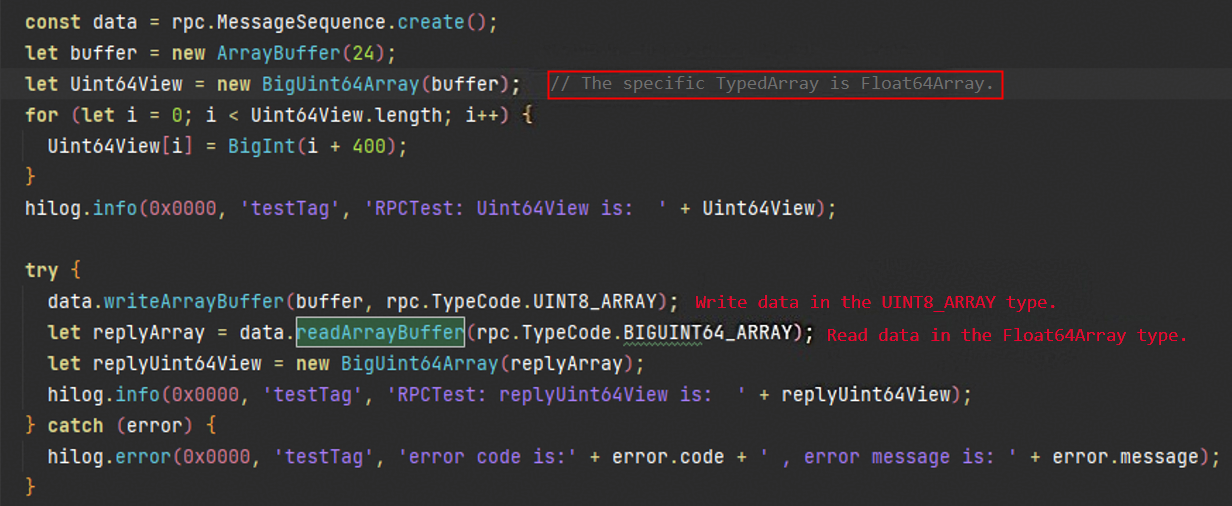
The bytes do not match, and the write operation fails.

7. The onRemoteRequest function reports an error, and the error code 4 is returned.
[Symptom]
When the client sends a message to the server, an error occurs during the processing on the server. The error log is "OnJsRemoteRequest failed, ret:4, time:xxxxx."

[Impact of Incorrect Usage]
After the server processes the received message, the client cannot obtain the returned information.
[Suggestions]
1. In the onRemoteRequest or RemoteMessageRequest function, the service should return true or false as required.
2. When the upper-layer service returns false, the IPC considers that the communication fails and directly sets the value as 4 to end the communication.
8. When the IPC is used for communication, the service data and reply are not released at the correct time.
[Symptom]
When the IPC is used for communication, the service data and reply are not released at the correct time. As a result, the service fails to invoke the readInt method.
[Impact of Incorrect Usage]
The method fails to be invoked, and the service cannot obtain the returned information.
[Suggestions]
Use the reclaim method properly to ensure that no error occurs when the data and reply objects are created.
[Document Link]
[Best Practices]
sendMessageRequest(code: number, data: MessageSequence, reply: MessageSequence, options: MessageOption): Promise<RequestResult>
When using the preceding methods, ensure that the objects that are no longer needed are released in the .finally callback of the promise, and ensure that the logic in the .then or .catch callback of the promise is executed before the objects are released.

sendMessageRequest(code: number, data: MessageSequence, reply: MessageSequence, options: MessageOption, callback: AsyncCallback<RequestResult>): void
When using this method, you must obtain the service data in the AsyncCallback callback before releasing the data.

1. OH_NativeWindow_DestroyNativeWindow() usage issue
[Symptom]
The understanding of the OH_NativeImage_AcquireNativeWindow() and OH_NativeWindow_DestroyNativeWindow() APIs is incorrect. As a result, the APIs are released repeatedly.
[Impact of Incorrect Usage]
Handle the out-of-bounds address issue.
[Suggestions]
When OH_NativeImage_Destroy is called, OH_NativeWindow_DestroyNativeWindow does not need to be called to release the resources.
[Document Link]
2. Crash caused by wild pointers in OH_NativeWindow-related APIs
[Symptom]
Crash occurs when the Native APIs are called.

[Impact of Incorrect Usage]
- If the OnSurfaceDestroyedCB callback API has been triggered after the xcomponent is destructed, the reference count of the native window decreases by 1. When the reference count decreases to 0, the native window will be destructed. After the native window is destructed, if the native window is called again, a crash caused by wild pointers will occur.
- The application may manually call the OH_NativeWindow_DestroyNativeWindow API to decrease the reference count of the native window by 1. If the native window has been destructed, calling this API again will cause a crash.
[Suggestions]
- Check whether the native window is still called after the xcomponent is released.
- Check whether the xcomponent is released and the native window API is called concurrently.
- Check whether the application calls the OH_NativeWindow_DestroyNativeWindow API to decrease the reference count of the native window by 1.
[Document Link]
3. Crash caused by null pointers in OH_NativeWindow-related APIs
[Symptom]
The top of the crash stack is in libsurface.z.so.

[Impact of Incorrect Usage]
1. When the GetBufferHandleFromNative API is called to access sfbuffer, the sfbuffer is a null pointer. This is because another thread sets the sfbuffer to null concurrently. As a result, the system crashes.
2. Another thread triggers the destruction process of the native window. In the destruction process, the buffer is unreferenced, and then the buffer is destructed. Finally, the sfbuffer is set to null.
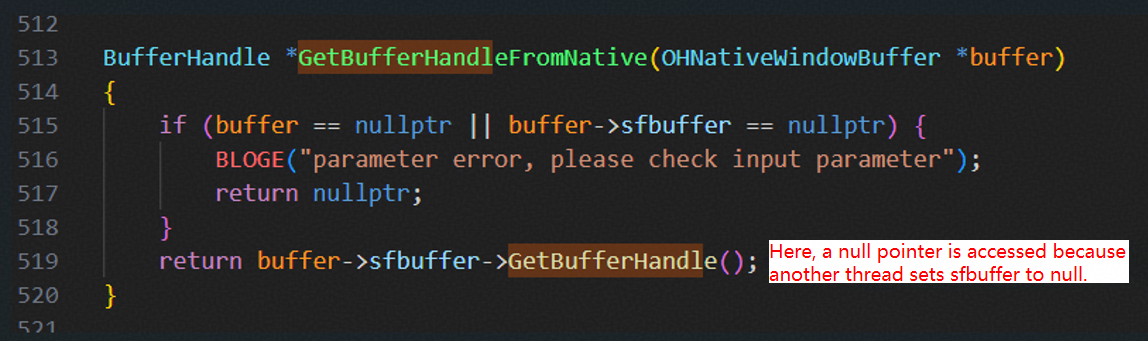
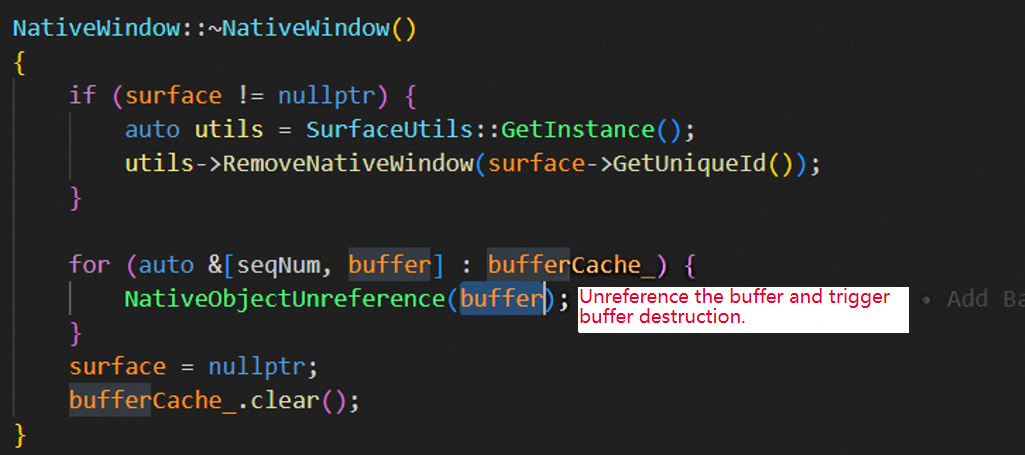
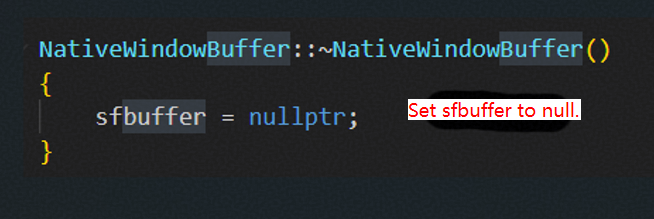
[Suggestions]
Search the call stack to find the .so file that actually uses the native window. For example, in the preceding call stack, find libweb_engine.so.
[Document Link]
Ark runtime APIs
1. [Use after free] napi_async_work is used in an incorrect way.
[Symptom]
The napi_async_work is used in an incorrect way, causing the UAF issue. The involved APIs include napi_create_async_work, napi_queue_async_work, napi_queue_async_work_with_qos, and napi_delete_async_work.
[Impact of Incorrect Usage]
The system stack crashes, making it difficult to trace the problem.
[Suggestions]
Set the callback function in the fifth parameter of napi_create_async_work, and execute the work of napi_delete_async_work in the callback function. This ensures that during the execution of the asynchronous task, the memory problem of the upper-layer developer will not cause the system stack to report an error, facilitating fault locating.
[Typical Cases]
A crash occurs when an application is opened.

This stack is caused by the UAF issue due to improper lifecycle management when native developers use the napi_async_work variable. The difficulty is that these stacks are system stacks, and the specific caller cannot be traced. However, this problem is inevitable. Therefore, after the memtracker is used to perform a pressure test, the crash stack is as follows:

According to the preceding crash stack, the memory is allocated and released by liblargelanguagemodel.z.so. Check the code of liblargelanguagemodel.z.so.
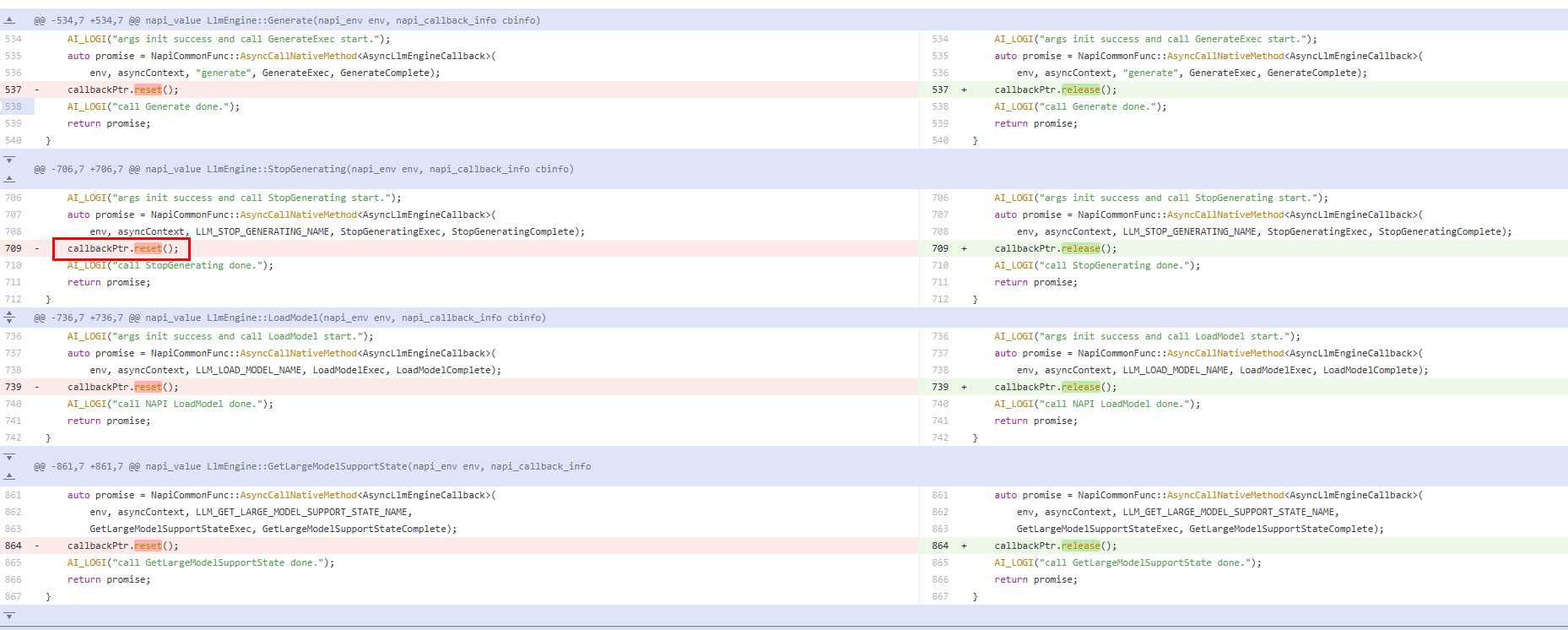
The developer uses the smart pointer to manage the memory of AsyncWorkData. After the task is inserted into the asynchronous task queue, the smart pointer is reset. As a result, napi_delete_async_work is called in the destructor. As a result, the memory is released before the asynchronous task process is completed, causing the UAF issue.
#include "napi/native_api.h"
#include "uv.h"
#define LOG_DOMAIN 0X0202
#define LOG_TAG "MyTag"
#include <hilog/log.h>
#include <thread>
#include <sys/eventfd.h>
#include <unistd.h>
uv_loop_t *loop;
napi_value jsCb;
int fd = -1;

static napi_value Add(napi_env env, napi_callback_info info)
{
    napi_value work_name;
    napi_async_work work;
    napi_create_string_utf8(env, "ohos", NAPI_AUTO_LENGTH, &work_name);
    /* The fourth parameter is the work task of the asynchronous thread, and the fifth parameter is the callback of the main thread. */
    napi_create_async_work(env, nullptr, work_name, [](napi_env env, void* data){
        OH_LOG_INFO(LOG_APP, "ohos in execute");
    }, [](napi_env env, napi_status status, void *data){
        /* The implementation is not concerned. */
        OH_LOG_INFO(LOG_APP, "ohos in complete");
        napi_delete_async_work(env, (napi_async_work)data);
    }, nullptr, &work);
    /* Trigger the execution of the asynchronous task through napi_queue_async_work. */
    napi_queue_async_work(env, work);
    return 0;
}

EXTERN_C_START
static napi_value Init(napi_env env, napi_value exports){
    napi_property_descriptor desc[] = {{"add", nullptr, Add, nullptr, nullptr, nullptr, napi_default, nullptr}};
    napi_define_properties(env, exports, sizeof(desc) / sizeof(desc[0]), desc);
    return exports;
}
EXTERN_C_END

static napi_module demoModule = {
    .nm_version = 1,
    .nm_flags = 0,
    .nm_filename = nullptr,
    .nm_register_func = Init,
    .nm_modname = "entry",
    .nm_priv = ((void *)0),
    .reserved = {0},
};

extern "C" __attribute__((constructor)) void RegisterEntryModule(void){
    napi_module_register(&demoModule);
}
Set the callback function in the fifth parameter of napi_create_async_work, and execute the work of napi_delete_async_work in this callback function. This ensures that memory problems of upper-layer developers will not be reflected in the system stack during asynchronous task execution, thereby avoiding difficult fault locating.
2. [Double free] Double free occurs because the developer manually frees the memory of ArrayBuffer.
[Symptom]
The developer uses the napi_get_arraybuffer_info API to obtain the data pointer of ArrayBuffer and then manually frees the memory. As a result, the application crashes. The memory of ArrayBuffer is managed by the VM GC in a unified manner. Developers are not allowed to manually free the memory.
The methods of using the napi_create_arraybuffer, napi_create_sendable_arraybuffer, napi_get_arraybuffer_info, napi_create_buffer, napi_get_buffer_info, napi_get_typedarray_info, and napi_get_dataview_info APIs are similar.
[Impact of Incorrect Usage]
The app crashes.
[Suggestions]
Do not manually release the ArrayBuffer memory.
[Document Link]
Avoiding Releasing the Obtained Buffer Repeatedly
[Typical Cases]
After an app is installed, if the app is left idle for a period of time, it will be forcibly exited. The crash stack is as follows:
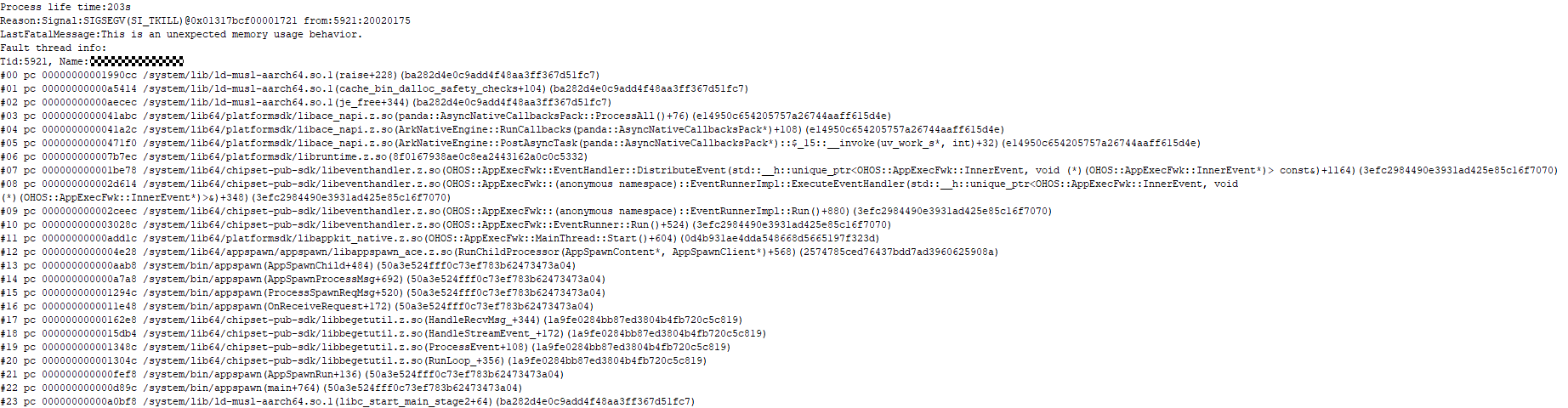
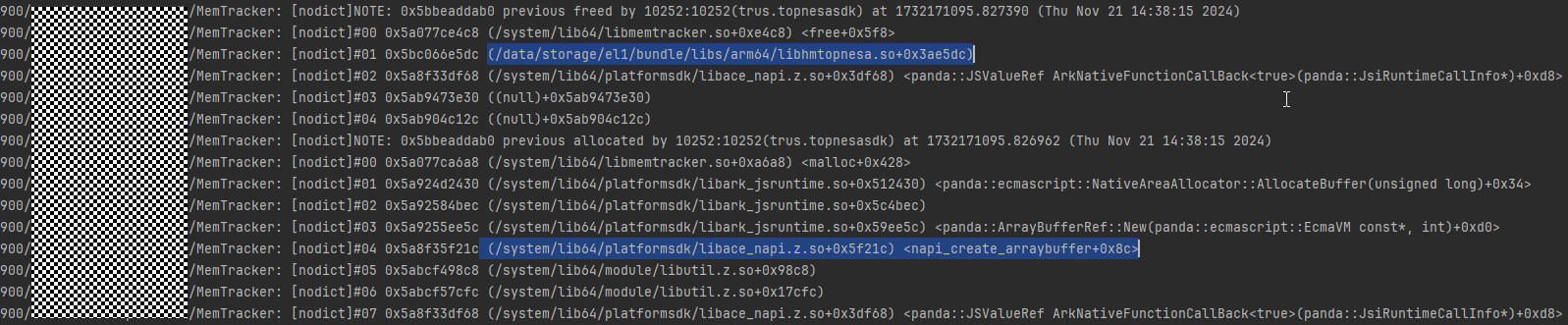
[Analysis]
After the MemTracker tool for detecting out-of-bounds access is installed, it is found that the developer manually released the ArrayBuffer memory created by the VM, and the VM attempted to release the same memory again during garbage collection. As a result, double free occurred. The ArrayBuffer memory should be managed by the VM in a unified manner, and the developer does not need to manually release the memory. If the developer manually releases the memory, double free may occur.
[Best Practices]
Developers are not allowed to proactively release the ArrayBuffer pointer managed by the VM.
3. [Memory leak] When the developer uses the uv_queue_work method to submit a task to the JS thread for execution, the handle scope is not added to the callback function of the JS thread.
[Symptom]
When the developer uses the uv_queue_work method to submit a task to the JS thread for execution, a JS object is created in the JS callback. However, the napi_handle_scope method is not used to manage the lifecycle of the napi_value created in the callback. As a result, memory leak occurs.
[Impact of Incorrect Usage]
Memory leak
[Suggestions]
When the uv_queue_work method is used to submit a task to the JS thread for execution, the napi_handle_scope method must be used in the callback function of the JS thread to manage the lifecycle of the napi_value created in the callback.
[Document Link]
[Best Practices]
void callbackTest(CallbackContext* context)
{
    uv_loop_s* loop = nullptr;
    napi_get_uv_event_loop(context->env, &loop);


    uv_work_t* work = new uv_work_t;
    context->retData = 1;
    work->data = (void*)context;


    uv_queue_work(
        loop, work, [](uv_work_t* work) {},
        // using callback function back to JS thread
        [](uv_work_t* work, int status) {
            CallbackContext* context = (CallbackContext*)work->data;
            napi_handle_scope scope = nullptr;
            napi_open_handle_scope(context->env, &scope); // open handle scope, The lifecycle of the JS object created below is managed by this scope
            if (scope == nullptr) {
                return;
            }
            napi_value callback = nullptr;
            napi_get_reference_value(context->env, context->callbackRef, &callback);
            napi_value retArg;
            napi_create_int32(context->env, context->retData, &retArg);
            napi_value ret;
            napi_call_function(context->env, nullptr, callback, 1, &retArg, &ret);
            napi_delete_reference(context->env, context->callbackRef);
            napi_close_handle_scope(context->env, scope); // close handle scope, If the objects under this scope are not referenced by other objects, they will be released after GC
            if (work != nullptr) {
                delete work;
            }
            delete context;
        }
    );
}
4. [Multi-thread] When a developer uses the NAPI, using napi_env or napi_value across threads causes multi-thread security issues.
[Symptom]
Most NAPIs require thread safety during calling. That is:
1. NAPIs can be used only on the JS thread.
2. The thread that uses the NAPI must be the same as the JS thread corresponding to the napi_env.
3. The thread that uses the NAPI must be the same as the JS thread that creates the resource type (such as napi_value and napi_ref).
If the developer uses any of the following methods, multi-thread security issues will occur:
1. The developer uses the NAPI on a non-JS thread.
2. The developer uses the NAPI on the JS thread, but not on the JS thread corresponding to the napi_env.
3. The developer uses the NAPI on a JS thread that is not created by napi_value or napi_ref.
The preceding refers to "most NAPIs". Some NAPIs are exceptions and do not have the preceding restrictions. The involved interface is the thread-safe function of 1.napi_call_threadsafe_function/napi_call_threadsafe_function_with_priority/napi_acquire_threadsafe_function/napi_release_threadsafe_function/napi_get_threadsafe_function_context/napi_ref_threadsafe_function/napi_unref_threadsafe_function -- thread-safe function of NAPI.
2. napi_get_uv_event_loop: Obtains the loop on the environment. The preceding restrictions are not involved.
3. napi_get_node_version.
[Impact of Incorrect Usage]
App crashing
[Suggestions]
Comply with the thread safety requirements and enable the multi-thread detection function during development to detect multi-thread security issues in a timely manner.
hdc shell param set persist.ark.properties 0x107c
hdc shell reboot
[Typical Cases]
struct AddonData {
    napi_async_work asyncWork = nullptr;
};
static void AddExecuteCB(napi_env env, void *data) {
    napi_value ret = nullptr;
    napi_create_object(env, &ret); // When the napi_create_object API is used in a non-JS thread, there are multi-thread security issues.
}
static void AddCallbackCompleteCB(napi_env env, napi_status status, void *data) {

}

static napi_value Test(napi_env env, napi_callback_info info) {
    struct AddonData *addonData = (struct AddonData *)malloc(sizeof(struct AddonData));
    if (addonData == nullptr) {
        return nullptr;
    }
    napi_value resourceName = nullptr;
    napi_create_string_utf8(env, "AsyncWorkTest", NAPI_AUTO_LENGTH, &resourceName);
    napi_create_async_work(env, nullptr, resourceName, AddExecuteCB, AddCallbackCompleteCB,
                                          (void *)addonData, &addonData->asyncWork);
    napi_queue_async_work(env, addonData->asyncWork);

    return nullptr;
}
[Best Practices]
After the multi-thread detection function is enabled, the first scene can be intercepted.
You can run a command to enable the multi-thread detection function for the entire device.
hdc shell param set persist.ark.properties 0x107c
hdc shell reboot
You can also select the multi-thread detection option in DevEco Studio.
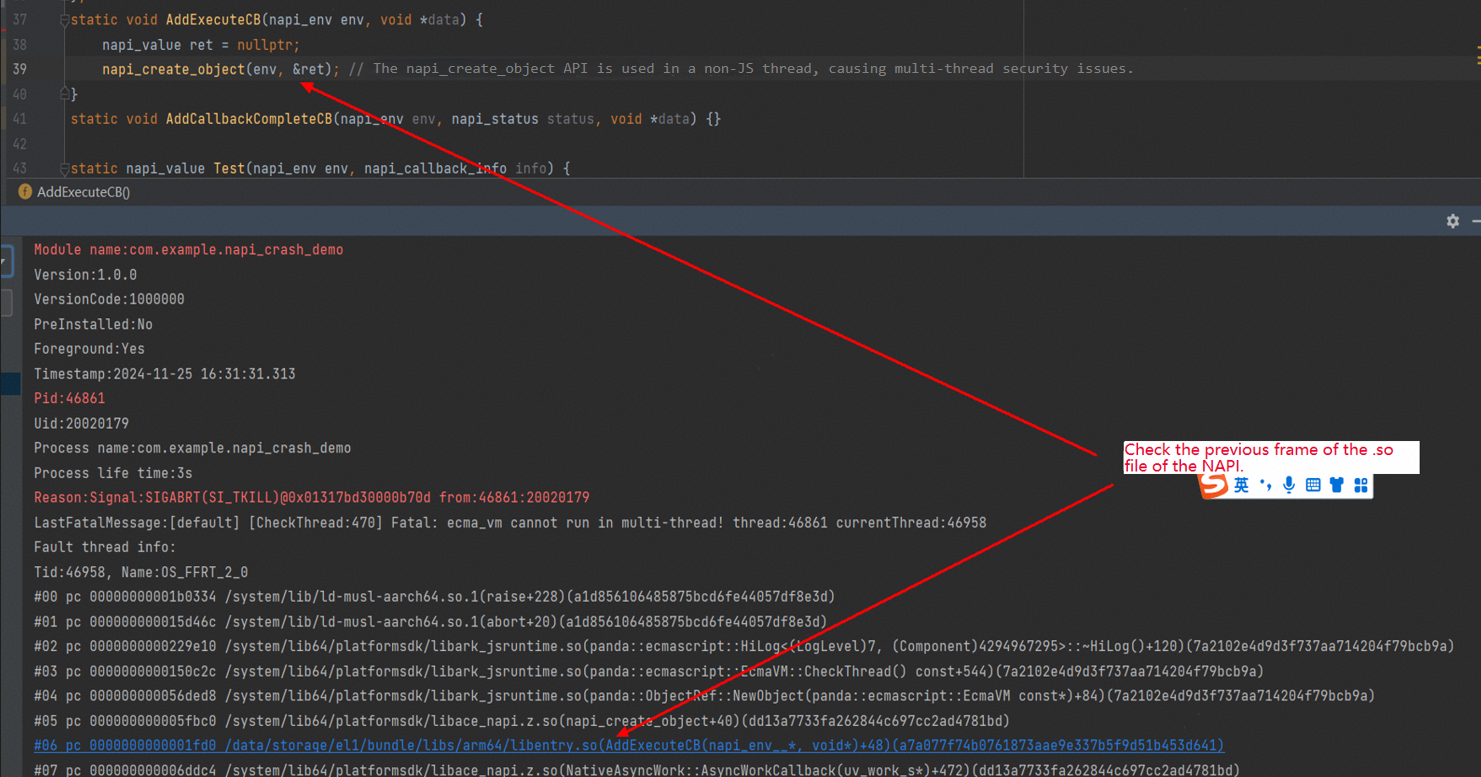
5. [Multi-thread] Multi-thread security issues caused by using napi_add_env_cleanup_hook across threads
[Symptom]
Similarly, the napi_remove_env_cleanup_hook API is available. These APIs are not thread-safe and can be used only on the JS thread corresponding to the napi_env. If they are used in multiple threads, multi-thread security issues may occur, causing crashes.
[Impact of Incorrect Usage]
App crashing
[Suggestions]
The napi_add_env_cleanup_hook and napi_remove_env_cleanup_hook APIs can be called only on the JS thread corresponding to the napi_env. Calling these APIs across threads is prohibited.
[Typical Cases]
Reason:Signal:SIGSEGV(SEGV_MAPERR)@0x006b6b5b440fd5c8
LastFatalMessage:LabelServiceStub construct
Fault thread info:
Tid:9138, Name:OS_IPC_13_9138
#00 pc 0000000000069ff0 /system/lib64/platformsdk/libace_napi.z.so(std::__h::__hash_table<NativeEngine*, std::__h::hash<NativeEngine*>, std::__h::equal_to<NativeEngine*>, std::__h::allocator<NativeEngine*>>::remove(std::__h::__hash_const_iterator<std::__h::__hash_node<NativeEngine*, void*>*>)+112)(1529322f26fe2bfe6fc21fa2caae6e4d)
#01 pc 000000000006a938 /system/lib64/platformsdk/libace_napi.z.so(1529322f26fe2bfe6fc21fa2caae6e4d)
#02 pc 0000000000068170 /system/lib64/platformsdk/libace_napi.z.so(NativeEngine::RemoveCleanupHook(void (*)(void*), void*)+416)(1529322f26fe2bfe6fc21fa2caae6e4d)
#03 pc 000000000006cbbc /system/lib64/platformsdk/libace_napi.z.so(napi_remove_env_cleanup_hook+76)(1529322f26fe2bfe6fc21fa2caae6e4d)
#04 pc 000000000004460c /system/lib64/platformsdk/libipc_napi.z.so(OHOS::NAPIRemoteObject::OnJsRemoteRequest(OHOS::CallbackParam*)+796)(f9231ae5cbe6abf63dff4fda9df5a97b)
#05 pc 00000000000441a8 /system/lib64/platformsdk/libipc_napi.z.so(OHOS::NAPIRemoteObject::OnRemoteRequest(unsigned int, OHOS::MessageParcel&, OHOS::MessageParcel&, OHOS::MessageOption&)+544)(f9231ae5cbe6abf63dff4fda9df5a97b)
#06 pc 00000000000443e8 /system/lib64/chipset-pub-sdk/libipc_single.z.so(OHOS::IPCObjectStub::SendRequestInner(unsigned int, OHOS::MessageParcel&, OHOS::MessageParcel&, OHOS::MessageOption&)+152)(762ec7ac78c9865d1985559fef9f42ac)
#07 pc 000000000005f508 /system/lib64/chipset-pub-sdk/libipc_single.z.so(OHOS::BinderInvoker::GeneralServiceSendRequest(binder_transaction_data const&, OHOS::MessageParcel&, OHOS::MessageParcel&, OHOS::MessageOption&)+408)(762ec7ac78c9865d1985559fef9f42ac)
#08 pc 000000000005f66c /system/lib64/chipset-pub-sdk/libipc_single.z.so(OHOS::BinderInvoker::TargetStubSendRequest(binder_transaction_data const&, OHOS::MessageParcel&, OHOS::MessageParcel&, OHOS::MessageOption&, unsigned int&)+148)(762ec7ac78c9865d1985559fef9f42ac)
#09 pc 000000000005f92c /system/lib64/chipset-pub-sdk/libipc_single.z.so(OHOS::BinderInvoker::Transaction(binder_transaction_data_secctx&)+644)(762ec7ac78c9865d1985559fef9f42ac)
[Best Practices]
You can enable the multi-thread security check during development. If the napi_add_env_cleanup_hook or napi_remove_env_cleanup_hook function has multi-thread problems, HiLog will print the call stack of the first onsite.

6. When the developer uses napi_add_env_cleanup_hook, the registration fails due to duplicate key values.
[Symptom]
Similarly, the napi_remove_env_cleanup_hook API is available. When the developer uses napi_add_env_cleanup_hook to register a callback with the env, the third input parameter args of the API is used as the key value of the map. When the developer registers the callback of the same args repeatedly, the subsequent registration fails. Only the first registration is successful. The registration failure may cause subsequent service function or crash problems.
[Impact of Incorrect Usage]
Function problems or app crashes.
[Suggestions]
Do not register different callbacks for the same args value. Complete all actions in one callback.
[Typical Cases]
The registration may fail when the env is used as a parameter to call AddCleanHook. If the registration fails, the callback cannot be invoked to clear the reference in the map. This may cause the pointer of the env to be reused, and thus obtaining a released napi_ref.
Modification solution: Use a unique key.

[Best Practices]
After the multi-thread detection function is enabled, HiLog prints the backtrace of the registration failure.

7. [Use after free] Properly use napi_handle_scope to avoid crashes caused by exceeding the lifecycle of napi_value.
[Symptom]
napi_value is managed by the scope. After the scope ends, napi_value becomes invalid. If napi_value is used after the scope ends, undefined behavior will occur.
[Impact of Incorrect Usage]
App crash/Abnormal app behavior
[Suggestions]
Optional solutions (select one of them):
1. Use napi_escapable_handle_scope to escape napi_value from the current scope and hand it over to the upper-level scope for management.
2. Use napi_ref to create a strong reference and proactively manage the lifecycle of the JS object. Note that you need to call napi_delete_reference to release the strong reference.
[Typical Cases]
Case 1: napi_value exceeds the scope declared by the developer.
static napi_value Test2(napi_env env, napi_callback_info info) {
    napi_handle_scope scope = nullptr;
    napi_value value1 = nullptr;
    napi_value value2 = nullptr;
    napi_value value3 = nullptr;
    napi_open_handle_scope(env, &scope);
    napi_create_object(env, &value1);
    napi_close_handle_scope(env, scope);
    napi_create_string_utf8(env, "const char *str", NAPI_AUTO_LENGTH, &value2);
    napi_create_string_utf8(env, "const char *str", NAPI_AUTO_LENGTH, &value3);
    napi_valuetype type = napi_null;
    napi_typeof(env, value1, &type);
    OH_LOG_INFO(LOG_APP, "xxx, %{public}d", type);

    return value1;
} 
The object is created as an object (obj). However, after the object goes out of the scope and is used again, its type changes to string. As a result, the behavior is abnormal.
Case 2: napi_value exceeds the scope of the NAPI framework.
testNapi.test3(2, 3);
testNapi.test4().length;
napi_value objvalues = nullptr;
static napi_value Test3(napi_env env, napi_callback_info info) {
    napi_create_object(env, &objvalues);
    return nullptr;
}

static napi_value Test4(napi_env env, napi_callback_info info) { return objvalues; } 
Cause:
The native_value across NAPIs is not saved using napi_ref. After the native_value exceeds the scope of the NAPI framework, the native_value becomes invalid.
Note: The scope in the NAPI framework is napi_handle_scope. You can use napi_handle_scope to manage the lifecycle of napi_value. The scope at the framework layer is embedded in the entire process of calling native code from JavaScript. The scope is opened before the native method is called and closed after the native method is executed.
[Best Practices]
1. For case 1, use napi_escapable_handle_scope and escape the handle scope before closing it.
static napi_value Test2(napi_env env, napi_callback_info info) {
    napi_escapable_handle_scope scope = nullptr;
    napi_value value1 = nullptr;
    napi_value value2 = nullptr;
    napi_value value3 = nullptr;
    napi_value value4 = nullptr;


    napi_open_escapable_handle_scope(env, &scope);
    napi_create_object(env, &value1);
    napi_escape_handle(env, scope, value1, &value4);
    napi_close_escapable_handle_scope(env, scope);
    napi_create_string_utf8(env, "const char *str", NAPI_AUTO_LENGTH, &value2);
    napi_create_string_utf8(env, "const char *str", NAPI_AUTO_LENGTH, &value3);
    napi_valuetype type = napi_null;
    napi_typeof(env, value4, &type);
    OH_LOG_INFO(LOG_APP, "xxx, %{public}d", type);


    return value1;
}
The result of the preceding code meets the expectation.

2. For case 2, use napi_ref to save strong references.
napi_ref g_ref = nullptr;
static napi_value Test3(napi_env env, napi_callback_info info) {
    napi_value value;
    napi_create_object(env, &value);
    napi_create_reference(env, value, 1, &g_ref);
    return nullptr;
}

static napi_value Test4(napi_env env, napi_callback_info info) {
    napi_value result;
    napi_get_reference_value(env, g_ref, &result);
    napi_delete_reference(env, g_ref);
    return result;
}
8. [Use after free] The developer saves the env pointer and continues to use it after the env is released. As a result, a UAF occurs, causing the crash.
[Symptom]
The developer saves the napi_env pointer in advance. After the JS thread exits, the address is released. When the old napi_env is used to call the NAPI, the crash occurs.
[Impact of Incorrect Usage]
App crashing
[Suggestions]
- To reduce the behavior of saving the env pointer, it is more secure to directly use the env of transparent transmission at the NAPI framework layer.
- If you need to save the env pointer, you can use the napi_add_env_cleanup_hook API to register the callback and handle the env exit in the callback.
[Typical Cases]
Timestamp:2023-07-21 22:42:43.036
Pid:3952
Uid:20010086
Reason:Signal:SIGSEGV(SEGV_MAPERR)@0x0000000000000028
Tid:3997, Name:PaEngineRunner1
#00 pc 0000000000022794 /system/lib64/platformsdk/libace_napi.z.so(NativeEngineInterface::ClearLastError()+0)(7c5267e605f12e7abb774fca82e34826)
#01 pc 000000000001c150 /system/lib64/platformsdk/libace_napi.z.so(napi_delete_reference+44)(7c5267e605f12e7abb774fca82e34826)
#02 pc 000000000002cf74 /system/lib64/chipset-pub-sdk/libipc_napi.z.so(OHOS::NAPIRemoteObject::~NAPIRemoteObject()+100)(e5ef129057d21508b210b1ea767c123e)
#03 pc 000000000002d0e0 /system/lib64/chipset-pub-sdk/libipc_napi.z.so(virtual thunk to OHOS::NAPIRemoteObject::~NAPIRemoteObject()+36)(e5ef129057d21508b210b1ea767c123e)
#04 pc 00000000000208b8 /system/lib64/chipset-pub-sdk/libutils.z.so(OHOS::RefBase::DecStrongRef(void const*)+184)(764d94f3f9f77923ad3529406319770b)
#05 pc 000000000003123c /system/lib64/chipset-pub-sdk/libipc_napi.z.so(OHOS::NAPIRemoteObjectHolder::~NAPIRemoteObjectHolder()+92)(e5ef129057d21508b210b1ea767c123e)
#06 pc 00000000000312b4 /system/lib64/chipset-pub-sdk/libipc_napi.z.so(OHOS::NAPIRemoteObjectHolder::~NAPIRemoteObjectHolder()+16)(e5ef129057d21508b210b1ea767c123e)
#07 pc 0000000000026b24 /system/lib64/libace_napi_ark.z.so(ArkNativeReference::FinalizeCallback()+36)(6b56b7e2cdfb750cbb348dbc6b3f65cd)
According to the env address printed in the log, it is found that the env is still in use after being released.

9. [Use after free] When the developer uses napi_get_reference_value, napi_ref has been released. As a result, a UAF issue occurs.
[Symptom]
The developer uses napi_get_reference_value when napi_ref has been released. As a result, a UAF issue occurs.
[Impact of Incorrect Usage]
App crashing
[Suggestions]
If the created napi_ref is a strong reference, the developer needs to proactively manage its lifecycle to avoid using it after napi_delete_reference is called.
[Typical Cases]
Using napi_ref after it is released

10. [Buffer overflow] When napi_get_value_string_utf8 is called, the buffer length is insufficient, causing out-of-bounds access.
[Symptom]
The same is true for the NAPIs. For example, the APIs napi_get_cb_info and napi_get_string_value_xxx have a common feature: The developer needs to pass the buffer and its length to the APIs. If the size of the buffer passed by the developer exceeds the actual buffer size, an out-of-bounds error occurs. The napi_get_reference_value function is used when _ref has been released, causing a UAF issue. Similarly, the APIs napi_get_cb_info and napi_get_string_value_xxx have a common feature: The developer needs to pass the buffer and its length to the APIs. If the size of the buffer passed by the developer exceeds the actual buffer size, an out-of-bounds error occurs.
[Impact of Incorrect Usage]
App crashing
[Suggestions]
1. Developers must ensure that the buffer capacity is sufficient to prevent out-of-bounds errors.
2. For the napi_get_value_string_xxx series APIs, you can pass NAPI_AUTO_LENGTH as the buffer length. The API will automatically calculate the buffer length.
[Typical Cases]
The value of argc exceeds the actual length of the argv array, causing out-of-bounds array.
static napi_value Test5(napi_env env, napi_callback_info info) {
    size_t argc; // Not initialized. argc may be a random and large value.
    napi_value argv[3] = {nullptr};
    napi_get_cb_info(env, info, &argc, argv, nullptr, nullptr);
    return argv[0];
} 