Event tracking is the process of combining the information collection program with the original function code to collect, process, and send information for specific user behavior to track application usage. It includes the number of visits, number of visitors, stay duration, number of page views, and bounce rate. Common service scenarios are as follows:
- Listening for the number of clicks in visible areas or components on the page, which is used to collect statistics on the click frequency and analyze user behavior preferences.
- Listening for the start and end of component sliding on the page, and calculating the sliding offset and exposure ratio.
- Listening for page redirection, collecting page stay duration, source page and destination page, and analyzing the number of page views and bounce rate.
- Analyzing the page loading performance, calculating the time consumed by each node during the loading process, and optimizing the page loading performance based on a key point.
Based on user behavior, tracking can be classified into click tracking, exposure tracking, and page tracking.
- Click tracking: indicates that a user clicks an area, for example, an icon or an image. Unlike passive user exposure, the click event is an active behavior.
- Exposure tracking: collects statistics on whether some areas of a page are effectively browsed by users, for example, the exposure ratio and exposure duration of each card in the waterflow. This is a passive behavior.
- Page tracking: collects statistics on the stay duration on a fixed page, page loading performance, and source and destination pages during page redirection.

The hiAppEvent.write() method for app event tracking stores events of the AppEventInfo type and implements asynchronous callback. If the reporting fails, you are advised to use the cache mechanism for subsequent processing or call the hiappEvent.write method again for tracking, and process the data during the next callback.
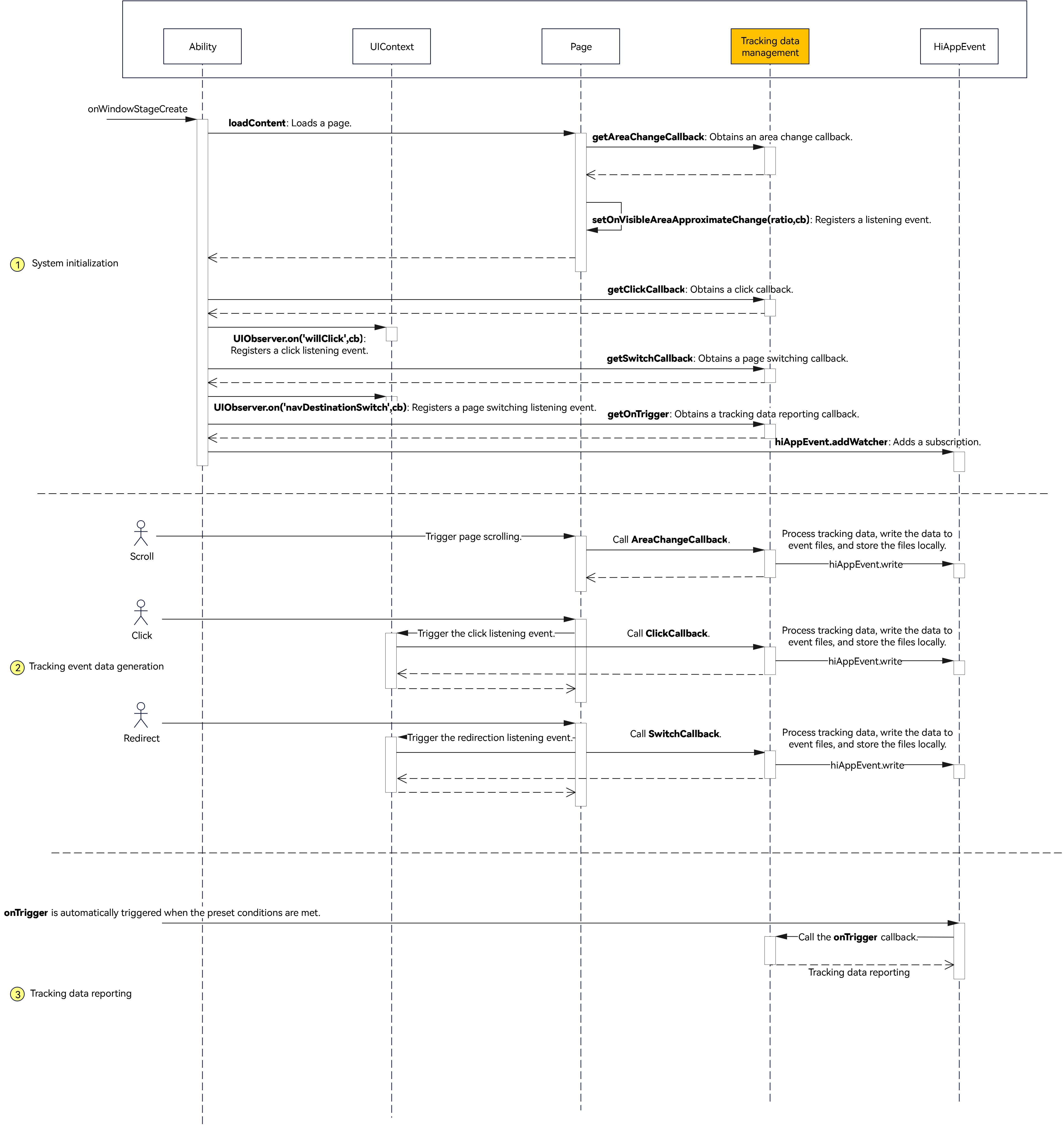
The following describes four tracking solutions based on dynamic binding of tracking data to components, click tracking, exposure tracking, and page tracking. The overall solution uses the global imperceptible listening capability UIObserver and setOnVisibleAreaApproximateChange property to implement tracking functionalities.
Specify the ID and tracking data for the component that requires tracking. For example, you can set the ID of the Button component to button-1 and use customProperty to set the key and value. The key is the component ID, and the value is the tracking data. To facilitate data obtaining, you can define tracking data in DataResource.
// entry\src\main\ets\pages\ClickPage.ets
Button('Click Tracing Point - Single Component')
  .width('100%')
  .id('button-1')
  .fontWeight(FontWeight.Bold)
  .customProperty('button-1', DataResource['Index']['button-1'])
  .onClick(() => {
    hilog.info(0x0000, 'ApplicationTrack', '%{public}s', 'btn');
  })
In this example, DataResource is encapsulated based on the page name, component name, and index. The page name is the outer key, and component name and index are inner keys. The value is configured based on the actual service.
// entry\src\main\ets\viewModel\DataResource.ets
export const DataResource: Record<string, Record<string, DataResourceType>> = {
  'Index': {
    'button-1': { id: 'button-1' },
    'button-2': { id: 'button-2' }
  },
  'Page2': {
    'component-1': { id: 'text-2' }
  }
}

export interface DataResourceType {
  id: string
} After configuring the tracking data and binding the component, you can register a click event listening in EntryAbility and obtain the click triggering node from the event callback. UIObserver provides two types of listening events:
- on('willClick') listens for the dispatch of click event instructions. The registered callback function is triggered before the event is triggered.
- on('didClick') listens for the dispatch of click event instructions. The registered callback function is triggered after the event is triggered.
Both methods can be used to trigger the callback when a user clicks the component. In this example, `willClick` is used as an example. The following describes the implementation.
Procedure
- Implement a simple page and bind the ID and tracking data to the component. The ID can be named in the format of component name-index. In the following code example, there are two Button components with respective IDs button-1 and button-2.
// entry\src\main\ets\pages\ClickPage.ets Row() { Text('Click Tracing Point - Composite Component') // ... Image($r('app.media.ic_public_arrow_right')) // ... } // ... .id('button-2') .margin({ top: 12 }) .customProperty('button-2', DataResource['Index']['button-2']) .onClick(() => { hilog.info(0x0000, 'ApplicationTrack', '%{public}s', 'row'); }) Row() { // entry\src\main\ets\pages\ClickPage.ets Button('Click Tracing Point - Single Component') .width('100%') .id('button-1') .fontWeight(FontWeight.Bold) .customProperty('button-1', DataResource['Index']['button-1']) .onClick(() => { hilog.info(0x0000, 'ApplicationTrack', '%{public}s', 'btn'); }) } - Register a listener for the willClick event of UIObserver in EntryAbility and obtain the triggered FrameNode from the event callback.
// entry\src\main\ets\entryability\EntryAbility.ets uiContext.getUIObserver()?.on('willClick', (_event: ClickEvent, node?: FrameNode) => { const clickCallback = CallbackManager.getInstance().getClickCallback(); clickCallback(node, uiContext); }) - Obtain the page and ID of the current component based on FrameNode and obtain the tracking data bound to the current component through getCustomProperty. In addition, you can obtain basic attributes of a component, such as the component size, component location, and whether the component is visible using the methods provided by FrameNode. For details, see the FrameNode official document.
// entry\src\main\ets\viewModel\CallBackManager.ets /** * Obtains the ClickCallback callback. * */ public getClickCallback() { return (node: FrameNode | undefined, uiContext: UIContext) => { hilog.info(0x0000, 'ApplicationTrack', '%{public}s', `FrameNode: ${node}`); const uniqueId = node?.getUniqueId(); const ID = node?.getId(); const pageInfo = uiContext.getPageInfoByUniqueId(uniqueId); const trackData = node?.getCustomProperty(ID); let eventParams: Record<string, string | number> = { 'component_id': ID ?? '', 'pageInfo': JSON.stringify(pageInfo ?? {}), 'trackData': JSON.stringify(trackData ?? {}) }; hiAppEvent.write({ domain: 'test_domain', name: 'test_event', eventType: hiAppEvent.EventType.FAULT, params: eventParams }, (err: BusinessError) => { if (err) { hilog.error(0x0000, 'CallBackManager', '%{public}s', `code: ${err.code}, message: ${err.message}`); return; } hilog.info(0x0000, 'ApplicationTrack', '%{public}s', `getClickCallback, success to write event`); }); }; } - Use the write() method of @kit.PerformanceAnalysisKit to write the required data to the event file of the day. Note that the value of eventParams can only be a string, number, boolean, or array.
hiAppEvent.write({ domain: 'test_domain', name: 'test_event', eventType: hiAppEvent.EventType.FAULT, params: eventParams }, (err: BusinessError) => { if (err) { hilog.error(0x0000, 'CallBackManager', '%{public}s', `code: ${err.code}, message: ${err.message}`); return; } hilog.info(0x0000, 'ApplicationTrack', '%{public}s', `getClickCallback, success to write event`); }); - Call the off() API of UIObserver in onWindowStageDestroy() to cancel event listening.
// entry\src\main\ets\entryability\EntryAbility.ets
onWindowStageDestroy(): void {
  const uiContext: UIContext | undefined = AppStorage.get('uiContext');
  uiContext?.getUIObserver().off('willClick');
  uiContext?.getUIObserver().off('scrollEvent');
  uiContext?.getUIObserver().off('navDestinationSwitch');
  uiContext?.getUIObserver().off('routerPageUpdate');
  // Main window is destroyed, release UI related resources
  hilog.info(0x0000, 'ApplicationTrack', '%{public}s', 'Ability onWindowStageDestroy');
}
In addition to the click event, you can also use on('scrollEvent') to listen for the component sliding event, which triggers a callback when the sliding starts and ends and obtains the sliding offset. The following uses WaterFlow as an example to describe how to set IDs for WaterFlow and FlowItem.
// entry\src\main\ets\pages\WaterFlowPage.ets
TrackNode({ track: new Track().id('WaterFlow-1') }) {
  WaterFlow() {
    LazyForEach(this.dataSource, (item: number, index: number) => {
      FlowItem() {
        TrackNode({ track: new Track().id(`flowItem_${index}`) }) {
          WaterFlowCard({ item: item, index: index }).id(`flowItem_${index}`)
        }
      }
      // ...
    }, (item: number) => item.toString())
  }
  .id('WaterFlow-1')
  // ...
  .onReachStart(() => {
    hilog.info(0x0000, 'ApplicationTrack', '%{public}s', 'waterFlow reach start');
  })
  .onScrollStart(() => {
    hilog.info(0x0000, 'ApplicationTrack', '%{public}s', 'waterFlow scroll start');
  })
  .onScrollStop(() => {
    hilog.info(0x0000, 'ApplicationTrack', '%{public}s', 'waterFlow scroll stop');
  })
  .onScrollFrameBegin((offset: number, state: ScrollState) => {
    hilog.info(0x0000, 'ApplicationTrack', '%{public}s', `waterFlow scrollFrameBegin offset: ${offset}`);
    hilog.info(0x0000, 'ApplicationTrack', '%{public}s',
      `waterFlow scrollFrameBegin state: ${state.toString()}`);
    return { offsetRemain: offset };
  })
}
Register the scrollEvent listening in EntryAbility and obtain the ScrollEventInfo information from the callback, including id, uniqueId, scrollEvent, and offset.
// entry\src\main\ets\entryability\EntryAbility.ets
uiContext.getUIObserver()
.on('scrollEvent', (info) => CallbackManager.getInstance().getScrollEvent(info)) 
The ID of the callback parameter in the scrollEvent listening can be accurate only to the outer component WaterFlow, but cannot be accurate to the inner component FlowItem. If you want to obtain the exposure ratio of each item component during sliding, see "Exposure Tracking".
The exposure tracking listens for the appearance and disappearance of each component on the page. For example, if the appearance duration of an item exceeds 500 ms when a user slides the waterflow, a valid exposure is recorded. To avoid injecting lengthy code to each page, you are advised to use a custom tracking hook for encapsulation. The implementation is as follows.
Procedure
- Customize a TrackNode hook component that supports child component nesting, component ID injection, and listening event registration. The build() method in TrackNode needs to be determined by the external invoker, and the component information should be injected into the onDidBuild() lifecycle. onDidBuild() is triggered when you perform the following operations:
(1) Call addTrack() of TrackManager to bind the current component to the TrackShadow object.
(2) Use setOnVisibleAreaApproximateChange() to listen for changes in the visible area of the tracking component. The ratio can be customized, which is set to 0.0, 0.5, and 1.0 in this example.
(3) Obtain the parent node of the current component and check whether the parent node has a tracking hook. If no, trace the parent node until the parent node is null. If yes, add the current node to the child component set of the parent node.
In the aboutToDisappear() lifecycle, note that you need to delete the current component information by calling removeTrack() in TrackManager.
// entry\src\main\ets\viewModel\TrackNode.ets // onDidBuild Life Cycle. onDidBuild(): void { // Construct the virtual tree of the tracing point. // The obtained node is the root node of the current page (row in the test case). let uid = this.getUniqueId(); let node: FrameNode | null = this.getUIContext().getFrameNodeByUniqueId(uid); hilog.info(0x0000, 'ApplicationTrack', '%{public}s', `Track onDidBuild node:${node?.getNodeType()}`); if (node === null) { return; } this.trackShadow.node = node; this.trackShadow.id = node?.getId(); this.trackShadow.track = this.track; TrackManager.get().addTrack(this.trackShadow.id, this.trackShadow); // The setOnVisibleAreaApproximateChange monitors and records the visible area of the tracing point component. node?.commonEvent.setOnVisibleAreaApproximateChange( { ratios: [0, 0.5, 1], expectedUpdateInterval: 500 }, (ratioInc: boolean, ratio: number) => { const areaChangeCb = CallbackManager.getInstance().getAreaChangeCallback(); areaChangeCb(node, ratio); this.trackShadow.visibleRatio = ratio; hilog.info(0x0000, 'ApplicationTrack', '%{public}s', `ratioInc: ${ratioInc}`); hilog.info(0x0000, 'ApplicationTrack', '%{public}s', `ratio: ${ratio}`); }); let parent: FrameNode | null = node?.getParent(); hilog.info(0x0000, 'ApplicationTrack', '%{public}s', `Parent getId: ${parent?.getId()}`); let attachTrackToParent: (parent: FrameNode | null) => boolean = (parent: FrameNode | null) => { while (parent !== null) { let parentTrack = TrackManager.get().getTrackById(parent?.getId()); if (parentTrack !== undefined) { parentTrack.childIds.add(this.trackShadow.id); this.trackShadow.parentId = parentTrack.id; return true; } parent = parent.getParent(); } return false; }; let attached = attachTrackToParent(parent); if (!attached) { node?.commonEvent.setOnAppear(() => { let attached = attachTrackToParent(parent); if (attached) { hilog.info(0x0000, 'ApplicationTrack', '%{public}s', `Track lazy attached: ${this.trackShadow.id}`); } }); } } - TrackManager encapsulates the operations of tracking hooks, including binding, deleting, and exporting. Binding is to store the current component ID and TrackShadow object in the global map. Exporting is to recursively output the exposure ratios of all child components starting from the root node. Deleting is to delete the corresponding data from the map based on the specific ID.
// entry\src\main\ets\viewModel\TrackNode.ets /** * Tracing point data operation class */ export class TrackManager { static instance: TrackManager; private trackMap: Map<string, TrackShadow> = new Map(); private rootTrack: TrackShadow | null = null; static get(): TrackManager { if (TrackManager.instance !== undefined) { return TrackManager.instance; } TrackManager.instance = new TrackManager(); return TrackManager.instance; } addTrack(id: string, track: TrackShadow): void { if (this.trackMap.size === 0) { this.rootTrack = track; } hilog.info(0x0000, 'ApplicationTrack', '%{public}s', `Track add id: ${id}`); this.trackMap.set(id, track); } removeTrack(id: string): void { let current = this.getTrackById(id); if (current !== undefined) { this.trackMap.delete(id); let parent = this.getTrackById(current?.parentId); parent?.childIds.delete(id); } } getTrackById(id: string): TrackShadow | undefined { return this.trackMap.get(id); } dump(): void { this.rootTrack?.dump(0); } } - The TrackShadow object includes FrameNode, track, childIds, and parentId. FrameNode indicates the component node, track contains the ID, childIds indicates the child component list, and parentId indicates the ID of the parent component.
// entry\src\main\ets\viewModel\TrackNode.ets export class Track { public areaPercent: number = 0; public trackId: string = ''; constructor() { } id(newId: string): Track { this.trackId = newId; return this; } } /** * Tracing point data. */ export class TrackShadow { public node: FrameNode | null = null; public id: string = ''; public track: Track | null = null; public childIds: Set<string> = new Set(); public parentId: string = ''; public visibleRect: common2D.Rect = { left: 0, top: 0, right: 0, bottom: 0 }; public visibleRatio: number = 0; // Output the information about the tracing point tree through global dump. dump(depth: number = 0): void { hilog.info(0x0000, 'ApplicationTrack', '%{public}s', `Track Dp: ${depth}`); hilog.info(0x0000, 'ApplicationTrack', '%{public}s', `AreaPer: ${this.track?.areaPercent}`); hilog.info(0x0000, 'ApplicationTrack', '%{public}s', `VisibleRatio: ${this.visibleRatio}`); this.childIds.forEach((value: string) => { TrackManager.get().getTrackById(value)?.dump(depth + 1); }); } } - Reconstruct the waterflow code based on the TrackNode component. Use the TrackNode hook to package WaterFlow and FlowItem and transfer a track object containing an ID, which is the unique identifier of the component.
// entry\src\main\ets\pages\WaterFlowPage.ets
TrackNode({ track: new Track().id('WaterFlow-1') }) {
  WaterFlow() {
    LazyForEach(this.dataSource, (item: number, index: number) => {
      FlowItem() {
        TrackNode({ track: new Track().id(`flowItem_${index}`) }) {
          WaterFlowCard({ item: item, index: index }).id(`flowItem_${index}`)
        }
      }
      // ...
    }, (item: number) => item.toString())
  }
  .id('WaterFlow-1')
  // ...
  .onReachStart(() => {
    hilog.info(0x0000, 'ApplicationTrack', '%{public}s', 'waterFlow reach start');
  })
  .onScrollStart(() => {
    hilog.info(0x0000, 'ApplicationTrack', '%{public}s', 'waterFlow scroll start');
  })
  .onScrollStop(() => {
    hilog.info(0x0000, 'ApplicationTrack', '%{public}s', 'waterFlow scroll stop');
  })
  .onScrollFrameBegin((offset: number, state: ScrollState) => {
    hilog.info(0x0000, 'ApplicationTrack', '%{public}s', `waterFlow scrollFrameBegin offset: ${offset}`);
    hilog.info(0x0000, 'ApplicationTrack', '%{public}s',
      `waterFlow scrollFrameBegin state: ${state.toString()}`);
    return { offsetRemain: offset };
  })
}
During scrolling in a waterflow, you can listen for the exposure ratio of each item and collect statistics on the exposure ratio of each child component in the root node.

- You can follow this section to track the exposure of child components in a scrolling container, such as List, Grid, Swiper, or WaterFlow.
- If a component remains unchanged, the callback used to track a valid exposure will not be triggered. For instance, in a waterflow scenario, if an item has been displayed for 500 ms but the user does not swipe the screen or exits the application, the exposure will not be tracked.
In this example, there are two types of page tracking: listening for page redirection and collecting page loading performance. The following describes two routing solutions: Navigation and Router.
Navigation
UIObserver provides the `navDestinationSwitch` event to listen for page redirection and supports obtaining the redirection information of the current page in the callback. You can register a `navDestinationSwitch` event listener in `EntryAbility`.
// entry\src\main\ets\entryability\EntryAbility.ets
uiContext.getUIObserver().on('navDestinationSwitch', (info) => {
  const switchCallback = CallbackManager.getInstance().getSwitchCallback();
  switchCallback(info);
})
In the callback function, info can include the context, from, to, and operation fields, which are used to identify the source and destination of the page.
Field | Type | Description |
|---|---|---|
context | UIContext | Page context information. |
from | NavDestinationInfo | NavBar | Source page. |
to | NavDestinationInfo | NavBar | Destination page. |
operation | Page operations. |
In addition, you can use the on("navDestinationUpdate") event of UIObserver to listen for the display and hiding of the page. The callback input parameters include the page name, status information, and unique ID of the page.
Router
UIObserver provides the on('routerPageUpdate') event, which triggers a callback during page redirection.
// entry\src\main\ets\entryability\EntryAbility.ets
uiContext.getUIObserver().on('routerPageUpdate', (info) => {
  const switchCallback = CallbackManager.getInstance().getSwitchCallback();
  switchCallback(info);
})
For example, when you call pushPath() to jump from page A to page B, the callback is triggered three times. The first triggered page is named PageB, and the page status is ABOUT_TO_APPEAR. The second triggered page is named PageA, and the page status is ON_PAGE_HIDE. The name of the page triggered for the third time is PageB, and the page status is ON_PAGE_SHOW. The callback input parameters also include the page context and the name of the page that triggers the event.
Field | Type | Description |
|---|---|---|
context | UIContext | Page context information. |
index | number | Position of the triggered page in the route stack. |
name | String | Name of the triggered page. |
path | String | Path of the triggered page. |
state | Page status. | |
pageId | String | Unique ID of the page. |
Page Loading Performance
You can determine the page loading performance by calculating the time difference between the time when the first frame is drawn and the time when the drawing ends. The UIObserver also provides the on("willDraw") and on("didLayout") events. The initial time can be recorded in the first frame listening, and the end time can be recorded when the drawing is complete. The event listening needs to be registered on the page. The route of Navigation is the same as that of Router. The following uses Navigation as an example. You can register the on("willDraw") and on("didLayout") events in aboutToAppear.
import { hilog } from '@kit.PerformanceAnalysisKit';
import { router } from '@kit.ArkUI';

@Entry
@Component
struct NavigationPage {
  // ...

  aboutToAppear(): void {
    const uiContext = this.getUIContext();
    // Registering a Listening Event
    uiContext.getUIObserver().on('willDraw', () => {
      this.startTime = Date.now();
    })
    uiContext.getUIObserver().on('didLayout', () => {
      this.endTime = Date.now();
    })
  }

  // ...
  getResourceString(resource: Resource): string {
    let resourceString: string = '';
    try {
      resourceString = this.getUIContext().getHostContext()!.resourceManager.getStringSync(resource.id);
    } catch (error) {
      hilog.error(0x0000, '[getResourceString]', `getResourceString err: ${JSON.stringify(error)}`);
    }
    return resourceString;
  }
  // ...
  build() {
    Navigation(this.pageInfos) {
      Column() {
        Button('pushPath', { stateEffect: true, type: ButtonType.Capsule })
          .width('100%')
          .onClick(() => {
            // Put the NavDestination page information specified by name into the stack.
            this.pageInfos.pushPath({ name: 'pageOne' });
          })
        Button('Use interception', { stateEffect: true, type: ButtonType.Capsule })
          // ...
          .onClick(() => {
            this.isUseInterception = !this.isUseInterception;
            if (this.isUseInterception) {
              // Register Interceptor.
              this.registerInterception();
            } else {
              // Do not use interceptors.
              this.pageInfos.setInterception(undefined);
            }
          })
        Button($r('app.string.back'), { stateEffect: true, type: ButtonType.Capsule })
          // ...
          .onClick(() => {
            this.getUIContext().getRouter().back();
          })
      }
      // ...
    }
    // ...
  }
} // entry\src\main\ets\entryability\EntryAbility.ets
const onTrigger = CallbackManager.getInstance().getOnTrigger();
hiAppEvent.addWatcher({
name: 'watcher1',
appEventFilters: [
{
domain: 'test_domain',
eventTypes: [hiAppEvent.EventType.FAULT, hiAppEvent.EventType.BEHAVIOR]
}
],
triggerCondition: {
row: 10,
size: 1000,
timeOut: 1
},
onTrigger: onTrigger
})
hilog.info(0x0000, 'ApplicationTrack', '%{public}s', 'Succeeded in loading the content.'); This section describes how to bind tracking data, including click, exposure, and page tracking. You can call addWatcher() of HiAppEvent to add a subscription object and the onTrigger() callback to implement data reporting logic.
- Click tracking: Use the on("willClick") method of UIObserver and the write() method of HiAppEvent to write the tracking data to a local device file.
- Exposure tracking: Call setOnVisibleAreaApproximateChange and use the write() method of HiAppEvent to implement event tracking and write the tracking data to a local device file.
- Page tracking: Use the on("navDestinationSwitch") method of UIObserver and the write() method of HiAppEvent to write tracking data to a local device file.