Overview
When a video editing app is exporting a video when the video editing is completed, if the app is switched to the background, or the device screen is locked or turned off, the system freezes the app process. As a result, the video export is paused, affecting user experience and export efficiency. To solve this problem, the system provides the continuous task mechanism and Live View Kit to enable apps to continuously export videos in the background and display the progress to users in real time through the live view. This document describes how to implement a complete solution for video export in the background based on system capabilities. By using the continuous task mechanism and Live View Kit, the app can continuously export the video in the background even when the screen is switched, locked, or turned off.

This document uses video export in the background as an example scenario. The implementation approach and some key source code are also applicable to scenarios where long-time data processing tasks, such as material transmission, cloud upload, and download, need to be executed in the background.
This document covers the following content:
- Video Export and Progress Callback: builds a multi-thread video processing pipeline at the C++ native layer based on AVCodec NDK to implement video decoding, OpenGL ES watermark synthesis, and re-encoding. The progress is called back in real time based on the number of decoded frames.
- Background Task Management: applies for a continuous task based on Background Tasks Kit to ensure that video export runs continuously in the background.
- Progress Display in Live Views: creates a live view using Live View Kit to display the export progress in real time and notify the user when the export is complete.
Overall Solution
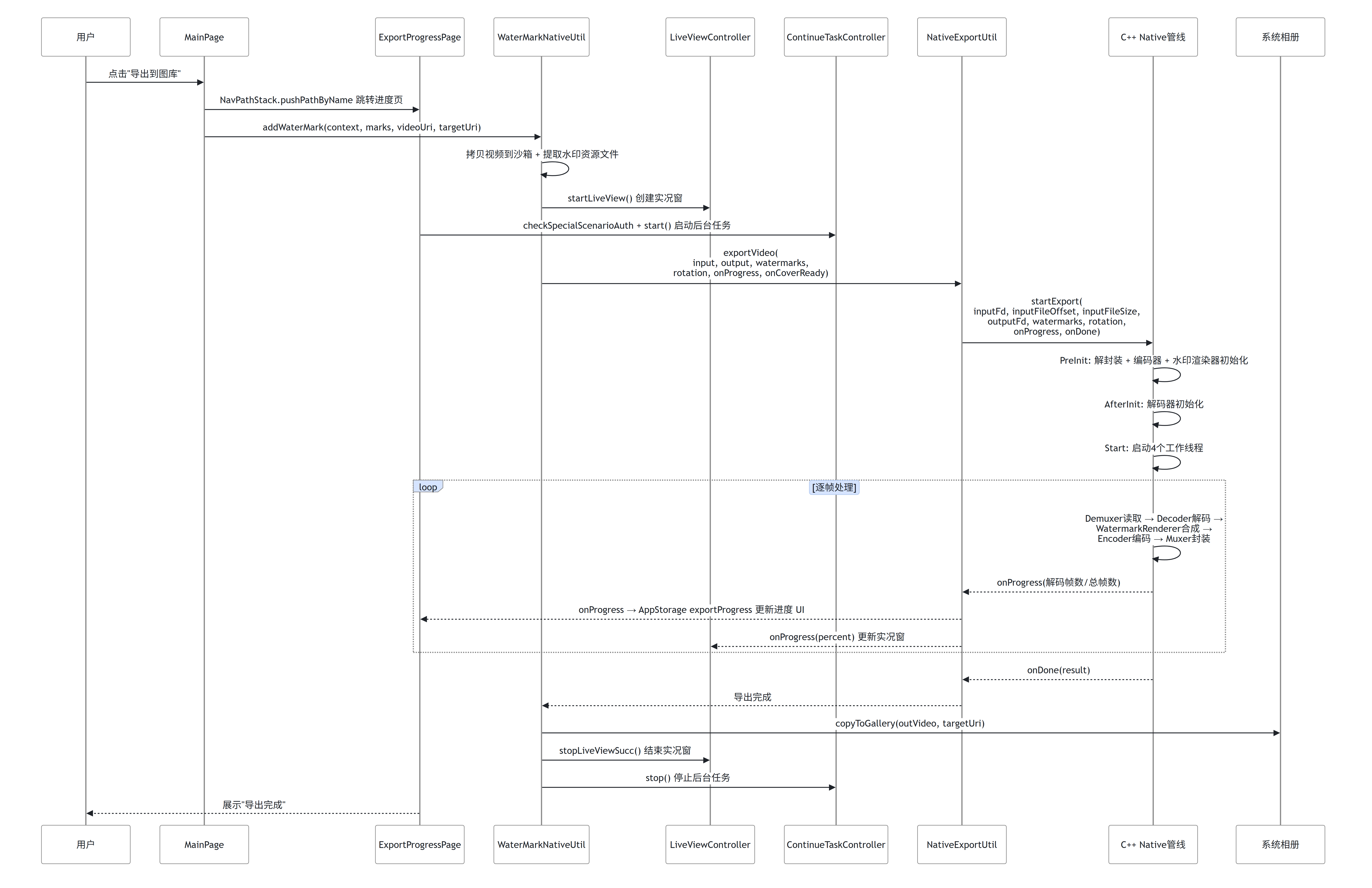
The following figure shows the complete interaction between modules in a normal export process. After the user taps the export button, the app performs the following operations in sequence: draft persistence, live view creation, continuous task startup, and frame-by-frame decoding, synthesis, encoding, and progress callback in the C++ native pipeline. Finally, the app writes the video to the system album and ends the live view and background task.
[h2]When to Use
Video export involves video decoding, watermark synthesis, and re-encoding. This solution builds a multi-thread video processing pipeline at the C++ native layer based on AVCodec NDK and uses OpenGL ES to complete watermark synthesis. The progress information during the export is transferred back to the ArkTS layer through the N-API thread security callback to drive the live view update and UI display.
[h2]How to Implement
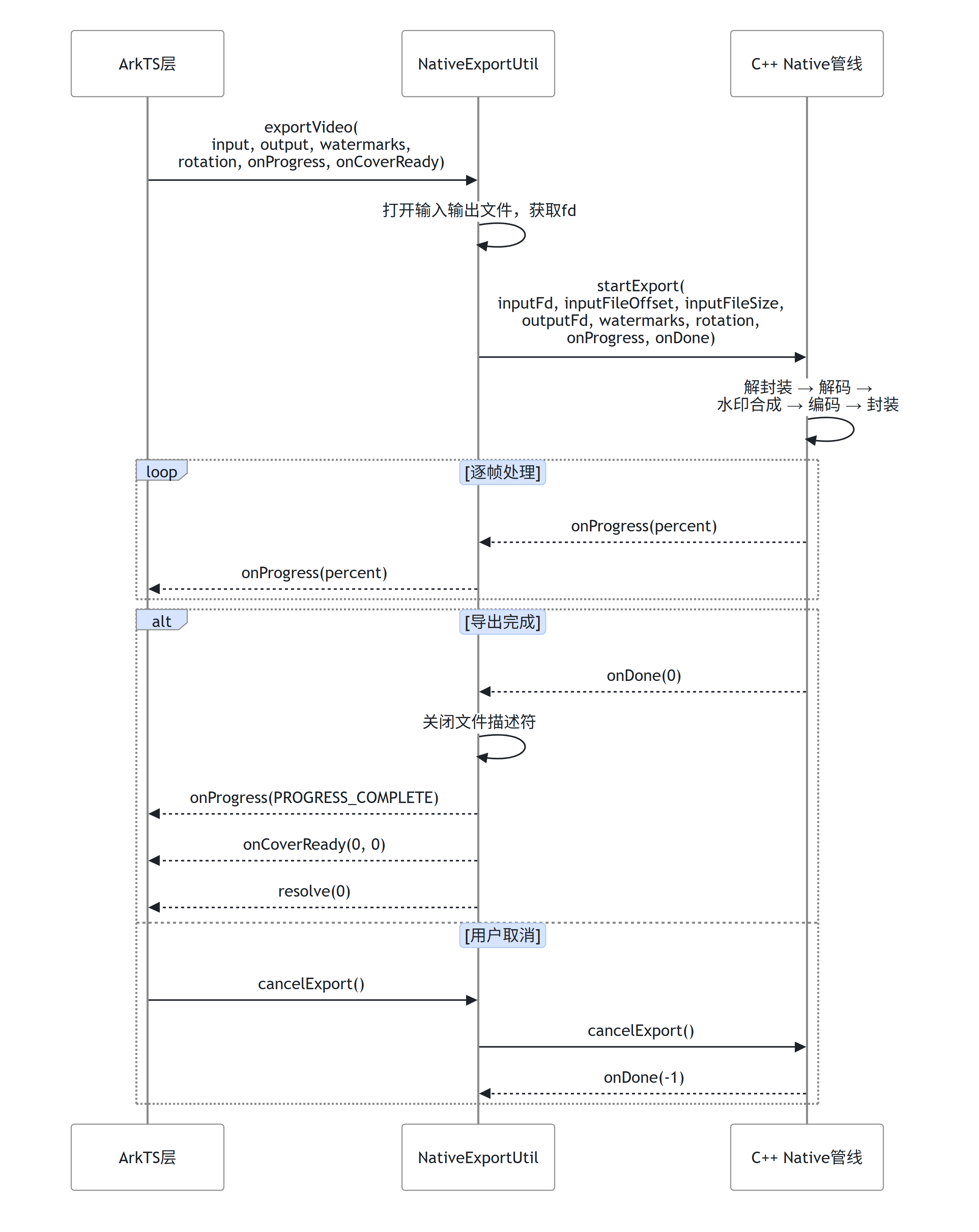
Video export is implemented by calling the C++ native module through NativeExportUtil. The native layer uses audio and video encoding and decoding to complete the entire process of video decapsulation, hardware decoding, OpenGL ES-based watermark synthesis, hardware encoding, and encapsulation. At the ArkTS layer, you only need to open the input and output files to obtain the file descriptors, pass the watermark parameters and rotation angle, and use the callback function to receive the progress and completion notification. You can cancel an ongoing export task at any time using nativeexport.cancelExport(). The following figure shows the video export process.
Key APIs:
- nativeexport.startExport(inputFd, inputFileOffset, inputFileSize, outputFd, watermarks, rotation, onProgress, onDone): starts the native export pipeline.
- nativeexport.cancelExport(): cancels an ongoing export task.
[h2]How to Develop
- Wait for the export to complete using a promise. startExport() is called asynchronously. The progress is reported in real time through the onProgress callback. When the export is complete or fails, the onDone callback is invoked. In the callback, close the file descriptor and resolve the promise.
return new Promise<number>((resolve) => { nativeexport.startExport( inputFile?.fd ?? -1, 0, stat.size, outputFile?.fd ?? -1, wmParams, rotation, (percent: number) => { onProgress(percent); }, (result: number) => { if (inputFile) { try { fileIo.closeSync(inputFile.fd); } catch (error) { Logger.error(TAG, `inputFile closeSync err, err.code is ${error.code}, message is ${error.message}`); } } if (outputFile) { try { fileIo.closeSync(outputFile.fd); } catch (error) { Logger.error(TAG, `outputFile closeSync err, err.code is ${error.code}, message is ${error.message}`); } } onProgress(PROGRESS_COMPLETE); onCoverReady(0, 0); resolve(result); } ); }); - Cancel an ongoing export task: Call nativeexport.cancelExport() to interrupt the native pipeline. The native layer sets a cancellation flag and wakes up all work threads, and finally notifies the ArkTS layer through doneCallback(-1).
static cancelExport(): void {
  nativeexport.cancelExport();
}
The core link for video export has been established: The ArkTS layer calls the C++ native pipeline through NativeExportUtil.exportVideo() to process the video. The progress is called back in real time to drive subsequent live view updates and background task management.
[h2]When to Use
Video export tasks usually take a long time, and users may switch to other apps or lock the screen during the export process. Without background task assurance, the system will suspend the app process, causing the export to be interrupted. You need to request a continuous task for the app to remain active in the background and continuously export the video
[h2]How to Implement
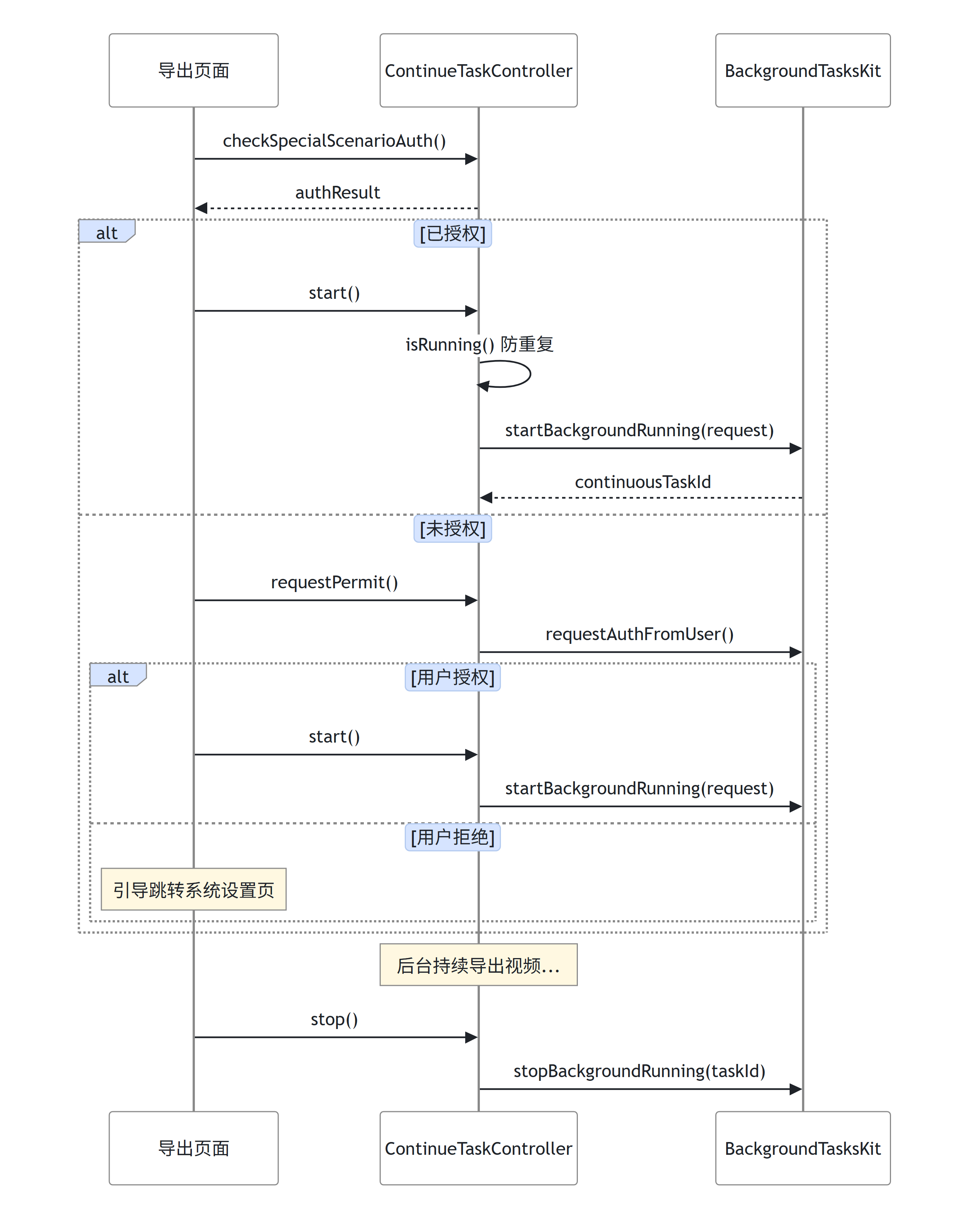
Background Tasks Kit provides the ContinuousTaskRequest mechanism. The app can declare the MODE_SPECIAL_SCENARIO_PROCESSING mode and SUBMODE_MEDIA_PROCESS_NORMAL_NOTIFICATION sub-mode to request a continuous background task for special scenarios from the system. This task allows the app to run continuously in the background, and the system displays the task status in the notification panel. The following figure shows the background task management process.
Key APIs:
- ContinuousTaskRequest: request object of a continuous task, which is used to configure the background mode and sub-mode.
- backgroundTaskManager.startBackgroundRunning(): starts a continuous task in the background and returns a ContinuousTaskNotification object containing the task ID.
- backgroundTaskManager.stopBackgroundRunning(): stops the background task based on the task ID.
- ContinuousTaskRequest.checkSpecialScenarioAuth(): checks whether the user has granted the background permission for special scenarios.
- ContinuousTaskRequest.requestAuthFromUser(): requests background permission authorization from the user in a pop-up window.

To integrate a continuous task in the background, comply with the Background Tasks Kit Integration Specifications.
[h2]How to Develop
- In the module.json5 configuration file, declare the background task mode backgroundModes as specialScenarioProcessing and apply for two background running permissions in requestPermissions.
"abilities": [ { // ... "backgroundModes": [ "specialScenarioProcessing" ] } ], "requestPermissions": [ { "name": "ohos.permission.KEEP_BACKGROUND_RUNNING_SPECIAL_SCENARIO", "reason": "$string:background_running_reason", "usedScene": { "abilities": ["EntryAbility"], "when": "always" } }, { "name": "ohos.permission.KEEP_BACKGROUND_RUNNING", "reason": "$string:background_running_reason", "usedScene": { "abilities": ["EntryAbility"], "when": "always" }, } ], - Construct a continuous task request and configure the background mode. Create a ContinuousTaskRequest object, set backgroundTaskModes to MODE_SPECIAL_SCENARIO_PROCESSING and backgroundTaskSubmodes to SUBMODE_MEDIA_PROCESS_NORMAL_NOTIFICATION, and specify the task type as media processing notification.
private static getTask(): backgroundTaskManager.ContinuousTaskRequest { let continuousTaskRequest = new backgroundTaskManager.ContinuousTaskRequest(); let modeList: number[] = [backgroundTaskManager.BackgroundTaskMode.MODE_SPECIAL_SCENARIO_PROCESSING]; continuousTaskRequest.backgroundTaskModes = modeList; let subModeList: number[] = [backgroundTaskManager.BackgroundTaskSubmode.SUBMODE_MEDIA_PROCESS_NORMAL_NOTIFICATION]; continuousTaskRequest.backgroundTaskSubmodes = subModeList; return continuousTaskRequest; } - Check the permission and start the continuous task in the background. Use isRunning() to prevent repeated startup, build WantAgent for redirection upon notification panel tapping, call startBackgroundRunning() to start the task, and save the returned continuousTaskId.
public isRunning(): boolean { // Prevent duplicate start of background continuous task return this.continuousTaskId !== undefined && this.continuousTaskId > 0; } public async start(): Promise<void> { if (this.isRunning()) { Logger.warn(TAG, `continuous task already running, id=${this.continuousTaskId}`); return; } if (!this.context) { Logger.error(TAG, `invalid context`); return; } try { let wantAgentObj = this.wantAgentCache ?? await this.buildWantAgent(); if (!wantAgentObj) { Logger.error(TAG, `wantAgent is undefined`); return; } // Build continuousTaskRequest object let continuousTaskRequest: backgroundTaskManager.ContinuousTaskRequest = ContinueTaskController.getTask(); if (continuousTaskRequest === undefined) { Logger.info(TAG, `continuousTaskRequest is undefined`); return; } continuousTaskRequest.wantAgent = wantAgentObj; continuousTaskRequest.combinedTaskNotification = false; continuousTaskRequest.continuousTaskId = -1; let res: backgroundTaskManager.ContinuousTaskNotification = await backgroundTaskManager.startBackgroundRunning(this.context, continuousTaskRequest); Logger.info(TAG, `Operation startBackgroundRunning succeeded. notificationId=${res.notificationId} continuousTaskId=${res.continuousTaskId}`); this.continuousTaskId = res.continuousTaskId; } catch (error) { Logger.error(TAG, `Operation startBackgroundRunning failed, code is ${error.code}, message is ${error.message}`); } } - Check the permission on the export page and apply for the permission as required. On the export page, the permission status of the continuous task is checked in aboutToAppear(). If the permission has been granted, the background task is directly started. If the permission has not been granted, a dialog box is displayed to request the authorization. If the user rejects the request, a message is displayed on the page, indicating that the export cannot continue in the background.
continueTaskController.checkSpecialScenarioAuth().then(async (result) => { // Request permission when no background continuous task permission for special scenario if (result !== backgroundTaskManager.UserAuthResult.GRANTED_ONCE && result !== backgroundTaskManager.UserAuthResult.GRANTED_ALWAYS) { this.hasContinueTaskPermission = false; continueTaskController.requestPermit(async (authResult) => { // Start continuous task if permission is granted if (authResult === backgroundTaskManager.UserAuthResult.GRANTED_ONCE || authResult === backgroundTaskManager.UserAuthResult.GRANTED_ALWAYS) { this.hasContinueTaskPermission = true; await ContinueTaskController.getInstance(this.context.getHostContext() as common.UIAbilityContext).start(); return; } }); } else { // Start continuous task directly if permission already granted this.hasContinueTaskPermission = true; await ContinueTaskController.getInstance(this.context.getHostContext() as common.UIAbilityContext).start(); } }).catch((err: BusinessError) => { Logger.error(TAG, `checkSpecialScenarioAuth failed: ${err.code} ${err.message}`); }); - Stop the background task after the export is complete. After the video export is successful or fails, call stopBackgroundRunning() at an appropriate time to release the background task resources. The stopping time is managed by TimeoutManager. When the app is running in the foreground, the task is stopped immediately. When the app is running in the background, a delay is set to ensure that the user has enough time to view the result through the live view. In this example, the delay is set to 5 minutes using the constant BACKGROUND_LIVEVIEW_TIMEOUT_MS.
const isForeground = AppStorage.get<boolean>(StorageConstants.IS_APP_FOREGROUND) ?? true; TimeoutManager.getInstance().addTimeout( async () => { // Timer: delay stopping LiveView if app is in background try { await liveViewController.stopLiveViewSucc(isForeground); await ContinueTaskController.getInstance(context).stop(); } catch (e) { Logger.error(TAG, `stopLiveView fail`); } }, async () => { // Stop LiveView immediately if app enters foreground after export try { await liveViewController.stopLiveViewSucc(true); await ContinueTaskController.getInstance(context).stop(); } catch (e) { Logger.error(TAG, `stopLiveViewSucc on user click fail`); } }, isForeground ? BACKGROUND_LIVEVIEW_TIMEOUT_0 : BACKGROUND_LIVEVIEW_TIMEOUT_MS // Timer delay duration ); WaterMarkNativeUtil.cleanupTempFiles(outVideoPath, inputVideoPath, tempFiles, outVideoPath + '.cover.jpg'); - Clear resources when the UIAbility is destroyed: Stop all active live views and background tasks in the onDestroy() lifecycle to prevent resource leakage.
async onDestroy(): Promise<void> {
  Logger.info(TAG, `Ability onDestroy`);
  await LiveViewController.stopAllActiveLiveView(this.context);
  await ContinueTaskController.getInstance(this.context).stop();
}
[h2]When to Use
When exporting videos in the background, users need to intuitively understand the export progress and results. Live View is a system-level UI capability provided by HarmonyOS. It can display real-time information in the status bar, lock screen, and notification center, making it the best carrier for displaying the progress of background tasks.
[h2]How to Implement
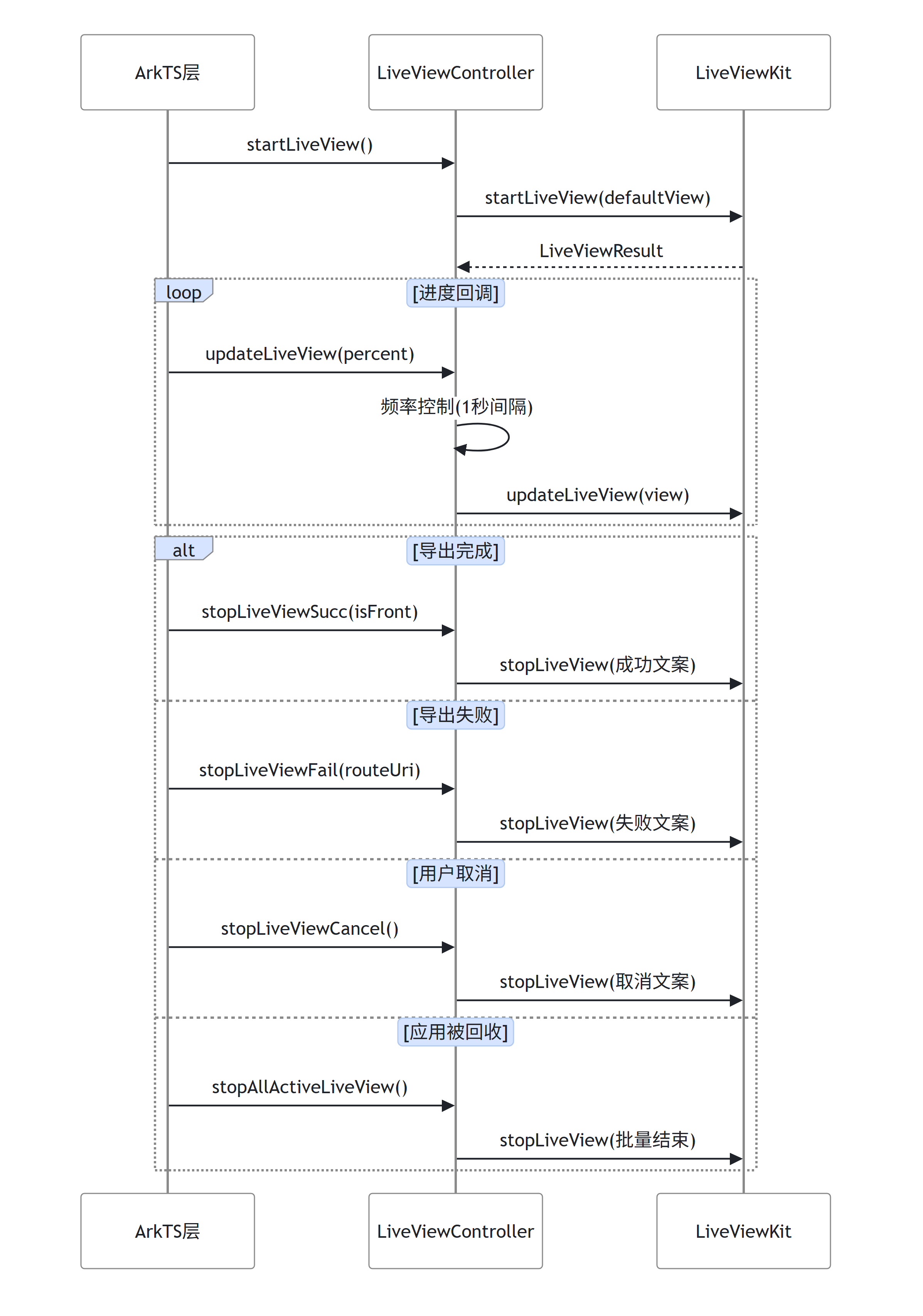
The lifecycle of a live view consists of three phases: creation (startLiveView), update (updateLiveView), and termination (stopLiveView). When the export starts, a live view is created and the initial progress is displayed. Each time the native pipeline calls back the progress, the live view content is updated. When the export is complete or fails, the live view is updated to the final state and terminated. The following figure shows the live view management process.
Key APIs:
- liveViewManager.startLiveView(): creates and displays a live view, and passes the LiveView configuration object.
- liveViewManager.updateLiveView(): updates the live view content, including the progress, title, and capsule status.
- liveViewManager.stopLiveView(): ends the live view and sets the final display status and retention period.
- liveViewManager.isLiveViewEnabled(): checks whether the live view feature is enabled.
- ExtensionType.EXTENSION_TYPE_PROGRESS: progress bar extension type, which is used to display the progress bar in the live view.
- Build a live view and make initial configuration: Construct a LiveView object. The title and capsule text are loaded from the resource file through resourceManager, and the progress is 0%. Use buildWantAgent() to configure the tap-to-redirection capability.
private static async buildDefaultView(context: common.UIAbilityContext, id: number, routeUri?: string): Promise<liveViewManager.LiveView> { return { // Build live view request id: id, // Live view ID, generated by developer event: 'PROGRESS', liveViewData: { primary: { title: LiveViewController.str(LVStr.EXPORTING_TITLE), content: [ { text: LiveViewController.str(LVStr.EXPORTING_CONTENT) }, ], keepTime: LIVEVIEW_KEEP_TIME, clickAction: await LiveViewController.buildWantAgent(context, routeUri), layoutData: { layoutType: liveViewManager.LayoutType.LAYOUT_TYPE_DEFAULT, color: '#FF317AF7', backgroundColor: '#F7819AE0', }, extensionData: { type: liveViewManager.ExtensionType.EXTENSION_TYPE_PROGRESS, progress: 0, } }, // Live view capsule parameters capsule: { type: liveViewManager.CapsuleType.CAPSULE_TYPE_TEXT, status: CommonConstants.CAPSULE_STATUS_ACTIVE, icon: 'icon.png', // Capsule icon, filename under "/resources/rawfile" or image.PixelMap backgroundColor: '#FF308977', title: LiveViewController.str(LVStr.START_EXPORT), content: `0%` } } }; } - Create a live view: Call liveViewManager.startLiveView().
public async startLiveView(): Promise<liveViewManager.LiveViewResult | undefined> {
  // ...
  this.liveViewId = LiveViewController.genLiveId();
  // Create live view
  const defaultView = await LiveViewController.buildDefaultView(this.context, this.liveViewId);
  try {
    let result = await liveViewManager.startLiveView(defaultView);
    LiveViewController.liveViewTemplates.set(this.liveViewId, defaultView);
    return result;
  } catch (error) {
    Logger.error(TAG, `startLiveView fail, code is ${error.code}, message is ${error.message}`);
  }
  return undefined;
}
- Respond to the progress callback to update the live view: In the native export progress callback, the progress value is synchronized to the live view. To avoid frequent updates that trigger traffic limiting (error code 1003500008), the isUpdating flag and nextProgress cache are used to combine updates.
public async updateLiveView(progress: number): Promise<void> {
  if (this.isStopping) {
    return;
  }
  if (this.isUpdating) {
    this.nextProgress = progress;
    return;
  }
  this.isUpdating = true;
  let currentProgress = progress;
  if (this.context === undefined) {
    return;
  }
  try {
    while (this.isStopping === false) {
      await this.executeLiveViewUpdate(currentProgress);
      if (this.nextProgress !== undefined) {
        currentProgress = this.nextProgress;
        this.nextProgress = undefined;
      } else {
        break;
      }
    }
  } finally {
    this.isUpdating = false;
  }
  return;
}
- Control the update frequency to prevent traffic limiting: In executeLiveViewUpdate(), check whether the interval between the current update and the last update is less than 1 second and whether the progress is rolled back. If the conditions are met, skip this update. After the update is successful, record the timestamp and progress value for the next determination.
private async executeLiveViewUpdate(progress: number, isSucc: boolean = true, isMute: boolean = true): Promise<liveViewManager.LiveViewResult | undefined> { // ... let currentTimeMs = Date.now(); if ((progress !== PROGRESS_COMPLETE && (currentTimeMs - this.lastUpdateTimeMs) < LIVEVIEW_FREQ_INTERVAL) || (progress < this.lastUpdateProgress)) { return undefined; } this.lastUpdateTimeMs = currentTimeMs; // ... } - End the live view: Update the content displayed in the live view when the live view is ended, set keepTime to specify the duration for retaining the live view notification after the live view is ended, and invoke liveViewManager.stopLiveView() to end the live view.
// Update live view content
const defaultView = await LiveViewController.buildDefaultView(this.context, this.liveViewId, routeUri);
defaultView.liveViewData.primary.title = title;
defaultView.liveViewData.primary.content = [
  { text: content },
];
defaultView.isMute = isMute;
defaultView.liveViewData.primary.keepTime = keeptime;

defaultView.liveViewData.primary.layoutData = {
  layoutType: liveViewManager.LayoutType.LAYOUT_TYPE_PROGRESS
};
if (showProgress) {
  defaultView.liveViewData.primary.extensionData =
    { type: liveViewManager.ExtensionType.EXTENSION_TYPE_PROGRESS, progress: PROGRESS_COMPLETE };
} else {
  defaultView.liveViewData.primary.extensionData = { type: liveViewManager.ExtensionType.EXTENSION_TYPE_DEFAULT };
}

defaultView.liveViewData.capsule = {
  type: liveViewManager.CapsuleType.CAPSULE_TYPE_TEXT,
  status: CommonConstants.CAPSULE_STATUS_STOPPED,
  icon: 'icon.png', // Capsule icon, filename under "/resources/rawfile" or image.PixelMap
  backgroundColor: CAPSULE_COLOR,
  title: capsuleText,
  content: '100%'
};
// ...
  try {
    let result = await liveViewManager.stopLiveView(defaultView);
    LiveViewController.liveViewTemplates.delete(this.liveViewId);

    this.isStopping = false;
    this.isUpdating = false;
    return result;
  } catch (error) {
    // ...
  }
- Process the downgrade notification when the live view is unavailable: When the live view switch is turned off or the API fails to be called (error code 1003500009), the notification is downgraded to a system notification. A common text notification is sent through NotificationController.publish() to ensure that the user can still receive the export result.
// Check if live view is enabled
if (!await this.isLiveViewEnabled() && needSendNotification === true) {
  Logger.error(TAG, `LiveView is disabled.`);
  NotificationController.publish(this.context, title, content);
  return undefined;
}
- End the live views in batches when the app is reclaimed by the system. Call stopAllActiveLiveView() in the onDestroy() to traverse all active live view IDs and call the corresponding method to end the live views based on the export status.
public static async stopAllActiveLiveView(context: common.UIAbilityContext): Promise<void> {
  const liveViewIds = Array.from(LiveViewController.liveViewTemplates.keys());
  const store = new DraftStore(context);
  const allDrafts = store.listDrafts();
  // Iterate all active LiveViews and stop them
  for (let liveViewId of liveViewIds) {
    const template = LiveViewController.liveViewTemplates.get(liveViewId);
    if (template !== undefined) {
      const matchedDraft = allDrafts.find(draft => draft.liveViewId === liveViewId);
      // Determine video export status
      const isSucc = matchedDraft === undefined || matchedDraft.status === DraftStatus.SUCC;
      try {
        // Update LiveView display content based on export status
        if (isSucc) {
          await LiveViewController.getInstance(context).stopLiveViewSucc(true);
        } else {
          let routeUri: string | undefined;
          if (matchedDraft !== undefined && matchedDraft.status !== DraftStatus.CANCELLED) {
            routeUri = `draft://${matchedDraft.draftId}`;
          }
          await LiveViewController.getInstance(context).stopLiveViewKill(routeUri);
        }
        Logger.info(TAG, `fast stopLiveView succ id=${liveViewId} isSucc=${isSucc}`);
      } catch (error) {
        Logger.error(TAG,
          `fast stopLiveView fail id=${liveViewId}, code is ${error.code}, message is ${error.message}`);
      }
    } else {
      Logger.info(TAG, `no template for id=${liveViewId}, skip`);
    }
    // Remove stopped LiveView from cache
    LiveViewController.liveViewTemplates.delete(liveViewId);
  }
  // ...
}
[h2]What Should I Do If an Error Is Reported Because the Live View Is Updated Too Frequently?
Symptom
When the liveViewManager.updateLiveView() API is called, error code 1003500008 is reported, and the live view content cannot be updated.
Possible cause
The live view API has restrictions on the update frequency. Frequent calls within a short period of time will trigger traffic limiting. The progress callback interval of the native pipeline may be short. Direct forwarding will cause frequent updates.
Solution
Add frequency control in updateLiveView(): Record the timestamp of the last update. If the interval between the current update and the last update is less than 1 second and the progress does not reach 100%, skip the current update. Use the isUpdating flag and nextProgress cache to combine consecutive update requests, ensuring that the next progress value is processed only after the current update is complete.
[h2]How Can I Do If the Export Is Interrupted Due to Lack of Background Task Permissions?
Symptom
After the user switches to another app, the video export task is suspended by the system, and the export progress stops.
Possible cause
The app does not have the KEEP_BACKGROUND_RUNNING_SPECIAL_SCENARIO permission, or the user rejects the background permission in a pop-up window. As a result, the continuous task cannot be started.
Solution
In aboutToAppear() of the export page, call checkSpecialScenarioAuth() to check the permission status. If the permission is not granted, call requestAuthFromUser() to display a pop-up window for the user to apply for the permission. If the user rejects the request, display a guide text on the UI. After the user taps the text, call startAbility() to redirect the user to the app information page in system settings, where the user is instructed to manually enable the background running permission.
[h2]What Can I Do If the Status of the Live View Is Abnormal After the App Is Recycled by the System?
Symptom
After the app is cleared by the system, the live view still displays the "Exporting" status and does not update to the final result.
Possible cause
When the app process is terminated, stopLiveView() is not called, and the live view remains in the last updated state.
Solution
Call stopAllActiveLiveView() in EntryAbility.onDestroy() to traverse all active live view templates, set the corresponding end text based on the export result, and then call liveViewManager.stopLiveView().