Overview
TaskPool, leveraging the concept of pooling and task mechanisms, provides a series of concurrency APIs to maximize the benefits of multi-core CPUs, reduce the load on the main thread, and improve program performance. When developing with TaskPool, you should comply with specific specifications and consider the service logic and concurrency characteristics to ensure the optimal performance. Failure to follow these guidelines may result in performance degradation, instability, or other unexpected problems.
This topic analyzes issues, such as app errors, service exceptions, and excessive resource consumption, caused by incorrect use of TaskPool. It also provides usage specifications to help you better use TaskPool during app development.
[h2]Properly Dividing the Project Structure Based on Service Scenarios to Avoid Direct or Indirect UI Introduction in Child Threads
When to Use
When importing files and HAR modules in a project, if some files use UI decorators or state variables such as @Observed and AppStorage, these UI decorators or state variables may be parsed and executed even if they are not explicitly called. However, child threads do not support UI properties. When these UI decorators or state variables are parsed, an exception is thrown, and the parsing of the current module is interrupted. Accessing certain variables in these UI-containing files may throw errors like "xxx is not initialized", leading to functional failure or even crashes. See the figure below.
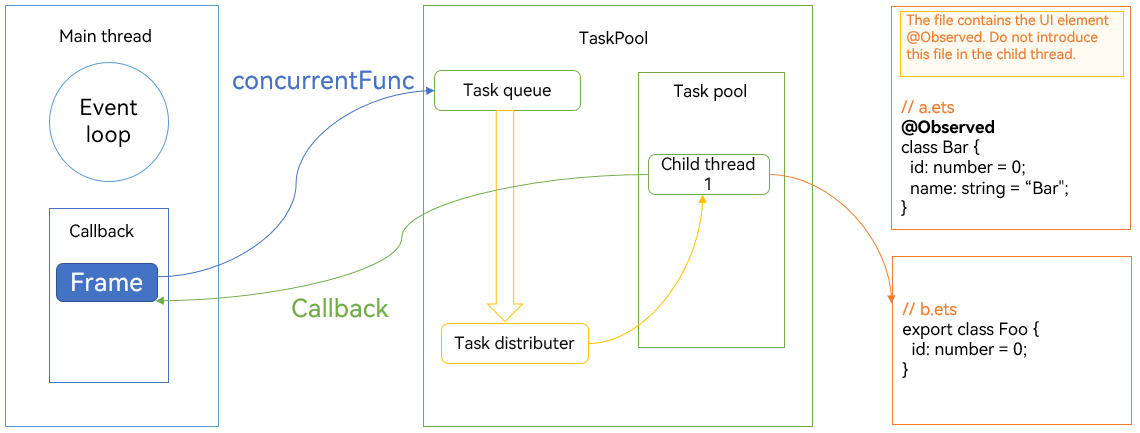
In complex projects, even if the current module is not modified, this issue may be caused by the change of the SDK or dependencies. It is difficult to locate this type of issues. Therefore, you are advised to take prevention measures and conduct verification in the development and iteration phases.
Negative Example
Implement Foo and Bar classes.
// a.ets
import { hilog } from '@kit.PerformanceAnalysisKit';
@Observed
class Foo {
  constructor() {
    hilog.info(0xFF00, "sampleTag", "this is class Foo");
  }
}

export class Bar {
  constructor() {
    hilog.info(0xFF00, "sampleTag", "this is class Bar");
  }
}
In Sample1.ets, import the classes and methods you need.
// Sample1.ets
import { Bar } from './wrong/a';
import { BusinessError } from '@ohos.base';
import { taskpool } from '@kit.ArkTS';
import { Foo } from './correct/b';
import { hilog } from '@kit.PerformanceAnalysisKit';
Implement a @Concurrent method.
// Sample1.ets
@Concurrent
function wrongConcurrentFunc() {
  try {
    let bar: Bar = new Bar;
  } catch (e) {
    let error: BusinessError = e;
    hilog.error(0xFF00, 'sampleTag', 'error occur: ' + error.message);
  }
}
In the onClick() method of the component, use taskpool.execute() to call wrongConcurrentFunc().
// Sample1.ets
taskpool.execute(wrongConcurrentFunc)
  .then(() => {
    hilog.info(0x000, 'testTag', 'execute success');
  })
  .catch((err: BusinessError) => {
    hilog.error(0x000, 'testTag', `execute failed, code=${err.code}, message=${err.message}`);
  })
In this example, two classes (Foo and Bar) are declared in a.ets, and class Foo is decorated with @Observed. During class Bar instantiation in a child thread, an exception is thrown when parsing the @Observed decorator, preventing the execution of class Bar's logic. This results in Bar being an undefined variable, and an exception "Bar is not initialized" is thrown when it is accessed.
Positive Example
Implement a Bar class, which is decorated with @Observed.
// a.ets
@Observed
export class Bar {
  id: number = 0;
  name: string = "Bar";
}
Implement a normal class Foo.
// b.ets
export class Foo {
  id: number = 0;
}
Create a Foo object in the correctConcurrentFunc() method.
// Sample1.ets
@Concurrent
function correctConcurrentFunc() {
  let foo: Foo = new Foo;
}
In the onClick() method of the component, use taskpool.execute() to call correctConcurrentFunc().
// Sample1.ets
taskpool.execute(correctConcurrentFunc)
  .then(() => {
    hilog.info(0x000, 'testTag', 'execute success');
  })
  .catch((err: BusinessError) => {
    hilog.error(0x000, 'testTag', `execute failed, code=${err.code}, message=${err.message}`);
  })
By separating the UI-related class (Bar) into a separate file and importing a non-UI class (Foo) in the child thread, the app can run correctly. This structure improves program correctness, execution efficiency, and maintainability.
[h2]Registering Event Listeners in Continuous Tasks and Avoiding Using Listener APIs in Transient Tasks
When to Use
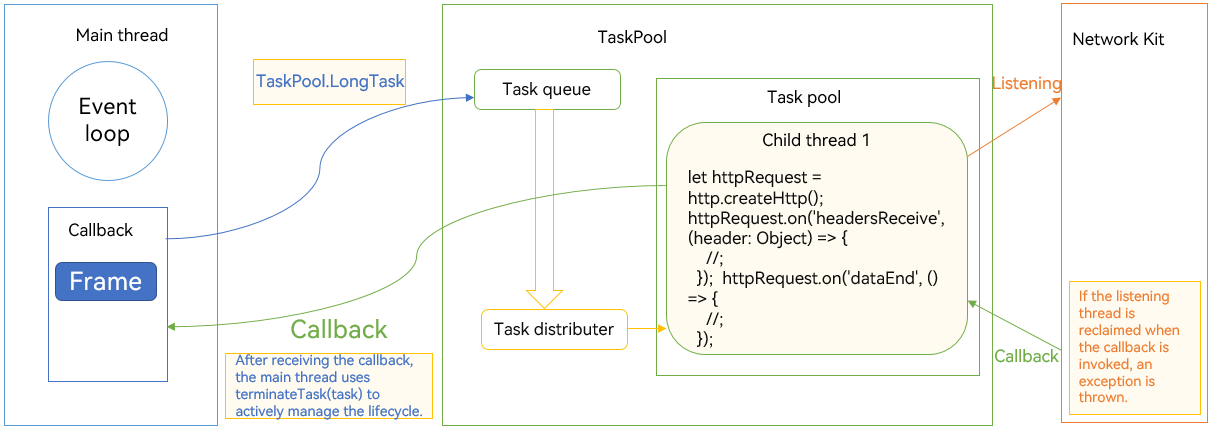
Typically, listener APIs have long-term properties. After you register a listener API in a child thread and execute callback events, the listener API remains effective even after the task has completed its execution. Moreover, the timing of when these APIs are triggered is unpredictable. Since TaskPool enables load balancing, the system attempts to reclaim idle threads after task execution for non-continuous tasks.
If the child thread that registers the listener API is released and another thread sends an event to it, function exceptions or undefined behavior, such as crash, may occur.
Therefore, to implement listening, you are advised to use a continuous task and proactively manage the lifecycle of the thread where the task resides.
Negative Example
In the concurrentFunc() method, call the listener method in httpRequest to listen for network request results.
// Sample2.ets
import { http } from '@kit.NetworkKit';
import { taskpool } from '@kit.ArkTS';
import { hilog } from '@kit.PerformanceAnalysisKit';
import { BusinessError } from '@kit.BasicServicesKit';

@Concurrent
function concurrentFunc() {
  let httpRequest = http.createHttp();
  httpRequest.on('headersReceive', (header: Object) => {
    hilog.info(0xFF00, 'sampleTag', 'header: ' + JSON.stringify(header));
  });

  httpRequest.on('dataEnd', () => {
    hilog.info(0xFF00, 'sampleTag', 'No more data in response, data receive end');
  });
}
In the onClick() method of the component, use taskpool.execute() to call concurrentFunc().
// Sample2.ets
taskpool.execute(concurrentFunc)
  .then(() => {
    hilog.info(0x000, 'testTag', 'execute success');
  })
  .catch((err: BusinessError) => {
    hilog.error(0x000, 'testTag', `execute failed, code=${err.code}, message=${err.message}`);
  })
In the preceding negative example, the HTTP API is used in concurrentFunc(), and the on() API listens for the headersReceive event and triggers the callback when the event arrives. From the perspective of concurrentFunc(), after the on() API is registered, its logic is complete and it returns the result immediately. If the callback is not invoked, the thread that executes this task remains idle. After a period of time, the thread may be released. If the headersReceive event occurs, unexpected behavior occurs.
Positive Example
In the concurrentFunc() method, call the listener method in httpRequest to listen for network request results.
// Sample2.ets
import { http } from '@kit.NetworkKit';
import { taskpool } from '@kit.ArkTS';
import { hilog } from '@kit.PerformanceAnalysisKit';
import { BusinessError } from '@kit.BasicServicesKit';

@Concurrent
function concurrentFunc() {
  let httpRequest = http.createHttp();
  httpRequest.on('headersReceive', (header: Object) => {
    hilog.info(0xFF00, 'sampleTag', 'header: ' + JSON.stringify(header));
  });

  httpRequest.on('dataEnd', () => {
    hilog.info(0xFF00, 'sampleTag', 'No more data in response, data receive end');
  });
}
In the onClick() method of the component, use taskpool.execute() to call concurrentFunc(), and terminate the task once the callback result is retrieved.
// Sample2.ets
let task: taskpool.LongTask = new taskpool.LongTask(concurrentFunc);
taskpool.execute(task)
  .then(() => {
    hilog.info(0xFF00, 'sampleTag', 'receive http msg success.');
    taskpool.terminateTask(task);
  })
  .catch((err: BusinessError) => {
    hilog.error(0x000, 'testTag', `execute failed, code=${err.code}, message=${err.message}`);
  })
Select an appropriate task type based on service requirements. Use continuous tasks for HTTP listening APIs. In addition, proactively manage the lifecycle of the thread where the task resides, and call the terminateTask() API to release resources after the specific logic is executed (usually after the result is obtained, for example, after await or in the then block). This prevents the thread from not being released for a long time.
[h2]Using the Combination of emitter and LongTask() to Meet Communication Demands in Callback Scenarios, and Avoiding sendData() in Callback Functions
When to Use
TaskPool provides the sendData() API for communication between TaskPool child threads and the host thread. As an interface provided by TaskPool, sendData() can securely transmit data from child threads to the host thread.
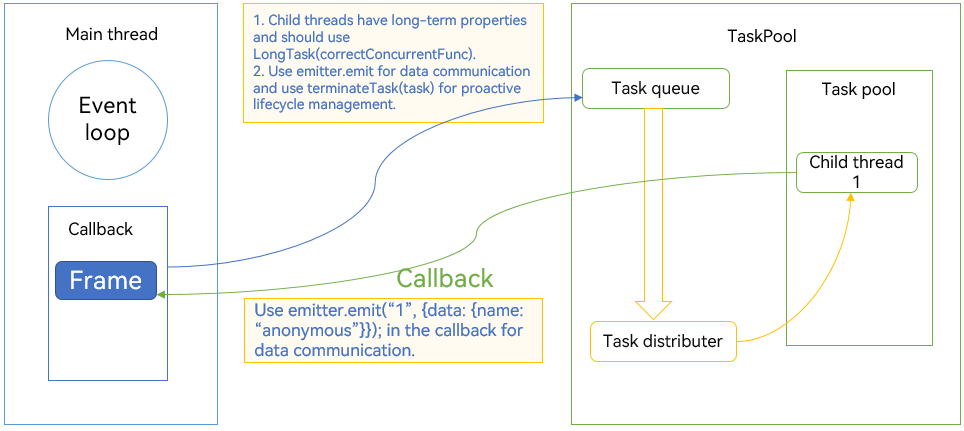
However, the sendData() API depends on the task, and its lifecycle is consistent with the task. Considering the features of microtasks and asynchronous events, the callback function may be processed after the TaskPool task result is returned. At this time, the task may have been destroyed, and it is unreasonable and insecure to call the sendData() API. TaskPool throws an exception in this case. If the exception is thrown after the task has completed and returned, it will remain unhandled within the thread. Therefore, avoid using sendData() in callback functions.
If necessary, you are advised to use emitter, which can implement bidirectional communication between the host thread and child threads. In addition, the on() API of emitter has a listening nature and can be triggered anytime before being unregistered. Therefore, the on() API needs to be registered in LongTask().
Negative Example
Implement a @Concurrent method and asynchronously call the sendData() method of the TaskPool using a promise.
// Sample3.ets
@Concurrent
function wrongConcurrentFunc() {
  let promise = Promise.resolve();
  promise.then(() => {
    try {
      taskpool.Task.sendData();
    } catch (error) {
      let err = error as BusinessError;
      hilog.warn(0x000, 'testTag', `sendData failed, code=${err.code}, message=${err.message}`);
    }
  })
}
Create a task, and call the onReceiveData() method to receive data sent by calling the sendData() method of the TaskPool.
// Sample3.ets
let task: taskpool.Task = new taskpool.Task(wrongConcurrentFunc);
task.onReceiveData(() => {
  hilog.info(0xFF00, 'sampleTag', "onReceiveData has been called");
})
taskpool.execute(task)
  .then(() => {
    hilog.info(0xFF00, 'sampleTag', 'receive http msg success.');
    taskpool.terminateTask(task);
  })
  .catch((err: BusinessError) => {
    hilog.error(0x000, 'testTag', `execute failed, code=${err.code}, message=${err.message}`);
  })
In the above negative example, an asynchronous interface is used, and sendData() is called in the then block. From the execution flow, wrongConcurrentFunc() first calls Promise.resolve() to generate and return a promise. At this point, there is no other executable logic. Therefore, it returns the result directly; that is, it exits the scope of wrongConcurrentFunc(). Later, when the microtask queue is executed, the callback logic in then is executed, but not within the scope of wrongConcurrentFunc(). Consequently, an exception "sendData is not called in the concurrent function" is thrown.
Positive Example
Implement a @Concurrent method and use the emitter() method to send data.
// Sample3.ets
@Concurrent
function correctConcurrentFunc() {
  let promise = Promise.resolve();
  promise.then(() => {
    emitter.emit("1", { data: { name: "anonymous" } });
  })
}
Create a long task and cancel it after emitter() receives data.
// Sample3.ets
let task: taskpool.LongTask = new taskpool.LongTask(correctConcurrentFunc);
emitter.on("1", (data: emitter.EventData) => {
  hilog.info(0xff00, 'sampleTag', "name is : " + data.data?.name);
  emitter.off("1")
  taskpool.terminateTask(task)
})
taskpool.execute(task)
  .then(() => {
    hilog.info(0xFF00, 'sampleTag', 'receive http msg success.');
    taskpool.terminateTask(task);
  })
  .catch((err: BusinessError) => {
    hilog.error(0x000, 'testTag', `execute failed, code=${err.code}, message=${err.message}`);
  })
In the positive example, Promise.then is still used, but emitter() is used instead of sendData() in the then block. Additionally, correctConcurrentFunc() is declared as a LongTask(), and terminateTask() is used to manually manage the lifecycle. This approach ensures functionality while maintaining program correctness.
When to Use
Using TaskPool incurs certain execution costs. For tasks that take a long time (whether synchronous or asynchronous callback stages are time-consuming), they can be thrown into TaskPool for execution. For tasks that are very short, they can be executed directly in the main thread.
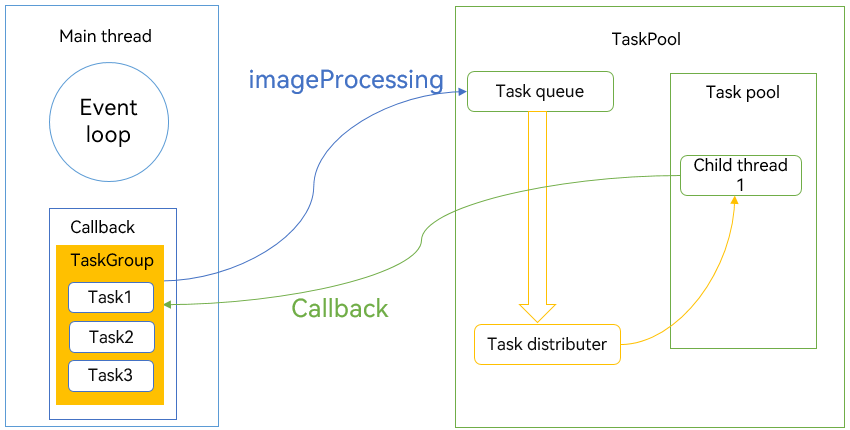
Reasonably divide the service granularity. For a group of related tasks, the TaskGroup interface can be used. Wait for all child tasks to be processed before continuing to handle them, thereby ensuring the integrity and maintainability of the service code. For some non-urgent query tasks, these tasks can be collected and thrown into the task pool during some relatively idle time periods.
In appropriate scenarios, APIs such as SequenceRunner() can also be used to avoid a large number of tasks entering the task pool in a short time, causing the thread count to instantly rise to the maximum. When the main thread continuously handles a large number of task callbacks and microtasks, it will block the UI, adversely affecting user experience.
// Sample5.ets
import { taskpool } from '@kit.ArkTS';
import { BusinessError } from '@kit.BasicServicesKit';
import { hilog } from '@kit.PerformanceAnalysisKit';

@Concurrent
function imageProcessing(dataSlice: ArrayBuffer): ArrayBuffer {
  // Step 1: Specific image processing operations and other time-consuming operations.
  return dataSlice;
}

function histogramStatistic(pixelBuffer: ArrayBuffer): void {
  // Step 2: Divide into three segments for concurrent scheduling.
  let number: number = pixelBuffer.byteLength / 3;
  let buffer1: ArrayBuffer = pixelBuffer.slice(0, number);
  let buffer2: ArrayBuffer = pixelBuffer.slice(number, number * 2);
  let buffer3: ArrayBuffer = pixelBuffer.slice(number * 2);

  let group: taskpool.TaskGroup = new taskpool.TaskGroup();
  try {
    group.addTask(imageProcessing, buffer1);
    group.addTask(imageProcessing, buffer2);
    group.addTask(imageProcessing, buffer3);
  } catch (error) {
    let err = error as BusinessError;
    hilog.warn(0x000, 'testTag', `addTask failed, code=${err.code}, message=${err.message}`);
  }

  taskpool.execute(group, taskpool.Priority.HIGH)
    .then((ret: Object) => {
      // Step 3: Summarize the result array.
    })
    .catch((err: BusinessError) => {
      hilog.error(0x000, 'testTag', `execute failed, code=${err.code}, message=${err.message}`);
    })

}
In the onClick() method of the component, call the histogramStatistic() method.
// Sample5.ets
let buffer: ArrayBuffer = new ArrayBuffer(24);
histogramStatistic(buffer);
The preceding example is a piece of code for image processing. In the example, the image buffer is divided into three segments. The TaskGroup interface of TaskPool is used to distribute a group of tasks to multiple child threads for computing. It then receives multiple results and returns them to the UI thread for display.
[h2]Properly Handling Service Logic Exceptions to Avoid Task Loss
When to Use
In the TaskPool concurrency scenario, API calls should be matched. For example, the open() API and the close() API should correspond. If setInterval() is used, clearInterval() should also be called. If the APIs are not matched, some handles may not be properly closed during the exit phase. Consequently, threads are not released. When there are many threads, this situation can have a significant impact on resident memory.
You are advised to use try...catch... to handle exceptions that may occur in service logic. For example, when the parameters passed to taskpool.execute() may throw exceptions, use an outer try...catch... to catch them. When a task in a child thread may throw an exception, use .catch to catch it.
Example 1
Create a @Concurrent method and use setInterval() to simulate a scheduled task.
// Sample4.ets
@Concurrent
function correctConcurrentFunc() {
  let count: number = 0;
  let id = setInterval(() => {
    count++;
    if (count == 10) {
      hilog.info(0xFF00, 'sampleTag', "the value has reached the threshold");
      clearInterval(id);
    }
  }, 1000);
}
In the onClick() method of the component, call the correctConcurrentFunc() method through the TaskPool.
// Sample4.ets
let task: taskpool.Task = new taskpool.Task(correctConcurrentFunc);
taskpool.execute(task)
  .then(() => {
    hilog.info(0xFF00, 'sampleTag', 'receive http msg success.');
  })
  .catch((err: BusinessError) => {
    hilog.error(0x000, 'testTag', `execute failed, code=${err.code}, message=${err.message}`);
  })
In the child thread, setInterval() is used to simulate a scheduled task. When the timing condition is met, clearInterval() is actively used to cancel the timer, ensuring that the thread can be normally released when it is idle.
Example 2
Create an @Observed class and pass an object of this class to the @Concurrent method.
// Sample4.ets
@Observed
class Foo {
  id: number = 0;
  name: string = "foo"
}

@Concurrent
function correctConcurrentFunc1(foo: Foo) {
  console.info("the id is: " + foo.id);
}
In the onClick() method of the component, call the correctConcurrentFunc1() method through the TaskPool and capture exceptions with try...catch....
// Sample4.ets
try {
  let foo = new Foo();
  taskpool.execute(correctConcurrentFunc1, foo)
    .then(() => {
      hilog.info(0xFF00, 'sampleTag', 'receive http msg success.');
    })
    .catch((err: BusinessError) => {
      hilog.error(0x000, 'testTag', `execute failed, code=${err.code}, message=${err.message}`);
    })
} catch (e) {
  let error: ErrorEvent = e;
  hilog.error(0xFF00, 'sampleTag', "error info: " + error.message);
}
In this example, class Foo decorated with @Observed is mistakenly passed into the task, simulating a serialization error scenario. Generally, exceptions thrown by TaskPool are captured using .catch. However, for the serialization logic of taskpool.execute(), promise has not yet been created and therefore cannot be captured by .catch. Therefore, an outer try...catch... is used to capture the exception.
Example 3
Implement a @Concurrent method that throws an exception.
// Sample4.ets
@Concurrent
function correctConcurrentFunc2() {
  let error: Error = new Error("TaskPoolThread error");
  throw error;
}
In the onClick() method of the component, call the correctConcurrentFunc2() method through the TaskPool.
// Sample4.ets
taskpool.execute(correctConcurrentFunc2).catch((error: BusinessError) => {
  hilog.error(0xFF00, 'sampleTag', "error info: " + error.message);
})
In example 3, exceptions thrown by the child thread are caught using .catch, and the logs are as expected.
When to Use
Currently, the supported data types for serialization are regular objects, ArrayBuffer objects, SharedArrayBuffer objects, Transferable objects (NativeBinding objects), and Sendable objects. Proxy and promise types are not supported. If the failure is caused by serialization, the log contains "taskpool: failed to serialize arguments." or "taskpool: failed to serialize result." You can filter ArkCompiler Error logs to view specific type errors and troubleshoot the code. (Passing of the return value does not support these types.)
Negative Example 1
Create a @Concurrent method that dynamically imports a module.
// Sample6.ets
@Concurrent
async function returnModule() {
  let module = await import('./a');
  return module;
}
In the onClick() method of the component, call the returnModule() method through the TaskPool and capture exceptions with try...catch....
// Sample6.ets
taskpool.execute(returnModule).catch((e: BusinessError) => {
  hilog.error(0xFF00, 'sampleTag', "error info: " + e.message);
})
In negative example 1, an attempt is made to dynamically import a module and return it to the main thread for use. Since the module is not supported for serialization, an error is reported.
Negative Example 2
Create a @Concurrent method that asynchronously executes the resolve() method using a promise.
// Sample6.ets
@Concurrent
async function returnPromise() {
  let promise = new Promise<void>((resolve) => {
    setTimeout(() => {
      resolve();
    }, 1000);
  })
  return promise;
}
In the onClick() method of the component, call the returnPromise() method through the TaskPool and capture exceptions with try...catch....
// Sample6.ets
taskpool.execute(returnPromise).catch((e: BusinessError) => {
  hilog.error(0xFF00, 'sampleTag', "error info: " + e.message);
})
In negative example 2, an attempt is made to return a pending promise. This is currently intercepted, and operations on the promise must be completed in the current thread.
According to the ECMAScript specification, when importing methods and variables, the JavaScript runtime will start from the entry file specified by the developer and perform a depth-first traversal of each file in the import chain, starting with the leaf nodes. Each file is executed only once and then stored in the thread cache for subsequent loading.
For concurrentFunc() in TaskPool, although the precise import mechanism is enabled, only the modules required for the current execution are imported at the top layer of concurrentFunc(). However, for larges modules or other modules imported within the current module, such an optimization cannot be performed on the system side.
import { a } from './a';
import { b } from './b';
import { c } from './c';
@Concurrent
function concurrentFunc() {
  hilog.info(0xFF00, 'sampleTag', 'value: ' + a);
}
In the preceding example, although modules a, b, and c are all referenced, only module a is used in concurrentFunc(). Therefore, when the concurrentFunc() function is executed in TaskPool, only module a is parsed and executed. However, all dependencies of module a are still parsed and executed.
Another common scenario is to import HAR packages. When using import { case } from '@ohos/common', the frontend translates it to import { case } from '@ohos/common/index'. Since the index file exports all APIs of the HAR packages, even if use one API is desired, the entire HAR package (including files imported by the HAR package) will be executed, resulting in significant overhead. Although this overhead is in the child thread, it can still have a significant impact on task execution time and memory usage.
Generally, only some independent methods are used to import HAR packages in the child threads. In such cases, using precise imports can bring significant benefits. For example, use import { case } from '@ohos/common/xxx/xxx/case' to import specific files (considering operability), or encapsulate this method into a new file so that only this single file is parsed.
Therefore, when using TaskPool, the minimal import principle should be followed, especially avoiding the introduction of a large number of unrelated files or HAR packages in independent tasks.

Context objects vary across different threads. TaskPool worker threads can only use thread-safe modules, and non-thread-safe UI-related modules are not allowed. Worker threads (such as those in TaskPool and Worker) do not support UI operation modules, non-thread-safe modules, or modules restricted to the main thread. UI modules are not supported because worker threads do not support UI operations. Non-thread-safe modules are not supported because using them in multiple threads may lead to multi-thread issues. Modules that are restricted to the main thread, such as ApplicationContext, are explicitly stated in the documentation. A thread-safe module is one that can be used by multiple threads simultaneously without causing multi-thread issues, such as TaskPool, Worker, and hilog.
[h2]What are the differences between using synchronous and asynchronous interfaces in child threads, and which interface is more suitable?
The maximum number of threads in TaskPool is limited. The current policy is maxThreads = CPU core count - 1. Therefore, based on the current device, the normal upper limit of threads is 11. When all threads are occupied, subsequent tasks may not be scheduled in a timely manner. Therefore, you are advised to use asynchronous interfaces instead of synchronous interfaces in worker threads. This allows new tasks to be processed while waiting for I/O, avoiding the task pool from being blocked.
For example, for the file system copy method, both synchronous and asynchronous interfaces are provided. Since file copying is time-consuming, asynchronous interfaces are recommended in child threads.
Synchronous interface:
let srcPath = pathDir + "/srcDir/test.txt";
let dstPath = pathDir + "/dstDir/test.txt";

fileIo.copyFileSync(srcPath, dstPath);
Asynchronous interface:
import { BusinessError } from '@kit.BasicServicesKit';


  let srcPath = pathDir + "/srcDir/test.txt";
  let dstPath = pathDir + "/dstDir/test.txt";
  fileIo.copyFile(srcPath, dstPath, 0).then(() => {
    hilog.info(0xFF00, 'sampleTag', 'copy file succeed');
  }).catch((err: BusinessError) => {
    hilog.error(0xFF00, 'sampleTag',
      'copy file failed with error message: ' + err.message + ', error code: ' + err.code);
  });
[h2]What are the differences between using Sendable and deep copy for data transmission?
By default, Sendable data is allocated in SharedHeap, and it is passed between ArkTS concurrency instances by reference. Compared with deep copy, this mode results in a noticeable decrease in serialization and deserialization times, as observed in tracing. Consequently, it is highly appropriate for scenarios where performance is a critical concern.
For example, to obtain data from a network database, you can reconstruct the logic for obtaining data into a child thread and declare the expected service model as Sendable. After obtaining the JSON data, convert and generate the model data in the child thread, and then pass it back to the main thread via Sendable by reference. This can significantly reduce the load on the main thread.
Child threads do not support UI properties. Therefore, the data placed in the child thread needs to be separated from the UI, and the returned data needs to be reasonably combined with the UI and rendered. For details about the combination of Sendable objects and UI, see makeObserved, a new feature of ArkUI. Using makeObserved with @Sendable meets the needs of app development where big data is processed in the child thread, and ViewModel display and data observation are performed in the UI thread.
The Sendable feature supports shared modules. For some utility class singletons, due to the thread isolation feature, it is necessary to reinitialize them when calling in a child thread. After using shared modules, a singleton can be shared across multiple threads, optimizing the code and improving usability. For some time-consuming SDKs, if shared modules can be used, the initialization phase can be moved to a child thread. When the main thread uses it, there is no need to reinitialize the related modules, which can effectively improve performance.
[h2]How do I handle time-consuming Node-API callbacks?
ArkTS execution is performed in a single thread, which means that asynchronous functions do not create their own threads. Even with TaskPool, tasks are executed in the child threads of TaskPool, but the result logic needs to be returned to the host thread for processing.
Generally, for an asynchronous task, if you call an API in the ArkTS thread, the API returns a promise and is suspended. The asynchronous logic is executed in the worker thread, and after the execution, the result is returned to the ArkTS thread by means of inter-thread communication. After returning to the ArkTS thread, the corresponding trace is marked as Napi complete, and napi_resolve_deferred is called at this stage.
When the promise state becomes Fulfield, the microtask queue is executed; that is, the logic defined after await or in the then block is executed. This duration is closely related to the logic and quantity of microtasks, and the Napi complete trace also records this duration. This duration is not caused by the system, but by your own code. If the duration is long, for example, complex processing of the returned data in forEach or rendering UI, frame loss may occur.