Overview
The Web component provided by ArkWeb supports web page access in applications. In practice, excessive static resources such as images and videos on web pages can cause quick traffic consumption. In addition, embedded malicious scripts slow down web page loading, affecting user experience. To address this, you can use the interception capability of the Web component to replace frequently accessed static resources with local resource copies and intercept malicious script loading based on the blocklist mechanism, thereby improving web page loading efficiency and optimizing user experience.
ArkWeb provides multiple interception capabilities that allow you to monitor, modify, and record network requests and responses, helping you customize service features and improving performance. These capabilities differ in interception timing, scope, and effect, and therefore apply to different development scenarios. This section outlines three interception solutions based on the Web component and provides typical application scenarios to help you select and use ArkWeb interception capabilities.
Principles
An application can use onLoadIntercept() to intercept web page redirection, or use onInterceptRequest() and WebSchemeHandler to intercept network requests initiated by the Web component. The three interception solutions differ in principles and application scenarios. The following describes the details.
Scenario | Page Redirection Control | Network Request Interception | |
|---|---|---|---|
Solution | onLoadIntercept | onInterceptRequest | WebSchemeHandler |
Typical application scenario |
| In addition to the application scenarios of onInterceptRequest, the following scenarios are supported:
| |
Interception timing | Before the Web component loads the URL | Before the request is initiated | |
Interception scope | Requests for the main URL of the page (including the navigation behavior of iframe on the page, excluding requests for sub-resources) | Requests for the main URL of the page and sub-resources | |
Data access capability | You can obtain the URL of the request and whether the request is sent to the main frame. For details, see WebResourceRequest. | In addition to the request URL and whether the request is sent to the main frame, the POST request body and buffer data can be obtained. For details, see WebSchemeHandlerRequest. | |
Interception effect | You can intercept or permit the current request initiated by the Web component. | You can intercept the current request and return a custom response, or permit the current request and return the original response. | |
Different features of the three interception solutions correspond to different application scenarios. The following describes how to use the three solutions. You can select a proper interception solution as needed.
[h2]Solution Selection Guide
onLoadIntercept
Feature: It intercepts the URL loading behavior of Web components and controls page redirection.
Core usage:
- Application redirection and startup: It intercepts requests from specific addresses, starts specified apps, or redirects to other pages. For example, it can intercept payment-related link redirection to payment apps, or intercept address link redirection to map apps.
- Request redirection: It intercepts requests from specific addresses and redirects the access to a new target address. For example, it can redirect users to the correct page when the domain name is changed or during login.
- Page whitelist configuration: You can configure a link blocklist or whitelist to intercept or allow specified URL requests, ensuring that Web component requests are within a trusted scope. For example, it can block users from accessing dangerous web pages.
Usage policy: Compared with the other two interception solutions, onLoadIntercept primarily intercepts page redirection rather than replacing request content.
onInterceptRequest
Feature: It intercepts URL loading and network requests of Web components.
Core usage:
- Local resource replacement: It caches frequently used static resources locally and return local responses when these resources are accessed, improving page loading speed and response performance.
- Custom resource loading strategy: It intercepts specific resource requests (such as images and videos) and loads high-definition resources over Wi-Fi and compressed resources over mobile networks, balancing data usage and user experience.
- Malicious request prompt: It intercepts known malicious requests and returns empty data or alert messages as request responses to prevent the loading of malicious scripts.
Usage policy: onInterceptRequest supports the replacement of request content through file handles, resources, ByteBuffer, or string. You need to provide complete request content at a time. Compared with WebSchemeHandler, onInterceptRequest offers a more lightweight solution and is therefore suitable for scenarios where network requests need to be intercepted and specific responses need to be returned to Web components.
WebSchemeHandler
Feature: It intercepts URL loading and network requests of Web components.
Core usage:
In addition to supporting all core capabilities of onInterceptRequest, it also provides the following features:
- Public request header configuration: It intercepts network requests to specific addresses, injects authentication information, and forwards the requests to the server. For example, it helps the server identify the user identity and verify the access permission.
- Cross-origin request interception: It intercepts cross-origin requests initiated by Web components, forwards the requests to remote servers, configures cross-origin request results into custom responses, and returns the responses to the Web components. For example, it resolves cross-origin issues for web applications that rely on multi-data interaction.
- POST request interception: It intercepts POST requests and dynamically generates responses based on the request content. For example, it implements functionalities such as form submission and processing.
Usage policy: In addition to all capabilities of onInterceptRequest, WebSchemeHandler offers more flexible streaming processing capabilities. You can use ByteBuffer to provide request content step by step and obtain the uploaded request content, such as data from POST requests. Therefore, WebSchemeHandler is more suitable for complex service scenarios where network requests need to be intercepted, additional request content needs to be retrieved, or stream processing is required.
Using the onLoadIntercept() Capability
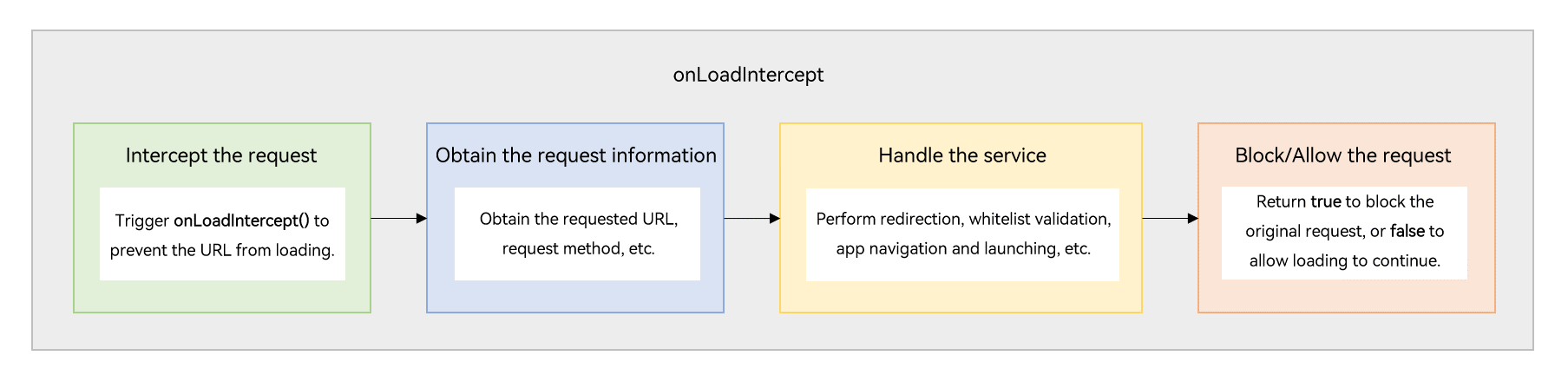
Before loading a URL, the Web component triggers the onLoadIntercept() callback to determine whether to intercept the request. This callback can be used to implement request redirection or page whitelist configuration.
[h2]Request Redirection
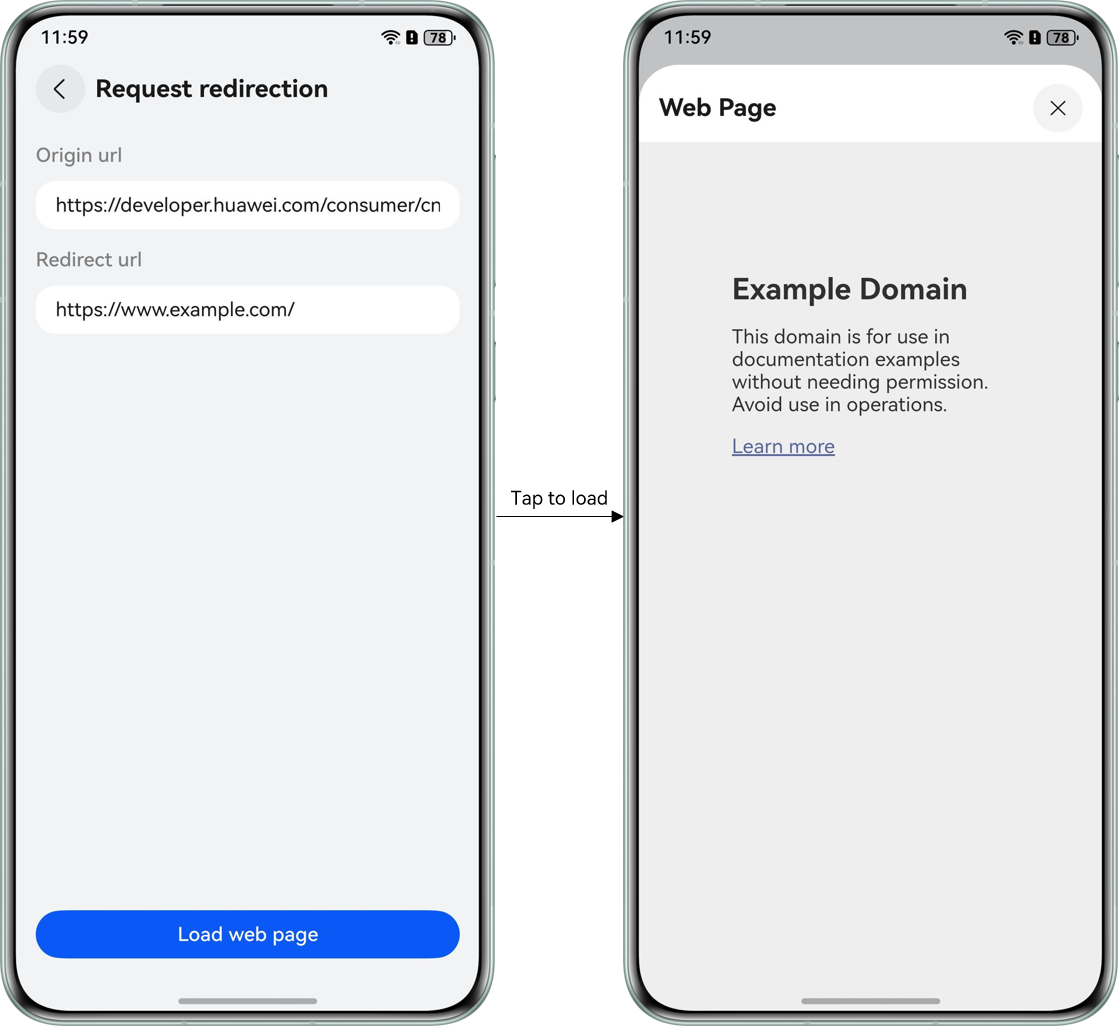
Request redirection is used to automatically redirect users to the correct page in scenarios such as website modification or login status management.
Running Effect
How to Implement
Obtain the request URL in the onLoadIntercept() callback of the Web component. If the URL meets redirection conditions, call WebviewController.loadUrl() to load the redirection page.
How to Develop
- Obtain the request URL.
/** * Processes the load intercept event * Returns true if loading should be blocked (redirect performed), false to allow */ processLoadIntercept(event: OnLoadInterceptEvent): boolean { const requestUrl = event.data.getRequestUrl(); // ... } - Check whether the URL meets redirection conditions.
/** * Checks if the URL needs to be intercepted and redirected */ shouldInterceptUrl(requestUrl: string): boolean { if (!this.redirectUrl) { return false; } const normalizedRequest = this.normalizeUrl(requestUrl); const normalizedRedirect = this.normalizeUrl(this.redirectUrl); const isRedirectTarget = normalizedRequest === normalizedRedirect; return !isRedirectTarget; } /** * Normalizes the URL */ private normalizeUrl(url: string): string { return url .replace(/^(?:[a-zA-Z]+:)?\/\//, '') .replace(/\/+$/, '') .trim(); } - If the redirection conditions are met, the redirection page is loaded through WebviewController.loadUrl().
/**
 * Processes the load intercept event
 * Returns true if loading should be blocked (redirect performed), false to allow
 */
processLoadIntercept(event: OnLoadInterceptEvent): boolean {
  // ...

  if (this.shouldInterceptUrl(requestUrl)) {
    // Perform redirect
    const redirected = this.performRedirect();
    return redirected; // Block original URL if redirect successful
  }

  return false; // Allow loading
}

/**
 * Performs the redirect operation
 */
performRedirect(): boolean {
  try {
    this.controller.loadUrl(this.redirectUrl);
    // ...
    return true;
  } catch (error) {
    // ...
    return false;
  }
}
[h2]Page Whitelist Configuration
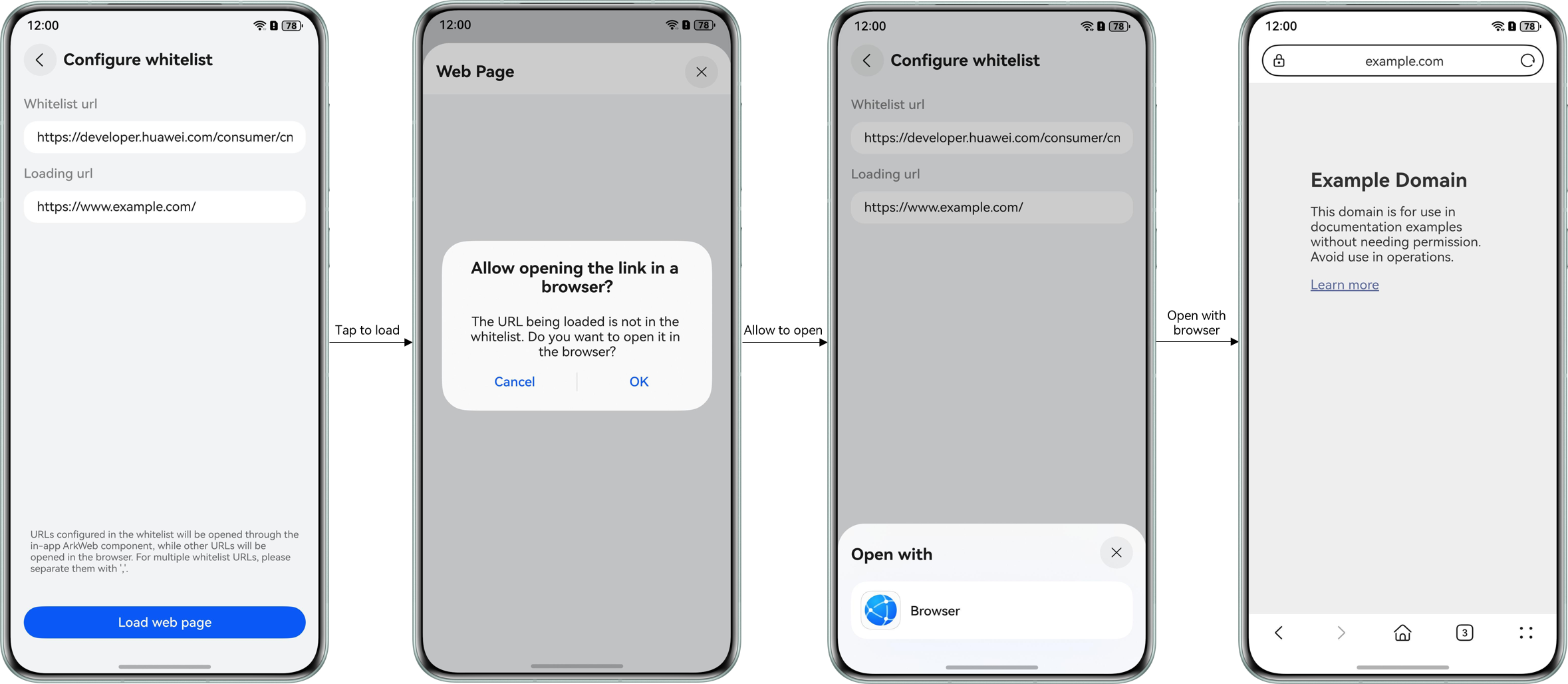
Page whitelist configuration is used to restrict access sources so that only trusted sources can access the system, preventing unauthorized access and network attacks.
Running Effect
How to Implement
Obtain the request URL in the onLoadIntercept() callback of the Web component. If the URL is not in the whitelist, the browser is redirected to the requested page.
How to Develop
- Configure page whitelist links.
Web({ src: this.loadingUrl, controller: this.controller })
  .onLoadIntercept((event) => {
    // Update whitelist URLs before intercepting
    this.viewModel?.setWhitelistUrls(this.whitelistUrlArr.map(url => url.toString()));
    // ...
  })
/** * Updates the whitelist URLs */ setWhitelistUrls(urls: string[]): void { this.whitelistDomains = urls .map(url => this.extractDomain(url)) .filter(domain => domain.length > 0); } /** * Extract the domain name from a URL */ private extractDomain(url: string): string { let normalized = url.trim().toLowerCase(); // ... normalized = normalized .replace(/^(?:[a-z0-9+.-]+:)?\/\//, '') // strip protocol-like prefixes .split(/[/?#]/)[0]; // drop everything after domain return normalized.replace(/:+$/, '').replace(/\/+$/, ''); } - Obtain the request URL.
/** * Processes the load intercept event * Returns true if loading should be blocked, false to allow */ processLoadIntercept(event: OnLoadInterceptEvent): boolean { const requestUrl = event.data.getRequestUrl(); // ... } - Check whether the URL is in the whitelist.
/** * Checks if a URL is in the whitelist */ isUrlInWhitelist(requestUrl: string): boolean { const requestDomain = this.extractDomain(requestUrl); if (!requestDomain) { return false; } return this.whitelistDomains.includes(requestDomain); } - If the link is not in the whitelist, a dialog box is displayed, asking you whether to open the link in the browser.
/** * Processes the load intercept event * Returns true if loading should be blocked, false to allow */ processLoadIntercept(event: OnLoadInterceptEvent): boolean { // ... // Check if URL is in whitelist if (this.isUrlInWhitelist(requestUrl)) { this.allowAllForCurrentLoad = true; return false; // Allow loading and subsequent requests } // URL not in whitelist, show dialog this.showDialog(requestUrl); return true; // Block loading } - Tap to load the requested page in the browser.
/**
 * Open URL in external browser
 */
private openInBrowser(url: string): void {
  // ...

  const want: Want = {
    uri: url,
    action: 'ohos.want.action.viewData',
    entities: ['entity.system.browsable'],
    parameters: {
      'ohos.ability.params.showDefaultPicker': true
    }
  };
  // ...
  const context: common.UIAbilityContext = this.uiContext.getHostContext()! as common.UIAbilityContext;
  context.startAbility(want)
    .then(() => {
      if (this.config?.onOk) {
        this.config?.onOk(this.targetUrl)
      }
      // ...
    })
    .catch((err: BusinessError) => {
      // ...
    });
}
Using the onInterceptRequest() Capability
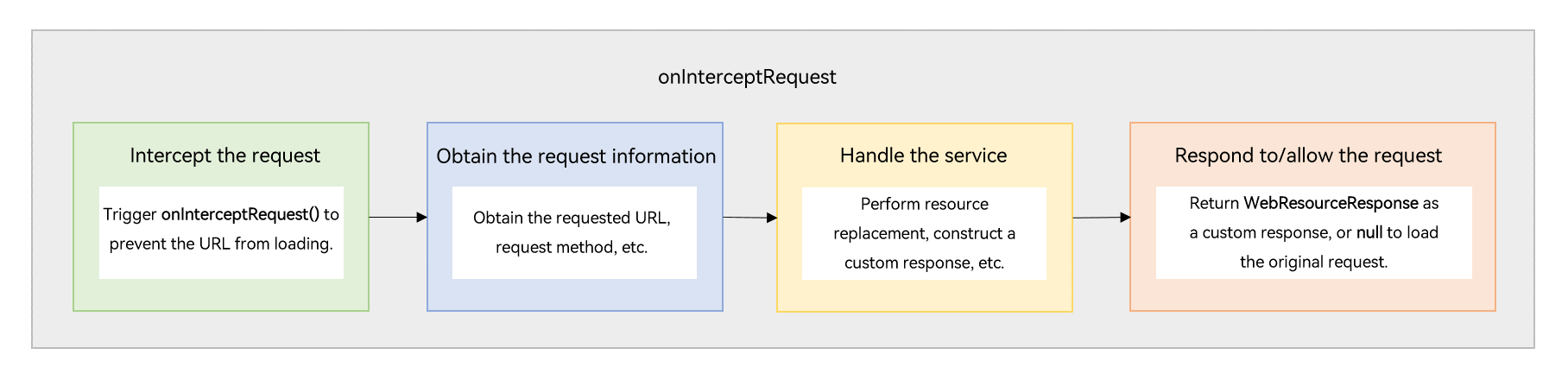
Before loading a URL, the Web component triggers the onInterceptRequest() callback to determine whether to intercept the request and return custom response data. This callback can be used to implement local resource replacement or custom resource loading strategy.
[h2]Local Resource Replacement
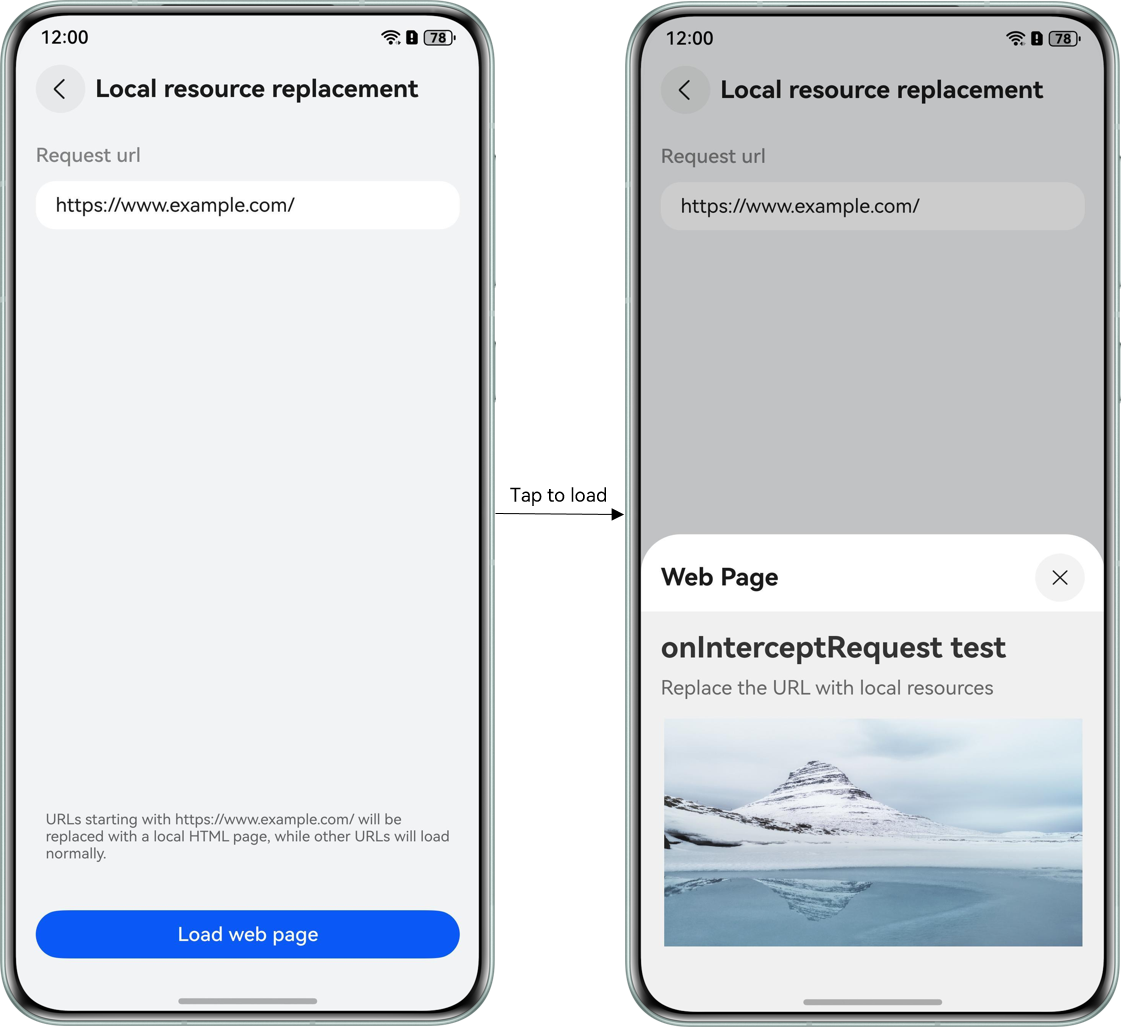
Local resource replacement is used to cache some frequently used and slightly changed remote static resources locally to improve page loading speed and response performance.
Running Effect
How to Implement
Obtain network request information in the onInterceptRequest() callback of the Web component, obtain the corresponding local resource based on the mapping between the network request resource and the local resource, and set the local resource to WebResourceResponse as the request response.
How to Develop
- Configure the mapping between the network request resource and local resource, and the mapping between the local resource and MIME type.
// Map between domain names and local files
schemeMap = new Map([
  ['https://www.example.com/', 'index.html'],
  ['https://www.example.com/mountain.png', 'mountain.png']
]);
// Map between local files and format mimeType
mimeTypeMap = new Map([
  ['index.html', 'text/html'],
  ['mountain.png', 'image/png']
]);
  Web({ src: this.requestUrl, controller: this.controller })
    .onInterceptRequest((event) => {
      // Update scheme map before intercepting
      this.viewModel?.updateMappings(this.schemeMap, this.mimeTypeMap);
      // ...
    })
/** * Updates the scheme and mime type mappings */ updateMappings(schemeMap: Map<string, string>, mimeTypeMap: Map<string, string>): void { this.schemeMap = schemeMap; this.mimeTypeMap = mimeTypeMap; } - Obtain the request URL.
/** * Processes the intercepted request and returns local resource response if applicable * Returns null if request should be allowed through */ processRequest(event: OnInterceptRequestEvent | null): WebResourceResponse | null { // ... const requestUrl = event.request.getRequestUrl(); // ... } - Obtain the local resource based on the mapping.
/** * Processes the intercepted request and returns local resource response if applicable * Returns null if request should be allowed through */ processRequest(event: OnInterceptRequestEvent | null): WebResourceResponse | null { // ... const key = this.getUrlSchemeFromMap(requestUrl); if (key.length === 0) { return null; // No match, allow original request } const rawfileName = this.schemeMap.get(key); if (!rawfileName) { return null; // Invalid mapping, allow original request } const mimeType = this.mimeTypeMap.get(rawfileName); if (!mimeType) { return null; // Invalid mapping, allow original request } // ... } /** * Gets the matching URL scheme key from the map */ getUrlSchemeFromMap(prefix: string): string { let matchedKey: string = ''; let maxLength: number = 0; const urlOrigin = this.getUrlOrigin(prefix); const urlFileName = this.getFileName(prefix); // Find the longest matching key to prioritize specific paths over general ones for (let key of this.schemeMap.keys()) { // 1. Direct prefix match if (prefix.startsWith(key) && key.length > maxLength) { matchedKey = key; maxLength = key.length; continue; } // 2. Same-domain file name match const keyFileName = this.getFileName(key); if (keyFileName.length === 0) { continue; } if (key.startsWith(urlOrigin) && keyFileName === urlFileName && key.length > maxLength) { matchedKey = key; maxLength = key.length; } } return matchedKey; } - Create a WebResourceResponse object and set and return the local resource as the request response.
/**
 * Processes the intercepted request and returns local resource response if applicable
 * Returns null if request should be allowed through
 */
processRequest(event: OnInterceptRequestEvent | null): WebResourceResponse | null {
  // ...
  // Create response with local file
  return this.createLocalResourceResponse(rawfileName, mimeType);
}
/**
 * Creates a response with local file data
 */
createLocalResourceResponse(rawfileName: string, mimeType: string): WebResourceResponse {
  const response = new WebResourceResponse();
  response.setResponseHeader([{
    headerKey: 'Connection',
    headerValue: 'keep-alive'
  }]);
  response.setResponseData($rawfile(rawfileName));
  response.setResponseEncoding('utf-8');
  response.setResponseMimeType(mimeType);
  response.setResponseCode(200);
  response.setReasonMessage('OK');
  response.setResponseIsReady(true);
  return response;
}
[h2]Custom Resource Loading Strategy
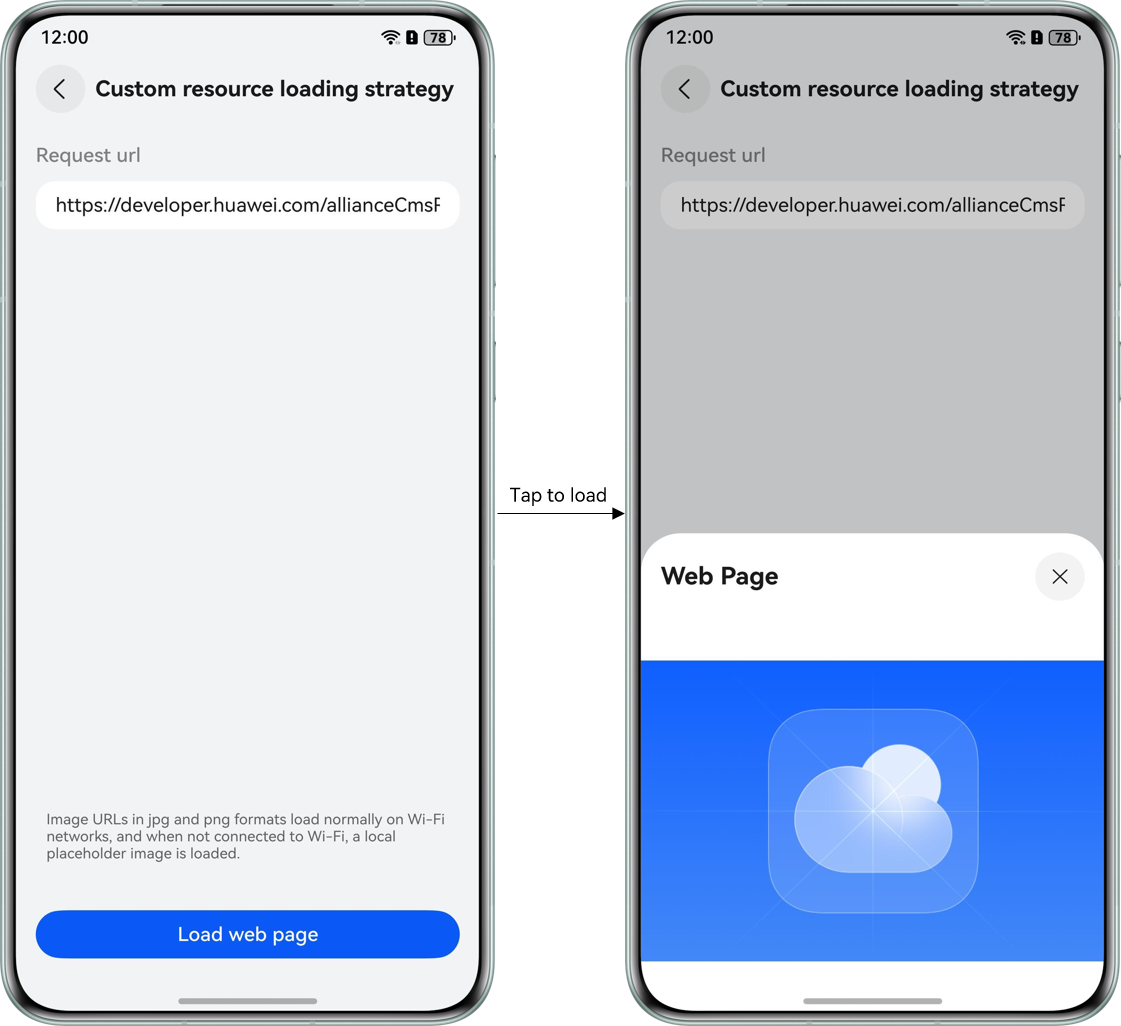
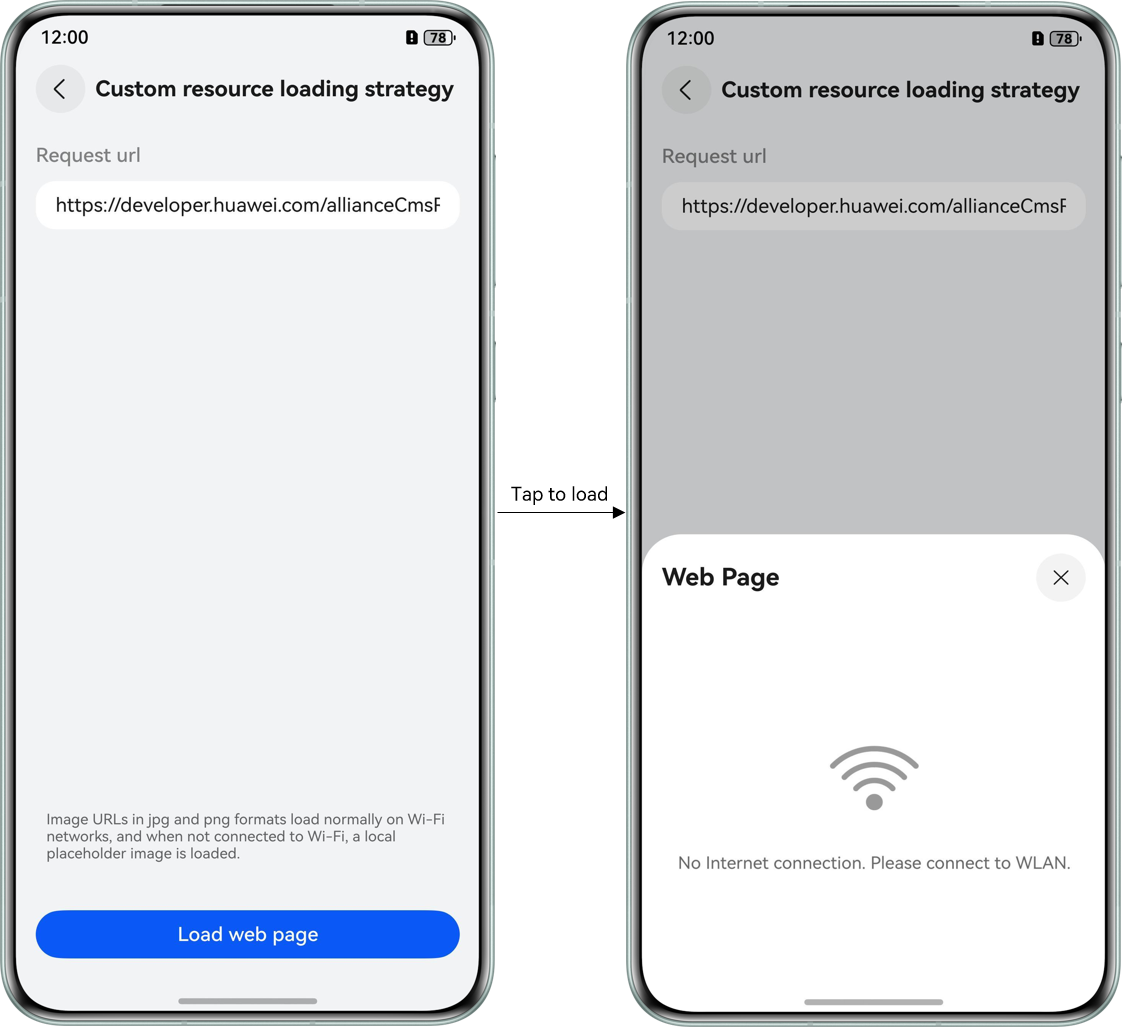
Custom resource loading strategy is used to load high-definition images over Wi-Fi networks and load compressed images or local placeholders over non-Wi-Fi networks, balancing data consumption and experience optimization.
Running Effect
How to Implement
Obtain network image request information in the onInterceptRequest() callback of the Web component to check whether the current network is Wi-Fi. If it is not Wi-Fi, set the local placeholder to WebResourceResponse as the request response.
How to Develop
- Check the current network environment. If the network is Wi-Fi, return the original request response.
/** * Processes the intercepted request and returns appropriate response * Returns null if request should be allowed through */ processRequest(event: OnInterceptRequestEvent | null): WebResourceResponse | null { // ... // If WiFi network, allow original network request if (this.isWifiNetwork()) { return null; } // ... } /** * Checks if currently connected to a Wi-Fi network */ isWifiNetwork(): boolean { try { const netHandle = connection.getDefaultNetSync(); const netData = connection.getNetCapabilitiesSync(netHandle); return netData.bearerTypes.includes(connection.NetBearType.BEARER_WIFI); } catch (error) { // ... return false; } } - Obtain the request URL.
/** * Processes the intercepted request and returns appropriate response * Returns null if request should be allowed through */ processRequest(event: OnInterceptRequestEvent | null): WebResourceResponse | null { // ... const requestUrl = event.request.getRequestUrl(); // ... } - Check the request type. If the request is not an image resource request, return the original request response.
/** * Processes the intercepted request and returns appropriate response * Returns null if request should be allowed through */ processRequest(event: OnInterceptRequestEvent | null): WebResourceResponse | null { // ... // Only intercept image requests if (!this.isImageRequestUrl(requestUrl)) { return null; // Not an image, allow original request } // ... } /** * Checks if a URL request is for an image */ isImageRequestUrl(url: string): boolean { for (let format of this.imageFormatList) { if (url.endsWith(format)) { return true; } } return false; } - Create a WebResourceResponse object and set and return the local placeholder as the request response for image resource requests in non-Wi-Fi networks.
/**
 * Processes the intercepted request and returns appropriate response
 * Returns null if request should be allowed through
 */
processRequest(event: OnInterceptRequestEvent | null): WebResourceResponse | null {
  // ...
  // Replace with placeholder image
  return this.createPlaceholderResponse();
}
/**
 * Creates a placeholder image response for non-WiFi networks
 */
createPlaceholderResponse(): WebResourceResponse {
  const response = new WebResourceResponse();
  response.setResponseHeader([{
    headerKey: 'Connection',
    headerValue: 'keep-alive'
  }]);
  response.setResponseData($rawfile(CommonConstants.IMAGE_NO_WLAN));
  response.setResponseEncoding('utf-8');
  response.setResponseMimeType('image/png');
  response.setResponseCode(200);
  response.setReasonMessage('OK');
  response.setResponseIsReady(true);
  return response;
}
Using the WebSchemeHandler Capability
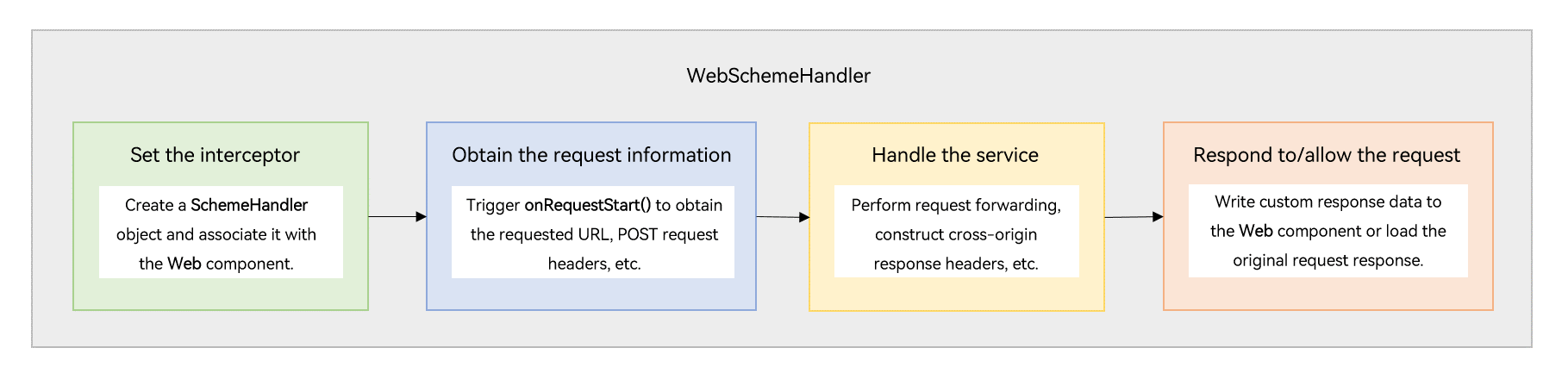
Set WebSchemeHandler for the current Web component to intercept requests of a specified protocol, obtain request information, and return custom response data. Based on the WebSchemeHandler mechanism, you can configure common request headers.
[h2]Common Request Header Configuration
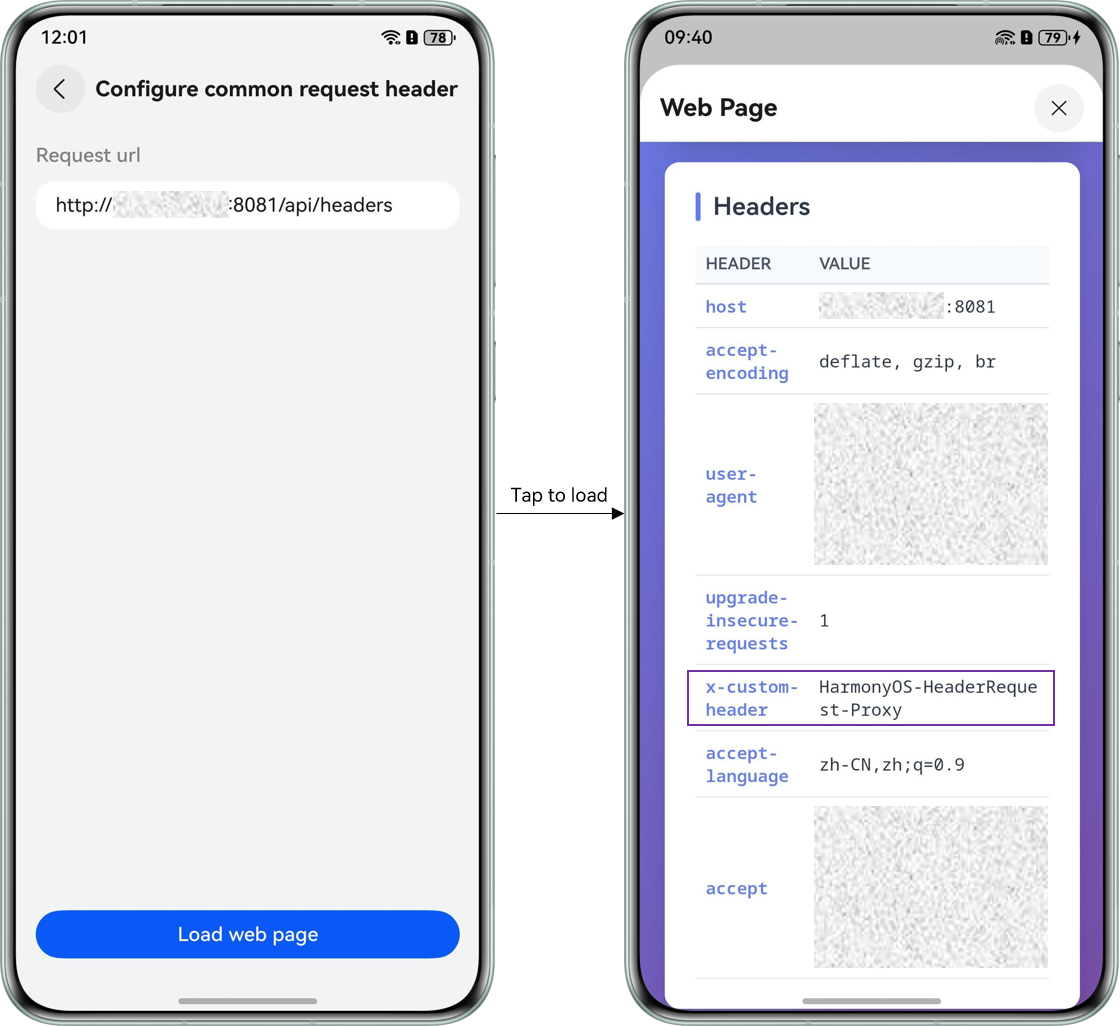
Common request headers are used to carry authentication information during network access, so that the server can identify the user identity and verify the access permission.
Running Effect
How to Implement
Configure a WebSchemeHandler for the current Web component through WebviewController. In the WebSchemeHandler.onRequestStart() callback, intercept network requests, add common request headers to the requests, and forward the requests to the server via RCP.
How to Develop
- Configure a WebSchemeHandler for the Web component through WebviewController.
// Bind interceptor to HTTP controller.setWebSchemeHandler('http', this.schemeHandler); - Intercept the network request in the WebSchemeHandler.onRequestStart() callback.
// Set up request interceptor this.schemeHandler.onRequestStart((request: webview.WebSchemeHandlerRequest, resourceHandler: webview.WebResourceHandler) => { // Process request const handled = this.model.processRequest(request, resourceHandler); return handled; }); - Add custom common request headers to the network request and create an HTTP session through rcp.createSession().
/** * Creates an RCP session for the next outbound request. */ private createSession(headers: Record<string, string>): void { try { // Create RCP session const sessionConfig: rcp.SessionConfiguration = { headers: headers }; this.session = rcp.createSession(sessionConfig); } catch (error) { // ... } } - Forward the request to the server via RCP to obtain the request response.
/** * Sends GET or HEAD requests via the RCP session. */ private forwardGetRequest( targetUrl: string, headers: Record<string, string>, resourceHandler: webview.WebResourceHandler, ): void { try { // ... this.createSession(headers); this.session?.get(targetUrl).then((response: rcp.Response) => { // ... this.handleResponse(response, resourceHandler); this.session?.close(); }).catch((error: BusinessError) => { // ... }); } catch (error) { // ... } } - Call didReceiveResponse() and didReceiveResponseBody() to pass the constructed response header and response body to the intercepted request.
/** * Maps the RCP response to a WebSchemeHandlerResponse. */ private handleResponse( response: rcp.Response, resourceHandler: webview.WebResourceHandler, ): void { try { const webResponse = new webview.WebSchemeHandlerResponse(); webResponse.setStatus(response.statusCode || 200); webResponse.setStatusText('OK'); // ... webResponse.setMimeType(mimeType); webResponse.setEncoding(encoding); webResponse.setNetErrorCode(WebNetErrorList.NET_OK); // Set CORS headers webResponse.setHeaderByName('Access-Control-Allow-Origin', '*', true); webResponse.setHeaderByName('Access-Control-Allow-Credentials', 'true', true); webResponse.setHeaderByName('Access-Control-Allow-Methods', 'GET, POST, PUT, DELETE, PATCH, OPTIONS', true); webResponse.setHeaderByName('Access-Control-Allow-Headers', 'Content-Type, Authorization, X-Custom-Header', true); // ... resourceHandler.didReceiveResponse(webResponse); resourceHandler.didReceiveResponseBody(response.body); // ... } catch (error) { // ... } } - Call didFinish() to notify the Web component of the completion of the intercepted request.
/**
 * Maps the RCP response to a WebSchemeHandlerResponse.
 */
private handleResponse(
  response: rcp.Response,
  resourceHandler: webview.WebResourceHandler,
): void {
  try {
    // ...
    resourceHandler.didFinish();
  } catch (error) {
    // ...
  }
}
[h2]Does the Web component support intercepting router.push() requests of front-end pages?
No. The Web component currently only provides interception methods for network requests, and the router.push() method of front-end pages does not trigger new network requests, so its requests cannot be intercepted.
[h2]Can the Web component asynchronously determine whether to intercept network requests?
No. The Web component cannot asynchronously determine whether to intercept network requests, but can asynchronously process the response data after intercepting network requests. For details, see the onInterceptRequest() sample code.
[h2]Does the Web component support intercepting the original Ajax response?
No. The Web component currently only provides interception methods for network requests and cannot intercept request responses. However, you can customize responses via the onInterceptRequest() callback or WebSchemeHandler.