


Intelligent Assistant
Chat with our virtual assistant to get answers promptly.
We use essential cookies for the website to function, as well as analytics cookies for analyzing and creating statistics of the website performance. To agree to the use of analytics cookies, click "Accept All". You can manage your preferences at any time by clicking "Cookie Settings" on the footer. More Information.
HarmonyOS
The following figure shows the service process of frame generation in extrapolation mode using OpenGL ES.
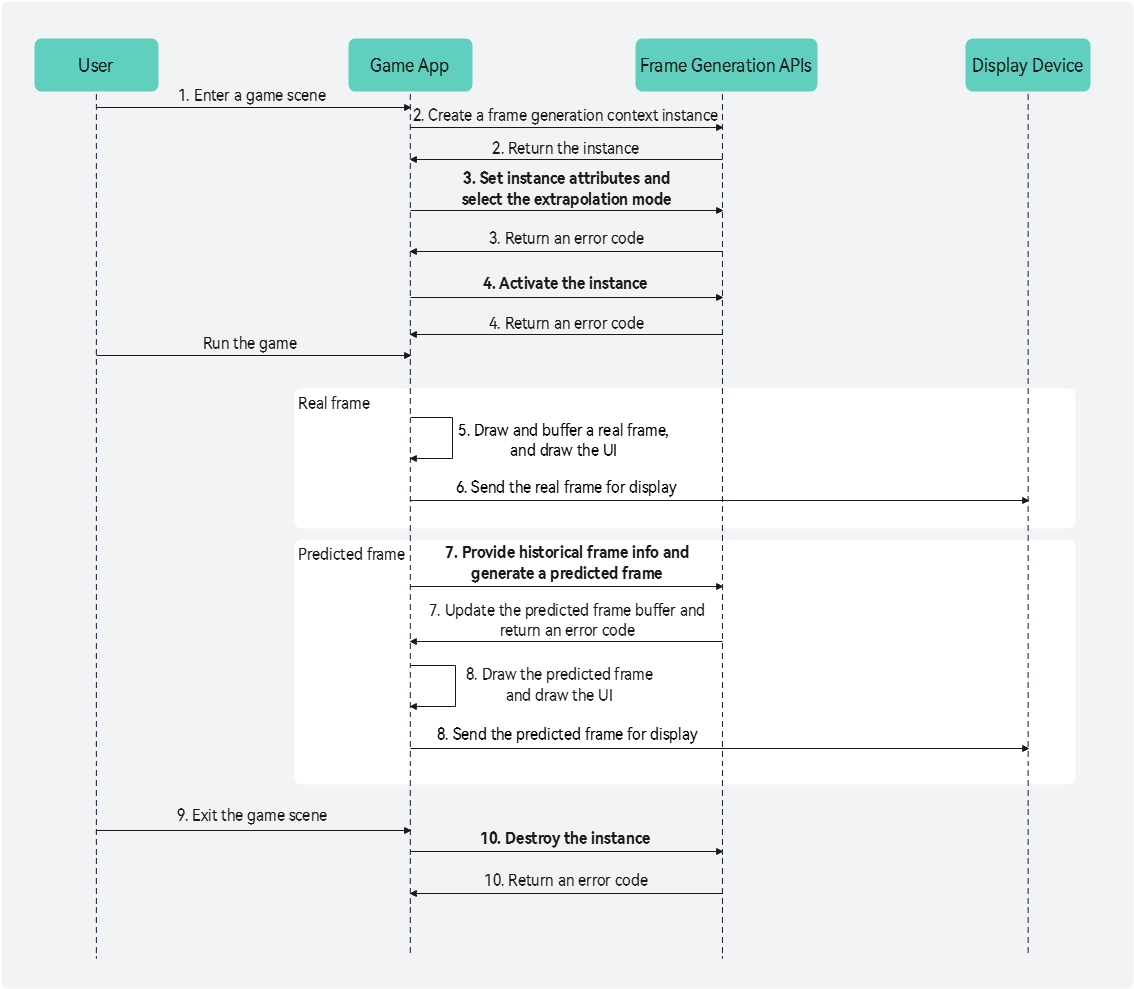
A user enters a game scene suitable for frame generation.
The game app calls the HMS_FG_CreateContext_GLES API to create a frame generation context instance. If the frame generation context instance fails to be created, the operations of alternately rendering and displaying real frames and predicted frames in step 5 to step 8 do not need to be performed. Instead, render and display real frames one by one.
The game app calls APIs to set properties of the frame generation context instance. For example, the game app calls the HMS_FG_SetAlgorithmMode_GLES API (mandatory) to set the frame generation algorithm mode (selecting the extrapolation mode), calls the HMS_FG_SetResolution_GLES API (mandatory) to set the resolutions of input and output images, calls the HMS_FG_SetCvvZSemantic_GLES API (optional) to set the homogeneous clip space Z/W range and depth function, and calls the HMS_FG_SetImageFormat_GLES API (optional) to set the image format of the color buffer of real frames. If the color buffer is flipped 180 degrees around the Y axis relative to the depth stencil buffer, the game app needs to call the HMS_FG_SetDepthStencilYDirectionInverted_GLES API (optional) to set the flipping status.
The game app calls the HMS_FG_Activate_GLES API to activate the frame generation context instance.
The game app renders the game scene to obtain a real frame, and buffers the color, depth, and camera matrix information about the real frame for subsequent frame prediction.
The game app draws the UI and sends the real frame for display.
The game app calls the HMS_FG_Dispatch_GLES API, passing the color, depth, and camera matrix information about historical real frames, to generate a predicted frame and update the predicted frame buffer. When the translation component of the camera view projection matrix is very large (for example, over 100,000), the frame prediction performance is compromised and image flickering may occur. In this case, you can call the HMS_FG_SetExtendedCameraInfo_GLES API to configure the extended camera property information before calling [HMS_FG_Dispatch_GLES] to improve the frame prediction accuracy.
The game app draws the predicted frame and its UI, and sends the predicted frame for display. Then, the game app repeats step 5 to this step until the user exits the game scene.
The user exits the game scene suitable for frame generation.
The game app calls the HMS_FG_DestroyContext_GLES API to destroy the frame generation context instance and release memory resources.
For the extrapolation mode, the eighth bit (from right to left) of the stencil buffer needs to be marked to distinguish static objects from dynamic objects. The stencil value of the area occupied by a static object must be marked as 0xxx xxxx, while the stencil value of the area occupied by a dynamic object must be marked as 1xxx xxxx. You can customize the remaining seven bits of the stencil buffer. If the mark is incorrect or missing, the frame prediction effect may be inaccurate. For example, blurring artifacts may occur on the edges of a moving object.
The following describes an example of using the OpenGL ES graphics API for frame generation. For details about the code, see Graphics Development Sample (Frame Generation with GLES).
Include the Graphics Accelerate Kit frame generation header file frame_generation_gles.h.
// Include the frame generation header file frame_generation_gles.h. #include <graphics_game_sdk/frame_generation_gles.h>
Write CMakeLists.txt.
find_library(
# Sets the name of the path variable.
framegeneration-lib
# Specifies the name of the NDK library that you want CMake to locate.
libframegeneration.so
)
target_link_libraries(entry PUBLIC
${framegeneration-lib}
)Call the HMS_FG_CreateContext_GLES API to create a frame generation context instance. If nullptr is returned, it indicates that the frame generation context instance fails to be created or the current device does not support the frame generation function.
// Create a frame generation context instance.
FG_Context_GLES* context_ = HMS_FG_CreateContext_GLES();
if (context_ == nullptr) {
return false;
}Call APIs to set attributes of the context instance. Set the frame generation algorithm mode to extrapolation.
// Initialize the error code of frame generation API calls.
FG_ErrorCode errorCode = FG_SUCCESS;
// Frame generation algorithm mode.
FG_AlgorithmModeInfo aInfo{};
aInfo.predictionMode = FG_PREDICTION_MODE_EXTRAPOLATION; // Extrapolation mode.
aInfo.meMode = FG_ME_MODE_BASIC; // Basic motion estimation mode.
errorCode = HMS_FG_SetAlgorithmMode_GLES(context_, &aInfo); // (Mandatory) Set the frame generation algorithm mode.
if (errorCode != FG_SUCCESS) {
return false;
}
// Resolution of the real frame color buffer.
FG_Dimension2D inputColorResolution{};
inputColorResolution.width = 1280; // Image width of the real frame color buffer.
inputColorResolution.height = 720; // Image height of the real frame color buffer.
// Resolution of the real frame depth stencil buffer.
FG_Dimension2D inputDepthStencilResolution{};
inputDepthStencilResolution.width = 1280; // Image width of the real frame depth stencil buffer.
inputDepthStencilResolution.height = 720; // Image height of the real frame depth stencil buffer.
// Resolution of the predicted frame.
FG_Dimension2D outputColorResolution{};
outputColorResolution.width = 1280; // Image width of the predicted frame.
outputColorResolution.height = 720; // Image height of the predicted frame.
// Input and output image resolutions.
FG_ResolutionInfo rInfo{};
rInfo.inputColorResolution = inputColorResolution;
rInfo.inputDepthStencilResolution = inputDepthStencilResolution;
rInfo.outputColorResolution = outputColorResolution;
errorCode = HMS_FG_SetResolution_GLES(context_, &rInfo); // [Mandatory] Set the resolutions of input and output images.
if (errorCode != FG_SUCCESS) {
return false;
}
// [Optional] Set the homogeneous clip space Z/W range and depth function. If this API is not called, the default value FG_CVV_Z_SEMANTIC_MINUS_ONE_TO_ONE_FORWARD_Z is used.
errorCode = HMS_FG_SetCvvZSemantic_GLES(context_, FG_CVV_Z_SEMANTIC_MINUS_ONE_TO_ONE_FORWARD_Z);
if (errorCode != FG_SUCCESS) {
return false;
}
// [Optional] Set the image format of the real frame color buffer. If this API is not called, the default value FG_FORMAT_R8G8B8A8_UNORM is used.
errorCode = HMS_FG_SetImageFormat_GLES(context_, FG_FORMAT_R8G8B8A8_UNORM);
if (errorCode != FG_SUCCESS) {
return false;
}
// [Optional] If the color buffer is flipped 180 degrees around the Y axis relative to the depth stencil buffer, set the second parameter to true. If this API is not called, the default value false is used.
errorCode = HMS_FG_SetDepthStencilYDirectionInverted_GLES(context_, true);
if (errorCode != FG_SUCCESS) {
return false;
}Call the HMS_FG_Activate_GLES API to activate the frame generation context instance.
// Activate the frame generation context instance.
errorCode = HMS_FG_Activate_GLES(context_);
if (errorCode != FG_SUCCESS) {
return false;
}Render and display the real frames and predicted frames alternately during game running. During real frame rendering, buffer their color, depth, and camera matrix information. During predicted frame rendering, call the HMS_FG_Dispatch_GLES API, passing the attributes of the previous real frame and specifying the predicted frame buffer index, to generate a predicted frame and update the memory of the predicted frame buffer.
// Count the number of frames.
uint32_t frameNum = 0;
// Struct for setting frame generation attributes.
FG_DispatchDescription_GLES dispatchDescriptionData_ {
.inputColor = 0U,
.inputDepthStencil = 0U,
.viewProj{},
.invViewProj{},
.outputColor = 0U
};
// Variable declaration.
uint32_t inputColor = 0;
uint32_t inputDepthStencil = 0;
uint32_t outputColor = 0;
FG_Mat4x4 preViewProj;
FG_Mat4x4 preInvViewProj;
// Frame loop
while (true) {
frameNum += 1;
if ((frameNum & 1) != 0) { // Real frame rendering phase.
// Render the game scene to obtain the current real frame. Buffer its color, depth, and camera matrix information for generating the next predicted frame.
// ...
// Draw the real frame.
// ...
// Draw the UI.
// ...
// Send the real frame for display.
// ...
} else { // Predicted frame rendering phase.
// Pass the color buffer index of the previous real frame.
dispatchDescriptionData_.inputColor = inputColor;
// Pass the depth stencil buffer index of the previous real frame.
dispatchDescriptionData_.inputDepthStencil = inputDepthStencil;
// Pass the predicted frame buffer index.
dispatchDescriptionData_.outputColor = outputColor;
// Pass the view projection matrix of the previous real frame.
dispatchDescriptionData_.viewProj = preViewProj;
// Pass the inverse view projection matrix of the previous real frame.
dispatchDescriptionData_.invViewProj = preInvViewProj;
// Generate a predicted frame and update the memory of the predicted frame buffer.
errorCode = HMS_FG_Dispatch_GLES(context_, &dispatchDescriptionData_);
switch (errorCode) {
case FG_SUCCESS: {
// Draw the predicted frame.
// ...
// Draw the UI.
// ...
// Send the predicted frame for display.
// ...
break;
}
case FG_COLLECTING_PREVIOUS_FRAMES:
// If the number of input real frames does not reach the fixed threshold, no predicted frame will be generated. This error code is returned when the number of input real frames is less than 3 in basic extrapolation mode or less than 2 in enhanced extrapolation mode. In this case, you do not need to perform predicted frame display.
break;
default:
// Failed to generate a predicted frame.
return false;
}
}
}Call the HMS_FG_DestroyContext_GLES API to destroy the frame generation context instance and release memory resources.
// Destroy the frame generation context instance and release memory resources.
errorCode = HMS_FG_DestroyContext_GLES(&context_);
if (errorCode != FG_SUCCESS) {
return false;
}Intelligent Assistant
Chat with our virtual assistant to get answers promptly.
Quick start
Helps you find desired resources with ease.