Overview of the Operator Implementation Process
Figure 1 shows the process of implementing a vector operator based on Ascend C.
Figure 1 Implementation process of vector operators
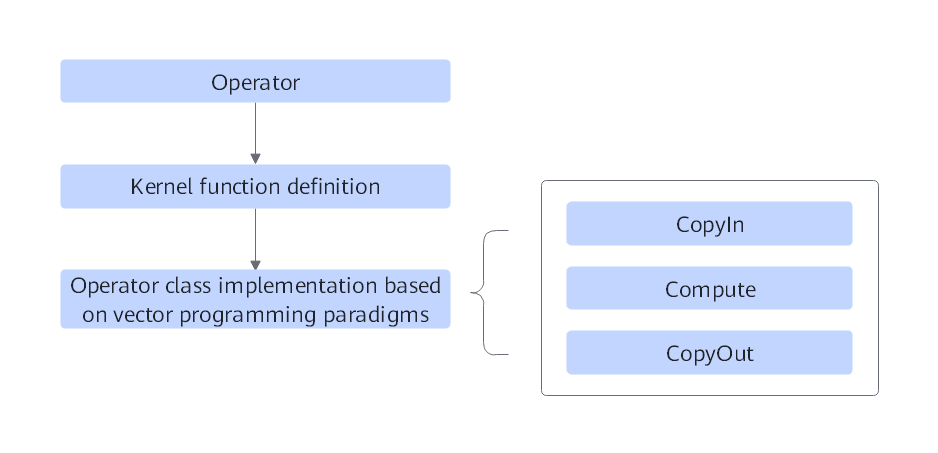
Analyze the operator: Analyze the mathematical expression, input, output, and compute logic implementation of the operator, and specify the Ascend C APIs to be called.
Define the kernel function: Define the entrypoint function of the Ascend C operator.
Implement the operator class according to the vector programming paradigm: Complete the internal implementation of the kernel function.
The following uses the ElemWise(Add) operator as an example to describe the steps in detail. For details about the complete code of the operator described in this sample, see add_custom.cpp.
[h2]Operator Analysis
Before developing the operator code, analyze the mathematical expression, input, output, and compute logic implementation of the operator, and specify the Ascend C APIs to be called.
Specify the mathematical expression and compute logic of the operator.
The Add operator is used as an example.
z = x + y
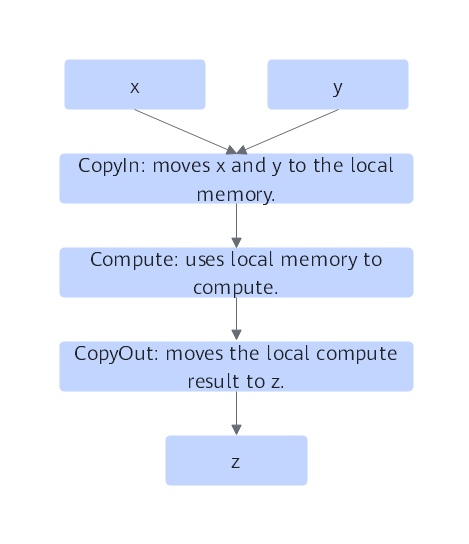
The computation logic is as follows: The operation elements of the vector computation APIs provided by Ascend C are all LocalTensors. The input data needs to be moved to the on-chip storage, and then the computation API is called to add the two input parameters to obtain the final result. Then, the final result is moved to the external storage. The following figure shows the computation logic of the Ascend C Add operator.
Figure 2 Operator computation logic
Specify the input and output.
- The Add operator has two inputs, x and y, and outputs the result z.
- The supported input data type is half (float16), and so is the output data type.
- The operator supported input shape is (8, 2048), and so is the output shape.
- The supported operator input format is ND.
Define the kernel function name and parameters.
- You can customize the kernel function name. In this sample, the kernel function is named add_custom.
- Based on the analysis of the operator input and output, the kernel function has three parameters: x, y, and z. x and y indicate the memory address of the input in the global memory, and z indicates the memory address of the output in the global memory.
Specify the APIs required for operator implementation.
- Move data between the local memory and global memory. For details about the data movement API, see the Ascend C API reference. Call DataCopy to move data.
- This example involves only the Add operation of vector computing. You can view the description of the Vector Computing API in the Ascend C API reference. According to the preliminary analysis, the binocular instruction Add API can be used to implement x + y.
- The tensor data structure used in computing is managed by the queue, involving calling APIs such as EnQue and DeQue.
Based on the preceding analysis, the design specifications of the Ascend C Add operator are as follows.
- Operator type (OpType): Add
- Operator inputs and output:
- name: x (input), y (input), and z (output)
- shape: (8, 2048)
- data type: half
- format: ND
- Kernel function name: add_custom
- Main APIs: DataCopy: data movement API; Add: vector binary instruction API; EnQue and DeQue: queue management APIs.
- Operator implementation file: add_custom.cpp
[h2]Kernel Function Definition
Define kernel functions based on the rules described in Kernel Function Definition.
Function prototype definition
In this sample, the function name is add_custom (the kernel function name can be customized). Based on the analysis of the operator input and output in Operator Analysis, there are three parameters x, y, and z, where x and y indicate the input memory and z indicates the output memory. According to the kernel function rules described in Kernel Function Definition, the function prototype is defined as follows: The global function type qualifier is used to identify a kernel function. The aicore function type qualifier is used to identify that the kernel function is executed on the AI Core on the device. For convenience, the GM_ADDR macro is used to modify the input parameters. For details about the definition of the GM_ADDR macro, see Kernel Function.
extern "C" __global__ __aicore__ void add_custom(GM_ADDR x, GM_ADDR y, GM_ADDR z)
{
}
Call the Init and Process functions of the operator class.
The Init function of the operator class completes memory initialization, and the Process function completes the core logic of operator implementation. For details, see Operator Class Implementation.
extern "C" __global__ __aicore__ void add_custom(GM_ADDR x, GM_ADDR y, GM_ADDR z)
{
    KernelAdd op;
    op.Init(x, y, z);
    op.Process();
}
[h2]Operator Class Implementation
The kernel function calls the Init and Process functions of the operator class. This section describes how to implement the operator class based on the programming paradigm.
The following describes how to design the Add operator based on the vector programming paradigm. For details about the vector programming paradigm, see Vector Programming Paradigm. For details about the implementation process of the Add operator, see Figure 3.
The implementation process of the Add operator consists of three basic tasks: CopyIn, Compute, and CopyOut. The CopyIn task transfers the input tensors xGm and yGm from the global memory to the local memory and stores them in xLocal and yLocal, respectively. The Compute task performs the addition operation on xLocal and yLocal, and stores the computation result in zLocal. The CopyOut task transfers the output data from zLocal to the output tensor zGm in the global memory.
CopyIn and Compute tasks communicate and synchronize with each other through the VECIN queues inQueueX and inQueueY. Compute and CopyOut tasks communicate and synchronize with each other through the VECOUT queue outQueueZ.
The memory used for interaction between tasks and the memory used by temporary variables are managed by the pipe memory management object.
Figure 3 Implementation process of the Add operator
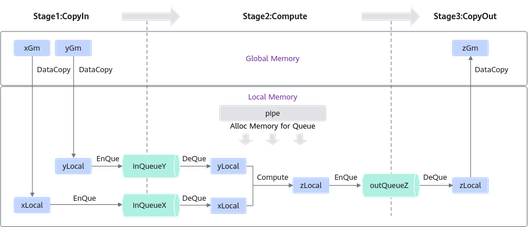
The workflow is mainly implemented by the operator class, including the initialization function Init and core processing function Process. The Process function calls the three basic tasks. Some private members used in operator implementation are also included, such as the GlobalTensor and VECIN and VECOUT queues. Members of the KernelAdd operator class are as follows:
class KernelAdd {
public:
    __aicore__ inline KernelAdd() {}
    // Initialization function, which is used to initialize the memory.
    __aicore__ inline void Init(GM_ADDR x, GM_ADDR y, GM_ADDR z){}
    // Core processing function, which implements the operator logic and calls the private member functions CopyIn, Compute, and CopyOut to complete the three-stage pipelined execution of the vector operator.
    __aicore__ inline void Process(){}

private:
    // CopyIn function, which is called by the Process function to complete the processing in the CopyIn stage.
    __aicore__ inline void CopyIn(int32_t progress){}
    // Compute function, which is called by the Process function to complete the processing in the Compute stage.
    __aicore__ inline void Compute(int32_t progress){}
    // CopyOut function, which is called by the Process function to complete the processing in the CopyOut stage.
    __aicore__ inline void CopyOut(int32_t progress){}

private:
    AscendC::TPipe pipe; // TPipe object
    AscendC::TQue<AscendC::QuePosition::VECIN, 1> inQueueX, inQueueY; // input data queue management object, with the queue position VECIN.
    AscendC::TQue<AscendC::QuePosition::VECOUT, 1> outQueueZ; // output data queue management object, with the queue position VECOUT.
    AscendC::GlobalTensor<half> xGm; // input and output global memory address management object. xGm and yGm are input, and zGm is output.
    AscendC::GlobalTensor<half> yGm;
    AscendC::GlobalTensor<half> zGm;
};
The initialization function performs the following operations:
Sets the global memory address of the input and output Global Tensors.
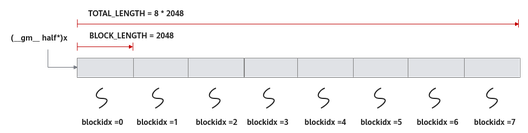
In this sample, multi-core parallel computation is used. Data is tiled and allocated to multiple cores for processing. An Ascend C kernel function is a processing function on a core. Only part of the data is processed. You need to obtain the memory offset address of the input and output to be processed by the kernel function in the global memory from the initialization function and set the offset address in the GlobalTensor.
For example, to obtain the memory offset address of input x in the global memory, run the following command:
xGm.SetGlobalBuffer((__gm__ half*)x + BLOCK_LENGTH * GetBlockIdx(), BLOCK_LENGTH);
The allocation scheme in this sample is as follows: The total data length TOTAL_LENGTH is 8 x 2048. The data is evenly allocated to eight cores. The size (BLOCK_LENGTH) of data processed by each core is 2048 bytes. x + BLOCK_LENGTH * GetBlockIdx() is the memory offset address of x in the global memory of the single-core processing program. After the offset address is obtained, call the API of the GlobalTensor class to set the start address and length of the global memory of the core. For details, see Figure 4.
Figure 4 Multi-core parallel processing
Allocate memory for the input and output queues through Pipe.
For example, allocating memory for the queue of input x can be implemented by using the following code snippet:
pipe.InitBuffer(inQueueX, BUFFER_NUM, TILE_LENGTH * sizeof(half))
For data processed on a single core, data tiling is applicable. In this sample, data is tiled into eight blocks. This number of blocks is for reference only, which does not mean the optimal performance. Each data block can be tiled into two sub-blocks. That is, to enable double buffer for parallel processing between pipelines.
In this way, the data (2048 elements) on a single core is partitioned into 16 tiles, each with TILE_LENGTH = 128. The preceding code indicates that the pipe allocates two memory blocks whose size is TILE_LENGTH x sizeof(half) bytes to inQueueX. Each memory block can contain TILE_LENGTH (128) half-type data. Figure 5 shows the data tiling.
Figure 5 Single-core data tiling
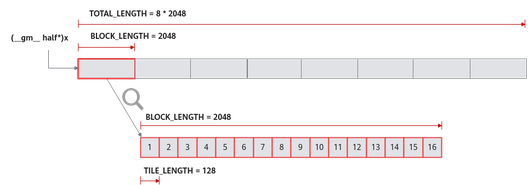
Kirin 9020, Kirin 9030, and Kirin X90 series processors support only one core. The initialization function code is as follows:
constexpr int32_t TOTAL_LENGTH = 8 * 2048; // Total data length.
constexpr int32_t USE_CORE_NUM = 1; // Number of used cores.
constexpr int32_t BLOCK_LENGTH = TOTAL_LENGTH / USE_CORE_NUM; // Length of data computed by each core.
constexpr int32_t TILE_NUM = 8; // Split the data into eight tiles for each core to process.
constexpr int32_t BUFFER_NUM = 2; // Number of tensors in each queue (for double buffering).
constexpr int32_t TILE_LENGTH = BLOCK_LENGTH / TILE_NUM / BUFFER_NUM; // Length of each tile (split into two parts due to the double buffering mechanism).
__aicore__ inline void Init(GM_ADDR x, GM_ADDR y, GM_ADDR z)
{
    // Obtain the start index of the current core for core parallel computing.
    xGm.SetGlobalBuffer((__gm__ half*)x + BLOCK_LENGTH * AscendC::GetBlockIdx(), BLOCK_LENGTH);
    yGm.SetGlobalBuffer((__gm__ half*)y + BLOCK_LENGTH * AscendC::GetBlockIdx(), BLOCK_LENGTH);
    zGm.SetGlobalBuffer((__gm__ half*)z + BLOCK_LENGTH * AscendC::GetBlockIdx(), BLOCK_LENGTH);
    // Initialize the pipe buffer to the queue, in bytes.
    pipe.InitBuffer(inQueueX, BUFFER_NUM, TILE_LENGTH * sizeof(half));
    pipe.InitBuffer(inQueueY, BUFFER_NUM, TILE_LENGTH * sizeof(half));
    pipe.InitBuffer(outQueueZ, BUFFER_NUM, TILE_LENGTH * sizeof(half));
}
Based on the vector programming paradigm, the implementation of kernel functions is divided into three basic tasks: CopyIn, Compute, and CopyOut. The three functions are called in the Process function as follows:
    __aicore__ inline void Process()
    {
        // Because dual buffers are used, the number of iterations needs to be doubled.
        constexpr int32_t loopCount = TILE_NUM * BUFFER_NUM;
        // Tiling policy and parallel pipelines
        for (int32_t i = 0; i < loopCount; i++) {
            CopyIn(i);
            Compute(i);
            CopyOut(i);
        }
    }
Based on the algorithm analysis of the programming paradigm, the entire computation is divided into three stages. You need to compile the code of each stage separately. For details about the process, see Figure 3.
Implement the CopyIn function.
- Call DataCopy to copy data from GlobalTensor to LocalTensor.
- Call EnQue to put LocalTensor into the queue of VecIn.
__aicore__ inline void CopyIn(int32_t progress)
    {
        // Allocate tensors from the queue memory.
        AscendC::LocalTensor<half> xLocal = inQueueX.AllocTensor<half>();
        AscendC::LocalTensor<half> yLocal = inQueueY.AllocTensor<half>();
        // Copy the progress_th tile from the global tensor to the local tensor.
        AscendC::DataCopy(xLocal, xGm[progress * TILE_LENGTH], TILE_LENGTH);
        AscendC::DataCopy(yLocal, yGm[progress * TILE_LENGTH], TILE_LENGTH);
        // Enqueue the input tensor to the VECIN queue.
        inQueueX.EnQue(xLocal);
        inQueueY.EnQue(yLocal);
    }
Implement the Compute function.
- Call the DeQue API to obtain LocalTensor from VecIn.
- Call the Add API to complete vector computation.
- Call the EnQue API to put the result LocalTensor into the queue of VecOut.
- Call the FreeTensor API to free the LocalTensor that is no longer needed.
__aicore__ inline void Compute(int32_t progress)
{
    // Obtain the input tensor from the VECIN queue.
    AscendC::LocalTensor<half> xLocal = inQueueX.DeQue<half>();
    AscendC::LocalTensor<half> yLocal = inQueueY.DeQue<half>();
    AscendC::LocalTensor<half> zLocal = outQueueZ.AllocTensor<half>();
    // Call the Add instruction to perform computation.
    AscendC::Add(zLocal, xLocal, yLocal, TILE_LENGTH);
    // Add the output tensor to the VECOUT queue.
    outQueueZ.EnQue<half>(zLocal);
    // Free input tensor, which can be reused
    inQueueX.FreeTensor(xLocal);
    inQueueY.FreeTensor(yLocal);
}
Implement the CopyOut function.
- Call the DeQue API to obtain LocalTensor from the VecOut queue.
- Call the DataCopy API to copy LocalTensor to GlobalTensor.
- Call theFreeTensor API to reclaim LocalTensors that are no longer used.
 __aicore__ inline void CopyOut(int32_t progress)
{
    // Obtain the output tensor from the VECOUT queue.
    AscendC::LocalTensor<half> zLocal = outQueueZ.DeQue<half>();
    // Copy the progress_th block from the local tensor to the global tensor.
    AscendC::DataCopy(zGm[progress * TILE_LENGTH], zLocal, TILE_LENGTH);
    // The tensor can be freely output for reuse.
    outQueueZ.FreeTensor(zLocal);
}