


Intelligent Assistant
Chat with our virtual assistant to get answers promptly.
We use essential cookies for the website to function, as well as analytics cookies for analyzing and creating statistics of the website performance. To agree to the use of analytics cookies, click "Accept All". You can manage your preferences at any time by clicking "Cookie Settings" on the footer. More Information.
HarmonyOS
Before using Car Kit capabilities, you need to configure the build mode, permissions, and capabilities.
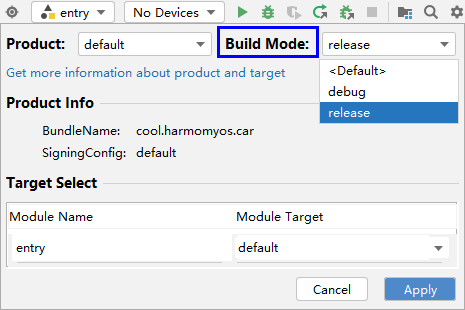
When packaging an app, click  in the upper right corner of DevEco Studio, change the build mode to release, and click Apply in the lower right corner.
Car Kit provides two types of APIs: navigation APIs and mobility connectivity APIs. You need to configure the corresponding permissions for using these APIs.
To use navigation APIs, you need to configure the ohos.permission.ACCESS_SERVICE_NAVIGATION_INFO permission.
To use mobility connectivity APIs, you need to configure the ohos.permission.ACCESS_CAR_DISTRIBUTED_ENGINE permission.
Configure required permissions in the app configuration file module.json5 in entry/src/main. The sample code is as follows:
- {
- "module": {
- "requestPermissions": [
- {
- "name": "ohos.permission.ACCESS_CAR_DISTRIBUTED_ENGINE"
- },
- {
- "name": "ohos.permission.ACCESS_SERVICE_NAVIGATION_INFO"
- }
- ]
- }
- }
Configure the navigation hop or HiCar capability in the abilities array of the app configuration file module.json5 in entry/src/main. The procedure is as follows:
Configure the actions of the navigation information service in skills.
If your app has other skills, do not directly modify the existing configuration. Instead, supplement the configuration in the skills array.
- "skills": [
- {
- "entities": [
- "entity.system.default"
- ],
- "actions": [
- "action.navigation.infoservice"
- ]
- },
- // Configure other skills.
- {
- // ...
- }
- ]
Configure the navigation hop or HiCar capability in metadata. The sample code is as follows:
- {
- "module": {
- "abilities": [
- {
- "name": "xxxx",
- "srcEntry": "xxxx",
- "description": "xxxx",
- "skills": [
- {
- "entities": [
- "entity.system.home"
- ],
- "actions": [
- "action.system.home"
- ]
- },
- {
- "entities": [
- "entity.system.default"
- ],
- "actions": [
- "action.navigation.infoservice"
- ]
- }
- ],
- "metadata": [
- {
- "name" : "carHopCapability",
- "value" : "carHopNavi,getOnCarNavi,insideCarNavi,getOffCarNavi"
- },
- {
- "name" : "hiCarCapability",
- "value" :"basicNavi,shortcutOper,multiScreenUI,mapUIOper,updateNaviStatus,searchPOI"
- }
- ]
- }
- ]
- }
- }
The options of name in metadata are carHopCapability and hiCarCapability.
If name is set to carHopCapability, the navigation hop capability is supported. Set value according to the service scenarios.
| value | Scenario |
|---|---|
| carHopNavi | Tap for navigation hop, which cannot coexist with "tap for address hop." |
| carHopAddress | Tap for address hop, which cannot coexist with "tap for navigation hop." |
| getOnCarNavi | Auto navigation hop upon vehicle entry. |
| insideCarNavi | In-vehicle auto navigation hop. |
| getOffCarNavi | Hop to walking navigation upon vehicle exit. |
If name is set to hiCarCapability, the HiCar capability is supported. Set value according to the service scenarios.
| value | Scenario |
|---|---|
| basicNavi | Basic navigation functions. The corresponding commands are as follows: 1. START_NAVIGATION 2. STOP_NAVIGATION |
| shortcutOper | Shortcut operation functions. The corresponding commands are as follows: 1. GO_HOME 2. GO_TO_COMPANY |
| multiScreenUI | Multi-screen display functions. The corresponding commands are as follows: 1. START_MAP_LAYER 2. STOP_MAP_LAYER |
| mapUIOper | Map UI control functions. The corresponding commands are as follows: 1. ZOOM_IN_MAP 2. ZOOM_OUT_MAP 3. CHANGE_THEME |
| updateNaviStatus | Map status and metadata update. The corresponding commands are as follows: 1. START_UPDATE_NAVIGATION_STATUS 2. STOP_UPDATE_NAVIGATION_STATUS |
| searchPOI | Address search. The corresponding command is as follows: SEARCH_POI |
For more information about the commands, please refer to CommandType.
Intelligent Assistant
Chat with our virtual assistant to get answers promptly.
Quick start
Helps you find desired resources with ease.