


Intelligent Assistant
Chat with our virtual assistant to get answers promptly.
We use essential cookies for the website to function, as well as analytics cookies for analyzing and creating statistics of the website performance. To agree to the use of analytics cookies, click "Accept All". You can manage your preferences at any time by clicking "Cookie Settings" on the footer. More Information.
HarmonyOS
This feature provides version detection and in-app update reminders for apps that have been released, so that you can notify users of the latest version.
After your app is launched or when a user proactively checks for a new version, you can use this service to determine if an update is available. If there is a new version, this service can display update reminders to users.
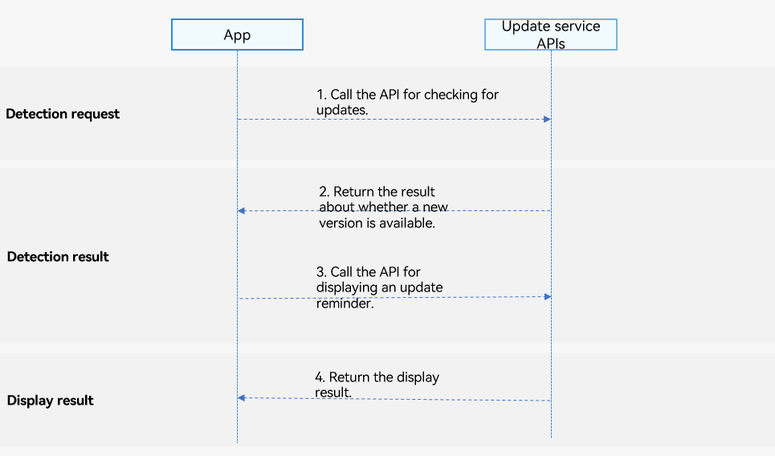
The app calls the API for checking for updates.
The API returns the result about whether a new version is available.
Call the API for displaying an update pop-up.
The display result is returned to the app.
The Update on AppGallery feature supports phones, tablets, and PCs/2-in-1 devices. Support for TVs is available starting from 5.1.1(19), and for wearables starting from 6.0.0(20).
The Update on AppGallery feature does not support the Emulator. Use a real device for debugging. If you use this service in the Emulator, the message "Unable to load content. Tap the screen to retry." will be displayed.
The app must have been released on AppGallery.
The Update on AppGallery feature provides the following APIs. For details, please refer to the API reference.
| API | Description |
|---|---|
| checkAppUpdate(context: common.UIAbilityContext): Promise<CheckUpdateResult> | Detects whether a new version is available. |
| showUpdateDialog(context:common.UIAbilityContext): Promise<ShowUpdateResultCode> | Displays an update pop-up. |
Import the updateManager module and related common modules.
- import { updateManager } from '@kit.AppGalleryKit';
- import { hilog } from '@kit.PerformanceAnalysisKit';
- import type { common } from '@kit.AbilityKit';
- import { BusinessError } from '@kit.BasicServicesKit';
Construct an input parameter, which is a context of the common.UIAbilityContext type.
- let context: common.UIAbilityContext = this.getUIContext().getHostContext() as common.UIAbilityContext;
Call the checkAppUpdate API to check whether a new app version is available.
- try {
- updateManager.checkAppUpdate(context)
- .then((checkResult: updateManager.CheckUpdateResult) => {
- hilog.info(0, 'TAG', 'Succeeded in checking Result updateAvailable:' + checkResult.updateAvailable);
- }).catch((error: BusinessError) => {
- hilog.error(0, 'TAG', `checkAppUpdate onError.code is ${error.code}, message is ${error.message}`);
- });
- } catch (error) {
- hilog.error(0, 'TAG', `checkAppUpdate onError.code is ${error.code}, message is ${error.message}`);
- }
An update can be detected only if the locally installed version is lower than the version released on AppGallery.
The signature of the locally installed version must be the same as that of the version released on AppGallery.
Currently, closed testing and open testing are not supported.
Import the updateManager module and related common modules.
- import { updateManager } from '@kit.AppGalleryKit';
- import { hilog } from '@kit.PerformanceAnalysisKit';
- import type { common } from '@kit.AbilityKit';
- import { BusinessError } from '@kit.BasicServicesKit';
Construct an input parameter, which is a context of the common.UIAbilityContext type.
- let context: common.UIAbilityContext = this.getUIContext().getHostContext() as common.UIAbilityContext;
Call the showUpdateDialog API to display the update pop-up.
- try {
- updateManager.showUpdateDialog(context)
- .then((resultCode: updateManager.ShowUpdateResultCode) => {
- hilog.info(0, 'TAG', 'Succeeded in showing UpdateDialog resultCode:' + resultCode);
- })
- .catch((error: BusinessError) => {
- hilog.error(0, 'TAG', `showUpdateDialog onError.code is ${error.code}, message is ${error.message}`);
- });
- } catch (error) {
- hilog.error(0, 'TAG', `showUpdateDialog onError.code is ${error.code}, message is ${error.message}`);
- }
Intelligent Assistant
Chat with our virtual assistant to get answers promptly.
Quick start
Helps you find desired resources with ease.