If you are using a computer without Internet access, set up the development environment by following the instructions below.
Installing hypium
As the project-level oh-package.json5 file in the project templates has Hypium configured as a dependency by default, you need to install Hypium. If you have other dependencies configured, you can follow similar steps to install them.
{
  "dependencies": {
    "@ohos/hypium": "1.0.18"
  }
}
Configure environment variables and open the CLI. Run the ohpm install command to generate the oh_modules folder and the oh-package-lock.json5 file.

Copy the oh_modules folder and the oh-package-lock.json5 file to the root directory of the project on the computer where Internet access is denied.

The ohpm versions must be consistent across environments with or without Internet access; otherwise, the oh-package-lock.json5 file may not take effect due to version mismatch.
Installing a Third-Party Library
- Method 1: Use ohpm-repo to set up a private repository, publish the required third-party library dependency to that repository, and replace the value of registry in the .ohpmrc file with the private repository address.
- Method 2: On the computer that has Internet access, create an empty folder (for example, third_library) and in it create the oh-package.json5 file. Add the third-party library dependency to the dependencies in the file:
{
  "dependencies": {
    "@ohos/hypium": "1.0.17",
    "@ohos/lottie": "^2.0.0"
  }
}
Open the CLI and run the ohpm install command. The oh_modules folder and the oh-package-lock.json5 file are automatically generated.
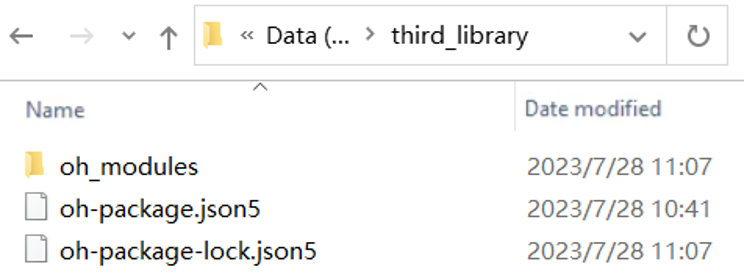
Copy the oh_modules folder and the oh-package-lock.json5 file to the root directory of the project on the computer without Internet access.

When using method 2, ensure that the ohpm versions are consistent across environments with or without Internet access; otherwise, the oh-package-lock.json5 file may not take effect due to version mismatch.