Use Cases
An app calls the getDeviceToken API of Device Security Kit to obtain a device token. The app server uses the device token to request the Device Security server to query and manage the app status on the device. This enables apps to record and query app status on devices even if the persistent device identifiers are not available.
Based on the app status returned by the Device Security server, the app can determine whether it is installed on the device for the first time or whether the user has obtained coupons on the device, supporting new user acquisition campaigns.
Constraints
The DeviceVerify capability does not support simulators. The supported devices include phones, tablets, PCs/2-in-1 devices, and wearables. Starting from version 5.1.1(19), TVs are also supported.
Service Process
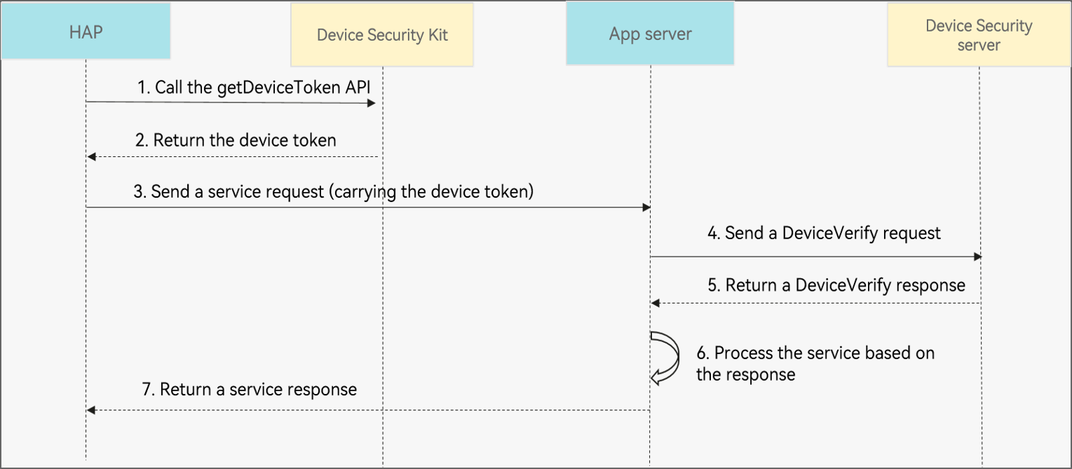
Process description:
-
Your app calls the getDeviceToken API of Device Security Kit to obtain a device token.
-
Device Security Kit returns the device token.
-
Your app sends the device token in a service request (for example, a coupon claiming request) to the app server.
-
The app server sends DeviceVerify REST requests to the Device Security server to perform operations such as query the device marking status (for example, whether a coupon has been claimed) through the getDeviceStatus API and update the device marking status through the setDeviceStatus API.

The Device Security server provides two bits for each app on each device to store and query the device marking status. The meanings of the two bits are defined by the app.
For example, bit0 can be used to indicate whether a device has claimed the new user gift. The value false indicates that the device has not claimed the new user gift, and the value true indicates that the device has claimed the new user gift. When a user claims the new user gift on a device, the app server queries the device marking status on the Device Security server and processes accordingly based on the value of bit0:
-
If the value of bit0 is true, the device has claimed the new user gift. The app server can reject the device's new user gift claiming request.
-
If the value of bit0 is false, the device has not claimed the new user gift. The app server can grant the new user gift to the device and call the device marking status update API of the Device Security server to change the value of bit0 to true.
-
-
The Device Security server returns a DeviceVerify response.
-
The app server processes the service based on the response returned by the Device Security server.
-
The app server returns a service response.
API Description
The following table lists DeviceVerify APIs, including ArkTS APIs and REST APIs. For more information about the APIs, please refer to API Reference.
| API | Description |
|---|---|
| getDeviceToken(): Promise<string> | Obtains the device token of a device. |
| checkDeviceToken | Checks the device token. |
| getDeviceStatus | Queries the device marking status. |
| setDeviceStatus | Updates the device marking status. |
| delDeviceStatus | Deletes the device marking status. |

If the getDeviceToken API cannot obtain the device token due to unstable network or other reasons, your app should be able to handle the exception to prevent unavailability of basic functions that rely on the device token. For example, your app can call the getDeviceToken API again or use other risk control factors for check.
[h2]App-Side Development

-
Import the Device Security Kit module and related public modules.
import { hilog } from '@kit.PerformanceAnalysisKit'; import { deviceCertificate } from '@kit.DeviceSecurityKit'; import { BusinessError } from '@kit.BasicServicesKit'; -
Obtain the device token.
const TAG: string = '[DevCertManagerModel]';

function deviceTokenPromise(): Promise<String> {
  return new Promise((resolve, reject) => {
    try {
      deviceCertificate.getDeviceToken().then((token) => {
        hilog.info(0x0000, TAG, 'Succeeded in executing getDeviceToken success');
        resolve(token);
      }).catch((err: BusinessError) => {
        hilog.error(0x0000, TAG, '%{public}s', 'getDeviceToken failed! err code: ' + err.code +
          ' ,err message: ' + err.message);
        reject(err);
      });
    } catch (err) {
      let error: BusinessError = err as BusinessError;
      hilog.error(0x0000, TAG, '%{public}s', 'getDeviceToken failed! catch err code: ' + error.code +
        ' ,err message: ' + error.message);
      reject(err);
    }
  });
}
The device token is generated and encrypted by Device Security Kit. The token generated each time is different and is valid for 1 hour.
[h2]Server Development
-
Obtain the JSON web token (JWT). For details, please refer to Generating a JWT Based on a Service Account.
-
Call the checkDeviceToken, getDeviceStatus, setDeviceStatus, and delDeviceStatus APIs to check the device token, obtain the device marking status, set the device marking status, and delete the device marking status, respectively. For details about more APIs, please refer to REST API.
Sample Code
import java.io.BufferedReader;
import java.io.IOException;
import java.io.InputStream;
import java.io.InputStreamReader;
import java.io.OutputStream;
import java.net.HttpURLConnection;
import java.net.URL;

import com.alibaba.fastjson.JSONObject;

public class DeviceTokenServer {
    // Device token obtained using the DeviceVerify function.
    static String deviceToken = "aes-gcm.gouLVEalfJxRLxt+3Gxh/orDAG9kDbkeFydkxGrDOHVJ3KEhiSDhIeW+/KH0ErqVxZ0vfkgtapaMu3yc0IND+lzC8ZH86NHxW+/GsqxYhvZ650TWUkanwdlZwYD0HPZ/KFnDPgIvGLvvWz1BdoPOOiFy5BuCQfGVNxl9OBTd7wsiJpl8kKywMRg/k1x61/8IpaH4F6tPrMV/Fv4N/WLfSHlC9AkB1ekZz4hxambDaXP8aXz59FYWItTl7tBOV09+JKnFqD0dB5ZmXjUhVLRKpYeGH8dPWG2gOmEksY6CsXvWBul+5HF76myfUeSvrWfD7Ee3+5Uuld3v+s8W+aFJkdUo8GSCF4xbiA+01BKnq0DIh0EKW/VJAQHjo/P/X/6jMwoDnbF7NWPmh827LHKQMIsN46zfke7qpdBsYpidKNxlXIb1azyAhD/izf5KQwkzwlVTctIvkUNH9XjTh1I6xb8yYb7TjZ7tnMGg2lWizNsejIcwAPqTTyXXupL5mPc8SwsZ424mDQhf1pCfacbZFaew0jWUC5ZQ2B8CiBeX";
    // JWT generated based on a service account.
    static String authorization = "Bearer eyJraWQiOiI5YTU5ZGRkZDZlYzY0MTgyYmUwMTc2MDNjZDU1YjEwNCIsInR5cCI6IkpXVCIsImFsZyI6IlBTMjU2In0.eyJhdWQiOiJodHRwczovL29hdXRoLWxvZ2luLmNsb3VkLmh1YXdlaS5jb20vb2F1dGgyL3YzL3Rva2VuIiwiaXNzIjoiMTE0MDIzMzQ1IiwiZXhwIjoxNzU0NDQ4NDU2LCJpYXQiOjE3NTQ0NDQ4NTZ9.cJEiLM53QBTSxzPjDAqK-HeteSv_qWxnAuEiwaN_udLQz78QZPcD54RFWSOqE459B0Y78hEL1-2eQlcCjbGn0OI2AQbwTwYzoRbLftAEyP5V9Juv1A-cfR8MoVapVdZ3pA9Jg6B5cBjcQLax-GTUJjevgI4PyTxQCIhLa-kaQq_h-KOnpcWlVUx2weLRAcGs4Tr3wYqdLnSPE7Hp_44C3S69dSoXoP8HL6-2L4aJzzvNn7uYoRiZAoCZoarJNHi7d8h9JEJ2K5vmaYV_lJ9l0_G4RDjpEmtCPOEkXLPIvjh5fwEBPyMZiUJqHyqTkdw8AjjgIaFe0wG9wCZk4sEo9GOruuy9tN6mEccFAEKbSf28gpUowWC23uKQPIYb9sdzrN8D3hpalrN5CDh1dv80wlhLxXeJOWWnfjCqYhA0m17UFC4xEhno-M52dEb4BODPsw-96xx02GX8_VqDDjjUmXEr6lwj4yLE_5feR1QFQS2NhC11Py4AzrsEPb9maFqR-bOUO2SfLdD1EjvMx2p-tELosFH8DmvwtbjNVYDN0zGEed150qhMtkDG9DUwT0dL3q_ikRq73syB9WbQrlpWeJAWBmazkb0EoSf24UO2rRjcZ0hGmgFIIH7AzHgw4Ok2ijCJ5uVIY59DUsXXUIBIH7tMyNUjrdZG0_ctDORrk_s";
    // HAP name.
    static String bundleName = "com.huawei.myapplication.shoubiao412";

    public static void main(String[] args) throws IOException {
        checkDeviceToken();
        setDeviceStatus();
        getDeviceStatus();
        delDeviceStatus();
    }
    public static void checkDeviceToken() throws IOException {
        // URL of the checkDeviceToken API.
        String url = "https://connect-api.cloud.huawei.com/api/rms/v1/deviceVerify/checkDeviceToken";
        URL obj = new URL(url);
        HttpURLConnection con = (HttpURLConnection) obj.openConnection();
        createRequestHeader(con);
        JSONObject postBody = createRequestBody();
        sendRequestAndReadResponse(con, postBody);
    }
    public static void getDeviceStatus() throws IOException {
        // URL of the getDeviceStatus API.
        String url = "https://connect-api.cloud.huawei.com/api/rms/v1/deviceVerify/getDeviceStatus";
        URL obj = new URL(url);
        HttpURLConnection con = (HttpURLConnection) obj.openConnection();
        createRequestHeader(con);
        JSONObject postBody = createRequestBodyWithMode();
        sendRequestAndReadResponse(con, postBody);
    }
    public static void setDeviceStatus() throws IOException {
        // URL of the setDeviceStatus API.
        String url = "https://connect-api.cloud.huawei.com/api/rms/v1/deviceVerify/setDeviceStatus";
        URL obj = new URL(url);
        HttpURLConnection con = (HttpURLConnection) obj.openConnection();
        createRequestHeader(con);
        JSONObject postBody = createRequestBodyWithBit();
        sendRequestAndReadResponse(con, postBody);
    }
    public static void delDeviceStatus() throws IOException {
        // URL of the delDeviceStatus API.
        String url = "https://connect-api.cloud.huawei.com/api/rms/v1/deviceVerify/delDeviceStatus";
        URL obj = new URL(url);
        HttpURLConnection con = (HttpURLConnection) obj.openConnection();
        createRequestHeader(con);
        JSONObject postBody = createRequestBodyWithMode();
        sendRequestAndReadResponse(con, postBody);
    }
    public static JSONObject createRequestBody() {
        // Create a request body.
        JSONObject data = new JSONObject();
        data.put("deviceToken", deviceToken);
        // (Optional) Add the data as required.
        // data.put("transactionId", "xxx");
        // UTC time on the app server.
        data.put("timestamp", 1704038400000L);
        JSONObject postBody = new JSONObject();
        postBody.put("data", data);
        return postBody;
    }
    public static JSONObject createRequestBodyWithMode() {
        // Create a request body.
        JSONObject data = new JSONObject();
        // Granularity of the device marking status. The options are as follows: 1: app-level; 2: developer-level.
        data.put("mode", 1);
        data.put("deviceToken", deviceToken);
        // (Optional) Add the data as required.
        // data.put("transactionId", "xxx");
        // UTC time on the app server.
        data.put("timestamp", 1704038400000L);
        JSONObject postBody = new JSONObject();
        postBody.put("data", data);
        return postBody;
    }
    public static JSONObject createRequestBodyWithBit() {
        // Create a request body.
        JSONObject data = new JSONObject();
        // Granularity of the device marking status. The options are as follows: 1: app-level; 2: developer-level.
        data.put("mode", 1);
        data.put("deviceToken", deviceToken);
        // (Optional) Add the data as required.
        // data.put("transactionId", "xxx");
        // UTC time on the app server.
        data.put("timestamp", 1704038400000L);
        // First bit of the device marking status.
        data.put("bit0", 1);
        // Second bit of the device marking status.
        data.put("bit1", 0);
        JSONObject postBody = new JSONObject();
        postBody.put("data", data);
        return postBody;
    }
    public static void createRequestHeader(HttpURLConnection con) throws IOException {
        con.setRequestMethod("POST");
        con.setDoOutput(true);

        // Set the request header.
        con.setRequestProperty("Content-Type", "application/json;charset=utf-8");
        con.setRequestProperty("Authorization", authorization);
        // Set the bundle name.
        con.setRequestProperty("bundleName", bundleName);
    }
    public static void sendRequestAndReadResponse(HttpURLConnection con, JSONObject postBody) throws IOException {
        try (OutputStream os = con.getOutputStream()) {
            byte[] input = postBody.toString().getBytes("utf-8");
            os.write(input, 0, input.length);
        }
        // Read the response code.
        int responseCode = con.getResponseCode();
        System.out.println("Response Code: " + responseCode);

        InputStream stream;
        if (responseCode >= 200 && responseCode < 300) {
            stream = con.getInputStream();
        } else {
            // Obtain the error information.
            stream = con.getErrorStream();
        }
        // Read the response content (regardless of success or failure).
        StringBuilder response = new StringBuilder();
        String line;
        try (BufferedReader br = new BufferedReader(new InputStreamReader(stream, "utf-8"))) {
            while ((line = br.readLine()) != null) {
                response.append(line);
            }
        } catch (Exception e) {
            System.out.println(e);
        }
        System.out.println("Response Content: " + response.toString());
    }
}

-
The device marking status is valid for two years, counting from the last update time specified by lastUpdateTime.
-
You can determine the validity period of the device marking status based on the lastUpdateTime field in the response to the getDeviceStatus call. For example, if you launch two promotional activities in May and June, you can determine which promotional activity the user has participated in based on the lastUpdateTime field. If the month in the value of lastUpdateTime is May, the user has participated in the promotional activity in May.