Video decoding is a core process in multimedia processing. It decodes compressed video bitstreams into raw pixel data. Video decoding supports synchronous mode and asynchronous mode. The main difference between the two modes lies in whether buffers are obtained synchronously or asynchronously. You can choose the API calling mode that best suits your service requirements.
This document mainly describes asynchronous video decoding. For synchronous video decoding, see Synchronous Video Decoding. Based on how decoded data is processed, video decoding supports surface mode and buffer mode for different use cases.
-
Surface mode
Decoded image frames are output through NativeWindow. This mode can be connected to other modules, such as the display module Custom Rendering (XComponent). It applies to decoding scenarios that require rendering images to the screen, such as video playback and real-time preview.
-
Buffer mode
Decoded raw YUV data is output through shared memory. You can directly access and process each image frame. This mode applies to decoding scenarios that require obtaining and processing raw data, such as video editing and saving raw YUV data.
| Difference | Surface Mode | Buffer Mode |
|---|---|---|
| Configuration | Before calling OH_VideoDecoder_Prepare, you must call OH_VideoDecoder_SetSurface to set OHNativeWindow. | - |
| Output processing | Without rendering: Call OH_VideoDecoder_FreeOutputBuffer to discard the decoded frame. With rendering: Call OH_VideoDecoder_RenderOutputBuffer to display and release the decoded frame, or call OH_VideoDecoder_RenderOutputBufferAtTime to display and release the decoded frame at a specified time. To implement audio-video synchronization or control the display speed, you are advised to call OH_VideoDecoder_RenderOutputBufferAtTime first. | After processing the output data, you must call OH_VideoDecoder_FreeOutputBuffer to release the data. |
| Callback data | In surface mode, only the data information of the output callback buffer can be obtained. | In buffer mode, the shared memory address and data information of the output callback buffer can be obtained. |
For details about the video decoding formats supported by AVCodec, see Video Decoding.
For details about the implementation, see Samples.
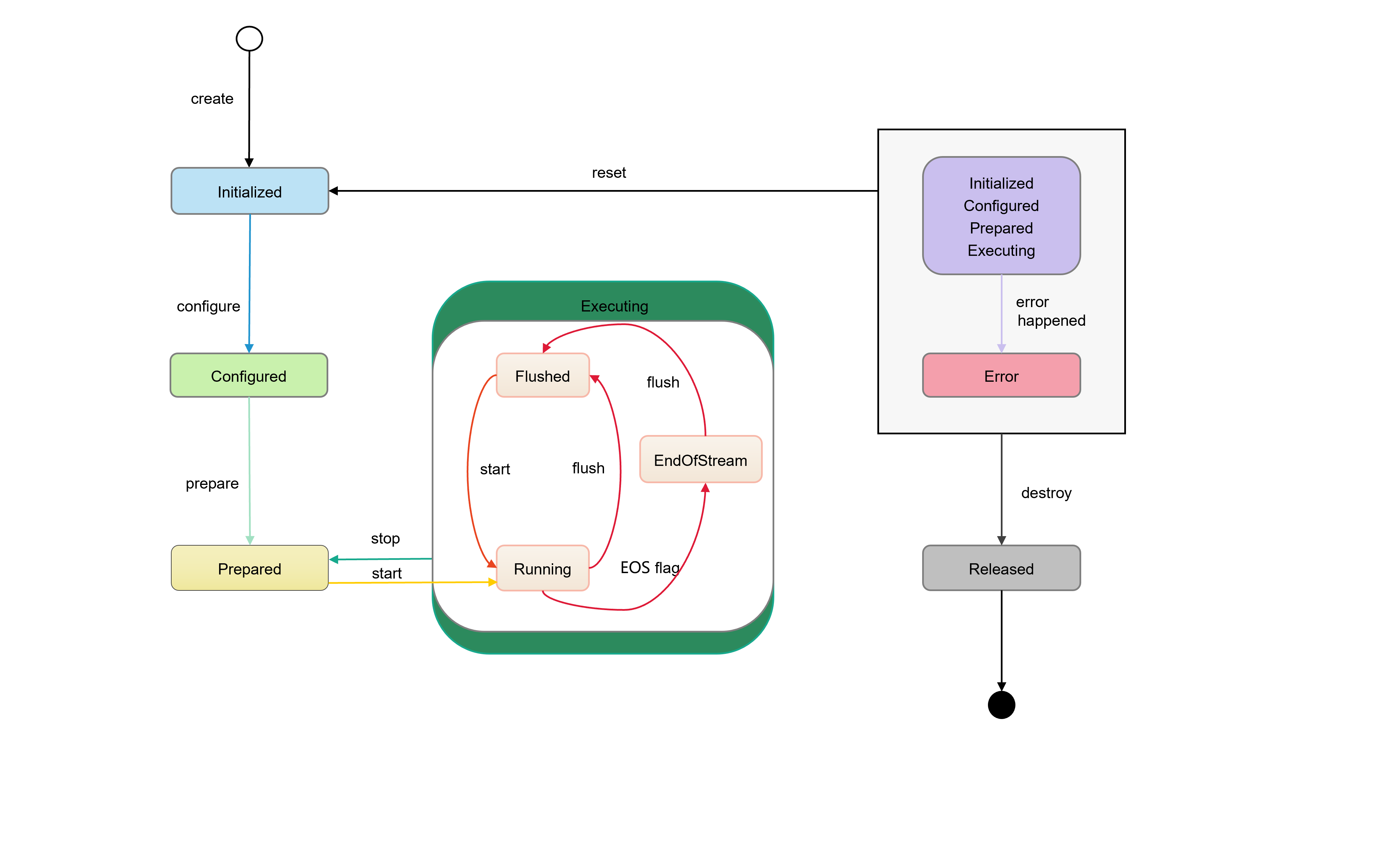
State Machine Interaction
-
Initialized state.
-
When a decoder instance is initially created, the decoder enters the Initialized state.
-
When OH_VideoDecoder_Reset is called in any state, the decoder can return to the Initialized state.
-
-
Configured state.
- In the Initialized state, call OH_VideoDecoder_Configure to configure the decoder. After the configuration is successful, the decoder enters the Configured state.
-
Prepared state.
-
In the Configured state, call OH_VideoDecoder_Prepare to enter the Prepared state.
-
In the Executing state, call OH_VideoDecoder_Stop to return to the Prepared state.
-
-
Executing state.
-
In the Prepared state, call OH_VideoDecoder_Start to enter the Executing state.
-
The Executing state contains three substates:
-
Running: Call OH_VideoDecoder_Start to enter the Running substate.
-
Flushed: Call OH_VideoDecoder_Flush to enter the Flushed substate.
-
End-of-Stream: When the decoder receives an input buffer whose flag is AVCODEC_BUFFER_FLAGS_EOS in OH_AVCodecBufferFlags, it enters the End-of-Stream substate. In this state, the decoder does not accept new inputs, but continues to generate outputs until the tail frame is output.
-
-
-
Error state.
-
In rare cases, the decoder enters the Error state when an exception occurs. An API returns an error code or an exception is reported through the OH_AVCodecOnError callback.
-
In the Error state, call OH_VideoDecoder_Reset to return to the Initialized state, or call OH_VideoDecoder_Destroy to enter the final Released state.
-
-
Released state.
- After using the decoder, you must call OH_VideoDecoder_Destroy to destroy the decoder instance and switch the decoder to the Released state.
Figure 1 State machine interaction
How to Develop
Read native_avcodec_videodecoder.h for the API reference.
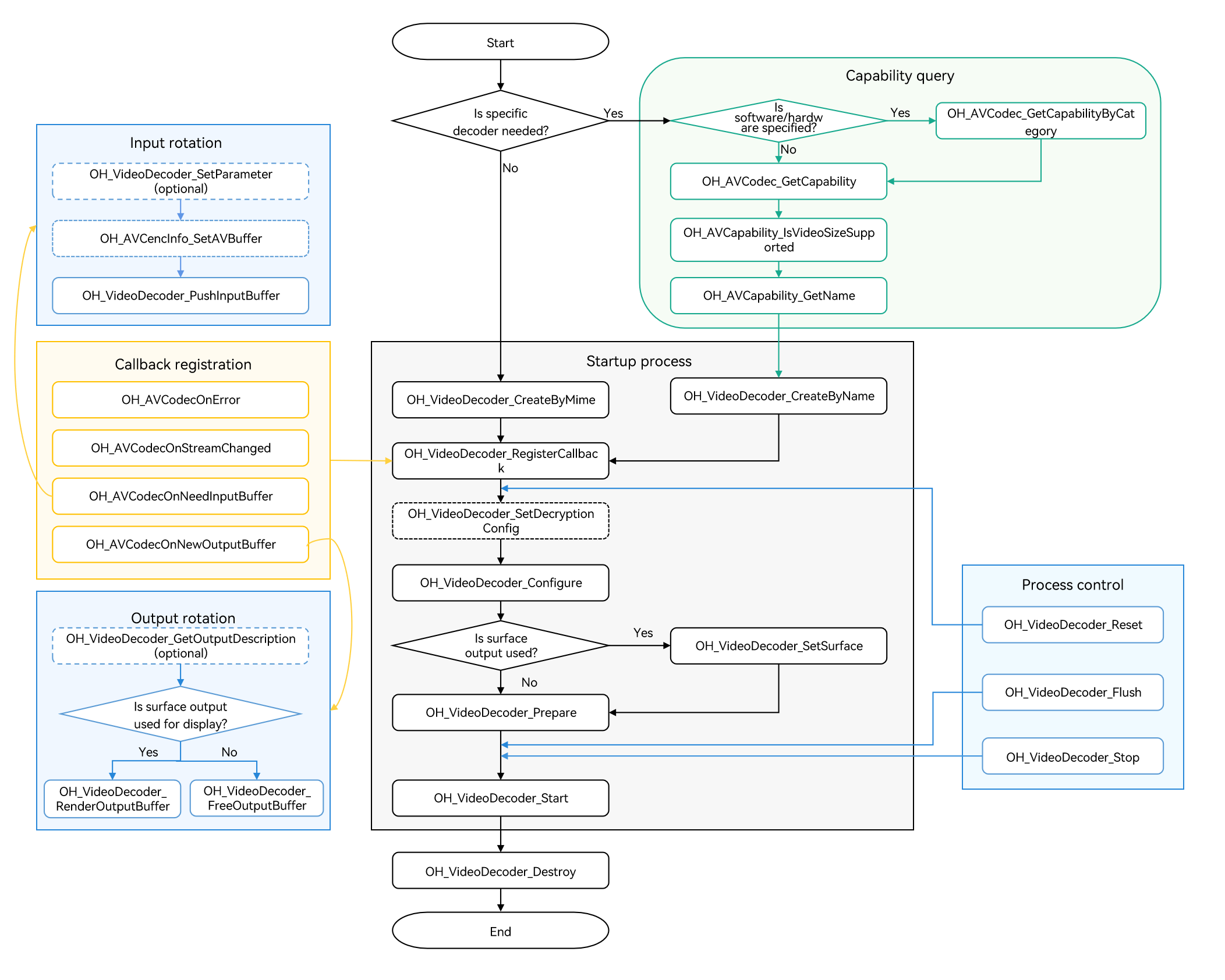
Refer to the following sample code to complete the basic video decoding process, including creating a decoder, setting decoding parameters, and starting, refreshing, resetting, stopping, and destroying resources.
Figure 2 Video decoding call relationship
-
The dotted line indicates an optional operation.
-
The solid line indicates a mandatory operation.
[h2]Linking the Dynamic Libraries in the CMake Script
target_link_libraries(sample PUBLIC libnative_media_codecbase.so)
target_link_libraries(sample PUBLIC libnative_media_core.so)
target_link_libraries(sample PUBLIC libnative_media_vdec.so)

The word sample in the preceding code snippet is only an example. Use the actual project directory name.
[h2]Defining the Basic Structure
The sample code provided in this section adheres to the C++17 standard and is for reference only. You can define your own buffer objects by referring to it.
-
Add the header files.
#include <condition_variable>
#include <memory>
#include <mutex>
#include <queue>
#include <shared_mutex>
-
Define the information about the decoder callback buffer.
struct CodecBufferInfo { CodecBufferInfo(uint32_t index, OH_AVBuffer *buffer): index(index), buffer(buffer), isValid(true) {} // Callback buffer. OH_AVBuffer *buffer = nullptr; // Index of the callback buffer. uint32_t index = 0; // Check whether the current buffer information is valid. bool isValid = true; }; -
Define the input and output queue for decoding.
class CodecBufferQueue { public: // Pass the callback buffer information to the queue. void Enqueue(const std::shared_ptr<CodecBufferInfo> bufferInfo) { std::unique_lock<std::mutex> lock(mutex_); bufferQueue_.push(bufferInfo); cond_.notify_all(); } // Obtain the information about the callback buffer. std::shared_ptr<CodecBufferInfo> Dequeue(int32_t timeoutMs = 1000) { std::unique_lock<std::mutex> lock(mutex_); (void)cond_.wait_for(lock, std::chrono::milliseconds(timeoutMs), [this]() { return !bufferQueue_.empty(); }); if (bufferQueue_.empty()) { return nullptr; } std::shared_ptr<CodecBufferInfo> bufferInfo = bufferQueue_.front(); bufferQueue_.pop(); return bufferInfo; } // Clear the queue. The previous callback buffer becomes unavailable. void Flush() { std::unique_lock<std::mutex> lock(mutex_); while (!bufferQueue_.empty()) { std::shared_ptr<CodecBufferInfo> bufferInfo = bufferQueue_.front(); // After the flush, stop, reset, and destroy operations are performed, the previous callback buffer information is invalid. bufferInfo->isValid = false; bufferQueue_.pop(); } } private: std::mutex mutex_; std::condition_variable cond_; std::queue<std::shared_ptr<CodecBufferInfo>> bufferQueue_; }; -
Configure global variables.
These global variables are for reference only. They can be encapsulated into an object based on service requirements.
// Video frame width.
int32_t width = 320;
// Video frame height.
int32_t height = 240;
// Video pixel format.
 OH_AVPixelFormat pixelFormat = AV_PIXEL_FORMAT_NV12;
// Video width stride.
int32_t widthStride = 0;
// Video height stride.
int32_t heightStride = 0;
// Pointer to the decoder instance.
OH_AVCodec *videoDec = nullptr;
// Decoder synchronization lock.
std::shared_mutex codecMutex;
// Decoder input queue.
CodecBufferQueue inQueue;
// Decoder output queue.
CodecBufferQueue outQueue;
[h2]Surface Mode
The following walks you through how to implement the entire video decoding process in surface mode and implement data rotation in asynchronous mode. In this example, an H.264 stream file is input, decoded, and rendered.
-
Add the header files.
#include <multimedia/player_framework/native_avcodec_videodecoder.h>
#include <multimedia/player_framework/native_avcapability.h>
#include <multimedia/player_framework/native_avcodec_base.h>
#include <multimedia/player_framework/native_avformat.h>
#include <multimedia/player_framework/native_avbuffer.h>
#include <fstream>
-
Create a decoder instance.
You can create a decoder by name or MIME type. In the code snippet below, the following variables are used:
-
videoDec: pointer to the video decoder instance.
-
capability: pointer to the decoder's capability.
-
OH_AVCODEC_MIMETYPE_VIDEO_AVC: AVC video codec.
// To create a decoder by name, call OH_AVCapability_GetName to obtain the codec names available and then call OH_VideoDecoder_CreateByName. If your application has special requirements, for example, expecting a decoder that supports a certain resolution, you can call OH_AVCodec_GetCapability to query the capability first.
OH_AVCapability *capability = OH_AVCodec_GetCapability(OH_AVCODEC_MIMETYPE_VIDEO_AVC, false);
// Create a hardware decoder instance.
OH_AVCapability *capability= OH_AVCodec_GetCapabilityByCategory(OH_AVCODEC_MIMETYPE_VIDEO_AVC, false, HARDWARE);
const char *name = OH_AVCapability_GetName(capability);
OH_AVCodec *videoDec = OH_VideoDecoder_CreateByName(name);
// Create a decoder by MIME type. Only specific codecs recommended by the system can be created in this way.
// If multiple codecs need to be created, create hardware decoder instances first. If the hardware resources are insufficient, create software decoder instances.
// Create an H.264 decoder for software/hardware decoding.
OH_AVCodec *videoDec = OH_VideoDecoder_CreateByMime(OH_AVCODEC_MIMETYPE_VIDEO_AVC);
// Create an H.265 decoder for software/hardware decoding.
OH_AVCodec *videoDec = OH_VideoDecoder_CreateByMime(OH_AVCODEC_MIMETYPE_VIDEO_HEVC);
-
-
Call OH_VideoDecoder_RegisterCallback() to register the callback functions.
Register the OH_AVCodecCallback struct that defines the following callback function pointers:
-
OH_AVCodecOnError, a callback used to report a decoder operation error. For details about the error codes, see OH_AVCodecOnError.
-
OH_AVCodecOnStreamChanged, a callback used to report a codec stream change, for example, stream width or height change.
-
OH_AVCodecOnNeedInputBuffer, a callback used to report input data required, which means that the decoder is ready for receiving data.
-
OH_AVCodecOnNewOutputBuffer, a callback used to report output data generated, which means that decoding is complete.
You need to process the callback functions to ensure that the decoder runs properly.
For details about the implementation of the callback function, see Sample Project.
// Implement the OH_AVCodecOnError callback function.
static void OnError(OH_AVCodec *codec, int32_t errorCode, void *userData)
{
    // Process the error code in the callback.
    (void)codec;
    (void)errorCode;
    (void)userData;
}

// Implement the OH_AVCodecOnStreamChanged callback function.
static void OnStreamChanged(OH_AVCodec *codec, OH_AVFormat *format, void *userData)
{
    // The changed video width and height can be obtained through format.
    (void)codec;
    (void)userData;
    bool ret = OH_AVFormat_GetIntValue(format, OH_MD_KEY_VIDEO_PIC_WIDTH, &width) &&
               OH_AVFormat_GetIntValue(format, OH_MD_KEY_VIDEO_PIC_HEIGHT, &height);
    if (!ret) {
        // Handle exceptions.
    }
}

// Implement the OH_AVCodecOnNeedInputBuffer callback function.
static void OnNeedInputBuffer(OH_AVCodec *codec, uint32_t index, OH_AVBuffer *buffer, void *userData)
{
    // The data buffer of the input frame and its index are sent to inQueue.
    (void)codec;
    (void)userData;
    inQueue.Enqueue(std::make_shared<CodecBufferInfo>(index, buffer));
}

// Implement the OH_AVCodecOnNewOutputBuffer callback function.
static void OnNewOutputBuffer(OH_AVCodec *codec, uint32_t index, OH_AVBuffer *buffer, void *userData)
{
    // The data buffer of the finished frame and its index are sent to outQueue.
    (void)codec;
    (void)userData;
    outQueue.Enqueue(std::make_shared<CodecBufferInfo>(index, buffer));
}

// Call OH_VideoDecoder_RegisterCallback() to register the callback functions.
OH_AVCodecCallback cb = {&OnError, &OnStreamChanged, &OnNeedInputBuffer, &OnNewOutputBuffer};
// Set the asynchronous callbacks.
OH_AVErrCode ret = OH_VideoDecoder_RegisterCallback(videoDec, cb, nullptr); // nullptr: userData on which the callback depends is empty.
if (ret != AV_ERR_OK) {
    // Handle exceptions.
}
- In the callback functions, pay attention to multi-thread synchronization for operations on the data queue.
- During video playback, if the SPS of the video stream contains color information, the decoder will return the information (RangeFlag, ColorPrimary, MatrixCoefficient, and TransferCharacteristic) through the OH_AVFormat parameter in the OH_AVCodecOnStreamChanged callback.
- In surface mode of video decoding, the internal data is processed by using High Efficiency Bandwidth Compression (HEBC) by default, and the values of widthStride and heightStride cannot be obtained.
-
-
(Optional) Call OH_VideoDecoder_SetDecryptionConfig to set the decryption configuration. Call this API after the media key system information is obtained and a media key is obtained but before Prepare() is called. For details about how to obtain such information, see step 4 in Media Data Demultiplexing. In surface mode, the DRM decryption capability supports both secure and non-secure video channels. For details about DRM APIs, see DRM.
Add the header files.
#include <multimedia/drm_framework/native_mediakeysystem.h>
#include <multimedia/drm_framework/native_mediakeysession.h>
#include <multimedia/drm_framework/native_drm_err.h>
#include <multimedia/drm_framework/native_drm_common.h>
Link the dynamic libraries in the CMake script.
target_link_libraries(sample PUBLIC libnative_drm.so)
Create a channel based on the content protection level required by the DRM stream and the content protection level supported by the hardware device.
If the content protection level required by the DRM stream is hardware-level protection, a secure video channel is recommended. The following is an example:
// Create a media key system based on the DRM information. The following uses com.wiseplay.drm as an example.
MediaKeySystem *system = nullptr;
int32_t ret = OH_MediaKeySystem_Create("com.wiseplay.drm", &system);
if (system == nullptr) {
    printf("create media key system failed");
    return;
}

// Create a decryption session. If a secure video channel is used, create a MediaKeySession with the content protection level of CONTENT_PROTECTION_LEVEL_HW_CRYPTO or higher.
MediaKeySession *session = nullptr;
DRM_ContentProtectionLevel contentProtectionLevel = CONTENT_PROTECTION_LEVEL_HW_CRYPTO;
ret = OH_MediaKeySystem_CreateMediaKeySession(system, &contentProtectionLevel, &session);
if (ret != DRM_OK) {
    // If the creation fails, refer to the DRM interface document and check logs.
    printf("create media key session failed.");
    return;
}
if (session == nullptr) {
    printf("media key session is nullptr.");
    return;
}

// Generate a media key request and set the response to the media key request.

// Set the decryption configuration, that is, set the decryption session and secure video channel flag to the decoder.
// If the DRM scheme supports a secure video channel, set secureVideoPath to true and create a secure decoder before using the channel.
// That is, in step 3, call OH_VideoDecoder_CreateByName, with a decoder name followed by .secure (for example, [CodecName].secure) passed in, to create a secure decoder.
bool secureVideoPath = true;
ret = OH_VideoDecoder_SetDecryptionConfig(videoDec, session, secureVideoPath);
If the content protection level required by the DRM stream is software-level protection, a non-secure video channel is recommended. The following is an example:
// Create a media key system based on the media key system information. The following uses com.wiseplay.drm as an example. MediaKeySystem *system = nullptr; int32_t ret = OH_MediaKeySystem_Create("com.wiseplay.drm", &system); if (system == nullptr) { printf("create media key system failed"); return; } // Create a decryption session. If a secure video channel is used, create a MediaKeySession with the content protection level of CONTENT_PROTECTION_LEVEL_HW_CRYPTO or higher. // To use a non-secure video channel, create a MediaKeySession with the content protection level of CONTENT_PROTECTION_LEVEL_SW_CRYPTO or higher. MediaKeySession *session = nullptr; DRM_ContentProtectionLevel contentProtectionLevel = CONTENT_PROTECTION_LEVEL_SW_CRYPTO; ret = OH_MediaKeySystem_CreateMediaKeySession(system, &contentProtectionLevel, &session); if (ret != DRM_ERR_OK) { // If the creation fails, refer to the DRM interface document and check logs. printf("create media key session failed."); return; } if (session == nullptr) { printf("media key session is nullptr."); return; } // Generate a media key request and set the response to the media key request. // Set the decryption configuration, that is, set the decryption session and secure video channel flag to the decoder. // If the DRM scheme supports a secure video channel, set secureVideoPath to true and create a secure decoder before using the channel. // That is, in step 2, call OH_VideoDecoder_CreateByName, with a decoder name followed by .secure (for example, [CodecName].secure) passed in, to create a secure decoder. bool secureVideoPath = false; ret = OH_VideoDecoder_SetDecryptionConfig(videoDec, session, secureVideoPath); -
Call OH_VideoDecoder_Configure() to configure the decoder.
For details about the configurable options, see Video Dedicated Key-Value Pairs.
For details about the parameter verification rules, see OH_VideoDecoder_Configure().
The parameter value ranges can be obtained through the capability query interface. For details, see Obtaining Supported Codecs.
Currently, the following options must be configured for all supported formats: video frame width and height.
auto format = std::shared_ptr<OH_AVFormat>(OH_AVFormat_Create(), OH_AVFormat_Destroy); if (format == nullptr) { // Handle exceptions. } // Set the format. OH_AVFormat_SetIntValue(format.get(), OH_MD_KEY_WIDTH, width); // Mandatory. OH_AVFormat_SetIntValue(format.get(), OH_MD_KEY_HEIGHT, height); // Mandatory. OH_AVFormat_SetIntValue(format.get(), OH_MD_KEY_PIXEL_FORMAT, pixelFormat); // (Optional) Configure low-latency decoding. // If supported by the platform, the video decoder outputs frames in the decoding sequence when OH_MD_KEY_VIDEO_ENABLE_LOW_LATENCY is enabled. OH_AVFormat_SetIntValue(format.get(), OH_MD_KEY_VIDEO_ENABLE_LOW_LATENCY, 1); // Configure the decoder. OH_AVErrCode ret = OH_VideoDecoder_Configure(videoDec, format.get()); if (ret != AV_ERR_OK) { // Handle exceptions. } -
Set the surface.
You can obtain NativeWindow in either of the following ways:
6.1 If the image is directly displayed after being decoded, obtain NativeWindow from the XComponent.
Add the header files.
#include <native_window/external_window.h>
Link the dynamic libraries in the CMake script.
target_link_libraries(sample PUBLIC libnative_window.so)
6.1.1 On ArkTS, call getXComponentSurfaceId of the xComponentController to obtain the surface ID of the XComponent. For details about the operation, see Custom Rendering (XComponent).
6.1.2 On the native side, call OH_NativeWindow_CreateNativeWindowFromSurfaceId to create a NativeWindow instance.
OHNativeWindow* nativeWindow;
// Create a NativeWindow instance based on the surface ID obtained in step 1.1.
OH_NativeWindow_CreateNativeWindowFromSurfaceId(surfaceId, &nativeWindow);
6.2 If OpenGL post-processing is performed after decoding, obtain NativeWindow from NativeImage. For details about the operation, see NativeImage.
You perform this step during decoding, that is, dynamically switch the surface.
// Set the surface.
// Set the window parameters.
OH_AVErrCode ret = OH_VideoDecoder_SetSurface(videoDec, nativeWindow);  // Obtain a NativeWindow instance using either of the preceding methods.
if (ret != AV_ERR_OK) {
    // Handle exceptions.
}
// Configure the matching mode between the video and screen. (Scale the buffer at the original aspect ratio to enable the smaller side of the buffer to match the window, while making the excess part transparent.)
OH_NativeWindow_NativeWindowSetScalingModeV2(nativeWindow, OH_SCALING_MODE_SCALE_CROP_V2);
If both decoder 1 and decoder 2 are bound to the same NativeWindow using the OH_VideoDecoder_SetSurface function, and decoder 2 is running, destroying decoder 1 with OH_VideoDecoder_Destroy will cause decoder 2's video playback to freeze.
Consider the following approaches:
- Wait for decoder 1 to be fully released before starting decoder 2 with OH_VideoDecoder_Start.
- Use surface 1 for decoder 1, and create a temporary surface for decoder 2 using OH_ConsumerSurface_Create. Once decoder 1 is released, bind decoder 2 to surface 1 using OH_VideoDecoder_SetSurface. For details, see Concurrently Creating a Video Decoder and Initializing NativeWindow.
-
Call OH_VideoDecoder_Prepare().
This API prepares internal resources for the decoder.
OH_AVErrCode ret = OH_VideoDecoder_Prepare(videoDec); if (ret != AV_ERR_OK) { // Handle exceptions. } -
Call OH_VideoDecoder_Start() to start the decoder.
// Start the decoder. OH_AVErrCode ret = OH_VideoDecoder_Start(videoDec); if (ret != AV_ERR_OK) { // Handle exceptions. } -
(Optional) Call OH_VideoDecoder_SetParameter() to set the surface parameters of the decoder.
For details about the configurable options, see Video Dedicated Key-Value Pairs.
auto format = std::shared_ptr<OH_AVFormat>(OH_AVFormat_Create(), OH_AVFormat_Destroy); if (format == nullptr) { // Handle exceptions. } // Configure the display rotation angle. OH_AVFormat_SetIntValue(format.get(), OH_MD_KEY_ROTATION, 90); OH_AVErrCode ret = OH_VideoDecoder_SetParameter(videoDec, format.get()); if (ret != AV_ERR_OK) { // Handle exceptions. } -
(Optional) Call OH_AVCencInfo_SetAVBuffer() to set the Common Encryption Scheme (CENC) information.
If the program to play is DRM encrypted and the application implements media demultiplexing instead of using the system's demuxer, you must call OH_AVCencInfo_SetAVBuffer() to set the CENC information to the AVBuffer. In this way, the AVBuffer carries the data to be decrypted and CENC information, so that the media data in the AVBuffer can be decrypted. You do not need to call this API when the application uses the system's demuxer.
Add the header files.
#include <multimedia/player_framework/native_cencinfo.h>
Link the dynamic libraries in the CMake script.
target_link_libraries(sample PUBLIC libnative_media_avcencinfo.so)
In the code snippet below, the following variable is used:
- buffer: parameter passed by the callback function OnNeedInputBuffer.
uint32_t keyIdLen = DRM_KEY_ID_SIZE; uint8_t keyId[] = { 0xd4, 0xb2, 0x01, 0xe4, 0x61, 0xc8, 0x98, 0x96, 0xcf, 0x05, 0x22, 0x39, 0x8d, 0x09, 0xe6, 0x28}; uint32_t ivLen = DRM_KEY_IV_SIZE; uint8_t iv[] = { 0xbf, 0x77, 0xed, 0x51, 0x81, 0xde, 0x36, 0x3e, 0x52, 0xf7, 0x20, 0x4f, 0x72, 0x14, 0xa3, 0x95}; uint32_t encryptedBlockCount = 0; uint32_t skippedBlockCount = 0; uint32_t firstEncryptedOffset = 0; uint32_t subsampleCount = 1; DrmSubsample subsamples[1] = { {0x10, 0x16} }; // Create a CencInfo instance. OH_AVCencInfo *cencInfo = OH_AVCencInfo_Create(); if (cencInfo == nullptr) { // Handle exceptions. } // Set the decryption algorithm. OH_AVErrCode errNo = OH_AVCencInfo_SetAlgorithm(cencInfo, DRM_ALG_CENC_AES_CTR); if (errNo != AV_ERR_OK) { // Handle exceptions. } // Set KeyId and Iv. errNo = OH_AVCencInfo_SetKeyIdAndIv(cencInfo, keyId, keyIdLen, iv, ivLen); if (errNo != AV_ERR_OK) { // Handle exceptions. } // Set the sample information. errNo = OH_AVCencInfo_SetSubsampleInfo(cencInfo, encryptedBlockCount, skippedBlockCount, firstEncryptedOffset, subsampleCount, subsamples); if (errNo != AV_ERR_OK) { // Handle exceptions. } // Set the mode. KeyId, Iv, and SubSamples have been set. errNo = OH_AVCencInfo_SetMode(cencInfo, DRM_CENC_INFO_KEY_IV_SUBSAMPLES_SET); if (errNo != AV_ERR_OK) { // Handle exceptions. } // Set CencInfo to the AVBuffer. errNo = OH_AVCencInfo_SetAVBuffer(cencInfo, buffer); if (errNo != AV_ERR_OK) { // Handle exceptions. } // Destroy the CencInfo instance. errNo = OH_AVCencInfo_Destroy(cencInfo); if (errNo != AV_ERR_OK) { // Handle exceptions. } -
Call OH_VideoDecoder_PushInputBuffer() to push the stream to the input buffer for decoding.
In the code snippet below, the following variables are used:
-
size, offset, pts, and frameData: size, offset, timestamp, and frame data. For details about how to obtain such information, see step 9 in Media Data Demultiplexing.
-
flags: type of the buffer flag. For details, see OH_AVCodecBufferFlags.
The member variables of bufferInfo are as follows:
-
buffer: parameter passed by the callback function OnNeedInputBuffer. You can obtain the virtual address of the input stream by calling OH_AVBuffer_GetAddr.
-
index: parameter passed by the callback function OnNeedInputBuffer, which uniquely corresponds to the buffer.
-
isValid: whether the buffer instance stored in bufferInfo is valid.
std::shared_ptr<CodecBufferInfo> bufferInfo = inQueue.Dequeue(); std::shared_lock<std::shared_mutex> lock(codecMutex); if (bufferInfo == nullptr || !bufferInfo->isValid) { // Handle exceptions. } // Write stream data. uint8_t *addr = OH_AVBuffer_GetAddr(bufferInfo->buffer); if (addr == nullptr) { // Handle exceptions. } int32_t capacity = OH_AVBuffer_GetCapacity(bufferInfo->buffer); if (size > capacity) { // Handle exceptions. } memcpy(addr, frameData, size); // Configure the size, offset, and timestamp of the frame data. OH_AVCodecBufferAttr info; info.size = size; info.offset = offset; info.pts = pts; info.flags = flags; // Write the information to the buffer. OH_AVErrCode setBufferRet = OH_AVBuffer_SetBufferAttr(bufferInfo->buffer, &info); if (setBufferRet != AV_ERR_OK) { // Handle exceptions. } // Send the data to the input buffer for decoding. OH_AVErrCode pushInputRet = OH_VideoDecoder_PushInputBuffer(videoDec, bufferInfo->index); if (pushInputRet != AV_ERR_OK) { // Handle exceptions. } -
-
Call OH_VideoDecoder_RenderOutputBuffer() or OH_VideoDecoder_RenderOutputBufferAtTime() to render the data and free the output buffer, or call OH_VideoDecoder_FreeOutputBuffer() to directly free the output buffer.
In the following example, the member variables of bufferInfo are as follows:
-
index: parameter passed by the callback function OnNewOutputBuffer, which uniquely corresponds to the buffer.
-
buffer: parameter passed by the callback function OnNewOutputBuffer. In surface mode, you cannot obtain the virtual address of the image by calling OH_AVBuffer_GetAddr.
-
isValid: whether the buffer instance stored in bufferInfo is valid.
std::shared_ptr<CodecBufferInfo> bufferInfo = outQueue.Dequeue();
std::shared_lock<std::shared_mutex> lock(codecMutex);
if (bufferInfo == nullptr || !bufferInfo->isValid) {
    // Handle exceptions.
}
// Obtain the decoded information.
OH_AVCodecBufferAttr info;
OH_AVErrCode getBufferRet = OH_AVBuffer_GetBufferAttr(bufferInfo->buffer, &info);
if (getBufferRet != AV_ERR_OK) {
    // Handle exceptions.
}
// You can determine the value.
bool isRender;
bool isNeedRenderAtTime;
OH_AVErrCode ret = AV_ERR_OK;
if (isRender) {
    // Render the data and free the output buffer. index is the index of the buffer.
    if (isNeedRenderAtTime){
        // Obtain the system absolute time, and call renderTimestamp to display the time based on service requirements.
        int64_t renderTimestamp =
            std::chrono::duration_cast<std::chrono::nanoseconds>(std::chrono::high_resolution_clock::now().time_since_epoch()).count();
        ret = OH_VideoDecoder_RenderOutputBufferAtTime(videoDec, bufferInfo->index, renderTimestamp);
    } else {
        ret = OH_VideoDecoder_RenderOutputBuffer(videoDec, bufferInfo->index);
    }

} else {
    // Free the output buffer.
    ret = OH_VideoDecoder_FreeOutputBuffer(videoDec, bufferInfo->index);
}
if (ret != AV_ERR_OK) {
    // Handle exceptions.
}
- To obtain the buffer attributes, such as pixel_format and stride, call OH_NativeWindow_NativeWindowHandleOpt.
- To render the data and free the output buffer, you are advised to call OH_VideoDecoder_RenderOutputBufferAtTime first.
-
-
(Optional) Call OH_VideoDecoder_Flush() to refresh the decoder.
After OH_VideoDecoder_Flush is called, the decoder remains in the Running state, but the input and output data and parameter set (such as the H.264 PPS/SPS) buffered in the decoder are cleared. To continue decoding, you must call OH_VideoDecoder_Start again.
In the code snippet below, the following variables are used:
- xpsData and xpsSize: PPS/SPS information. For details about how to obtain such information, see Media Data Demultiplexing.
std::unique_lock<std::shared_mutex> lock(codecMutex); // Refresh the decoder. OH_AVErrCode flushRet = OH_VideoDecoder_Flush(videoDec); if (flushRet != AV_ERR_OK) { // Handle exceptions. } inQueue.Flush(); outQueue.Flush(); // Start decoding again. OH_AVErrCode startRet = OH_VideoDecoder_Start(videoDec); if (startRet != AV_ERR_OK) { // Handle exceptions. } std::shared_ptr<CodecBufferInfo> bufferInfo = inQueue.Dequeue(); if (bufferInfo == nullptr || !bufferInfo->isValid) { // Handle exceptions. } // Retransfer PPS/SPS. // Configure the frame PPS/SPS information. uint8_t *addr = OH_AVBuffer_GetAddr(bufferInfo->buffer); if (addr == nullptr) { // Handle exceptions. } int32_t capacity = OH_AVBuffer_GetCapacity(bufferInfo->buffer); if (xpsSize > capacity) { // Handle exceptions. } memcpy(addr, xpsData, xpsSize); OH_AVCodecBufferAttr info; info.flags = AVCODEC_BUFFER_FLAG_CODEC_DATA; // Write the information to the buffer. OH_AVErrCode setBufferRet = OH_AVBuffer_SetBufferAttr(bufferInfo->buffer, &info); if (setBufferRet != AV_ERR_OK) { // Handle exceptions. } // Push the frame data to the decoder. index is the index of the corresponding queue. OH_AVErrCode pushInputRet = OH_VideoDecoder_PushInputBuffer(videoDec, bufferInfo->index); if (pushInputRet != AV_ERR_OK) { // Handle exceptions. } -
(Optional) Call OH_VideoDecoder_Reset() to reset the decoder.
After OH_VideoDecoder_Reset is called, the decoder returns to the Initialized state. To continue decoding, you must call OH_VideoDecoder_Configure, OH_VideoDecoder_SetSurface, and OH_VideoDecoder_Prepare in sequence.
std::unique_lock<std::shared_mutex> lock(codecMutex); // Reset the decoder. OH_AVErrCode resetRet = OH_VideoDecoder_Reset(videoDec); if (resetRet != AV_ERR_OK) { // Handle exceptions. } inQueue.Flush(); outQueue.Flush(); // Reconfigure the decoder. auto format = std::shared_ptr<OH_AVFormat>(OH_AVFormat_Create(), OH_AVFormat_Destroy); if (format == nullptr) { // Handle exceptions. } OH_AVErrCode configRet = OH_VideoDecoder_Configure(videoDec, format.get()); if (configRet != AV_ERR_OK) { // Handle exceptions. } // Reconfigure the surface in surface mode. This is not required in buffer mode. OH_AVErrCode setRet = OH_VideoDecoder_SetSurface(videoDec, nativeWindow); if (setRet != AV_ERR_OK) { // Handle exceptions. } // The decoder is ready again. OH_AVErrCode prepareRet = OH_VideoDecoder_Prepare(videoDec); if (prepareRet != AV_ERR_OK) { // Handle exceptions. } -
(Optional) Call OH_VideoDecoder_Stop() to stop the decoder.
After OH_VideoDecoder_Stop() is called, the decoder retains the decoding instance and releases the input and output buffers. You can directly call OH_VideoDecoder_Start to continue decoding. The first input buffer must carry the parameter set, starting from the IDR frame.
std::unique_lock<std::shared_mutex> lock(codecMutex); // Stop the decoder. OH_AVErrCode ret = OH_VideoDecoder_Stop(videoDec); if (ret != AV_ERR_OK) { // Handle exceptions. } inQueue.Flush(); outQueue.Flush(); -
Call OH_VideoDecoder_Destroy() to destroy the decoder instance and release resources.

- This API cannot be called in the callback function.
- After the call, you must set a null pointer to the decoder to prevent program errors caused by wild pointers.
std::unique_lock<std::shared_mutex> lock(codecMutex);
// Release the nativeWindow instance.
if(nativeWindow != nullptr){
    OH_NativeWindow_DestroyNativeWindow(nativeWindow);
    nativeWindow = nullptr;
}
// Call OH_VideoDecoder_Destroy to destroy the decoder.
OH_AVErrCode ret = AV_ERR_OK;
if (videoDec != nullptr) {
    OH_VideoDecoder_Destroy(videoDec);
    videoDec = nullptr;
}
inQueue.Flush();
outQueue.Flush();
[h2]Buffer Mode
The following walks you through how to implement the entire video decoding process in buffer mode and implement data rotation in asynchronous mode. In this example, an H.264 stream file is input and decoded into a YUV file.
-
Add the header files.
#include <multimedia/player_framework/native_avcodec_videodecoder.h>
#include <multimedia/player_framework/native_avcapability.h>
#include <multimedia/player_framework/native_avcodec_base.h>
#include <multimedia/player_framework/native_avformat.h>
#include <multimedia/player_framework/native_avbuffer.h>
#include <native_buffer/native_buffer.h>
#include <fstream>
-
Create a decoder instance.
The procedure is the same as that in surface mode and is not described here.
// To create a decoder by name, call OH_AVCapability_GetName to obtain the codec names available and then call OH_VideoDecoder_CreateByName. If your application has special requirements, for example, expecting a decoder that supports a certain resolution, you can call OH_AVCodec_GetCapability to query the capability first.
OH_AVCapability *capability = OH_AVCodec_GetCapability(OH_AVCODEC_MIMETYPE_VIDEO_AVC, false);
const char *name = OH_AVCapability_GetName(capability);
OH_AVCodec *videoDec = OH_VideoDecoder_CreateByName(name);
// Create a decoder by MIME type. Only specific codecs recommended by the system can be created in this way.
// If multiple codecs need to be created, create hardware decoder instances first. If the hardware resources are insufficient, create software decoder instances.
// Create an H.264 decoder for software/hardware decoding.
OH_AVCodec *videoDec = OH_VideoDecoder_CreateByMime(OH_AVCODEC_MIMETYPE_VIDEO_AVC);
// Create an H.265 decoder for hardware decoding.
OH_AVCodec *videoDec = OH_VideoDecoder_CreateByMime(OH_AVCODEC_MIMETYPE_VIDEO_HEVC);
-
Call OH_VideoDecoder_RegisterCallback() to register the callback functions.
Register the OH_AVCodecCallback struct that defines the following callback function pointers:
-
OH_AVCodecOnError, a callback used to report a decoder operation error. For details about the error codes, see OH_AVCodecOnError.
-
OH_AVCodecOnStreamChanged, a callback used to report a codec stream change, for example, stream width or height change.
-
OH_AVCodecOnNeedInputBuffer, a callback used to report input data required, which means that the decoder is ready for receiving data.
-
OH_AVCodecOnNewOutputBuffer, a callback used to report output data generated, which means that decoding is complete.
You need to process the callback functions to ensure that the decoder runs properly.
For details about the implementation of the callback function, see Sample Project.
int32_t cropTop = 0;
int32_t cropBottom = 0;
int32_t cropLeft = 0;
int32_t cropRight = 0;
bool isFirstFrame = true;
// Implement the OH_AVCodecOnError callback function.
static void OnError(OH_AVCodec *codec, int32_t errorCode, void *userData)
{
    // Process the error code in the callback.
    (void)codec;
    (void)errorCode;
    (void)userData;
}

// Implement the OH_AVCodecOnStreamChanged callback function.
static void OnStreamChanged(OH_AVCodec *codec, OH_AVFormat *format, void *userData)
{
    // Optional. Configure the data when you want to obtain the video width, height, and stride.
    // The changed video width, height, and stride can be obtained through format.
    (void)codec;
    (void)userData;
    bool ret = OH_AVFormat_GetIntValue(format, OH_MD_KEY_VIDEO_PIC_WIDTH, &width) &&
               OH_AVFormat_GetIntValue(format, OH_MD_KEY_VIDEO_PIC_HEIGHT, &height) &&
               OH_AVFormat_GetIntValue(format, OH_MD_KEY_VIDEO_STRIDE, &widthStride) &&
               OH_AVFormat_GetIntValue(format, OH_MD_KEY_VIDEO_SLICE_HEIGHT, &heightStride) &&
               // (Optional) Obtain the cropped rectangle information.
               OH_AVFormat_GetIntValue(format, OH_MD_KEY_VIDEO_CROP_TOP, &cropTop) &&
               OH_AVFormat_GetIntValue(format, OH_MD_KEY_VIDEO_CROP_BOTTOM, &cropBottom) &&
               OH_AVFormat_GetIntValue(format, OH_MD_KEY_VIDEO_CROP_LEFT, &cropLeft) &&
               OH_AVFormat_GetIntValue(format, OH_MD_KEY_VIDEO_CROP_RIGHT, &cropRight);
    if (!ret) {
        // Handle exceptions.
    }
}

// Implement the OH_AVCodecOnNeedInputBuffer callback function.
static void OnNeedInputBuffer(OH_AVCodec *codec, uint32_t index, OH_AVBuffer *buffer, void *userData)
{
    // The data buffer of the input frame and its index are sent to inQueue.
    (void)codec;
    (void)userData;
    inQueue.Enqueue(std::make_shared<CodecBufferInfo>(index, buffer));
}

// Implement the OH_AVCodecOnNewOutputBuffer callback function.
static void OnNewOutputBuffer(OH_AVCodec *codec, uint32_t index, OH_AVBuffer *buffer, void *userData)
{
    // Optional. Configure the data when you want to obtain the video width, height, and stride.
    // Obtain the video width, height, and stride.
    if (isFirstFrame) {
        auto format = std::shared_ptr<OH_AVFormat>(OH_VideoDecoder_GetOutputDescription(codec), OH_AVFormat_Destroy);
        if (format == nullptr) {
            // Handle exceptions.
        }
        bool ret = OH_AVFormat_GetIntValue(format.get(), OH_MD_KEY_VIDEO_PIC_WIDTH, &width) &&
                   OH_AVFormat_GetIntValue(format.get(), OH_MD_KEY_VIDEO_PIC_HEIGHT, &height) &&
                   OH_AVFormat_GetIntValue(format.get(), OH_MD_KEY_VIDEO_STRIDE, &widthStride) &&
                   OH_AVFormat_GetIntValue(format.get(), OH_MD_KEY_VIDEO_SLICE_HEIGHT, &heightStride) &&
                   // (Optional) Obtain the cropped rectangle information.
                   OH_AVFormat_GetIntValue(format.get(), OH_MD_KEY_VIDEO_CROP_TOP, &cropTop) &&
                   OH_AVFormat_GetIntValue(format.get(), OH_MD_KEY_VIDEO_CROP_BOTTOM, &cropBottom) &&
                   OH_AVFormat_GetIntValue(format.get(), OH_MD_KEY_VIDEO_CROP_LEFT, &cropLeft) &&
                   OH_AVFormat_GetIntValue(format.get(), OH_MD_KEY_VIDEO_CROP_RIGHT, &cropRight);
        if (!ret) {
            // Handle exceptions.
        }
        isFirstFrame = false;
    }
    // The data buffer of the finished frame and its index are sent to outQueue.
    (void)userData;
    outQueue.Enqueue(std::make_shared<CodecBufferInfo>(index, buffer));
}
// Call OH_VideoDecoder_RegisterCallback() to register the callback functions.
OH_AVCodecCallback cb = {&OnError, &OnStreamChanged, &OnNeedInputBuffer, &OnNewOutputBuffer};
// Set the asynchronous callbacks.
OH_AVErrCode ret = OH_VideoDecoder_RegisterCallback(videoDec, cb, nullptr); // nullptr: userData on which the callback depends is empty.
if (ret != AV_ERR_OK) {
    // Handle exceptions.
}
In the callback functions, pay attention to multi-thread synchronization for operations on the data queue.
-
-
(Optional) Call OH_VideoDecoder_SetDecryptionConfig to set the decryption configuration. Call this API after the media key system information is obtained and a media key is obtained but before Prepare() is called. For details about how to obtain such information, see step 4 in Media Data Demultiplexing. In buffer mode, the DRM decryption capability supports only non-secure video channels. For details about DRM APIs, see DRM.
Add the header files.
#include <multimedia/drm_framework/native_mediakeysystem.h>
#include <multimedia/drm_framework/native_mediakeysession.h>
#include <multimedia/drm_framework/native_drm_err.h>
#include <multimedia/drm_framework/native_drm_common.h>
Link the dynamic libraries in the CMake script.
target_link_libraries(sample PUBLIC libnative_drm.so)
The sample code is as follows.
// Create a media key system based on the media key system information. The following uses com.wiseplay.drm as an example. MediaKeySystem *system = nullptr; int32_t ret = OH_MediaKeySystem_Create("com.wiseplay.drm", &system); if (system == nullptr) { printf("create media key system failed"); return; } // Create a media key session. // To use a non-secure video channel, create a MediaKeySession with the content protection level of CONTENT_PROTECTION_LEVEL_SW_CRYPTO or higher. MediaKeySession *session = nullptr; DRM_ContentProtectionLevel contentProtectionLevel = CONTENT_PROTECTION_LEVEL_SW_CRYPTO; ret = OH_MediaKeySystem_CreateMediaKeySession(system, &contentProtectionLevel, &session); if (ret != DRM_ERR_OK) { // If the creation fails, refer to the DRM interface document and check logs. printf("create media key session failed."); return; } if (session == nullptr) { printf("media key session is nullptr."); return; } // Generate a media key request and set the response to the media key request. // Set the decryption configuration, that is, set the decryption session and secure video channel flag to the decoder. bool secureVideoPath = false; ret = OH_VideoDecoder_SetDecryptionConfig(videoDec, session, secureVideoPath); -
Call OH_VideoDecoder_Configure() to configure the decoder.
The procedure is the same as that in surface mode and is not described here.
auto format = std::shared_ptr<OH_AVFormat>(OH_AVFormat_Create(), OH_AVFormat_Destroy); if (format == nullptr) { // Handle exceptions. } // Set the format. OH_AVFormat_SetIntValue(format.get(), OH_MD_KEY_WIDTH, width); // Mandatory. OH_AVFormat_SetIntValue(format.get(), OH_MD_KEY_HEIGHT, height); // Mandatory. OH_AVFormat_SetIntValue(format.get(), OH_MD_KEY_PIXEL_FORMAT, pixelFormat); // Configure the decoder. OH_AVErrCode ret = OH_VideoDecoder_Configure(videoDec, format.get()); if (ret != AV_ERR_OK) { // Handle exceptions. } -
Call OH_VideoDecoder_Prepare().
This API prepares internal resources for the decoder.
OH_AVErrCode ret = OH_VideoDecoder_Prepare(videoDec); if (ret != AV_ERR_OK) { // Handle exceptions. } -
Call OH_VideoDecoder_Start() to start the decoder.
std::unique_ptr<std::ofstream> outputFile = std::make_unique<std::ofstream>(); if (outputFile != nullptr) { outputFile->open("/*yourpath*.yuv", std::ios::out | std::ios::binary | std::ios::ate); } // Start the decoder. OH_AVErrCode ret = OH_VideoDecoder_Start(videoDec); if (ret != AV_ERR_OK) { // Handle exceptions. } -
(Optional) Call OH_VideoDecoder_SetParameter() to set the decoder parameters.
For details about the configurable options, see Video Dedicated Key-Value Pairs.
auto format = std::shared_ptr<OH_AVFormat>(OH_AVFormat_Create(), OH_AVFormat_Destroy); if (format == nullptr) { // Handle exceptions. } // Set the frame rate. OH_AVFormat_SetDoubleValue(format.get(), OH_MD_KEY_FRAME_RATE, 30.0); OH_AVErrCode ret = OH_VideoDecoder_SetParameter(videoDec, format.get()); if (ret != AV_ERR_OK) { // Handle exceptions. } -
(Optional) Call OH_AVCencInfo_SetAVBuffer() to set the CENC information.
The procedure is the same as that in surface mode and is not described here.
The sample code is as follows.
uint32_t keyIdLen = DRM_KEY_ID_SIZE; uint8_t keyId[] = { 0xd4, 0xb2, 0x01, 0xe4, 0x61, 0xc8, 0x98, 0x96, 0xcf, 0x05, 0x22, 0x39, 0x8d, 0x09, 0xe6, 0x28}; uint32_t ivLen = DRM_KEY_IV_SIZE; uint8_t iv[] = { 0xbf, 0x77, 0xed, 0x51, 0x81, 0xde, 0x36, 0x3e, 0x52, 0xf7, 0x20, 0x4f, 0x72, 0x14, 0xa3, 0x95}; uint32_t encryptedBlockCount = 0; uint32_t skippedBlockCount = 0; uint32_t firstEncryptedOffset = 0; uint32_t subsampleCount = 1; DrmSubsample subsamples[1] = { {0x10, 0x16} }; // Create a CencInfo instance. OH_AVCencInfo *cencInfo = OH_AVCencInfo_Create(); if (cencInfo == nullptr) { // Handle exceptions. } // Set the decryption algorithm. OH_AVErrCode errNo = OH_AVCencInfo_SetAlgorithm(cencInfo, DRM_ALG_CENC_AES_CTR); if (errNo != AV_ERR_OK) { // Handle exceptions. } // Set KeyId and Iv. errNo = OH_AVCencInfo_SetKeyIdAndIv(cencInfo, keyId, keyIdLen, iv, ivLen); if (errNo != AV_ERR_OK) { // Handle exceptions. } // Set the sample information. errNo = OH_AVCencInfo_SetSubsampleInfo(cencInfo, encryptedBlockCount, skippedBlockCount, firstEncryptedOffset, subsampleCount, subsamples); if (errNo != AV_ERR_OK) { // Handle exceptions. } // Set the mode. KeyId, Iv, and SubSamples have been set. errNo = OH_AVCencInfo_SetMode(cencInfo, DRM_CENC_INFO_KEY_IV_SUBSAMPLES_SET); if (errNo != AV_ERR_OK) { // Handle exceptions. } // Set CencInfo to the AVBuffer. errNo = OH_AVCencInfo_SetAVBuffer(cencInfo, buffer); if (errNo != AV_ERR_OK) { // Handle exceptions. } // Destroy the CencInfo instance. errNo = OH_AVCencInfo_Destroy(cencInfo); if (errNo != AV_ERR_OK) { // Handle exceptions. } -
Call OH_VideoDecoder_PushInputBuffer() to push the stream to the input buffer for decoding.
The procedure is the same as that in surface mode and is not described here.
std::shared_ptr<CodecBufferInfo> bufferInfo = inQueue.Dequeue(); std::shared_lock<std::shared_mutex> lock(codecMutex); if (bufferInfo == nullptr || !bufferInfo->isValid) { // Handle exceptions. } // Write stream data. uint8_t *addr = OH_AVBuffer_GetAddr(bufferInfo->buffer); if (addr == nullptr) { // Handle exceptions. } int32_t capacity = OH_AVBuffer_GetCapacity(bufferInfo->buffer); if (size > capacity) { // Handle exceptions. } memcpy(addr, frameData, size); // Configure the size, offset, and timestamp of the frame data. OH_AVCodecBufferAttr info; info.size = size; info.offset = offset; info.pts = pts; info.flags = flags; // Write the information to the buffer. OH_AVErrCode setBufferRet = OH_AVBuffer_SetBufferAttr(bufferInfo->buffer, &info); if (setBufferRet != AV_ERR_OK) { // Handle exceptions. } // Send the data to the input buffer for decoding. index is the index of the buffer. OH_AVErrCode pushInputRet = OH_VideoDecoder_PushInputBuffer(videoDec, bufferInfo->index); if (pushInputRet != AV_ERR_OK) { // Handle exceptions. } -
Call OH_VideoDecoder_FreeOutputBuffer() to free the output buffer.
In the following example, the member variables of bufferInfo are as follows:
-
index: parameter passed by the callback function OnNewOutputBuffer, which uniquely corresponds to the buffer.
-
buffer: parameter passed by the callback function OnNewOutputBuffer. You can obtain the virtual address of an image by calling OH_AVBuffer_GetAddr.
-
isValid: whether the buffer instance stored in bufferInfo is valid.
std::shared_ptr<CodecBufferInfo> bufferInfo = outQueue.Dequeue();
std::shared_lock<std::shared_mutex> lock(codecMutex);
if (bufferInfo == nullptr || !bufferInfo->isValid) {
    // Handle exceptions.
}
// Obtain the decoded information.
OH_AVCodecBufferAttr info;
OH_AVErrCode getBufferRet = OH_AVBuffer_GetBufferAttr(bufferInfo->buffer, &info);
if (getBufferRet != AV_ERR_OK) {
    // Handle exceptions.
}
// Write the decoded data (specified by data) to the output file.
uint8_t *addr = OH_AVBuffer_GetAddr(bufferInfo->buffer);
if (addr == nullptr) {
   // Handle exceptions.
}
if (outputFile != nullptr && outputFile->is_open()) {
    outputFile->write(reinterpret_cast<char *>(addr), info.size);
}
// Free the buffer that stores the output data. index is the index of the buffer.
OH_AVErrCode freeOutputRet = OH_VideoDecoder_FreeOutputBuffer(videoDec, bufferInfo->index);
if (freeOutputRet != AV_ERR_OK) {
    // Handle exceptions.
}
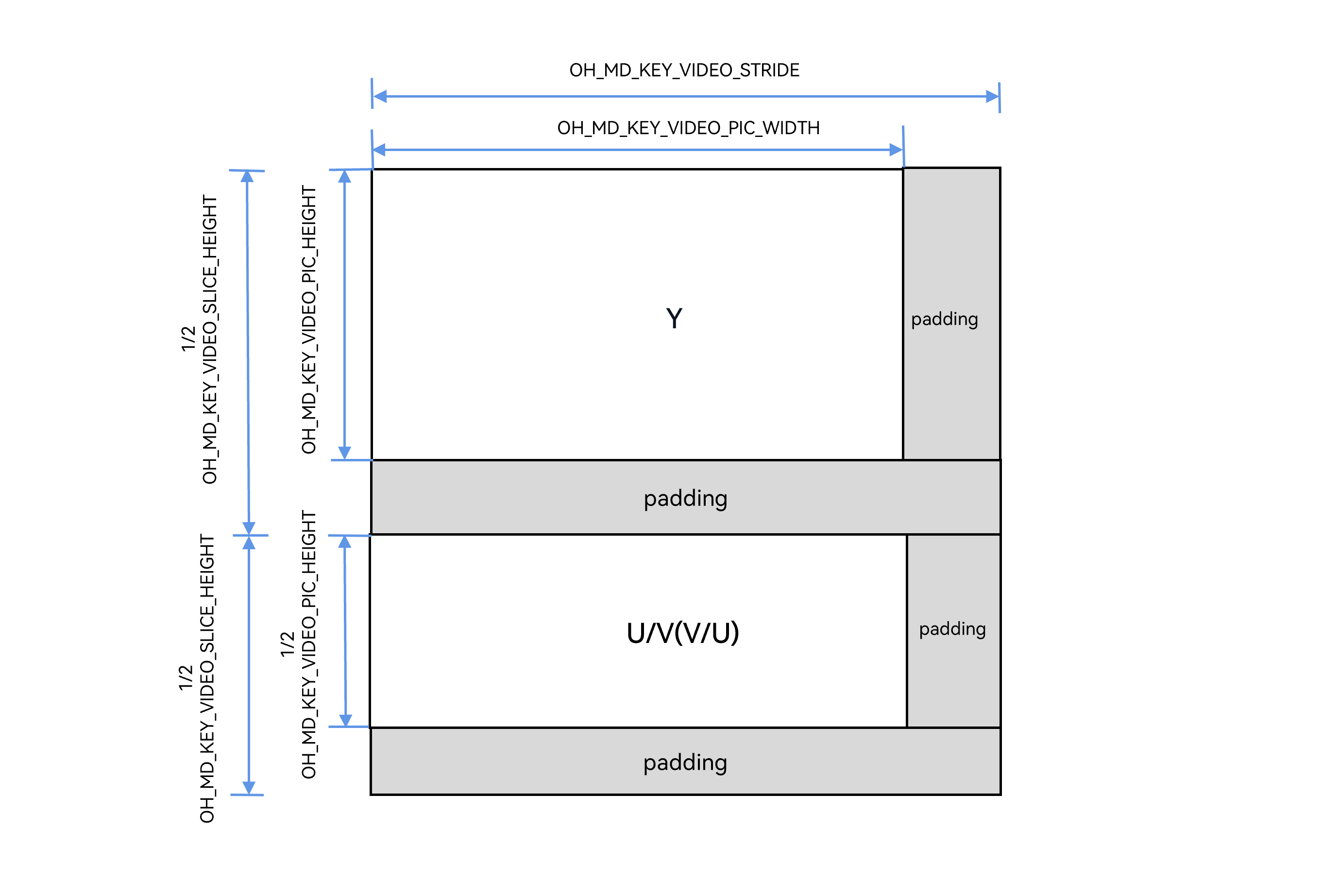
To copy the Y, U, and V components of an NV12 or NV21 image to another buffer in sequence, perform the following steps (taking an NV12 image as an example),
presenting the image layout of width, height, wStride, and hStride.
-
OH_MD_KEY_VIDEO_PIC_WIDTH corresponds to width.
-
OH_MD_KEY_VIDEO_PIC_HEIGHT corresponds to height.
-
OH_MD_KEY_VIDEO_STRIDE corresponds to wStride.
-
OH_MD_KEY_VIDEO_SLICE_HEIGHT corresponds to hStride.
Add the header files.
#include <string.h>
The sample code is as follows.
// Obtain the width and height of the source buffer by using the callback function OnStreamChanged or OH_VideoDecoder_GetOutputDescription.
struct Rect
{
    int32_t width;
    int32_t height;
};

struct DstRect // Width stride and height stride of the destination buffer. They are set by the caller.
{
    int32_t wStride;
    int32_t hStride;
};
// Obtain the width stride and height stride of the source buffer by using the callback function OnStreamChanged or OH_VideoDecoder_GetOutputDescription.
struct SrcRect
{
    int32_t wStride;
    int32_t hStride;
};

Rect rect = {320, 240};
DstRect dstRect = {320, 240};
SrcRect srcRect = {320, 256};
uint8_t* dst = new uint8_t[dstRect.hStride * dstRect.wStride * 3 / 2]; // Pointer to the target memory area.
uint8_t* src = new uint8_t[srcRect.hStride * srcRect.wStride * 3 / 2]; // Pointer to the source memory area.
uint8_t* dstTemp = dst;
uint8_t* srcTemp = src;
rect.height = ((rect.height + 1) / 2)  * 2; // This ensures the height is always even.
rect.width = ((rect.width + 1) / 2)  * 2; // This ensures the width is always even.

// Y: Copy the source data in the Y region to the target data in another region.
for (int32_t i = 0; i < rect.height; ++i) {
    // Copy a row of data from the source to a row of the target.
    memcpy(dstTemp, srcTemp, rect.width);
    // Update the pointers to the source data and target data to copy the next row. The pointers to the source data and target data are moved downwards by one wStride each time the source data and target data are updated.
    dstTemp += dstRect.wStride;
    srcTemp += srcRect.wStride;
}
// Padding.
// Update the pointers to the source data and target data. The pointers move downwards by one padding.
dstTemp += (dstRect.hStride - rect.height) * dstRect.wStride;
srcTemp += (srcRect.hStride - rect.height) * srcRect.wStride;
rect.height >>= 1;
// UV: Copy the source data in the UV region to the target data in another region.
for (int32_t i = 0; i < rect.height; ++i) {
    memcpy(dstTemp, srcTemp, rect.width);
    dstTemp += dstRect.wStride;
    srcTemp += srcRect.wStride;
}

delete[] dst;
dst = nullptr;
delete[] src;
src = nullptr;
When processing buffer data (before releasing data) during hardware decoding, the output callback AVBuffer receives the image data after width and height alignment.
Generally, copy the image width, height, stride, and pixel format to ensure correct processing of the decoded data.
For details, see step 3 in Buffer Mode.
-
The subsequent processes (including refreshing, resetting, stopping, and destroying the decoder) are basically the same as those in surface mode. For details, see steps 13-16 in Surface Mode.
Notes
-
After the decoder performs Flush, Reset, or Stop, you must resend the SPS/PPS bitstream parameter sets when calling OH_VideoDecoder_Start to restart decoding. For details, see "Step 13. Call OH_VideoDecoder_Flush() to flush the decoder" in Surface Mode.
-
The Flush, Reset, Stop, and Destroy APIs must be called in a non-callback thread. When these APIs are executed, they block and wait until all triggered callbacks are complete, and then return the execution result.
-
Due to limited hardware decoder resources, you must call OH_VideoDecoder_Destroy to destroy every decoder instance and release resources when the decoder is no longer needed.
-
Video decoding input bitstreams support only the AnnexB format, and multiple slices of the same frame must be sent to the decoder at a time.
-
Once Flush, Reset, or Stop is called, the system reclaims OH_AVBuffer. Do not continue to operate the OH_AVBuffer obtained through the previous callback function.
-
In surface mode, DRM decryption supports both non-secure and secure video channels. In buffer mode, DRM decryption supports only non-secure video channels.
-
In buffer mode, after obtaining OH_AVBuffer through the output callback function OH_AVCodecOnNewOutputBuffer, you must call OH_VideoDecoder_FreeOutputBuffer to release it, ensuring that the system can write subsequently decoded data to the corresponding location. If you obtain the OH_NativeBuffer pointer instance by calling OH_AVBuffer_GetNativeBuffer and the lifecycle of this instance exceeds that of the current OH_AVBuffer pointer instance, you need to manually copy the data and manage the lifecycle of the newly generated OH_NativeBuffer instance to ensure that it is correctly used and released.
- To ensure the continuous availability of system services, the system will automatically intervene when it detects that any abnormal instances of an application occupying resources. You should be aware that improper instance management may result in the process being terminated.
Video Decoding Capabilities
| Capability | Description |
|---|---|
| Dynamic resolution switching | Only hardware decoders support input bitstream resolution changes. When the resolution changes, the OnStreamChanged() callback function set by OH_VideoDecoder_RegisterCallback is triggered. For details, see step 3 in surface mode or step 3 in buffer mode. |
| Dynamic surface switching | Call OH_VideoDecoder_SetSurface to dynamically switch OHNativeWindow. This capability is supported only in surface mode. For details, see step 6 in surface mode. |
| Low-latency decoding | Call OH_VideoDecoder_Configure to configure low-latency key values. For details, see step 5 in surface mode or step 5 in buffer mode. |