Service Process
Camera-based barcode scanning of the Bitmap mode provides two scanning APIs: decode and decodeWithBitmap. decode supports image data in NV21 format (which is output by your custom camera API) and multi-barcode recognition. decodeWithBitmap supports the bitmap format. If the format of the image captured by the device camera is not bitmap, the image format needs to be converted first. If you adopt Scan SDK 2.11.0.300 or later, you are advised to use the decode API. It saves the time for image format conversion and thus speeds up scanning.
The process of scanning barcodes using the camera in Bitmap mode is as follows.
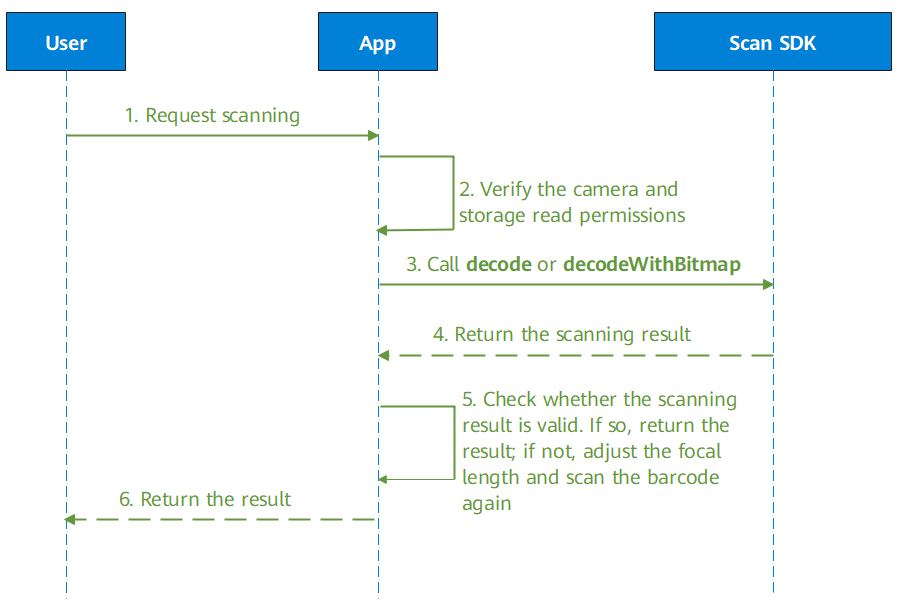
- A user launches an app and sends a request of scanning a barcode.
- The app checks whether it has the camera access and storage read permissions.
- If the app has the permissions, the decode or decodeWithBitmap API of the HMS Core Scan SDK will be called.
- The HMS Core SDK returns the scanning result.
- The app checks whether the scanning result is valid. If it is valid, start processing the result. If the value of zoomValue is greater than 1.0, the barcode detected is too small. Adjust the focal length accordingly and scan the barcode again.
- The app encapsulates the scanning result and sends it to the user.
Development Process Using the decode API

You are advised to use this API if you adopt Scan SDK 2.11.0.300 or later.
- Obtain an image frame of the camera.
Java
// Convert the data array of the camera into a ByteArrayOutputStream stream. data is an instance of the byte array, and camera is an instance of android.hardware.Camera.
YuvImage yuv = new YuvImage(data, ImageFormat.NV21, camera.getParameters().getPreviewSize().width,
        camera.getParameters().getPreviewSize().height, null);
Kotlin // Convert the data array of the camera into a ByteArrayOutputStream stream. data is an instance of the byte array, and camera is an instance of android.hardware.Camera. val yuv = YuvImage(data, ImageFormat.NV21, camera.getParameters().getPreviewSize().width, camera.getParameters().getPreviewSize().height, null) - Convert the obtained YUV data streams to HmsScanFrame.
Java
HmsScanFrame frame= new HmsScanFrame(yuv);
Kotlin val frame = HmsScanFrame(yuv) - Initialize HmsScanFrameOptions to set the supported barcode formats, set whether to use the camera mode or image mode for barcode scanning, set whether to scan a single barcode or multiple barcodes, and set whether to enable barcode parsing:
- setHmsScanTypes(int type): sets the supported barcode formats. Fewer formats mean faster scanning. All formats supported by Scan Kit will be scanned by default.
- setPhotoMode(boolean photoMode): sets whether to use the camera mode or image mode for barcode scanning. The default value is false (camera mode).
- setMultiMode(boolean multiMode): sets whether to scan a single barcode or multiple barcodes. The default value is false (single barcode).
- setParseResult(boolean parseResul): sets whether to enable barcode parsing. Set the parameter to false if you only need the original scanning result. In this case, the format of the detected barcode will be returned in text via getScanType(). The default value is true (barcode parsing is enabled).
Java
// QRCODE_SCAN_TYPE and PDF417_SCAN_TYPE indicate that only barcodes in the QR code format and PDF-417 format are supported.
HmsScanFrameOptions option = new HmsScanFrameOptions.Creator().setHmsScanTypes(HmsScan.QRCODE_SCAN_TYPE| HmsScan.PDF417_SCAN_TYPE).setMultiMode(false).setParseResult(true).setPhotoMode(true).create();
Kotlin // QRCODE_SCAN_TYPE and PDF417_SCAN_TYPE indicate that only barcodes in the QR code format and PDF-417 format are supported. val option = HmsScanFrameOptions.Creator().setHmsScanTypes(HmsScan.QRCODE_SCAN_TYPE| HmsScan.PDF417_SCAN_TYPE).setMultiMode(false).setParseResult(true).setPhotoMode(true).create() - Call the static method decode of ScanUtil to initiate a barcode scanning request and obtain the scanning result object HmsScanResult. For the information contained in this object, please refer to Parsing Barcodes.
- If you do not have specific barcode formats to set, set options to null here.
- If the barcode detected is too small, Scan Kit will return an instruction to the app for adjusting the camera's focal length to obtain a clearer barcode image.
Java
HmsScanResult result = ScanUtil.decode(BitmapActivity.this, frame, option);
HmsScan[] hmsScans = result.getHmsScans();
// Process the parsing result when the scanning is successful.
if (hmsScans != null && hmsScans.length > 0 && !TextUtils.isEmpty(hmsScans[0].getOriginalValue())) {
    // Display the scanning result.
    ...
}
// If the value of zoomValue is greater than 1.0, adjust the focal length using getZoomValue() and scan the barcode again.
if (hmsScans != null && hmsScans.length > 0 && TextUtils.isEmpty(hmsScans[0].getOriginalValue()) && hmsScans[0].getZoomValue() != 1.0) {
    // Set the focal length of the camera. The camera generates new bitmap data and scans again. (The convertZoomInt() function converts the magnification level to the focal length parameter that can be received and recognized by the camera.)
    Camera.Parameters parameters= camera.getParameters();
    parameters.setZoom(convertZoomInt(hmsScans[0].getZoomValue()));
    camera.setParameters(parameters);
}
Kotlin val hmsScansResult= ScanUtil.decode(this@BitmapActivity, frame, options) val hmsScans = hmsScansResult.hmsScans // Process the parsing result when the scanning is successful. if (hmsScans != null && hmsScans.size > 0 && !TextUtils.isEmpty(hmsScans[0].getOriginalValue())) { // Display the scanning result. ... } // If the value of zoomValue is greater than 1.0, adjust the focal length using getZoomValue() and scan the barcode again. if (hmsScans != null && hmsScans.size > 0 && TextUtils.isEmpty(hmsScans[0].getOriginalValue()) && hmsScans[0].getZoomValue() != 1.0) { // Set the focal length of the camera. The camera generates new bitmap data and scans again. (The convertZoomInt() function converts the magnification level to the focal length parameter that can be received and recognized by the camera.) var parameters= camera.getParameters() parameters.setZoom(convertZoomInt(hmsScans[0].getZoomValue())) camera.setParameters(parameters) }
Development Process Using the decodeWithBitmap API
- Obtain an image frame of the camera.
Java
// Convert the data array of the camera into a ByteArrayOutputStream stream. data is an instance of the byte array, and camera is an instance of android.hardware.Camera.
YuvImage yuv = new YuvImage(data, ImageFormat.NV21, camera.getParameters().getPreviewSize().width,
        camera.getParameters().getPreviewSize().height, null);
ByteArrayOutputStream stream = new ByteArrayOutputStream();
yuv.compressToJpeg(new Rect(0, 0, camera.getParameters().getPreviewSize().width,
        camera.getParameters().getPreviewSize().height), 100, stream);
Kotlin // Convert the data array of the camera into a ByteArrayOutputStream stream. data is an instance of the byte array, and camera is an instance of android.hardware.Camera. val yuv = YuvImage(data, ImageFormat.NV21, camera.getParameters().getPreviewSize().width, camera.getParameters().getPreviewSize().height, null) val stream = ByteArrayOutputStream() yuv.compressToJpeg(Rect(0, 0, camera.getParameters().getPreviewSize().width, camera.getParameters().getPreviewSize().height), 100, stream) - Convert the obtained ByteArrayOutputStream stream into a bitmap.
Java
Bitmap bitmap = BitmapFactory.decodeByteArray(stream.toByteArray(), 0, stream.toByteArray().length);
Kotlin val bitmap = BitmapFactory.decodeByteArray(stream.toByteArray(), 0, stream.toByteArray().size) - Initialize HmsScanAnalyzerOptions, set your desired barcode formats, and set the Bitmap mode to camera-based barcode scanning.
Call the following methods to set optional parameters:
- setHmsScanTypes(int type): sets the supported barcode formats. Fewer formats mean faster scanning. All formats supported by Scan Kit will be scanned by default.
- setPhotoMode(boolean photoMode): sets whether to use the camera mode or image mode for barcode scanning. The default value is false (camera mode).
Java
// QRCODE_SCAN_TYPE and DATAMATRIX_SCAN_TYPE are set for the barcode format, indicating that Scan Kit will support only the QR code and DataMatrix code.
HmsScanAnalyzerOptions options = new HmsScanAnalyzerOptions.Creator().setHmsScanTypes(HmsScan.QRCODE_SCAN_TYPE, HmsScan.DATAMATRIX_SCAN_TYPE).setPhotoMode(false).create();
Kotlin // QRCODE_SCAN_TYPE and DATAMATRIX_SCAN_TYPE are set for the barcode format, indicating that Scan Kit will support only the QR code and DataMatrix code. val options = HmsScanAnalyzerOptions.Creator().setHmsScanTypes(HmsScan.QRCODE_SCAN_TYPE, HmsScan.DATAMATRIX_SCAN_TYPE).setPhotoMode(false).create() - Call the static method decodeWithBitmap of ScanUtil to initiate a barcode scanning request and obtain the scanning result object HmsScan. For the information contained in this object, please refer to Parsing Barcodes.
- If you do not have specific barcode formats to set, set options to null here.
- If the barcode detected is too small, Scan Kit will return an instruction to the app for adjusting the camera's focal length to obtain a clearer barcode image.
Java
HmsScan[] hmsScans = ScanUtil.decodeWithBitmap(BitmapActivity.this, bitmap, options);
// Process the parsing result when the scanning is successful.
if (hmsScans != null && hmsScans.length > 0 && !TextUtils.isEmpty(hmsScans[0].getOriginalValue())) {
    // Display the scanning result.
    ...
}
// If the value of zoomValue is greater than 1.0, adjust the focal length using getZoomValue() and scan the barcode again.
if (hmsScans != null && hmsScans.length > 0 && TextUtils.isEmpty(hmsScans[0].getOriginalValue()) && hmsScans[0].getZoomValue() != 1.0) {
    // Set the focal length of the camera. The camera generates new bitmap data and scans again. (The convertZoomInt() function converts the magnification level to the focal length parameter that can be received and recognized by the camera.)
    Camera.Parameters parameters= camera.getParameters();
    parameters.setZoom(convertZoomInt(hmsScans[0].getZoomValue()));
    camera.setParameters(parameters);
}
Kotlin val hmsScans = ScanUtil.decodeWithBitmap(this@BitmapActivity, bitmap, options) // Process the parsing result when the scanning is successful. if (hmsScans != null && hmsScans.size > 0 && !TextUtils.isEmpty(hmsScans[0].getOriginalValue())) { // Display the scanning result. ... } // If the value of zoomValue is greater than 1.0, adjust the focal length using getZoomValue() and scan the barcode again. if (hmsScans != null && hmsScans.size > 0 && TextUtils.isEmpty(hmsScans[0].getOriginalValue()) && hmsScans[0].getZoomValue() != 1.0) { // Set the focal length of the camera. The camera generates new bitmap data and scans again. (The convertZoomInt() function converts the magnification level to the focal length parameter that can be received and recognized by the camera.) var parameters= camera.getParameters() parameters.setZoom(convertZoomInt(hmsScans[0].getZoomValue())) camera.setParameters(parameters) }Sample code for implementing the convertZoomInt() method:Java public int convertZoomInt(double zoomValue) { // Calculate the zoom value of the camera preview. parameters is the camera parameters. List<Integer> allZoomRatios = parameters.getZoomRatios(); float maxZoom = Math.round(allZoomRatios.get(allZoomRatios.size() - 1) / 100f); if (zoomValue >= maxZoom) { return allZoomRatios.size() - 1; } for (int i = 1; i < allZoomRatios.size(); i++) { if (allZoomRatios.get(i) >= (zoomValue * 100) && allZoomRatios.get(i - 1) <= (zoomValue * 100)) { return i; } } return -1; }Kotlin public fun convertZoomInt(zoomValue:Double):Int { // Calculate the zoom value of the camera preview. parameters is the camera parameters. val allZoomRatios = parameters.getZoomRatios() val maxZoom = Math.round(allZoomRatios.get(allZoomRatios.size() - 1) / 100f) if (zoomValue >= maxZoom) { return allZoomRatios.size() - 1 } for (i in 1 until allZoomRatios.size) { if (allZoomRatios.get(i) >= (zoomValue * 100) && allZoomRatios.get(i - 1) <= (zoomValue * 100)) { return i } } return -1 }