Click here to download the resources before presenting the HUAWEI Health logo to users in your app.
About the Logo
The icon features a heart-shaped graphic element and runway elements, and a vibrant color of orange, which, combined, underline the specificity and identity of a health and fitness brand. |
|

[h2]Icon Only
A single icon can be used when you display the data source to users on the authorization screen or the linking authorization details screen.
- Displaying the data source and authorization status on the authorization screen
- Showing the app linking status on the linking authorization details screen


[h2]"Works with HUAWEI Health" Badge (Hereinafter Referred to as the Health Badge)
1. Rules for using the Health badge
In addition to the use of the Health badge for co-branding, only ecosystem app partners authorized by Huawei Health can use the Health badge.

2. Health badge application scenarios and examples
- Specifications for using the Health badge in product KVs of authorized ecosystem app partners
Core principles
- In product KVs of authorized ecosystem app partners, the Health badge should be in the lower right corner of the image, above the disclaimer.
- The HUAWEI Health badge with a white background is preferred in KVs.
Rules for using the Health badge
- In a square or vertical KV, the badge height is subject to the KV width, and the badge width is no more than 1/4 of the KV width. If the badge height is X, the distances from the badge and the disclaimer to the right and bottom of the image should both be X.
- In a horizontal KV, the badge height is subject to the KV width, and the badge width is no more than 1/6 of the KV width. If the badge height is X, the distances from the badge and the disclaimer to the right and bottom of the image should both be X.

- Specifications and samples for using the Health badge on the app download details screen of authorized ecosystem app partners
Core principles
If you need to notify users on the app download details screen that the app supports data connections with Huawei Health, display the Health badge horizontally centered on the screen below the app introduction image.
Health badge size and proportion
The badge width is 1/3 of the screen width. If the badge width is X, the distance from the badge to the content above is 0.24 x X. You can adjust the distance as required.

- Specifications for using the Health badge in promotional videos of authorized ecosystem partners
Core principles
- Ecosystem app partners:
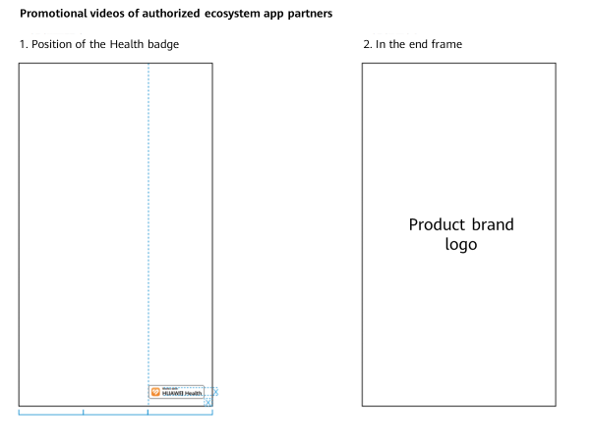
- In promotional videos of authorized ecosystem app partners, the Health badge should be placed in the lower right corner of the video.
- The logo of the product brand must be displayed in the end frame, without the HUAWEI Health logo or badge.
- The white-background badge is used in videos with a white or light background, and the black-background badge is used in videos with a black or dark background.
Figure 1 Horizontal style reference Figure 2 Vertical style reference
- Ecosystem hardware partners:
In promotional videos of authorized ecosystem hardware partners, if you want to notify users that the device supports connections with Huawei Health, display the text "Supports connection with Huawei Health".
- Ecosystem app partners:

If you need the authorization to use the Health badge or have any questions about the application scenarios of the Health badge, send an email to hihealth@huawei.com.
