To use the Map Kit plugin for Flutter, you need to set up the Flutter development environment on your computer. For details about the requirements of development with Flutter, please refer to Flutter Installation Guide.
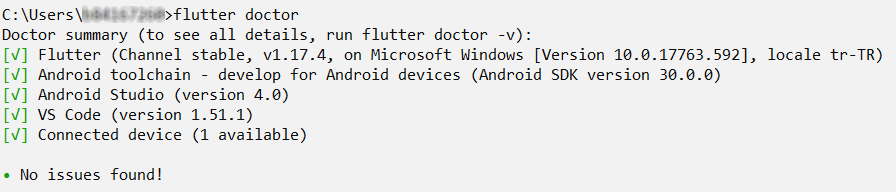
- After successfully installing Flutter on your computer, run the flutter doctor command on the command line to ensure that everything is working properly in your environment.
Check the command output after running the command.
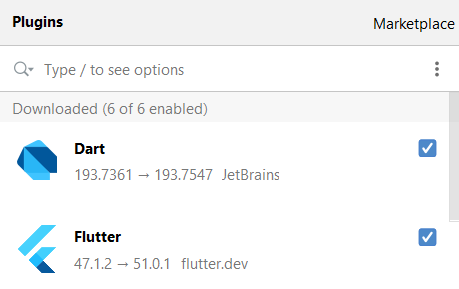
- Install the Flutter and Dart plugins in Android Studio.
Go to in Android Studio, search for Dart and Flutter respectively, and install them.
Installing HMS Core (APK)
To use the APIs of Map Kit, you need to download and install HMS Core (APK) of the latest version on your device.
Installing the Android SDK
Perform the following operations:
- Download Android SDK 10.0 (API level 29) and 9.0 (API level 28):
Go to Settings > Android SDK > SDK Platforms, select Android 10.0 and Android 9.0, and click OK. Android Studio will automatically download and install Android SDK 10.0 (API level 29) and 9.0 (API level 28).
- Set the environment variable ANDROID_HOME:
Open Control Panel on the Windows, go to System and Security > System > Change settings > Advanced > Environment Variables > New, and create an ANDROID_HOME system or user variable that points to the directory to your Android SDK.

- By default, the Android SDK is installed in the C:\Users\Your_Username\AppData\Local\Android\Sdk directory. Note that the AppData folder may be hidden according to your preferences.
- To check where the Android SDK is located, open Android Studio, and go to File > Settings. Then, go to Appearance & Behavior > System Settings > Android SDK, and click Android SDK Location in the pane on the right.
- Add the platform-tools directory to Path:
Open Control Panel on the Windows, go to System and Security > System > Change settings > Advanced > Environment Variables, select the Path variable, and click Edit. Then, click New and add the platform-tools directory to the list.

The platform-tools directory is under the Android SDK directory. After setting the environment variable ANDROID_HOME in the previous step, add %ANDROID_HOME%\platform-tools to the Path variable.