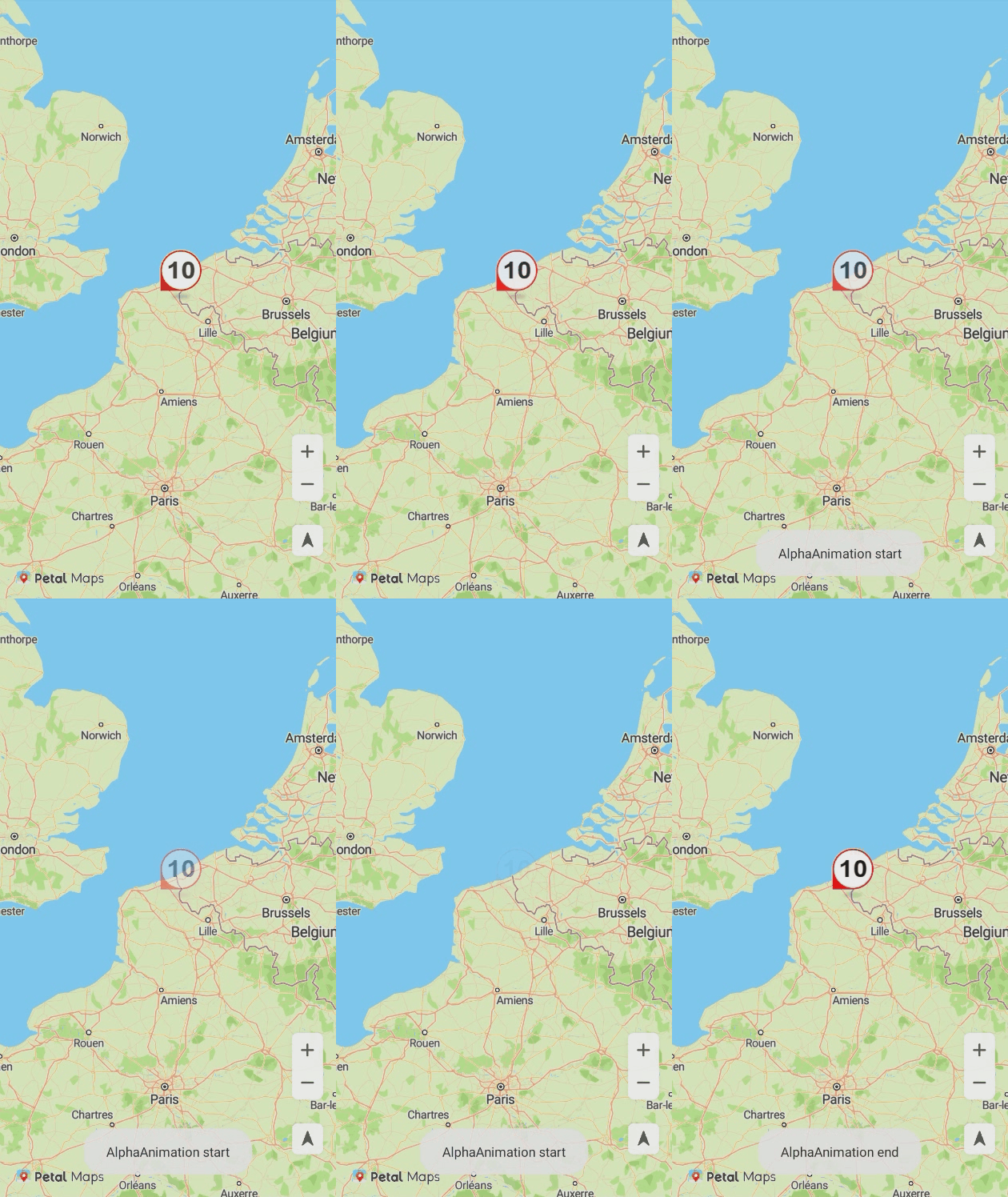
You can use bubbles to show speed and congestion information at a specified location on the road. This function allows you to:
- Set icons for four directions. (The icons must have the same height and width.)
- Set the icon collision rule.
- Set the candidate coordinates segment for a bubble, so that the bubble can be displayed on the optimal position on the road after calculation.
- Set the icon animation.
- Add click events.
Adding a Bubble
Call the addBubble method of HuaweiMapEx to add a bubble on the map.
The sample code is as follows:
Java
private BubbleOptions bubbleOptions = new BubbleOptions();
private HuaweiMapEx hMapEx;
// Set icons for four directions.
if (bubbleOptions.getIcon().size() == 0 ){
    bubbleOptions.icons(BitmapDescriptorFactory.fromResource(R.drawable.speed_limit_10),
        BitmapDescriptorFactory.fromResource(R.drawable.speed_limit_20),
        BitmapDescriptorFactory.fromResource(R.drawable.speed_limit_30),
        BitmapDescriptorFactory.fromResource(R.drawable.speed_limit_40));
}
// Set the collision rule.
bubbleOptions.isCollision(true);
// Set the maximum zoom level.
bubbleOptions.maxZoom(15);
// Set the minimum zoom level.
bubbleOptions.minZoom(0);
// Set the zoom level.
bubbleOptions.zoom(0.0f, 15.0f);
// Set the overlapping relationship.
bubbleOptions.zIndex(1);
// Set the position.
bubbleOptions.position(new LatLng(50.8388866, 2.2661504));
// Set the collision priority. A larger value indicates a lower priority.
bubbleOptions.priority(15);
// Set whether the bubble is visible.
bubbleOptions.visible(true);

// Add a bubble.
hMapEx.addBubble(bubbleOptions);
Kotlin
val bubbleOptions = BubbleOptions()
var hMapEx: HuaweiMapEx
// Set icons for four directions.
if (bubbleOptions.icon.size == 0) {
bubbleOptions.icons(BitmapDescriptorFactory.fromResource(R.drawable.speed_limit_10),
BitmapDescriptorFactory.fromResource(R.drawable.speed_limit_20),
BitmapDescriptorFactory.fromResource(R.drawable.speed_limit_30),
BitmapDescriptorFactory.fromResource(R.drawable.speed_limit_40))
}
// Set the collision rule.
bubbleOptions.isCollision(true)
// Set the maximum zoom level.
bubbleOptions.maxZoom(15f)
// Set the minimum zoom level.
bubbleOptions.minZoom(0f)
// Set the zoom level.
bubbleOptions.zoom(0.0f, 15.0f)
// Set the overlapping relationship.
bubbleOptions.zIndex(1)
// Set the position.
bubbleOptions.position(LatLng(50.8388866, 2.2661504))
// Set the collision priority. A larger value indicates a lower priority.
bubbleOptions.priority(15f)
// Set whether the bubble is visible.
bubbleOptions.visible(true)
// Add a bubble.
hMapEx.addBubble(bubbleOptions) 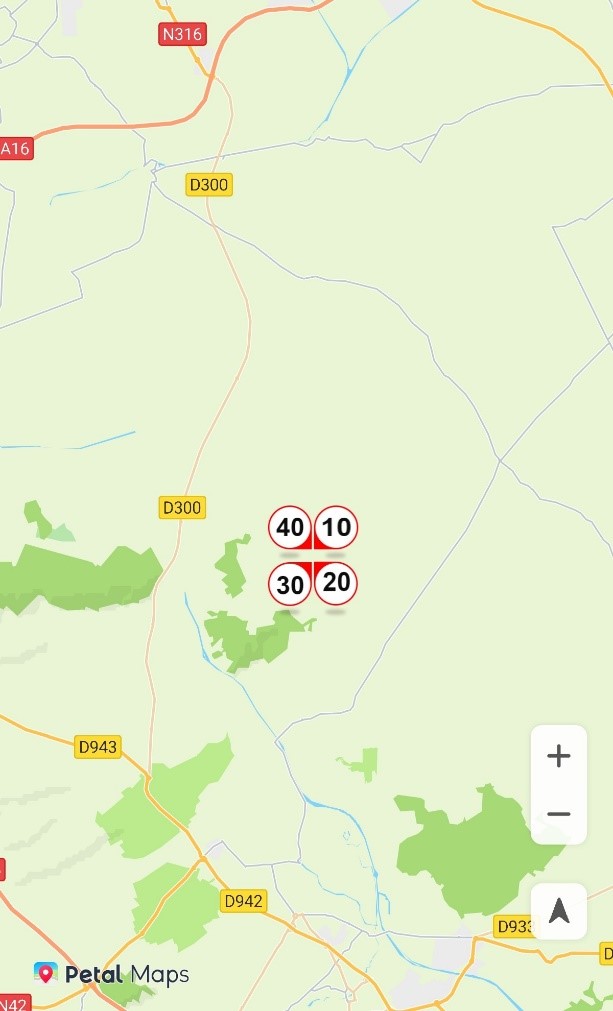
Listening for Bubble Click Events
You can use HuaweiMapEx.OnBubbleClickListener to listen for bubble click events. To set a listener for bubble click events, call the setOnBubbleClickListener method of the HuaweiMapEx object.
The sample code is as follows:
Java
// Add a listener for bubble click events.
hMapEx.setOnBubbleClickListener(new HuaweiMapEx.OnBubbleClickListener() {
    @Override
    public void onBubbleClick(Bubble bubble) {
        Toast.makeText(getApplicationContext(), "onBubbleClick", Toast.LENGTH_SHORT).show();
    }
});
Kotlin
// Add a listener for bubble click events.
hMapEx.setOnBubbleClickListener { Toast.makeText(applicationContext, "onBubbleClick", Toast.LENGTH_SHORT).show() } Setting Animations for a Bubble
You can set the transparency animation (AlphaAnimation) and scale animation (ScaleAnimation) for the bubble icon. To set an animation, call the setAnimation method of the Bubble object, and then call the startAnimation method to start the animation.
The sample code is as follows:
Java
private Bubble mBubble;
private AlphaAnimation alphaAnimation;
if (mBubble == null){
    return;
}
// Create a transparency animation.
alphaAnimation = new AlphaAnimation(1,0);
// Set the fill mode.
alphaAnimation.setFillMode(1);
// Set the repeat mode.
alphaAnimation.setRepeatMode(1);
// Set the number of repetitions.
alphaAnimation.setRepeatCount(1);
// Set the animation duration.
alphaAnimation.setDuration(1000);
// Add an animation listener.
ScaleAnimation.AnimationListener listener = new ScaleAnimation.AnimationListener() {
    @Override
    public void onAnimationStart() {
        Toast.makeText(getApplicationContext(), "AlphaAnimation start", Toast.LENGTH_SHORT).show();
    }
    @Override
    public void onAnimationEnd() {
        Toast.makeText(getApplicationContext(), "AlphaAnimation end", Toast.LENGTH_SHORT).show();
    }
};
alphaAnimation.setAnimationListener(listener);
// Set the transparency animation effect for the bubble icon.
mBubble.setAnimation(alphaAnimation);
// Start the animation.
mBubble.startAnimation();
Kotlin
var mBubble : Bubble? = null
var alphaAnimation : AlphaAnimation
if (mBubble == null) {
return
}
// Create a transparency animation.
alphaAnimation = AlphaAnimation(1f, 0f)
// Set the fill mode.
alphaAnimation.fillMode = 1
// Set the repeat mode.
alphaAnimation.repeatMode = 1
// Set the number of repetitions.
alphaAnimation.repeatCount = 1
// Set the animation duration.
alphaAnimation.duration = 1000
// Add an animation listener.
val listener : Animation.AnimationListener = object : Animation.AnimationListener {
override fun onAnimationStart() {
Toast.makeText(applicationContext, "AlphaAnimation start", Toast.LENGTH_SHORT).show()
}
override fun onAnimationEnd() {
Toast.makeText(applicationContext, "AlphaAnimation end", Toast.LENGTH_SHORT).show()
}
}
alphaAnimation.setAnimationListener(listener)
// Set the transparency animation effect for the bubble icon.
mBubble.setAnimation(alphaAnimation)
// Start the animation.
mBubble.startAnimation() The figure below shows the bubble transparency animation effect.