Overview
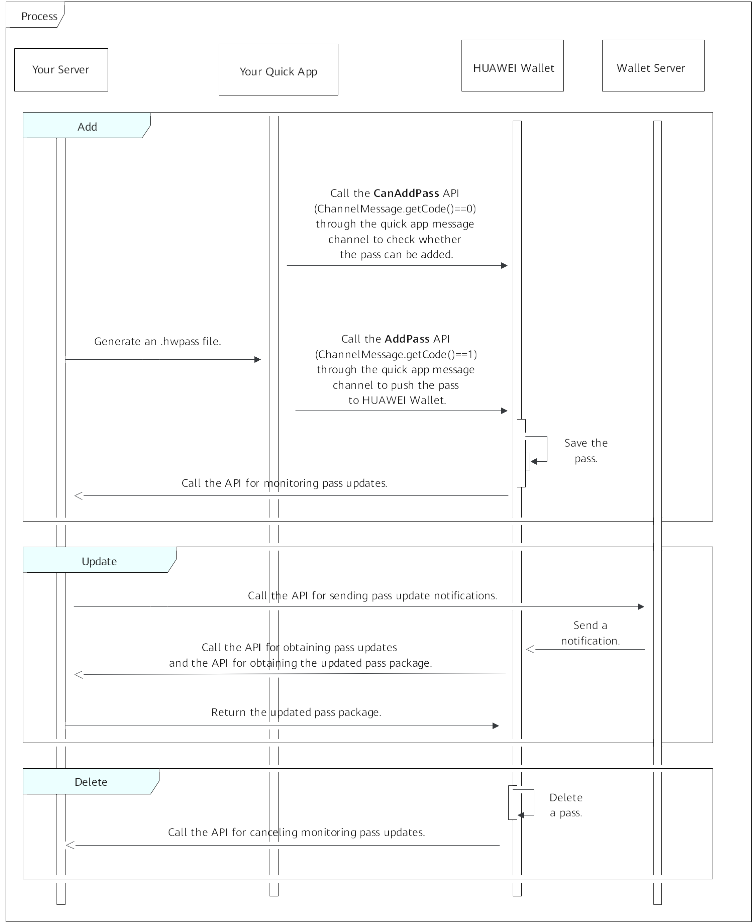
You can push a pass to HUAWEI Wallet from your quick app.

Currently, this mode is available only in the Chinese mainland.
For details about how to generate a pass package on your server, please refer to Server Sample Code.
Creating a Message Channel
Create a message channel from your quick app to HUAWEI Wallet. After the channel is successfully created, your quick app can exchange data with HUAWEI Wallet.
Contact Huawei technical support to obtain the value of sign in the following sample code. If error code 1002 indicating that the channel fails to be created is displayed during the call, contact HUAWEI Wallet technical support to obtain an open Wallet version for debugging.
// Create a message channel.
 var channel = new messageChannel({
     package:'com.huawei.wallet',
     sign:'native app sign'
 });
Checking Whether a Pass Can Be Added
By calling the CanAddPass API, your quick app checks whether the device meets the following pass addition conditions: The device has the HUAWEI Wallet app installed and the installed HUAWEI Wallet version supports the pass addition function.
// Call the CanAddPass API to check whether the pass can be added.
channel.send({
     message: {
         code: 0,
         data: 'appId|passType'
     },
     success: function() {
         console.log('send success')
     },
     fail: function(data, code) {
         console.log(`handling fail, code = ${code}`)
     }
 });
Adding a Pass
- Your server uses your certificate and private key to sign the pass data and generates a pass package.
You need to replace the certificate and private key in the src\test\resources\release.config.properties file in Server Sample Code. The certificate and private key files are used to sign pass data. You can obtain them by referring to Applying for Security Components, perform Base64 transcoding to convert the entire files into character strings, and use the character strings to replace the original ones in the release.config.properties file.
- The pass package consists of the following files: home.png, detail.png, signature, hwpass.json, manifest.json, home@2x.png, and detail@2x.png. The signature and manifest.json files are automatically created when the Huawei server demo is called to sign the pass package. You need to generate the hwpass.json file according to the following rules and provide the other four .png files. (The .png files are optional. If you do not provide them, the default background image of HUAWEI Wallet will be used.)
- The pass package must be smaller than 150 KB. Otherwise, it cannot be added.
- The pass package is stored in HUAWEI Wallet as a ZIP file with the file name extension .hwpass. The ZIP file name can contain only uppercase and lowercase letters, digits, and underscores (_).
The following table describes the files in a pass package.
File
Description
Mandatory
Format Requirement
Remarks (Movie Ticket as an Example)
hwpass.json
Pass data file.
Yes
-
Variables such as the ticket number, movie theater, show time, and phone number are filled in by HUAWEI Wallet based on the hwpass.json file.
signature
Signature file.
Yes
-
-
manifest.json
SHA-256 hash value for each file in the package.
Yes
-
-
home.png
Home page image.
No
Image size requirements:
Dimensions: 320 x 200 px
Size: 25 KB max
The image can be used to show the merchant trademark, movie poster, and fixed movie text. After a movie expires, the home.png file needs to be updated. This is implemented by updating the pass package.
detail.png
Details page image.
No
Image size requirements:
Dimensions: 656 x 405 px
Size: 40 KB max
The image can be used to show the merchant trademark, movie poster, and fixed movie text. After a movie expires, the detail.png file needs to be updated. This is implemented by updating the pass package.
home@2x.png
Home page image for a large screen.
No
Image size requirements:
Dimensions: 480 x 300 px
Size: 25 KB max
The image can be used to show the merchant trademark, movie poster, and fixed movie text. After a movie expires, the home@2x.png file needs to be updated. This is implemented by updating the pass package.
detail@2x.png
Details page image for a large screen.
No
Image size requirements:
Dimensions: 984 x 608 px
Size: 40 KB max
The image can be used to show the merchant trademark, movie poster, and fixed movie text. After a movie expires, the detail@2x.png file needs to be updated. This is implemented by updating the pass package.
hwpass.json
Field
Description
Example
Mandatory
formatVersion
Currently, the value is always 1.0.
1.0
Yes
passTypeIdentifier
Pass type ID registered with HUAWEI Developers.
hwpass.membership.hotel
Yes
passStyleIdentifier
Display style of the pass in HUAWEI Wallet. Currently, the style is defined by Huawei. After style customization is allowed in the future, you can register the display style for a pass when registering the pass type ID on HUAWEI Developers. It is recommended that you use the same value for this parameter as passTypeIdentifier.
hwpass.membership.hotel
Yes
passesUpdateSince
Parameter used by HUAWEI Wallet to interact with the pass issuing system. It is transferred to your server through the pass update API and is used by your server to fetch the latest pass package for HUAWEI Wallet.
414994617
Yes
organizationName
Name of the pass issuer.
XX hotel loyalty card
Yes
organizationPassId
Pass number.
E15285WF65
Yes
webServiceURL
URL used by HUAWEI Wallet to interact with the pass issuing system.
https://www.XXX.com/ download/pass
Yes
authorizationToken
Authorization token used by HUAWEI Wallet to interact with the pass issuing system.
ae13d3bsdfsfwwd7f9a4a5235f10803c09
Yes
serialNumber
Serial number used by HUAWEI Wallet to interact with the pass issuing system. To prevent pass number leak, it is recommended that the field value be different from that of organizationPassId.
8a452215a35855dsffgwfce3aa94bbee
Yes
fields.commonFields
Mandatory fields for a specific type of pass.
{
"key": "name",
"label": "name",
"value": "XXX"
}
Yes
fields.appendFields
Optional fields for a specific type of pass.
{
"key": "detail",
"label": "details",
"value": "https://xxx"
}
No

Either commonFields or appendFields must be specified.
The following table describes the fields in the commonFields and appendFields sections.
Field
Description
Example
Can Be Empty
Key
Key.
name
No
label
Field name.
name
No
value
Field value.
XXX International Hotel
No
// Generate the PassFileService object using the certificate and private key. This object will be used to generate a signed pass package. public PassFileService getPassFileService(Properties properties, String passKeyPrefix) { PassCertificateService passCertificateService = new PassCertificateService() { @Override public byte[] getCertificateByPassType(String passTypeIdentifier) { String property = properties.getProperty(passKeyPrefix + "certificate." + passTypeIdentifier, ""); return Base64.decodeBase64(property); } @Override public byte[] getPrivateKeyByPassType(String passTypeIdentifier) { String property = properties.getProperty(passKeyPrefix + "privatekey." + passTypeIdentifier, ""); return Base64.decodeBase64(property); } @Override public byte[] getPassCACertificate() { String property = properties.getProperty(passKeyPrefix + "ca", ""); return Base64.decodeBase64(property); } PassFileService passFileService = new PassFileServiceImpl(passCertificateService); return passFileService; } } // Generate a signed pass package. public byte[] createRandomPass(String passType, PassFileService passFileService) throws IOException, NoSuchAlgorithmException, PassException, CertificateException, InvalidKeySpecException,InvalidKeyException, SignatureException, NoSuchProviderException { String passNumber = utilService.getCompressUUID(); ObjectNode passJson = JsonNodeFactory.instance.objectNode(); passJson.put("passTypeIdentifier", "hwpass.com.huawei.wallet.pass.sdktest"); passJson.put("passStyleIdentifier", "hwpass.com.huawei.wallet.pass.sdktest"); passJson.put("organizationName", "Business Name"); passJson.put("organizationPassId", "passPackage unique value"); passJson.put("webServiceURL", "Card update interface webServiceURL"); passJson.put("authorizationToken", "Card update interface token"); passJson.put("serialNumber", "Card update interface serialNumber"); // Include the pass display fields in fields. ObjectNode fieldsPassJson = JsonNodeFactory.instance.objectNode(); passJson.put("fields", fieldsPassJson); // Include image resources (if any) in fileMap. Map<String, byte[]> fileMap = new HashMap<String, byte[]>(); byte[] signBytes = passFileService.createPass(fileMap, passJson); return signBytes; } - After your app obtains the pass package from your server and encrypts the package using Base64, it pushes the package to HUAWEI Wallet by calling the AddPass API through the message channel.
When receiving the signed pass package from your app, HUAWEI Wallet verifies the package and saves it upon successful verification. Then, the corresponding pass can be viewed by users in HUAWEI Wallet > Cards.
// Call the AddPass API to add a pass.
channel.send({
     message: {
         code: 1,
         data: 'appId|hwPassData
     },
     success: function() {
         console.log('send success')
     },
     fail: function(data, code) {
         console.log(`handling fail, code = ${code}`)
     }
 });