Push Kit provides an API for adding the small image on the right of the notification message. You can encapsulate image in messages. An HTTPS URL (such as https://example.com/image.png) needs to be passed to the image parameter.
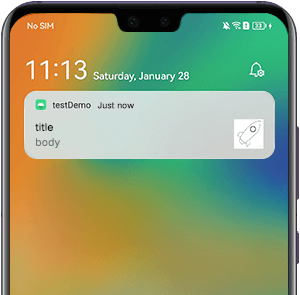
Message body example:
{
    "validate_only": false,
    "message": {
        "android": {
            "notification": {
                "title":"message title",
                "body":"message body",
                "image":"your image url",
                "click_action": {
                    "type": 3
                }
            }
        },
        "token": ["pushtoken1"]
    }
} 
- The image size must be less than 512 KB. It is recommended that the dimensions be 40 x 40 dp and corner radius be 8 dp. If the image dimensions exceed the recommended ones, the image may be compressed or displayed incompletely.
- The recommended image format is JPG, JPEG, or PNG.