Sign in to AppGallery Connect, click My projects, and find and click the desired project in the project list. Then, go to Grow > Push Kit > Notifications and click Add notification to create a task.
[h2]Setting Message Content
- Set the basic message information.
Parameter
Description
Name
Mandatory. It identifies the message pushed in AppGallery Connect and is not displayed on the device.
Type
Message type (notification message or data message). Here, select the notification message.
Summary
Optional. Summary of a notification message, which can contain a maximum of 40 characters.
Title
Mandatory. Title of a notification message, which can contain a maximum of 40 characters.
Body
Mandatory. Content of a notification message, which can contain a maximum of 1024 characters.
Action triggered after a notification message is tapped. This parameter can be set to Open app (default value) or Open web page.
NOTE:For games, this parameter cannot be set to Open web page.
App page
App page displayed after a notification message is tapped when Action is set to Open app. The options are Homepage, Custom action page, and Custom intent URI page.
- Homepage: The home page of an app is displayed when a user taps the message.
- Custom action page: If you select this option, you need to enter an action used to display a custom page when a user taps the message.
- Custom intent URI page: If you select this option, you need to enter an intent URI so that a custom page can be opened by explicit intent when a user taps the message.
Web page URL
Website URL that you need to set when Action is set to Open web page. The URL starts with https:// and can contain a maximum of 300 characters.
Buttons
Buttons under a notification message. A user can tap the buttons to trigger actions. For details, please refer to 2.
NOTE:A maximum of three buttons can be created.
Key-value pair
Data in key-value format, which you need to parse. For details, please refer to Customizing Actions to Be Triggered upon Notification Message Tapping.
- Add a button.
A button can be added to a notification message sent to Android apps. You can customize the button name (containing a maximum of 40 characters), and select an action for the button, which may be Open app, Open web page, Clear notification, or Share.
- Open app: The action is similar to Open app of Action.
- Open web page: If you select this action, you need to enter a website URL starting with https://. The URL can contain a maximum of 1024 characters.
- Clear notification: If you select this action, the message will be deleted when a user taps the button.
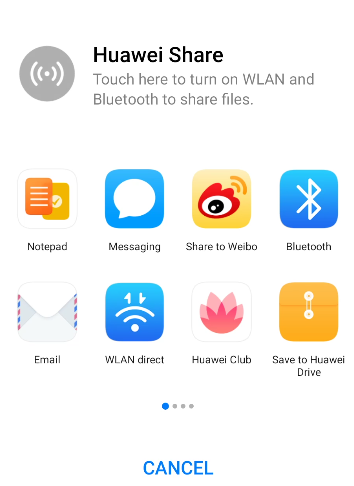
- Share: Use Huawei Share. If you select this action, you need to enter the content to be shared, which can contain a maximum of 1024 characters. When a user taps the button, Huawei Share is triggered to share the content to other apps (such as Notepad and Messaging).
[h2]Setting the Push Scope
Currently, messages can be pushed to a combination of apps. You can push messages to multiple apps across platforms. For iOS, HarmonyOS, and web apps, messages can be pushed only to specified devices. For quick apps, messages can be pushed to audiences or subscribers.
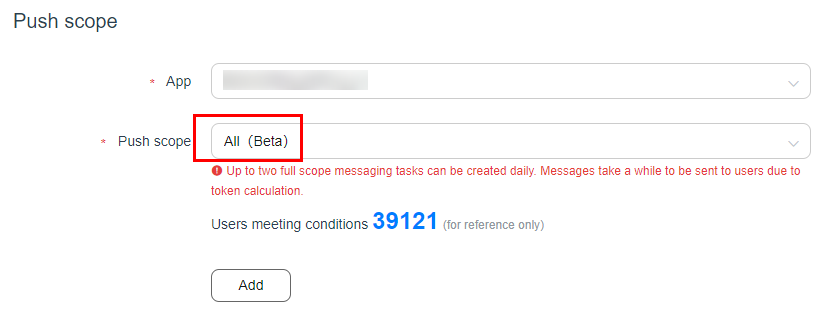
Push scope can be set to Specified device, Audience, Subscriber, or All.
- Specified device: If you select this option, set tokens of target devices. Currently, a maximum of 500 tokens are allowed.
- Audience: If you select this option, choose a target audience. If there is no target audience, create it by referring to Audience-based Message Sending.
- Subscriber: If you select this option, push messages based on the subscribed or unsubscribed topic list.
Subscription Condition
Description
Common mode

You can select Subscribed or Unsubscribed, and choose a topic. Up to five conditions can be added. You must select Subscribed for at least one condition.
Custom expression

You cannot use a custom expression and common mode together. Example of a custom expression: 'TopicA' in topics && ('TopicB' in topics || 'TopicC' in topics)

You can push messages based on the topics users subscribed to. For details, please refer to Topic-based Message Sending.
- All: If you select this option, a message can be sent to all users.
[h2]Setting the Push Time
Set Pushed by to Selected time zone or User local time zone.
Pushed by | Description |
|---|---|
|
| Set Push time to One-off or Periodic.
|
User local time zone
| For this option, you need to set the start time (accurate to second) and Duration (indicating a validity period). The value of Duration ranges from 1 to 24 hours. The default value is 24 hours. |


[h2]Setting Other Parameters
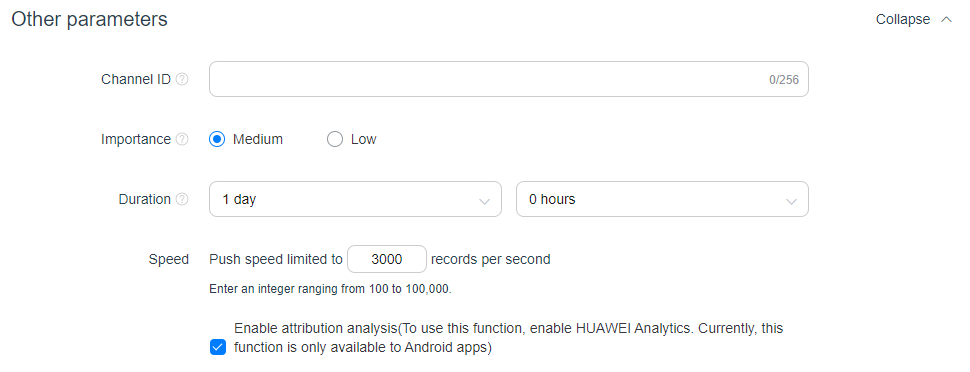
Other parameters are optional.
- Channel ID: custom notification channel, which is valid only for service and communication messages. News and marketing messages are still displayed through Huawei marketing notification channel.
- Importance: priority of a notification message. The default value is Medium.
- Duration: When Pushed by is set to Selected time zone, you can set this parameter. The value is accurate to hour, and the maximum value is 360 hours (15 days).
- Speed: number of messages sent per second. The default value is 3000.
- Enable attribution analysis: indicates whether to enable attribution analysis. This function helps precision marketing. The marketing attribution analysis function displays the contribution of different push tasks to target conversion events. This helps you evaluate the conversion effect of different push messages.

The Enable attribution analysis parameter is displayed only after you enable HUAWEI Analytics for your Android app and send notification messages.
[h2]Sending the Message
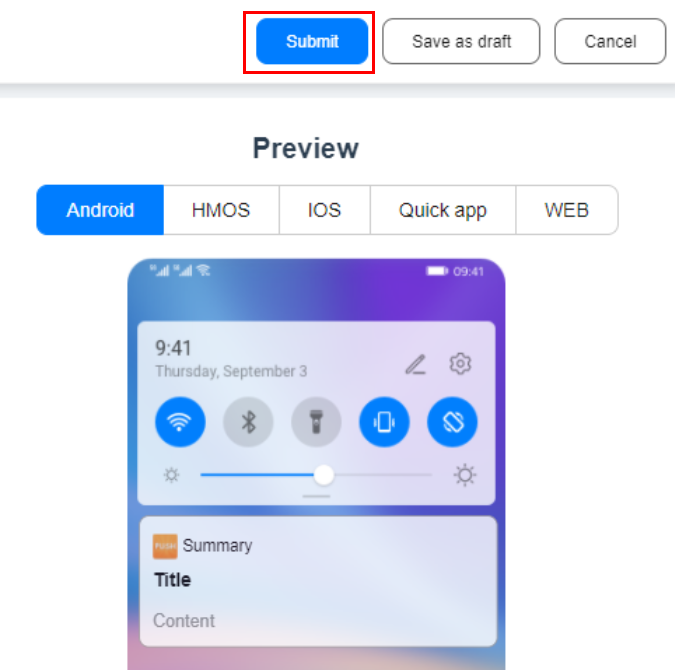
After the preceding steps are complete, click Submit in the upper right corner of the page to send the message.
[h2]Setting Message Content
- Set the basic message information.
Parameter
Description
Name
Mandatory. It identifies the message pushed in AppGallery Connect and is not displayed on the device.
Type
Message type (notification message or data message). Here, select the data message.
Custom parameter type
Set it to Key-value pair or Custom parameter to send data message content to your app. Then your app processes the content for display.
NOTE:For details about how to obtain the custom parameter, please refer to Obtaining Data Message Content.
Key-value pair
The message content is transmitted in key-value format.
Custom parameter
The message content is transmitted as a common string or a JSON string. The maximum length is 1024 characters.
- Set Push time, Push scope, and other parameters by referring to Setting the Push Time.
