Currently, Analytics Kit provides the APIs for importing custom user attributes and reporting user behavior. To reduce the coding workload, a Java SDK is provided for you to efficiently use the capabilities provided by these APIs.
Procedure
- Integrate the Java SDK by importing a JAR package.
- Add the address of the repository where the SDK is located to the settings.xml file of the Maven project.
<mirror> <id>central</id> <mirrorOf>central</mirrorOf> <url>https://developer.huawei.com/repo/</url> </mirror> - In the profile element, enter the public repository address and the repository address of HUAWEI Developers.The public repository address is the address of the public repository where you store public packages, for example, the address of the official Maven repository. The repository address of HUAWEI Developers is https://developer.huawei.com/repo/.
<profiles> <profile> <id>central</id> <repositories> <repository> <id>test1</id> <url>Public repository address</url> <releases><enabled>true</enabled></releases> <snapshots> <enabled>true</enabled> <updatePolicy>always</updatePolicy> </snapshots> </repository> <repository> <id>test2</id> <url>https://developer.huawei.com/repo/</url> <releases><enabled>true</enabled></releases> <snapshots> <enabled>true</enabled> <updatePolicy>always</updatePolicy> </snapshots> </repository> </repositories> </profile> </profiles> - Enable profile.
<activeProfiles> <activeProfile>central</activeProfile> </activeProfiles> - Add the following code to the pom.xml file of your project to import the corresponding JAR package:
<dependencies>
    <dependency>
        <groupId>com.huawei.wisecloud</groupId>
        <artifactId>analytics-java</artifactId>
        <version>6.3.2.302</version>
    </dependency>
</dependencies>
- Add the address of the repository where the SDK is located to the settings.xml file of the Maven project.
- Initialize the Java SDK.
- Sign in to AppGallery Connect and click My projects.
- Find your app project and click the app that needs to integrate the SDK.
- On the Project settings page, obtain the app information.
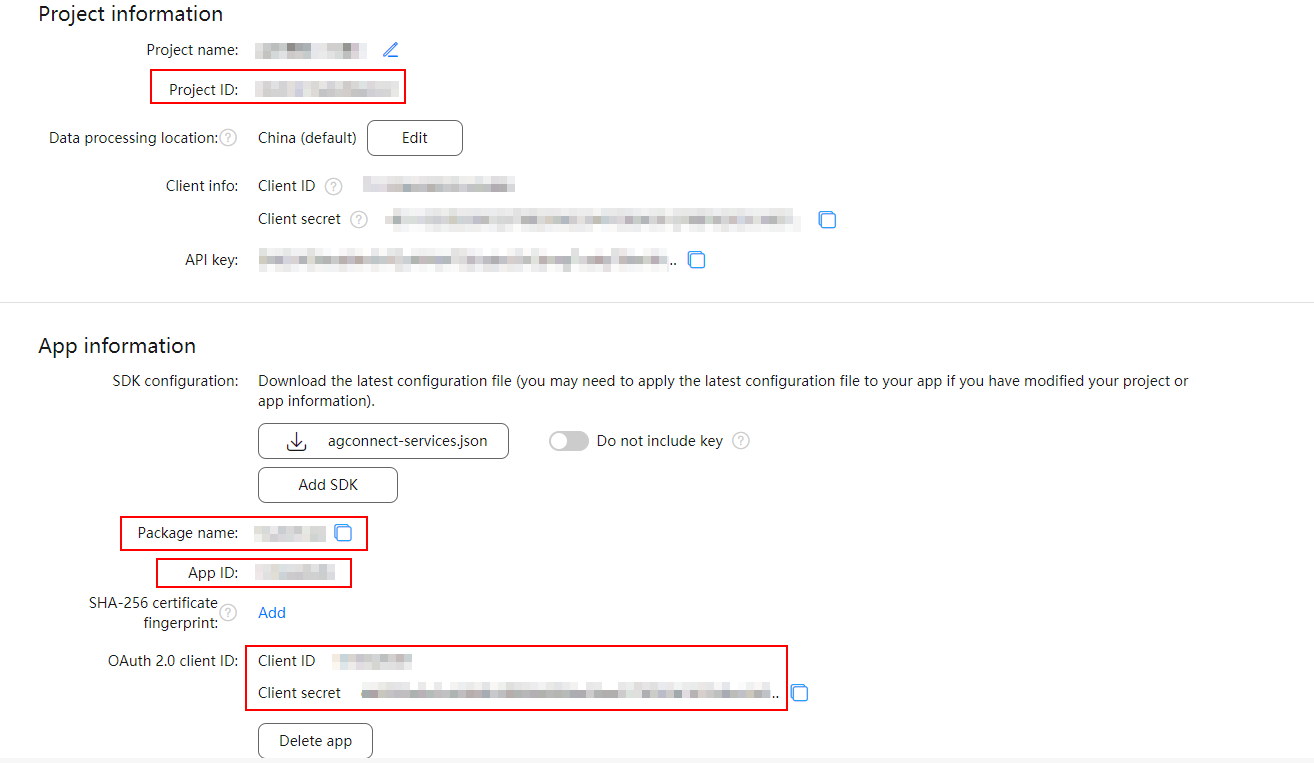
- Add app information. If your server receives requests from multiple apps, you need to add information about all these apps.

- For an iOS app, go to HUAWEI Analytics > Management > Apps and obtain the app ID and app package name. Then set setAppId to the app ID and setPackageName to the app package name.
- For a web app, set setPackageName to the app ID.
HuaweiApp.init("Android", "https://test.test.cn")
     .setAppId("123")
     .setProductId("123")
     .setClientId("123")
     .setClientSecret("456")
     .setPackageName("123.123")
     .build();
The details are as follows:
- "Android": type of the app to be added, for example, Android, iOS, HarmonyOS, WEB, or Quick App.
- "https://test.test.cn": storage address corresponding to your app's data processing location.
Data Processing Location
Storage Address
China
- Find your project, and click the app for which you want to configure analysis data.
- Go to HUAWEI Analytics > Management > Analysis settings > API management and obtain the storage address.
Singapore
Russia
Germany
- setAppId: Set this parameter to the value of App ID displayed under App information on the Project settings page.
- setProductId: Set this parameter to the value of Project ID displayed under Project information on the Project settings page.
- setClientId: Set this parameter to the value of Client ID displayed under App information on the Project settings page.
- setClientSecret: Set this parameter to the value of Client secret displayed under App information on the Project settings page.
- setPackageName: Set this parameter to the value of Package name displayed under App information on the Project settings page.
- (Optional) Configure data reporting. You can also call SdkConfig.defaultConfig() to use the default configuration.
SdkConfig.init().setMaxCacheSize(10000).setCacheTime(10).setMaxRetry(2).setEventSendSize(100).setUserSendSize(100).build();
Parameter
Description
setMaxCacheSize
Maximum number of cached data records. When the number of cached data records reaches the maximum, the earliest data records will be deleted and recorded in logs. The value ranges from 1 to 1000000, and the default value is 10000.
setCacheTime
Interval for reporting cached data, in seconds. The value ranges from 1 to 1800, and the default value is 10.
setMaxRetry
Number of reporting retries upon failure. If the reporting still fails after maximum retries, a log will be recorded. The default value is 2.
setEventSendSize
Number of user behavior records reported at a time. The value ranges from 1 to 100, and the default value is 100.
setUserSendSize
Number of custom user attributes reported at a time. The value ranges from 1 to 100, and the default value is 100.
- Initialize the Java SDK.
@Component
 @Slf4j
 public class AnalyticsSdkInit {
     private HuaweiAnalyticsClient huaweiAnalyticsClient;
    // Initialize the Java SDK.
     @PostConstruct
     public void init() {
         HuaweiApp huaweiApp = HuaweiApp.init("Android", "http://123")
             .setAppId("123")
             .setProductId("123")
             .setClientId("123")
             .setClientSecret("123")
             .setPackageName("123.123")
             .build();
         SdkConfig sdkConfig = SdkConfig.init().setCacheTime(10).setMaxCacheSize(10000).build();
         HuaweiAnalyticsClient.init(Collections.singletonList(huaweiApp), sdkConfig);
        // Refresh data upon an exception.
        flushData();
      }

    private void flushData() {
        Runtime.getRuntime().addShutdownHook(new Thread(new Runnable() {
            @Override
            public void run() {
                HuaweiAnalyticsClient.flush();
            }
        }));
    }
  }
- Send data.
 // Report user behavior.
 public void addEvent(String appId, EventPojo eventPojo) throws HaServiceException {
 }
 // Import custom user attributes.
 public void addUser(String appId, UserDataPojo userDataPojo) throws HaServiceException {
 }
- Refresh data to report all data to the server immediately.

When your app process is stopped due to an app update, restart, or other reasons, you can call the flush method to report all data.
 // Send all collected data to the server.
 public void flush() {
 }
Other Configurations
The Java SDK defines the logging API AnalyticsLog. If you need to record a log of the Java SDK, implement the logData method of the AnalyticsLog API in your code, and then call the initLogger method to set a custom logger during SDK initialization.
 public static void initLogger(AnalyticsLog logger) {
    }
Sample Code
- Reporting user behavior
EventPojo eventPojo = new EventPojo(); eventPojo.setAaid("123"); eventPojo.setUserId(""); eventPojo.setEventTime(1631606679895L); eventPojo.setEventId("$EnterScreen"); eventPojo.setEventSessionName("123"); eventPojo.setFirstSessionEvent("true"); eventPojo.setProperties(""); HuaweiAnalyticsClient.addEvent("123", eventPojo); - Importing custom user attributes
  UserDataPojo userDataPojo = new UserDataPojo();
  userDataPojo.setId("123");
  UserPropertyPojo userPropertyPojo = new UserPropertyPojo();
  userPropertyPojo.setId("123");
  userPropertyPojo.setValue("123");
  userDataPojo.setProperties(Collections.singletonList(userPropertyPojo));
  HuaweiAnalyticsClient.addUser("123", userDataPojo);