Background
To secure game sign-ins using the OAuth 2.0 protocol, it is recommended that playerId be replaced with openId gradually. If you are using playerId, which is still compatible in current versions, as the unique identifier of your players, please replace it as soon as possible.
Phase 1: Setting Up Mapping Between OpenIDs and PlayerIDs
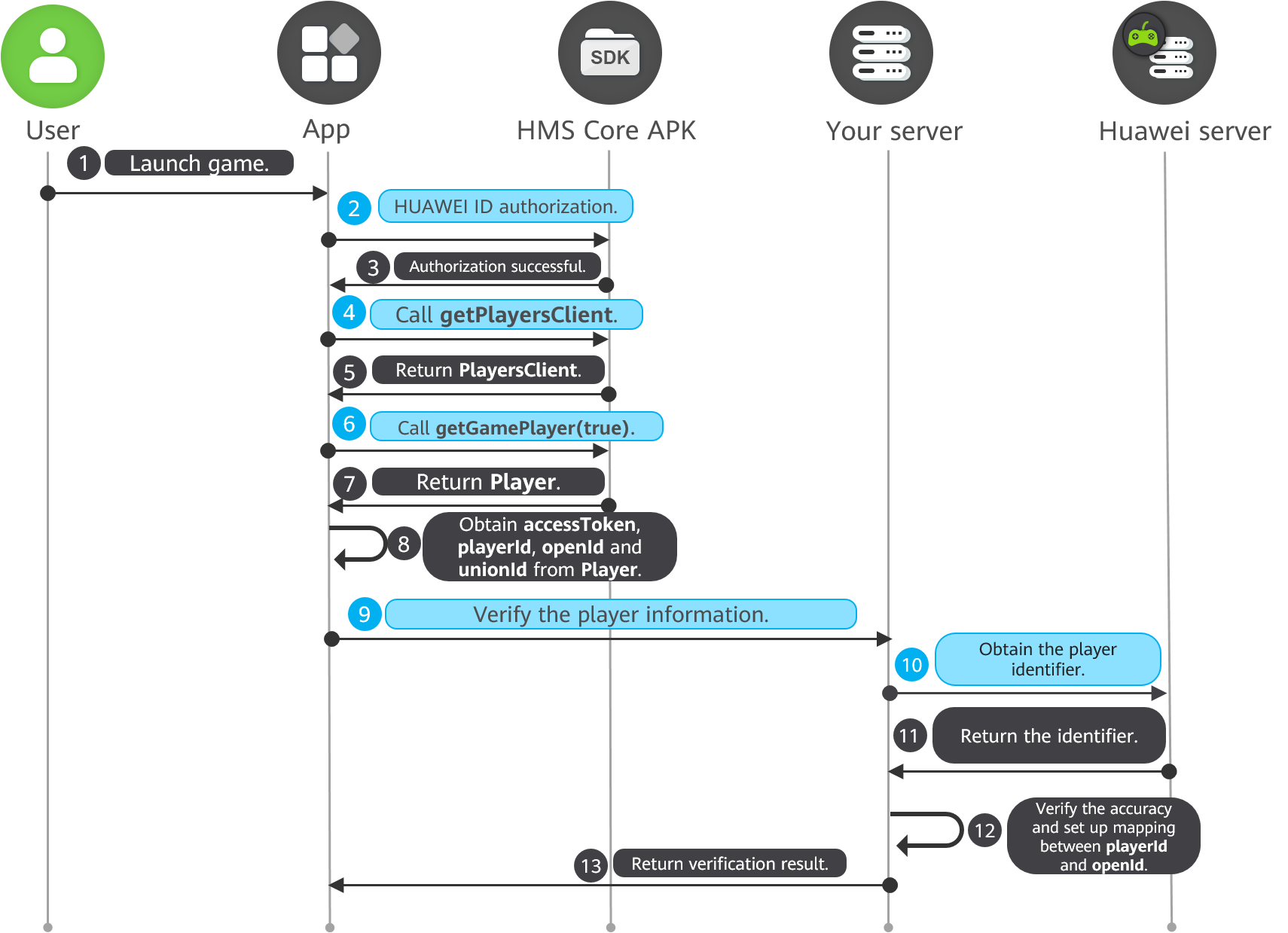
The procedure in the first phase is as follows:
- After successful HUAWEI ID authorization, call PlayersClient.getGamePlayer(boolean isRequirePlayerId) and set isRequirePlayerId to true to sign in to the game.
Obtain openId and playerId from the returned Player object.
- Call the API for obtaining the user identifier from the Huawei game server instead of the API for verifying the sign-in signature to verify playerId and openId. After obtaining the player identifier from the Huawei game server using the access token, verify it with that returned by PlayersClient.getGamePlayer.
Your server can establish a mapping between an OpenID and PlayerID only after the verification is successful.

Currently, the openId returned by the Account Kit server does not have a fixed length, but the maximum length allowed is 256 characters. For future expansion considerations, reserve at least 768 (256 x 3) characters for the openId. Actually, you are advised not to set any length limit for the openId.
- Wait for your player to update the game and sign in to the game, and obtain playerId and openId of the player. In this phase, if it has been a long period of time since the last update for some players, you can call the API for querying openId in batches to view OpenIDs corresponding to their PlayerIDs for direct mapping upon their sign-ins.

OpenIDs and PlayerIDs cannot coexist for a long time. Please start phase 2 as soon as possible according to the player coverage rate.
Phase 2: Replacing playerId with openId
After the mapping between openId and playerId is set up, you can perform the following modifications in your new game version:
- Set isRequirePlayerId of the PlayersClient.getGamePlayer(boolean isRequirePlayerId) method to false, or replace the method with PlayersClient.getGamePlayer(). The returned Player object will not contain playerId, player profile, and player level. The player profile can be obtained from AuthHuaweiId after successful HUAWEI ID authorization. You need to make some modifications for the player level is no longer returned.
- Call the Obtaining the User Identifier API to verify the player identifier and do not verify playerId anymore.
- Replace playerId with openId.
For details about the subsequent game sign-in process, please refer to Game Sign-in.