This video introduces the user lifecycle model, including its application scenarios, and functions such as user lifecycle customization, prediction of user conversion at each phase, and prediction of users who may churn. What is the user lifecycle? For a mobile app, the lifecycle of a user starts when the user opens the app for the first time and ends when the user uses the app for the last time. All companies long to extend this lifecycle and make it more valuable. |
The user lifecycle model helps you improve the lifecycle value with data-driven analysis from the following aspects:
- Divides the user lifecycle into different phases to facilitate targeted operations.
Based on how deep a user uses your app, the model divides the user lifecycle into five phases: beginner, growing, mature, inactive, and lost. It also allows you to customize the user lifecycle, making hierarchical user management possible for your actual service needs.
- Provides hierarchical audiences for precision marketing.
In each phase, all users, new users, users with high conversion potentials, or users with high churn risks can be saved as an audience with one click. You can reach them by using Push Kit or App Messaging, to improve user activity and conversion.
- Prevents user loss and improves user conversion with the prediction capabilities.
Based on machine learning algorithms, this model predicts which users have high churn risks or conversion potentials in each phase of the lifecycle. Such users can also be saved as an audience with a single click. This feature enables you to make targeted operations strategies, preventing user churn and improving user conversion.

In Analytics Kit 6.10.0.300 and later versions, the user lifecycle function is deleted (only for projects whose data processing location is Germany).
Typical Application Scenarios
- Understand how the number of users changes in each phase and how users convert between the phases.
- Evaluate how effective an operations activity is by comparing the number of growing and mature users before and after the activity.
- Adjust user attraction strategies by analyzing the ratios of and trends in mature users of different device brands and channels.
- Design operations activities to lead users with high conversion potentials to complete key behavior for conversion.
- Provide benefits for users with high churn risks to promote their activity and lower the churn rate.
[h2]Case
An e-commerce app expects to induce beginner users to make their first payment as soon as possible and become mature users.
[h2]Procedure
- Sign in to AppGallery Connect and click My projects.
- Find your project, and click the app for which you want to view analysis data.
- Go to HUAWEI Analytics > User lifecycle to check the user lifecycle report.
- Customize the lifecycle.
Go to Overview > Set lifecycle and define beginner users and mature users as needed.
- Go to Beginner > Potential forecast and click the number above High-potential users to save them as an audience.
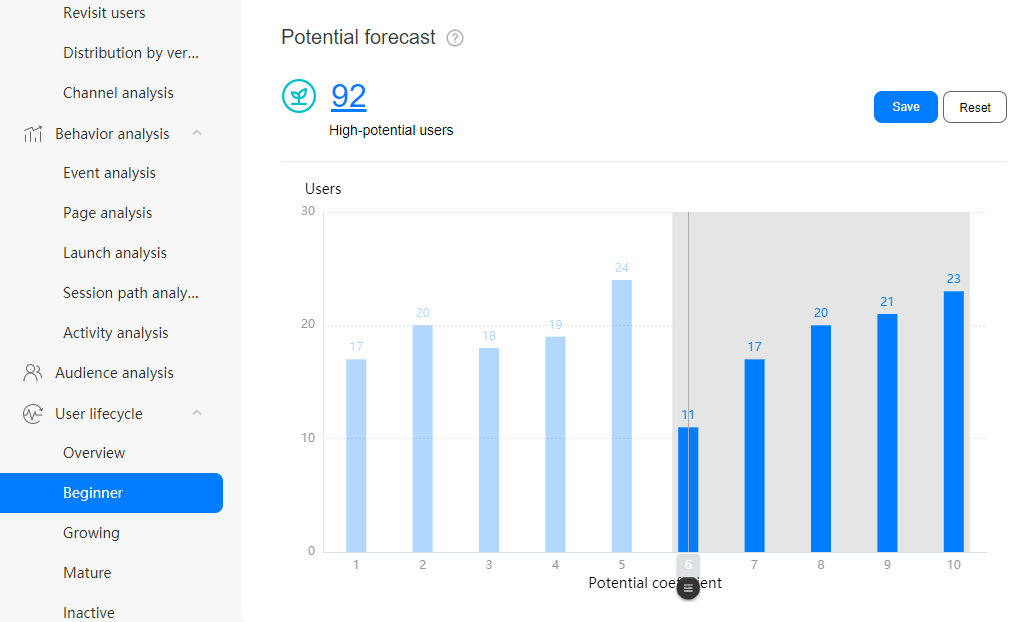
- Send vouchers or promotion messages to beginner users with high conversion potentials through Push Kit or App Messaging to attract them to make their first payment as soon as possible, accelerating the conversion from beginner users to mature users.