If you are using Android Studio, you can integrate the HMS Core SDK via the Maven repository. Before you start developing an app, integrate the HMS Core SDK into your Android Studio project.
Adding the AppGallery Connect Configuration File of Your App
- Sign in to AppGallery Connect and click My projects.
- Find your app project and click the app that needs to integrate the HMS Core SDK.
- Go to . In the App information area, download the agconnect-services.json file.

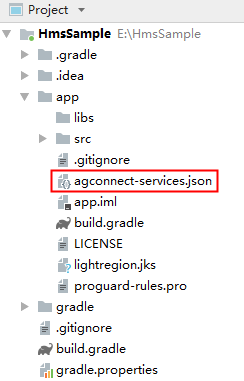
- Copy the agconnect-services.json file to the app's root directory of your Android Studio project.

- Before obtaining the agconnect-services.json file, ensure that you have enabled the HUAWEI Analytics service. For details, please refer to Enabling HUAWEI Analytics.
- If you have performed any modification such as setting the data storage location and enabling or managing some APIs, you need to download the latest agconnect-services.json file and use the file to replace the existing one in the app directory of your Android Studio project.
Configuring the Maven Repository Address for the HMS Core SDK
The procedure for configuring the Maven repository address in Android Studio is different for Gradle plugin earlier than 7.0, Gradle plugin 7.0, and Gradle plugin 7.1 or later. Click a relevant link below to find the configuration procedure for the specific Gradle plugin version.

The Maven repository address cannot be accessed from a browser. It can only be configured in the IDE. If there are multiple Maven repositories, add the Maven repository address of Huawei as the last one.
- Gradle plugin earlier than 7.0
- Open the build.gradle file in the root directory of your Android Studio project.
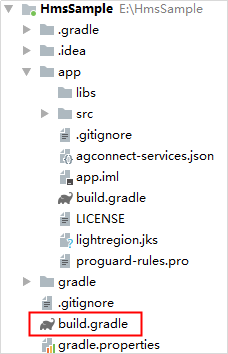
- Add the AppGallery Connect plugin and the Maven repository.
- Go to and configure the Maven repository address for the HMS Core SDK.
- Go to and configure the Maven repository address for the HMS Core SDK.
- If the agconnect-services.json file has been added to the app, go to and add the AppGallery Connect plugin configuration.
buildscript {
    repositories {
        google()
        jcenter()
        // Configure the Maven repository address for the HMS Core SDK.
        maven {url 'https://developer.huawei.com/repo/'}
    }
    dependencies {
        ...
        // Add the AppGallery Connect plugin configuration. Please refer to AppGallery Connect Plugin Dependency to select a proper plugin version.
        classpath 'com.huawei.agconnect:agcp:1.6.0.300'
    }
}

allprojects {
    repositories {
        google()
        jcenter()
        // Configure the Maven repository address for the HMS Core SDK.
        maven {url 'https://developer.huawei.com/repo/'}
    }
}
- Open the build.gradle file in the root directory of your Android Studio project.
- Gradle plugin 7.0
- Open the build.gradle file in the root directory of your Android Studio project.
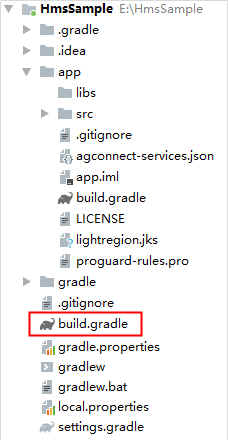
- Add the AppGallery Connect plugin and the Maven repository.
- Go to and configure the Maven repository address for the HMS Core SDK.
- Go to and add Android Gradle plugin configurations.
- If the agconnect-services.json file has been added to the app, go to and add the AppGallery Connect plugin configuration.
buildscript { repositories { google() jcenter() // Configure the Maven repository address for the HMS Core SDK. maven {url 'https://developer.huawei.com/repo/'} } dependencies { ... // Add the Android Gradle plugin configuration. You need to replace {version} with the actual Gradle plugin version, for example, 7.0.1. classpath 'com.android.tools.build:gradle:{version}' // Add the AppGallery Connect plugin configuration. Please refer to AppGallery Connect Plugin Dependency to select a proper plugin version. classpath 'com.huawei.agconnect:agcp:1.6.0.300' } } - Open the project-level settings.gradle file and configure the Maven repository address for the HMS Core SDK.
dependencyResolutionManagement {
    ...
    repositories {
        google()
        jcenter()
        // Configure the Maven repository address for the HMS Core SDK.
        maven {url 'https://developer.huawei.com/repo/'}
    }
}
- Open the build.gradle file in the root directory of your Android Studio project.
- Gradle plugin 7.1 or later
- Open the build.gradle file in the root directory of your Android Studio project.
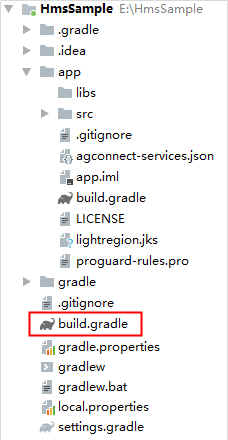
- Go to and add Android Gradle plugin configurations. If the agconnect-services.json file has been added to the app, go to and add the AppGallery Connect plugin configuration.
buildscript { dependencies { ... // Add the Android Gradle plugin configuration. You need to replace {version} with the actual Gradle plugin version, for example, 7.1.1. classpath 'com.android.tools.build:gradle:{version}' // Add the AppGallery Connect plugin configuration. Please refer to AppGallery Connect Plugin Dependency to select a proper plugin version. classpath 'com.huawei.agconnect:agcp:1.6.0.300' } } plugins { ... } - Open the project-level settings.gradle file and configure the Maven repository address for the HMS Core SDK.
pluginManagement {
    repositories {
        gradlePluginPortal()
        google()
        mavenCentral()
        // Configure the Maven repository address for the HMS Core SDK.
        maven { url 'https://developer.huawei.com/repo/' }
    }
}
dependencyResolutionManagement {
    ...
    repositories {
        google()
        mavenCentral()
        // Configure the Maven repository address for the HMS Core SDK.
        maven { url 'https://developer.huawei.com/repo/' }
    }
}
- Open the build.gradle file in the root directory of your Android Studio project.
Adding Build Dependencies
- Open the app-level build.gradle file of your project.
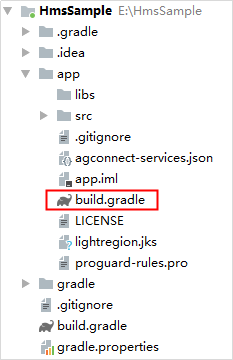
- Add the AppGallery Connect plugin configuration in either of the following methods:
- Method 1: Add the following configuration under the declaration in the file header:
apply plugin: 'com.huawei.agconnect'
- Method 2: Add the plugin configuration in the plugins block.
plugins {
    id 'com.android.application'
    // Add the following configuration:
    id 'com.huawei.agconnect'
}
- Method 1: Add the following configuration under the declaration in the file header:
- Add build dependencies in the dependencies section.
implementation 'com.huawei.hms:hianalytics:{version}'
implementation 'com.huawei.hms:dtm-api:{version}'

Replace {version} with the actual SDK version number. For details about the Analytics Kit version number, please refer to version-change-history. For details about the DTM version number, please refer to Version Change History.
Example: implementation 'com.huawei.hms:hianalytics:6.12.0.301' and implementation 'com.huawei.hms:dtm-api:6.6.0.308'.
(Optional) Integrating the DTM Plugin
After integrating the DTM plugin, you can dynamically inject event tracking code to the target class during app build, therefore improving the app runtime performance.
If the version in com.huawei.hms:dtm-api:version is 5.2.0.300 or later, you are advised to integrate the DTM plugin.

The plugin is available only for Android Studio projects.
After integrating the plugin, you can skip 2 in Adding Visual Events for a Fragment.
- Add a dependency on the DTM plugin in the project-level build.gradle file.
buildscript { repositories { google() jcenter() // Configure the Maven repository address. maven {url 'https://developer.huawei.com/repo/'} } dependencies { ... // Add the DTM plugin configuration. classpath 'com.huawei.hms:dtm-plugin:6.1.0.300'} } allprojects { repositories { google() jcenter() // Configure the Maven repository address. maven {url 'https://developer.huawei.com/repo/'} } } - Add the DTM plugin configuration in the app-level build.gradle file in either of the following methods as needed:
- Method 1: Add the following configuration under the declaration in the file header:
apply plugin: 'com.huawei.hms.dtm.plugin'
- Method 2: Add the plugin configuration in the plugins block.
plugins {
    id 'com.android.application'
    // Add the plugin configuration.
    id 'com.huawei.hms.dtm.plugin'
}
- Method 1: Add the following configuration under the declaration in the file header:
- (Optional) To view the DTM plugin build logs, add the following configuration to the app-level build.gradle file:
android {       }
// Configure the following information.
dtmConfig{
 // Specify whether to record DTM plugin compilation logs. true: yes; false: no.
    debug = true
}

