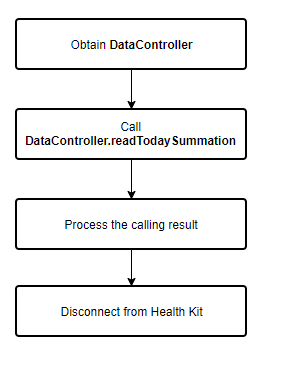
After obtaining user authorization and enabling Health Service Kit in the Huawei Health app, you can call APIs provided by the Health Service Kit SDK for Android to obtain users' health and fitness data. In the following example, we will show you the procedure of reading the step count of the current day by calling DataController.readTodaySummation().

- Before calling APIs provided by the Health Service Kit SDK, make sure that the phone screen is on. Otherwise, API calling may fail with the error code DISABLE_DATA_OPERATION. For details, please refer to error codes.
- Before calling APIs provided by the Health Service Kit SDK, make sure that your app runs in the foreground, or is bound with a foreground app. Otherwise, API calling may fail with the error code APPLICATION_NOT_FORGROUND. For details, please refer to error codes.
- Call DataController for health and fitness data management.
// Note:
// 1. this refers to an Activity or Context object.
// 2. Initialize objects of the DataController class each time before API calling. Otherwise, data reading may fail due to expired Activity or Context.
// 3. DataController provides multiple APIs for managing health and fitness data.
DataController dataController = HuaweiHiHealth.getDataController(this);
- Call DataController.readTodaySummation().
// Call readTodaySummation using the specified data type (incremental step count: DT_CONTINUOUS_STEPS_DELTA) to query the statistics of the data type on the current day.
// If you want to query the statistics of other data types of the current day, please refer to the parameter description for calling readTodaySummation.
Task<SampleSet> todaySummationTask = dataController.readTodaySummation(DataType.DT_CONTINUOUS_STEPS_DELTA);
- Process the API calling result.
// Register a listener to monitor the data query result (success or failure), as calling readTodaySummation to query the statistics of the current day is an asynchronous operation.
todaySummationTask.addOnSuccessListener(new OnSuccessListener<SampleSet>() {
    @Override
    public void onSuccess(SampleSet sampleSet) {
        Log.i("TAG", "Success read today summation from HMS core");
        // TODO: Add the code for displaying sampleSet data.
        Log.i("TAG", "the result sampleSet is:" + sampleSet.toString());
        // TODO: Call the API in Step 4 to disconnect from Health Service Kit.
    }
});
todaySummationTask.addOnFailureListener(new OnFailureListener() {
    @Override
    public void onFailure(Exception e) {
        String errorCode = e.getMessage();
        String errorMsg = HiHealthStatusCodes.getStatusCodeMessage(Integer.parseInt(errorCode));
        Log.e("TAG", "errorCode + ": " + errorMsg);
        // Process the result codes returned by the request. For details, please refer to HiHealthStatusCodes.
        // TODO: Call the API in Step 4 to disconnect from Health Service Kit.
    }
});
- Disconnect from Health Service Kit.
// To reduce power consumption, call the following API to disconnect from Health Service Kit after the API calling is complete.
HuaweiHiHealth.disconnect();