[h2]问题现象
报9568263错误。
在HarmonyOS 开发者中心中配置了真机的udid,并应用了更新后的p7b文件、证书文件进行sign后重新打包,使用hdc命令始终无法安装新HAP包。其他机器均正常安装。
运行命令hdc install xxx.hap的报错信息如下:
[Info]App install path:xxx.hap, queuesize:0, msg:error: failed to install bundle. code:9568263 error: install version downgrade.
[h2]定位过程
查看日志返回的错误信息code:9568263 error: install version downgrade。正在安装的应用的版本号versionCode小于系统已安装的该应用的版本号。
[h2]修改建议
- 桌面直接卸载原版本应用(PC/2in1设备需要确保所有用户下都卸载完成,手机/平板侧需要关注隐私空间和主用户下是否卸载完成),重新执行安装。
- 手机界面直接卸载应用。
- 重新执行hdc install命令。
- 使用命令卸载工具再重装。
- 切换到可执行hdc命令目录下,一般是DevEco Studio工具的SDK目录toolchains中会有hdc.exe的可执行文件。
- 先执行hdc shell bm dump -a <应用bundleName>检查下看是否之前的包还存在,如果存在就执行hdc uninstall <应用bundleName>卸载。
- 重新执行hdc install命令。
[h2]问题现象
报9568283错误。
先安装老包,修改build-profile.json5中的API版本后,再安装新包,报错如下:
Install Failed: error: failed to install bundle.
code:9568283.
error: install releaseType compatible not same.
[h2]定位过程
检查修改API版本前后的两个包对应的打包产物的versionCode、apiReleaseType、minAPIVersion、targetAPIVersion的一致性。打包产物查看路径:工程目录build/default/outputs/default/,找到对应.hap包后,打开module.json文件可核对相关字段。
[h2]分析结论
由于只修改了API版本号,两个版本的versionCode相同,但apiReleaseType、minAPIVersion、targetAPIVersion两个产物中的值不都分别一致,导致报错。

[h2]定位过程
- 检查项目中各个模块的module.json5是否配置了skills字段,配置了该字段则表示该模块为入口ability。确认项目的正确入口ability是哪个,一个项目只需要一个主入口即可。
- 检查IDE运行项目时的命令是否正确,如:hdc shell aa start -a EntryAbility -b com.example.myapplication中的入口模块EntryAbility是否与项目主入口ability相同。
[h2]修改建议
- 在运行报错时,把该命令中对应ability的module.json5中的skills字段去掉,不作为入口ability;
- 在运行项目前,编辑运行配置,在Launch Options下手动选择项目的正确入口ability。
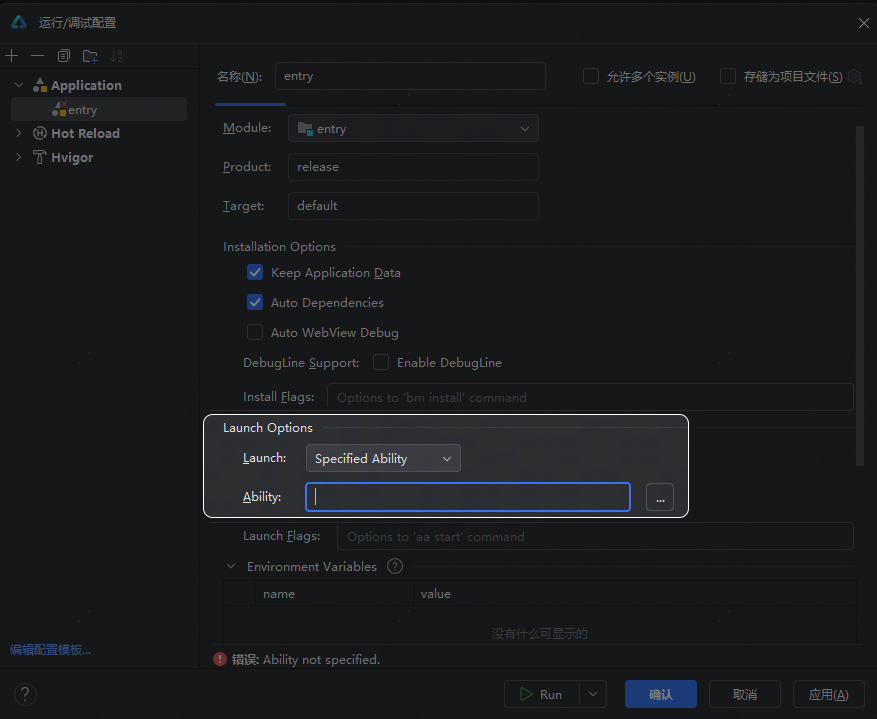
[h2]问题现象
运行项目出现如下报错信息。
Install Failed: error: failed to install bundle.
code:9568320.
error: no signature file.
根据错误码9568320提供的处理方案无法解决问题。
[h2]问题现象
项目修改包名后安装失败,报错信息如下:
hvigor ERROR: Failed :entry:default@SignHap...
hvigor ERROR: BundleName in the project configuration does not match that in the SigningConfigs.
Detail: Open the project-level build-profile.json5 file. Change the bundleName value.
to that in the SigningConfigs. Otherwise, go to the app.json5 file and change the bundleName value there.
at /Users/hmn/Desktop/xxx/ztyhm/build-profile.json5.
hvigor ERROR: BUILD FAILED in 18 s 719 ms.
[h2]定位过程
根据报错提示"BundleName in the project configuration does not match that in the SigningConfigs."可知:修改包名后需要同步修改签名信息。
[h2]定位过程
DevEco Studio在部署应用时,检测到设备上已存在相同bundleName的应用包,会执行卸载命令hdc uninstall <包名>。第一个设备上已存在与正在安装应用bundleName相同的应用,因此执行了卸载操作。第二个设备也执行了卸载操作,但已安装应用的VersionCode大于正在安装应用的VersionCode,导致重新安装时报9568263错误。
[h2]分析结论
多设备部署时,DevEco Studio会对每个检测到相同bundleName应用的设备执行卸载操作。当某设备上已安装应用的VersionCode高于正在安装应用的VersionCode时,卸载后重新安装会报9568263错误。
[h2]修改建议
- 提前在相关设备上卸载已存在的同bundleName应用(PC/2in1设备需要确保所有用户下都卸载完成,手机/平板侧需要关注隐私空间和主用户下是否卸载完成),保证设备上不存在与正在安装应用bundleName相同的应用,然后进行多设备部署。即使设备上有相同包名的应用,正在安装应用的VersionCode也应高于系统中已安装应用的VersionCode。
- 若需降级安装,对于已安装的证书分发类型为app_gallery或签名证书类型为debug的三方应用,可使用-d命令实现降级安装:hdc shell bm install -p /data/example.hap -d。
- 多设备运行可参考多设备运行。