问题现象
- 下载安装DevEco Studio for Mac(x86) 5.0.3.600之后,打开报错如下:DevEco-Studio已损坏,无法打开。
- DevEco Studio NEXT Developer Beta1安装到了win10后无法新建工程、文件等,新建窗口打开后是空白的窗体。重复安装几次,都是同样现象。电脑硬件配置是8G内存。
- DevEco Studio软件安装后无法进入,弹出错误弹窗。
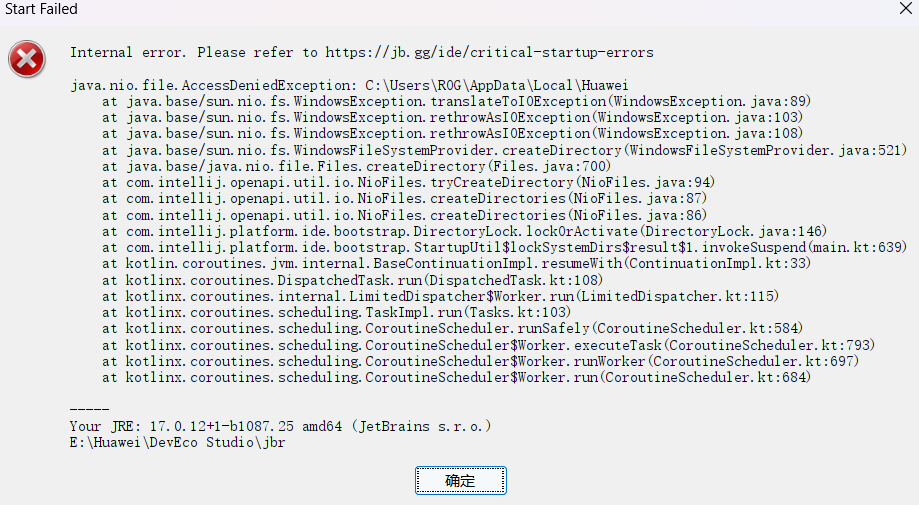
macOS系统报错如下:
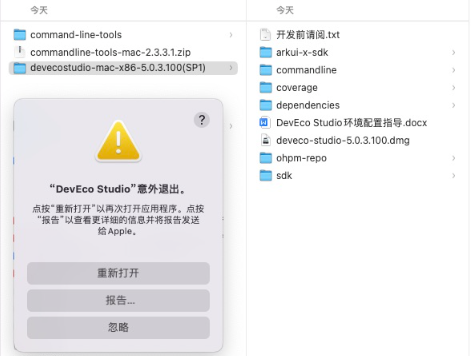
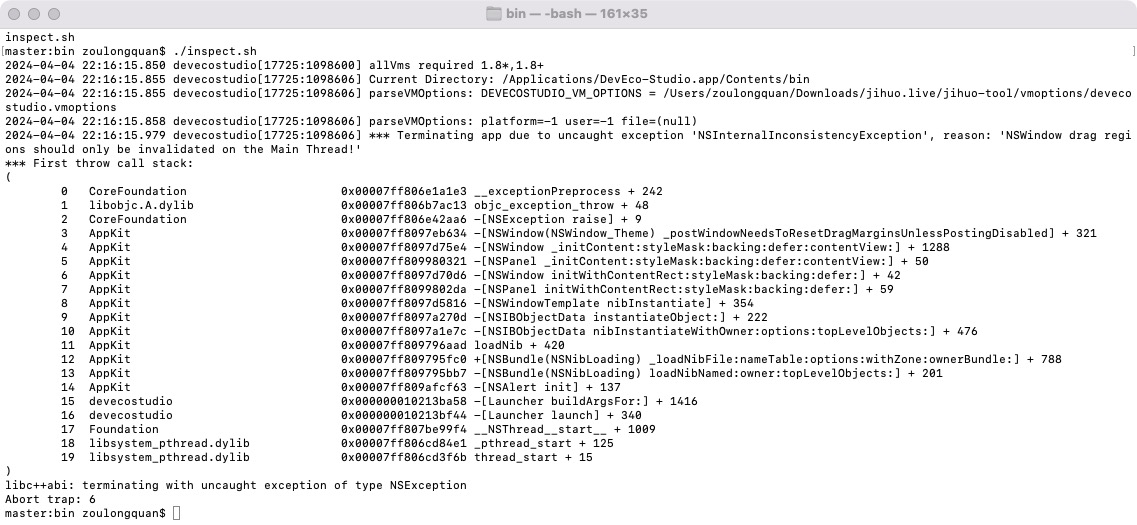
- 无法启动,报错信息如下:
Translated Report (Full Report Below)
-------------------------------------

Process: devecostudio [2948]
Path: /Applications/DevEco-Studio.app/Contents/MacOS/devecostudio
Identifier: com.huawei.devecostudio.ds
Version: 4.1.3 (DS-223.8617.56.36.413700)
Code Type: X86-64 (Native)
Parent Process: launchd [1]
User ID: 501

Date/Time: 2024-04-20 13:38:27.2126 +0800
OS Version: macOS 12.7.4 (21H1123)
Report Version: 12
Anonymous UUID: 888C3BC7-7E6D-8E07-2EE8-AD781E36DF31


Time Awake Since Boot: 990 seconds

System Integrity Protection: enabled

Crashed Thread: 3

Exception Type: EXC_CRASH (SIGABRT)
Exception Codes: 0x0000000000000000, 0x0000000000000000
Exception Note: EXC_CORPSE_NOTIFY

Application Specific Information:
abort() called


Application Specific Backtrace 0:
0 CoreFoundation 0x00007ff81c5a36e3 __exceptionPreprocess + 242
1 libobjc.A.dylib 0x00007ff81c3038bb objc_exception_throw + 48
2 CoreFoundation 0x00007ff81c5cbfc6 -[NSException raise] + 9
3 AppKit 0x00007ff81ef8cc44 -[NSWindow(NSWindow_Theme) _postWindowNeedsToResetDragMarginsUnlessPostingDisabled] + 321
4 AppKit 0x00007ff81ef78bf4 -[NSWindow _initContent:styleMask:backing:defer:contentView:] + 1288
5 AppKit 0x00007ff81f121931 -[NSPanel _initContent:styleMask:backing:defer:contentView:] + 50
6 AppKit 0x00007ff81ef786e6 -[NSWindow initWithContentRect:styleMask:backing:defer:] + 42
7 AppKit 0x00007ff81f1218ea -[NSPanel initWithContentRect:styleMask:backing:defer:] + 59
8 AppKit 0x00007ff81ef76e26 -[NSWindowTemplate nibInstantiate] + 354
9 AppKit 0x00007ff81ef43c7d -[NSIBObjectData instantiateObject:] + 222
10 AppKit 0x00007ff81ef433ec -[NSIBObjectData nibInstantiateWithOwner:options:topLevelObjects:] + 476
11 AppKit 0x00007ff81ef3801d loadNib + 420
12 AppKit 0x00007ff81ef3752f +[NSBundle(NSNibLoading) _loadNibFile:nameTable:options:withZone:ownerBundle:] + 788
13 AppKit 0x00007ff81ef37126 -[NSBundle(NSNibLoading) loadNibNamed:owner:topLevelObjects:] + 201
14 AppKit 0x00007ff81f29e383 -[NSAlert init] + 137
15 devecostudio 0x00000001051b7a58 -[Launcher buildArgsFor:] + 1416
16 devecostudio 0x00000001051b7f44 -[Launcher launch] + 340
17 Foundation 0x00007ff81d37d964 __NSThread__start__ + 1009
18 libsystem_pthread.dylib 0x00007ff81c4614e1 _pthread_start + 125
19 libsystem_pthread.dylib 0x00007ff81c45cf6b thread_start + 15
- 电脑之前下载了5.0.5.200版本的“DevEco-Studio”,没分配模拟器的权限,卸载后,安装910版本的IDE,打开的时候弹框:没权限打开应用程序“DevEco-Studio”。
- Mac电脑上,点击DevEco Studio图标启动时直接崩溃,崩溃日志中会出现一行报错信息"System Integrity Protection:disabled"。
- 异常断电后打开IDE,弹框报错Error sending command line to existing instance,打开项目报错信息如下:
java.io.UncheckedIOException: com.intellij.util.io.CorruptedException: file[6658].child[14][#48385] is out of valid/allocated id range (1..48384] -> VFS is corrupted (was IDE forcibly terminated?)
   at com.intellij.openapi.vfs.newvfs.persistent.FSRecordsImpl.lambda$static$0(FSRecordsImpl.java:134)
   at com.intellij.openapi.vfs.newvfs.persistent.FSRecordsImpl.handleError(FSRecordsImpl.java:1383)
   at com.intellij.openapi.vfs.newvfs.persistent.FSRecordsImpl.list(FSRecordsImpl.java:696)
   at com.intellij.openapi.vfs.newvfs.persistent.FSRecordsImpl.update(FSRecordsImpl.java:720)
   at com.intellij.openapi.vfs.newvfs.persistent.PersistentFSImpl.findChildInfo(PersistentFSImpl.java:603)
   at com.intellij.openapi.vfs.newvfs.impl.VirtualDirectoryImpl.findInPersistence(VirtualDirectoryImpl.java:154)
   at com.intellij.openapi.vfs.newvfs.impl.VirtualDirectoryImpl.doFindChild(VirtualDirectoryImpl.java:137)
   at com.intellij.openapi.vfs.newvfs.impl.VirtualDirectoryImpl.findChild(VirtualDirectoryImpl.java:83)
   at com.intellij.openapi.vfs.newvfs.impl.VirtualDirectoryImpl.findChild(VirtualDirectoryImpl.java:535)
   at com.intellij.openapi.vfs.newvfs.impl.VirtualDirectoryImpl.findChild(VirtualDirectoryImpl.java:51)
   at com.intellij.openapi.vfs.newvfs.VfsImplUtil.findFileByPath(VfsImplUtil.java:56)
   at com.intellij.openapi.vfs.impl.local.LocalFileSystemBase.findFileByPath(LocalFileSystemBase.java:119)
   at com.intellij.openapi.vfs.impl.VirtualFileManagerImpl.findByUrl(VirtualFileManagerImpl.java:344)
   at com.intellij.openapi.vfs.impl.VirtualFileManagerImpl.findFileByUrl(VirtualFileManagerImpl.java:331)
   at com.intellij.openapi.fileEditor.impl.HistoryEntry.parseEntry(HistoryEntry.java:201)
   at com.intellij.openapi.fileEditor.impl.HistoryEntry.createLight(HistoryEntry.java:75)
   at com.intellij.openapi.fileEditor.impl.UiBuilder$processFiles$2.invokeSuspend(EditorsSplitters.kt:948)
   at com.intellij.openapi.fileEditor.impl.UiBuilder$processFiles$2.invoke(EditorsSplitters.kt)
   at com.intellij.openapi.fileEditor.impl.UiBuilder$processFiles$2.invoke(EditorsSplitters.kt)
   at kotlinx.coroutines.intrinsics.UndispatchedKt.startUndispatchedOrReturn(Undispatched.kt:78)
   at kotlinx.coroutines.CoroutineScopeKt.coroutineScope(CoroutineScope.kt:264)
   at com.intellij.openapi.fileEditor.impl.UiBuilder.processFiles(EditorsSplitters.kt:924)
   at com.intellij.openapi.fileEditor.impl.UiBuilder.process(EditorsSplitters.kt:903)
   at com.intellij.openapi.fileEditor.impl.EditorsSplitters.createEditors(EditorsSplitters.kt:314)
   at com.intellij.openapi.project.impl.ProjectFrameAllocatorKt$restoreEditors$2$3.invokeSuspend(ProjectFrameAllocator.kt:352)
   at com.intellij.openapi.project.impl.ProjectFrameAllocatorKt$restoreEditors$2$3.invoke(ProjectFrameAllocator.kt)
   at com.intellij.openapi.project.impl.ProjectFrameAllocatorKt$restoreEditors$2$3.invoke(ProjectFrameAllocator.kt)
   at kotlinx.coroutines.intrinsics.UndispatchedKt.startUndispatchedOrReturn(Undispatched.kt:78)
   at kotlinx.coroutines.BuildersKt__Builders_commonKt.withContext(Builders.common.kt:167)
   at kotlinx.coroutines.BuildersKt.withContext(Unknown Source)
   at com.intellij.platform.diagnostic.telemetry.impl.TracerKt.span(tracer.kt:53)
   at com.intellij.platform.diagnostic.telemetry.impl.TracerKt.span$default(tracer.kt:49)
   at com.intellij.openapi.project.impl.ProjectFrameAllocatorKt$restoreEditors$2.invokeSuspend(ProjectFrameAllocator.kt:351)
   at com.intellij.openapi.project.impl.ProjectFrameAllocatorKt$restoreEditors$2.invoke(ProjectFrameAllocator.kt)
   at com.intellij.openapi.project.impl.ProjectFrameAllocatorKt$restoreEditors$2.invoke(ProjectFrameAllocator.kt)
   at kotlinx.coroutines.intrinsics.UndispatchedKt.startUndispatchedOrReturn(Undispatched.kt:78)
   at kotlinx.coroutines.CoroutineScopeKt.coroutineScope(CoroutineScope.kt:264)
   at com.intellij.openapi.project.impl.ProjectFrameAllocatorKt.restoreEditors(ProjectFrameAllocator.kt:335)
   at com.intellij.openapi.project.impl.ProjectFrameAllocatorKt.access$restoreEditors(ProjectFrameAllocator.kt:1)
   at com.intellij.openapi.project.impl.ProjectUiFrameAllocator$doRun$2$reopeningEditorJob$1$1.invokeSuspend(ProjectFrameAllocator.kt:183)
   at com.intellij.openapi.project.impl.ProjectUiFrameAllocator$doRun$2$reopeningEditorJob$1$1.invoke(ProjectFrameAllocator.kt)
   at com.intellij.openapi.project.impl.ProjectUiFrameAllocator$doRun$2$reopeningEditorJob$1$1.invoke(ProjectFrameAllocator.kt)
   at kotlinx.coroutines.intrinsics.UndispatchedKt.startUndispatchedOrReturn(Undispatched.kt:78)
   at kotlinx.coroutines.BuildersKt__Builders_commonKt.withContext(Builders.common.kt:167)
   at kotlinx.coroutines.BuildersKt.withContext(Unknown Source)
   at com.intellij.platform.diagnostic.telemetry.impl.TracerKt.span(tracer.kt:53)
   at com.intellij.platform.diagnostic.telemetry.impl.TracerKt.span$default(tracer.kt:49)
   at com.intellij.openapi.project.impl.ProjectUiFrameAllocator$doRun$2$reopeningEditorJob$1.invokeSuspend(ProjectFrameAllocator.kt:182)
   at kotlin.coroutines.jvm.internal.BaseContinuationImpl.resumeWith(ContinuationImpl.kt:33)
   at kotlinx.coroutines.DispatchedTask.run(DispatchedTask.kt:108)
   at kotlinx.coroutines.scheduling.CoroutineScheduler.runSafely(CoroutineScheduler.kt:584)
   at kotlinx.coroutines.scheduling.CoroutineScheduler$Worker.executeTask(CoroutineScheduler.kt:793)
   at kotlinx.coroutines.scheduling.CoroutineScheduler$Worker.runWorker(CoroutineScheduler.kt:697)
   at kotlinx.coroutines.scheduling.CoroutineScheduler$Worker.run(CoroutineScheduler.kt:684)
Caused by: com.intellij.util.io.CorruptedException: file[6658].child[14][#48385] is out of valid/allocated id range (1..48384] -> VFS is corrupted (was IDE forcibly terminated?)
   at com.intellij.openapi.vfs.newvfs.persistent.PersistentFSTreeAccessor.checkChildIdValid(PersistentFSTreeAccessor.java:403)
   at com.intellij.openapi.vfs.newvfs.persistent.PersistentFSTreeRawAccessor.lambda$doLoadChildren$0(PersistentFSTreeRawAccessor.java:69)
   at com.intellij.openapi.vfs.newvfs.persistent.PersistentFSAttributeAccessor.lambda$readAttributeRaw$0(PersistentFSAttributeAccessor.java:79)
   at com.intellij.openapi.vfs.newvfs.persistent.AttributesStorageOverBlobStorage.lambda$readAttributeValue$8(AttributesStorageOverBlobStorage.java:1037)
   at com.intellij.openapi.vfs.newvfs.persistent.dev.blobstorage.StreamlinedBlobStorageOverMMappedFile.readRecord(StreamlinedBlobStorageOverMMappedFile.java:219)
   at com.intellij.openapi.vfs.newvfs.persistent.dev.blobstorage.StreamlinedBlobStorageHelper.readRecord(StreamlinedBlobStorageHelper.java:216)
   at com.intellij.openapi.vfs.newvfs.persistent.AttributesStorageOverBlobStorage.readAttributeValue(AttributesStorageOverBlobStorage.java:1026)
   at com.intellij.openapi.vfs.newvfs.persistent.AttributesStorageOverBlobStorage.readAttributeRaw(AttributesStorageOverBlobStorage.java:134)
   at com.intellij.openapi.vfs.newvfs.persistent.PersistentFSAttributeAccessor.readAttributeRaw(PersistentFSAttributeAccessor.java:72)
   at com.intellij.openapi.vfs.newvfs.persistent.PersistentFSTreeRawAccessor.doLoadChildren(PersistentFSTreeRawAccessor.java:62)
   at com.intellij.openapi.vfs.newvfs.persistent.FSRecordsImpl.list(FSRecordsImpl.java:693)
   ... 51 more
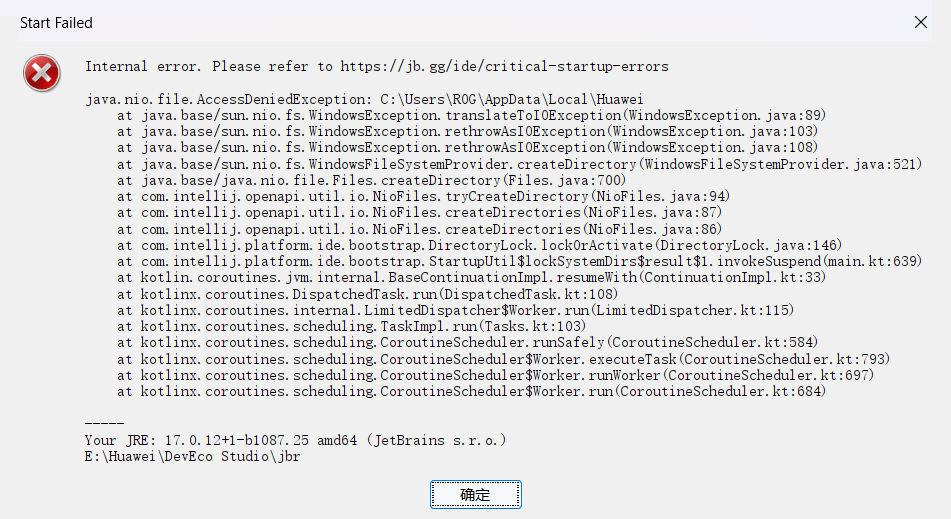
DevEco Studio突然无法打开,弹框报错信息如下:
- DevEco Studio无法正常打开项目。
背景知识
HUAWEI DevEco Studio是基于IntelliJ IDEA Community开源版本打造,为运行在HarmonyOS系统上的应用和元服务提供一站式的开发平台。
SIP是macOS的一项安全功能,旨在防止对关键系统文件和资源的修改,保护用户免受恶意软件的侵害。
问题定位
- 旧版DevEco-Studio是否卸载干净。
- 检查registry界面中是否取消勾选jcef.sandbox.enable选项。
- 是否修改了JetBrain的启动脚本。
- 检查macOS系统SIP是否处于关闭状态。
- 请检查电脑中是否安装了JetBrains破解软件。
- 是否是意外退出导致缓存文件受损。
- 排查是否有内部加密软件。
- 检查是否有多个DevEco Studio版本,多个版本互相影响导致。
分析结论
可能的原因多样,主要为以下多个方面:
- 安装过程异常导致DevEco Studio异常。或者由于命令行工具没有足够的App管理权限导致。
- DevEco Studio部分设置错误,比如jcef.sandbox.enable被取消勾选。
- 修改了JetBrains的启动脚本,导致DevEco Studio使用此脚本时出现不可知的问题。
- "System Integrity Protection: disabled",这个报错表示系统完整性保护(SIP)已被禁用,macOS 12.3版本之后,如果SIP(System Integrity Protection)处于关闭状态,则启动IDE时会自动闪退崩溃。
- 电脑中安装了JetBrains破解软件。
- 意外退出导致VFS(虚拟文件系统)中文件受损。
- 内部加密软件修改PC设备的IP地址,导致DevEco Studio出现不可知的问题。
- 安装多个DevEco Studio版本后,多个缓存配置会影响其使用。
修改建议
- 安装过程异常导致DevEco Studio异常,或者由于命令行工具没有足够的App管理权限导致。
- 重新安装DevEco Studio。卸载之后、重新安装之前,需要删除缓存文件:
系统
默认路径
MacOS
/Users/您的用户名/Library/Application Support/Huawei/DevEcoStudio5.0<br/>/Users/您的用户名/Library/Logs/Huawei/DevEcoStudio5.0<br/>/Users/您的用户名/Library/Caches/Huawei/DevEcoStudio5.0
Windows
C:\Program Files\Huawei\DevEco Studio<br/>C:\Users\您的用户名\AppData\Local\Huawei\DevEcoStudio5.0
- 命令行工具没有足够的App管理权限导致。打开应用,然后在“系统设置->隐私与安全性->安全性”,在提示“已阻止使用DevEco-Studio”附近,点击“仍要打开”。然后在终端执行如下命令:sudo xattr -d com.apple.quarantine /Applications/DevEco-Studio.app
- 重新安装DevEco Studio。卸载之后、重新安装之前,需要删除缓存文件:
- help->find action,输入registry,点击生成registry界面;registry界面中取消勾选jcef.sandbox.enable选项。
- 删除JetBrain的启动脚本。
- 打开/Users/{USER_NAME}/Library/LaunchAgents/jetbrains.vmoptions.plist。
- 删除所有launch setenv *_OPTIONS。
- 保存并关闭文件。
- 重启DevEco Studio。
- 开启SIP。
- 先重启电脑,在开机时一直按住Command+R进入Recovery模式。
- 进入Recovery模式后打开终端,终端输入命令csrutil enable开启SIP后重启电脑。
- 如果第一步不生效,尝试修改boot-args配置。打开终端命令行,输入sudo nvram boot-args="ipc_control_port_options=0",设置完成后重启电脑。
- 需要删除启动脚本(/Users/{USER_NAME}/Library/LaunchAgents/jetbrains.vmoptions.plist)或者删除/Users/{USER_NAME}/Library/LaunchAgents路径下的文件。
- 关闭IDE重启电脑,一般IDE发现缓存的VFS损坏,则会进行重新缓存,等待缓存完成即可。
- 卸载内部加密软件或恢复PC设备之前的IP地址。
- 只保留一个DevEco版本,删除所有缓存文件。
- macOS系统默认缓存文件地址:/Users/您的用户名/Library/Application Support/Huawei/DevEcoStudio5.0、/Users/您的用户名/Library/Logs/Huawei/DevEcoStudio5.0、/Users/您的用户名/Library/Caches/Huawei/DevEcoStudio5.0。
- Windows系统默认缓存文件地址:C:\Program Files\Huawei\DevEco Studio、C:\Users\您的用户名\AppData\Local\Huawei\DevEcoStudio5.0。