背景知识
图片压缩是指把原始图片处理为指定大小以内的图片。目前图片压缩支持jpeg、webp、png格式。超大分辨率图片在压缩过程中通过packToData编码存在内存泄漏问题,需要在解码前对图片进行优化处理,通过DecodingOptions中的desiredSize属性提前设置缩小后的分辨率,可以提高压缩效率并且避免内存溢出。
问题定位
- 根据如下代码进行图片压缩:
let context = this.getUIContext().getHostContext() as common.UIAbilityContext; const resourceMgr: resourceManager.ResourceManager = context.resourceManager; resourceMgr.getRawFileContent('XXXXXX.jpg').then((fileData: Uint8Array) => { const buffer = fileData.buffer.slice(0); const imageSource: image.ImageSource = image.createImageSource(buffer); const decodingOptions: image.DecodingOptions = { editable: true } imageSource.createPixelMap(decodingOptions).then((originalPixelMap: image.PixelMap) => { const imagePackerApi = image.createImagePacker(); const packOpts: image.PackingOption = { format: 'image/webp', quality: 1 }; let compressedImageData: ArrayBuffer = await imagePackerApi.packToData(sourcePixelMap, packOpts); }) }) - 压缩小分辨率图片时可以正常压缩图片,功能无异常;
- 压缩超大分辨率(30648X12480)图片,当PackingOption参数中的quality设置为0时,输出最低质量图片,应用仍然Crash;
- 分析日志,写入数据超出最大值"write data:[29144176] out of max size:[26214400].";
- DevEco Profiler工具分析,packToData压缩图片时内存溢出。
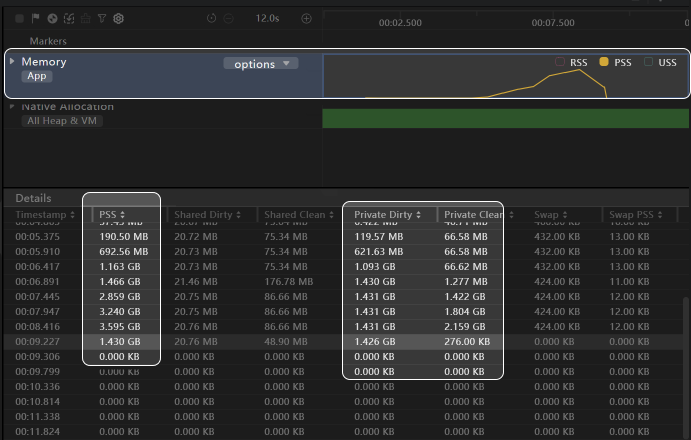
PrivateDirty持续增长,存在内存泄漏风险。

修改建议
使用packToData对超大分辨率图片进行编码时需要设置desiredSize属性提前缩小图片分辨率,代码示例如下:
import { common } from '@kit.AbilityKit';
import { resourceManager } from '@kit.LocalizationKit';
import { image } from '@kit.ImageKit';
import { util } from '@kit.ArkTS';

@Entry
@Component
struct Index {
  @State base64Image: string = '';

  aboutToAppear(): void {
    let context = this.getUIContext().getHostContext() as common.UIAbilityContext;
    const resourceMgr: resourceManager.ResourceManager = context.resourceManager;
    // startIcon.png仅供参考使用,开发者可替换为实际使用图片
    resourceMgr.getMediaContent($r('app.media.startIcon').id).then((fileData: Uint8Array) => {
      const buffer = fileData.buffer.slice(0);
      const imageSource: image.ImageSource = image.createImageSource(buffer);
      const decodingOptions: image.DecodingOptions = {
        editable: true,
        // desiredSize属性设置为缩小后的分辨率
        desiredSize: { width: 1000, height: 1000 }
      };
      imageSource.createPixelMap(decodingOptions).then(async (originalPixelMap: image.PixelMap) => {
        const imagePackerApi = image.createImagePacker();
        const packOpts: image.PackingOption = { format: 'image/webp', quality: 1 };
        let compressedImageData: ArrayBuffer = await imagePackerApi.packToData(originalPixelMap, packOpts);
        // 转为base64编码,用来展示图片
        let base64Helper = new util.Base64Helper();
        this.base64Image =
          'data:image/webp;base64,' + base64Helper.encodeToStringSync(new Uint8Array(compressedImageData));
      });
    });
  }

  build() {
    Column() {
      Image(this.base64Image)
        .width(200)
        .height(200)
    }
    .justifyContent(FlexAlign.Center)
    .alignItems(HorizontalAlign.Center)
    .height('100%')
    .width('100%')
  }
}