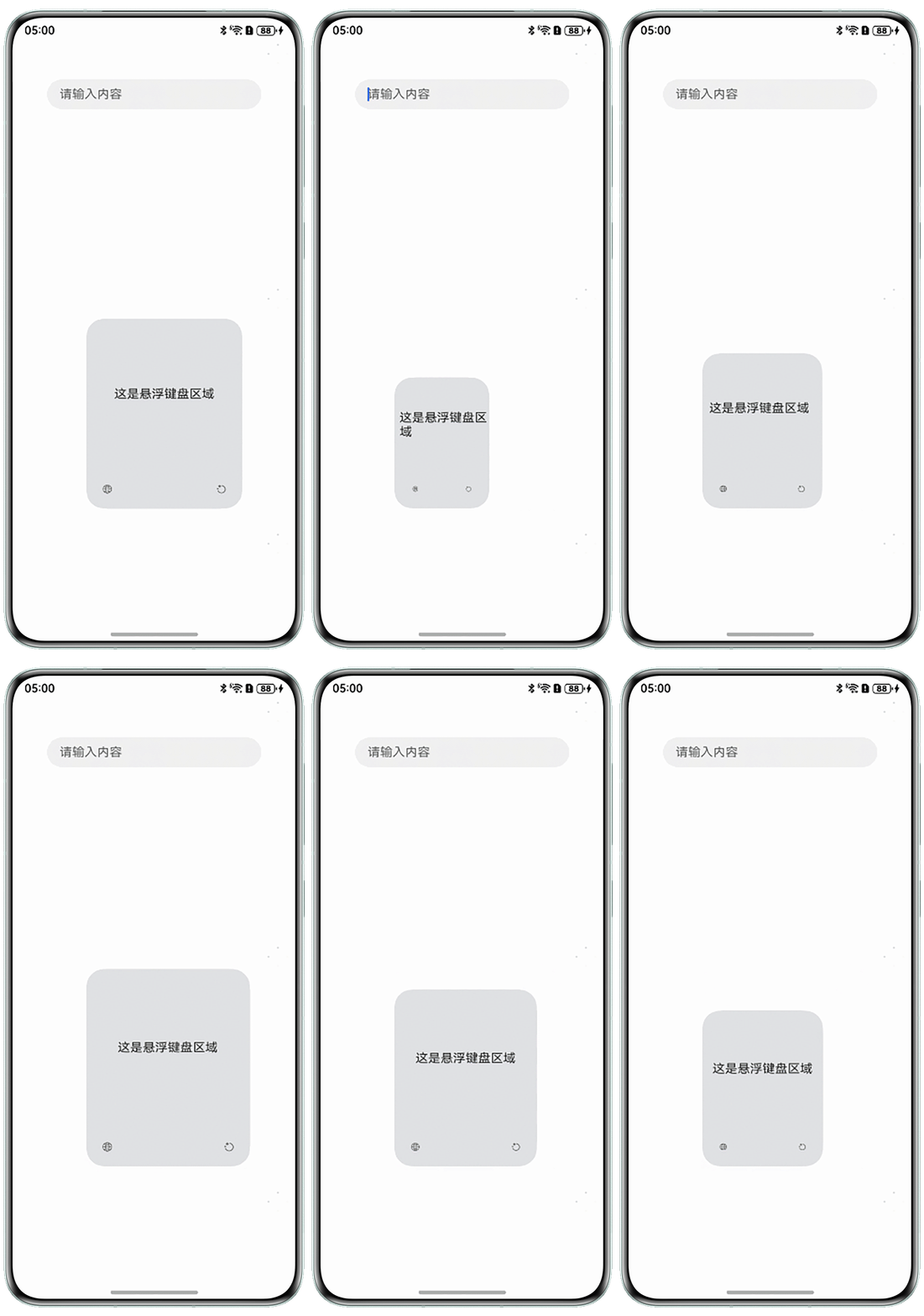
Q:同时调用moveTo()和resize()接口来实现悬浮键盘缩放时,键盘会出现抖动现象,如何解决?问题现象如图:
A:moveTo()方法用于移动输入法面板的位置,而resize()方法用于调整面板的大小。这两种操作都会导致系统的UI层进行重新计算和绘制,特别是在移动和缩放操作快速执行时,可能会导致视觉上的抖动效果。同时修改悬浮面板的位置和尺寸建议用adjustPanelRect()方法。
- 需要先实现一个输入法应用,请参考官网。
- 实现同时修改悬浮键盘的位置和尺寸时键盘防抖效果需要修改以下文件:src/main/ets/InputMethodExtensionAbility/model/KeyboardController.ets:
import { Rect } from '@kit.ArkUI';
import { inputMethodEngine, InputMethodExtensionContext } from '@kit.IMEKit';
import { emitter } from '@kit.BasicServicesKit';

// 调用输入法框架的getInputMethodAbility方法获取实例,并由此实例调用输入法框架功能接口
const inputMethodAbility: inputMethodEngine.InputMethodAbility = inputMethodEngine.getInputMethodAbility();

export class KeyboardController {
  private mContext: InputMethodExtensionContext | undefined = undefined;
  private panel: inputMethodEngine.Panel | undefined = undefined;

  constructor() {

  }

  public onCreate(context: InputMethodExtensionContext): void {
    this.mContext = context;
    this.initWindow(); // 初始化窗口
    this.registerListener(); // 注册对输入法框架的事件监听
  }

  // 应用生命周期销毁
  public onDestroy(): void {
    this.unRegisterListener(); // 取消事件监听
    if (this.panel) {
      this.panel.hide(); // 销毁窗口
      inputMethodAbility.destroyPanel(this.panel);
    }
    if (this.mContext) {
      this.mContext.destroy();
    }
  }

  // 初始化窗口
  private initWindow(): void {
    if (this.mContext === undefined) {
      return;
    }
    let panelInfo: inputMethodEngine.PanelInfo = {
      type: inputMethodEngine.PanelType.SOFT_KEYBOARD,
      flag: inputMethodEngine.PanelFlag.FLG_FLOATING
    };

    inputMethodAbility.createPanel(this.mContext, panelInfo).then(async (inputPanel: inputMethodEngine.Panel) => {
      this.panel = inputPanel;
      if (this.panel) {
        await this.adjustSize();
        await this.panel.setUiContent('InputMethodExtensionAbility/pages/Index');
      }
    });
  }

  async adjustSize() {
    let x = KeyboardController.floatWindowRect.left;
    let y = KeyboardController.floatWindowRect.top;
    let w = KeyboardController.floatWindowRect.right - KeyboardController.floatWindowRect.left;
    let h = KeyboardController.floatWindowRect.bottom - KeyboardController.floatWindowRect.top;
    // 设置输入法应用横竖屏大小
    this.panel?.adjustPanelRect(inputMethodEngine.PanelFlag.FLG_FLOATING, {
      landscapeRect: {
        left: x,
        top: y,
        width: w,
        height: h
      },
      portraitRect: {
        left: x,
        top: y,
        width: w,
        height: h
      }
    });
  }

  public static floatWindowRect: Rect = {
    left: 325,
    top: 1300,
    right: 975,
    bottom: 1950
  };

  private registerListener(): void {
    this.registerInputListener(); // 注册对输入法框架服务的监听
    // 注册隐藏键盘事件监听等
  }

  // 注册对输入法框架服务的开启及停止事件监听
  private registerInputListener(): void {
    emitter.on('onResize', async (data: emitter.EventData) => {
      console.info(`eventData: ${JSON.stringify(data)}`);
      this.adjustSize();
    });
  }

  private unRegisterListener(): void {
    emitter.off('onResize');
  }
}

const keyboardController = new KeyboardController();

export default keyboardController;
src/main/ets/InputMethodExtensionAbility/pages/Index.ets:
import { FrameNode, NodeController, Position, window } from '@kit.ArkUI';
import { BusinessError, emitter } from '@kit.BasicServicesKit';
import { KeyboardController } from '../model/KeyboardController';

class MyNodeController extends NodeController {
  private rootNode: FrameNode | null = null;
  left: FrameNode | null = null;

  constructor() {
    super();
  }

  context?: UIContext;

  makeNode(context: UIContext): FrameNode | null {
    let rootNode = new FrameNode(context);
    this.rootNode = rootNode;
    this.context = context;
    return this.rootNode;
  }
}

@Entry
@Component
struct Index {
  uiContext = this.getUIContext();
  adjustSizeX: number = 0;
  adjustSizeY: number = 0;
  adjustSizeWidth: number = 0;
  adjustSizeHeight: number = 0;
  adjustSizeMoveStartPos: Position = { x: -1, y: -1 };
  private myNodeController: MyNodeController = new MyNodeController();
  currentFloatingAdjustDirection: FloatingAdjustDirection = FloatingAdjustDirection.NONE;

  build() {
    RelativeContainer() {
      Stack() {
        NodeContainer(this.myNodeController)
          .width('100%')
          .height(300)
          .backgroundColor($r('app.color.grey'));
        Text('这是悬浮键盘区域');
      };

      Row() {
      }
      .width(30)
      .height(30);

      Row() {
      }
      .width(30)
      .height(30)
      .alignRules({
        right: { anchor: '__container__', align: HorizontalAlign.End },
        top: { anchor: '__container__', align: VerticalAlign.Top }
      });

      Row() {
      }
      .width(30)
      .height(30)
      .alignRules({
        left: { anchor: '__container__', align: HorizontalAlign.Start },
        bottom: { anchor: '__container__', align: VerticalAlign.Bottom }
      });

      Row() {
      }
      .width(30)
      .height(30)
      .alignRules({
        right: { anchor: '__container__', align: HorizontalAlign.End },
        bottom: { anchor: '__container__', align: VerticalAlign.Bottom }
      });
    }
    .width('100%')
    .height('100%')
    .onTouch((event) => {
      this.adjustSize(event);
    });
  }

  getAvoidRect() {
    let type1 = window.AvoidAreaType.TYPE_SYSTEM;
    let type2 = window.AvoidAreaType.TYPE_NAVIGATION_INDICATOR;
    window.getLastWindow(this.uiContext.getHostContext()).then((data) => {
      // 获取系统默认区域,一般包括状态栏、导航栏
      let avoidArea1 = data.getWindowAvoidArea(type1);
      // 顶部状态栏高度
      let statusBarHeight = avoidArea1.topRect.height;
      // 底部导航栏高度
      let bottomNavHeight = avoidArea1.bottomRect.height;
      // 获取导航条区域
      let avoidArea2 = data.getWindowAvoidArea(type2);
      // 获取到导航条区域的高度
      let indicatorHeight = avoidArea2.bottomRect.height;
      console.info(`statusBarHeight is ${statusBarHeight}`);
      console.info(`bottomNavHeight is ${bottomNavHeight}`);
      console.info(`indicatorHeight is ${indicatorHeight}`);
    }).catch((err: BusinessError) => {
      console.error(`Failed to obtain the window. Cause: ${JSON.stringify(err)}`);
    });
  }

  getMoveDirection(event: TouchEvent): FloatingAdjustDirection {
    if (!event) {
      return FloatingAdjustDirection.NONE;
    }
    let adjustDirection = FloatingAdjustDirection.NONE;
    let firstTouch = event.touches[0];
    let x = firstTouch.displayX;
    let y = firstTouch.displayY;
    let directionX = FloatingAdjustIdentificationDirection.NONE;
    let directionY = FloatingAdjustIdentificationDirection.NONE;
    let mfloatingAdjustIdentificationZone = this.px2vp(128);
    let floatX = this.px2vp(KeyboardController.floatWindowRect.left);
    let floatY = this.px2vp(KeyboardController.floatWindowRect.top);
    let floatWidth = this.px2vp(KeyboardController.floatWindowRect.right - KeyboardController.floatWindowRect.left);

    if (x <= floatX + mfloatingAdjustIdentificationZone && x >= floatX - mfloatingAdjustIdentificationZone) {
      directionX = FloatingAdjustIdentificationDirection.LEFT;
    } else if (x <= floatX + floatWidth + mfloatingAdjustIdentificationZone &&
      x >= floatX + floatWidth - mfloatingAdjustIdentificationZone) {
      directionX = FloatingAdjustIdentificationDirection.RIGHT;
    }
    if (y <= floatY + mfloatingAdjustIdentificationZone && y >= floatY - mfloatingAdjustIdentificationZone) {
      directionY = FloatingAdjustIdentificationDirection.TOP;
    } else if (y <= floatY + floatWidth + mfloatingAdjustIdentificationZone &&
      y >= floatY + floatWidth - mfloatingAdjustIdentificationZone) {
      directionY = FloatingAdjustIdentificationDirection.BOTTOM;
    }
    if (directionX === FloatingAdjustIdentificationDirection.LEFT &&
      directionY === FloatingAdjustIdentificationDirection.TOP) {
      adjustDirection = FloatingAdjustDirection.TOP_LEFT;
    } else if (directionX === FloatingAdjustIdentificationDirection.RIGHT &&
      directionY === FloatingAdjustIdentificationDirection.TOP) {
      adjustDirection = FloatingAdjustDirection.TOP_RIGHT;
    } else if (directionX === FloatingAdjustIdentificationDirection.LEFT &&
      directionY === FloatingAdjustIdentificationDirection.BOTTOM) {
      adjustDirection = FloatingAdjustDirection.BOTTOM_LEFT;
    } else if (directionX === FloatingAdjustIdentificationDirection.RIGHT &&
      directionY === FloatingAdjustIdentificationDirection.BOTTOM) {
      adjustDirection = FloatingAdjustDirection.BOTTOM_RIGHT;
    }
    return adjustDirection;
  }

  adjustSize(event: TouchEvent) {
    if (!event) {
      return;
    }
    const firstTouch = event.touches[0];
    let displayX = Math.round(firstTouch.displayX);
    let displayY = Math.round(firstTouch.displayY);
    switch (event.type) {
      case TouchType.Down:
        this.currentFloatingAdjustDirection = this.getMoveDirection(event);
        if (this.currentFloatingAdjustDirection !== FloatingAdjustDirection.NONE) {
          this.adjustSizeMoveStartPos.x = displayX;
          this.adjustSizeMoveStartPos.y = displayY;
          this.adjustSizeX = KeyboardController.floatWindowRect.left;
          this.adjustSizeY = KeyboardController.floatWindowRect.top;
          this.adjustSizeWidth = KeyboardController.floatWindowRect.right - KeyboardController.floatWindowRect.left;
          this.adjustSizeHeight = KeyboardController.floatWindowRect.bottom - KeyboardController.floatWindowRect.top;
        }
        break;
      case TouchType.Move:
        if (this.currentFloatingAdjustDirection !== FloatingAdjustDirection.NONE) {
          let offsetX = displayX - this.adjustSizeMoveStartPos.x;
          let offsetY = displayY - this.adjustSizeMoveStartPos.y;
          let max = Math.abs((offsetX)) > Math.abs((offsetY)) ? this.vp2px(offsetX) : this.vp2px(offsetY);
          switch (this.currentFloatingAdjustDirection) {
            case FloatingAdjustDirection.TOP_LEFT:
              this.adjustSizeX = this.adjustSizeX + max;
              this.adjustSizeY = (this.adjustSizeY + max);
              this.adjustSizeWidth = this.adjustSizeWidth - max;
              this.adjustSizeHeight = this.adjustSizeHeight - max;
              break;
            case FloatingAdjustDirection.TOP_RIGHT:
              this.adjustSizeY = (this.adjustSizeY + max);
              this.adjustSizeWidth = this.adjustSizeWidth - max;
              this.adjustSizeHeight = this.adjustSizeHeight - max;
              break;
            case FloatingAdjustDirection.BOTTOM_LEFT:
              this.adjustSizeX = this.adjustSizeX - max;
              this.adjustSizeWidth = this.adjustSizeWidth + max;
              this.adjustSizeHeight = this.adjustSizeHeight + max;
              break;
            case FloatingAdjustDirection.BOTTOM_RIGHT:
              this.adjustSizeWidth = this.adjustSizeWidth + max;
              this.adjustSizeHeight = this.adjustSizeHeight + max;
              break;
          }

          if (this.adjustSizeX < 0) {
            this.adjustSizeX = 0;
          }
          if (this.adjustSizeY < 0) {
            this.adjustSizeY = 0;
          }

          let eventData: emitter.EventData = {
            data: {
              'x': this.adjustSizeX,
              'y': this.adjustSizeY,
              'width': this.adjustSizeWidth,
              'height': this.adjustSizeHeight
            }
          };
          KeyboardController.floatWindowRect.left = this.adjustSizeX;
          KeyboardController.floatWindowRect.top = this.adjustSizeY;
          KeyboardController.floatWindowRect.right = this.adjustSizeX + this.adjustSizeWidth;
          KeyboardController.floatWindowRect.bottom = this.adjustSizeY + this.adjustSizeHeight;
          emitter.emit('onResize', eventData);

          this.adjustSizeMoveStartPos.x = displayX;
          this.adjustSizeMoveStartPos.y = displayY;
        }
        break;
      case TouchType.Cancel:
      case TouchType.Up:
        break;
    }
  }

  vp2px(value: number): number {
    return this.uiContext.vp2px(value);
  }

  px2vp(value: number): number {
    return this.uiContext.px2vp(value);
  }
}

export enum FloatingAdjustDirection {
  TOP_LEFT,
  TOP_RIGHT,
  BOTTOM_LEFT,
  BOTTOM_RIGHT,
  NONE
}

export enum FloatingAdjustIdentificationDirection {
  LEFT,
  RIGHT,
  TOP,
  BOTTOM,
  NONE
}
src/main/ets/pages/Index.ets:
@Entry
@Component
struct Index {
  build() {
    Stack() {
      TextInput({
        placeholder: '请输入内容'
      })
        .margin(50);
    }
    .alignContent(Alignment.TopStart)
    .position({ x: 0, y: 0 }).zIndex(99999);
  }
}
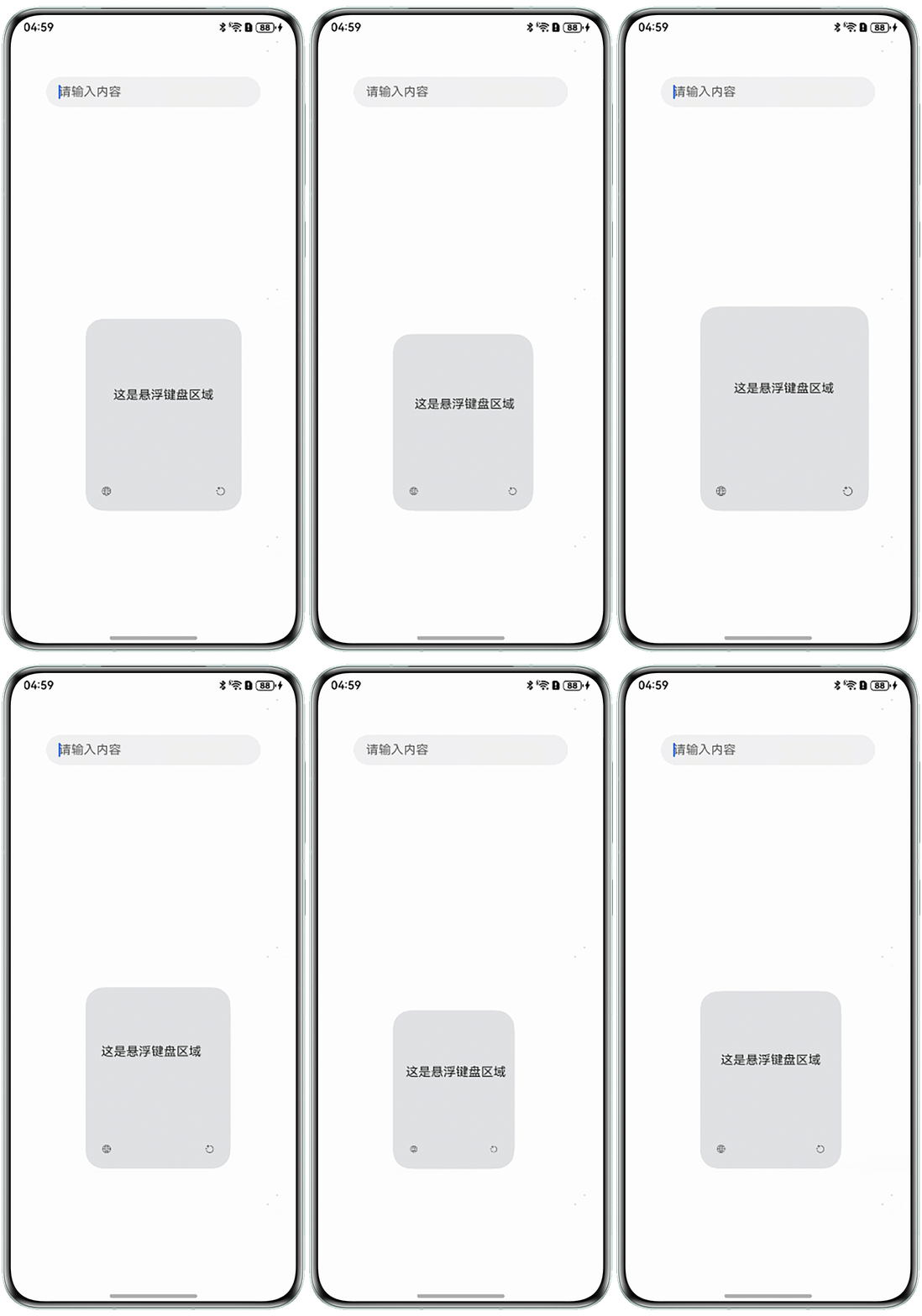
示例效果如图所示: