背景知识
- pdfService(PDF服务)提供PDF转图片的API如下:
- convertToImage:转换PDF文档为图片。
- getPagePixelMap:获取当前页的图片。
- getCustomPagePixelMap:获取指定PdfPage区间的图片内容。
- getAreaPixelMap:获取指定PdfPage区间的图片内容,并指定图片的宽和高。
- getAreaPixelMapWithOptions:获取指定PdfPage区域的图片内容,并指定图片的宽和高等参数。
- pdfViewManager(PDF预览)提供PDF转图片的API如下:
getPagePixelMap:获取对应PDF页面的缩略图,使用Promise异步回调。
解决方案
PDF Kit提供的PDF转图片的多个API使用场景不同,功能及注意事项见下表:
API | 提供方 | 作用对象 | 功能 | 起始版本 | 注意事项 |
|---|---|---|---|---|---|
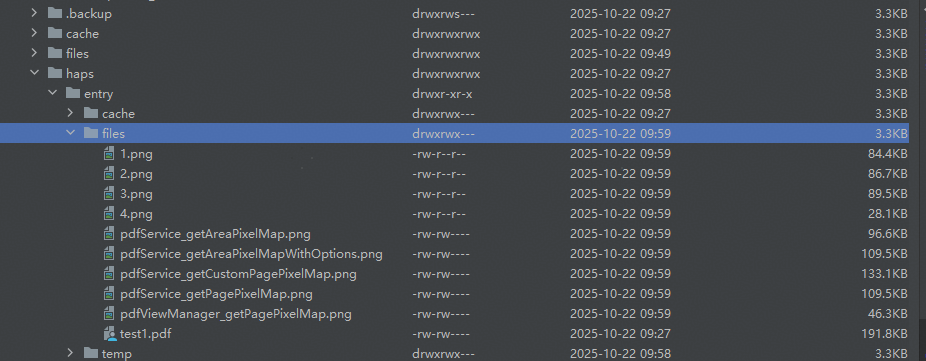
pdfDocument.convertToImage | pdfService | 整个PDF文件 | 转换PDF文档为图片。 | 5.0.0(12) | 入参path为文件夹路径。转换后的图片以PDF文件的页码为名,每页生成一张图片。 此API不支持自定义图片名,若需重命名,待图片生成后使用@ohos.file.fs (文件管理)的能力修改。 |
pdfPage.getPagePixelMap | pdfService | PDF文件的某一页 | 将当前页转换成图片。 | 5.0.0(12) | 仅根据PDF文件的某一页生成图片,不支持其他个性设置,如PDF页中矩形区域翻转、X、Y轴偏移等。 |
pdfPage.getCustomPagePixelMap | pdfService | PDF文件的某一页 | 获取指定PdfPage区间的图片内容。 支持设置PDF页中矩形区域翻转、X、Y轴偏移、宽高。 支持设置是否只获取黑白色。支持设置是否在图像中绘制注释。 | 5.0.0(12) | 按需合理设置PDF页中矩形区域翻转、X、Y轴偏移、宽高。偏移过多会导致图片留白过多、PDF页中矩形区域被截断,宽高过小会导致图片不清晰。 |
pdfPage.getAreaPixelMap | pdfService | PDF文件的某一页 | 获取指定PdfPage区间的图片内容。支持设置PDF页中矩形区域翻转、X、Y轴偏移、宽高。支持设置图片宽高。 支持设置是否只获取黑白色。支持设置是否在图像中绘制注释。 | 5.0.0(12) | 若图片宽高小于PDF页中矩形区域宽高,生成的图片里PDF页中矩形区域超出图片宽高的部分会被截断。 若图片宽高大于PDF页中矩形区域宽高,生成的图片里PDF页中矩形区域不足图片宽高的部分会以空白填补。 |
pdfPage.getAreaPixelMapWithOptions | pdfService | PDF文件的某一页 | 获取指定PdfPage区域的图片内容。支持设置PDF页中矩形区域翻转、X、Y轴偏移、宽高。支持设置图片宽高。 支持设置是否只获取黑白色。支持设置是否在图像中绘制注释。支持设置是否获取透明图像。 | 5.1.0(18) | 若图片宽高小于PDF页中矩形区域宽高,生成的图片里PDF页中矩形区域超出图片宽高的部分会被截断。 若图片宽高大于PDF页中矩形区域宽高,生成的图片里PDF页中矩形区域不足图片宽高的部分会以空白填补。 |
pdfController.getPagePixelMap | pdfViewManager | PDF文件的某一页 | 获取对应PDF页面的缩略图。 | 5.0.0(12) | 可通过设置参数isSync来控制使用异步/同步方式。 |
完整示例参考如下:
import { common } from '@kit.AbilityKit';
import { pdfService, pdfViewManager } from '@kit.PDFKit';
import { fileIo as fs } from '@kit.CoreFileKit';
import { image } from '@kit.ImageKit';

@Entry
@Component
struct Index {
  @State filePath: string = '';
  @State pixelMap: image.PixelMap | string = '';
  uiContext = this.getUIContext();

  aboutToAppear(): void {
    let context = this.uiContext.getHostContext() as common.UIAbilityContext;
    let dir: string = context.filesDir;
    // 确保在工程目录src/main/resources/rawfile里存在test.pdf文档
    this.filePath = dir + '/test.pdf';
    let res = fs.accessSync(this.filePath);
    if (!res) {
      let content: Uint8Array = context.resourceManager.getRawFileContentSync('rawfile/test.pdf');
      let fdSand: fs.File | null = null;
      try {
        fdSand =
          fs.openSync(this.filePath, fs.OpenMode.WRITE_ONLY | fs.OpenMode.CREATE | fs.OpenMode.TRUNC);
        fs.writeSync(fdSand.fd, content.buffer);
      } catch (e) {
        console.error('fs.openSync failed error is : ', JSON.stringify(e));
      } finally {
        if (fdSand !== null) {
          fs.closeSync(fdSand.fd);
        }
      }
    }
  }

  build() {
    Column({ space: 5 }) {
      Button('pdfService.getCustomPagePixelMap')
        .onClick(async () => {
          let document = new pdfService.PdfDocument();
          let loadResult = document.loadDocument(this.filePath, '');
          if (pdfService.ParseResult.PARSE_SUCCESS === loadResult) {
            let page: pdfService.PdfPage = document.getPage(0);
            this.pixelMap = page.getCustomPagePixelMap({
              x: 0,
              y: 0,
              rotate: 0,
              width: 1000,
              height: 1000
            }, false, false);

            let context = this.uiContext.getHostContext() as common.UIAbilityContext;
            let dir: string = context.filesDir;
            let filePath = dir + '/pdfService_getCustomPagePixelMap.png';
            let file: fs.File | null = null;
            try {
              file = fs.openSync(filePath, fs.OpenMode.READ_WRITE | fs.OpenMode.CREATE);
              let packOpts: image.PackingOption = { format: 'image/png', quality: 100 };
              const imagePacker: image.ImagePacker = image.createImagePacker();
              await imagePacker.packToFile(this.pixelMap, file.fd, packOpts).finally(() => {
                imagePacker.release(); // 释放
              });
            } catch (e) {
              console.error('fs.openSync failed error is : ', JSON.stringify(e));
            } finally {
              if (file !== null) {
                fs.closeSync(file.fd);
              }
            }
          }
        })

      Button('pdfService.getPagePixelMap')
        .onClick(async () => {
          let pdfDocument = new pdfService.PdfDocument();
          let loadResult = pdfDocument.loadDocument(this.filePath, '');
          if (pdfService.ParseResult.PARSE_SUCCESS === loadResult) {
            let pdfPage: pdfService.PdfPage = pdfDocument.getPage(0);
            this.pixelMap = pdfPage.getPagePixelMap();

            let context = this.uiContext.getHostContext() as common.UIAbilityContext;
            let dir: string = context.filesDir;
            let filePath = dir + '/pdfService_getPagePixelMap.png';
            let file: fs.File | null = null;
            try {
              file = fs.openSync(filePath, fs.OpenMode.READ_WRITE | fs.OpenMode.CREATE);
              let packOpts: image.PackingOption = { format: 'image/png', quality: 100 };
              const imagePacker: image.ImagePacker = image.createImagePacker();
              await imagePacker.packToFile(this.pixelMap, file.fd, packOpts).finally(() => {
                imagePacker.release(); // 释放
              });
            } catch (e) {
              console.error('fs.openSync failed error is : ', JSON.stringify(e));
            } finally {
              if (file !== null) {
                fs.closeSync(file.fd);
              }
            }
          }
        })

      Button('pdfService.getAreaPixelMap')
        .onClick(async () => {
          let document = new pdfService.PdfDocument();
          let loadResult = document.loadDocument(this.filePath, '');
          if (pdfService.ParseResult.PARSE_SUCCESS === loadResult) {
            let page: pdfService.PdfPage = document.getPage(0);
            this.pixelMap = page.getAreaPixelMap({
              x: 200,
              y: 200,
              rotate: 0,
              width: page.getWidth() * 2,
              height: page.getHeight() * 2
            }, page.getWidth(), page.getHeight(), false, false);

            let context = this.uiContext.getHostContext() as common.UIAbilityContext;
            let dir: string = context.filesDir;
            let filePath = dir + '/pdfService_getAreaPixelMap.png';
            let file: fs.File | null = null;
            try {
              file = fs.openSync(filePath, fs.OpenMode.READ_WRITE | fs.OpenMode.CREATE);
              let packOpts: image.PackingOption = { format: 'image/png', quality: 100 };
              const imagePacker: image.ImagePacker = image.createImagePacker();
              await imagePacker.packToFile(this.pixelMap, file.fd, packOpts).finally(() => {
                imagePacker.release(); // 释放
              });
            } catch (e) {
              console.error('fs.openSync failed error is : ', JSON.stringify(e));
            } finally {
              if (file !== null) {
                fs.closeSync(file.fd);
              }
            }
          }
        })

      Button('pdfService.convertToImage')
        .onClick(async () => {
          let document = new pdfService.PdfDocument();
          let loadResult = document.loadDocument(this.filePath, '');
          if (pdfService.ParseResult.PARSE_SUCCESS === loadResult) {
            let context = this.uiContext.getHostContext() as common.UIAbilityContext;
            let dir: string = context.filesDir;
            document.convertToImage(dir, pdfService.ImageFormat.PNG);
          }
        })

      Button('pdfService.getAreaPixelMapWithOptions')
        .onClick(async () => {
          let document = new pdfService.PdfDocument();
          let loadResult = document.loadDocument(this.filePath, '');
          if (pdfService.ParseResult.PARSE_SUCCESS === loadResult) {
            let pdfPage: pdfService.PdfPage = document.getPage(0);
            let pdfMatrix: pdfService.PdfMatrix = new pdfService.PdfMatrix();
            pdfMatrix.x = 0;
            pdfMatrix.y = 0;
            pdfMatrix.width = pdfPage.getWidth();
            pdfMatrix.height = pdfPage.getHeight();
            pdfMatrix.rotate = 0;
            let options: pdfService.PixelOptions = new pdfService.PixelOptions();
            options.isGray = false;
            options.drawAnnotations = true;
            options.isTransparent = false;
            this.pixelMap =
              pdfPage.getAreaPixelMapWithOptions(pdfMatrix, pdfPage.getWidth(), pdfPage.getHeight(), options);
            let context = this.uiContext.getHostContext() as common.UIAbilityContext;
            let dir: string = context.filesDir;
            let filePath = dir + '/pdfService_getAreaPixelMapWithOptions.png';
            let file: fs.File | null = null;
            try {
              file = fs.openSync(filePath, fs.OpenMode.READ_WRITE | fs.OpenMode.CREATE);
              let packOpts: image.PackingOption = { format: 'image/png', quality: 100 };
              const imagePacker: image.ImagePacker = image.createImagePacker();
              await imagePacker.packToFile(this.pixelMap, file.fd, packOpts).finally(() => {
                imagePacker.release(); // 释放
              });
            } catch (e) {
              console.error('fs.openSync failed error is : ', JSON.stringify(e));
            } finally {
              if (file !== null) {
                fs.closeSync(file.fd);
              }
            }
          }
        })

      Button('pdfViewManager.getPagePixelMap')
        .onClick(async () => {
          let pdfController = new pdfViewManager.PdfController();
          let loadResult: pdfService.ParseResult = await pdfController.loadDocument(this.filePath);
          if (pdfService.ParseResult.PARSE_SUCCESS === loadResult) {
            this.pixelMap = await pdfController.getPagePixelMap(0, false);

            let context = this.uiContext.getHostContext() as common.UIAbilityContext;
            let dir: string = context.filesDir;
            let filePath = dir + '/pdfViewManager_getPagePixelMap.png';
            let file: fs.File | null = null;
            try {
              file = fs.openSync(filePath, fs.OpenMode.READ_WRITE | fs.OpenMode.CREATE);
              let packOpts: image.PackingOption = { format: 'image/png', quality: 100 };
              const imagePacker: image.ImagePacker = image.createImagePacker();
              await imagePacker.packToFile(this.pixelMap, file.fd, packOpts).finally(() => {
                imagePacker.release(); // 释放
              });
            } catch (e) {
              console.error('fs.openSync failed error is : ', JSON.stringify(e));
            } finally {
              if (file !== null) {
                fs.closeSync(file.fd);
              }
            }
          }
        })
      Image(this.pixelMap)
        .width('300')
        .objectFit(ImageFit.Contain)
        .height('500')
        .border({ width: 2, color: Color.Pink })
    }
    .height('100%')
    .width('100%')
  }
}
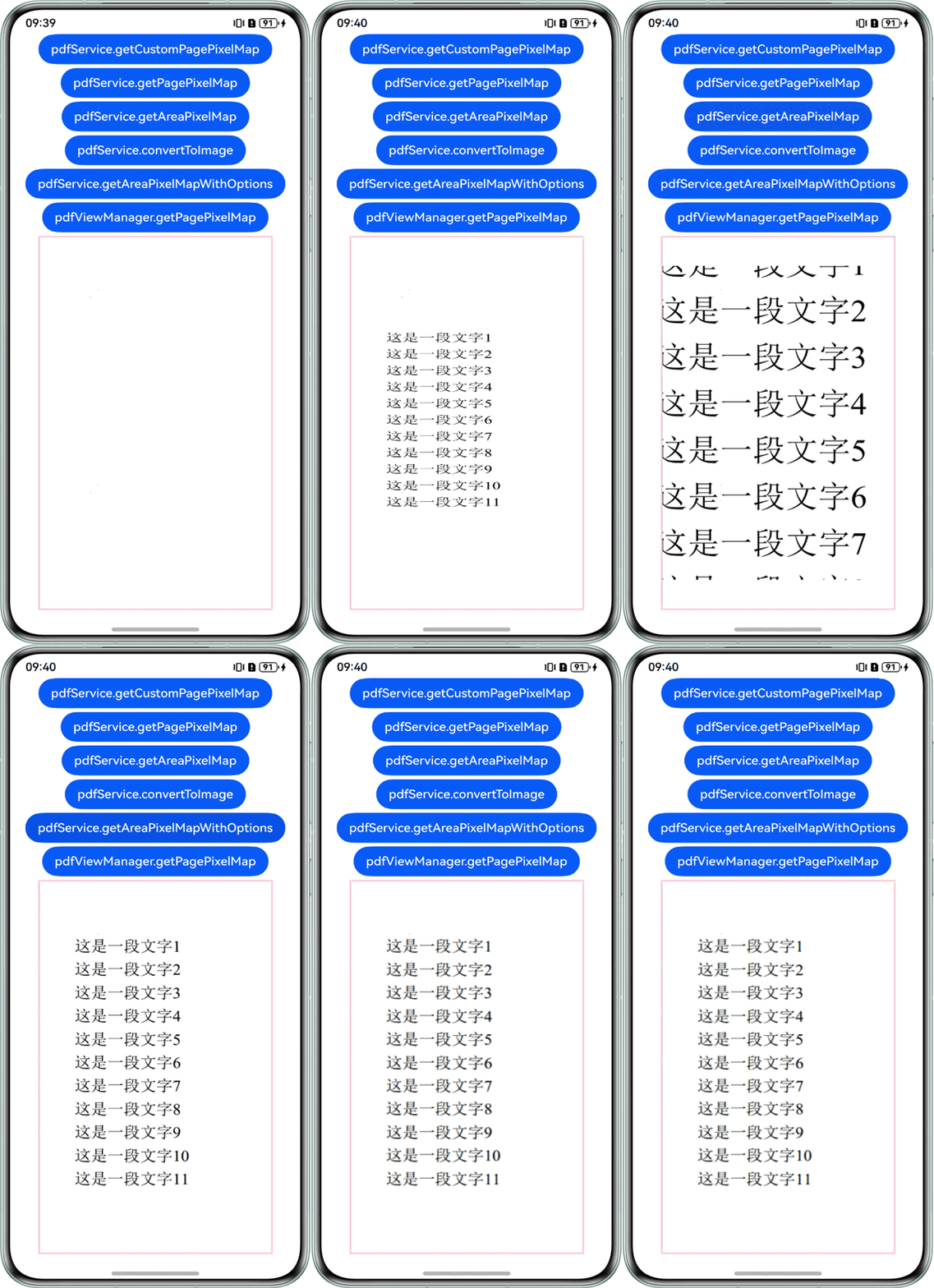
效果预览图:
参考Device File Browser操作步骤查看生成的图片: