问题现象
开发过程中,有很多场景需要获取本应用(模块)的相关信息,如versionCode版本号,versionName版本号描述,bundleName应用包名,module.json5里面的应用配置项值,当前包的编译模式(debug还是release)等等,本文将详细分析此类情形。
背景知识
- 三方应用目前只能查询到自身应用包的信息,由于安全隐私,暂时不支持查询其他应用;其中@ohos.bundle.bundleManager包(即bundleManager模块)提供了应用信息查询能力,支持各类属性查询,详见【bundleManager获取应用信息】。
- 非自身应用包的信息,可以通过hdc命令进行查询。
- HarmonyOS应用使用Hvigor进行编译构建,Hvigor会生成BuildProfile类,开发者可以通过该类在运行时获取编译构建参数,也可以在build-profile.json5中通过buildProfileFields增加自定义字段,从而在运行时获取自定义的参数;参见【获取自定义编译参数】。
解决方案
- 命令行查询:
- hdc shell bm dump -a,获取设备已安装所有应用包名。
- hdc shell bm dump -n com.huawei.hmos.browser,获取指定应用包名的详细信息。
- 代码中查询:
此种查询方式可以获取到应用的签名证书信息,应用id,应用包名,应用版本号,访问应用程序所需的权限,应用程序的元信息,应用程序的安装目录,应用程序签名证书文件的类型(debug、release),以及应用是否为系统应用,应用是否处于调试模式,应用包的类型(应用或元服务)等等;
- 方式一:bundleManager.getBundleInfo、bundleManager.getBundleInfoSync;
由@ohos.bundle.bundleManager包提供,如果有ohos.permission.GET_BUNDLE_INFO_PRIVILEGED权限,可以查询其他应用包信息,否则只能查询自身应用包信息;
代码使用示例:
import bundleManager from '@ohos.bundle.bundleManager'; import { BusinessError } from '@ohos.base'; import hilog from '@ohos.hilog'; @Entry @Component struct TestMain { build() { Column() { Button('TEST') .onClick(() => { this.test1(); }) } } test1() { let bundleName = 'com.dao.ooo'; let bundleFlags = bundleManager.BundleFlag.GET_BUNDLE_INFO_WITH_HAP_MODULE | bundleManager.BundleFlag.GET_BUNDLE_INFO_WITH_ABILITY; let userId = 100; try { // 查询自身(com.dao.ooo)不需要申请权限; // 如果查询其他应用,则报错。 bundleManager.getBundleInfo(bundleName, bundleFlags, userId, (err, data) => { hilog.info(0x0000, 'testTag', 'getBundleInfoForSelf successfully. Data: %{public}s', JSON.stringify(data)); if (err) { hilog.error(0x0000, 'testTag', 'getBundleInfo failed: %{public}s', err.message); } else { hilog.info(0x0000, 'testTag', 'getBundleInfo successfully: %{public}s', JSON.stringify(data)); } }); } catch (err) { let message = (err as BusinessError).message; hilog.error(0x0000, 'testTag', 'getBundleInfo failed: %{public}s', message); } } } - 方式二:bundleManager.getBundleInfoForSelf;
由@ohos.bundle.bundleManager包提供,无需申请权限,用于应用查询自身包信息,其中返回对象BundleInfo里面的属性字段,记录了应用包的各类信息【BundleInfo相关属性值详解】。
代码使用示例:
import bundleManager from '@ohos.bundle.bundleManager'; import { BusinessError } from '@ohos.base'; import hilog from '@ohos.hilog'; @Entry @Component struct TestMain { build() { Column() { Button('TEST') .onClick(() => { this.test(); }) } } test() { // 入参bundleFlags指定所返回的BundleInfo中所包含的信息 // 此处获取包含应用信息的bundleInfo、额外获取metadata信息,额外获取permissions信息 let bundleFlags2 = bundleManager.BundleFlag.GET_BUNDLE_INFO_WITH_APPLICATION | bundleManager.BundleFlag.GET_BUNDLE_INFO_WITH_METADATA | bundleManager.BundleFlag.GET_BUNDLE_INFO_WITH_REQUESTED_PERMISSION | bundleManager.BundleFlag.GET_BUNDLE_INFO_WITH_SIGNATURE_INFO; bundleManager.getBundleInfoForSelf(bundleFlags2).then((data) => { hilog.info(0x0000, 'testTag', 'getBundleInfoForSelf successfully. Data: %{public}s', JSON.stringify(data) ); // 获取应用的签名证书信息 console.info('fingerPrint', data.signatureInfo.fingerprint); console.info('certificate', data.signatureInfo.certificate); console.info('certificate', data.signatureInfo.appId); // 应用包名,当前输出:com.dao.ooo console.info('name', data.name); // 应用版本号,当前输出:1000000 console.info('versionCode', data.versionCode); // 应用版本号描述,当前输出:1.0.0 console.info('versionName', data.versionName); // 应用名称,当前输出:$string:app_name console.info('label', data.appInfo.label); // 访问应用程序所需的权限,当前项目输出空,未配置 // 即module.json5文件里面的requestPermissions字段对应的权限数组 console.info('permissions', data.appInfo.permissions); // 应用程序的元信息,当前项目输出空,未配置 const metadataArray = data.appInfo.metadataArray; console.info('metadataArray', JSON.stringify(metadataArray)); // 应用程序的安装目录,输出:/data/app/el1/bundle/public/com.dao.ooo console.info('codePath', data.appInfo.codePath); // 应用程序签名证书文件的类型,分为debug和release两种类型。输出debug console.info('appProvisionType', data.appInfo.appProvisionType); // 应用是否为系统应用,取值为true表示系统应用,取值为false表示非系统应用。当前输出false console.info('systemApp', data.appInfo.systemApp); // 应用是否处于调试模式,取值为true表示应用处于调试模式,取值为false表示应用处于非调试模式。当前输出true console.info('debug', data.appInfo.debug); // 标识包的类型,取值为APP(应用)或者ATOMIC_SERVICE(元服务),当前输出0 console.info('bundleType', data.appInfo.bundleType); }).catch((err: BusinessError) => { hilog.error(0x0000, 'testTag', 'getBundleInfoForSelf failed. Cause: %{public}s', err.message); }); } } - 方式三:UIAbilityContext.abilityInfo;
代码使用示例:
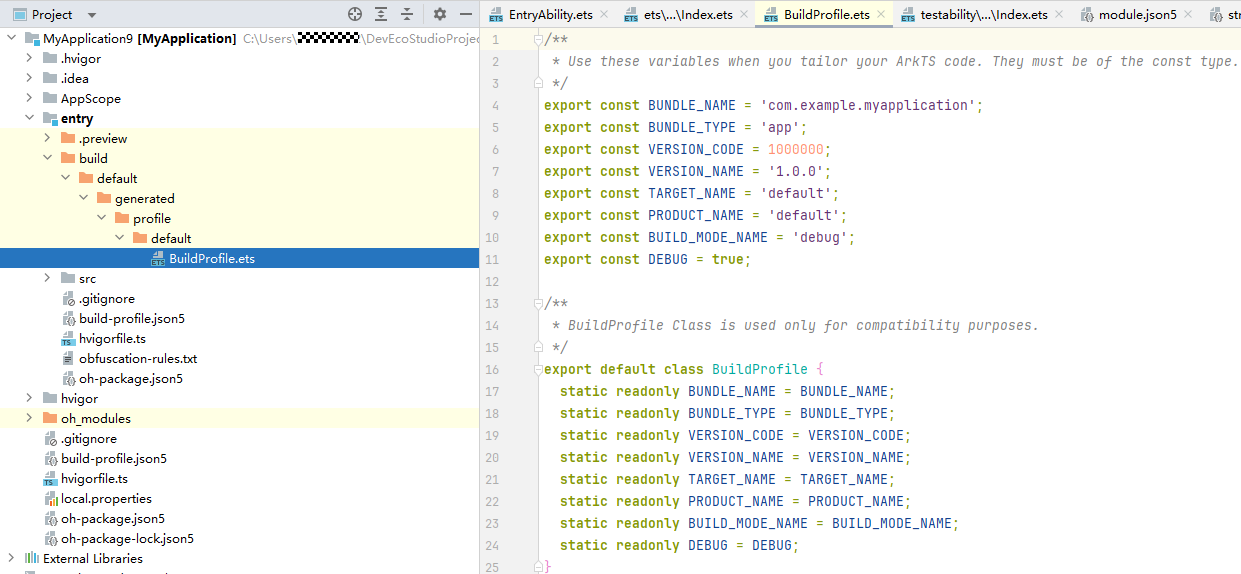
import hilog from '@ohos.hilog'; import { common } from '@kit.AbilityKit'; @Entry @Component struct TestMain { build() { Column() { Button('TEST') .onClick(() => { this.test2(); }) } } test2() { let context = this.getUIContext().getHostContext() as common.UIAbilityContext; hilog.info(0x0000, 'testTag', 'context.abilityInfo successfully. Data: %{public}s', JSON.stringify(context.abilityInfo)); // eg:获取应用包名,输出:com.dao.ooo console.info(`bundleName: ${context.abilityInfo.bundleName}`); } } - 方式四:借助Hvigor编译构建生成的配置文件【BuildProfile.ets】动态获取(此种方式前提:项目构建成功,BuildProfile.ets文件正常生成);此种方式可以获取应用包名即Bundle名称、Bundle类型,应用版本号,Product名称,Target名称,编译模式(debug还是release),是否可调试等;
- 已有的系统构建参数查询:
针对hap、hsp包,BuildProfile文件中自动生成系统默认参数有:应用包名即Bundle名称、Bundle类型,应用版本号,Product名称,Target名称,编译模式(debug还是release),是否可调试等;
针对har包,BuildProfile文件中自动生成系统默认参数有:har版本号、编译模式、应用是否可调试、目标名称等;
- 自定义构建参数查询:
如果开发者需要的包信息或者构建信息,在上述方式中都取不到,可以自定义在模块级、工程级的build-profile.json5文件中,构建完成后这些自定义参数会生成到对应的BuildProfile文件中,导出后代码里面即可直接获取;
其中Hvigor编译构建生成的BuildProfile类文件如图:
对于自定义构建参数,详细调用示例:动态获取自定义构建参数。
- 已有的系统构建参数查询: