背景知识
- 在输入法框架中,可以通过getController方法获取到InputMethodController实例来绑定输入法并监听输入法应用的各种操作,比如插入、删除、选择、光标移动等。这样就可以在自绘编辑框中使用输入法,并实现更加灵活和自由的编辑操作。
接口
描述
attach
自绘控件绑定输入法。
detach
自绘控件解除与输入法的绑定。
on('insertText')
订阅输入法应用插入文本事件。
on('deleteLeft')
订阅输入法应用向左删除事件。
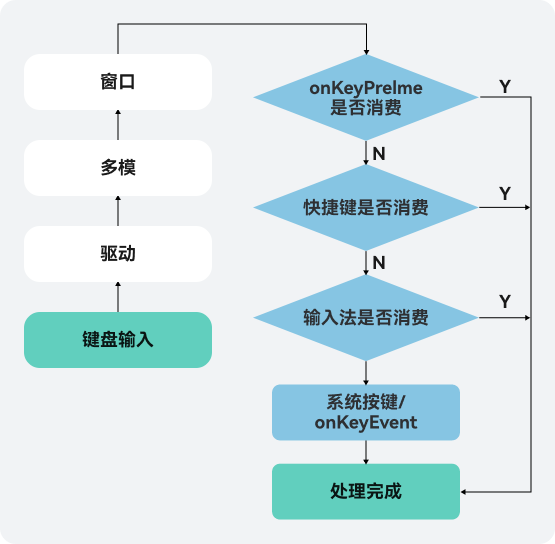
- 按键事件由外设键盘等设备触发,经驱动和多模处理转换后发送给当前获焦的窗口,窗口获取到事件后,会尝试分发三次事件。三次分发的优先顺序如下,一旦事件被消费,则跳过后续分发流程。
- 首先分发给ArkUI框架用于触发获焦组件绑定的onKeyPreIme回调和页面快捷键。
- 再向输入法分发,输入法会消费按键用作输入。
- 再次将事件发给ArkUI框架,用于响应系统默认Key事件(例如走焦)以及获焦组件绑定的onKeyEvent回调。
问题定位
- 用UIViewer检查验证码输入框组件,发现是用的Text组件,该组件聚焦无法自动拉起输入法,需应用自行绑定输入法。
- 搜索inputMethod.getController,检查应用是否绑定输入法,检查代码逻辑,验证码输入逻辑如下。
this.inputController.on('insertText', (text) => { this.verifyCode += text; }) - 其他键盘按键能通过上述方法监听到,然而数字按键无法监听到,输出如下日志,即输入法会忽略数字按键,数字按键的上屏不由输入法控制。
isConsumedKeyDown. ignore keyCodeNumber.
- 检查是否实现onKeyPreIme或onKeyEvent监听数字按键。
修改建议
import inputMethod from '@ohos.inputMethod';
import { KeyCode } from '@ohos.multimodalInput.keyCode';

@Entry
@Component
struct KeyboardTestPage {
  @State inputText: string = ''; // inputText作为Text组件要显示的内容。
  private isAttach: boolean = false;
  private inputController: inputMethod.InputMethodController = inputMethod.getController();

  build() {
    Column() {
      Text(this.inputText) // Text组件作为自绘编辑框的文本显示组件。
        .fontSize(16)
        .width('100%')
        .lineHeight(25)
        .id('customInput')
        .onBlur(() => {
          this.off();
        })
        .height(50)
        .border({ color: '#554455', radius: 30, width: 1 })
        .maxLines(1)
        .onClick(() => {
          this.attachAndListener(); // 点击控件
        })
        .onKeyEvent((event: KeyEvent) => {
          this.handleKeyEvent(event);
        })
        .margin({top: 200})
        .focusable(true)
        .defaultFocus(true)
    }
    .height('100%')
    .width('100%')
  }

  async attachAndListener() { // 绑定和设置监听
    focusControl.requestFocus('customInput');
    try {
      await this.inputController.attach(true, {
        inputAttribute: {
          textInputType: inputMethod.TextInputType.TEXT,
          enterKeyType: inputMethod.EnterKeyType.SEARCH
        }
      });
    } catch (err) {
      console.error(`Failed to attach: code:${err.code}, message:${err.message}`);
    }
    if (!this.isAttach) {
      this.inputController.on('insertText', (text) => {
        this.inputText += text;
      });
      this.inputController.on('deleteLeft', (length) => {
        this.inputText = this.inputText.substring(0, this.inputText.length - length);
      });
      this.isAttach = true;
    }
  }

  off() {
    this.isAttach = false;
    this.inputController.off('insertText');
    this.inputController.off('deleteLeft');
  }

  handleKeyEvent(event: KeyEvent) {
    if (event.type === KeyType.Down) {
      return;
    }
    if (event.keyCode >= KeyCode.KEYCODE_0 && event.keyCode <= KeyCode.KEYCODE_9) {
      this.inputText += (event.keyCode - KeyCode.KEYCODE_0);
    }
  }
}