背景知识
- 自定义弹窗 (CustomDialog):通过CustomDialogController类显示自定义弹窗。使用弹窗组件时,优先考虑自定义弹窗,便于弹窗样式与内容的自定义。
- 密码自动填充服务:密码保险箱作为HarmonyOS系统安全功能,为用户提供了便捷的免密登录体验。用户在应用或浏览器进行注册/登录操作时,可一键完成自动生成强密码、自动保存、自动填充,无需记住或手动输入繁琐的密码,由系统实现统一的安全管理密码能力。
- requestPermissionsFromUser:用于UIAbility/UIExtensionAbility拉起弹框请求用户授权。
- Swiper:滑块视图容器,提供子组件滑动轮播显示的能力。
- on('uiExtensionSecureLimitChange'):开启窗口内uiExtension安全限制变化事件的监听。
- @Watch装饰器:应用于对状态变量的监听。如果开发者需要关注某个状态变量的值是否改变,可以使用@Watch为状态变量设置回调函数。
解决方案
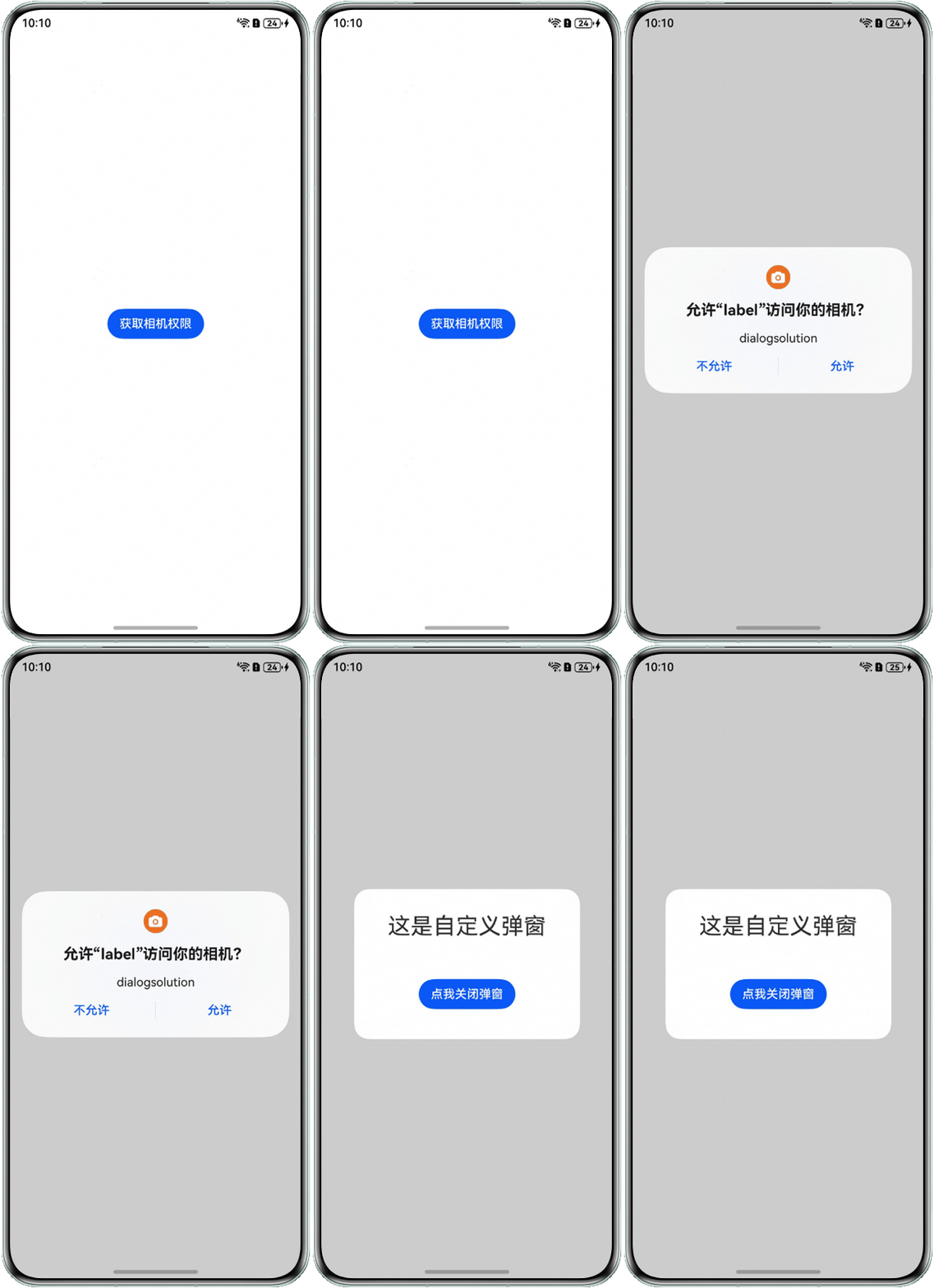
- 方案一:通过requestPermissionsFromUser接口,获取相册、相机、网络、麦克风等安全类系统权限时,系统会弹出权限申请弹窗,如果此时再调用CustomDialog、openCustomDialog、showAlertDialog、showActionSheet、showToast、openToast等弹窗类组件时会出现自定义弹窗不显示的问题,此时可在requestPermissionsFromUser接口的回调内处理弹窗的显示逻辑,本文以获取相机权限为示例,具体实现方案如下:
- 使用requestPermissionsFromUser接口,获取系统相机权限,在requestPermissionsFromUser接口的回调内处理弹窗的显示逻辑,代码示如下:
import { BusinessError } from '@kit.BasicServicesKit'; import { abilityAccessCtrl, PermissionRequestResult, Permissions } from '@kit.AbilityKit'; @Entry @Component struct Index { dialogController: CustomDialogController | null = new CustomDialogController({ builder: CustomDialogExample1({}), autoCancel: true, alignment: DialogAlignment.Center, customStyle: false, cornerRadius: 20, width: 300, height: 200, showInSubWindow: true, backgroundColor: Color.White, }); reqPermissionsFromUser(permissions: Array<Permissions>): void { let context: Context = this.getUIContext().getHostContext() as Context; let atManager: abilityAccessCtrl.AtManager = abilityAccessCtrl.createAtManager(); // requestPermissionsFromUser会判断权限的授权状态来决定是否唤起弹窗 atManager.requestPermissionsFromUser(context, permissions).then((data: PermissionRequestResult) => { let grantStatus: Array<number> = data.authResults; let length: number = grantStatus.length; for (let i = 0; i < length; i++) { if (grantStatus[i] === 0) { // 用户授权,可以继续访问目标操作,此时模拟网络返回数据 if (this.dialogController != null) { this.dialogController.open(); } } else { // 用户拒绝授权,提示用户必须授权才能访问当前页面的功能,并引导用户到系统设置中打开相应的权限 this.getUIContext().getPromptAction().showToast({ message: '用户拒绝授权' }); if (this.dialogController != null) { this.dialogController.open(); } return; } } // 授权成功 }).catch((err: BusinessError) => { console.error(`Failed to request permissions from user. Code is ${err.code}, message is ${err.message}`); }); } build() { RelativeContainer() { Button('打开弹窗') .alignRules({ center: { anchor: '__container__', align: VerticalAlign.Center }, middle: { anchor: '__container__', align: HorizontalAlign.Center } }) .onClick(() => { try { const permissions: Array<Permissions> = ['ohos.permission.CAMERA']; // 获取权限 this.reqPermissionsFromUser(permissions); } catch (err) { console.error(`Failed to get PasteData. Cause: ${err.message}`); } }); } .height('100%') .width('100%'); } } @CustomDialog struct CustomDialogExample1 { controller?: CustomDialogController; build() { Column() { Text('这是自定义弹窗') .fontSize(30) .height(100); Button('点我关闭弹窗') .onClick(() => { if (this.controller != undefined) { this.controller.close(); } }) .margin(20); }; } } - 在module.json5中配置相机权限,代码如下:
"requestPermissions": [
  {
    "name": "ohos.permission.CAMERA",
    "usedScene": {
      "abilities": [
        "EntryAbility"
      ],
      "when": "inuse"
    },
    "reason": "$string:app_name"
  }
],
实现效果如下:
- 使用requestPermissionsFromUser接口,获取系统相机权限,在requestPermissionsFromUser接口的回调内处理弹窗的显示逻辑,代码示如下:
- 方案二:应用登录页面需要保存账号信息到密码保险箱中,在HarmonyOS 5.1.1及以上版本中,通过将CustomDialog、openCustomDialog、showAlertDialog、showActionSheet等弹窗类组件的showInSubWindow属性设置为true(showToast、openToast需要设置showMode: promptAction.ToastShowMode.TOP_MOST),可以使其显示层级高于系统密码保险箱弹窗(如果是密码保险箱自动填充账号信息的场景,请参考方案三),代码示如下:
@Entry @Component struct LoginPage { pathInfos: NavPathStack = new NavPathStack(); @State ReserveAccount: string = ''; @State ReservePassword: string = ''; @Builder PageMap(name: string) { if (name === 'home_page') { HomePage(); } } // 在6.0系统中,保存和更新的弹窗,密码保险箱是设置了可以覆盖的。可以通过自定义弹窗加了showInSubWindow:true属性后自定义弹窗弹窗是可以遮盖系统弹窗 build() { Navigation(this.pathInfos) { Column({ space: 16 }) { Text('账户登录') .fontSize(24) .fontColor('#000000') .fontWeight(FontWeight.Medium) .margin({ top: 24, bottom: 16 }); TextInput({ placeholder: '用户名' }) .placeholderColor(0x182431) .width('100%') .opacity(0.6) .placeholderFont({ size: 16, weight: FontWeight.Regular }) .margin({ top: 16 }) .type(InputType.USER_NAME) // 账号框使用USER_NAME属性 .onChange((value: string) => { this.ReserveAccount = value; }); TextInput({ placeholder: '密码' }) .showPasswordIcon(true) .placeholderColor(0x182431) .width('100%') .opacity(0.6) .placeholderFont({ size: 16, weight: FontWeight.Regular }) .margin({ top: 16 }) .type(InputType.Password) // 密码框使用Password属性 .onChange((value: string) => { this.ReservePassword = value; }); Button('登录') .width('100%') .enabled((this.ReserveAccount !== '') && (this.ReservePassword !== '')) .onClick(() => { this.pathInfos.pushPathByName('home_page', null); }); } .padding(16); } .navDestination(this.PageMap) .height('100%') .width('100%'); } } @Component struct HomePage { pathInfos: NavPathStack = new NavPathStack(); dialogController: CustomDialogController | null = new CustomDialogController({ builder: CustomDialogExample({}), autoCancel: true, alignment: DialogAlignment.Center, customStyle: false, cornerRadius: 20, width: 300, height: 200, showInSubWindow: true, backgroundColor: Color.White, }); aboutToAppear(): void { if (this.dialogController != null) { this.dialogController.open(); } } aboutToDisappear(): void { this.dialogController = null; // 将dialogController置空 } build() { NavDestination() { Column() { Text('Home Page') .fontSize(24) .fontColor('#000000') .fontWeight(FontWeight.Medium) .margin({ top: 24, bottom: 16 }); }.width('100%').height('100%'); }.title('Home Page') .onReady((context: NavDestinationContext) => { this.pathInfos = context.pathStack; }); } } @CustomDialog struct CustomDialogExample { controller?: CustomDialogController; build() { Column() { Text('这是自定义弹窗') .fontSize(30) .height(100); Button('点我关闭弹窗') .onClick(() => { if (this.controller != undefined) { this.controller.close(); } }) .margin(20); }; } } - 方案三:应用登录页面需要获取密码保险箱中保存的账号信息,将其一键填充到账号密码输入框,此时如果同时有CustomDialog、openCustomDialog、showAlertDialog、showActionSheet、showToast、openToast等弹窗类组件需要显示,就会因安全类窗口问题导致自定义弹窗不显示,这种场景可以通过windowClass.on('uiExtensionSecureLimitChange')监听安全类窗口的状态,再根据监听回调的结果,通过判断当前状态来控制自定义弹窗的弹出逻辑,具体实现方案如下:
- 在EntryAbility.ets中通过windowClass.on('uiExtensionSecureLimitChange')监听安全类窗口的状态,并将结果保存在AppStorage中,代码示如下:
import { UIAbility } from '@kit.AbilityKit'; import { hilog } from '@kit.PerformanceAnalysisKit'; import { window } from '@kit.ArkUI'; const DOMAIN = 0x0000; export default class EntryAbility extends UIAbility { onDestroy(): void { hilog.info(DOMAIN, 'testTag', '%{public}s', 'Ability onDestroy'); } onWindowStageCreate(windowStage: window.WindowStage): void { // Main window is created, set main page for this ability hilog.info(DOMAIN, 'testTag', '%{public}s', 'Ability onWindowStageCreate'); windowStage.loadContent('pages/GuidePage', (err) => { if (err.code) { hilog.error(DOMAIN, 'testTag', 'Failed to load the content. Cause: %{public}s', JSON.stringify(err)); return; } let windowClass = windowStage.getMainWindowSync(); try { windowClass.on('uiExtensionSecureLimitChange', (data: boolean) => { console.info(`Window secure limit Change: ${data}`); AppStorage.setOrCreate('uiExtensionSecureLimitChangeRes', data); }); } catch (exception) { console.error(`Failed to register callback. Cause code: ${exception.code}, message: ${exception.message}`); } hilog.info(DOMAIN, 'testTag', 'Succeeded in loading the content.'); }); } onWindowStageDestroy(): void { // Main window is destroyed, release UI related resources hilog.info(DOMAIN, 'testTag', '%{public}s', 'Ability onWindowStageDestroy'); } onForeground(): void { // Ability has brought to foreground hilog.info(DOMAIN, 'testTag', '%{public}s', 'Ability onForeground'); } onBackground(): void { // Ability has back to background hilog.info(DOMAIN, 'testTag', '%{public}s', 'Ability onBackground'); } }; - 创建GuidePage.ets页面,使用Swiper组件实现一个引导页,代码示如下:
@Entry @Component struct MinePage { // 实际使用时替换为需要的图片 private guideData: Resource[] = [$r('app.media.img'), $r('app.media.img_1'), $r('app.media.img_2')]; build() { Column() { Swiper() { ForEach(this.guideData, (item: Resource, index: number) => { Stack() { Image(item) .height('100%') .width('100%'); if (index == this.guideData.length - 1) { Button('开启探索之旅') .onClick(() => { this.getUIContext().getRouter().pushUrl({ url: 'pages/UserLoginPage' }); }); } }; }); } .loop(false) .ignoreLayoutSafeArea() .height(LayoutPolicy.matchParent) .width('100%'); } .ignoreLayoutSafeArea() .height(LayoutPolicy.matchParent) .width('100%'); } } - 创建UserLoginPage.ets页面,通过@StorageProp获取在EntryAbility中保存的安全类窗口的状态,并用@Watch监听,代码示如下:
@Entry
@Component
struct UserLoginPage {
  @State ReserveAccount: string = '';
  @State ReservePassword: string = '';
  @StorageProp('uiExtensionSecureLimitChangeRes') @Watch('uiExtensionSecureLimitChangeWatch') uiExtensionSecureLimitChangeRes: boolean = true;
  dialogController: CustomDialogController | null = new CustomDialogController({
    builder: CustomDialogExample1({}),
    autoCancel: true,
    alignment: DialogAlignment.Center,
    customStyle: false,
    cornerRadius: 20,
    width: 300,
    height: 200,
    showInSubWindow: true,
    backgroundColor: Color.White,
  });


  uiExtensionSecureLimitChangeWatch() {
    if (!this.uiExtensionSecureLimitChangeRes) {
      if (this.dialogController != null) {
        this.dialogController.open();
      }
    }
  }


  build() {


    Column({ space: 16 }) {
      Text('账户登录')
        .fontSize(24)
        .fontColor('#000000')
        .fontWeight(FontWeight.Medium)
        .margin({ top: 24, bottom: 16 });
      TextInput({ placeholder: '用户名' })
        .placeholderColor(0x182431)
        .width('100%')
        .opacity(0.6)
        .placeholderFont({ size: 16, weight: FontWeight.Regular })
        .margin({ top: 16 })
        .type(InputType.USER_NAME) // 账号框使用USER_NAME属性
        .onChange((value: string) => {
          this.ReserveAccount = value;
        });


      TextInput({ placeholder: '密码' })
        .showPasswordIcon(true)
        .placeholderColor(0x182431)
        .width('100%')
        .opacity(0.6)
        .placeholderFont({ size: 16, weight: FontWeight.Regular })
        .margin({ top: 16 })
        .type(InputType.Password) // 密码框使用Password属性
        .onChange((value: string) => {
          this.ReservePassword = value;
        });
    }
    .padding(16)
    .height('100%')
    .width('100%');
  }
}


@CustomDialog
struct CustomDialogExample1 {
  controller?: CustomDialogController;


  build() {
    Column() {
      Text('即将登录您选择的账号')
        .fontSize(22)
        .height(100);
      Button('我知道了')
        .onClick(() => {
          if (this.controller != undefined) {
            this.controller.close();
          }
        })
        .margin(20);
    };
  }
}
- 在EntryAbility.ets中通过windowClass.on('uiExtensionSecureLimitChange')监听安全类窗口的状态,并将结果保存在AppStorage中,代码示如下:
常见FAQ
Q:使用uiExtensionSecureLimitChange事件监听,发现当出现“使用密码保险箱保存的账号”系统弹窗时,该监听会触发;但是当登录后,出现“是否保存账号和密码”系统弹窗时,该监听没有触发。想问下这是什么原因呢?
A:on('uiExtensionSecureLimitChange')事件监听是否生效,取决于安全限制是否发生变化,其底层逻辑就是看hideNonSecureWindows的状态是否变化,hideNonSecureWindows只有模态UEC和安全UEC的场景才会涉及,与系统弹窗类型无关。