背景知识
- AppStorage:与应用进程绑定的全局UI状态存储中心,由UI框架在应用启动时创建,将UI状态数据存储于运行内存,实现应用级全局状态共享。
- getMainWindowSync:获取该WindowStage实例下的主窗口,该接口为同步调用。
- getWindowAvoidArea:获取宿主应用窗口内容规避的区域;如系统栏区域、刘海屏区域、手势区域、软键盘区域等与宿主窗口内容重叠时,需要宿主窗口内容避让的区域。
- createSubWindow:创建该WindowStage实例下的子窗口,使用callback异步回调。
- moveWindowTo:移动窗口位置,使用callback异步回调。
- resize:基于窗口左上角顶点改变当前窗口大小,使用callback异步回调。
- showWindow:显示当前窗口,使用callback异步回调,支持系统窗口、应用子窗口、模态窗和全局悬浮窗,或将已显示的应用主窗口层级提升至顶部。
- gesture:绑定手势。
- PanGesture:创建滑动手势对象。
- startAbility:启动一个UIAbility。使用callback异步回调。仅支持在主线程调用。
- window.shiftAppWindowFocus:在同应用内将窗口焦点从源窗口转移到目标窗口,仅支持应用主窗、子窗范围内的焦点转移。使用Promise异步回调。
- setWindowDecorVisible:设置窗口标题栏是否可见,对存在标题栏和三键区的窗口形态生效。
- setWindowTitleButtonVisible:设置主窗标题栏上的最大化、最小化、关闭按钮是否可见。
- setWindowTopmost:应用主窗口调用,用于实现将窗口置于其他应用窗口之上不被遮挡,使用Promise异步回调。
解决方案
方案 | 优缺点 | 适用场景 |
|---|---|---|
方案一:通过普通子窗口实现。 | 实现简单,不需要申请特殊权限,只能实现应用内悬浮窗。 | 该方案适用于应用内的全局悬浮窗。 |
方案二:通过系统提供的悬浮窗实现。 | 需要申请ohos.permission.SYSTEM_FLOAT_WINDOW权限,多人视频通话、屏幕共享特殊场景与功能可申请该权限。 | 该方案适用于应用全局悬浮窗,应用进入后台,悬浮窗显示在桌面上,如多人视频通话、屏幕共享。 |
方案三:通过多UIAbility实现。 | 需申请ohos.permission.WINDOW_TOPMOST权限,目前仅PC/2in1支持。 | 该方案适用于应用全局悬浮窗,应用进入后台,悬浮窗显示在桌面上。 |
方案四:通过闪控球实现。 | 需申请ohos.permission.USE_FLOAT_BALL权限,特殊场景与功能可申请该权限,且需要API20及以上才可使用。 | 该方案适用于应用全局悬浮窗,如跨应用的题目搜索、账单记录、商品比价、翻译等。 |
- 方案一:通过普通子窗口实现,通过createSubWindow创建子窗口,再通过PanGesture拖拽手势实时更新子窗口的位置即可实现。
- 在EntryAbility.ets中,通过getWindowAvoidArea获取状态栏和导航条区域高度,并通过AppStorage保存windowStage、UIContext、状态栏和导航条区域高度,具体实现如下:
import { UIAbility } from '@kit.AbilityKit'; import { hilog } from '@kit.PerformanceAnalysisKit'; import { window } from '@kit.ArkUI'; const DOMAIN = 0x0000; export default class EntryAbility extends UIAbility { onDestroy(): void { hilog.info(DOMAIN, 'testTag', '%{public}s', 'Ability onDestroy'); } onWindowStageCreate(windowStage: window.WindowStage): void { // Main window is created, set main page for this ability hilog.info(DOMAIN, 'testTag', '%{public}s', 'Ability onWindowStageCreate'); windowStage.loadContent('pages/Page', (err) => { if (err.code) { hilog.error(DOMAIN, 'testTag', 'Failed to load the content. Cause: %{public}s', JSON.stringify(err)); return; } AppStorage.setOrCreate('uiContext', windowStage.getMainWindowSync() .getUIContext()); AppStorage.setOrCreate('windowStage', windowStage); let windowClass: window.Window = windowStage.getMainWindowSync(); // 获取应用主窗口 // 2. 获取布局避让遮挡的区域 let type = window.AvoidAreaType.TYPE_NAVIGATION_INDICATOR; // 以导航条避让为例 let avoidArea = windowClass.getWindowAvoidArea(type); let bottomRectHeight = avoidArea.bottomRect.height; // 获取到导航条区域的高度 AppStorage.setOrCreate('bottomRectHeight', bottomRectHeight); type = window.AvoidAreaType.TYPE_SYSTEM; // 以状态栏避让为例 avoidArea = windowClass.getWindowAvoidArea(type); let topRectHeight = avoidArea.topRect.height; // 获取状态栏区域高度 AppStorage.setOrCreate('topRectHeight', topRectHeight); hilog.info(DOMAIN, 'testTag', 'Succeeded in loading the content.'); }); } onWindowStageDestroy(): void { // Main window is destroyed, release UI related resources hilog.info(DOMAIN, 'testTag', '%{public}s', 'Ability onWindowStageDestroy'); } onForeground(): void { // Ability has brought to foreground hilog.info(DOMAIN, 'testTag', '%{public}s', 'Ability onForeground'); } onBackground(): void { // Ability has back to background hilog.info(DOMAIN, 'testTag', '%{public}s', 'Ability onBackground'); } }; - 在Page.ets内通过createSubWindow创建子窗口,通过setUIContent、moveWindowTo、resize、showWindow方法分别设置窗口加载的内容页面、位置、大小、子窗口显示,具体实现如下:
import { window } from '@kit.ArkUI'; @Entry @Component struct Page { private message: string = 'Hello World'; private windowStage: window.WindowStage = AppStorage.get('windowStage') as window.WindowStage; aboutToAppear(): void { this.showSubWindow(); } build() { RelativeContainer() { Text(this.message) .fontSize(15) .fontWeight(FontWeight.Bold) .alignRules({ center: { anchor: '__container__', align: VerticalAlign.Center }, middle: { anchor: '__container__', align: HorizontalAlign.Center } }); } .backgroundColor(Color.White) .height('100%') .width('100%'); } showSubWindow() { this.windowStage.createSubWindow('FloatWindow', (err, windowClass) => { if (err.code > 0) { return; } try { // 设置子窗口加载页 windowClass.setUIContent('pages/FloatWindowBySubWindow', () => { }); // 设置子窗口左上角坐标 windowClass.moveWindowTo(0, 200); // 设置子窗口大小 windowClass.resize(this.getUIContext() .vp2px(50), this.getUIContext() .vp2px(50)); // 展示子窗口 windowClass.showWindow(); } catch (err) { } }); } } - FloatWindowBySubWindow.ets创建悬浮窗的内容页面,并通过PanGesture手势,设置子窗口的拖拽跟随效果,具体实现如下:
import { window } from '@kit.ArkUI'; import { ChangeFocus, CusPosition, dragToMove, edgeDetermination } from './WindowUtil'; @Entry @Component struct FloatWindowBySubWindow { private windowStage: window.WindowStage = AppStorage.get('windowStage') as window.WindowStage; private subWindow: window.Window = window.findWindow('FloatWindow'); // 创建位置变量,变量发生变化调用moveWindow方法移动窗口 @State windowPosition: CusPosition = { x: 0, y: 200 }; private panOption: PanGestureOptions = new PanGestureOptions({ direction: PanDirection.All }); ctx?: Context = this.getUIContext().getHostContext(); eventFunc = () => { edgeDetermination(this.subWindow, this.windowPosition); }; aboutToAppear(): void { this.ctx!.eventHub.on('onForeground', this.eventFunc); } aboutToDisappear(): void { this.ctx!.eventHub.off('onForeground'); } onPageShow(): void { ChangeFocus(this.windowStage, 'FloatWindow'); } build() { Column() { Stack() { this.floatingWindow(); } .width(50) .height(50) .alignContent(Alignment.Start); } .backgroundColor(Color.Transparent); } @Builder floatingWindow() { Column() { // 真实项目中可替换为开发者真实的图片 Image($r('app.media.play')) .width(30) .height(30); } .width(50) .height(50) .borderRadius(25) .backgroundColor('#f1f3f5') .justifyContent(FlexAlign.Center) .gesture( // 声明该组合手势的类型为Sequence类型 PanGesture(this.panOption)// 发生拖拽时,获取到触摸点的位置,并将位置信息传递给windowPosition .onActionStart(async () => { }) .onActionUpdate((event: GestureEvent) => { dragToMove(event, this.subWindow, this.windowPosition); }) .onActionEnd(() => { edgeDetermination(this.subWindow, this.windowPosition); ChangeFocus(this.windowStage, 'FloatWindow'); }) ); } } - 创建WindowUtil.ets文件,定义ChangeFocus方法,通过shiftAppWindowFocus方法实现主窗口和子窗口焦点的切换,定义edgeDetermination方法根据当前子窗口的位置,进行贴边判断,定义dragToMove方法进行拖拽跟随,具体实现如下:
import { display, window } from '@kit.ArkUI';


let uiContext: UIContext = AppStorage.get('uiContext') as UIContext;


/**
 * 位置信息
 */
export interface CusPosition {
  x: number,
  y: number
}


/**
 * 聚焦到主窗口
 * @param windowStage 窗口管理器
 * @param windowName 子窗口名
 */
export function ChangeFocus(windowStage: window.WindowStage, windowName: string) {
  setTimeout(() => {
    // 获取子窗口ID
    let subWindowID: number = window.findWindow(windowName).getWindowProperties().id;
    // 获取主窗口ID
    let mainWindowID: number = windowStage.getMainWindowSync().getWindowProperties().id;
    // 将焦点从子窗口转移到主窗口
    window.shiftAppWindowFocus(subWindowID, mainWindowID);
  }, 500);
}


/**
 * 贴边判断
 * @param window 目标窗口
 * @param windowPosition 位置信息
 */
export function edgeDetermination(window: window.Window, windowPosition: CusPosition): void {
  const HALF_WIDTH = display.getDefaultDisplaySync().width * 0.5;
  if (windowPosition.x < HALF_WIDTH) {
    windowPosition.x = 0;
  } else {
    windowPosition.x = display.getDefaultDisplaySync().width - window.getWindowProperties().windowRect.width;
  }
  window.moveWindowTo(windowPosition.x, windowPosition.y);
}


/**
 * 拖拽滑动
 * @param event 手势事件
 * @param window 目标窗口
 * @param windowPosition 位置信息
 */
export function dragToMove(event: GestureEvent, window: window.Window, windowPosition: CusPosition): void {
  let bottomRectHeight = AppStorage.get('bottomRectHeight') as number;
  let topRectHeight = AppStorage.get('topRectHeight') as number;
  let bottomY =
    display.getDefaultDisplaySync().height - bottomRectHeight - uiContext.vp2px(50);
  windowPosition.x += event.offsetX;
  if (windowPosition.y > topRectHeight && windowPosition.y < bottomY) {
    windowPosition.y += event.offsetY;
  } else if (windowPosition.y <= topRectHeight && event.offsetY > 0) {
    windowPosition.y += event.offsetY;
  } else if (windowPosition.y >= bottomY && event.offsetY < 0) {
    windowPosition.y += event.offsetY;
  }
  window.moveWindowTo(windowPosition.x, windowPosition.y);
}
效果如下:
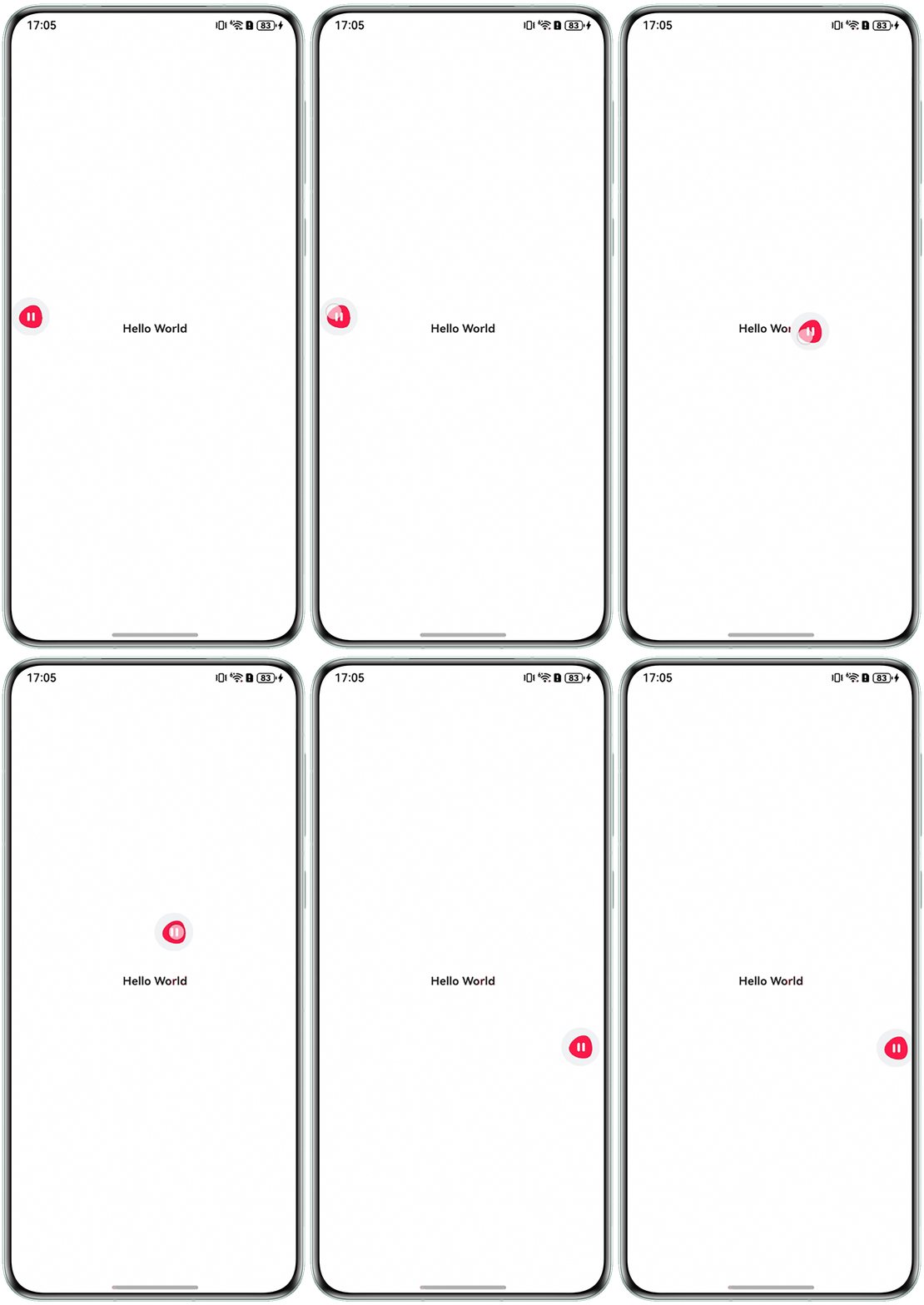
- 在EntryAbility.ets中,通过getWindowAvoidArea获取状态栏和导航条区域高度,并通过AppStorage保存windowStage、UIContext、状态栏和导航条区域高度,具体实现如下:
- 方案二:通过系统提供的悬浮窗实现,通过createWindow的创建类型为TYPE_FLOAT的窗口即可实现。
- 新建FloatWindowBySystemApi.ets页面,通过setUIContent、moveWindowTo、resize、showWindow方法分别设置窗口加载的内容页面、位置、大小、窗口的显示,具体实现如下:
import { window } from '@kit.ArkUI'; @Entry @Component struct FloatWindowBySystemApi { private windowClass: window.Window | null = null; private context1 = this.getUIContext().getHostContext(); build() { Column() { Text('打开悬浮窗') .fontSize(25) .fontWeight(FontWeight.Bold) .onClick(() => { // 1.创建悬浮窗。 let config: window.Configuration = { name: 'floatWindow', windowType: window.WindowType.TYPE_FLOAT, ctx: this.context1 }; window.createWindow(config, (err: BusinessError, data) => { let errCode: number = err.code; if (errCode) { return; } this.windowClass = data; // 2.悬浮窗窗口创建成功后,设置悬浮窗的位置、大小及相关属性等。 this.windowClass.moveWindowTo(300, 300, (err: BusinessError) => { let errCode: number = err.code; if (errCode) { return; } }); this.windowClass.resize(500, 500, (err: BusinessError) => { let errCode: number = err.code; if (errCode) { return; } }); // 3.为悬浮窗加载对应的目标页面。 this.windowClass.setUIContent('pages/Index', (err: BusinessError) => { let errCode: number = err.code; if (errCode) { return; } // 3.显示悬浮窗。 (this.windowClass as window.Window).showWindow((err: BusinessError) => { let errCode: number = err.code; if (errCode) { return; } }); }); }); }); Text('关闭悬浮窗') .fontSize(25) .margin({ top: 15 }) .fontWeight(FontWeight.Bold) .onClick(() => { this.windowClass?.destroyWindow(); }); } .alignItems(HorizontalAlign.Center) .justifyContent(FlexAlign.Center) .height('100%') .width('100%'); } } - 新建悬浮窗内容页面Index.ets,具体实现如下:
import { display, window } from '@kit.ArkUI'; @Entry @Component struct Index { private windowX: number = 100; private windowY: number = 100; private floatWindow: window.Window | null = null; private screenWidth: number = 0; aboutToAppear() { // 获取悬浮窗实例 this.floatWindow = window.findWindow('floatWindow'); // 获取屏幕尺寸 let displayInfo = display.getDefaultDisplaySync(); this.screenWidth = displayInfo.width; } // 处理拖拽更新 private onPan(event: GestureEvent) { this.windowX += event.offsetX; this.windowY += event.offsetY; if (this.floatWindow) { this.floatWindow.moveWindowTo(this.windowX, this.windowY); } } // 处理拖拽结束,实现自动贴边 private onPanEnd() { const midX = this.screenWidth / 2; const threshold = 100; // 贴边阈值,可根据需要调整 let targetX = this.windowX; // 判断是否靠近屏幕中间 if (Math.abs(this.windowX - midX) < threshold) { targetX = this.windowX > midX ? this.screenWidth - 200 : 0; // 200为窗口宽度 } // 更新窗口位置 if (this.floatWindow) { this.floatWindow.moveWindowTo(targetX, this.windowY); } } build() { Row() { Column() { // 真实项目中可替换为开发者真实的图片 Image($r('app.media.play')) .margin({ left: 10, top: 10 }) .width(55) .height(55); Text('ArkTS是HarmonyOS主力应用开发语言。') .fontSize(15) .fontWeight(FontWeight.Bold) .margin({ left: 10, top: 10 }); } .width('100%'); } .gesture( PanGesture({ direction: PanDirection.All }) .onActionUpdate((event: GestureEvent) => { this.onPan(event); }) .onActionEnd(() => { this.onPanEnd(); }) ) .height('100%'); } } - 在module.json5中添加requestPermissions并新增ohos.permission.SYSTEM_FLOAT_WINDOW权限。
{
  "name": "ohos.permission.SYSTEM_FLOAT_WINDOW",
},
效果如下:
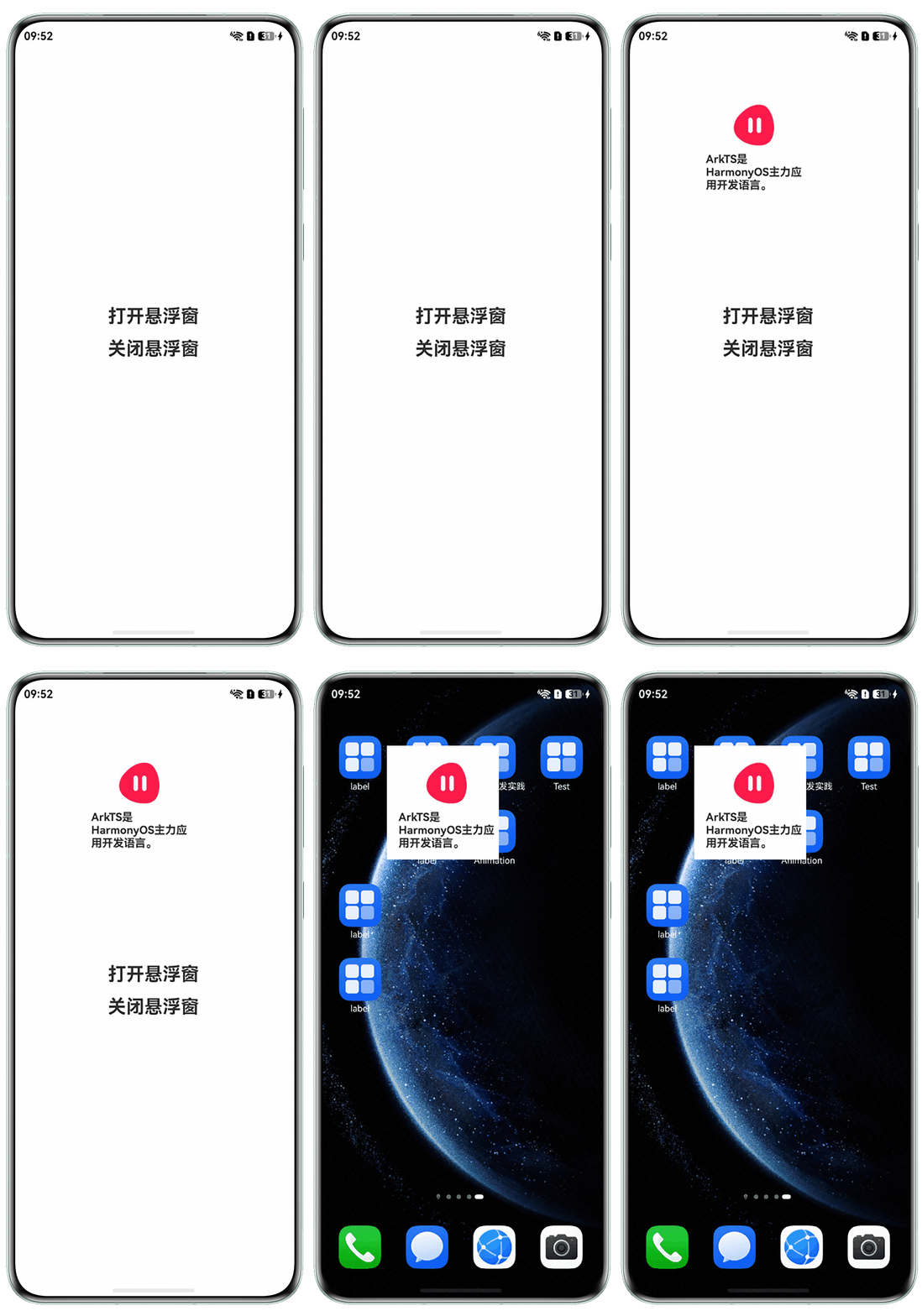
- 新建FloatWindowBySystemApi.ets页面,通过setUIContent、moveWindowTo、resize、showWindow方法分别设置窗口加载的内容页面、位置、大小、窗口的显示,具体实现如下:
- 方案三:通过多Ability实现,该方案主要通过startAbility拉起UIAbility,并隐藏窗口的标题栏和控制窗口大小和层级来实现。
- 新建一个名称为的FloatWindowAbility的UIAbility,通过setWindowDecorVisible隐藏窗口的标题栏,通过setWindowTitleButtonVisible隐藏标题栏上的最大化、最小化、关闭按钮,再通过setWindowTopmost方法设置窗口置顶,具体实现如下:
import { UIAbility } from '@kit.AbilityKit'; import { window } from '@kit.ArkUI'; export default class FloatWindowAbility extends UIAbility { private async resizeWindow(win: window.Window, width: number, height: number): Promise<void> { try { await win.resize(width, height); console.info('Succeeded in resizing window.'); } catch (err) { console.error(`resize window failed: <${err.code}>${err.message}`); } } private setDecorVisible(win: window.Window, isVisible: boolean) { try { win.setWindowDecorVisible(isVisible); console.info('set window decor visible success.'); } catch (err) { console.error(`set window decor visible failed: <${err.code}>${err.message}`); } } private setTitleButtonVisible(win: window.Window, isMaxVisible: boolean, isMinVisible: boolean, isCloseVisible?: boolean) { try { win.setWindowTitleButtonVisible(isMaxVisible, isMinVisible, isCloseVisible); console.info('set window title button visible success.'); } catch (err) { console.error(`set window title button visible failed: <${err.code}>${err.message}`); } } private async setTopmost(win: window.Window, isWindowTopmost: boolean): Promise<void> { try { await win.setWindowTopmost(isWindowTopmost); console.info('set window topmost success.'); } catch (err) { console.error(`set window topmost failed: <${err.code}>${err.message}`); } } onWindowStageCreate(windowStage: window.WindowStage): void { // 加载主窗口对应的页面。 windowStage.loadContent('pages/FloatWindowByAbilityDetailPage', () => { let mainWindow: window.Window | undefined = undefined; // 获取应用主窗口。 windowStage.getMainWindow().then(async (data: window.Window) => { if (!data) { return; } mainWindow = data; // 设置窗口大小 await this.resizeWindow(mainWindow, 300, 400); // 设置窗口标题可见 this.setDecorVisible(mainWindow, false); // 设置窗口最大化、最小化、关闭按钮可见 this.setTitleButtonVisible(mainWindow, false, false, false); // 设置窗口置顶 await this.setTopmost(mainWindow, true); }).catch((err: BusinessError) => { if (err.code) { console.error(`Failed to obtain the main window. Cause code: ${err.code}, message: ${err.message}`); } }); }); } }; - 新建FloatWindowByAbility.ets页面,通过startAbility启动第一步创建的FloatWindowAbility,具体实现如下:
import { common, Want } from '@kit.AbilityKit'; import { BusinessError } from '@kit.BasicServicesKit'; @Entry @Component struct FloatWindowByAbility { private abilityContext: common.UIAbilityContext = this.getUIContext().getHostContext() as common.UIAbilityContext; build() { Column({ space: 20 }) { Button('拉起悬浮窗') .onClick(() => { let want: Want = { // 此处需要根据实际包名进行更改 bundleName: 'com.example.floatwindowdemo', abilityName: 'FloatWindowAbility', moduleName: 'entry', }; this.abilityContext?.startAbility(want) .then(() => { console.info('start ability success'); }).catch((error: BusinessError) => { console.error(`start ability failed, code: ${error.code}, message: ${error.message}`); }); }); } .width('100%') .height('100%') .justifyContent(FlexAlign.Center); } } - 新建FloatWindowByAbilityDetailPage.ets,用来承载悬浮窗的内容,具体实现如下:
@Entry @Component struct FloatWindowByAbilityDetailPage { build() { Row() { Column() { Image($r('app.media.play')) .margin({ left: 10, top: 10 }) .width(55) .height(55); Text('ArkTS是HarmonyOS主力应用开发语言,基于TypeScript(简称TS)语言扩展而来,是TS的超集。') .fontSize(20) .fontWeight(FontWeight.Bold) .margin({ left: 10, top: 10 }); } .width('100%'); } .height('100%') .width('100%'); } } - 在module.json5中添加requestPermissions并新增ohos.permission.WINDOW_TOPMOST权限。
{
  "name": "ohos.permission.WINDOW_TOPMOST"
},
效果如下:
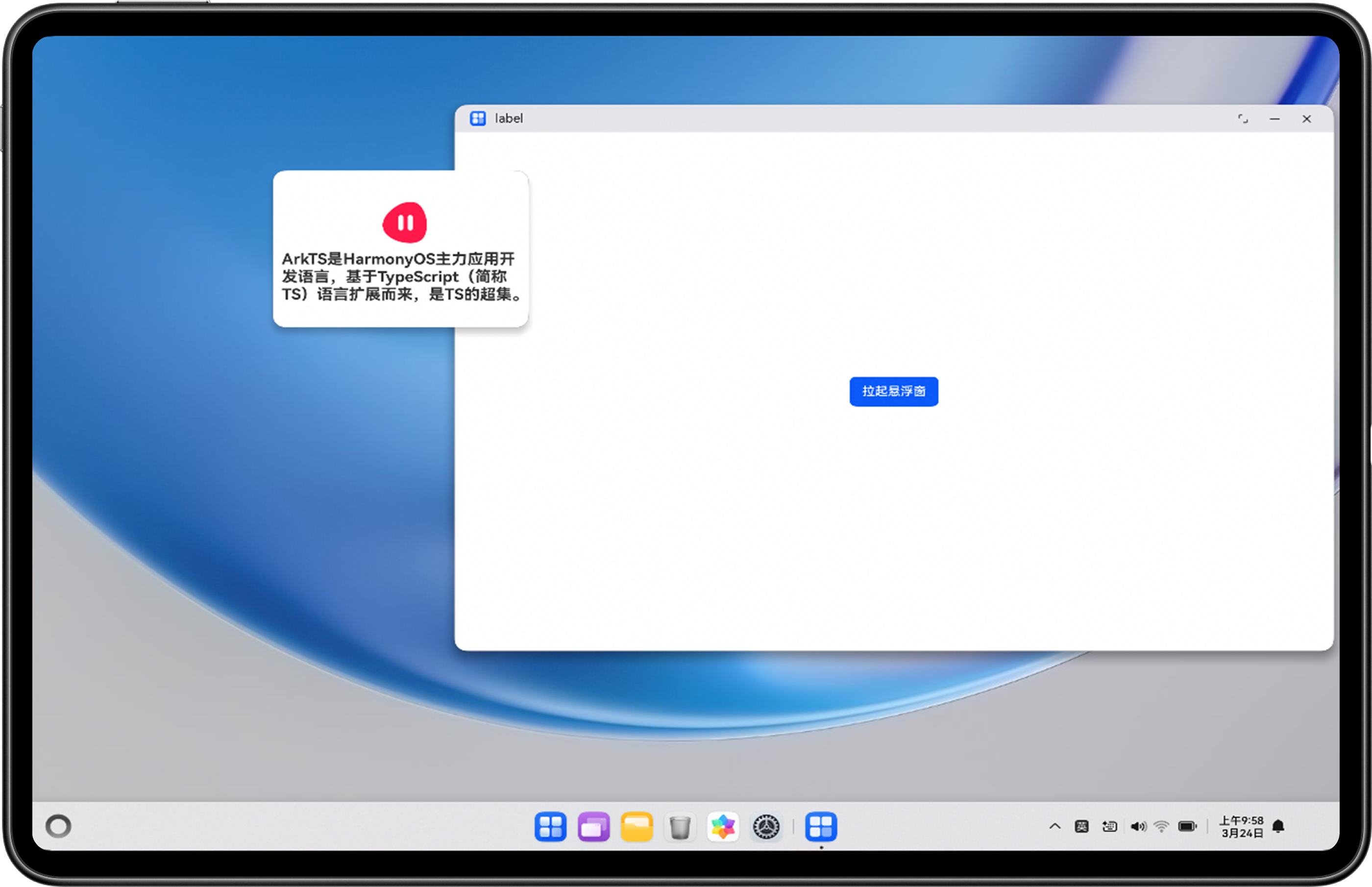
- 新建一个名称为的FloatWindowAbility的UIAbility,通过setWindowDecorVisible隐藏窗口的标题栏,通过setWindowTitleButtonVisible隐藏标题栏上的最大化、最小化、关闭按钮,再通过setWindowTopmost方法设置窗口置顶,具体实现如下:
- 方案四:通过闪控球实现。
闪控球是一种在设备屏幕上悬浮的非全屏应用窗口,为应用提供临时的全局能力,完成跨应用交互,具体实现可参考官网详细开发步骤:全局闪控球开发指导。