问题现象
服务器返回给端侧一张大图和多组图像裁剪坐标,页面根据图像坐标裁剪出小图进行展示。该行为需要将一张大图裁剪为多张小图,使用常规方案(使用PixelMap图像变换拷贝图片后裁剪)处理10张小图约耗时2S,页面会长时间保持loading状态。
背景知识
- PixelMap图像像素类,用于读取或写入图像数据以及获取图像信息。
- PixelMap.crop根据输入的尺寸对图片进行裁剪,会对PixelMap自身进行修改。
- PixelMap.readPixels固定按照BGRA_8888格式,读取PixelMap指定区域内的图像像素数据,并写入PositionArea.pixels缓冲区中,该区域由PositionArea.region指定。
解决方案
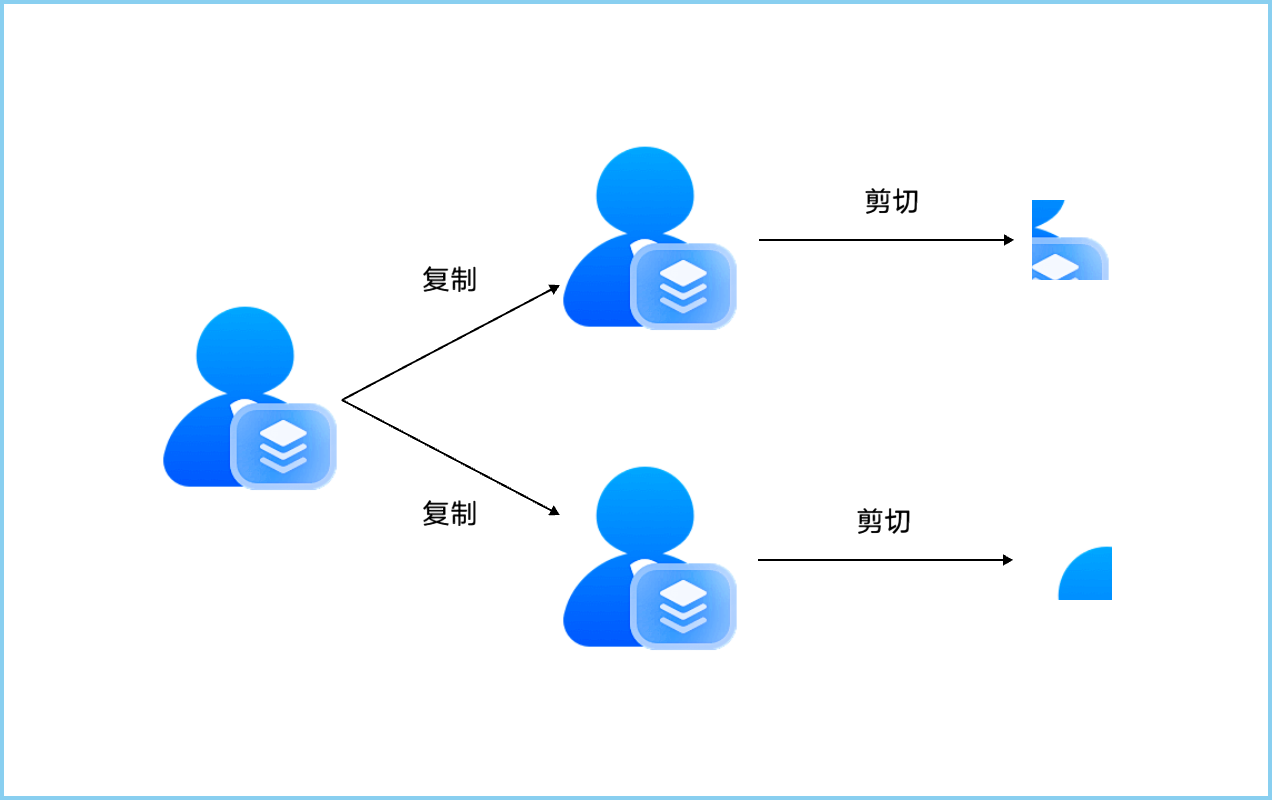
由于PixelMap.crop方法操作PixelMap自身而不是返回副本,一张图裁剪为多张小图时,需要将原图拷贝后再剪切的方式处理,大量的复制拷贝增加了处理耗时,参考PixelMap深拷贝案例。实现逻辑如下图所示:
实现一张图片的高效裁剪,可以使用PixelMap.readPixels,传入area参数仅读取裁剪范围,再使用writePixels写入新图片。此时仅复制了必须的裁剪结果数据,降低大量复制消耗并且可以省略复制后的裁剪步骤,操作示意图及步骤如下:
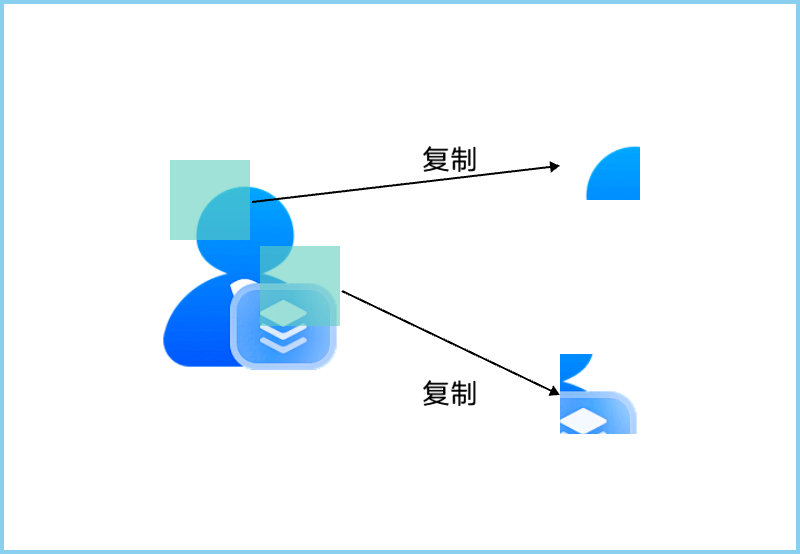
- 获取需要裁剪的PixelMap通过readPixels读取裁剪区域数据。
- 使用writePixels将读取到的数据写入空白PixelMap,生成小图。裁剪逻辑代码:
static async cropImage(pixelMap: image.PixelMap, x: number, y: number, width: number, height: number): Promise<PixelMap> { let region: image.Region = { x: x, y: y, size: { height: height, width: width } }; const area: image.PositionArea = { pixels: new ArrayBuffer(pixelMap.getPixelBytesNumber()), offset: 0, stride: pixelMap.getBytesNumberPerRow(), region: region }; pixelMap.readPixelsSync(area); const opts: image.InitializationOptions = { editable: true, // readPixelsSync使用的是BGRA_8888,转换时设置RGBA_8888 pixelFormat: image.PixelMapFormat.RGBA_8888, size: { height: height, width: width } }; let snapshot = image.createPixelMapSync(opts); const snapshotArea: image.PositionArea = { pixels: area.pixels, offset: 0, stride: area.stride, region: { size: { width: width, height: height }, x: 0, y: 0 } }; snapshot.writePixelsSync(snapshotArea); return snapshot; } - 通过demo进行性能对比,将图片裁剪为多张100*100的小图时,使用writePixels裁剪小图比拷贝裁剪小图的性能提升约7倍。完整代码示例如下:
import { image } from '@kit.ImageKit';
import { BusinessError, systemDateTime } from '@kit.BasicServicesKit';
import fs from '@ohos.file.fs';
import { photoAccessHelper } from '@kit.MediaLibraryKit';

const MAX_PICK_COUNT = 1;

// 图片选择类
export class PickerUtil {
  static async photoSelect(): Promise<image.PixelMap | null> {
    return PickerUtil.photoSelectWithLimit(MAX_PICK_COUNT);
  }

  static async photoSelectWithLimit(count: number): Promise<image.PixelMap | null> {
    try {
      let photoSelectOptions = new photoAccessHelper.PhotoSelectOptions();
      photoSelectOptions.MIMEType = photoAccessHelper.PhotoViewMIMETypes.IMAGE_TYPE;
      photoSelectOptions.maxSelectNumber = count;
      photoSelectOptions.isEditSupported = false;
      let photoPicker = new photoAccessHelper.PhotoViewPicker();
      return await photoPicker.select(photoSelectOptions)
        .then(async (photoSelectResult: photoAccessHelper.PhotoSelectResult) => {
          return PickerUtil.readImageToCache(photoSelectResult.photoUris[0]);
        })
        .catch((err: BusinessError) => {
          console.error(`PhotoViewPicker.select failed with err: ${err.code}, ${err.message}`);
          return null;
        });
    } catch (error) {
      let err: BusinessError = error as BusinessError;
      console.error(`PhotoViewPicker failed with err: ${err.code}, ${err.message}`);
      return null;
    }
  }

  // 压缩图片
  private static async readImageToCache(path: string): Promise<image.PixelMap> {
    let readFile = fs.openSync(path, fs.OpenMode.READ_ONLY);
    try {
      let imageSource: image.ImageSource = image.createImageSource(readFile.fd);
      let decodingOptions: image.DecodingOptions = {
        editable: false, desiredPixelFormat: 3,
      };
      return await imageSource.createPixelMap(decodingOptions);
    } finally {
      fs.closeSync(readFile);
    }
  }
}

// 图片裁剪类
export class ImageUtil {
  // 像素读取方式实现裁剪
  static async cropImage(pixelMap: image.PixelMap, x: number, y: number, width: number,
    height: number): Promise<PixelMap> {
    let region: image.Region = { x: x, y: y, size: { height: height, width: width } };
    const area: image.PositionArea = {
      pixels: new ArrayBuffer(pixelMap.getPixelBytesNumber()),
      offset: 0,
      stride: pixelMap.getBytesNumberPerRow(),
      region: region
    };
    pixelMap.readPixelsSync(area);

    const opts: image.InitializationOptions = {
      editable: true,
      // readPixelsSync使用的是BGRA_8888,转换时设置RGBA_8888
      pixelFormat: image.PixelMapFormat.RGBA_8888,
      size: { height: height, width: width }
    };
    let snapshot = image.createPixelMapSync(opts);
    const snapshotArea: image.PositionArea = {
      pixels: area.pixels,
      offset: 0,
      stride: area.stride,
      region: {
        size: {
          width: width,
          height: height
        },
        x: 0,
        y: 0
      }
    };
    snapshot.writePixelsSync(snapshotArea);
    return snapshot;
  }

  // copy方式实现裁剪
  static async cropImageWithCopy(pixelMap: image.PixelMap, x: number, y: number, width: number,
    height: number): Promise<PixelMap> {
    let region: image.Region = { x: x, y: y, size: { height: height, width: width } };
    let copy = await ImageUtil.copyPixelMap(pixelMap);
    await copy.crop(region);
    return copy;
  }

  static async copyPixelMap(pixelMap: PixelMap): Promise<PixelMap> {
    const imageInfo: image.ImageInfo = await pixelMap.getImageInfo();
    const buffer: ArrayBuffer = new ArrayBuffer(pixelMap.getPixelBytesNumber());
    await pixelMap.readPixelsToBuffer(buffer);
    const opts: image.InitializationOptions = {
      editable: true,
      srcPixelFormat: imageInfo.pixelFormat,
      pixelFormat: imageInfo.pixelFormat,
      size: { height: imageInfo.size.height, width: imageInfo.size.width }
    };
    return image.createPixelMap(buffer, opts);
  }
}

@Entry
@ComponentV2
struct Index {
  @Local copyImages: image.PixelMap[] = [];
  @Local copyTime: number = 0;
  @Local cropImages: image.PixelMap[] = [];
  @Local cropTime: number = 0;
  @Local cropX: number = 0;
  @Local cropY: number = 0;
  @Local cropWidth: number = 100;
  @Local cropHeight: number = 100;

  async doTest() {
    try {
      this.copyImages = [];
      this.cropImages = [];

      let pixel = await PickerUtil.photoSelect();
      if (pixel === null) {
        return;
      }
      let subWidth = 100;
      if (this.cropWidth > 0) {
        subWidth = this.cropWidth;
      }
      let subHeight = 100;
      if (this.cropHeight > 0) {
        subHeight = this.cropHeight;
      }
      let x = 0;
      if (this.cropX > 0) {
        x = this.cropX;
      }
      let y = 0;
      if (this.cropY > 0) {
        y = this.cropY;
      }
      let count = 10;
      let copyImages: image.PixelMap[] = [];
      let cropImages: image.PixelMap[] = [];

      let start = systemDateTime.getTime();
      for (let i = 0; i < count; i++) {
        copyImages.push(await ImageUtil.cropImageWithCopy(pixel, x + i * 100, y + i * 100, subWidth, subHeight));
      }
      this.copyTime = systemDateTime.getTime() - start;

      start = systemDateTime.getTime();
      for (let i = 0; i < count; i++) {
        cropImages.push(await ImageUtil.cropImage(pixel, x + i * 100, y + i * 100, subWidth, subHeight));
      }
      this.cropTime = systemDateTime.getTime() - start;

      this.copyImages = copyImages;
      this.cropImages = cropImages;
    } catch (e) {
      console.error('error:', e);
    }
  }

  build() {
    RelativeContainer() {
      Scroll() {
        Column() {
          Text(`拷贝裁剪耗时${this.copyTime}`)
          Grid() {
            ForEach(this.copyImages, (image: image.PixelMap) => {
              GridItem() {
                Image(image)
                  .width(80)
              }
            })
          }

          Text(`直接裁剪耗时${this.cropTime}`)
          Grid() {
            ForEach(this.cropImages, (image: image.PixelMap) => {
              GridItem() {
                Image(image)
                  .width(80)
              }
            })
          }

          Button('选择图片开始测试')
            .onClick(() => {
              this.doTest();
            })
          Column() {
            TextInput({ placeholder: '左上角坐标 x,y逗号分割' })
              .onChange(value => {
                let sub = value?.split(',');
                if (sub && sub.length > 1) {
                  this.cropX = Number(sub[0]).valueOf();
                  this.cropY = Number(sub[1]).valueOf();
                  console.info('this.cropX:', this.cropX, 'this.cropY:', this.cropY);
                }
              })
            TextInput({ placeholder: '裁剪宽度' })
              .onChange(value => {
                this.cropWidth = Number(value).valueOf();
                console.info('this.cropWidth:', this.cropWidth);
              })
            TextInput({ placeholder: '裁剪高度' })
              .onChange(value => {
                this.cropHeight = Number(value).valueOf();
                console.info('this.cropHeight:', this.cropHeight);
              })
          }
        }
      }
    }
    .height('100%')
    .width('100%')
  }
}