问题现象
整个调用链为hap ArkTS->har ArkTS->har Native侧->har ArkTS。设定hap模块为entry。
- entry模块ArkTS调用har ArkTS侧A.ets页面导出的接口。
- har ArkTS侧A.ets页面中接口调用har Native侧的方法。
- har Native侧方法通过napi_load_module_with_info来加载har ArkTS侧B.ets导出的自定义接口。
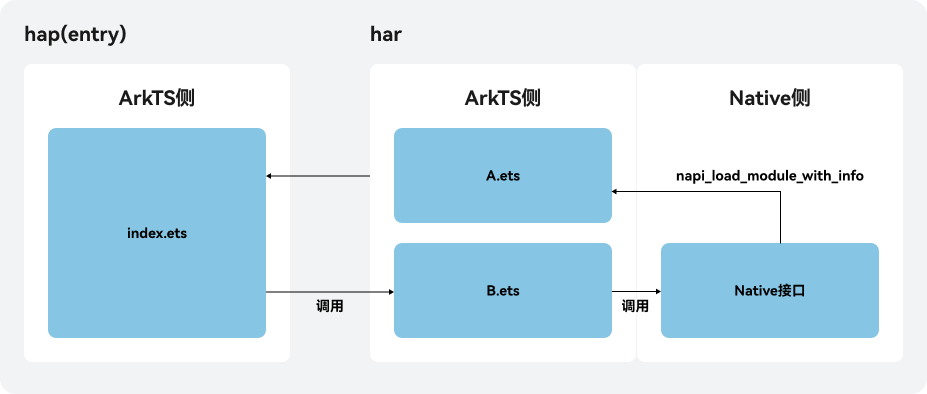
har的ArkTS侧将函数包裹在命名空间中导出,其Native侧用napi_get_named_property加载函数,加载失败。
问题代码示例参考如下:
// har包的ObjectUtil.ets
namespace  ObjectUtil{
  export function testOne(){
    console.info('你好,世界!')
  }
}

export {ObjectUtil}
// har包的napi_init.cpp
static napi_value loadModule(napi_env env, napi_callback_info info) {
    napi_value result;
    // 1.使用napi_load_module_with_info加载Test文件中的模块
    napi_status status = napi_load_module_with_info(env, "mytest_sdk/src/main/ets/common/ObjectUtil",
                                                    "com.example.sodemo/mytest_sdk", &result);
    if (status != napi_ok) {
        return nullptr;
    }
    napi_value testFn;
    // 2.使用napi_get_named_property获取test函数
    status = napi_get_named_property(env, result, "testOne", &testFn); // 获取失败,status:napi_object_expected
    if (status != napi_ok) {
        return nullptr;
    }
    // 3.使用napi_call_function调用函数test
    status = napi_call_function(env, result, testFn, 0, nullptr, nullptr);
    if (status != napi_ok) {
        return nullptr;
    }
    return result;
}
背景知识
应用开发中往往是由多个业务组共同完成一个APP的开发,每个业务组都有自己的工程,业务组会以HSP或har包的形式提供SDK能力给各个hap模块使用,这些SDK往往会提供C++接口或ets接口供其他模块直接调用。har包构建参考如何构建har包并导出Native方法。
Node-API中的napi_load_module_with_info接口的功能是进行模块的加载,当模块加载出来之后,可以使用函数napi_get_property获取模块导出的变量,也可以使用napi_get_named_property获取模块导出的函数。
napi_status napi_load_module_with_info(napi_env env,
                                       const char* path,
                                       const char* module_info,
                                       napi_value* result);
参数 | 说明 |
|---|---|
env | 当前的虚拟机环境。 |
path | 加载的文件路径或者模块名。 |
module_info | bundleName/moduleName的路径拼接。 |
result | 加载的模块。 |
解决方案
- har的ArkTS侧导出接口时包裹了一层namespace,Native侧在加载时需要用napi_get_named_property()先获取到命名空间对象,再去获取函数对象(一共获取两次),无法直接获取函数。
- har是集成到hap中的,其入口模块是hap,即entry模块。所以napi_load_module_with_info中:
- path:加载文件路径或者moduleName。注意此处的moduleName指的是入口模块(即entry模块)中oh-package.json5中dependencies标签下为har定义的名称,而不是har模块的实际名称。hap(即entry模块)的oh-package.json5:
{
  "name": "entry",
  "version": "1.0.0",
  "description": "Please describe the basic information.",
  "main": "",
  "author": "",
  "license": "",
  "dependencies": {
    "mytest_sdk": "file:../mytest_sdk"
  }
}
如以上示例,若依赖中配置是"lib_mytest_sdk": "file:../mytest_sdk",则path参数中的moduleName为lib_mytest_sdk,而非mytest_sdk。即path:“lib_mytest_sdk/src/main/ets/common/ObjectUtil”,非“mytest_sdk/src/main/ets/common/ObjectUtil”。
- module_info:bundleName/moduleName的路径拼接。此处的moduleName指的是被加载的模块(har)所在的hap下module.json5中module节点的name属性。hap(即entry模块)的module.json5:
{
  "module": {
    "name": "entry",
    "type": "entry",
    "description": "$string:module_desc",
    "mainElement": "EntryAbility",
    "deviceTypes": [
      "phone"
    ],
    "deliveryWithInstall": true,
    "installationFree": false,
    "pages": "$profile:main_pages",
    "abilities": [
      {
        "name": "EntryAbility",
        "srcEntry": "./ets/entryability/EntryAbility.ets",
        "description": "$string:EntryAbility_desc",
        "icon": "$media:layered_image",
        "label": "$string:EntryAbility_label",
        "startWindowIcon": "$media:startIcon",
        "startWindowBackground": "$color:start_window_background",
        "exported": true,
        "skills": [
          {
            "entities": [
              "entity.system.home"
            ],
            "actions": [
              "ohos.want.action.home"
            ]
          }
        ]
      }
    ],
    "extensionAbilities": [
      {
        "name": "EntryBackupAbility",
        "srcEntry": "./ets/entrybackupability/EntryBackupAbility.ets",
        "type": "backup",
        "exported": false,
        "metadata": [
          {
            "name": "ohos.extension.backup",
            "resource": "$profile:backup_config"
          }
        ],
      }
    ]
  },
如上图所示,module_info参数中的moduleName为入口模块的模块名entry,而非har的模块名mytest_sdk。module_info:com.example.sodemo/entry,非com.example.sodemo/mytest_sdk。
- path:加载文件路径或者moduleName。注意此处的moduleName指的是入口模块(即entry模块)中oh-package.json5中dependencies标签下为har定义的名称,而不是har模块的实际名称。
- 完整示例参考如下:har包(即mytest_sdk模块)的napi_init.cpp:
static napi_value TestCall(napi_env env, napi_callback_info info)
{
    size_t argc = 2;
    napi_value args[2] = {nullptr};
    napi_get_cb_info(env, info, &argc, args, nullptr, nullptr);

    size_t len1 = 0;
    napi_get_value_string_utf8(env, args[0], nullptr, 0, &len1);    // Get string length to len
    char* path = new char[len1+1];                                   // Allocate a char array of appropriate size
    napi_get_value_string_utf8(env, args[0], path, len1 + 1, &len1);  // get string

    size_t len2 = 0;
    napi_get_value_string_utf8(env, args[1], nullptr, 0, &len2);    // Get string length to len
    char* moduleInfo = new char[len2+1];                                   // Allocate a char array of appropriate size
    napi_get_value_string_utf8(env, args[1], moduleInfo, len2 + 1, &len2);  // get string

    OH_LOG_INFO(LOG_APP, "Receive:path[%{public}s], module_info:[%{public}s]", path,moduleInfo);

    napi_value result;
    // 1. 使用napi_load_module_with_info加载Test文件中的模块
    napi_status status = napi_load_module_with_info(env, path,moduleInfo, &result);
    if (status != napi_ok) {
        OH_LOG_INFO(LOG_APP, "napi_load_module_with_info加载Test文件中的模块 失败: %{public}d", status);
        return nullptr;
    }
    napi_value testFn;
    napi_value testNamespace;
    // 2. 使用napi_get_named_property获取命名空间对象
    status = napi_get_named_property(env, result, "ObjectUtil", &testNamespace);
    if (status != napi_ok) {
        OH_LOG_INFO(LOG_APP, "napi_get_named_property获取命名空间对象 失败: %{public}d", status);
        return nullptr;
    }
    // 2.1 使用napi_get_named_property获取testTwo函数
    status = napi_get_named_property(env, testNamespace, "testOne", &testFn);
    if (status != napi_ok) {
        OH_LOG_INFO(LOG_APP, "napi_get_named_property获取testTwo函数 失败: %{public}d", status);
        return nullptr;
    }
    // 3. 使用napi_call_function调用函数test
    status = napi_call_function(env, testNamespace, testFn, 0, nullptr, nullptr);
    if (status != napi_ok) {
        OH_LOG_INFO(LOG_APP, "napi_call_function调用函数test 失败: %{public}d", status);
        return nullptr;
    }
    napi_value ret;
    std::string str = "TestCall";
    napi_create_string_utf8(env, str.c_str(), str.size(), &ret);
    return ret;
}