解决方案
convertToImage将PDF文档转换成图片,每一页对应一张图片,图片名称按数字顺序命名。此API不支持自定义生成的图片名,需要使用@ohos.file.fs (文件管理)的能力重命名图片。
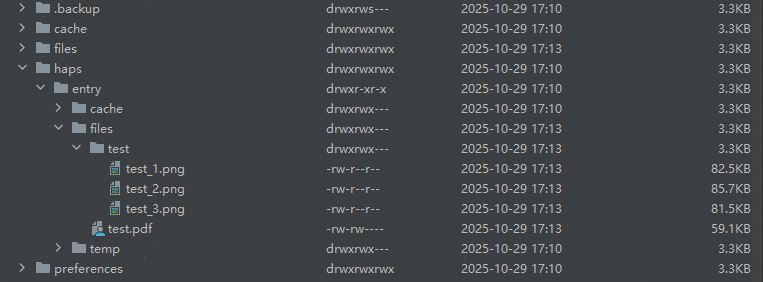
以将生成的图片重命名为{{PDF文件名(不带后缀)}}_{{数字顺序}}.png为例,示例代码如下:
import { common } from '@kit.AbilityKit';
import { fileIo as fs, ListFileOptions } from '@kit.CoreFileKit';
import { pdfService, pdfViewManager } from '@kit.PDFKit';

@Entry
@Component
struct PdfPreview {
  private controller: pdfViewManager.PdfController = new pdfViewManager.PdfController();
  private context = this.getUIContext().getHostContext() as common.UIAbilityContext;
  @State filePath: string = '';

  aboutToAppear(): void {
    let dir: string = this.context.filesDir;
    // 确保在工程目录src/main/resources/rawfile里存在test.pdf文档
    this.filePath = dir + '/test.pdf';
    let res = fs.accessSync(this.filePath);
    if (!res) {
      let content: Uint8Array = this.context.resourceManager.getRawFileContentSync('rawfile/test.pdf');
      let fdSand: fs.File | null = null;
      try {
        fdSand =
          fs.openSync(this.filePath, fs.OpenMode.WRITE_ONLY | fs.OpenMode.CREATE | fs.OpenMode.TRUNC);
        fs.writeSync(fdSand.fd, content.buffer);
      } catch (e) {
        console.error('fs.openSync fdSand failed error is : ', JSON.stringify(e));
      } finally {
        if (fdSand !== null) {
          fs.closeSync(fdSand.fd);
        }
      }
    }
    (async () => {
      let loadResult: pdfService.ParseResult = await this.controller.loadDocument(this.filePath);
      console.log('loadResult is ', loadResult);
      if (pdfService.ParseResult.PARSE_SUCCESS === loadResult) {
        this.controller.setPageZoom(1);
      }
    })();

  }

  build() {
    Column({ space: 5 }) {
      Row() {
        Button('生成图片并重命名').onClick(async () => {
          // 获取PDF文件名(不带后缀),作为存放生成的图片的文件夹
          let file: fs.File | null = null;
          try {
            file = fs.openSync(this.filePath, fs.OpenMode.READ_ONLY);
            let pdfFileNameWithoutSuf = file.name.slice(0, file.name.length - 4);
            let document = new pdfService.PdfDocument();
            let loadResult = document.loadDocument(this.filePath, '');
            if (pdfService.ParseResult.PARSE_SUCCESS === loadResult) {
              let pdfImgDir: string = this.context.filesDir + '/' + pdfFileNameWithoutSuf;
              if (!fs.accessSync(pdfImgDir)) {
                fs.mkdirSync(pdfImgDir);
              }
              document.convertToImage(pdfImgDir, pdfService.ImageFormat.PNG);
              // 生成图片后遍历出路径下所有图片
              let listFileOption: ListFileOptions = {
                recursion: false,
                listNum: 0,
                filter: {
                  suffix: ['.png']
                }
              };
              let filenames = fs.listFileSync(pdfImgDir, listFileOption);
              // 获取图片原名,拼接好新名后调用fs.renameSync重命名图片
              for (let i = 0; i < filenames.length; i++) {
                let oldDir = pdfImgDir + '/' + filenames[i];
                let curFile: fs.File | null = null;
                try {
                  curFile = fs.openSync(oldDir, fs.OpenMode.READ_ONLY);
                  let curFileName = curFile.name;
                  if (curFileName.indexOf(pdfFileNameWithoutSuf) < 0) {
                    let newDir = pdfImgDir + '/' + pdfFileNameWithoutSuf + '_' + curFileName;
                    fs.renameSync(oldDir, newDir);
                  }
                } catch (e) {
                  console.error('fs.openSync curFile failed error is : ', JSON.stringify(e));
                } finally {
                  if (curFile !== null) {
                    fs.closeSync(curFile.fd);
                  }
                }
              }
            }
          } catch (e) {
            console.error('fs.openSync file failed error is : ', JSON.stringify(e));
          } finally {
            if (file !== null) {
              fs.closeSync(file.fd);
            }
          }
        })
      }
      .height('10%')
    }
    .width('100%')
    .height('100%')
  }
} 可使用Device File Browser查看重命名效果:

- convertToImage将PDF文档转换成图片是耗时任务,若PDF文件过大,需要放到子线程里执行。
- 若有多个PDF文件需要转图片,由于convertToImage生成的图片以数字顺序命名,若放在同一个目录下会存在图片文件覆盖问题,可以按PDF文件名新建目录存放生成的图片,重命名后再移动到同一个目录下。