
HMS Core opens up the WebAuthn-based FIDO2 client capability.
The registration process is as follows.
1. Your app integrates the FIDO2 client SDK and sends a registration request to the FIDO server.
2. The FIDO server generates a random challenge value and sends it to your app. Your app forwards the challenge value to the FIDO client which connects to the authenticator and initiates registration.
3. After verifying the request, the authenticator generates a pair of public and private keys and saves the private key to the local device. Then, the authenticator uses its preset private key to sign the public key and challenge value to generate a signature.
4. The authenticator sends the signature to the FIDO client and your app. Your app sends the signature to the FIDO server for registration.
5. The FIDO server verifies the signature, saves the public key, and sends the handling result to your app.
The authentication process is as follows.
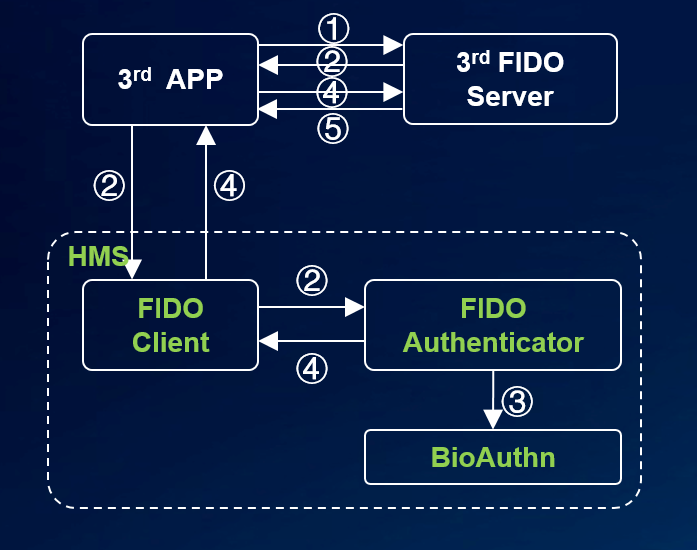
1. Your app integrates the FIDO2 SDK and sends an authentication request to the FIDO server.
2. The FIDO server generates a random challenge value and sends it to your app. Your app forwards the challenge value to the FIDO client which connects to the authenticator and initiates authentication.
3. After the authentication is successful, the authenticator uses the saved private key to sign the challenge value to generate a signature.
4. The authenticator sends the signature to the FIDO client and your app. Your app sends the signature to the FIDO server for authentication.
5. The FIDO server verifies the signature and sends the handling result to your app.
For details, visit the following links:
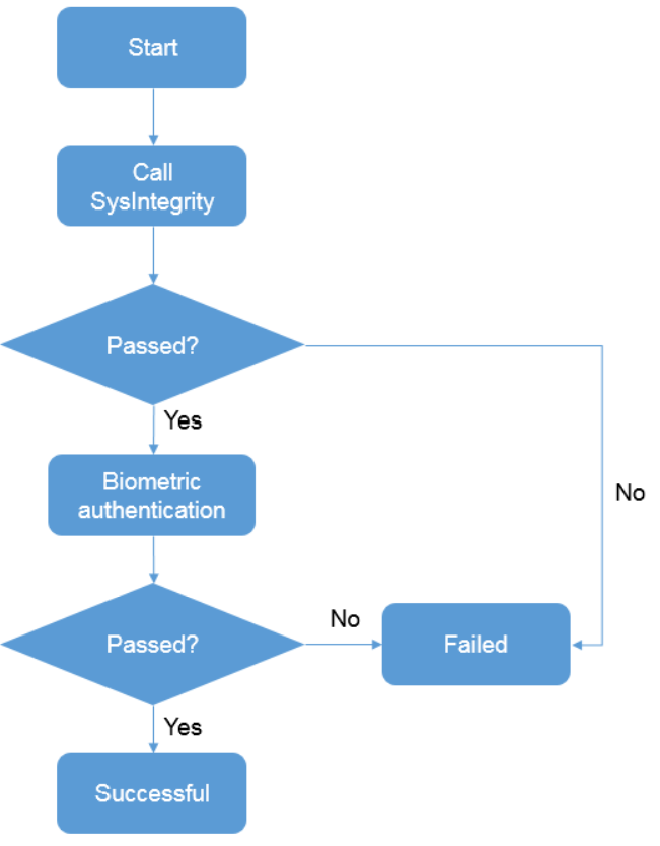
1. Your app integrates the FIDO BioAuthn SDK.
2. The FIDO BioAuthn SDK calls the SysIntegrity API of Safety Detect to check whether the device operating system is secure.
3. If so, the FIDO BioAuthn SDK performs local biometric authentication. If not, the SDK returns that the operating system fails the integrity check.