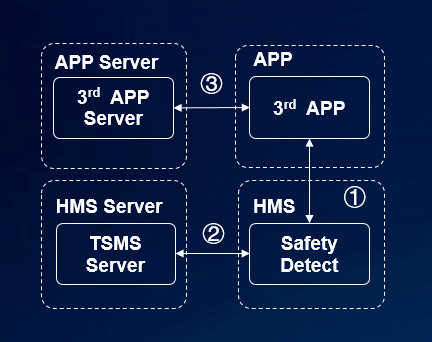
1. TEE-based system integrity check results: The API evaluates the system integrity in the secure boot process in the Trusted Execution Environment (TEE) and will dynamically evaluate the system integrity. The check results are high reliable.
2. Trustworthy system integrity check results: System integrity check results request the certificate signature. The server uses the X.509 digital certificate to sign the system integrity check results and transfers the signed JWS-format results to the SysIntegrity API. The signed results cannot be tampered with.
(1) Your app integrates the HMS SDK to call the Safety Detect service.
(2) The Safety Detect service sends a request to the TSMS server to sign the check results.
(3) Your app requests the check results.
An app calls the SysIntegrity API to check the system integrity of a device. If the device is insecure, it will take the appropriate measures.
For details, please refer to Development Process.
Before using the SysIntegrity API of Safety Detect, you must ensure that Huawei Mobile Services (APK) of the required version has been installed on the user device. If the installed version is not the required one, your app may stop responding after calling the API. If your app detects that the Huawei Mobile Services (APK) version installed on user devices is not the required one, it should ask the user to update Huawei Mobile Services (APK).
To check whether the installed Huawei Mobile Services (APK) version is compatible with your Android SDK version, call the isHuaweiMobileServicesAvailable() method. The sample code is as follows:
- if (HuaweiApiAvailability.getInstance().isHuaweiMobileServicesAvailable(context)== ConnectionResult.SUCCESS){
- // The SafetyDetect SysIntegrity API is available.
- } else {
- // Prompt user to update HMS.
- }
After you create an app in AppGallery Connect and configure the signing certificate fingerprint, your app can use the SysIntegrity API of Safety Detect. Perform the following steps:
1. Obtain a nonce value.
2. Request the SysIntegrity API of Safety Detect.
3. Verify the check result (signature, certificate chain, and domain name) on your server.
When calling the SysIntegrity API of Safety Detect, you must transfer a nonce value that will be contained in the check result. You can check the nonce value to determine whether the returned result corresponds to your request and does not encounter replay attacks.
The SysIntegrity API has two input parameters. The first one is the nonce value, and the other is appId. Because you have created an app during development preparations, you can obtain appId on HUAWEI Developer as described in the "Configuring a Signing Certificate Fingerprint" section. Transfer appId to the API as the second input parameter.
- private void invokeSysIntegrity() {
- SafetyDetectClient mClient = SafetyDetect.getClient(Mainactivity.this);
- // TODO(developer): Change the nonce generation to include your own, used once value,
- // ideally from your remote server.
- byte[] nonce = ("Sample" + System.currentTimeMillis()).getBytes();
- Task task = mClient.sysIntegrity(nonce,"3*******");
- task.addOnSuccessListener(new OnSuccessListener<SysIntegrityResp>() {
- @Override
- public void onSuccess(SysIntegrityResp response) {
- // Indicates communication with the service was successful.
- // Use response.getResult() to get the result data.
- String jwsStr = response.getResult();
- }
- }).addOnFailureListener(new OnFailureListener() {
- @Override
- public void onFailure(Exception e) {
- // An error occurred while communicating with the service.
- if (e instanceof ApiException) {
- // An error with the HMS API contains some
- // additional details.
- ApiException apiException = (ApiException) e;
- // You can retrieve the status code using
- // the apiException.getStatusCode() method.
- Log.e(TAG, "Error: " + SafetyDetectStatusCodes.getStatusCodeString(apiException.getStatusCode()) + ": " + apiException.getMessage());
- } else {
- // A different, unknown type of error occurred.
- Log.e(TAG, "ERROR:" + e.getMessage());
- }
- }
- });
- }
Huawei Mobile Services (APK) sends the check result to the Huawei server to verify the certificate, and returns the result to you through the SysIntegrityResp object. You can use the getResult() method of the object to obtain the response in JSON Web Signature (JWS) format.
1. Parse the JWS-format result to obtain header, payload, and signature.
2. Obtain the certificate chain from header and use the HUAWEI CBG Root CA certificate to verify it.
3. Verify the domain name of the leaf certificate in the certificate chain. The correct domain name is sysintegrity.platform.hicloud.com.
4. Obtain the signature from signature and verify it.
5. Obtain the integrity verification result from payload. The format and example are as follows:
- {
- "advice":"RESTORE_TO_FACTORY_ROM",
- "apkCertificateDigestSha256":[
- "yT5JtXRgeIgXssx1gQTsMA9GzM9ER4xAgCsCC69Fz3I="
- ],
- "apkDigestSha256":"6Ihk8Wcv1MLm0O5KUCEVYCI/0KWzAHn9DyN38R3WYu8=",
- "apkPackageName":"com.huawei.hms.safetydetectsample",
- "basicIntegrity":false,
- "nonce":"R2Rra24fVm5xa2Mg",
- "timestampMs":1571708929141
- }
If the value of basicIntegrity is false in the check result, you can decide whether to remind users of the risks based on your security requirements.
Note:
l For details about the fields, please refer to Huawei SafetyDetect API Index.
l For details about the verification logic, click SafetyDetect-SysIntegrity-Sample.zip to download the sample code.
l You need to download the Huawei CBG Root CA.zip certificate.