After a user clicks the button for 'signing in using a HUAWEI ID', your app processes the click event, combines the link for requesting the authorization code from the OAuth service, and redirects the user's browser to the link to access the OAuth service.
Sample code:
- <html>
- <head>
- <title>Demo</title>
- <meta http-equiv="Content-Type" content="text/html; charset=UTF-8" />
- <meta name="client_id" content="<APP ID>" />
- <meta name="redirect_uri" content="<App redirection URI>" />
- <meta name="scope" content="openid+profile" />
- </head>
- <body>
- <p> <button id="hwlogin" onclick=redirect()>HUAWEIID login</button></p>
- </body>
- <script type="text/javascript">
- var client_id ='',redirect_uri='',scope='';
- for(var metas=document.getElementsByTagName("meta"),i=0;i<metas.length;++i){
- switch(metas[i].name) {
- case 'client_id':
- client_id = metas[i].content;
- break;
- case 'redirect_uri':
- redirect_uri = metas[i].content;
- break;
- case 'scope':
- scope = metas[i].content;
- break;
- default:break
- }
- }
- var redirectUrl='https://oauth-login.cloud.huawei.com/oauth2/v3/authorize?'+
- 'response_type=code&access_type=offline&state=state_parameter_passthrough_value&client_id='+client_id +'&redirect_uri='+ redirect_uri +'&scope='+ scope;
- function redirect() {
- window.location.href=redirectUrl;
- }
- </script>
- </html>
Redirection URI:
- https://oauth-login.cloud.huawei.com/oauth2/v3/authorize?
- response_type=code&
- access_type=offline&
- state=state_parameter_passthrough_value&
- client_id=<APP ID>&
- redirect_uri=<App redirection URI>&
- scope=openid+profile
| Parameter | Mandatory (M) /Optional (O) | Description |
|---|---|---|
| response_type | M | Set this parameter to code (indicating the authorization code mode). |
| client_id | M | APP ID created in Preparing for Web App Development. |
| redirect_uri | M | Redirection URI after authorization, that is, URI for the app to receive the authorization code. The value must be the same as the redirection URI set in Preparing for Web App Development. You can add a parameter to the end of the redirection URI. The redirection URI is: https://www.thirdwebdemo.com/redirect_url, and other parameters may be added after the redirection URI like this:https://www.thirdwebdemo.com/redirect_url?somearg=XXXXXX |
| scope | M | Character string array separated by spaces (spaces are changed to plus signs (+) after URL encoding). The character 'openid' must be contained. |
| access_type | O | If this parameter is set to 'offline', a Refresh Token will be generated to refresh the Access Token. |
| state | O | Random string, which is used to prevent CSRF. The value is returned without any change along with the authorization code. |
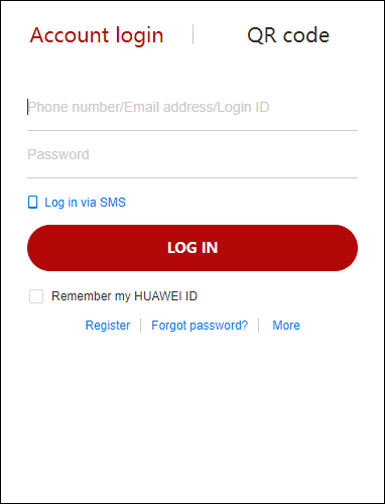
When the request is redirected to the OAuth service, the OAuth service displays an authorization page to prompt a user to perform authorization. The page shows the name and icon of your app as well as the permission required by your app.
As follow:
Sign-in page
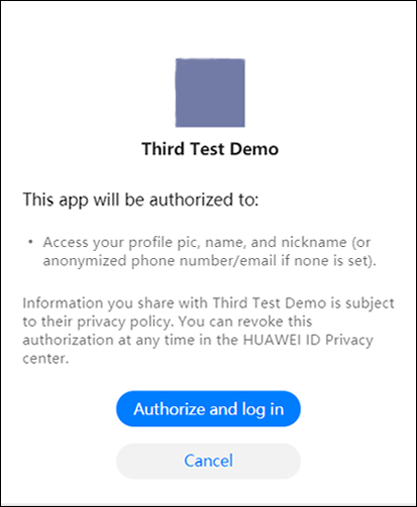
Authorization page
The OAuth service calls back the value in the response to the app through redirect_uri.
If the user agrees to the authorization, the callback request contains an authorization code.
If the user does not agree to the authorization, the callback request contains error information.
Sample code:
Callback request containing error information
Callback request containing an authorization code
- https://www.thirdwebdemo.com/redirect_url?
- code=<Returned authorization code>&
- state=state_parameter_passthrough_value
Callback request containing error information
- https://www.thirdwebdemo.com/redirect_url #error=1107&error_description=access+denied
After obtaining the authorization code, the app calls the API (https://oauth-login.cloud.huawei.com/oauth2/v3/token) of the OAuth service to obtain an Access Token, a Refresh Token, and an ID Token based on the authorization code.
Sample code:
Request
- POST /oauth2/v3/token HTTP/1.1
- Host: oauth-login.cloud.huawei.com
- Content-Type: application/x-www-form-urlencoded
- grant_type=authorization_code&
- code=<Returned authorization code>&
- client_id=<App ID>&
- client_secret=<App secret>&
- redirect_uri=<App redirection URI>
| Parameter | Mandatory (M) /Optional (O) | Description |
|---|---|---|
| grant_type | M | This parameter is defined in the OAuth 2.0 specifications and must be set to authorization_code. |
| code | M | The value is the same as the authorization code returned in section 1.3 Returning a Response by the OAuth service. |
| client_id | M | APP ID created in Preparing for Web App Development. |
| client_secret | M | APP SECRET allocated to the APP ID created in Preparing for Web App Development. |
| redirect_uri | M | The value must be the same as the redirection URI transferred in section 1.1 Applying for an Authorization Code. |
- HTTP/1.1 200 OK
- Content-Type: text/json ; charset=UTF-8
- Cache-Control: no-store
- {
- "access_token": "<Returned access token>",
- "refresh_token": "<Returned refresh token>",
- "expires_in": 3600,
- "scope": "profile openid",
- "token_type": "Bearer",
- "id_token": "<Returned ID token in JWT format>"
- }
| Parameter | Mandatory (M) /Optional (O) | Description |
|---|---|---|
| access_token | M | Access token of a user. |
| expires_in | M | Remaining validity period of an Access Token, in seconds. |
| scope | M | Scope contained in the Access Token generated. |
| token_type | M | This value is always Bearer, indicating the type of the returned Access Token. |
| id_token | M | ID Token in JWT format. If the input parameter scope in section 1.1 Applying for an Authorization Code contains profile and email, the app can directly parse the ID token to obtain user's basic account and email address information after the verification on id_token is complete locally (for details about the verification, please refer to section 5.1 Performing Local Verification) without the need to request the information from Huawei user information server. For details about the parsed fields, please refer to section 5.2 Parsing the Id_token Field. |
| refresh_token | O | The value of this parameter is returned, if access_type=offline is contained in the input parameter in section 1.1 Applying for an Authorization Code. This parameter is used to update an Access Token. |
By now, the user has signed in to your app with the HUAWEI ID, and your app obtains user's basic account information. If you need to call other Huawei public APIs, please refer to the following section.
When your app calls a Huawei API, the Access Token used to check whether the API can be called is placed in the Authorization header.
Example: Call the API (/openapi/inner/v1/sports/dailySteps). In section 1.1 Applying for an Authorization Code, Scope contains the permission item https://www.huawei.com/health/sport.readonly for calling this API. In this case, the obtained Access Token can be placed in the header of the request to call this API.
- GET /openapi/inner/v1/sports/dailySteps?startDate=<Service parameter 1>&endDate=<Service parameter 2> HTTP/1.1
- Host: <XXX>
- Content-Type: multipart/form-data; boundary=----WebKitFormBoundary7MA4YWxkTrZu0gW
- Accept: application/json
- x-huid: <Service parameter 3>
- x-appid: <Service parameter 4>
- x-client-version: <Service parameter 5>
- x-prdPkgName: <Service parameter 6>
- cache-control: no-cache
- Authorization: Bearer <Obtained access token>
The Access Token has a validity period. After the access token expires, the access token is unavailable. If the Access Token is called again, the authentication fails. In this case, you are advised to add the input parameter access_type that is set to offline when combining the link in section 1.1 Applying for an Authorization Code. In this way, a Refresh Token and an Access Token are generated at the same time. (Note: The Refresh Token and Access Token cannot be replaced with each other.)
The validity period of the Refresh Token is long (180 days by default). Within the validity period, the app can directly call the API (https://oauth-login.cloud.huawei.com/oauth2/v3/token) of the OAuth service through the Refresh Token to obtain a new Access Token. In this way, your app does not need to bring up the authorization page again to ask for sign-in authorization from the user.
Sample code:
Request
- POST /oauth2/v3/token HTTP/1.1
- Host: oauth-login.cloud.huawei.com
- Content-Type: application/x-www-form-urlencoded
- grant_type=refresh_token&
- client_id=<App ID>&
- client_secret=<App secret>&
- refresh_token=<Refresh token obtained after authorization>
Response
- HTTP/1.1 200 OK
- Content-Type: text/html;charset=UTF-8
- Cache-Control: no-store
- {
- "access_token": "<New access token>",
- "expires_in": 3600,
- "id_token": "<Returned ID token in JWT format>",
- "scope": "profile openid",
- "token_type": "Bearer"
- }
Your app can call the API (https://oauth-login.cloud.huawei.com/oauth2/v3/revoke) to revoke the authorization from an authorized Access Token or Refresh Token. The Access Token and Refresh Token are in a pair. If the authorization of one token is revoked, the authorization of the other token also becomes invalid.
Sample code:
Request
- POST /oauth2/v3/revoke HTTP/1.1
- Host: oauth-login.cloud.huawei.com
- Content-Type: application/x-www-form-urlencoded
- token=<Access token for which authorization is to be revoked>
Response
- HTTP/1.1 200 OK
- Cache-Control: no-store
- Pragma: no-cache
- {}
1. Obtain the public key URI field jwks_uri from the return value of https://oauth-login.cloud.huawei.com/.well-known/openid-configuration, request the URI, and access the URI to obtain the public key. (The public key is updated once a day, and cached on the app server.)
- //JAVA_Demo sample code:
- getRSAPublicKeyByKid(decoder.getKeyId());
2. Verify the signature. The ID Token is in JWT format, whose signature can be verified by using a common JWT library, such as jwt.io.
- //JAVA_Demo sample code:
- DecodedJWT decoder = JWT.decode(idToken);
- Algorithm algorithm = Algorithm.RSA256(getRSAPublicKeyByKid(decoder.getKeyId()) , null);
- JWTVerifier verifier = JWT.require(algorithm).build();
- // Verify the signature.
- verifier.verify(decoder);
3. Check whether the value of iss in the ID Token is https://accounts.huawei.com.
- //JAVA_Demo sample code:
- decoder.getIssuer().equals(ID_TOKEN_ISSUE);
4. Check whether the value of aud in the ID Token is the same as the value of client_id of the app.
- //JAVA_Demo sample code:
- decoder.getAudience().get(0).equals(CLIENT_ID);
5. Check whether the ID Token expires at the time specified by exp.
- //JAVA_Demo sample code:
- verifier.verify(decoder);// If the token expires, TokenExpiredException is thrown.
6. If the preceding items pass the check, the ID Token is successfully verified. The app can parse the user information in the ID Token.
- //JAVA_Demo sample code:
- JSONObject jsonObject = JSONObject.parseObject(new String(Base64.decodeBase64(decoder.getPayload())));
Verify JAVA_Demo code locally. To obtain the code, click Download.
Your app verifies the signature of the id_token field. After the parsing, the tables of openid, email, and profile contained in scope are obtained.
openid in scope:
| Parameter | Mandatory (M) /Optional (O) | Type | Description |
|---|---|---|---|
| iss | M | String | This value is always https://accounts.huawei.com. |
| sub | M | String | UnionID obtained after a value containing a user ID and developer ID is encoded. The value is unique. |
| aud | M | String | App ID, which is contained in the ID Token. |
| exp | M | Long | Expiration time. |
| iat | M | Long | Time when an ID Token is generated. |
| nonce | O | String | Random character string. |
| at_hash | O | String | Access Token HASH value. |
| azp | O | String | App ID, which is used to generate an ID Token. |
email in scope:
| Parameter | Mandatory (M) /Optional (O) | Type | Description |
|---|---|---|---|
| email_verified | O | Boolean | Indicates whether a user's email box has been verified. The options are as follows: true: yes false: no |
| O | String | User email address. |
profile in scope:
| Parameter | Mandatory (M) /Optional (O) | Type | Description |
|---|---|---|---|
| picture | O | String | Link to profile picture of a user. |
| name | O | String | Full name of a user. |
| locale | O | String | Preferred language of a user, for example, zh-cn or en-us. |
| family_name | O | String | Last name. |
| given_name | O | String | First name. |
| display_name | O | String | Nickname of a HUAWEI ID. |