Scan Kit in MultiProcessor mode scans multiple barcodes simultaneously. The MultiProcessor mode is less capable than the other three modes in processing efficiency. You are advised to use the MultiProcessor mode only when simultaneous scanning is required. The MultiProcessor mode works in a synchronous or asynchronous way. Which of the two ways you choose depends on your needs.
Service Process
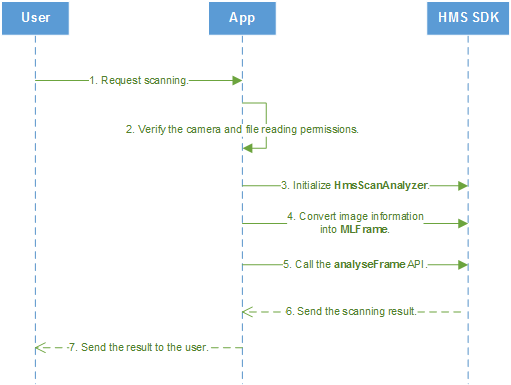
The service process of using the MultiProcessor mode in synchronous mode is as follows:
1. A user starts an app and sends a request of scanning a barcode.
2. Check whether the app has the camera access and file reading permissions.
3. If the app has the permissions, initialize HmsScanAnalyzer.
4. Convert image information into MLFrame.
5. Call the scanning API analyseFrame of HmsScanAnalyzer.
6. Return the scanning result.
7. The app encapsulates the scanning result and sends it to the user.
Development Process
1. (Optional) Initialize the HmsScanAnalyzerOptions object and set the supported barcode format.
setHmsScanTypes() is an optional parameter. Set it as needed.
setHmsScanTypes(): Set your desired barcode formats. Scan Kit with only a few barcode formats supported will scan faster. Barcode Formats Supported by HUAWEI Scan Kit will be scanned by default.
- // QRCODE_SCAN_TYPE and DATAMATRIX_SCAN_TYPE are set for the barcode format, indicating that Scan Kit will support only QR Code and Data Matrix.
- HmsScanAnalyzerOptions options = new HmsScanAnalyzerOptions.Creator().setHmsScanTypes(HmsScan.QRCODE_SCAN_TYPE, HmsScan.DATAMATRIX_SCAN_TYPE).create();
2. Initialize the HmsScanAnalyzer object. If you do not have specific barcode formats to set, set options to null here.
- HmsScanAnalyzer barcodeDetector = new HmsScanAnalyzer(options);
3. Convert image information into MLFrame, which is the image information class encapsulated by HUAWEI ML Kit.
- MLFrame image = MLFrame.fromBitmap(bitmap);
4. Call the scanning method analyseFrame of the HmsScanAnalyzer object to initiate a scanning request and obtain the scanning result. The scanning result is a data structure containing HmsScan. For details about HmsScan, please refer to Parsing Barcodes.
- SparseArray<HmsScan> result = barcodeDetector.analyseFrame(image);
- // Display the scanning result.
- showResult(result);
Service Process
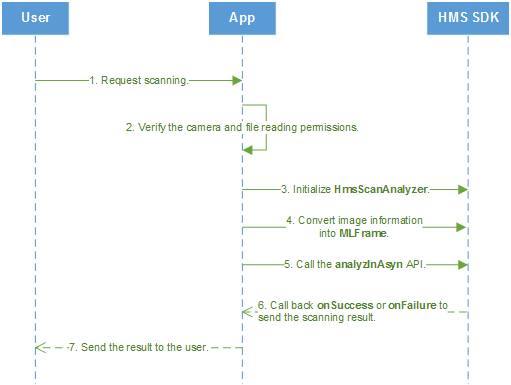
The service process of using the MultiProcessor mode in asynchronous mode is as follows:
1. A user starts an app and sends a request of scanning a barcode.
2. Check whether the app has the camera access and file reading permissions.
3. If the app has the permissions, initialize HmsScanAnalyzer.
4. Convert image information into MLFrame.
5. Call the asynchronous scanning API analyzInAsyn of HmsScanAnalyzer.
6. The HMS SDK calls back the onSuccess or onFailure API of the app to send the scanning result.
7. The app encapsulates the scanning result and sends it to the user.
Development Process
1. (Optional) Initialize the HmsScanAnalyzerOptions object and set the supported barcode format.
setHmsScanTypes() is an optional parameter. Set it as needed.
setHmsScanTypes(): Set your desired barcode formats. Scan Kit with only a few barcode formats supported will scan faster. Barcode Formats Supported by HUAWEI Scan Kit will be scanned by default.
- // QRCODE_SCAN_TYPE and DATAMATRIX_SCAN_TYPE are set for the barcode format, indicating that Scan Kit will support only QR Code and Data Matrix.
- HmsScanAnalyzerOptions options = new HmsScanAnalyzerOptions.Creator().setHmsScanTypes(HmsScan.QRCODE_SCAN_TYPE,HmsScan.DATAMATRIX_SCAN_TYPE).create();
2. Initialize the HmsScanAnalyzer object. If you do not have specific barcode formats to set, set options to null here.
- HmsScanAnalyzer barcodeDetector = new HmsScanAnalyzer(options);
3. Convert image information into MLFrame, which is the image information class encapsulated by HUAWEI ML Kit.
- MLFrame image = MLFrame.fromBitmap(bitmap);
4. Call the analyzInAsyn API of HmsScanAnalyzer to initiate a scanning request and subscribe to the scanning result event. The scanning result is a data structure containing HmsScan. For details about HmsScan, please refer to Parsing Barcodes.
- barcodeDetector.analyzInAsyn(image).addOnSuccessListener(new OnSuccessListener<List<HmsScan>>() {
- @Override
- public void onSuccess(List<HmsScan> hmsScans) {
- if (hmsScans != null && hmsScans.size() > 0) {
- // Display the scanning result.
- showResult(hmsScans);
- }
- }
- }).addOnFailureListener(new OnFailureListener() {
- @Override
- public void onFailure(Exception e) {
- Log.w(TAG, e);
- }
- });