The Maven repository address cannot be accessed from a browser. It can only be configured in the IDE.
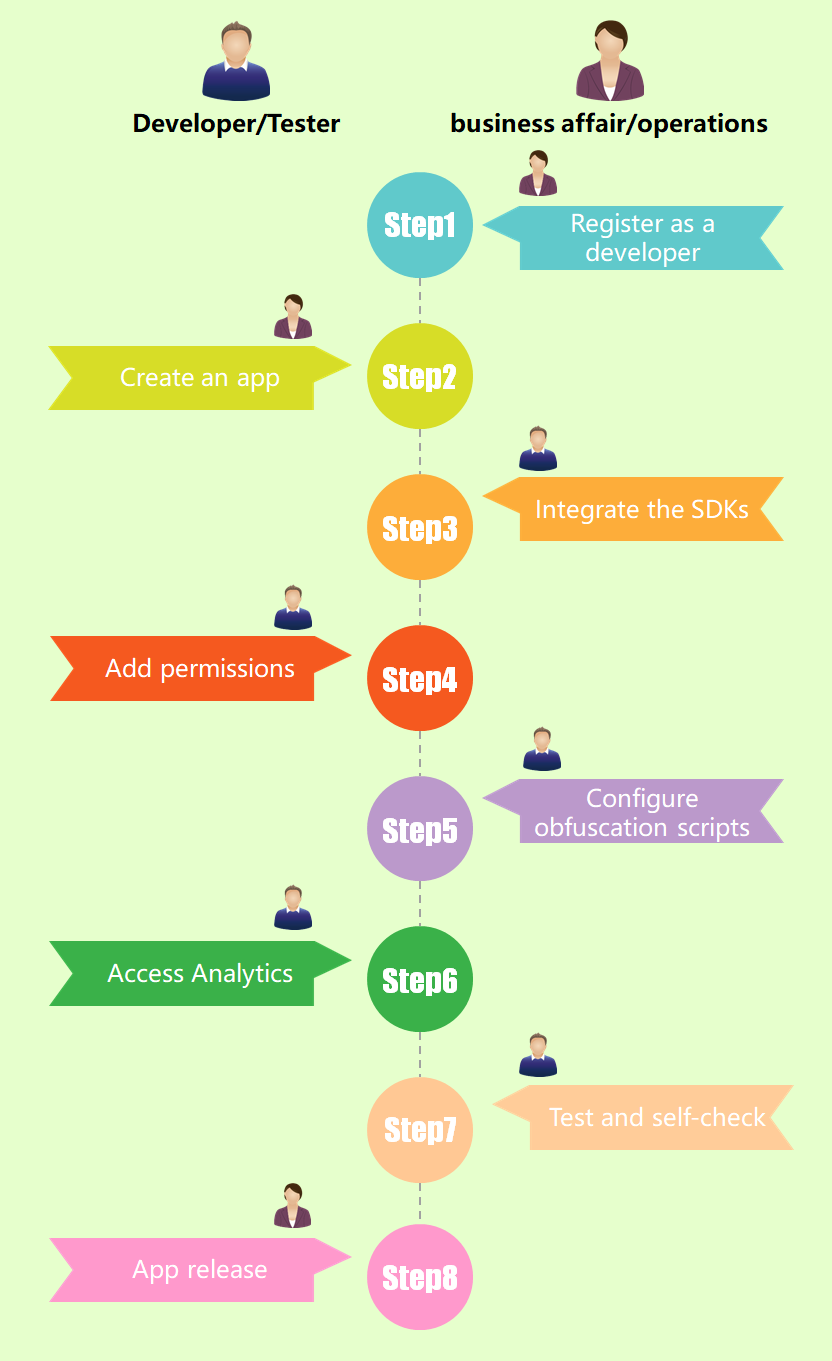
| Development Procedure | Reference | Description |
|---|---|---|
| Registering as a Developer | Registering as a Developer | You need to register an account in Huawei Developer, so that you can perform operations, such as creating an app, in AppGallery Connect. |
| Creating an App | Creating an App | After you create an app, an app ID that uniquely identifies the app is generated. |
| Integrating Android SDK | Integrating Android SDK | You can integrate the SDK through Android Studio or Eclipse. |
| SDK Permissions | SDK Permissions | SDK permissions. |
| Integrating the React-Native SDK | Integrating the React-Native SDK | You need to integrate the React-Native SDK packages locally. |
| Configuring Obfuscation Scripts | Configuring Obfuscation Scripts | You need to add the configuration of not obfuscating HUAWEI Analytics Kit in the obfuscation configuration file. |
| Accessing Analytics | Accessing Analytics | You can implement analytics functions using the APIs described in API Indexes. |
| Testing and Self-check | Testing and Self-check | You can check your app using the self-check tool and checklist provided by Huawei. |
| Submitting for Release Review | App Release | You need to submit your app to Huawei for review, which usually takes one to two workdays. |
1.If you do not have a HUAWEI ID, register one on Huawei Developer and complete real-name authentication. For details, see Registering as a Developer.
2.Sign in to AppGallery Connect using the applied Huawei ID and create an app. Ensure that Package type is set to APK (Android app). For details, see Creating an App.
3.Enable HUAWEI Analytics Kit:
a. Sign in to AppGallery Connect, and click Analytics. Select the app you created, and click the Advanced Analysis tab. On the page that is displayed, click Enable Analytics service.
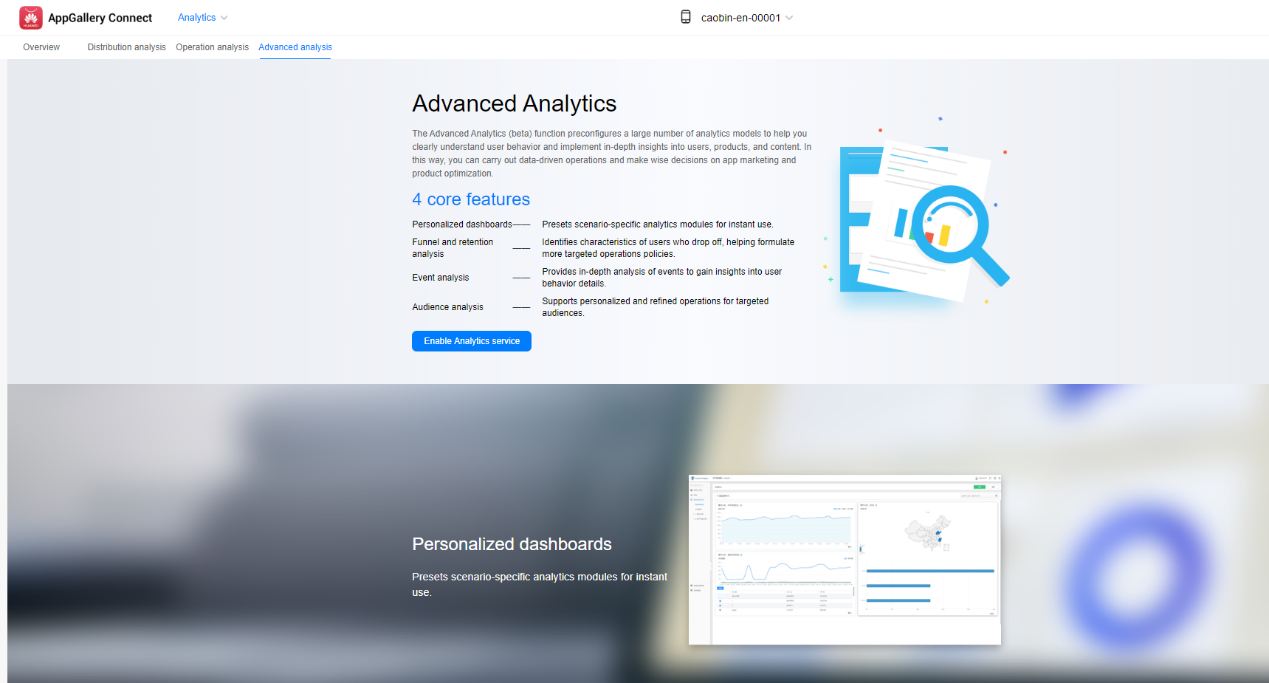
b. Select an app for which you need to view analytics data.
c. Enable HUAWEI Analytics Kit. For details, please refer to Enabling Services.
d. On the Project access settings page, set the data storage location, time zone, currency, user data storage time, and calendar week, and click Finish.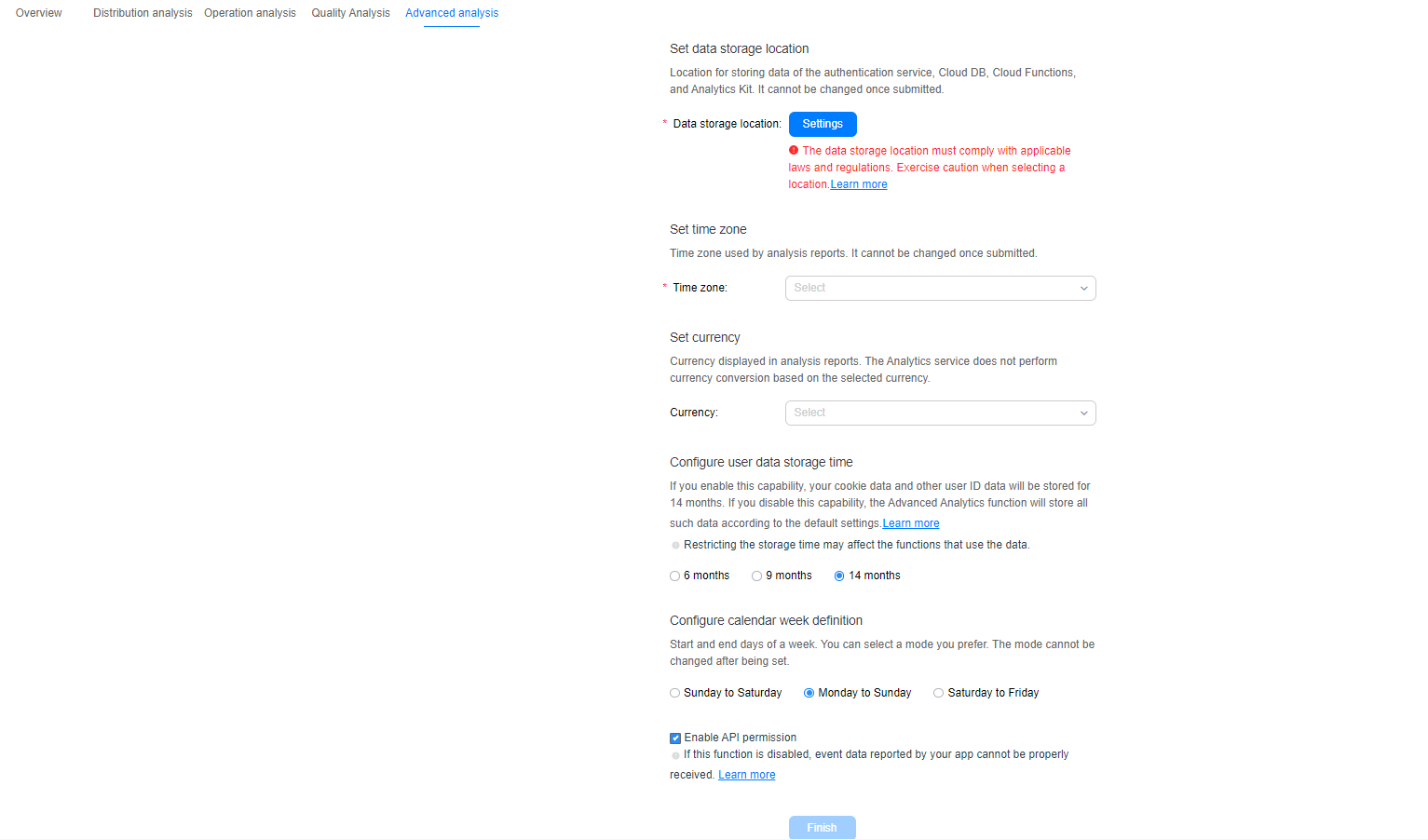
Sign in to AppGallery Connect, and select My apps. On the displayed page, click the app, go to Develop > Overview > Manage APIs, and enable HUAWEI Analytics Kit.
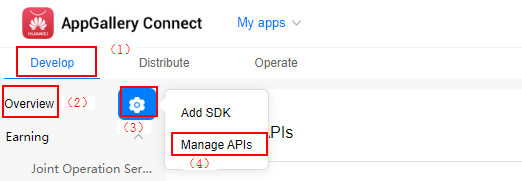

The React-Native SDK depends on the Android SDK. Therefore, the Android SDK must be integrated first.
1.Import the android directory in the root directory of the React-Native project to Android Studio. Android Studio automatically identifies the directory as an Android project.Add the AppGallery Connect configuration file of the current app to your Android Studio project.
a. Sign in to AppGallery Connect and select My apps.
b. Find your app from the list, and click the link under Android App in the Mobile phone column.
c. Go to Develop > Overview.
d. In the App information area, Click agconnect-services.json to download the configuration file.

e. In your Android Studio project, switch to the Project view and move the agconnect-services.json file obtained from AppGallery Connect to the app directory.
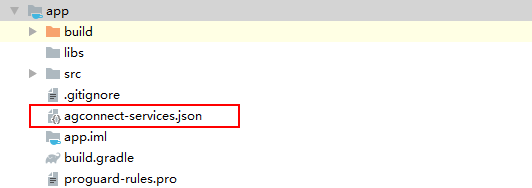
NOTE:
(1) Before obtaining the agconnect-services.json file, ensure that HUAWEI Analytics Kit has been enabled. For details about how to enable HUAWEI Analytics Kit, please refer to Enable the analytics service..
(2) If you have made any changes in the development module, such as setting the data storage location and enabling or managing APIs, you need to download the latest agconnect-services.json file and replace the existing file in the app directory.
2.Add the Maven repository address and AppGallery Connect service dependencies in the build.gradle file of your project.
- maven {url 'https://developer.huawei.com/repo/'}
- classpath 'com.huawei.agconnect:agcp:1.2.1.301'
3.Add the plug-in configuration and SDK version in the build.gradle file in the app directory.
- apply plugin: 'com.huawei.agconnect'
- implementation 'com.huawei.hms:hianalytics:4.0.1.300'
The Maven repository address cannot be accessed from a browser. It can only be configured in the IDE.
If an app needs to integrate other SDKs such as HMS Core Push SDK and HMS Core Game SDK, HUAWEI Analytics Kit of version 2.3.0.304 or earlier may fail to obtain the Application Associated ID (AAID) because the HMS Core Push SDK, HMS Core Game SDK, and HMS Core Analytics SDK depend on the Huawei base SDK package, and the combined base may not match the opendevice on which HUAWEI Analytics Kit of an earlier version depends. As a result, the APIs are incompatible. The workaround is as follows: 1. Ensure that the base and opendevice are of the same version. 2. Upgrade the base and opendevice to version 3.0.3.x or later. In this case, the versions can be different. 3. Upgrade all SDKs to the latest version.
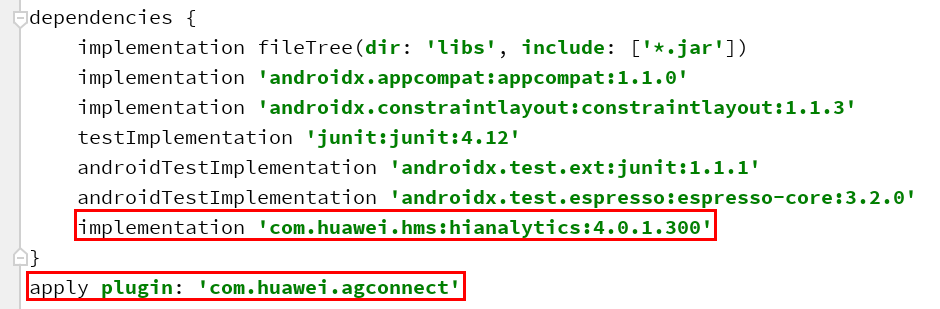
Regardless of whether you use the remote Maven repository to integrate the SDK or integrate the SDK locally, the plug-in cannot be added to the first line of the build.gradle file. Otherwise, the app crashes.
4.Click Sync now or Sync Project with Gradle Files to build a project.
Please refer to Integrating the SDK into Your App Project in the Eclipse IDE for the Eclipse configuration.
1. Download the React-Native HA SDK package.
2. Copy the downloaded software package to the node-modules directory in the React-Native project directory.

3. Run the following command in the root directory of the React-Native project:
- yarn add {project_path}/node_modules/react-native-ha-interface
In the command, {project_path} is the path of the React-Native project.
4. Check whether the SDK is successfully added to the package.json file in the root directory of the React-Native project file.

5. Automatically Collected Event:
Run the React-Native app and check whether the automatically collected event can be properly reported in the Real-time analysis menu on the Advanced analysis page in HUAWEI Developer.
6. Custom Events:
①Import the Reactive-Native HA SDK to the app.js file in the root directory of the Reactive-Native project file, compile the haOnEvent function to call the onEvent API of the SDK, and call the function.
- import haSDK from 'react-native-ha-interface';
- function haOnEvent(){
- const eventObj={
- testString:'StrContent',
- testInt:20,
- testDouble:2.2,
- testBoolean:false
- }
- haSDK.onEvent('newTestEvent',eventObj);
- }
- ……
- componentDidMount(){
- haSDK.onEvent();
- }
②Run the React-Native app and check whether the custom event can be properly reported in the Real-time analysis menu on the Advanced analysis page in HUAWEI Developer.
HUAWEI Analytics Kit requires the following permissions, which have been preset in HUAWEI Analytics Kit. You do not need to apply for permissions.
- <!--Network permission -->
- <uses-permission android:name="android.permission.INTERNET" />
- <!-- Check the network status. -->
- <uses-permission android:name="android.permission.ACCESS_NETWORK_STATE" />
- <!--AppGallery channel number query permission. -->
- <uses-permission android:name="com.huawei.appmarket.service.commondata.permission.GET_COMMON_DATA" />
Before building the APK, configure obfuscation scripts to prevent HUAWEI Analytics Kit from being obfuscated. If obfuscation arises, HUAWEI Analytics Kit may not function properly.
The configuration file in Android Studio is proguard-rules.pro, and that in Eclipse is proguard-project.txt.
1.Open the obfuscation configuration file of the Android project.
2.Add configurations to exclude HUAWEI Analytics Kit from obfuscation.
- -keep class com.hianalytics.android.**{*;}
- -keep class com.huawei.updatesdk.**{*;}
- -keep class com.huawei.hms.**{*;}
- -keep interface com.huawei.hms.analytics.type.HAEventType{*;}
- -keep interface com.huawei.hms.analytics.type.HAParamType{*;}
- -keep class com.huawei.hianalytics.CommonUtil{*;}
- -keep class com.huawei.hianalytics.HaInterfaceModule{*;}
- -keep class com.huawei.hianalytics.HaInterfacePackage{*;}
- -keep class com.huawei.hianalytics.HaSdkInitProvider{*;}
- -keep class com.huawei.hianalytics.LifeCycleListener{*;}
HUAWEI Analytics Kit is based on the event analytics data model.
The analytics data model uses the Event-Param-User model to record data, describes events using parameters, and describes the characteristics of users.
Term | Meaning | Description |
Event | Event | An event describes a specific task completed by a user at a location using a method at a time, including key elements such as who, when, where, how, and what. |
Param | Parameter | Associated parameters reported in events. For example, the product name and product price parameters in the event of a product being added to the shopping cart. These parameters can be used for subsequent in-depth analytics. |
UserProfiles | User attribute | List of user attributes. Common user attributes include the ODID, device model, app version, and custom user attributes such as food preferences. |
HUAWEI Analytics Kit collects the AAID that is allocated by the HMS Instance ID to each app instance installed on the device. The AAID is used for connecting various Huawei services, such as HUAWEI PUSH Kit, HUAWEI Analytics Kit, and remote configurations.
The AAID will be reset in the following scenarios:
The user uninstalls or reinstalls the app.
The user restores the device to its factory settings.
The user clears the app data.
The app calls the clearCachedData API.
1.Import the HMS Core Analytics SDK.
2.Record defined events using the onEvent API. For definitions of the events, please refer to Appendix A: Event Description.
3.Implement analytics functions by calling the APIs described in API Indexes. For example, call the setUserProfile API to set user attributes.
1.After the agconnect-services.json file is successfully imported, import the SDK object to the app.js file. If the agconnect-services.json file is incorrect, data cannot be collected at specified tracing points.
- import haSDK from 'react-native-ha-interface';
2.Insert tracing points in proper positions of the code.
- // Compile the haOnEvent function to call the onEvent API in the SDK.
- // eventObj is the parameter object contained in the custom event that you want to upload. The parameter can be of the string, number, and bool types.
- function haOnEvent(){
- const eventObj={
- testString:'StrContent',
- testInt:20,
- testDouble:2.2,
- testBoolean:false
- }
- haSDK.onEvent('newTestEvent',eventObj);
- }
- export default class TestApp extends Component {
- componentDidMount(){
- // Call the haOnEvent function in the code for event reporting.
- haOnEvent();
- }
- render() {
- return (
- <View>
- <Text>"Hello World"</Text>
- </View>
- );
- }
- }
During the development, you can enable the debug mode to view the event records in real time, observe the results, and adjust the event tracing scheme.
1.Run the following command on an Android device to enable the debug mode:
- adb shell setprop debug.huawei.hms.analytics.app <package_name>
After the debug mode is enabled, all events are reported in real time.
2.To disable the debug mode, run the following command:
- adb shell setprop debug.huawei.hms.analytics.app .none.
Successfully reported data will be displayed in Huawei Developer, as shown in the following figure.
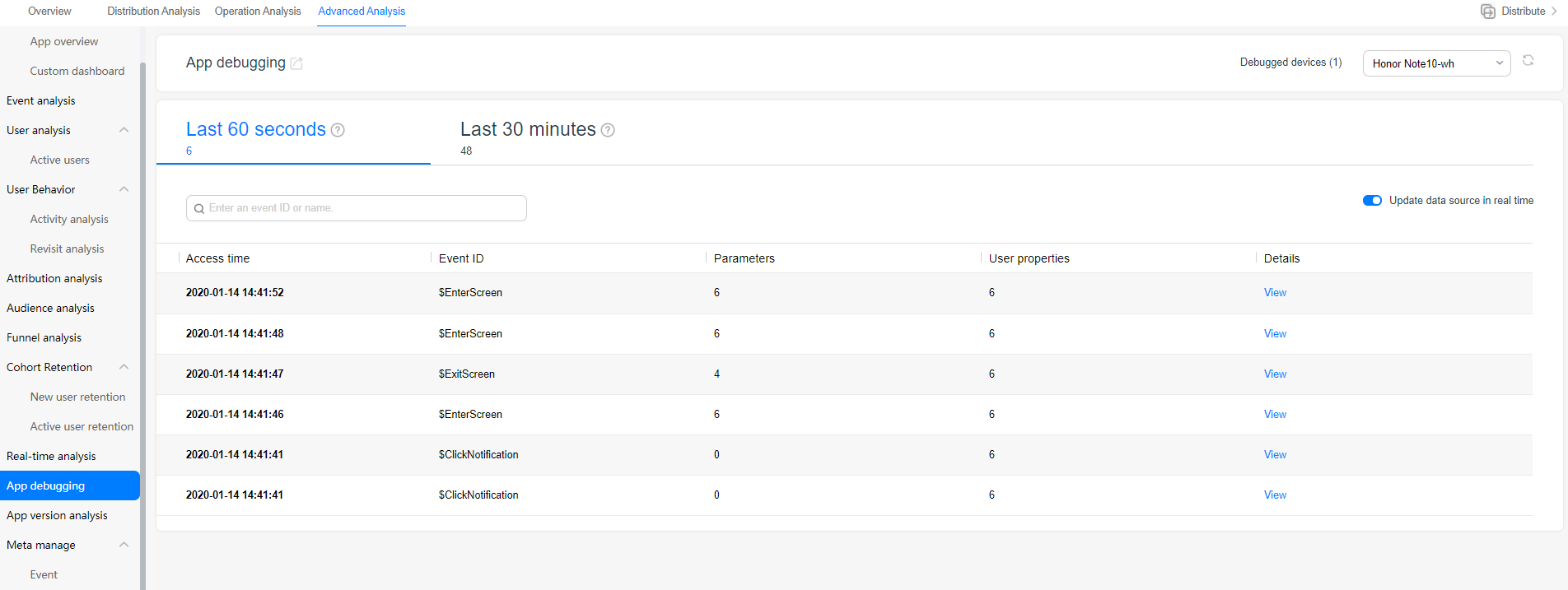
For details about how to view data on Huawei Developer, please refer to “App Debugging” in the Analytics Kit User Guide.
Event IDs of automatically collected events are reserved by HUAWEI Analytics Kit and cannot be reused.
| Event ID | Description |
|---|---|
DISPLAYNOTIFICATION | Event reported when a notification is sent and displayed to users. |
CLICKNOTIFICATION | Event reported when a user clicks a displayed notification. |
CLEARNOTIFICATION | Event reported when a user clears a displayed notification. |
JOINABTASK | Event reported when a user participates in an A/B test. |
INSTALLAPP | Event reported when an app is launched for the first time after being installed. |
LAUNCHAPP | Event reported when a user launches an app or a user goes back to an app 30 seconds after accessing the home screen. |
UPDATEAPP | Event reported when an app is updated to the new version and launched again. |
APPFIRSTOPEN | Event reported when a user launches an app for the first time after installing or reinstalling it. The event will not be triggered when the user downloads the app to the device.Through this event, you can know the launch type, installation channel, and launch time. |
ENTERSCREEN | Event reported when the automatic collection function is enabled and an activity is entered. |
EXITSCREEN | Event reported when the automatic collection function is enabled and an activity exits. |
CLEARDATA | Event reported when a user clears data. The possible cause is that the storage space occupied by the app data is too large. |
CLEARCACHE | Event reported when a user clears cache. The possible cause is that the storage space occupied by the app cache is too large. |
UNINSTALLAPP | Event reported when a user uninstalls an app. |
SIGNIN | Event reported when a user signs in to HUAWEI Analytics Kit using a HUAWEI ID. |
SIGNOUT | Event reported when a user signs out of HUAWEI Analytics Kit using a HUAWEI ID. |
| APPERROR | Event reported when an app crashes or an exception occurs on the app. |
| INAPPPURCHASE | Event reported when a user purchases or subscribes to an in-app product using HUAWEI In-App Purchases. |
HUAWEI Analytics Kit predefines some event IDs based on common application scenarios. It is recommended that predefined constants be used for event tracing and analytics. Based on preset events, you can customize various insight reports.
Preset events and parameters are reserved for HUAWEI Analytics Kit. The ID of a custom event cannot be the same as that of a preset event. Otherwise, the custom event will be identified as a preset event.
The following is an example of reporting an Add To Wishlist event.
- import haSDK from 'react-native-ha-interface';
- const eventObj={
- PRODUCTID:'item_ID',
- PRODUCTNAME:'name',
- CATEGORY:'category',
- QUANTITY:100,
- PRICE:10.01,
- REVENUE:10,
- CURRNAME:'currency',
- PLACEID:'location_ID'
- }
- haSDK.onEvent(hasdk.ADDPRODUCT2WISHLIST,eventObj);
| Type | Event ID | Event Name |
|---|---|---|
String | Add payment information | |
String | Add to shopping cart | |
String | Add to wishlist | |
String | Open app | |
String | Start check-out | |
String | Participate in marketing | |
String | Check out | |
String | Obtain virtual currency | |
String | Purchase product | |
String | Obtain lead | |
String | Join group | |
String | Unlock level | |
String | Complete level | |
String | Level up | |
String | Sign in | |
String | Submit score | |
String | Display order | |
String | Refund | |
String | Remove product from shopping cart | |
String | Search | |
String | Touch content | |
String | Set check-out option | |
String | Share | |
String | Register | |
String | Consume virtual currency | |
String | Start tutorial | |
| String | Complete tutorial | |
String | Unlock achievement | |
String | View product | |
String | View product list | |
String | View search result |
This event is reported when a user has added payment information but has not initiated payment during checkout.
It can be used with STARTCHECKOUT and COMPLETEPURCHASE to construct funnel analysis for the checkout process.
This event is reported when a user adds a product to the shopping cart.
It can be used with VIEWPRODUCT and STARTCHECKOUT to construct funnel analysis for product purchase. This event can also be used to analyze developers' products that users are interested in, enabling developers to promote the products to the users.
| Event Parameter ID | Parameter Name | Parameter Type | Optional/Mandatory | Parameter Description |
|---|---|---|---|---|
PRODUCTID | Product ID | String | Mandatory | ID of the product added to the shopping cart. |
PRODUCTNAME | Product name | String | Mandatory | Name of the product added to the shopping cart. |
PRODUCTFEATURE | Product features | String | Optional | Features of the product added to the shopping cart. |
BRAND | Product brand | String | Optional | Brand of the product added to the shopping cart. |
CATEGORY | Product category | String | Mandatory | Category of the product added to the shopping cart. |
STORENAME | Store name | String | Optional | Store from which the product added to the shopping cart comes. |
QUANTITY | Purchase quantity | Number | Mandatory | Number of products that a user wants to purchase. |
PRICE | Purchase price | Number | Optional | Product price. |
REVENUE | Expected revenue | Number | Optional | Your expected revenue after a user purchase the product. This parameter must be used together with CurrName. |
CURRNAME | Currency type | String | Optional | Revenue currency type. This parameter must be used together with Revenue. |
PLACEID | Location ID | String | Optional | ID of the product location. |
This event is reported when a user adds a product to favorites.
It can be used to analyze developers' products that users are interested in, enabling developers to promote the products to the users.
| Event Parameter ID | Parameter Name | Parameter Type | Optional/Mandatory | Parameter Description |
|---|---|---|---|---|
PRODUCTID | Product ID | String | Mandatory | ID of the product added to favorites. |
PRODUCTNAME | Product name | String | Mandatory | Name of the product added to favorites. |
PRODUCTFEATURE | Product features | String | Optional | Features of the product added to favorites. |
BRAND | Product brand | String | Optional | Brand of the product added to favorites. |
CATEGORY | Product category | String | Mandatory | Category of the product added to favorites. |
STORENAME | Store name | String | Optional | Store from which the product added to favorites comes. |
QUANTITY | Purchase quantity | Number | Mandatory | Number of products that a user wants to purchase. |
PRICE | Purchase price | Number | Optional | Product price. |
REVENUE | Expected revenue | Number | Optional | Your expected revenue after a user purchase the product. This parameter must be used together with CURRNAME. |
CURRNAME | Currency type | String | Optional | Revenue currency type. This parameter must be used together with REVENUE. |
PLACEID | Location ID | String | Optional | ID of the product location. |
This event is reported when a user opens the app.
This event is reported when a user taps the checkout button after placing an order. It can be used with events such as VIEWPRODUCt and COMPLETEPURCHASE to analyze the e-commerce purchase conversion rate.
| Event Parameter ID | Parameter Name | Parameter Type | Optional/Mandatory | Parameter Description |
|---|---|---|---|---|
REVENUE | Revenue | Number | Optional | Revenue you receive. This parameter must be used together with CURRNAME. |
CURRNAME | Currency type | String | Optional | Revenue currency type. This parameter must be used together with REVENUE. |
TRANSACTIONID | Transaction ID | String | Optional | Transaction ID generated by your transaction system. |
BOOKINGDAYS | Stay duration | Number | Optional | Number of days a user books for a hotel reservation. |
BOOKINGROOMS | Rooms booked | Number | Optional | Number of rooms a user books for a hotel reservation. |
PASSENGERSNUMBER | Guests | Number | Optional | Number of guests for a hotel reservation. |
ORIGINATINGPLACE | Departure location | String | Optional | User departure location for a hotel reservation. |
DESTINATION | Destination | String | Optional | User destination for a hotel reservation. |
BEGINDATE | Check-in date | String | Optional | User check-in date for a hotel reservation. |
ENDDATE | Check-out date | String | Optional | User check-out date for a hotel reservation. |
CLASS | Room level | String | Optional | Level of a room booked by a user for a hotel reservation. |
This event is reported when a user view details of a marketing activity. It can be used to analyze the conversion rate of a marketing activity.
| Event Parameter ID | Parameter Name | Parameter Type | Optional/Mandatory | Parameter Description |
|---|---|---|---|---|
SOURCE | Marketing source | String | Mandatory | ID of a marketing activity provider, for example, Huawei PPS. |
MEDIUM | Marketing type | String | Mandatory | Type of a marketing activity, for example, CPC or Email. |
PROMOTIONNAME | Marketing name | String | Mandatory | Name of a marketing activity. |
KEYWORDS | Keyword | String | Optional | Keyword of a marketing activity, for example, a keyword for searching for an ad. |
CONTENT | Marketing content | String | Optional | Marketing content of a marketing activity. |
MATERIALNAME | Creative name | String | Optional | Name of the creative material used in a marketing activity. |
MATERIALSLOT | Display position | String | Optional | Position where the creative material is displayed. |
CLICKID | Ad network flag | String | Optional | Flag generated by the ad network for marking the ad click. |
EXTENDPARAM | Custom parameter | String | Optional | Custom parameter. |
This event is reported after each step in the multi-step checkout process is completed. It can be used to analyze the conversion rate of each step in the checkout process, supporting product design optimization.
| Event Parameter ID | Parameter Name | Parameter Type | Optional/Mandatory | Parameter Description |
|---|---|---|---|---|
STEP | Check-out step | String | Optional | Current step of a user in the check-out process. |
OPTION | Check-out option | String | Optional | Check-out option entered by a user in the current checkout step. |
This event is reported when a user obtains virtual currency. It can be used to analyze the difficulty for users to obtain virtual currency, supporting product design optimization.
| Event Parameter ID | Parameter Name | Parameter Type | Optional/Mandatory | Parameter Description |
|---|---|---|---|---|
VIRTUALCURRNAME | Virtual currency type | String | Mandatory | Type of the virtual currency obtained by a user. |
REVENUE | Virtual currency amount | Number | Mandatory | Virtual currency amount obtained by a user. |
This event is reported after a user purchases a product. It can be used to analyze the products or contents that users are more interested in, supporting operations policy optimization.
Event Parameter ID | Parameter Name | Parameter Type | Optional/Mandatory | Parameter Description |
CURRNAME | Currency type | String | Optional | Revenue currency type. This parameter must be used together with REVENUE. |
REVENUE | Revenue | Number | Optional | Revenue you receive through the transaction. This parameter must be used together with CURRNAME. |
TRANSACTIONID | Transaction ID | String | Optional | Transaction ID generated by your transaction system. |
TAXFEE | Tax | Number | Optional | Tax generated for the transaction. |
SHIPPING | Transportation fee | Number | Optional | Transportation fee generated for the transaction. |
VOUCHER | Coupon | String | Optional | Coupon used in the transaction. |
PLACE | Location ID | String | Optional | ID of the product location. |
BOOKINGDAYS | Stay duration | Number | Optional | Number of days a user books for a hotel reservation. |
BOOKINGROOMS | Rooms booked | Number | Optional | Number of rooms a user books for a hotel reservation. |
PASSENGERSNUMBER | Guests | Number | Optional | Number of guests for a hotel reservation. |
ORIGINATINGPLACE | Departure location | String | Optional | User departure location for a hotel reservation. |
DESTINATION | Destination | String | Optional | User destination for a hotel reservation. |
BEGINDATE | Check-in date | String | Optional | User check-in date for a hotel reservation. |
ENDDATE | Check-out date | String | Optional | User check-out date for a hotel reservation. |
CLASS | Room level | String | Optional | Level of a room booked by a user for a hotel reservation. |
This event is reported when a sales lead is obtained. For example, it can be reported after a user touches the ad placed by a developer and fills in and submits the contact information. In this case, the event is used to evaluate the possible revenue brought by the lead to developers. In addition, the event can also be used to evaluate the ROI of the placed ad.
| Event Parameter ID | Parameter Name | Parameter Type | Optional/Mandatory | Parameter Description |
|---|---|---|---|---|
CURRNAME | Currency type | String | Optional | Revenue currency type. This parameter must be used together with REVENUE. |
REVENUE | Expected revenue | Number | Optional | Expected revenue generated after lead conversion, which is not the real revenue. |
This event is reported when a user joins in a group, for example, joining in a group chart in a social app. It can be used to evaluate the attractiveness of a product's social features to users.
| Event Parameter ID | Parameter Name | Parameter Type | Optional/Mandatory | Parameter Description |
|---|---|---|---|---|
USERGROUPID | Group ID | String | Mandatory | ID of the user group that a user joins. |
This event is reported when a user starts a game level in a game app. It can be used with COMPLETELEVEL to analyze whether the game level design is optimal and make targeted optimization policies.
| Event Parameter ID | Parameter Name | Parameter Type | Optional/Mandatory | Parameter Description |
|---|---|---|---|---|
LEVELNAME | Level name | Number | Mandatory | Name of a game level. |
This event is reported when a user completes a game level in a game app. It can be used with STARTLEVEL to analyze whether the game level design is optimal and make targeted optimization policies.
| Event Parameter ID | Parameter Name | Parameter Type | Optional/Mandatory | Parameter Description |
|---|---|---|---|---|
LEVELNAME | Level name | Level name | Mandatory | Name of a game level. |
RESULT | Level completion status | String | Mandatory | Game level completion status. |
This event is reported when a user levels up in a game app. It can be used to analyze whether the product's user level design is optimal and make targeted optimization policies.
| Event Parameter ID | Parameter Name | Parameter Type | Optional/Mandatory | Parameter Description |
|---|---|---|---|---|
LEVELID | User level | Number | Mandatory | Level of a user after level-up. |
ROLENAME | User role | String | Optional | Role of a user. |
This event is reported when a user signs in to an app requiring sign-in. It can be used to analyze users' sign-in habits and make targeted operations policies.
| Event Parameter ID | Parameter Name | Parameter Type | Optional/Mandatory | Parameter Description |
|---|---|---|---|---|
CHANNEL | Sign-in mode | String | Mandatory | Sign-in mode of a user. |
This event is reported when a user submits the score in a game or education app. It can be used to analyze the difficulty of product content and make targeted optimization policies.
| Event Parameter ID | Parameter Name | Parameter Type | Optional/Mandatory | Parameter Description |
|---|---|---|---|---|
SCORE | Score | Number | Mandatory | Score of a user. |
LEVELID | User level | Number | Optional | Current level of a user. |
ROLENAME | User role | String | Optional | Role of a user. |
This event is reported when the order details are displayed before checkout. It can be used with events such as VIEWPRODUCT and COMPLETEPURCHASE to construct an analysis funnel for analyzing user churn in each phase and make optimization policies.
| Event Parameter ID | Parameter Name | Parameter Type | Optional/Mandatory | Parameter Description |
|---|---|---|---|---|
PRODUCTID | Product ID | String | Optional | ID of the associated product. |
PRODUCTNAME | Product name | String | Mandatory | Name of the associated product. |
PRODUCTFEATURE | Product features | String | Optional | Features of the associated product. |
BRAND | Product brand | String | Optional | Brand of the associated product. |
CATEGORY | Product category | String | Mandatory | Category of the associated product. |
STORENAME | Store name | String | Optional | Store from which the associated product comes. |
QUANTITY | Purchase quantity | Number | Mandatory | Number of products purchased by a user. |
PRICE | Price | Number | Optional | Product price. |
REVENUE | Revenue | Number | Optional | Revenue you receive through the transaction. |
CURRNAME | Currency type | String | Optional | Revenue currency type. |
PLACEID | Location ID | String | Optional | ID of the product location. |
This event is reported when the refund is successful for a user. It can be used to analyze loss caused by the refund and make targeted optimization policies.
| Event Parameter ID | Parameter Name | Parameter Type | Optional/Mandatory | Parameter Description |
|---|---|---|---|---|
CURRNAME | Currency type | String | Optional | Refund currency type. |
REVENUE | Refund amount | Number | Optional | Your revenue loss due to the refund. |
TRANSACTIONID | Transaction ID | String | Optional | Transaction ID generated by your transaction system. |
This event is reported when a user removes a product from the shopping cart. It can be used for marketing to the user.
| Event Parameter ID | Parameter Name | Parameter Type | Optional/Mandatory | Parameter Description |
|---|---|---|---|---|
QUANTITY | Purchase quantity | Number | Optional | Number of products removed from the shopping cart. |
CATEGORY | Product category | String | Mandatory | Category of the product removed from the shopping cart. |
PRODUCTNAME | Product name | String | Mandatory | Name of the product removed from the shopping cart. |
PRODUCTID | Product ID | String | Mandatory | ID of the product removed from the shopping cart. |
PRODUCTFEATURE | Product features | String | Optional | Features of the product removed from the shopping cart. |
BRAND | Product brand | String | Optional | Brand of the product removed from the shopping cart. |
STORENAME | Store name | String | Optional | Store from which the product removed from the shopping cart comes. |
REVENUE | Revenue loss | Number | Optional | Your expected revenue loss due to the removal. |
PRICE | Price | Number | Optional | Price of the product removed from the shopping cart. |
CURRNAME | Currency type | String | Optional | Currency type of the revenue loss. |
PLACEID | Location ID | String | Optional | ID of the product location. |
BEGINDATE | Adding to shopping cart time | String | Optional | Time when the product is added to the shopping cart. |
ENDDATE | Removing from shopping cart time | String | Optional | Time when the product is removed from the shopping cart. |
ORIGINATINGPLACE | Place of delivery | String | Optional | Place from which the product is delivered. |
DESTINATION | Place of receipt | String | Optional | Place where the user receives the product. |
This event is reported when a user searches for content in an app. It can be used with events such as VIEWSEARCHRESULT and VIEWPRODUCT to analyze the accuracy of search results.
| Event Parameter ID | Parameter Name | Parameter Type | Optional/Mandatory | Parameter Description |
|---|---|---|---|---|
SEARCHKEYWORDS | Search keyword | String | Mandatory | Keyword for search. |
BOOKINGDAYS | Stay duration | Number | Optional | Number of days a user books for a hotel reservation. |
BOOKINGROOMS | Rooms booked | Number | Optional | Number of rooms a user books for a hotel reservation. |
PASSENGERSNUMBER | Guests | Number | Optional | Number of guests for a hotel reservation. |
ORIGINATINGPLACE | Departure location | String | Optional | User departure location for a hotel reservation. |
DESTINATION | Destination | String | Optional | User destination for a hotel reservation. |
BEGINDATE | Check-in date | String | Optional | User check-in date for a hotel reservation. |
ENDDATE | Check-out date | String | Optional | User check-out date for a hotel reservation. |
CLASS | Room level | String | Optional | Level of a room booked by a user for a hotel reservation. |
This event is reported when a user touches a content, for example, touching a product in the product list in an e-commerce app to view the product details. It can be used to analyze the products that users are interested in.
| Event Parameter ID | Parameter Name | Parameter Type | Optional/Mandatory | Parameter Description |
|---|---|---|---|---|
CONTENT_TYPE | Content type | String | Mandatory | Type of the content touched by a user. |
PRODUCTID | Content ID | String | Mandatory | ID of the content touched by a user. |
This event is reported when a user sets some checkout options during checkout. It can be used to analyze checkout preferences of users.
| Event Parameter ID | Parameter Name | Parameter Type | Optional/Mandatory | Parameter Description |
|---|---|---|---|---|
STEP | Check-out step | String | Optional | Current step of a user in the check-out process. |
OPTION | Check-out option | String | Optional | Check-out option entered by a user in the current check-out step. |
This event is reported when a user shares a product or content through a social channel. It can be used to analyze users' loyalty to the product.
| Event Parameter ID | Parameter Name | Parameter Type | Optional/Mandatory | Parameter Description |
|---|---|---|---|---|
CONTENTTYPE | Shared content type | String | Mandatory | Type of the content shared by a user. |
PRODUCTID | Shared content ID | String | Mandatory | ID of the content shared by a user. |
CHANNEL | Sharing mode | String | Mandatory | Channel for a user to share the content. |
This event is reported when a user registers an account. It can be used to analyze the user sources and optimize operations policies.
| Event Parameter ID | Parameter Name | Parameter Type | Optional/Mandatory | Parameter Description |
|---|---|---|---|---|
CHANNEL | Sign-up mode | String | Mandatory | Sign-up mode of a user. |
This event is reported when a user consumes virtual currency. It can be used to analyze the products that users are interested in.
| Event Parameter ID | Parameter Name | Parameter Type | Optional/Mandatory | Parameter Description |
|---|---|---|---|---|
PRODUCTNAME | Product name | String | Mandatory | Name of the product purchased by a user. |
VIRTUALCURRNAME | Virtual currency unit | String | Mandatory | Currency unit of the virtual currency used by a user. |
REVENUE | Virtual currency amount | Number | Mandatory | Amount of the virtual currency consumed by a user. |
This event is reported when a user starts to use the tutorial. It can be used with COMPLETETUTORIAL to evaluate the tutorial quality and formulate targeted optimization measures.
This event is reported when a user completes the tutorial. It can be used with STARTTUTORIAL to evaluate the tutorial quality and formulate targeted optimization measures.
This event is reported when a user unlocks an achievement. It can be used to analyze whether the achievement level design is optimal and make targeted optimization policies.
| Event Parameter ID | Parameter Name | Parameter Type | Optional/Mandatory | Parameter Description |
|---|---|---|---|---|
ACHIEVEMENTID | Achievement ID | String | Mandatory | ID of an achievement. |
This event is reported when a user browses a product. It can be used to analyze the products that users are interested in, or used with other events for funnel analysis.
| Event Parameter ID | Parameter Name | Parameter Type | Optional/Mandatory | Parameter Description |
|---|---|---|---|---|
PRODUCTID | Product ID | String | Mandatory | ID of the product viewed by a user. |
PRODUCTNAME | Product name | String | Mandatory | Name of the product viewed by a user. |
PRODUCTFEATURE | Product features | String | Optional | Features of the product viewed by a user. |
CATEGORY | Product category | String | Mandatory | Category of the product viewed by a user. |
BRAND | Product brand | String | Optional | Brand of the product viewed by a user. |
STORENAME | Store name | String | Optional | Store from which the product viewed by a user comes. |
PLACEID | Location ID | String | Optional | ID of the product location. |
POSITIONID | Product index | String | Optional | Index of the product viewed by a user in the product list. |
PRODUCTLIST | Product list | String | Optional | List of products viewed by a user. |
PRICE | Product price | Number | Optional | Product price. |
QUANTITY | Quantity | Number | Optional | Number of products that a user wants to purchase. |
CURRNAME | Currency type | String | Optional | Revenue currency type. This parameter must be used together with REVENUE. |
REVENUE | Revenue | Number | Optional | Your expected revenue after a user purchase the product. This parameter must be used together with CURRNAME. |
FLIGHTNO | Flight number | String | Optional | Flight number generated by your transaction system. |
PASSENGERSNUMBER | Customers | Number | Optional | Number of customers in the case of hotel reservation. |
BOOKINGDAYS | Stay duration | Number | Optional | Number of days a user books for a hotel reservation. |
BOOKINGROOMS | Rooms booked | Number | Optional | Number of rooms a user books for a hotel reservation. |
ORIGINATINGPLACE | Departure location | String | Optional | User departure location for a hotel reservation. |
DESTINATION | Destination | String | Optional | User destination for a hotel reservation. |
BEGINDATE | Check-in date | String | Optional | User check-in date for a hotel reservation. |
ENDDATE | Check-out date | String | Optional | User check-out date for a hotel reservation. |
SEARCHKEYWORDS | Search keyword | String | Mandatory | Search keywords generated by your transaction system. |
CLASS | Room level | String | Optional | Level of a room reserved by a user in the case of hotel reservation. |
This event is reported when a user browses a list of products, for example, browsing the list of products by category. It can be used to analyze the types of contents that users are more interested in.
| Event Parameter ID | Parameter Name | Parameter Type | Optional/Mandatory | Parameter Description |
|---|---|---|---|---|
CATEGORY | Product category | String | Mandatory | Category of the product viewed by a user in the product list. |
This event is reported when a user views the search results. It can be used with VIEWPRODUCT and SEARCH to measure the accuracy of the search algorithm.
| Event Parameter ID | Parameter Name | Parameter Type | Optional/Mandatory | Parameter Description |
|---|---|---|---|---|
SEARCHKEYWORDS | Search keyword | String | Mandatory | Keyword for search. |
Developers may need personalized events for tracing and analytics. HUAWEI Analytics Kit allows developers to customize events and extend event parameters, or add personalized parameters for predefined events.
For example, you can add custom event begin _examination to indicate the event of entering a new exam and add the exam_difficulty parameter to define the exam difficulty, to meet analysis requirements of specific service scenarios.
The following is an example of a custom event.
- const eventObj={
- begin_examination:'high',
- exam_level:'1-1',
- exam_time:'20190520-08'
- }
- haSDK.onEvent('begin_examination',eventObj);
- }