The events feature allows you to collect specific data generated by your players during gameplay and store them on the Huawei game server for AppGallery Connect to use as feedback to conduct game analytics.
You can flexibly define what event data your game should submit, for example, players have paid a specific amount, players reach a certain level, and players perform a specific game action.
You can improve your game based on submitted events. For example, if the number of users who purchase a game prop is far lower than expected, the developer can adjust the game props expense and interest.
An event can contain the following basic attributes.
Attribute | Description |
ID | A unique string generated by AppGallery Connect to identify an event. |
Name | Name of an event. You can define it when configuring an event. |
Description | Description of an event. |
Type | Type of an event. Three event types are supported now:
|
Value | Value of an event, which is set when events are submitted instead of when events are defined. For the event "gold coins spent", if the value is 500, it means that the player spent 500 gold coins. You can define the data type for an event value as number or time when defining an event. For a value of the number type, you can also define the number of decimal places and unit. AppGallery Connect automatically adds a unit for the value of a submitted event based on the data type setting. |
Icon | Icon associated with an event. The icon must be of the resolution 512 x 512 px, and in PNG or JPG format. Avoid using any texts that need to be localized in the icon. |
Initial state | Initial state of an event. You can set the attribute when defining an event to determine whether to display or hide the event. |
List order | Order of an event among all events. You need to specify the attribute when configuring an event. |
Ensure that the HMS SDK version is 4.0.0.300 or later.
Before developing the events feature in your game, ensure that you have defined events in AppGallery Connect. For details, please refer to Adding an Event.
Before calling events APIs, ensure that the player has signed in with his/her HUAWEI ID. For details, please refer to Game Login.
To use the event feature, users need to enable Game Services in HUAWEI AppGallery (10.3 or later). If a user who has not enabled Game Services triggers event API calling, the HMS Core SDK redirects the user to the Game Services switch screen in HUAWEI AppGallery and instructs the user to enable Game Services. If the user does not enable Game Services, result code 7018 is returned. Your game needs to actively instruct users to go to Me > Settings > Game Services in AppGallery, so the event feature will be available.
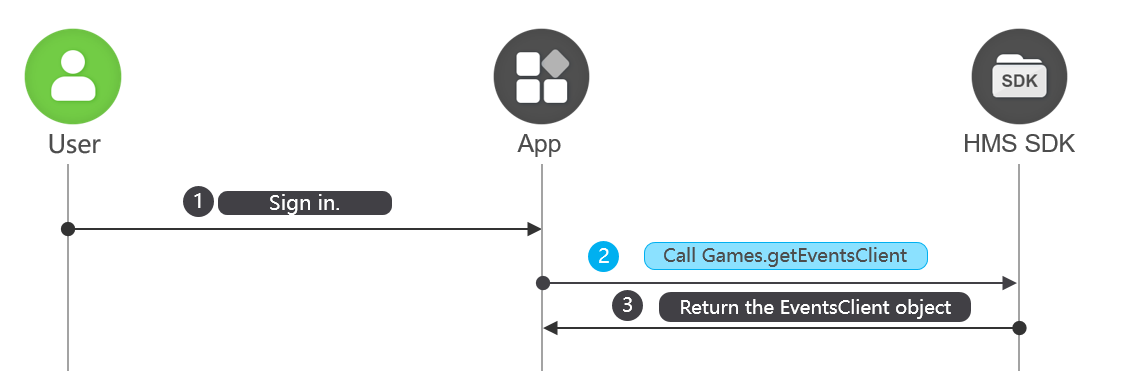
Before using any events API capabilities, call Games.getEventsClient() to obtain the EventsClient instance. Sample code is as follows:
- EventsClient client = Games.getEventsClient(this, mAuthHuaweiId);
The value of mAuthHuaweiId passed in the API is the AuthHuaweiId object obtained when a user signs in to the game. If the sign-in session has expired, call the HuaweiIdAuthService.getSignInIntent method to sign the user in to the game again or call the HuaweiIdAuthService.silentSignIn method to implement silent sign-in and obtain AuthHuaweiId.
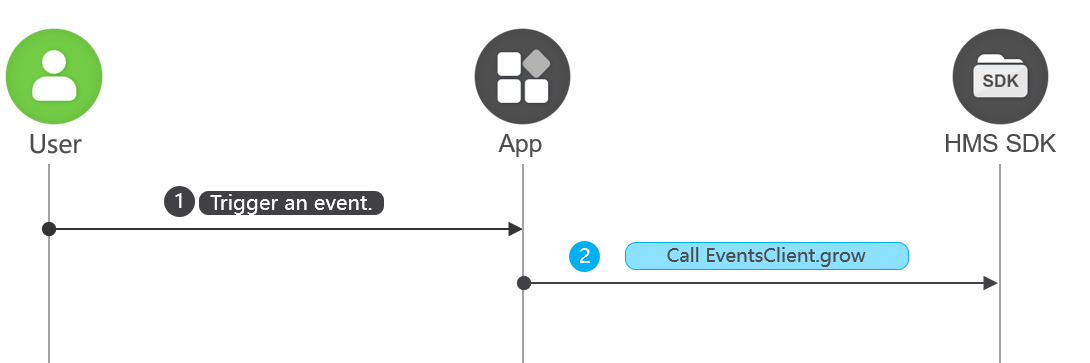
When an event of interest to your game occurs, call the EventsClient.grow method with the eventId and growAmount parameters to submit event data to the Huawei game server.
The eventId parameter indicates the ID of the event and is generated when you define the event in AppGallery Connect.
The growAmount parameter specifies an increment amount of the event value. For example, if the event your game wants to track is "Defeat 100 monsters" and your player killed 20 monsters in a single battle, the value of growAmount in this case is 20. If your player defeated another 40 monsters in the next battle, the value of growAmount submitted is the increment amount 40.
The following is the sample code for submitting an event:
- client.increment(eventId, growAmount);
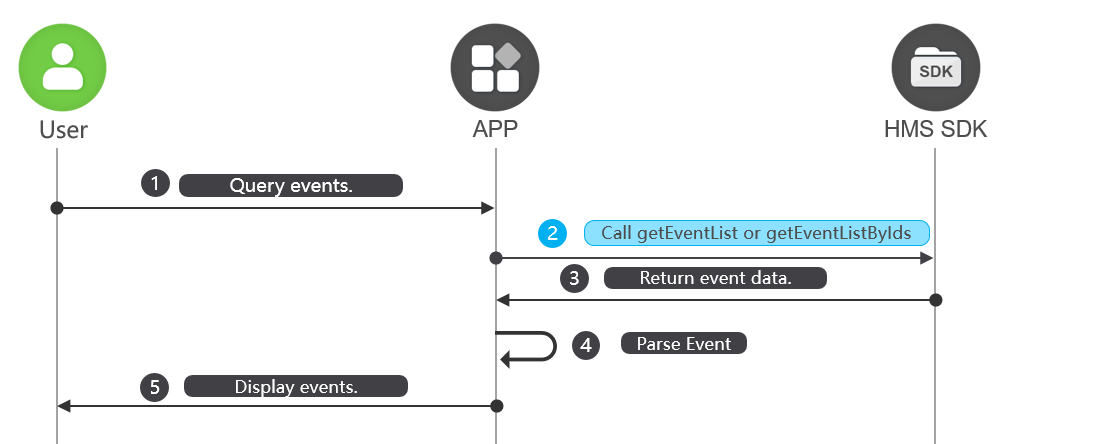
You can display events to users during gameplay.
To display all events to your players, call the EventsClient.getEventList method.
To display only specific events to your players, call the EventClient.getEventListByIds method to pass in an array of the event IDs.
For both methods, either to display all events or only specific events, you can pass in the forceReload parameter of the boolean type to indicate whether to obtain data stored on the Huawei game server or locally cached data.
The following sample code shows how to obtain all events:
- Task<List<Event>> task = client.getEventList(forceReload);
The following sample code shows how to obtain specified events:
- Task<List<Event>> task = client.getEventListByIds(forceReload, eventIds);
The following sample code shows how a list of specified events is returned:
- task.addOnSuccessListener(new OnSuccessListener<List<Event>>() {
- @Override
- public void onSuccess(List<Event> data) {
- if (data == null) {
- Log.w("Event", "event is null");
- return;
- }
- for (Event event : data) {
- Log.i("Event", "event id:" + event.getEventId());
- }
- }
- }).addOnFailureListener(new OnFailureListener() {
- @Override
- public void onFailure(Exception e) {
- if (e instanceof ApiException) {
- String result = "rtnCode:"
- + ((ApiException) e).getStatusCode();
- Log.e("Event", result);
- }
- }
- });