 Perform the following steps for your development:
This section describes how to develop an app that connects to HUAWEI IAP, helping you quickly understand client APIs provided by HUAWEI IAP and their call method.
Before using HUAWEI IAP on your app, send an isEnvReady request from your app to HUAWEI IAP to check whether the currently signed-in HUAWEI ID is located in a country or region where HUAWEI IAP is available.
If your app does not connect to the HUAWEI ID sign-in API, connect to this API to sign in.
Perform the following steps for your development:
Send an isEnvReady request and set two callback listeners to receive the request result.
● If the request result is Succeeded, your app will obtain an IsEnvReadyResult instance, indicating that the country or region where the currently signed-in HUAWEI ID is located supports HUAWEI IAP.
● If the request result is Failed, HUAWEI IAP will return an Exception object. If the object is IapApiException, use its getStatusCode() method to obtain the result code of the request.
If the result code is OrderStatusCode.ORDER_HWID_NOT_LOGIN (no HUAWEI ID signed in), use status in the IapApiException object to bring up the HUAWEI ID sign-in screen. Then, obtain the result in the onActivityResult method of Activity. Parse returnCode from the intent returned by onActivityResult. If returnCode is OrderStatusCode.SUCCESS, the country or region where the currently signed-in HUAWEI ID is located supports HUAWEI IAP. If returnCode is not OrderStatusCode.SUCCESS, an exception occurs.
- // To get the Activity instance that calls this API.
- Activity activity = getActivity();
- Task<IsEnvReadyResult> task = Iap.getIapClient(activity).isEnvReady();
- task.addOnSuccessListener(new OnSuccessListener<IsEnvReadyResult>() {
- @Override
- public void onSuccess(IsEnvReadyResult result) {
- // Obtain the execution result.
- }
- }).addOnFailureListener(new OnFailureListener() {
- @Override
- public void onFailure(Exception e) {
- if (e instanceof IapApiException) {
- IapApiException apiException = (IapApiException) e;
- Status status = apiException.getStatus();
- if (status.getStatusCode() == OrderStatusCode.ORDER_HWID_NOT_LOGIN) {
- // Not logged in.
- if (status.hasResolution()) {
- try {
- // 6666 is an int constant defined by the developer.
- status.startResolutionForResult(getActivity(), 6666);
- } catch (IntentSender.SendIntentException exp) {
- }
- }
- } else if (status.getStatusCode() == OrderStatusCode.ORDER_ACCOUNT_AREA_NOT_SUPPORTED) {
- // The current region does not support HUAWEI IAP.
- }
- }
- }
- });
- @Override
- protected void onActivityResult(int requestCode, int resultCode, Intent data) {
- super.onActivityResult(requestCode, resultCode, data);
- if (requestCode == 6666) {
- if (data != null) {
- // Obtain the execution result.
- int returnCode = data.getIntExtra("returnCode", 1);
- }
- }
- }
If you use in-app products configured in AppGallery Connect, you need to use the obtainProductInfo API of your app to obtain details of these products.
Perform the following steps for your development:
1. Construct a ProductInfoReq object, send an obtainProductInfo request, and set callback listeners OnSuccessListener and OnFailureListener to receive the request result. Transfer the product ID that has been defined and takes effect in AppGallery Connect to the ProductInfoReq object, and specify priceType for a product.
2. If the request is successful, HUAWEI IAP will return a ProductInfoResult object. Using the getProductInfoList method of this object, your app can obtain the list of ProductInfo objects, each of which contains the information about a specific product, including the product price, name, and description. Based on the information, the list of products that are available for purchase can be presented to users.
- // Pass in the productId list of products to be queried.
- List<String> productIdList = new ArrayList<>();
- // The product ID is the same as that set by a developer when configuring product information in AppGallery Connect.
- productIdList.add("ConsumeProduct1001");
- ProductInfoReq req = new ProductInfoReq();
- // priceType: 0: consumable; 1: non-consumable; 2: auto-renewable subscription
- req.setPriceType(0);
- req.setProductIds(productIdList);
- // to call the obtainProductInfo API.
- // To get the Activity instance that calls this API.
- Activity activity = getActivity();
- Task<ProductInfoResult> task = Iap.getIapClient(activity).obtainProductInfo(req);
- task.addOnSuccessListener(new OnSuccessListener<ProductInfoResult>() {
- @Override
- public void onSuccess(ProductInfoResult result) {
- // Obtain the result
- List<ProductInfo> productList = result.getProductInfoList();
- }
- }).addOnFailureListener(new OnFailureListener() {
- @Override
- public void onFailure(Exception e) {
- if (e instanceof IapApiException) {
- IapApiException apiException = (IapApiException)e;
- int returnCode = apiException.getStatusCode();
- } else {
- // Other external errors
- }
- }
- });
AppGallery Connect allows for purchases of consumable and non-consumable products and also for subscriptions. Your app can initiate a purchase request through the createPurchaseIntent API. Perform the following steps for your development:
1. Construct a PurchaseIntentReq object to send a createPurchaseIntent request. Transfer the product ID that has been defined and takes effect in AppGallery Connect to the PurchaseIntentReq object.
If the request is successful, your app will receive a PurchaseIntentResult object. Its getStatus method returns a Status object. Your app will display the checkout page of HUAWEI IAP using the startResolutionForResult method of the Status object.
- // Constructs a PurchaseIntentReq object.
- PurchaseIntentReq req = new PurchaseIntentReq();
- // The product ID is the same as that set by a developer when configuring product information in AppGallery Connect.
- req.setProductId("CProduct1");
- // In-app product type contains:
- // priceType: 0: consumable; 1: non-consumable; 2: auto-renewable subscription
- req.setPriceType(0);
- req.setDeveloperPayload("test");
- // to call the createPurchaseIntent API.
- // To get the Activity instance that calls this API.
- final Activity activity = getActivity();
- Task<PurchaseIntentResult> task = Iap.getIapClient(activity).createPurchaseIntent(req);
- task.addOnSuccessListener(new OnSuccessListener<PurchaseIntentResult>() {
- @Override
- public void onSuccess(PurchaseIntentResult result) {
- // Obtain the payment result.
- Status status = result.getStatus();
- if (status.hasResolution()) {
- try {
- // 6666 is an int constant defined by the developer.
- status.startResolutionForResult(activity, 6666);
- } catch (IntentSender.SendIntentException exp) {
- }
- }
- }
- }).addOnFailureListener(new OnFailureListener() {
- @Override
- public void onFailure(Exception e) {
- if (e instanceof IapApiException) {
- IapApiException apiException = (IapApiException)e;
- Status status = apiException.getStatus();
- int returnCode = apiException.getStatusCode();
- } else {
- // Other external errors
- }
- }
- });
2. After your app opens the checkout page of HUAWEI IAP and the user completes the payment process (that is, successfully purchases a product or cancels the purchase), HUAWEI IAP will return the payment result to your app through onActivityResult. You can use the parsePurchaseResultInfoFromIntent method to obtain the PurchaseResultInfo object that contains the result information.
● If the purchase is successful, obtain the purchase data InAppPurchaseData and its signature data from the PurchaseResultInfo object. Use the public key allocated by AppGallery Connect to verify the signature. For more information on the verification method, please refer to Verifying the Signature in the Returned Result.
● When a user purchases a consumable, if the following payment exception is returned, check whether the delivery is successful. For details, please refer to Redelivering a Consumable Product.
- Payment failure (OrderStatusCode.ORDER_STATE_FAILED, -1).
- A user has the product (OrderStatusCode.ORDER_PRODUCT_OWNED, 60051).
- @Override
- protected void onActivityResult(int requestCode, int resultCode, Intent data) {
- super.onActivityResult(requestCode, resultCode, data);
- if (requestCode == 6666) {
- if (data == null) {
- Log.e("onActivityResult", "data is null");
- return;
- }
- PurchaseResultInfo purchaseResultInfo = Iap.getIapClient(this).parsePurchaseResultInfoFromIntent(data);
- switch(purchaseResultInfo.getReturnCode()) {
- case OrderStatusCode.ORDER_STATE_CANCEL:
- // User cancel payment.
- break;
- case OrderStatusCode.ORDER_STATE_FAILED:
- case OrderStatusCode.ORDER_PRODUCT_OWNED:
- // to check if there exists undelivered products.
- break;
- case OrderStatusCode.ORDER_STATE_SUCCESS:
- // pay success.
- String inAppPurchaseData = purchaseResultInfo.getInAppPurchaseData();
- String inAppPurchaseDataSignature = purchaseResultInfo.getInAppDataSignature();
- // use the public key of your app to verify the signature.
- // If ok, you can deliver your products.
- // If the user purchased a consumable product, call the consumeOwnedPurchase API to consume it after successfully delivering the product.
- break;
- default:
- break;
- }
- return;
- }
- }
After a user pays for a purchase or subscription, your app checks whether the payment is successful based on the purchaseState field in InAppPurchaseData. If purchaseState is 0 (already paid), your app will deliver the purchased product or service to the user, then send a delivery confirmation request to HUAWEI IAP.
1. For a consumable product, parse purchaseToken from InAppPurchaseData in JSON format to check the delivery status of the product.
After the product is successfully delivered and its purchaseToken is obtained, your app needs to use the consumeOwnedPurchase API to consume the product and instruct the Huawei IAP server to update the delivery status of the product. purchaseToken is transferred to the API call request. After the consumption is complete, the Huawei IAP server resets the product status to available for purchase. Then the product can be purchased again.
- // Constructs a ConsumeOwnedPurchaseReq object.
- String purchaseToken = "";
- try {
- InAppPurchaseData inAppPurchaseDataBean = new InAppPurchaseData(inAppPurchaseData);
- purchaseToken = inAppPurchaseDataBean.getPurchaseToken();
- } catch (JSONException e) {
- }
- ConsumeOwnedPurchaseReq req = new ConsumeOwnedPurchaseReq();
- req.setPurchaseToken(purchaseToken);
- // to call the consumeOwnedPurchase API.
- // To get the Activity instance that calls this API.
- Activity activity = getActivity();
- Task<ConsumeOwnedPurchaseResult> task = Iap.getIapClient(activity).consumeOwnedPurchase(req);
- task.addOnSuccessListener(new OnSuccessListener<ConsumeOwnedPurchaseResult>() {
- @Override
- public void onSuccess(ConsumeOwnedPurchaseResult result) {
- // Obtain the result
- }
- }).addOnFailureListener(new OnFailureListener() {
- @Override
- public void onFailure(Exception e) {
- if (e instanceof IapApiException) {
- IapApiException apiException = (IapApiException)e;
- Status status = apiException.getStatus();
- int returnCode = apiException.getStatusCode();
- } else {
- // Other external errors
- }
- }
- });
2. For non-consumables, Huawei IAP server returns confirmed purchase data by default. You need to continuously provide corresponding product services for users after they successfully purchase the products. For details, please refer to Providing the Service of a Non-Consumable.
3. For details about how to confirm a subscription, please refer to Subscription Functions.
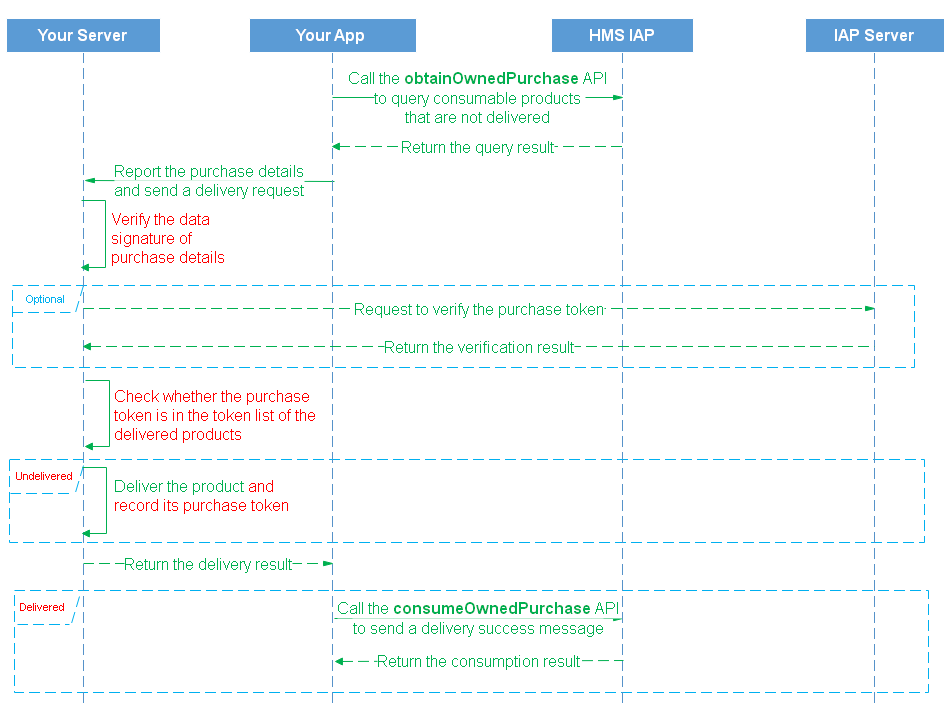
If an exception (such as network error or process killing) occurs after a payment, your app will fail to detect whether the payment is successful. The purchased product may not be delivered as expected. HUAWEI IAP enables you to redeliver a consumable product. See the following figure for the redelivery process.
Perform the following steps for your development:
1. When error code -1 or 60051 is returned during app launch or purchase request, use obtainOwnedPurchases to obtain the purchase information about the consumables that have been purchased but not delivered. Specify priceType as 0 in OwnedPurchasesReq.
If this API is successfully called, HUAWEI IAP will return an OwnedPurchasesResult object, which contains the purchase data and signature data of all products purchased but not delivered. Use the public key allocated by AppGallery Connect to verify the signature. For more information about the verification method, please refer to Verifying the Signature in the Returned Result.
The data of each purchase is a character string in JSON format and contains the parameters listed in InAppPurchaseData. Parse the purchaseState field from the InAppPurchaseData character string. If purchaseState of a purchase is 0, the purchase is successful. Deliver the required product for this purchase again.
- // Constructs a OwnedPurchasesReq object.
- OwnedPurchasesReq ownedPurchasesReq = new OwnedPurchasesReq();
- // In-app product type contains:
- // priceType: 0: consumable; 1: non-consumable; 2: auto-renewable subscription
- ownedPurchasesReq.setPriceType(0);
- // to call the obtainOwnedPurchases API
- // To get the Activity instance that calls this API.
- Activity activity = getActivity();
- Task<OwnedPurchasesResult> task = Iap.getIapClient(activity).obtainOwnedPurchases(ownedPurchasesReq);
- task.addOnSuccessListener(new OnSuccessListener<OwnedPurchasesResult>() {
- @Override
- public void onSuccess(OwnedPurchasesResult result) {
- // Obtain the execution result.
- if (result != null && result.getInAppPurchaseDataList() != null) {
- for (int i = 0; i < result.getInAppPurchaseDataList().size(); i++) {
- String inAppPurchaseData = result.getInAppPurchaseDataList().get(i);
- String InAppSignature = result.getInAppSignature().get(i);
- // use the payment public key to verify the signature of the inAppPurchaseData.
- // if success.
- try {
- InAppPurchaseData inAppPurchaseDataBean = new InAppPurchaseData(inAppPurchaseData);
- int purchaseState = inAppPurchaseDataBean.getPurchaseState();
- } catch (JSONException e) {
- }
- }
- }
- }
- }).addOnFailureListener(new OnFailureListener() {
- @Override
- public void onFailure(Exception e) {
- if (e instanceof IapApiException) {
- IapApiException apiException = (IapApiException)e;
- Status status = apiException.getStatus();
- int returnCode = apiException.getStatusCode();
- } else {
- // Other external errors
- }
- }
- });
2. Call the consumeOwnedPurchase API to consume a delivered product.
Conduct a delivery confirmation for all products queried through the obtainOwnedPurchases API. If a product is already delivered, call the consumeOwnedPurchase API to consume the product and instruct the Huawei IAP server to update the delivery status. After the consumption is complete, the Huawei IAP server resets the product status to available for purchase. Then the product can be purchased again.
If your app provides non-consumable products for users, it can call the obtainOwnedPurchases API during app launch to obtain the data about non-consumable products that a user has purchased. For the data format, please refer to the description of InAppPurchaseData. If some purchase data is returned, confirm the purchaseState field of each purchase. If the value of purchaseState is 0, you need to deliver the product.
Perform the following steps for your development:
Call the obtainOwnedPurchases API to obtain the data of non-consumable products that a user has purchased.
Specify priceType as 1 in OwnedPurchasesReq. Parse purchaseState from the purchase data of a product to check the product purchase state and determine whether to deliver the product accordingly.
- // Constructs a OwnedPurchasesReq object.
- OwnedPurchasesReq ownedPurchasesReq = new OwnedPurchasesReq();
- // In-app product type contains:
- // priceType: 0: consumable; 1: non-consumable; 2: auto-renewable subscription
- ownedPurchasesReq.setPriceType(1);
- // to call the obtainOwnedPurchases API
- // To get the Activity instance that calls this API.
- Activity activity = getActivity();
- Task<OwnedPurchasesResult> task = Iap.getIapClient(activity).obtainOwnedPurchases(ownedPurchasesReq);
- task.addOnSuccessListener(new OnSuccessListener<OwnedPurchasesResult>() {
- @Override
- public void onSuccess(OwnedPurchasesResult result) {
- // Obtain the execution result.
- if (result != null && result.getInAppPurchaseDataList() != null) {
- for (int i = 0; i < result.getInAppPurchaseDataList().size(); i++) {
- String inAppPurchaseData = result.getInAppPurchaseDataList().get(i);
- String InAppSignature = result.getInAppSignature().get(i);
- // use the payment public key to verify the signature of the inAppPurchaseData.
- // if success.
- try {
- InAppPurchaseData inAppPurchaseDataBean = new InAppPurchaseData(inAppPurchaseData);
- int purchaseState = inAppPurchaseDataBean.getPurchaseState();
- } catch (JSONException e) {
- }
- }
- }
- }
- }).addOnFailureListener(new OnFailureListener() {
- @Override
- public void onFailure(Exception e) {
- if (e instanceof IapApiException) {
- IapApiException apiException = (IapApiException)e;
- Status status = apiException.getStatus();
- int returnCode = apiException.getStatusCode();
- } else {
- // Other external errors
- }
- }
- });
Call the obtainOwnedPurchaseRecord API to obtain the data of all consumable products consumed by a user.
- // Constructs a OwnedPurchasesReq object.
- OwnedPurchasesReq req = new OwnedPurchasesReq();
- // In-app product type contains:
- // 0: consumable; 1: non-consumable; 2: auto-renewable subscription
- req.setPriceType(0);
- // to call the obtainOwnedPurchaseRecord API.
- // To get the Activity instance that calls this API.
- Activity activity = getActivity();
- Task<OwnedPurchasesResult> task = Iap.getIapClient(activity).obtainOwnedPurchaseRecord(req);
- task.addOnSuccessListener(new OnSuccessListener<OwnedPurchasesResult>() {
- @Override
- public void onSuccess(OwnedPurchasesResult result) {
- // Obtain the execution result.
- }
- }).addOnFailureListener(new OnFailureListener() {
- @Override
- public void onFailure(Exception e) {
- if (e instanceof IapApiException) {
- IapApiException apiException = (IapApiException)e;
- int returnCode = apiException.getStatusCode();
- } else {
- // Other external errors
- }
- }
- });