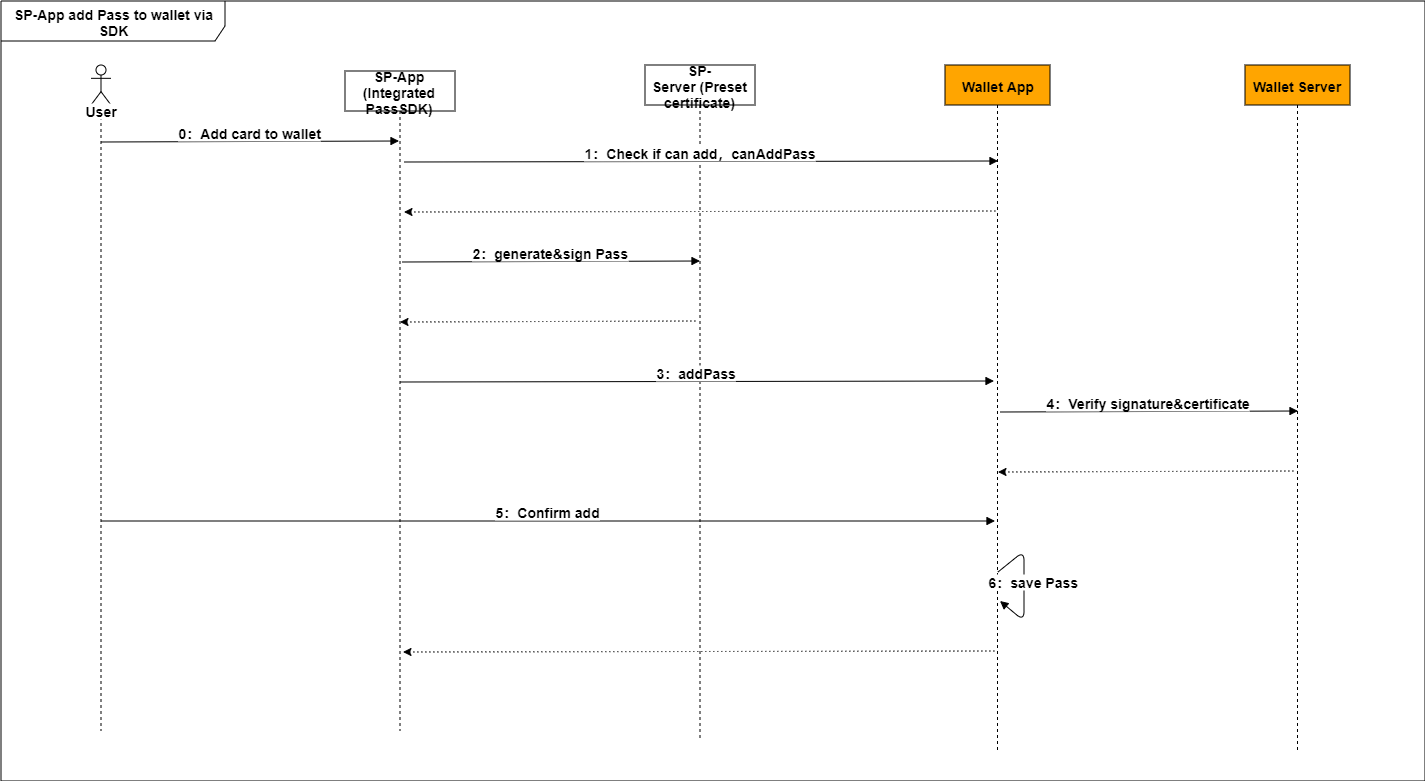
You can generate a pass package (an .hwpass file) for the pass based on your certificate and private key and directly add the package to HUAWEI Wallet through the addPass API provided by the Wallet SDK. Data of passes added in this way will not be stored on the Huawei server. To update the pass, you can send a message to the Huawei server through the pass update API. The Huawei server pushes the message to the corresponding device, and then the device requests the updated pass package from your server.
The pass can be deleted through the pass deletion API of the Wallet SDK or by tapping the delete button on the pass details page of HUAWEI Wallet.
You can directly push a pass package to HUAWEI Wallet through the Wallet SDK API.
The procedure is as follows:
Step 1 Through the Wallet SDK API, your app checks that the device meets the following pass addition conditions: The device has the HUAWEI Wallet app installed and the installed HUAWEI Wallet version supports the pass addition function.
- // Check that the pass can be added. (Call the API in the thread.)
- WalletPassApiResponse response = mWalletKitApi.canAddPass(appId, passType);
Step 2 Your server uses your certificate and private key to sign the pass data and generates a pass package.
Replace the private key and certificate in the sample project(HwPassSDK.zip) file src\test\resources\release.config.properties with your private key and certificate. (The private key and certificate will be used to sign pass data. You can obtain them by referring to Preparations. Then, encode them with Base64 and add them to the release.config.properties file.)
The pass package consists of seven files: home.png, detail.png, signature, hwpass.json, manifest.json, home@2x.png, and detail@2x.png. The signature and manifest.json files are automatically created when the Huawei server demo is called to sign the pass package. You need to generate the hwpass.json file according to the following rules and provide the other four .png files. (The .png files are optional. If you do not provide them, the default background image of HUAWEI Wallet will be used.)
The pass package must be smaller than 150 KB. Otherwise, it cannot be added.
The pass package is stored in HUAWEI Wallet as a ZIP file with the file name extension .hwpass. The ZIP file name can contain only letters, digits, and underscores (_).
The following table describes the files in a pass package.
File | Description | Mandatory/Optional | Format Requirement | Remarks (Using a Movie Ticket as an Example) |
hwpass.json | Pass data file. | Mandatory | Variables such as the ticket number, movie theater, show time, and phone number are filled in by HUAWEI Wallet based on the hwpass.json file. | |
signature | Signature file. | Mandatory | ||
manifest.json | SHA-256 hash value for each file in the package. | Mandatory | ||
home.png | Home page image. | Optional | Image size requirements: Dimensions: 320 x 200 px Size: 25 KB max | The image can be used to show the merchant trademark, movie poster, and fixed movie text. After a movie expires, the detail.png file needs to be updated. This is implemented by updating the pass package. |
detail.png | Details page image. | Optional | Image size requirements: Dimensions: 656 x 405 px Size: 40 KB max | The image can be used to show the movie details. After a movie expires, the detail.png file needs to be updated. This is implemented by updating the pass package. |
home@2x.png | Home page image for a large screen. | Optional | Image size requirements: Dimensions: 480 x 300 px Size: 25 KB max | The image can be used to show the merchant trademark, movie poster, and fixed movie text. After a movie expires, the detail.png file needs to be updated. This is implemented by updating the pass package. |
detail@2x.png | Details page image for a large screen. | Optional | Image size requirements: Dimensions: 984 x 608 px Size: 40 KB max | The image can be used to show the movie details. After a movie expires, the detail.png file needs to be updated. This is implemented by updating the pass package. |
hwpass.json:
Section | Description | Example | Mandatory/Optional |
formatVersion | This parameter has a fixed value of1.0. | 1.0 | Mandatory |
passTypeIdentifier | Pass type ID registered on HUAWEI Developer. | hwpass.membership.hotel | Mandatory |
passStyleIdentifier | Display style of the pass in HUAWEI Wallet. Currently, the style is defined by Huawei. After style customization is allowed in the future, you can register the display style for a pass when registering the pass type ID on HUAWEI Developer. It is recommended that you use the same value for this parameter aspassTypeIdentifier. | hwpass.membership.hotel | Mandatory |
passesUpdateSince | Parameter used by HUAWEI Wallet to interact with the pass issuing system. It is passed to your server through the pass update API and is used by your server to fetch the latest pass package for HUAWEI Wallet. | 414994617 | Mandatory |
organizationName | Name of the pass issuer. | XX hotel membership card | Mandatory |
organizationPassId | Pass number. | E15285WF65 | Mandatory |
webServiceURL | URL used by HUAWEI Wallet to interact with the pass issuing system. | http://www.XXX.com/ download/pass | Mandatory |
authorizationToken | Authorization token used by HUAWEI Wallet to interact with the pass issuing system. | ae13d3bsdfsfwwd7f9a4a5235f10803c09 | Mandatory |
serialNumber | Serial number used by HUAWEI Wallet to interact with the pass issuing system. To prevent pass number leaks, it is recommended that the parameter value be different from that oforganizationPassId. | 8a452215a35855dsffgwfce3aa94bbee | Mandatory |
fields.commonFields | Mandatory fields for a specific type of pass. | { "key": "name", "label": "name", "value": "XXX" } | Mandatory |
fields.appendFields | Optional fields for a specific type of pass. | { "key": "details", "label": "details", "value": "http://xxx" } | Optional |
Either commonFields or appendFields must be specified.
Fields in commonFields and appendFields are described as follows.
Field | Description | Example | Must Be Specified |
Key | Field keyword. | name | Yes |
label | Field name. | name | Yes |
value | Field value. | XXX International Hotel | Yes |
- // Generate the PassFileService object using the certificate and private key. This object will be used to generate a signed pass package.
- public PassFileService getPassFileService(Properties properties, String passKeyPrefix) {
- PassCertificateService passCertificateService = new PassCertificateService() {
- @Override
- public byte[] getCertificateByPassType(String passTypeIdentifier) {
- String property = properties.getProperty(passKeyPrefix + "certificate." + passTypeIdentifier, "");
- return Base64.decodeBase64(property);
- }
- @Override
- public byte[] getPrivateKeyByPassType(String passTypeIdentifier) {
- String property = properties.getProperty(passKeyPrefix + "privatekey." + passTypeIdentifier, "");
- return Base64.decodeBase64(property);
- }
- @Override
- public byte[] getPassCACertificate() {
- String property = properties.getProperty(passKeyPrefix + "ca", "");
- return Base64.decodeBase64(property);
- }
- PassFileService passFileService = new PassFileServiceImpl(passCertificateService);
- return passFileService;
- }
- }
- // Generate a signed pass package.
- public byte[] createRandomPass(String passType, PassFileService passFileService) throws IOException, NoSuchAlgorithmException, PassException, CertificateException, InvalidKeySpecException,InvalidKeyException, SignatureException, NoSuchProviderException {
- String passNumber = utilService.getCompressUUID();
- ObjectNode passJson = JsonNodeFactory.instance.objectNode();
- passJson.put("passTypeIdentifier", "hwpass.com.huawei.wallet.pass.sdktest");
- passJson.put("passStyleIdentifier", "hwpass.com.huawei.wallet.pass.sdktest");
- passJson.put("organizationName", "Business Name");
- passJson.put("organizationPassId", "passPackage unique value");
- passJson.put("webServiceURL", "Card update interface webServiceURL");
- passJson.put("authorizationToken", "Card update interface token");
- passJson.put("serialNumber", "Card update interface serialNumber");
- // Include the pass display fields in fields.
- ObjectNode fieldsPassJson = JsonNodeFactory.instance.objectNode();
- passJson.put("fields", fieldsPassJson);
- // Include image resources (if any) in fileMap.
- Map<String, byte[]> fileMap = new HashMap<String, byte[]>();
- byte[] signBytes = passFileService.createPass(fileMap, passJson);
- return signBytes;
- }
Step 3 After your app obtains the pass package from your server and encrypts the package using Base64, it pushes the package to HUAWEI Wallet through the Wallet SDK API.
When receiving the signed pass package from your app, HUAWEI Wallet verifies the package and saves it upon successful verification. Then, the corresponding pass can be viewed by users in HUAWEI Wallet > Cards.
- // createRandomPass() is the API used by the server for generating the pass package.
- byte[] base64ZipData= Base64.encode(createRandomPass(),Base64.NO_WRAP);
- // addPass(byte[] byte) is the API for adding the pass package.
- WalletPassApiResponse response = mWalletPassApi.addPass(base64ZipData);
----End
If you have selected Enable NFC when applying for the HUAWEI Wallet Kit service on HUAWEI Developer, it is necessary that you understand the file structure in the device chipset. This is because during card writing, card file data is written to the chipset, and during card swiping, card file data is retrieved and verified by the card reader.
Note: This section only describes the file structure in a specific scenario. To learn more about the blank card file, please contact us by visiting the Support page on HUAWEI Developer.
In the following scenario, as the card issuer, you write NFC card data through an offline card writer or your app.
Card writing process:
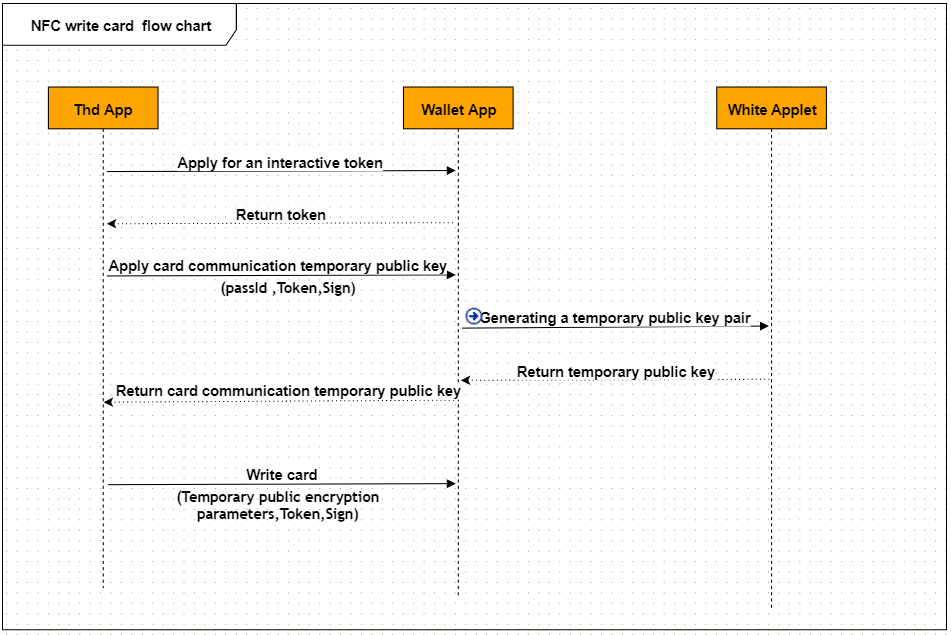
During service application on HUAWEI Developer, define the NFC variables, which specify the target key files for data writing. When configuring NFC parameters on HUAWEI Developer, obtain the file ID, corresponding parameters, and application maintenance key. The mapping between files and NFC parameters is specified by Huawei. The Trusted Service Manager (TSM) converts the NFC parameters into APDU instructions and delivers them to the chipset during card personalization.
The procedure is as follows:
Call the Wallet SDK API to obtain the one-off token for interacting with the NFC card. This token is used to verify the validity of the card writing API.
Call the Wallet SDK API to obtain the temporary public key for interacting with the NFC card. This temporary public key is used by the card writing API to encrypt the card data to be written to the device chipset.
Write the card data to the device chipset through HUAWEI Wallet.
----End
The file structure in the device chipset consists of four parts:
number of files, external authentication key, file permissions, and file content.
Number of files: A maximum of 10 independent EF key files are allocated by HUAWEI Wallet for storing access information (customizable). For example, for a hotel, the key files can store the access information of a card holder to hotel rooms, elevators, and public entrances; for a gym, the key files can store the membership card ID, Bluetooth information, access information, and locker information of a card holder.
External authentication key: The app-level key that you provided during service application on HUAWEI Developer. It is used by your card reader to verify card validity.
File permissions: Each key file has its own app maintenance key (a file-level key that you have defined, which is used by your card reader to read and write the specified file after completing external authentication based on the external authentication key).
File content: You can call the card writing API provided by the Wallet SDK to write file content to the mobile phone chipset through HUAWEI Wallet or a card writer. The content must be encrypted using an algorithm of your choice.
Through the Wallet SDK API, your app obtains the temporary token for interacting with the NFC card. This token has a validity period and can only be used once. When you call the requireAccessCardSec or modifyNFCCard API, you need to pass the token, which will be verified by HUAWEI Wallet.
- // Obtain the token.
- WalletPassApiResponse response=mWalletPassApi.requireAccessToken(passType);
Through the Wallet SDK API, your app obtains the temporary public key for communicating with the NFC card.
This temporary public key is used to encrypt card writing parameters in response to a modifyNFCCard API call. After obtaining the card writing parameters, HUAWEI Wallet will decrypt them and perform the carding writing operation.
In addition, your app should have the card writing parameters signed by your server and pass the Sign value to HUAWEI Wallet. Then, HUAWEI Wallet verifies the parameters.
- // API used by your server to sign card writing parameters.
- public byte[] getNFCCardSign(String passType, ObjectNode objectNode) throws InvalidKeyException, CertificateException, NoSuchAlgorithmException, SignatureException, InvalidKeySpecException, IOException {
- byte[] objectByte=objectNode.getBytes(StandardCharsets.UTF_8);
- byte[] signBytes=passFileService.signMessage(objectByte, passType);
- return signBytes;
- }
After obtaining the Sign value from your server, your app calls the Wallet SDK API to request a temporary public key.
- // Obtain the temporary public key.
- String sign= getSign(passType,passId,token)
- WalletPassApiResponse response = mHuaWeiPayPassServiceManager.requireAccessCardSec(passType, passId, sign);
- /**
- * Obtain the Sign value based on passTypeId, PassId, and accesstoken.
- */
- public byte[] getSign(String passType,String passId,String token) {
- // The getNFCCardSign API is implemented by your server.
- JsonObject objectNode=new JsonObject();
- objectNode.put("passTypeId", passType);
- objectNode.put("passId", passId);
- objectNode.put("accesstoken", token);
- byte[] signBytes=getNFCCardSign(passType, objectNode.toString());
- return signBytes;
- }
Your app can call the Wallet SDK API to perform card writing operations.
To do so, first encrypt the card writing file using the temporary public key obtained through the requireAccessCardSec API, and then obtain the cardParams value to be passed to the card data modification API.
Based on the cardParams value, obtain the Sign value by signing the data to be sent to HUAWEI Wallet through the parameter signing API of your server. Then, pass the cardParams value and Sign value to HUAWEI Wallet.
The parameter signing API of your server is as follows:
- /**
- * Obtain the Sign value based on passTypeId, PassId, and accesstoken.
- */
- public byte[] getSign(String passType,String passId,String token) {
- // The getNFCCardSign API is implemented by your server.
- JsonObject objectNode=new JsonObject();
- objectNode.put("passTypeId", passType);
- objectNode.put("passId", passId);
- objectNode.put("cardParams", cardParams);
- objectNode.put("reason ", reason);
- objectNode.put("accessToken", accessToken);
- byte[] signBytes=getNFCCardSign(passType, objectNode.toString()); return signBytes;
- }
- public byte[] getNFCCardSign(String passType, ObjectNode objectNode) throws InvalidKeyException, CertificateException, NoSuchAlgorithmException, SignatureException, InvalidKeySpecException, IOException {
- byte[] objectByte=objectNode.getBytes(StandardCharsets.UTF_8);
- byte[] signBytes=passFileService.signMessage(objectByte, passType);
- return signBytes;
- }
Call the Wallet SDK API to write the data to the device chipset through HUAWEI Wallet.
- // Write card data to the device chipset through HUAWEI Wallet.
- WalletPassApiResponse response = mHuaWeiPayPassServiceManager.modifyNFCCard(passType, passId, cardParams,reason, sign);
Your app can call the Wallet SDK API to perform card reading operations.
To do so, first encrypt the card writing file using the temporary public key obtained through the requireAccessCardSec API, and then obtain the cardParams value to be passed to the card data modification API.
Based on the cardParams value, obtain the Sign value by signing the data to be sent to HUAWEI Wallet through the parameter signing API of your server. Then, pass the cardParams value and Sign value to HUAWEI Wallet.
The parameter signing API of your server is as follows:
- // Obtain the Sign value based on passTypeId, PassId, and accesstoken.
- public byte[] getSign(String passType,String passId,String token) {
- // The getNFCCardSign API is implemented by your server.
- JsonObject objectNode=new JsonObject();
- objectNode.put("passTypeId", passType);
- objectNode.put("passId", passId);
- objectNode.put("cardParams", cardParams);
- objectNode.put("reason ", reason);
- objectNode.put("accessToken", accessToken);
- byte[] signBytes=getNFCCardSign(passType, objectNode.toString());
- return signBytes;
- }
- public byte[] getNFCCardSign(String passType, ObjectNode objectNode) throws InvalidKeyException,CertificateException,NoSuchAlgorithmException, SignatureException, InvalidKeySpecException, IOException {
- byte[] objectByte=objectNode.getBytes(StandardCharsets.UTF_8);
- byte[] signBytes=passFileService.signMessage(objectByte, passType);
- return signBytes;
- }
Read data from the device chipset through the Wallet SDK API.
- WalletPassApiResponse response = mHuaWeiPayPassServiceManager.readNFCCard (passType, passId, cardParams,reason, sign);
To update a pass that has been added to HUAWEI Wallet through the Wallet SDK, you need to implement the following APIs on your server so that HUAWEI Wallet can call these APIs to query and update the corresponding pass package.
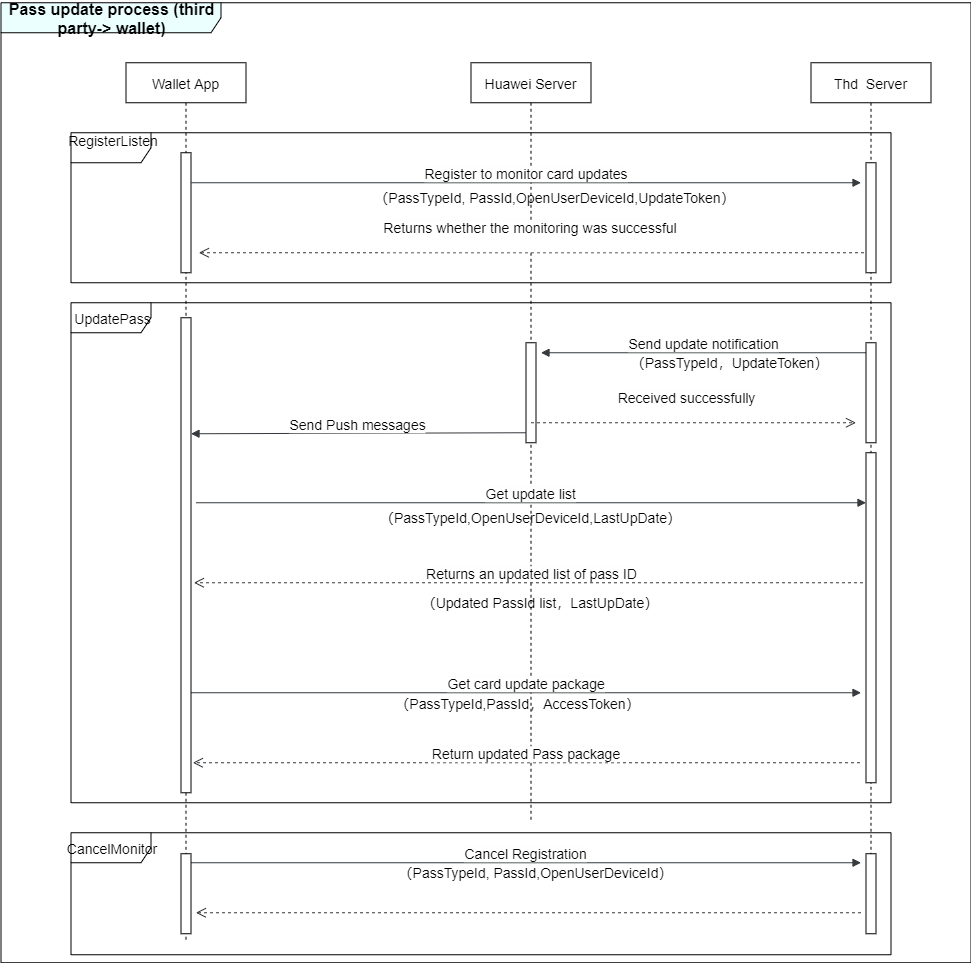
API function: This API is used by HUAWEI Wallet to listen on pass updates from your server.
Scenario: After a pass package is added to HUAWEI Wallet, HUAWEI Wallet will send the unique user device ID (determined based on the current device and user information) and the pass package ID (serialNumber) to your server through this API. Your server should define the mapping between the two IDs so that when the pass package needs to be updated, the server can send an update notification to the device based on the user device ID in the update request received through its update API.
l URL: POST {webServiceURL}/version/devices/deviceId/registrations/passTypeIdentifier/serialNumber
URL parameters:
Parameter | Type | Description | Mandatory (M)/Optional (O) |
webServiceURL | String | Request URL to your server API, which is specified by the webServiceURL field in the hwpass.json file of the pass package. | M |
version | String | Fixed value: v1. | M |
deviceId | String | Device ID. | M |
passTypeIdentifier | String | Pass type ID | M |
serialNumber | String | Pass serial number. | M |
Note: The URL is built directly by combining the preceding parameters. Therefore, it must not contain any special characters.
l Input Parameters
Request header:
Parameter | Type | Description | Mandatory (M)/Optional (O) |
Authorization | String | Adopts the "HuaweiPassToken + Space + Base64-encoded authorization token" format. The authorization token is in the hwpass.json file of the pass package and is used by your server to verify the validity of a request from HUAWEI Wallet. Note that when receiving the authorization token, your server should check whether it is issued by you or other parties. Example: HuaweiPassToken CUDJEMSDIJGHSAESJEMSDIJGHSAESCUD | M |
Request body (JSON format):
Parameter | Type | Description | Mandatory (M)/Optional (O) |
pushToken | String | Token to be passed to your server for sending pass update notification. | M |
Example:
- {
- "pushToken":"xxxxxx"
- }
l Output parameters:
Parameter | Type | Description | Mandatory (M)/Optional (O) |
HTTP Status | 200: Operation successful. 401: Bad request (incorrect token). | M |
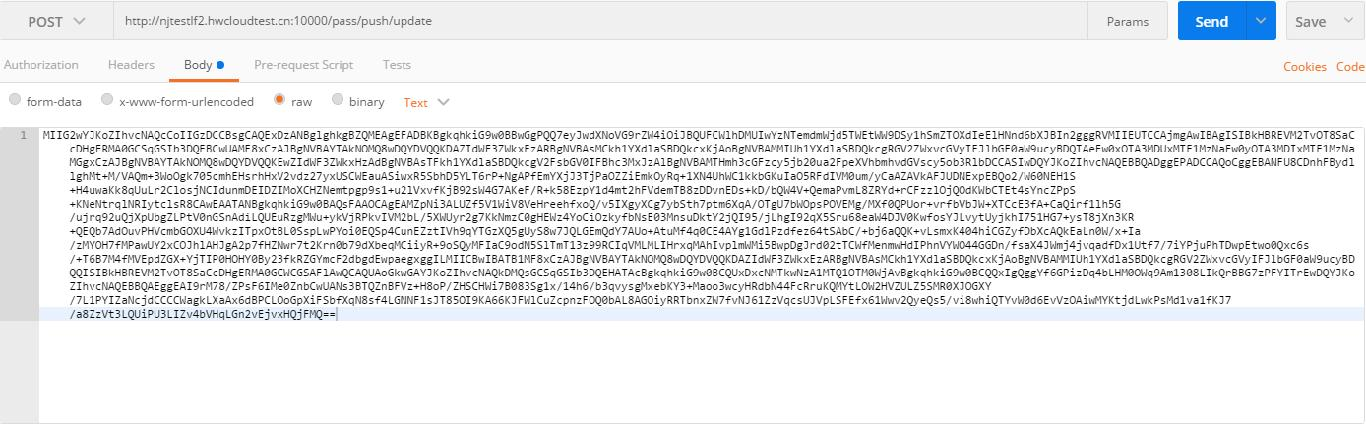
API function: This API is used by your server to notify the Huawei server of pass updates.
Scenario: When a pass package update is available, your server calls this API to notify the Huawei server of the update. Based on the received user device ID, the Huawei server sends a push notification to the corresponding device, notifying HUAWEI Wallet to retrieve the pass update list from your server.
l URL: POST https://domain:port/Wallet/pass/push/update
l Input Parameters
Parameter description:
Parameter | Type | Description | Mandatory (M)/Optional (O) |
signature | String | Signs pushMessage in the PKCS7 attached format (signed data is embedded in the signature) using the certificate issued by Huawei and encodes it using Base64. Example: Base64(PKCS7Sign(JSON(pushMessage).getBytes("UTF-8")) | M |
pushMessage is in JSON format. The JSON structure is defined as follows:
Parameter | Type | Description | Mandatory (M)/Optional (O) |
pushToken | String | Push token obtained during pass registration. | M |
l Output Parameters
Parameter | Type | Description | Mandatory (M)/Optional (O) |
returnCode | String | 0: Successful. Other: Failed. | M |
returnDesc | String | Description of the returned value. | M |
HTTP status | 200: Operation successful. 400: Bad request (signature verification failed or package content is incorrect). | M |
Request example:
- ObjectNode messageJson = JsonNodeFactory.instance.objectNode();
- messageJson.put("pushToken","");
- byte[] messageBytes = messageJson.toString().getBytes(StandardCharsets.UTF_8);
- byte[] signMessage = passFileService.signMessage(messageBytes, passType);
- String signByteStr = Base64.encodeBase64String(signMessage);
- return signByteStr;
API function: This API is used by HUAWEI Wallet to retrieve pass updates.
Scenario: After receiving a pass update notification, HUAWEI Wallet calls this API to retrieve the list of serial numbers for all passes to be updated.
l URL:
GET webServiceURL/version/devices/deviceId/registrations/passTypeIdentifier?passesUpdatedSince=tag
URL parameters:
Parameter | Type | Description | Mandatory (M)/Optional (O) |
webServiceURL | String | Request URL to your server API, which is specified by the webServiceURL field in the hwpass.json file of the pass package. | M |
version | String | Fixed value: v1. | |
devices | String | Fixed value: devices. | |
deviceId | String | Device ID. | |
registrations | String | Fixed value: registrations. | |
passTypeIdentifier | String | Pass type ID. | M |
passesUpdatedSince | String | passesUpdatedSince in the hwpass.json file of the pass package, which is passed to your server from HUAWEI Wallet. | M |
Note: The URL is built directly by combining the preceding parameters. Therefore, it must not contain any special characters.
l Input Parameter
Request header:
Parameter | Type | Description | Mandatory (M)/Optional (O) |
Authorization | String | Adopts the "HuaweiPassToken + Space + Base64-encoded authorization token" format. The authorization token is in the hwpass.json file of the pass package and is used by your server to verify the validity of a request from HUAWEI Wallet. Note that when receiving the authorization token, your server should check whether it is issued by you or other parties. Example: HuaweiPassToken CUDJEMSDIJGHSAESJEMSDIJGHSAESCUD | M |
l Output Parameter
Parameter | Type | Description | Mandatory (M)/Optional (O) |
HTTP Status | 200: Operation successful. 401: Bad request (incorrect token). | M |
Response body (JSON format):
Parameter | Type | Description | Mandatory (M)/Optional (O) |
lastUpdated | String | Latest tag, which can be used to compare with the local tag. | M |
serialNumbers | String | List of updated pass serial numbers. |
Example:
- {
- "lastUpdated":"xxxxxx",
- "serialNumbers" :[ "1001","1020","6045"]
- }
API function: This API is used by HUAWEI Wallet to retrieve the latest pass package from your server.
Scenario: HUAWEI Wallet calls this API to retrieve the latest content of a pass identified by serialNumber.
l URL: GET webServiceURL/version/passes/passTypeIdentifier/serialNumber
URL parameters:
Parameter | Type | Description | Mandatory (M)/Optional (O) |
webServiceURL | String | Request URL to your server API, which is specified by the webServiceURL field in the hwpass.json file of the pass package. | |
version | String | Fixed value: v1. | M |
passTypeIdentifier | String | Pass type ID. | M |
serialNumber | String | Pass serial number. | M |
l Input Parameter
Request header:
Parameter | Type | Description | Mandatory (M)/Optional (O) |
Authorization | String | Adopts the "HuaweiPassToken + Space + Base64-encoded authorization token" format. The authorization token is in the hwpass.json file of the pass package and is used by your server to verify the validity of a request from HUAWEI Wallet. Note that when receiving the authorization token, your server should check whether it is issued by you or other parties. Example: HuaweiPassToken CUDJEMSDIJGHSAESJEMSDIJGHSAESCUD | M |
l Output Parameters
Parameter | Type | Description | Mandatory (M)/Optional (O) |
HTTP Status | 200: Operation successful. 401: Bad request (incorrect token). | M | |
HTTP Body | Binary content of the pass package. | M |
API function: This API is used by HUAWEI Wallet to cancel listening on pass updates from your server.
Scenario: When a user attempts to delete a pass from HUAWEI Wallet, HUAWEI Wallet calls this API and passes the user device ID and the pass serial number to your server. Then, your server removes the mapping between the user device ID and the pass serial number.
l URL DELETE webServiceURL/version/devices/deviceId/registrations/passTypeIdentifier/serialNumber
URL parameters:
Parameter | Type | Description | Mandatory (M)/Optional (O) |
webServiceURL | String | Request URL to your server API, which is specified by the webServiceURL field in the hwpass.json file of the pass package. | M |
version | String | Fixed value: v1. | |
deviceId | String | Device ID. | |
passTypeIdentifier | String | Pass type ID. | M |
serialNumber | String | Pass serial number. | M |
l Input Parameter
Request header:
Parameter | Type | Description | Mandatory (M)/Optional (O) |
Authorization | String | Adopts the "HuaweiPassToken + Space + Base64-encoded authorization token" format. The authorization token is in the hwpass.json file of the pass package and is used by your server to verify the validity of a request from HUAWEI Wallet. Note that when receiving the authorization token, your server should check whether it is issued by you or other parties. Example: HuaweiPassToken CUDJEMSDIJGHSAESJEMSDIJGHSAESCUD | M |