阻尼弹簧曲线(以下简称弹簧曲线)对应的阻尼弹簧系统中,偏离平衡位置的物体一方面受到弹簧形变产生的反向作用力,被迫发生振动。另一方面,阻尼的存在为物体振动提供阻力。除阻尼为0的特殊情况,物体在振动过程中振幅不断减小,且最终趋于0,其轨迹对应的动画曲线自然连续。
采用弹簧曲线的动画在达终点时动画速度为0,不会产生动画“戛然而止”的观感,以避免影响用户体验。
ArkUI提供了四种阻尼弹簧曲线接口。
-
curves.springMotion:创建弹性动画,动画时长由曲线参数、属性变化值大小和弹簧初速度自动计算,开发者指定的动画时长不生效。
springMotion不提供速度设置接口,速度通过继承获得,无需开发者指定。对于某个属性,如果当前存在正在运行的springMotion或者responsiveSpringMotion类型动画,新创建的弹簧动画将停止正在运行的动画,并继承其当前时刻的动画属性值和速度作为新建动画的初始状态。此外,接口提供默认参数,便于开发者直接使用。
function springMotion(response?: number, dampingFraction?: number, overlapDuration?: number): ICurve;
-
curves.responsiveSpringMotion:是springMotion动画的一种特例,仅默认参数不同。一般用于跟手做成动画的场景,离手时可用springMotion创建动画,此时离手阶段动画将自动继承跟手阶段动画速度,完成动画衔接。
当新动画的overlapDuration参数不为0,且当前属性的上一个springMotion动画还未结束时,response和dampingFraction将在overlapDuration指定的时间内,从旧动画的参数值过渡到新动画的参数值。
function responsiveSpringMotion(response?: number, dampingFraction?: number, overlapDuration?: number): ICurve;
-
curves.interpolatingSpring:适合于需要指定初速度的动效场景,动画时长同样由接口参数自动计算,开发者在动画接口中指定的时长不生效。
曲线接口提供速度入参,且由于接口对应一条从0到1的阻尼弹簧曲线,实际动画值根据曲线进行插值计算。所以速度也应该为归一化速度,其值等于动画属性改变的绝对速度除以动画属性改变量。因此不适合于动画起点属性值和终点属性值相同的场景,此时动画属性改变量为0,归一化速度不存在。
function interpolatingSpring(velocity: number, mass: number, stiffness: number, damping: number): ICurve;
-
curves.springCurve:适合于需要直接指定动画时长的场景。springCurve接口与interpolatingSpring接口几乎一致,但是对于采用springCurve的动画,会将曲线的物理时长映射到指定的时长,相当于在时间轴上拉伸或压缩曲线,破坏曲线原本的物理规律,因此不建议开发者使用。
function springCurve(velocity: number, mass: number, stiffness: number, damping: number): ICurve;
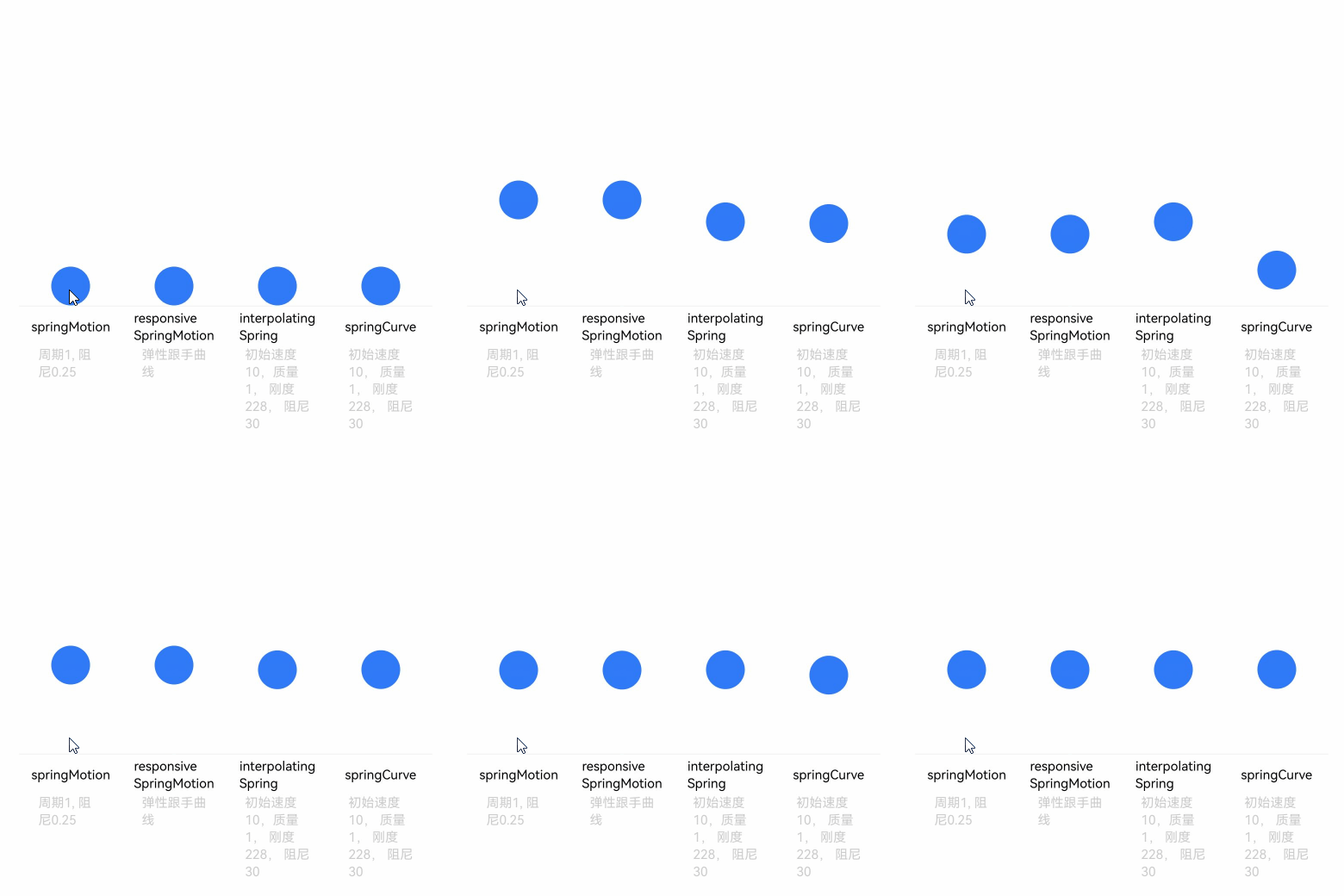
关于弹簧曲线完整的使用示例和参考效果如下,开发者也可参考动画衔接,掌握使用responsiveSpringMotion和springMotion进行手势和动画之间的衔接。
弹簧曲线的示例代码和效果如下。
import { curves } from '@kit.ArkUI';
import { common } from '@kit.AbilityKit';

class Spring {
  public title: string;
  public subTitle: ResourceStr;
  public iCurve: ICurve;

  constructor(title: string, subTitle: ResourceStr, iCurve: ICurve) {
    this.title = title;
    this.iCurve = iCurve;
    this.subTitle = subTitle;
  }
}

// 弹簧组件
@Component
struct Motion {
  @Prop dTranslate: number = 0;
  private title: string = '';
  private subTitle: ResourceStr = '';
  private iCurve: ICurve | undefined = undefined;

  build() {
    Column() {
      Circle()
        .translate({ y: this.dTranslate })
        .animation({ curve: this.iCurve, iterations: -1 })
        .foregroundColor('#317AF7')
        .width(30)
        .height(30)

      Column() {
        Text(this.title)
          .fontColor(Color.Black)
          .fontSize(10).height(30)
        Text(this.subTitle)
          .fontColor(0xcccccc)
          .fontSize(10).width(50)
      }
      .borderWidth({ top: 1 })
      .borderColor(0xf5f5f5)
      .width(80)
      .alignItems(HorizontalAlign.Center)
      .height(100)

    }
    .height(110)
    .margin({ bottom: 5 })
    .alignItems(HorizontalAlign.Center)
  }
}

@Entry
@Component
export struct SpringCurve {
  private context = this.getUIContext().getHostContext() as common.UIAbilityContext;
  @State dTranslate: number = 0;
  private springs: Spring[] = [
    // 请将$r('app.string.springCurve_text1')替换为实际资源文件,在本示例中该资源文件的value值为"周期1, 阻尼0.25"
    new Spring('springMotion', $r('app.string.springCurve_text1'), curves.springMotion(1, 0.25)),
    // 请将$r('app.string.springCurve_text2')替换为实际资源文件,在本示例中该资源文件的value值为"弹性跟手曲线"
    new Spring('responsive' + '\n' + 'SpringMotion', $r('app.string.springCurve_text2'),
      curves.responsiveSpringMotion(1, 0.25)),
    // 请将$r('app.string.springCurve_text3')替换为实际资源文件,在本示例中该资源文件的value值为"初始速度10, 质量1, 刚度228, 阻尼30"
    new Spring('interpolating' + '\n' + 'Spring', $r('app.string.springCurve_text3'),
      curves.interpolatingSpring(10, 1, 228, 30)),
    // 请将$r('app.string.springCurve_text3')替换为实际资源文件,在本示例中该资源文件的value值为"初始速度10, 质量1, 刚度228, 阻尼30"
    new Spring('springCurve', $r('app.string.springCurve_text3'),
      curves.springCurve(10, 1, 228, 30))
  ];

  build() {
    Row() {
      ForEach(this.springs, (item: Spring) => {
        Motion({
          title: item.title,
          subTitle: item.subTitle,
          iCurve: item.iCurve,
          dTranslate: this.dTranslate
        })
      })
    }
    .justifyContent(FlexAlign.Center)
    .alignItems(VerticalAlign.Bottom)
    .width('100%')
    .height(437)
    .margin({ top: 20 })
    .onClick(() => {
      this.dTranslate = -50;
    })
  }
}