为了增强状态管理框架对持久化存储UI的能力,开发者可以使用PersistenceV2存储持久化的数据。
PersistenceV2是应用程序中的可选单例对象。此对象的作用是持久化存储UI相关的数据,以确保这些属性在应用程序重新启动时的值与应用程序关闭时的值相同。
PersistenceV2提供状态变量持久化能力,开发者可以通过connect或者globalConnect绑定同一个key,在状态变量变化和应用冷启动时,实现持久化能力。
在阅读本文档前,建议提前阅读:@ComponentV2,@ObservedV2和@Trace,配合阅读:PersistenceV2-API文档。

PersistenceV2从API version 12开始支持。
globalConnect从API version 18开始支持,行为和connect保持一致,唯一的区别为connect的底层存储路径为module级别的路径,而globalConnect的底层存储路径为应用级别,详细区别见使用场景在不同的module中使用connect和globalConnect。
globalConnect从API version 23开始支持集合类型(Array、Map、Set、collections.Array、collections.Map、collections.Set)和Date类型的持久化,支持在UI线程持久化@Sendable类型的数据,支持持久化循环引用的对象,支持持久化单个key超过8k的数据。目前建议开发者使用API version 23新增的globalConnect接口。
概述
PersistenceV2是在应用UI启动时会被创建的单例。它的目的是提供应用状态数据的中心存储,这些状态数据在应用级别都是可访问的。数据通过唯一的键值字符串访问。不同于AppStorageV2,PersistenceV2还将最新数据存储在设备磁盘上(持久化)。这意味着,应用退出再次启动后,依然能保存选定的结果。
对于与PersistenceV2关联的@ObservedV2对象,该对象的@Trace属性的变化,会触发整个关联对象的自动持久化;非@Trace属性的变化则不会,如有必要,可调用PersistenceV2 API手动持久化。请注意:被PersistenceV2持久化的类属性必须要有初值,否则不支持持久化。
PersistenceV2可以和UI组件同步,且可以在应用业务逻辑中被访问。
PersistenceV2支持应用的主线程内多个UIAbility实例间的状态共享。
PersistenceV2继承自AppStorageV2,支持通过connect创建或获取存储的数据。
使用说明
- globalConnect:创建或获取存储的数据。

-
关联@Observed对象时,由于该类型的name属性未定义,需要指定key或者自定义name属性。
-
globalConnect为应用级别存储,对于一个key,整个应用在对应加密分区只有一份存储路径。使用PersistenceV2的connect存储的数据路径为module级别,即哪个module调用了connect,数据副本存入对应module的持久化文件中。如果多个module使用相同的key,则数据为最先使用connect的module,并且PersistenceV2中的数据也会存入最先使用connect的module里。因为存储路径在应用第一个ability启动时就已确定,为该ability所属的module。如果一个ability调用了connect,并且该ability能被不同的module拉起, 那么ability存在多少种启动方式,就会有多少份数据副本,因此,建议开发者使用globalConnect代替connect接口。
-
- remove:删除指定key的存储数据。删除PersistenceV2中不存在的key会报警告。
- keys:返回所有PersistenceV2中的key。包括module级别存储路径和应用级别存储路径中的所有key。
- save:手动持久化数据。
- notifyOnError:响应序列化或反序列化失败的回调。将数据存入磁盘时,需要对数据进行序列化;当某个key序列化失败时,错误是不可预知的;可调用该接口捕获异常。
以上接口详细描述请参考PersistenceV2-API文档和AppStorageV2-API文档。
使用限制
-
需要配合UI使用(UI线程),不能在其他线程使用。在API version 23以前,不支持@Sendable。
- 从API version 23开始,提供globalConnect接口,支持在UI线程持久化@Sendable装饰的类对象,其成员属性的类型需为基础内置类型(string、number和boolean)。
-
在API version 23以前,不支持collections.Set、collections.Map等类型。
- 从API version 23开始,提供globalConnect接口,支持collections.Set、collections.Map和collections.Array。collections.Set、collections.Map和collections.Array本身无法观察,在globalConnect接口使用defaultCreator时,需要使用UIUtils.makeObserved,才能在值变化时自动保存,如果不使用,开发者需要手动调用PersistenceV2.save(key)保存变化的数据。
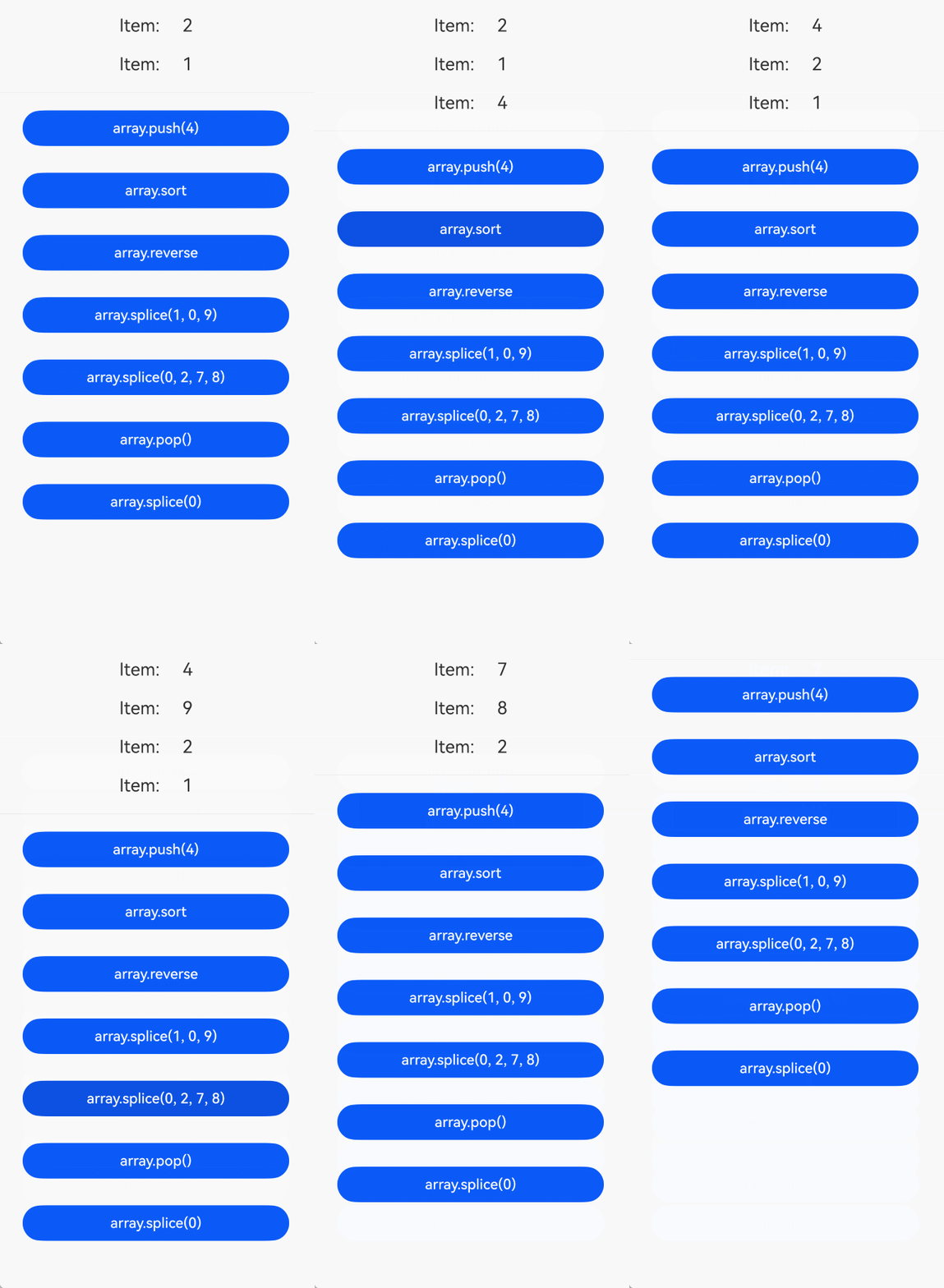
如下是新增接口globalConnect支持collections.Array的示例代码:
import { PersistenceV2, UIUtils } from '@kit.ArkUI';
import { collections } from '@kit.ArkTS';

@Entry
@ComponentV2
struct Page1 {
  // 支持直接持久化collections.Array的类型
  @Local array: collections.Array<number> = PersistenceV2.globalConnect({
    // 定义持久化的数据类型
    type: collections.Array<number>,
    // 定义默认构造器,返回时需要调用makeObserved,才能实现自动持久化
    defaultCreator: () => UIUtils.makeObserved(new collections.Array<number>(2, 1))
  })!;
  // 基于collections.Array构建Repeat的数据源
  toArray<T>(array: collections.Array<T>): Array<T> {
    const result = new Array<T>();
    array.forEach((item: T) => result.push(item));
    return result;
  }

  build() {
    Column({ space: 10 }) {
      Column({ space: 0 }) {
        Repeat(this.toArray(this.array))
          .each(ri => {
            Row() {
              Text(`Item: `)
                .fontSize(20)
                .margin(10)
              Text(`${ri.item}`)
                .fontSize(20)
                .margin(10)
            }
          })
          .key((item: number, index: number) => `${index} - ${item}`)
      }
      Divider().width('100%')
      // 以下按钮依次演示对collections.Array的操作;数据已自动持久化,重启应用后保持当前数组状态
      // 点击后追加元素4,数组项变为:2, 1, 4
      Button('array.push(4)')
        .onClick(() => {
          this.array.push(4);
        })
        .width(300)
        .margin(10)
      // 点击后对数组升序排序,数组项变为:1, 2, 4
      Button('array.sort')
        .onClick(() => {
          this.array.sort((a, b) => a - b);
        })
        .width(300)
        .margin(10)
      // 点击后反转数组,数组项变为:4, 2, 1
      Button('array.reverse')
        .onClick(() => {
          this.array.reverse();
        })
        .width(300)
        .margin(10)
      // 点击后在索引1处插入元素9,数组项变为:4, 9, 2, 1
      Button('array.splice(1, 0, 9)')
        .onClick(() => {
          this.array.splice(1, 0, 9);
        })
        .width(300)
        .margin(10)
      // 点击后替换前两个元素为7和8,数组项变为:7, 8, 2, 1
      Button('array.splice(0, 2, 7, 8)')
        .onClick(() => {
          this.array.splice(0, 2, 7, 8);
        })
        .width(300)
        .margin(10)
      // 点击后移除末尾元素,数组项变为:7, 8, 2
      Button('array.pop()')
        .onClick(() => {
          this.array.pop();
        })
        .width(300)
        .margin(10)
      // 点击后清空数组,数组项为空
      Button('array.splice(0)')
        .onClick(() => {
          this.array.splice(0);
        })
        .width(300)
        .margin(10)
    }
    .width('100%')
  }
}
- globalConnect在持久化多个相同集合类型时,需要提供不同的key来区分持久化数据。
如下展示开发者持久化相同的Array<number>类型的部分示例代码片段:
@Entry @ComponentV2 struct Page1 { // 持久化相同容器类型的数据,建议开发者使用不同的key来区分持久化数据 @Local arr1: Array<number> = PersistenceV2.globalConnect({ type: Array<number>, key: 'arr1', defaultCreator: () => UIUtils.makeObserved(new Array<number>()), })!; @Local arr2: Array<number> = PersistenceV2.globalConnect({ type: Array<number>, key: 'arr2', defaultCreator: () => UIUtils.makeObserved(new Array<number>()), })!; // ... } -
在API version 23以前,单个key支持数据大小约8k,过大会导致持久化失败。
- 从API version 23开始,解除单个key只能持久化8K数据的限制,读取和写入持久化存储的数据会在UI线程中同步进行,但开发者需要注意,不建议开发者在UI线程存储大量的持久化数据,会导致界面卡顿。
-
在API version 23以前,持久化的数据必须是class对象,不支持容器类型(如Array、Set、Map),不支持built-in的构造对象(如String、Number),不支持持久化基本类型(如string、number、boolean)。如果需要持久化非class对象,建议使用Preferences进行数据持久化。
-
从API version 23开始,支持持久化Class类型、容器类型(Array、Set、Map)和Date类型。支持built-in的构造对象类型(如String、Number)及基本类型(如string、number、boolean)作为class属性的持久化(String、Number是不可变的数据对象,没法直接作为顶层数据类型进行持久化)。对于不支持的类型,会抛出运行时报错,从API version 23开始,将返回错误码140103。
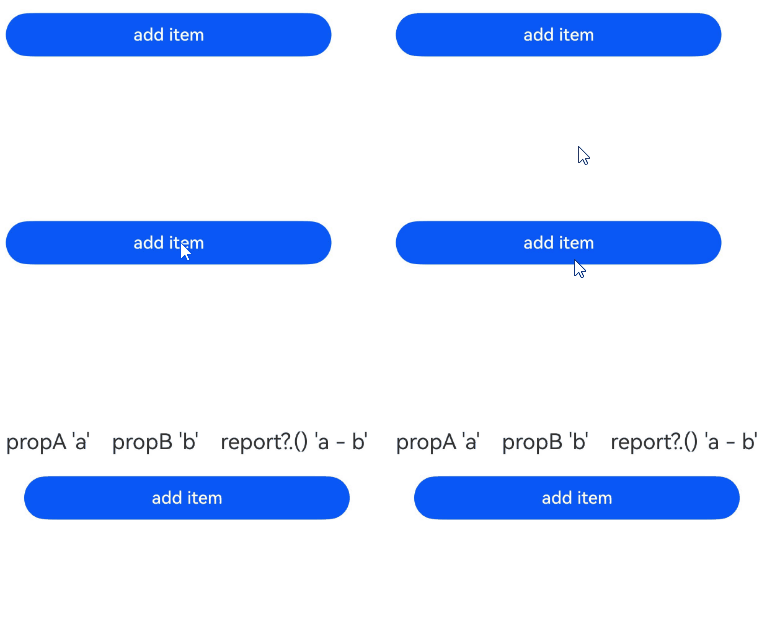
如下为新增globalConnect支持Array<ClassA>类型的持久化示例:
import { PersistenceV2, UIUtils } from '@kit.ArkUI';

@ObservedV2
class ClassA {
  @Trace public propA: string = '';
  @Trace public propB: string = '';

  public report(): string {
    return `${this.propA} - ${this.propB}`;
  }
}

@Entry
@ComponentV2
struct Comp {
  // 持久化顶层数据类型为Array<ClassA>的数据
  @Local arr: Array<ClassA> = PersistenceV2.globalConnect({
    type: Array<ClassA>,
    defaultCreator: () => UIUtils.makeObserved(new Array<ClassA>()),
    // 添加defaultSubCreator,通知状态管理框架如何创建数组项
    // 另外持久化的数据需要加上makeObserved,因为JSON对象本身没有观察能力,自动持久化会失败
    defaultSubCreator: () => UIUtils.makeObserved(new ClassA())
  })!;

  build() {
    Column() {
      Repeat(this.arr)
        .each(ri => {
          Row() {
            Text(`propA '${ri.item.propA}'`)
              .fontSize(20)
              .margin(10)
            Text(`propB '${ri.item.propB}'`)
              .fontSize(20)
              .margin(10)
            Text(`report?.() '${ri.item.report?.()}'`)
              .fontSize(20)
              .margin(10)
          }
        })
      // 点击'add item',显示`propA 'a' propB 'b'report?.()'a - b'`, 杀掉应用,再次进入,会显示上次的结果
      Button('add item')
        .width(300)
        .margin(10)
        .onClick(() => {
          let temp: ClassA = new ClassA();
          temp.propA = 'a';
          temp.propB = 'b';
          this.arr.push(temp);
        })
    }
  }
}
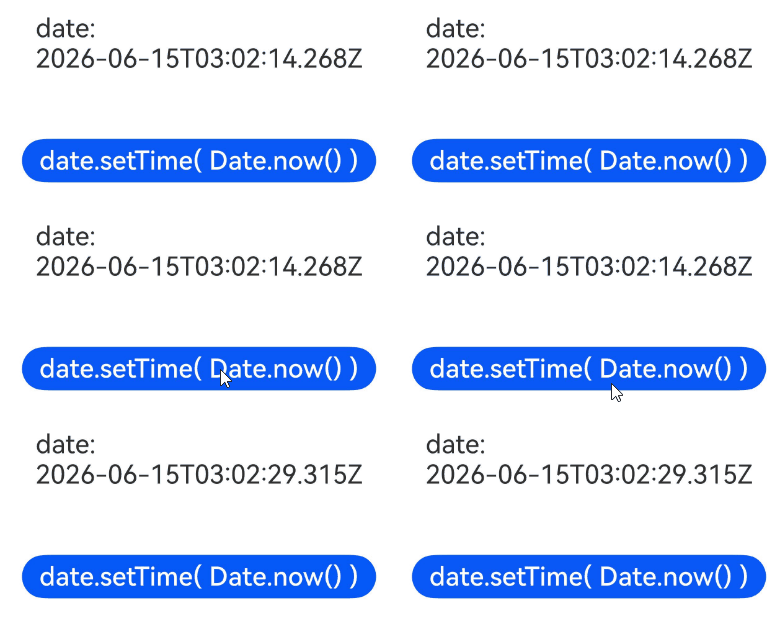
如下为globalConnect支持Date类型的持久化示例:
import { PersistenceV2, UIUtils } from '@kit.ArkUI';

@Entry
@ComponentV2
struct Page1 {
  // 支持直接持久化Date类型的数据
  @Local date: Date = PersistenceV2.globalConnect({
    type: Date,
    defaultCreator: () => UIUtils.makeObserved(new Date())
  })!;

  build() {
    Column({ space: 40 }) {
      Text(`date: ${this.date.toISOString()}`)
        .fontSize(24)
        .margin(10)
      // 点击'date.setTime( Date.now() )', 杀掉应用,进入应用后,显示日期
      Button('date.setTime( Date.now() )')
        .margin(10)
        .onClick(() => {
          this.date.setTime(Date.now());
        })
        .fontSize(24)
    }
    .width('100%')
  }
}
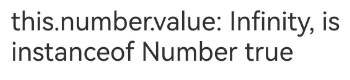
如下为globalConnect支持Number类型作为class子属性的持久化示例:
import { PersistenceV2 } from '@kit.ArkUI';

@ObservedV2 class NumberClass {
  // Number类型不是顶层持久化数据类型,只能支持非顶层数据类型的持久化
  @Trace public value: Number = new Number(Infinity);
}

@Entry
@ComponentV2
struct Page1 {
  // Number类型只能作为NumberClass的子属性去持久化
  @Local number: NumberClass = PersistenceV2.globalConnect({
    type: NumberClass,
    defaultCreator: () => new NumberClass()
  })!;
  output: string[] = [];

  aboutToAppear(): void {
    this.output.push(`this.number.value: ${this.number.value}, is instanceof Number ${this.number.value instanceof Number}`);
    this.number.value = new Number(-this.number.value);
  }

  build() {
    Column() {
      Row() {
        // 第一次打开应用,界面显示'this.number.value: Infinity, is instanceof Number true'
        // 第二次打开应用,界面显示'this.number.value: -Infinity, is instanceof Number true'
        Text(this.output.join('\n\n'))
          .fontSize(24)
      }
    }
    .width('100%')
  }
}
-
-
在API version 23以前,不支持循环引用对象的持久化。
- 在API version 23开始,提供globalConnect接口支持循环引用的对象持久化。
如下为globalConnect支持循环引用的对象的持久化示例:
import { PersistenceV2 } from '@kit.ArkUI';

@ObservedV2
class ClassA {
  @Trace public value: string = 'a';
  @Trace public refB: ClassB | undefined;
}

@ObservedV2
class ClassB {
  @Trace public value: string = 'b';
  @Trace public refA: ClassA | undefined;
}

@ObservedV2
class ClassC {
  @Trace public value: string = 'c';
  @Trace public objA: ClassA = new ClassA();
  @Trace public objB: ClassB = new ClassB();

  // ClassC是循环引用对象
  constructor() {
    this.objA.refB = this.objB;
    this.objB.refA = this.objA;
  }
}

@Entry
@ComponentV2
struct Page1 {
  @Local test: ClassC = PersistenceV2.globalConnect({
    type: ClassC,
    defaultCreator: () => new ClassC()
  })!;
  output: string[] = [];

  aboutToAppear(): void {
    const refAValue = this.test.objA?.refB?.refA?.value;
    const refBValue = this.test.objB?.refA?.refB?.value;
    this.output.push(`${refAValue}, ${refBValue}`);
    this.test.objA.value += 'a';
    this.test.objB.value += 'b';
  }

  build() {
    Column() {
      Row() {
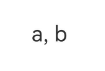
        // 第一次打开应用,界面显示'a, b'
        // 第二次打开应用,界面显示'aa, bb'
        Text(this.output.join('\n\n'))
          .fontSize(20)
          .width(300)
          .margin(10)
      }
      .height('100%')
    }
    .width('100%')
  }
}
-
connect和globalConnect不建议混用,如果混用,key不能一样,否则应用crash,从API version 23开始,将返回错误码140105。
-
PersistenceV2必须与UI实例关联,持久化操作需在UI实例初始化完成后调用(即loadContent回调触发后)。
// EntryAbility.ets // 以下为代码片段,需要开发者自己在EntryAbility.ets中补全 import { PersistenceV2 } from '@kit.ArkUI'; // 在EntryAbility外部定义class @ObservedV2 class Storage { @Trace isPersist: boolean = false; } // 在onWindowStageCreate的loadContent回调中调用PersistenceV2 onWindowStageCreate(windowStage: window.WindowStage): void { windowStage.loadContent('pages/Index', (err) => { if (err.code) { return; } PersistenceV2.connect(Storage, () => new Storage()); }); } -
如果开发者对数据持久化能力有较强的诉求,例如持久化时机,建议使用Preferences进行数据持久化。注意:不允许混用PersistenceV2和Preferences,因为Preferences存储的数据不会有状态变量信息,反序列化的数据不能触发PersistenceV2的自动化存储。
-
当开发者使用globalConnect持久化数据,从磁盘读取数据时,需要保证key数据在持久化前后类型一致。从API version 23开始,将返回错误码140107。
-
globalConnect仅支持设置EL1-EL5加密级别,否则会抛出运行时异常,从API version 23开始,将返回错误码140106,示例见使用globalConnect存储数据。
-
当存储数据的结构与当前数据的结构不一致时,可能会导致反序列化失败。在API版本26.0.0以前,开发者无法获取旧的序列化数据,进而无法判断自己的数据结构有哪些改变。
- 从API版本26.0.0开始,PersistenceErrorCallback支持传入oldValue参数,开发者可通过该参数获取存于磁盘的旧的序列化数据,具体用例可见通过notifyOnError获取旧的序列化数据。
-
不支持在使用connect或globalConnect的类中使用@Computed。@Computed为只读属性,不支持赋值操作,因此会导致反序列化失败。
-
在使用globalConnect持久化集合类型(如Array、Map、Set、collections.Array、collections.Map、collections.Set)时,若容器内部元素类型为基础类型(如number、string、boolean),则不应声明defaultSubCreator,否则会导致编辑、编译报错。
-
defaultSubCreator的类型为StorageDefaultCreator<S>,其泛型参数S受S extends object约束,而number、string、boolean等基础类型在ArkTS中不继承自object,无法满足该约束,因此当容器内部元素类型为基础类型时,声明defaultSubCreator将导致编辑、编译报错。
-
当容器内部元素类型为自定义class类型(即继承自object的引用类型)时,才需要声明defaultSubCreator,用于通知状态管理框架如何创建容器内的对象项。如下示例以Array<number>为例展示正反用法:
// 反例:容器内元素类型为基础类型number,声明defaultSubCreator会导致编辑、编译报错 @Local arr1: Array<number> = PersistenceV2.globalConnect({ type: Array<number>, defaultCreator: () => UIUtils.makeObserved(new Array<number>()), defaultSubCreator: () => 10 })!; // 正例:容器内元素类型为基础类型number,不声明defaultSubCreator @Local arr2: Array<number> = PersistenceV2.globalConnect({ type: Array<number>, defaultCreator: () => UIUtils.makeObserved(new Array<number>()) })!; -
-
不支持对持久化数据类的类名和属性名进行混淆,否则会导致已有数据无法读取或反序列化失败。应用需关闭混淆,或通过混淆配置保留相关类名和属性名,具体请参考源码混淆保留选项和字节码混淆保留选项。
-
通过意图装饰器开发标准意图场景中声明的后台意图(UI_ABILITY_BACKGROUND)的程序执行入口不涉及UI组件,不会初始化PersistenceV2模块,导致在onExecute函数中使用PersistenceV2无法持久化数据。建议开发者在后台意图场景下使用ArkData模块的通过用户首选项实现数据持久化(ArkTS)能力,向UI主程序同步持久化数据。
[h2]globalConnect顶层持久化数据类型及非顶层数据类型
在API version 23以前,持久化的顶层数据类型必须是用户自定义的class对象,不支持容器类型(如Array、Set、Map)和Date类型。从API version 23开始,持久化的顶层数据类型可以是用户自定义的class,可以是容器类型,也可以是Date类型。非顶层数据类型,是指定义在用户自定义class属性的类型。
如下示例中,Array<ClassA>是顶层持久化数据类型,可作为globalConnect的直接返回值类型,collections.Map是CollectionMapClass类中属性的类型,属于非顶层持久化的数据类型。
class ClassA {
  propA: number;

}
@Sendable
class CollectionMapClass {
  // 用户自定义的class中属性类型为collections.Map,非顶层持久化数据类型
  value = new collections.Map<number, number>([]);
}

@ComponentV2
struct Page1 {
  // 顶层持久化数据类型为Array<ClassA>
  @Local arr: Array<ClassA> = PersistenceV2.globalConnect({
    type: Array<ClassA>,
    defaultCreator: () => UIUtils.makeObserved(new Array<ClassA>()),
    // 添加defaultSubCreator,通知状态管理框架如何创建数组项
    // 另外持久化的数据需要加上makeObserved,否则会持久化失败
    defaultSubCreator: () => UIUtils.makeObserved(new ClassA())
  })!;

  // 顶层持久化数据类型为用户自定义的class,collections.Map为非顶层持久化数据类型
  collectionMap: CollectionMapClass = PersistenceV2.globalConnect({
    type: CollectionMapClass,
    defaultCreator: () => new CollectionMapClass()
  })!
  // ...
}
[h2]globalConnect用户自定义class对象属性支持的类型
用户自定义class对象的属性可以使用以下类型:boolean、number、string、undefined、null、Object、Date、Number、Boolean、String以及自定义类class。还支持以下集合类型:Array、Map、Set。
// 观察类的@Trace属性支持上述所有类型
@ObservedV2
class ClassA {
  // VType是上述列举的类型
  @Trace propA: VType;
}

@ComponentV2 struct Comp {
  @Local obsObj : ClassA = PersistenceV2.globalConnect({
    type: ClassA,
    defaultCreator: () => new ClassA()
  })
  // ...
}
用户自定义class类型的属性必须使用@Type装饰器装饰,且其class属性值必须严格为@Type中指定类的实例。
class ClassA {
  // ...
}
class PersistClass {
  @Type(ClassA)
  propA: ClassA = new ClassA();
}
[h2]globalConnect支持的集合类型
集合类型是指Array<V>、Map<K, V>、Set<V>、collections.Array<V>、collections.Map<K, V>、collections.Set<V>。
其中,Map<K, V>和collections.Map<K, V>中的key值类型(K)是指string或number类型。
Array<V>、Map<K, V>和 Set<V>中,V的类型包括:boolean、number、string、Date、Number、Boolean、String、interface类型和class类型。
collections.Array<V>、collections.Map<K, V>、collections.Set<V>要求V的类型必须是@Sendable类型的数据(boolean、number、string类型)。
如下展示globalConnect持久化Array<ClassA>的示例:
import { PersistenceV2, UIUtils } from '@kit.ArkUI';

class ClassA {
  public propA: number = 0;

  public classAToString(): string {
    return this.propA?.toString()
  }
}

@Entry
@ComponentV2
struct Page1 {
  @Local arr: Array<ClassA> = PersistenceV2.globalConnect({
    type: Array<ClassA>,
    defaultCreator: () => {
      const arr = UIUtils.makeObserved(new Array<ClassA>());
      const item = new ClassA();
      item.propA = 2;
      arr.push(UIUtils.makeObserved(item));
      return arr;
    },
    // 添加defaultSubCreator,通知状态管理框架如何创建ClassA对象
    // 另外持久化后的数据需要加上makeObserved,否则会持久化失败
    defaultSubCreator: () => UIUtils.makeObserved(new ClassA())
  })!;

  build() {
    Column({ space: 10 }) {
      Column({ space: 0 }) {
        Repeat(this.arr)
          .each(ri => {
            Row() {
              Text(`Item: `)
                .fontSize(20)
                .margin(10)
              Text(ri.item?.classAToString ? ri.item?.classAToString() :
                `classAToString() missing from object, propA: ${ri.item?.propA}`)
                .fontSize(20)
                .margin(10)
            }
          })
          .key((item: ClassA, index: number) => `${index} - ${item?.propA}`)
      }
      .width('100%')

      Divider().width('100%')
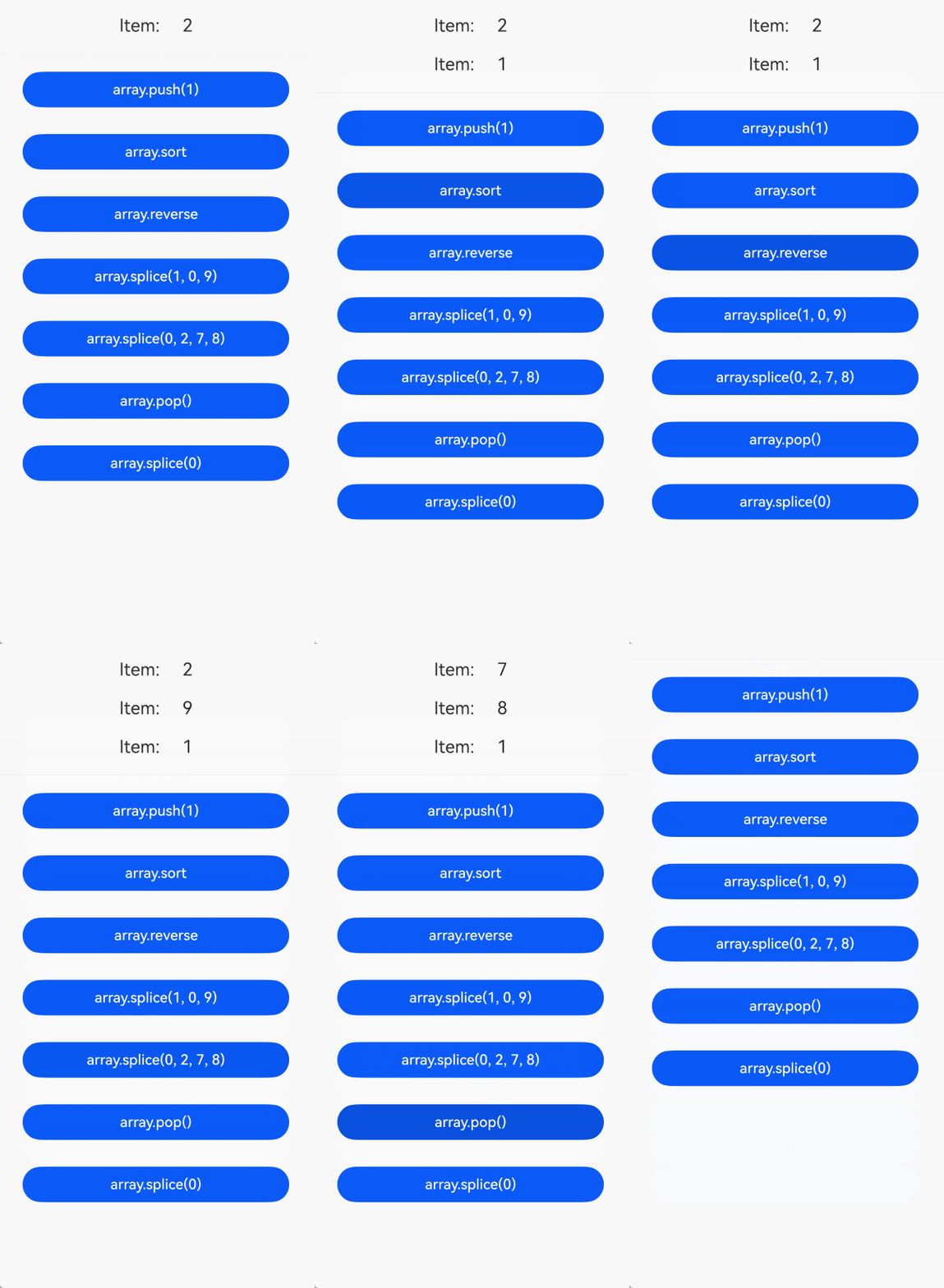
      // 以下按钮依次演示对Array<ClassA>的操作;数据已自动持久化,重启应用后保持当前数组状态
      // 点击后追加元素(propA=1),数组propA序列变为:2, 1
      Button('array.push(1)')
        .width(300)
        .margin(10)
        .onClick(() => {
          let temp = new ClassA();
          temp.propA = 1;
          this.arr.push(UIUtils.makeObserved(temp));
        })
      // 点击后按propA升序排序,数组propA序列变为:1, 2
      Button('array.sort')
        .width(300)
        .margin(10)
        .onClick(() => {
          this.arr.sort((tempA, tempB) => tempA?.propA - tempB?.propA);
        })
      // 点击后反转数组,数组propA序列变为:2, 1
      Button('array.reverse')
        .width(300)
        .margin(10)
        .onClick(() => {
          this.arr.reverse();
        })
      // 点击后在索引1处插入元素(propA=9),数组propA序列变为:2, 9, 1
      Button('array.splice(1, 0, 9)')
        .width(300)
        .margin(10)
        .onClick(() => {
          let temp = new ClassA();
          temp.propA = 9;
          this.arr.splice(1, 0, UIUtils.makeObserved(temp));
        })
      // 点击后替换前两个元素(propA=7、8),数组propA序列变为:7, 8, 1
      Button('array.splice(0, 2, 7, 8)')
        .width(300)
        .margin(10)
        .onClick(() => {
          let tempA = new ClassA();
          tempA.propA = 7;
          let tempB = new ClassA();
          tempB.propA = 8;
          this.arr.splice(0, 2, UIUtils.makeObserved(tempA), UIUtils.makeObserved(tempB));
        })
      // 点击后移除末尾元素,数组propA序列变为:7, 8
      Button('array.pop()')
        .width(300)
        .margin(10)
        .onClick(() => {
          this.arr.pop();
        })
      // 点击后清空数组,数组为空
      Button('array.splice(0)')
        .width(300)
        .margin(10)
        .onClick(() => {
          this.arr.splice(0);
        })
    }
    .width('100%')
  }
} 
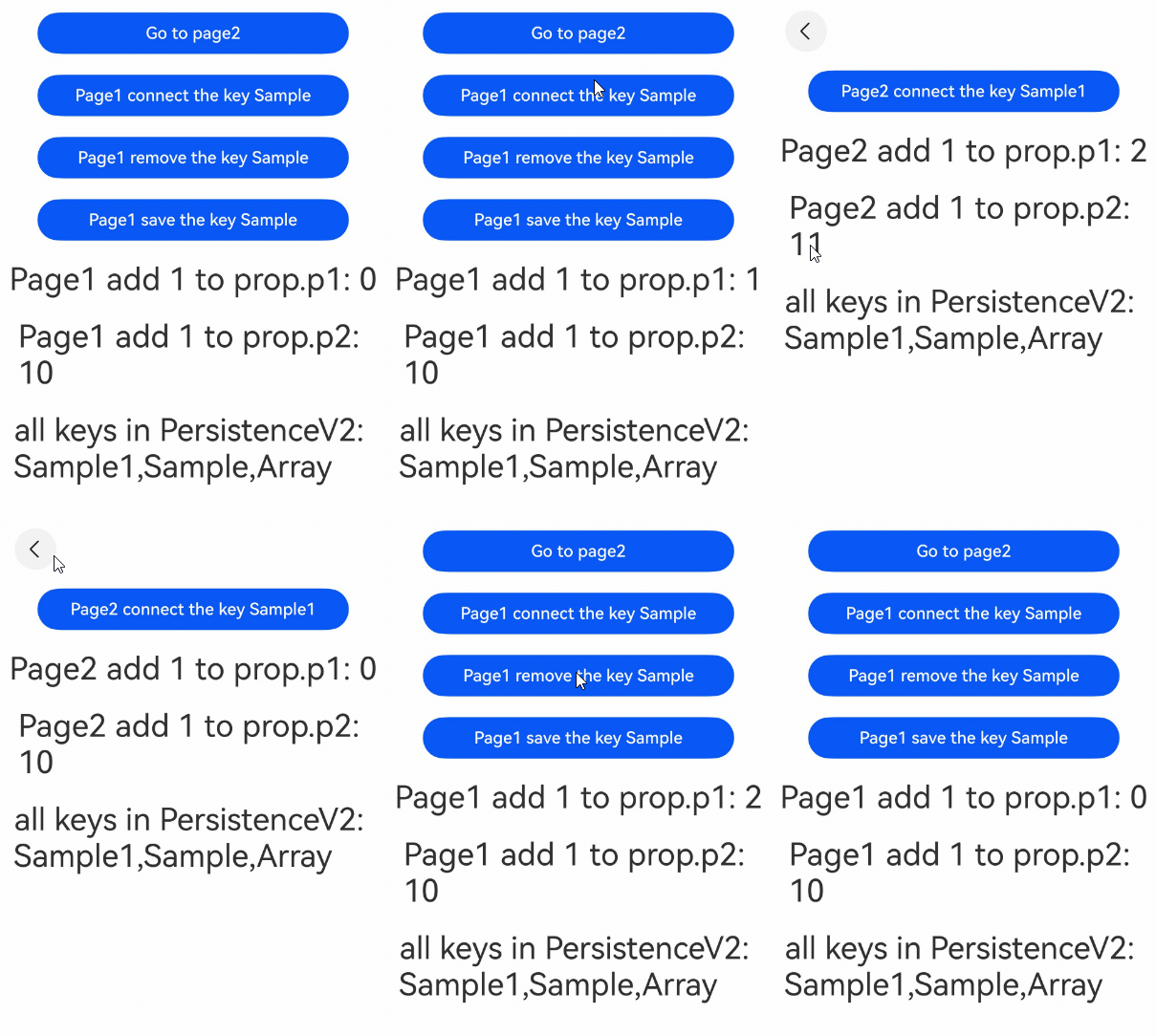
[h2]在两个页面之间存储数据
数据页面
// Sample.ets
import { Type } from '@kit.ArkUI';

// 数据中心
@ObservedV2
class SampleChild {
  @Trace public p1: number = 0;
  public p2: number = 10;
}

@ObservedV2
export class Sample {
  // 对于复杂对象需要@Type修饰,确保序列化成功
  @Type(SampleChild)
  @Trace public f: SampleChild = new SampleChild();
}
页面1
// Page1.ets
import { PersistenceV2 } from '@kit.ArkUI';
import { Sample } from '../Sample';
import { hilog } from '@kit.PerformanceAnalysisKit';

const DOMAIN = 0x0000;

// 接受序列化失败的回调
PersistenceV2.notifyOnError((key: string, reason: string, msg: string) => {
  hilog.error(DOMAIN, 'testTag', '%{public}s', `error key: ${key}, reason: ${reason}, message: ${msg}`);
});

@Entry
@ComponentV2
struct Page1 {
  // 在PersistenceV2中创建一个key为Sample的键值对(如果存在,则返回PersistenceV2中的数据),并且和prop关联
  // 对于需要换connect对象的prop属性,需要加@Local修饰(不建议对属性换connect的对象)
  @Local prop: Sample = PersistenceV2.connect(Sample, () => new Sample())!;
  pageStack: NavPathStack = new NavPathStack();

  build() {
    Navigation(this.pageStack) {
      Column() {
        Button('Go to page2')
          .width(300)
          .margin(10)
          .onClick(() => {
            this.pageStack.pushPathByName('Page2', null);
          })

        Button('Page1 connect the key Sample')
          .width(300)
          .margin(10)
          .onClick(() => {
            // 在PersistenceV2中创建一个key为Sample的键值对(如果存在,则返回PersistenceV2中的数据),并且和prop关联
            // 不建议对prop属性换connect的对象
            this.prop = PersistenceV2.connect(Sample, 'Sample', () => new Sample())!;
          })

        Button('Page1 remove the key Sample')
          .width(300)
          .margin(10)
          .onClick(() => {
            // 从PersistenceV2中删除后,prop将不会再与key为Sample的值关联
            PersistenceV2.remove(Sample);
          })

        Button('Page1 save the key Sample')
          .width(300)
          .margin(10)
          .onClick(() => {
            // 如果处于connect状态,持久化key为Sample的键值对
            PersistenceV2.save(Sample);
          })

        Text(`Page1 add 1 to prop.p1: ${this.prop.f.p1}`)
          .fontSize(30)
          .margin(10)
          .onClick(() => {
            this.prop.f.p1++;
          })

        Text(`Page1 add 1 to prop.p2: ${this.prop.f.p2}`)
          .fontSize(30)
          .margin(10)
          .onClick(() => {
            // 页面不刷新,但是p2的值改变了
            this.prop.f.p2++;
          })

        // 获取当前PersistenceV2里面的所有key
        Text(`all keys in PersistenceV2: ${PersistenceV2.keys()}`)
          .fontSize(30)
          .margin(10)
      }
        .width('100%')
    }
  }
}
页面2
// Page2.ets
import { PersistenceV2 } from '@kit.ArkUI';
import { Sample } from '../Sample';

@Builder
export function Page2Builder() {
  Page2()
}

@ComponentV2
struct Page2 {
  // 在PersistenceV2中创建一个key为Sample的键值对(如果存在,则返回PersistenceV2中的数据),并且和prop关联
  // 对于需要换connect对象的prop属性,需要加@Local修饰(不建议对属性换connect的对象)
  @Local prop: Sample = PersistenceV2.connect(Sample, () => new Sample())!;
  pathStack: NavPathStack = new NavPathStack();

  build() {
    NavDestination() {
      Column() {
        Button('Page2 connect the key Sample1')
          .width(300)
          .margin(10)
          .onClick(() => {
            // 在PersistenceV2中创建一个key为Sample1的键值对(如果存在,则返回PersistenceV2中的数据),并且和prop关联
            // 不建议对prop属性换connect的对象
            this.prop = PersistenceV2.connect(Sample, 'Sample1', () => new Sample())!;
          })

        Text(`Page2 add 1 to prop.p1: ${this.prop.f.p1}`)
          .fontSize(30)
          .margin(10)
          .onClick(() => {
            this.prop.f.p1++;
          })

        Text(`Page2 add 1 to prop.p2: ${this.prop.f.p2}`)
          .fontSize(30)
          .margin(10)
          .onClick(() => {
            // 页面不刷新,但是p2的值改变了;只有重新初始化才会改变
            this.prop.f.p2++;
          })

        // 获取当前PersistenceV2里面的所有key
        Text(`all keys in PersistenceV2: ${PersistenceV2.keys()}`)
          .fontSize(30)
          .margin(10)
      }
      .width('100%')
    }
    .onReady((context: NavDestinationContext) => {
      this.pathStack = context.pathStack;
    })
  }
}
使用Navigation时,需要添加配置系统路由表文件src/main/resources/base/profile/route_map.json,并替换pageSourceFile为Page2页面的路径,并且在module.json5中添加:"routerMap": "$profile:route_map"。
{
  "routerMap": [
    {
      "name": "Page2",
      "pageSourceFile": "src/main/ets/pages/Page2.ets",
      "buildFunction": "Page2Builder",
      "data": {
        "description" : "PersistenceV2 example"
      }
    }
  ]
} 
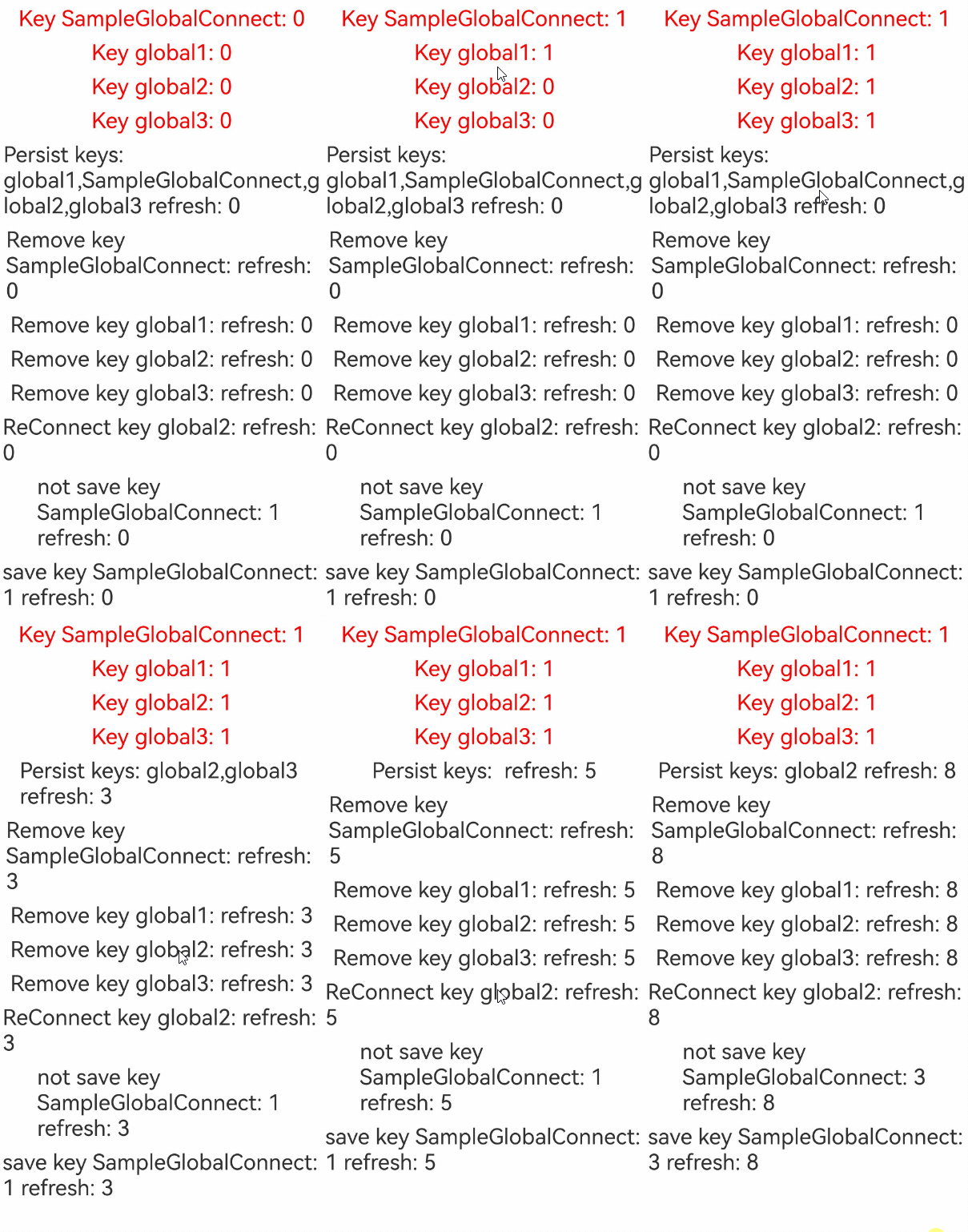
[h2]使用globalConnect存储数据
import { PersistenceV2, Type, ConnectOptions } from '@kit.ArkUI';
import { contextConstant } from '@kit.AbilityKit';
import { hilog } from '@kit.PerformanceAnalysisKit';

const DOMAIN = 0x0000;
// 接受序列化失败的回调
PersistenceV2.notifyOnError((key: string, reason: string, msg: string) => {
  hilog.error(DOMAIN, 'testTag', '%{public}s', `error key: ${key}, reason: ${reason}, message: ${msg}`);
});

@ObservedV2
class SampleChild {
  @Trace public childId: number = 0;
  public groupId: number = 1;
}

@ObservedV2
export class SampleGlobalConnect {
  // 对于复杂对象需要@Type修饰,确保序列化成功
  @Type(SampleChild)
  @Trace public father: SampleChild = new SampleChild();
}

@Entry
@ComponentV2
struct Page1 {
  @Local refresh: number = 0;
  // key不传入尝试用为type的name作为key,加密参数不传入默认加密等级为EL2
  @Local p: SampleGlobalConnect =
    PersistenceV2.globalConnect({ type: SampleGlobalConnect, defaultCreator: () => new SampleGlobalConnect() })!;
  // 使用key:global1连接,传入加密等级为EL1
  @Local p1: SampleGlobalConnect = PersistenceV2.globalConnect({
    type: SampleGlobalConnect,
    key: 'global1',
    defaultCreator: () => new SampleGlobalConnect(),
    areaMode: contextConstant.AreaMode.EL1
  })!;
  // 使用key:global2连接,使用构造函数形式,加密参数不传入默认加密等级为EL2
  options: ConnectOptions<SampleGlobalConnect> =
    { type: SampleGlobalConnect, key: 'global2', defaultCreator: () => new SampleGlobalConnect() };
  @Local p2: SampleGlobalConnect = PersistenceV2.globalConnect(this.options)!;
  // 使用key:global3连接,直接写加密数值,范围只能在0-4,否则运行会crash,例如加密设置为EL3
  @Local p3: SampleGlobalConnect = PersistenceV2.globalConnect({
    type: SampleGlobalConnect,
    key: 'global3',
    defaultCreator: () => new SampleGlobalConnect(),
    areaMode: 3
  })!;

  build() {
    Column() {
      // 显示数据
      // 被@Trace装饰的属性可以自动持久化进磁盘
      Text('Key SampleGlobalConnect: ' + this.p.father.childId.toString())
        .onClick(() => {
          this.p.father.childId += 1;
        })
        .fontSize(25)
        .margin(5)
        .fontColor(Color.Red)
      Text('Key global1: ' + this.p1.father.childId.toString())
        .onClick(() => {
          this.p1.father.childId += 1;
        })
        .fontSize(25)
        .margin(5)
        .fontColor(Color.Red)
      Text('Key global2: ' + this.p2.father.childId.toString())
        .onClick(() => {
          this.p2.father.childId += 1;
        })
        .fontSize(25)
        .margin(5)
        .fontColor(Color.Red)
      Text('Key global3: ' + this.p3.father.childId.toString())
        .onClick(() => {
          this.p3.father.childId += 1;
        })
        .fontSize(25)
        .margin(5)
        .fontColor(Color.Red)
      // keys接口
      // keys本身不会刷新,需要借助状态变量刷新
      Text('Persist keys: ' + PersistenceV2.keys().toString() + ' refresh: ' + this.refresh)
        .onClick(() => {
          this.refresh += 1;
        })
        .fontSize(25)
        .margin(5)

      // remove接口
      Text('Remove key SampleGlobalConnect: ' + 'refresh: ' + this.refresh)
        .onClick(() => {
          // 删除这个key,会导致和p失去联系,之后即使reconnect,p也无法存储
          PersistenceV2.remove(SampleGlobalConnect);
          this.refresh += 1;
        })
        .fontSize(25)
        .margin(5)
      Text('Remove key global1: ' + 'refresh: ' + this.refresh)
        .onClick(() => {
          // 删除这个key,会导致和p1失去联系,之后即使reconnect,p1也无法存储
          PersistenceV2.remove('global1');
          this.refresh += 1;
        })
        .fontSize(25)
        .margin(5)
      Text('Remove key global2: ' + 'refresh: ' + this.refresh)
        .onClick(() => {
          // 删除这个key,会导致和p2失去联系,之后即使reconnect,p2也无法存储
          PersistenceV2.remove('global2');
          this.refresh += 1;
        })
        .fontSize(25)
        .margin(5)
      Text('Remove key global3: ' + 'refresh: ' + this.refresh)
        .onClick(() => {
          // 删除这个key,会导致和p3失去联系,之后即使reconnect,p3也无法存储
          PersistenceV2.remove('global3');
          this.refresh += 1;
        })
        .fontSize(25)
        .margin(5)
      // reConnect
      // 重新连接也无法和之前的状态变量建立联系,因此无法保存数据
      Text('ReConnect key global2: ' + 'refresh: ' + this.refresh)
        .onClick(() => {
          // 此时会重新存储一个key为global2的变量,但该变量与p2无关
          PersistenceV2.globalConnect(this.options);
          this.refresh += 1;
        })
        .fontSize(25)
        .margin(5)

      // save接口
      Text('not save key SampleGlobalConnect: ' + this.p.father.groupId.toString() + ' refresh: ' + this.refresh)
        .onClick(() => {
          // 未被@Trace装饰的属性无法自动存储
          this.p.father.groupId += 1;
          this.refresh += 1;
        })
        .fontSize(25)
        .margin(5)
      Text('save key SampleGlobalConnect: ' + this.p.father.groupId.toString() + ' refresh: ' + this.refresh)
        .onClick(() => {
          // 未被@Trace装饰的属性无法自动存储,需要调用save存储
          this.p.father.groupId += 1;
          PersistenceV2.save(SampleGlobalConnect);
          this.refresh += 1;
        })
        .fontSize(25)
        .margin(5)
    }
    .width('100%')
  }
} 
[h2]在不同的module中使用connect和globalConnect
connect的存储路径需要注意以下两点:
-
connect使用module级别的存储路径,以最先启动的module的路径作为存储路径,从内存回写磁盘时会回写到第一个连接该module的路径。应用如果之后先从另一个module启动,则会以新module的路径作为存储路径。
-
当不同module使用相同的key时,哪个module先启动,数据就为哪个module中保存的键值对,回写到对应的module中。
globalConnect的存储路径需要注意:
globalConnect虽然是应用级别的路径,但是可以设置不同的加密分区,不同加密分区即代表不同的存储路径。connect不支持设置加密分区,但是module自身切换加密级别时,module存储路径也会切换成对应加密分区路径。
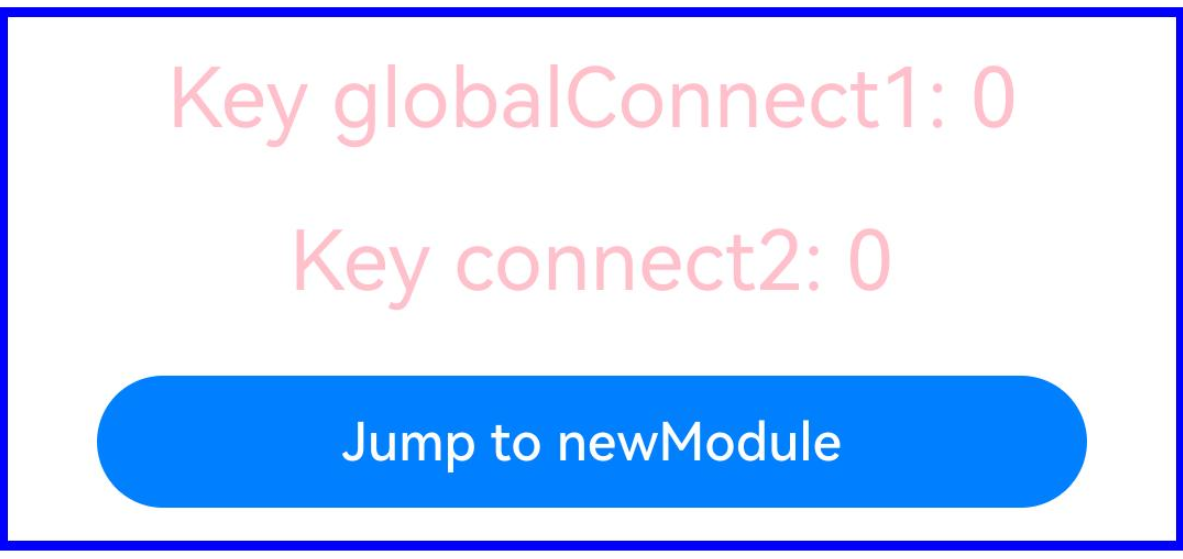
示例代码如下:开发者需要在项目基础上,新建一个module,并按照示例代码跳转到新module中。
// 模块1
import { PersistenceV2, Type } from '@kit.ArkUI';
import { common, Want } from '@kit.AbilityKit';
import { hilog } from '@kit.PerformanceAnalysisKit';
import { contextConstant } from '@kit.AbilityKit';

const DOMAIN = 0x0000;

// 接受序列化失败的回调
PersistenceV2.notifyOnError((key: string, reason: string, msg: string) => {
  hilog.error(DOMAIN, 'testTag', '%{public}s', `error key: ${key}, reason: ${reason}, message: ${msg}`);
});

@ObservedV2
class SampleChild {
  @Trace public childId: number = 0;
  public groupId: number = 1;
}

@ObservedV2
export class Sample {
  // 对于复杂对象需要@Type修饰,确保序列化成功
  @Type(SampleChild)
  @Trace public father: SampleChild = new SampleChild();
}

@Entry
@ComponentV2
struct Page1 {
  @Local refresh: number = 0;
  // 使用key:globalConnect1连接,传入加密等级为EL1
  @Local p1: Sample =
    PersistenceV2.globalConnect({
      type: Sample,
      key: 'globalConnect1',
      defaultCreator: () => new Sample(),
      areaMode: contextConstant.AreaMode.EL1
    })!;
  // 使用key:connect2连接,使用构造函数形式,加密参数不传入默认加密等级为EL2
  @Local p2: Sample = PersistenceV2.connect(Sample, 'connect2', () => new Sample())!;
  private context = this.getUIContext().getHostContext() as common.UIAbilityContext;

  build() {
    Column() {
      // 显示数据
      Text('Key globalConnect1: ' + this.p1.father.childId.toString())
        .onClick(() => {
          this.p1.father.childId += 1;
        })
        .fontSize(25)
        .margin(10)
        .fontColor(Color.Pink)
      Text('Key connect2: ' + this.p2.father.childId.toString())
        .onClick(() => {
          this.p2.father.childId += 1;
        })
        .fontSize(25)
        .margin(10)
        .fontColor(Color.Pink)

      // 跳转
      Button('Jump to newModule')
        .width(300)
        .margin(10)
        .onClick(() => { // 不同module之间使用,建议使用globalConnect
          let want: Want = {
            deviceId: '', // deviceId为空代表本设备
            bundleName: 'com.samples.paradigmstatemanagement', // 在app.json5中查看
            moduleName: 'demo', // 在需要跳转的module的module.json5中查看,非必选参数
            abilityName: 'NewModuleAbility', // 跳转启动的ability,在需要跳转的module的module.json5中查看
            uri: 'src/main/ets/pages/Index'
          };
          // context为调用方UIAbility的UIAbilityContext
          this.context.startAbility(want).then(() => {
            hilog.info(DOMAIN, 'testTag', '%{public}s', 'start ability success');
          }).catch((err: Error) => {
            hilog.error(DOMAIN, 'testTag', '%{public}s',
              `start ability failed. code is ${err.name}, message is ${err.message}`);
          });
        })
    }
    .width('100%')
    .borderWidth(3)
    .borderColor(Color.Blue)
    .margin({ top: 5, bottom: 5 })
  }
} 
// 模块2
import { PersistenceV2, Type } from '@kit.ArkUI';
import { hilog } from '@kit.PerformanceAnalysisKit';
import { contextConstant } from '@kit.AbilityKit';

const DOMAIN = 0x0000;
// 接受序列化失败的回调
PersistenceV2.notifyOnError((key: string, reason: string, msg: string) => {
  hilog.error(DOMAIN, 'testTag', '%{public}s', `error key: ${key}, reason: ${reason}, message: ${msg}`);
});

@ObservedV2
class SampleChild {
  @Trace public childId: number = 0;
  public groupId: number = 1;
}

@ObservedV2
export class Sample {
  // 对于复杂对象需要@Type修饰,确保序列化成功
  @Type(SampleChild)
  @Trace public father: SampleChild = new SampleChild();
}

@Entry
@ComponentV2
struct Page1 {
  @Local a: number = 0;
  // 使用key:globalConnect1连接,传入加密等级为EL1
  @Local p1: Sample =
    PersistenceV2.globalConnect({ type: Sample, key: 'globalConnect1', defaultCreator: () => new Sample(), areaMode: contextConstant.AreaMode.EL1 })!;
  // 使用key:connect2连接,使用构造函数形式,加密参数不传入默认加密等级为EL2
  @Local p2: Sample = PersistenceV2.connect(Sample, 'connect2', () => new Sample())!;

  build() {
    Column() {
      // 显示数据
      Text('Key globalConnect1: ' + this.p1.father.childId.toString())
        .onClick(() => {
          this.p1.father.childId += 1;
        })
        .fontSize(25)
        .margin(10)
        .fontColor(Color.Red)
      Text('Key connect2: ' + this.p2.father.childId.toString())
        .onClick(() => {
          this.p2.father.childId += 1;
        })
        .fontSize(25)
        .margin(10)
        .fontColor(Color.Red)
    }
    .width('100%')
  }
} 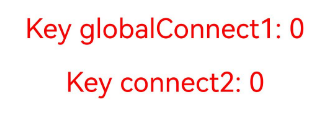
当开发者对newModule使用不同启动方式会有以下现象:
- 开发者直接启动newModule,分别修改globalConnect1和connect2绑定的变量,例如将childId都改成5。
- 应用退出并清空后台,启动模块entry,通过跳转按键启动newModule,会发现globalConnect1值为5,而connect2值为0未修改。
- globalConnect为应用级别存储,对于一个key,整个应用在对应加密分区只有一份存储路径;connect为module级别的存储路径,会因为module的启动方式不同而在各自的加密分区对应不同的存储路径。
[h2]通过notifyOnError获取旧的序列化数据
当存储数据的结构与当前数据的结构不同时,可能会导致反序列化失败。从API版本26.0.0开始,开发者可通过向notifyOnError的入参回调中加入oldValue参数来获取存于磁盘的旧的序列化数据,从而直观感知到数据结构的差异。
import { PersistenceV2, Type } from '@kit.ArkUI';
import { hilog } from '@kit.PerformanceAnalysisKit';

const DOMAIN = 0x0000;

// 接受序列化失败的回调
PersistenceV2.notifyOnError((key: string, reason: string, msg: string, oldValue?: string) => {
  hilog.error(DOMAIN, 'testTag', '%{public}s',
    `error key: ${key}, reason: ${reason}, message: ${msg}, oldValue: ${oldValue}`);
});

@ObservedV2
class SampleInfo {
  @Trace public info: boolean = true;
  @Trace public propertyName: string = 'Hello';
}

@ObservedV2
class SampleChild {
  // 起始时childInfo类型为SampleInfo,使用connect/globalConnect将其存储到磁盘
  @Type(SampleInfo)
  @Trace public childInfo: SampleInfo = new SampleInfo();
  // 将childInfo类型切换为number,并重新运行
  // @Trace public childInfo: number = 0;
  public groupId: number = 1;
}

@ObservedV2
export class Sample {
  // 对于复杂对象需要@Type修饰,确保序列化成功
  @Type(SampleChild)
  @Trace public father: SampleChild = new SampleChild();
}

@Entry
@ComponentV2
struct Index {
  @Local refresh: number = 0;
  // 调用connect或globalConnect存储
  @Local p: Sample = PersistenceV2.connect(Sample, 'connectSample', () => new Sample())!;
  // @Local p: Sample = PersistenceV2.globalConnect(
  //   { type: Sample, key: 'connectSample', defaultCreator: () => new Sample() })!;

  build() {
    Column({ space: 5 }) {
      // 显示数据
      Text('Key connectSample: ' + this.p.father.groupId.toString())
        .onClick(() => {
          this.p.father.groupId += 1;
        })
        .fontSize(25)
        .margin(10)
        .fontColor(Color.Red)

      // save接口
      // 未被@Trace装饰的属性需要借助状态变量refresh才能刷新
      Text('save key connectSample: ' + this.p.father.groupId.toString() + ' refresh:' + this.refresh)
        .onClick(() => {
          // 未被@Trace装饰的属性无法自动存储,需要调用save存储
          this.p.father.groupId += 1;
          PersistenceV2.save('connectSample');
          this.refresh += 1;
        })
        .fontSize(25)
        .margin(10)
    }
    .width('100%')
  }
} 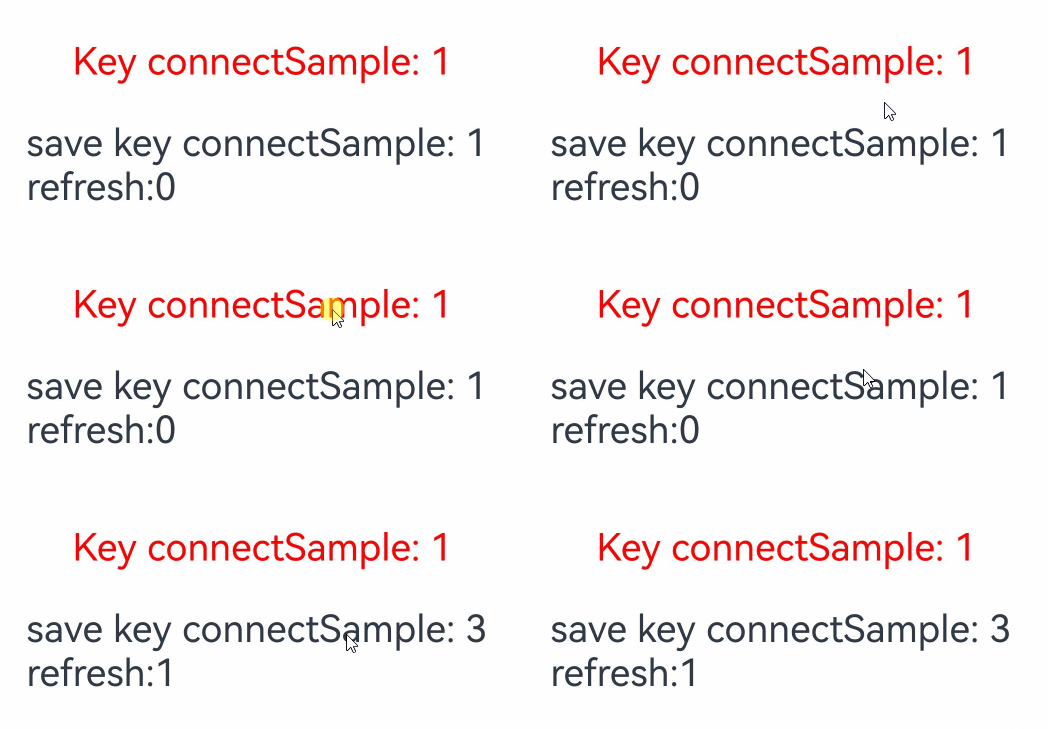
起始时,SampleChild中的childInfo变量类型为SampleInfo,正常存储后,将childInfo变量的类型切换为number,并赋值为1,之后再次启动程序,此时会由于存储数据的结构与当前数据的结构不一致,导致数据反序列化失败。此时会通过notifyOnError中写入的回调,将磁盘中存储的旧的序列化数据打印出来。即在Error日志中显示:
error key: connectSample, reason: serialization, message: TypeError: Receiver is not a JSObject, oldValue: {"father":{"childInfo":{"info":true,"propertyName":"Hello"},"groupId":1}} 使用建议
建议开发者使用新接口globalConnect创建和获取数据。globalConnect的存储规格和内存规格一致,对于应用只有一份,并且支持设置加密级别,不需要去切换ability的加密才能设置数据的加密级别。当然如果开发者应用不涉及多模块,保持使用connect也不会有影响。
[h2]connect向globalConnect迁移实现
// 使用connect存储数据
import { PersistenceV2, Type } from '@kit.ArkUI';
import { hilog } from '@kit.PerformanceAnalysisKit';

const DOMAIN = 0x0000;

// 接受序列化失败的回调
PersistenceV2.notifyOnError((key: string, reason: string, msg: string) => {
  hilog.error(DOMAIN, 'testTag', '%{public}s', `error key: ${key}, reason: ${reason}, message: ${msg}`);
});

@ObservedV2
class SampleChild {
  @Trace public childId: number = 0;
  public groupId: number = 1;
}

@ObservedV2
export class Sample {
  // 对于复杂对象需要@Type修饰,确保序列化成功
  @Type(SampleChild)
  @Trace public father: SampleChild = new SampleChild();
}

@Entry
@ComponentV2
struct Page1 {
  @Local refresh: number = 0;
  // 使用key:connect3存储
  @Local p: Sample = PersistenceV2.connect(Sample, 'connect3', () => new Sample())!;

  build() {
    Column({ space: 5 }) {
      // 显示数据
      Text('Key connect3: ' + this.p.father.childId.toString())
        .onClick(() => {
          this.p.father.childId += 1;
        })
        .fontSize(25)
        .margin(10)
        .fontColor(Color.Red)

      // save接口
      // 未被@Trace装饰的属性需要借助状态变量refresh才能刷新
      Text('save key connect3: ' + this.p.father.groupId.toString() + ' refresh:' + this.refresh)
        .onClick(() => {
          // 未被@Trace装饰的属性无法自动存储,需要调用save存储
          this.p.father.groupId += 1;
          PersistenceV2.save('connect3');
          this.refresh += 1;
        })
        .fontSize(25)
        .margin(10)
    }
    .width('100%')
  }
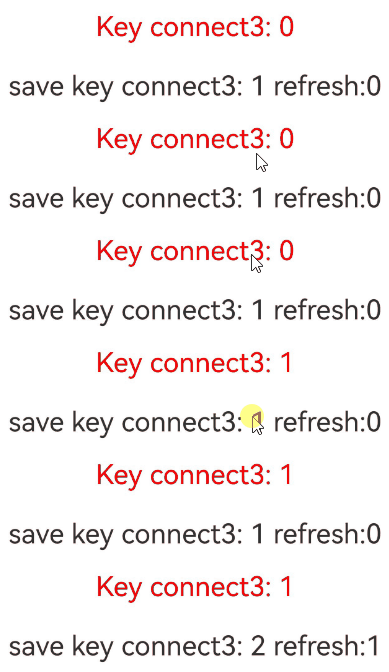
} 
// 迁移到globalConnect
import { PersistenceV2, Type } from '@kit.ArkUI';
import { hilog } from '@kit.PerformanceAnalysisKit';

const DOMAIN = 0x0000;

// 接受序列化失败的回调
PersistenceV2.notifyOnError((key: string, reason: string, msg: string) => {
  hilog.error(DOMAIN, 'testTag', '%{public}s', `error key: ${key}, reason: ${reason}, message: ${msg}`);
});

@ObservedV2
class SampleChild {
  @Trace public childId: number = 0;
  public groupId: number = 1;
}

@ObservedV2
export class Sample {
  // 对于复杂对象需要@Type修饰,确保序列化成功
  @Type(SampleChild)
  @Trace public father: SampleChild = new SampleChild();
}

// 用于判断是否完成数据迁移的辅助数据
@ObservedV2
class StorageState {
  @Trace public isCompleteMoving: boolean = false;
}

function move() {
  let movingState = PersistenceV2.globalConnect({ type: StorageState, defaultCreator: () => new StorageState() })!;
  if (!movingState.isCompleteMoving) {
    let p: Sample = PersistenceV2.connect(Sample, 'connect3', () => new Sample())!;
    PersistenceV2.remove('connect3');
    let p1 = PersistenceV2.globalConnect({ type: Sample, key: 'connect4', defaultCreator: () => p })!; // 使用默认构造函数也可以
    // 赋值数据,@Trace装饰的属性会自动保存
    p1.father = p.father;
    // 将迁移标志设置为true
    movingState.isCompleteMoving = true;
  }
}

move();

@Entry
@ComponentV2
struct Page1 {
  @Local refresh: number = 0;
  // 使用key:connect4存入数据
  @Local p: Sample =
    PersistenceV2.globalConnect({ type: Sample, key: 'connect4', defaultCreator: () => new Sample() })!;

  build() {
    Column({ space: 5 }) {
      // 显示数据
      Text('Key connect4: ' + this.p.father.childId.toString())
        .onClick(() => {
          this.p.father.childId += 1;
        })
        .fontSize(25)
        .margin(10)
        .fontColor(Color.Red)

      // save接口
      // 未被@Trace装饰的属性需要借助状态变量refresh才能刷新
      Text('save key connect4: ' + this.p.father.groupId.toString() + ' refresh:' + this.refresh)
        .onClick(() => {
          // 未被@Trace装饰的属性无法自动存储,需要调用save存储
          this.p.father.groupId += 1;
          PersistenceV2.save('connect4');
          this.refresh += 1;
        })
        .fontSize(25)
        .margin(10)
    }
    .width('100%')
  }
} 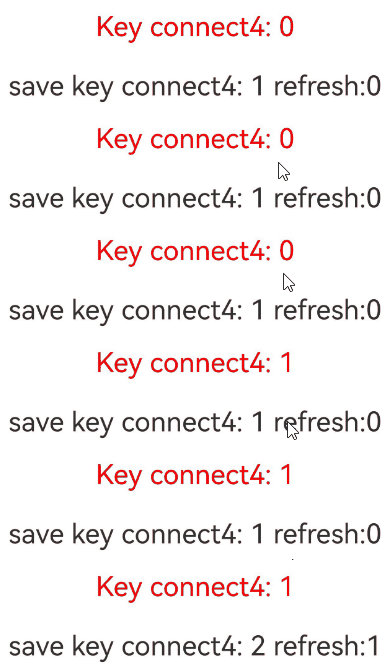
connect向globalConnect迁移,需要将key绑定的value赋值给globalConnect进行存储,之后当自定义组件使用globalConnect连接时,globalConnect绑定的数据即为之前使用connect保存的数据,开发者可以自定义move函数,并将其放在合适位置迁移即可。
[h2]使用connect/globalConnect存储数据后,不建议变更数据结构
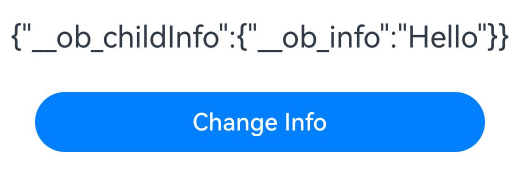
在使用connect/globalConnect存储数据后,不建议变更数据结构,因为变更数据结构可能导致存储的数据反序列化失败,从而无法获取之前的数据。上文通过notifyOnError获取旧的序列化数据介绍了在变更数据结构后,如何通过旧的序列化数据定位数据结构的具体变更。但是,某些场景下由于代码实现中存在数据结构隐式转换等原因,不会触发notifyOnError,导致无法获取旧的序列化数据,例如下面代码所示场景。
import { PersistenceV2, Type } from '@kit.ArkUI';
import { hilog } from '@kit.PerformanceAnalysisKit';

const DOMAIN = 0x0000;

// 接受序列化失败的回调
PersistenceV2.notifyOnError((key: string, reason: string, msg: string, oldValue?: string) => {
  hilog.error(DOMAIN, 'testTag', '%{public}s',
    `error key: ${key}, reason: ${reason}, message: ${msg}, oldValue: ${oldValue}`);
});

@ObservedV2
class SampleChild {
  @Trace public info: string = 'Hello';
}

@ObservedV2
class Sample {
  // 起始时childInfo类型为SampleChild,使用connect/globalConnect将其存储到磁盘
  @Type(SampleChild)
  @Trace public childInfo: SampleChild = new SampleChild();
}

@Entry
@ComponentV2
struct Index {
  // 调用connect或globalConnect存储
  @Local sample: Sample =
    PersistenceV2.globalConnect({ type: Sample, key: 'connectSample', defaultCreator: () => new Sample() })!;

  build() {
    Column({ space: 5 }) {
      Text(JSON.stringify(this.sample)) // 序列化sample变量并显示
        .fontSize(20)
        .margin(10)
      Button('Change Info')
        .width(300)
        .margin(10)
        .onClick(() => {
          // 通过将类型转换为ESObject,再转为SampleChild,绕过了类型校验,故点击后不会触发notifyOnError。
          // 点击并重新运行后,由于此处存储的info为Array类型,但SampleChild中的info仍是string类型,故会触发notifyOnError。
          this.sample.childInfo = { info: [1, 2] } as ESObject as SampleChild;
        })
    }
    .width('100%')
  }
} 
下表将结合样例,说明在变更数据结构时会触发notifyOnError的情形。

-
oldValue为notifyOnError的入参回调的参数,用于在反序列化失败时,获取旧的序列化数据。
-
下表中会触发notifyOnError的类型,指的是将原始类型改变后,会触发notifyOnError回调的类型。
-
下表中的类型,均是指class中属性的类型。
-
在反序列化时,如果属性类型为Object,则会递归遍历并反序列化其内部属性。
使用PersistenceV2.connect在数据结构变更后触发notifyOnError情况表
| 原始类型 | 样例 | 样例的序列化存储结果 | 会触发notifyOnError的类型 | oldValue |
|---|---|---|---|---|
| number | 50 | 50 | boolean, Array, Set, Map, Object | 50 |
| boolean | true | true | number, Array, Set, Map, Object | true |
| string | 'hello' | "hello" | number, boolean, Array, Set, Map, Object | "hello" |
| Array | new Array<number>([1,2,3]) | [1,2,3] | number, boolean, string | [1,2,3] |
| Set | new Set<number>([1,2,3]) | [1,2,3] | number, boolean, string | [1,2,3] |
| Map | new Map<string, number>([['a',1],['b',2]]) | [["a",1],["b",2]] | number, boolean, string, Array, Date | [["a",1],["b",2]] |
| Date | new Date() | "2026-03-26T00:00:00.000Z" | number, boolean, Array, Set, Map, Object | "2026-03-26T00:00:00.000Z" |
| Object | new Class A { public info: number = 100; } | {"info":100} | number, boolean, string | {"info":100} |
使用PersistenceV2.globalConnect在数据结构变更后触发notifyOnError情况表
| 原始类型 | 样例 | 样例的序列化存储结果 | 会触发notifyOnError的类型 | oldValue |
|---|---|---|---|---|
| number | 50 | 50 | 无 | 无 |
| boolean | true | true | 无 | 无 |
| string | 'hello' | "hello" | 无 | 无 |
| Array | new Array<number>([1,2,3]) | \"Ar0003[1,2,3]\" | number, boolean, string, Set, Map, Date, Object | [1,2,3] |
| Set | new Set<number>([1,2,3]) | \"Se0003\\\"Ar0004[1,2,3]\\\"\" | number, boolean, string, Array, Map, Date, Object | [1,2,3] |
| Map | new Map<string, number>([['a',1],['b',2]]) | \"Ma0003[[\\\"a\\\",\\\"1\\\"],[\\\"b\\\",\\\"2\\\"]]\" | number, boolean, string, Array, Set, Date, Object | [["a",1],["b",2]] |
| Date | new Date() | \"Da00032026-03-26T00:00:00.000Z\" | 无 | 无 |
| Object | new Class A { public info: number = 100; } | \"0b0003{\\\"info\\\":100}\" | number, boolean, string | {"info":100} |