PDF Kit支持对指定页面添加、删除页眉页脚。页眉页脚信息包含文字、日期和页码等相关内容,并可设置字体大小、颜色和间距等相关样式,具体属性参考HeaderFooterInfo。如下图:
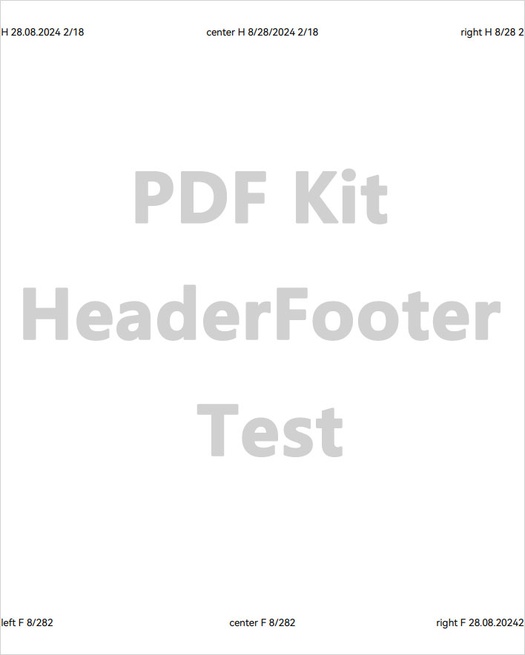
接口说明
| 接口名 | 描述 |
|---|---|
| addHeaderFooter(info: HeaderFooterInfo, startIndex: number, endIndex: number, oddPages: boolean, evenPages: boolean): void | 插入PDF文档页眉页脚。 |
| removeHeaderFooter(): boolean | 删除PDF文档页眉页脚。 |

addHeaderFooter方法属于耗时业务,需要遍历每一页去添加页眉页脚,添加页面较多时建议放到线程里去处理。
示例代码
添加页眉页脚:
-
调用loadDocument方法,加载PDF文档。
-
实例化页眉页脚HeaderFooterInfo类,并设置相关属性,包括字体大小、颜色和间距等。
-
调用addHeaderFooter方法,添加页眉页脚到页面中。
-
保存PDF文档到应用沙箱。
删除页眉页脚:
-
调用loadDocument方法,加载PDF文档。
-
调用removeHeaderFooter方法,删除页眉页脚。
-
保存PDF文档到应用沙箱。
import { pdfService } from '@kit.PDFKit';
import { hilog } from '@kit.PerformanceAnalysisKit';
import { Font } from '@kit.ArkUI';
// ...

@Entry
@Component
struct HeaderFooterPage {
  private pdfDocument: pdfService.PdfDocument = new pdfService.PdfDocument();
  private context = this.getUIContext().getHostContext() as Context;

  build() {
    Column() {
    // ...
        Button('addHeaderFooter').onClick(async () => {
          // 确保在工程目录src/main/resources/resfile里有input.pdf文档
          let filePath = this.context.resourceDir + '/input.pdf';
          let res = this.pdfDocument.loadDocument(filePath);
          if (res === pdfService.ParseResult.PARSE_SUCCESS) {
            let hfInfo: pdfService.HeaderFooterInfo = new pdfService.HeaderFooterInfo();
            hfInfo.fontInfo = new pdfService.FontInfo();
            // 确保字体路径存在
            let font: Font = new Font()
            hfInfo.fontInfo.fontPath = font.getFontByName('HarmonyOS Sans')?.path;
            // 如果不知道字体的具体名称,可以为空字符串
            hfInfo.fontInfo.fontName = '';
            hfInfo.textSize = 10;
            hfInfo.charset = pdfService.CharsetType.PDF_FONT_DEFAULT_CHARSET;
            hfInfo.underline = false;
            hfInfo.textColor = 0x00000000;
            hfInfo.leftMargin = 1.0;
            hfInfo.topMargin = 40.0;
            hfInfo.rightMargin = 1.0;
            hfInfo.bottomMargin = 40.0;
            hfInfo.headerLeftText = 'left H <<dd.mm.yyyy>> <<1/n>>';
            hfInfo.headerCenterText = 'center H <<m/d/yyyy>> <<1/n>>';
            hfInfo.headerRightText = 'right H <<m/d>><<1>>';
            hfInfo.footerLeftText = 'left F <<m/d>><<1>>';
            hfInfo.footerCenterText = 'center F <<m/d>><<1>>';
            hfInfo.footerRightText = 'right F <<dd.mm.yyyy>><<1>>';
            this.pdfDocument.addHeaderFooter(hfInfo, 1, 5, true, true);
            let outPdfPath = this.context.filesDir + '/testAddHeaderFooter.pdf';
            let result = this.pdfDocument.saveDocument(outPdfPath);
            hilog.info(0x0000, 'HeaderFooterPage', 'addHeaderFooter %{public}s!', result ? 'success' : 'fail');
          }
          this.pdfDocument.releaseDocument();
        })
        Button('removeHeaderFooter').onClick(async () => {
          let filePath = this.context.filesDir + '/testAddHeaderFooter.pdf';
          let res = this.pdfDocument.loadDocument(filePath);
          if (res === pdfService.ParseResult.PARSE_SUCCESS && this.pdfDocument.hasHeaderFooter()) {
            let removeResult = this.pdfDocument.removeHeaderFooter();
            if (removeResult) {
              let outPdfPath = this.context.filesDir + '/removeHeaderFooter.pdf';
              let result = this.pdfDocument.saveDocument(outPdfPath);
              hilog.info(0x0000, 'HeaderFooterPage', 'removeHeaderFooter %{public}s!', result ? 'success' : 'fail');
            }
          }
          this.pdfDocument.releaseDocument();
        })
        // ...
    }
  }
}