约束与限制
该特性需要设备支持安全地理位置功能。
开发者在调用initializeAttestContext接口成功初始化安全地理位置的证明会话后,通过调用getCurrentSecureLocation接口尝试获取安全地理位置,当接口异常并返回ATTEST_ERROR_LOCATION_SERVICE_UNAVAILABLE时,当前设备不支持安全地理位置。具体判断方法参考如下示例:
// 初始化安全地理位置证明会话后,获取安全地理位置信息,以速度优先为例
const timeout = 5000; // 获取安全地理位置的超时时间,单位为毫秒
const priority = trustedAppService.LocatingPriority.PRIORITY_LOCATING_SPEED; // 采用速度优先策略
try {
  return await trustedAppService.getCurrentSecureLocation(timeout, priority);
} catch (err) {
  const error = err as BusinessError;
  if (error.code == trustedAppService.AttestExceptionErrCode.ATTEST_ERROR_LOCATION_SERVICE_UNAVAILABLE) {
    hilog.error(0x0000, 'TrustedAppService', 'current device not support secure location');
  } else {
    hilog.error(0x0000, 'TrustedAppService',
      `Failed to get location by PRIORITY_LOCATING_SPEED. Code: ${error.code}, Message: ${error.message}`);
  }
  throw new Error(error.message);
}
业务流程
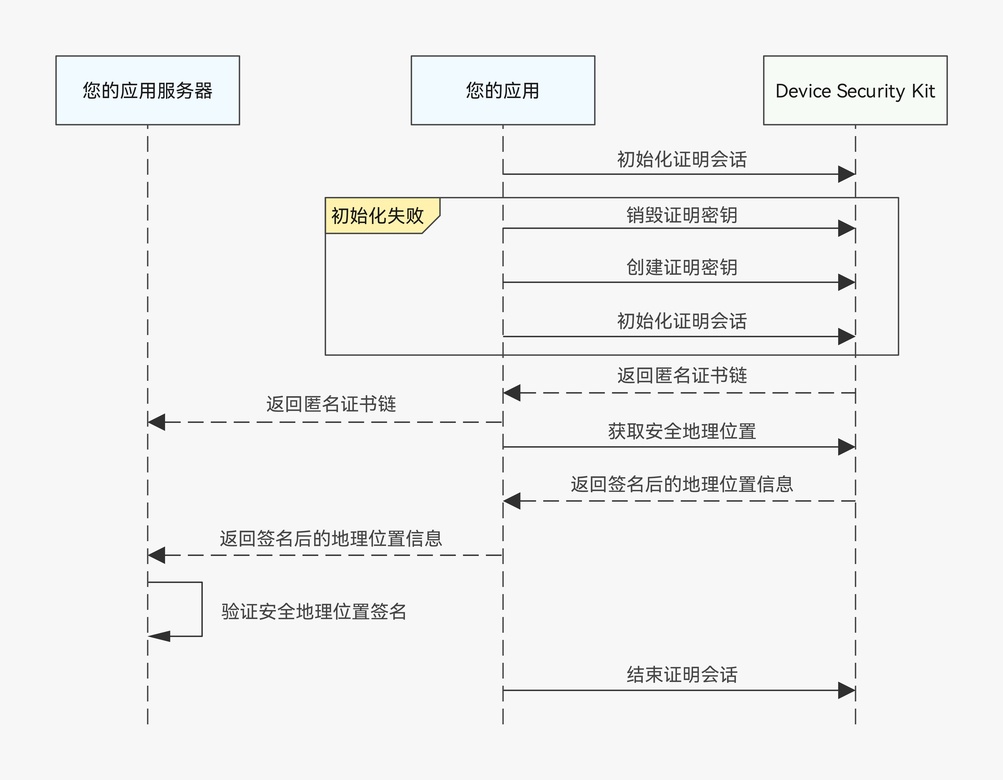
应用获取安全地理位置的优先级策略有两种,分别是精度优先和速度优先。如果选择精度优先策略,可信应用服务会优先返回GPS的结果,GPS获取超时后返回网络地理位置;而如果选择速度优先策略,可信应用服务会返回从二者中最先获取到的结果。
接口说明
接口及使用方法请参见API参考。
| 接口名 | 描述 |
|---|---|
| createAttestKey(options: AttestOptions): Promise<void> | 创建证明密钥。 |
| initializeAttestContext(userData: string, options: AttestOptions): Promise<AttestReturnResult> | 初始化证明会话。 |
| finalizeAttestContext(options: AttestOptions): Promise<void> | 结束证明会话。 |
| destroyAttestKey(): Promise<void> | 销毁证明密钥。 |
| getCurrentSecureLocation(timeout: number, priority: LocatingPriority): Promise<SecureLocation> | 获取安全地理位置信息。 |
开发步骤
-
申请位置权限,权限名称为“ohos.permission.APPROXIMATELY_LOCATION”和“ohos.permission.LOCATION”,具体请参考向用户申请授权。
-
导入trustedAppService模块和相关依赖模块。
import { trustedAppService } from '@kit.DeviceSecurityKit'; import { BusinessError } from '@kit.BasicServicesKit'; import { util } from '@kit.ArkTS'; import { cryptoFramework } from '@kit.CryptoArchitectureKit'; import { cert } from '@kit.DeviceCertificateKit'; import hilog from '@ohos.hilog'; -
创建证明密钥并初始化证明会话。
- 创建安全地理位置场景的证明密钥:
private async creatSecureLocationAttestKey(): Promise<void> { // 创建证明密钥的参数 const createProperties: Array<trustedAppService.AttestParam> = [ { tag: trustedAppService.AttestTag.ATTEST_TAG_ALGORITHM, value: trustedAppService.AttestKeyAlg.ATTEST_ALG_ECC }, { tag: trustedAppService.AttestTag.ATTEST_TAG_KEY_SIZE, value: trustedAppService.AttestKeySize.ATTEST_ECC_KEY_SIZE_256 } ]; const createOptions: trustedAppService.AttestOptions = { properties: createProperties }; // 创建证明会话 try { await trustedAppService.createAttestKey(createOptions); hilog.info(0x0000, 'TrustedAppService', 'createAttestKey successfully'); } catch (error) { const err = error as BusinessError; hilog.error(0x0000, 'TrustedAppService', `createattestkey failed, errCode: ${err.code}, errMsg: ${err.message}`); throw new Error(err.message); } } - 初始化安全地理位置场景的证明会话:
private async initSecureLocationAttestContext(): Promise<number> {
  try {
    // 初始化证明会话的参数
    const deviceId = 0;
    const initProperties: Array<trustedAppService.AttestParam> = [
      {
        tag: trustedAppService.AttestTag.ATTEST_TAG_DEVICE_TYPE,
        value: trustedAppService.AttestType.ATTEST_TYPE_LOCATION
      },
      {
        tag: trustedAppService.AttestTag.ATTEST_TAG_DEVICE_ID,
        value: BigInt(deviceId) // 此参数在安全地理位置场景下不生效
      }
    ];
    const initOptions: trustedAppService.AttestOptions = {
      properties: initProperties
    };
    let userData = 'trusted_app_service_default_userdata'; // 示例值,实际值请自行生成,长度在16到127 Bytes之间
    // 初始化证明会话
    const certChainResult = await trustedAppService.initializeAttestContext(userData, initOptions);
    if (certChainResult.certChains.length < 1) {
      throw new Error('empty returned cert chain');
    }
    // ...
    return 0;
  } catch (err) {
    const businessError = err as BusinessError;
    hilog.error(0x0000, 'TrustedAppService',
      `initializeAttestContext failed. errCode: ${businessError.code}, errMsg: ${businessError.message}`);
    const finalNumericCode = Number(String(businessError.code ?? '').replace('n', '').trim());
    return Number.isNaN(finalNumericCode) ? -1 : finalNumericCode;
  }
}
- 创建安全地理位置场景的证明密钥:
-
获取安全地理位置信息,以精度优先为例。
private async getSecureLocationByAccuracy(): Promise<trustedAppService.SecureLocation> { const timeout = 5000; // 获取安全地理位置的超时时间,单位为毫秒 const priority = trustedAppService.LocatingPriority.PRIORITY_ACCURACY; // 采用精度优先策略 // 获取当前安全地理位置信息 try { return await trustedAppService.getCurrentSecureLocation(timeout, priority); } catch (err) { const error = err as BusinessError; hilog.error(0x0000, 'TrustedAppService', `Failed to get location by PRIORITY_ACCURACY. Code: ${error.code}, Message: ${error.message}`); throw new Error(error.message); } } -
结束证明会话。
private async finalizeSecureLocationAttestContext(): Promise<void> { // 结束证明会话的参数 const finalProperties: Array<trustedAppService.AttestParam> = [ { tag: trustedAppService.AttestTag.ATTEST_TAG_DEVICE_TYPE, value: trustedAppService.AttestType.ATTEST_TYPE_LOCATION } ]; const finalOptions: trustedAppService.AttestOptions = { properties: finalProperties, }; // 结束证明会话 try { await trustedAppService.finalizeAttestContext(finalOptions); } catch (err) { const error = err as BusinessError; hilog.error(0x0000, 'TrustedAppService', `Failed to finalize attest context, code: ${error.code}, message: ${error.message}`); } }如果需要销毁证明密钥,请在结束证明会话后,调用destroyAttestKey接口。由于安全摄像头、安全地理位置和安全图像压缩、裁剪共用同一个证明密钥,销毁前需要保证其余功能未在使用该证明密钥。