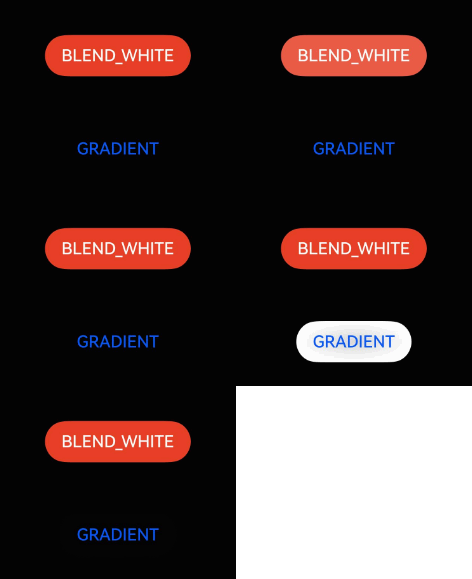
开发步骤
-
导入模块。
import { hdsEffect } from '@kit.UIDesignKit'; -
创建按压阴影效果。
@Entry
@Component
struct PressShadowExample {
  @State buttonBlendState: hdsEffect.PressShadowType = hdsEffect.PressShadowType.NONE;
  @State buttonGradientState: hdsEffect.PressShadowType = hdsEffect.PressShadowType.NONE;

  build() {
    NavDestination() {
      Column({ space: 50 }) {
        Button('BLEND_WHITE', { buttonStyle: ButtonStyleMode.EMPHASIZED, role: ButtonRole.ERROR, stateEffect: false })
          .visualEffect(new hdsEffect.HdsEffectBuilder()
            .pressShadow(this.buttonBlendState)
            .buildEffect())
          .onTouch((event: TouchEvent) => {
            if (event.type === TouchType.Down) {
              this.buttonBlendState = hdsEffect.PressShadowType.BLEND_WHITE;
            } else if (event.type === TouchType.Up || event.type === TouchType.Cancel) {
              this.buttonBlendState = hdsEffect.PressShadowType.NONE;
            }
          })

        Button('GRADIENT', { buttonStyle: ButtonStyleMode.NORMAL, stateEffect: false })
          .visualEffect(new hdsEffect.HdsEffectBuilder()
            .pressShadow(this.buttonGradientState)
            .buildEffect())
          .onTouch((event: TouchEvent) => {
            if (event.type === TouchType.Down) {
              this.buttonGradientState = hdsEffect.PressShadowType.BLEND_GRADIENT;
            } else if (event.type === TouchType.Up || event.type === TouchType.Cancel) {
              this.buttonGradientState = hdsEffect.PressShadowType.NONE;
            }
          })
      }
      .height('70%')
      .justifyContent(FlexAlign.Center)
    }
    .width('100%')
    .height('100%')
    .title('Button example')
    .backgroundColor('#040404')
  }
}